Authors

Martin-Pierre Roset
Martin-Pierre Roset
Every orchestrator sits on top of two things: a queue that carries messages between its components, and a repository that stores your flows, executions, and logs. Which technologies you pick for those two jobs decides how fast your orchestrator responds, how much it costs to run, and how hard it is to operate.
Until 2.0, Kestra made you pick both at once, from two bundles, and live with it like any other orchestrator.
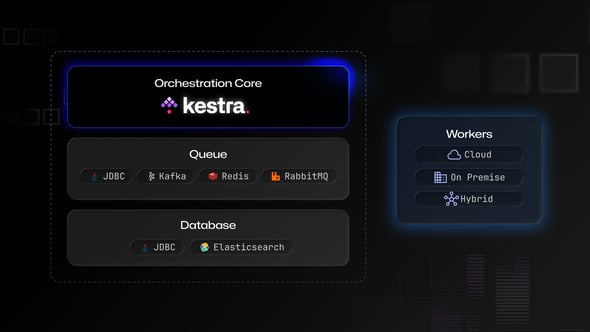
Kestra 2.0 separates them. The queue and the repository are now independent choices, with a single engine implementation underneath whichever ones you pick, and you can change either one later without touching a flow.
This post covers the architectures we recommend, what each one actually gives you, and what changed inside the queue itself.
You had two options. JDBC, where your Postgres or MySQL served as both the queue and the repository. Or Kafka plus Elasticsearch, where Kafka carried the messages and Elasticsearch held the data.
You picked a bundle. And behind those two bundles sat two engine implementations: a JDBC one and a Kafka Streams one. Two codebases doing the same job meant every fix and feature landed twice.
2.0 removes the Kafka Streams engine entirely. Now there is one executor, one scheduler, and one indexer, whichever backend runs underneath. Behavior is consistent instead of subtly different between paths.
Kafka Streams was the heaviest thing we asked operators to run, and running it well meant understanding its state stores, its rebalancing, and its failure modes. Taking it out lightens the operational burden and cuts the infrastructure cost of a Kafka deployment.
We recommend three shapes. They cover nearly everything we see in production.
One database serving as both queue and repository. This is the reference architecture. We benchmark against it, and roughly 80% of our customers run it. It is fast, and it is the simplest thing to operate. You can run it highly available, the way you already run any production Postgres. Start here unless you have a specific reason not to.
Keep Postgres as your repository and move the queue to a broker. Latency drops by roughly half. We lead with AMQP, RabbitMQ specifically, because the implementation on our side is simpler and there are fewer edge cases in it. Redis is supported and delivers comparable latency.
This buys you latency, not capacity. Moving the queue to AMQP might let you push a few hundred more executions per minute, but it does not fundamentally raise the ceiling on what a single instance handles. If your problem is queue-to-execution delay, this is your answer. If your problem is total throughput, it is not.
Pair it with either Postgres or Elasticsearch for the repository. In previous versions, Kafka came welded to Elasticsearch. In 2.0 they are separate decisions, so you can take Kafka’s queue and keep Postgres as your repository.
That combination is the one to reach for first, because of where execution state now lives. In 2.0 the executor keeps execution state in the repository. In 1.3, the Kafka path kept it in Kafka Streams state stores instead.
That change matters because the executor needs read-your-own-write: it updates execution state and immediately reads it back. Elasticsearch and OpenSearch are built for analytical and search queries, and they get there through an asynchronous indexing phase. That phase is exactly what costs you when what you need is single-document insertion atomicity. Postgres gives you that for free, so an Elasticsearch repository costs the executor latency that a Postgres one does not.
Pick Elasticsearch when your search and retention patterns genuinely want it, which is what it is good at.
High throughput no longer forces you into Elasticsearch, and high availability never required Kafka in the first place. Kestra is now better placed than ever to meet requirements for both high availability and low latency.
All 2.0-specific backend changes are included in the same Docker image, and you configure your backend from the configuration file:
kestra: queue: type: postgres repository: type: postgres storage: type: s3 logs: type: postgresOn Kestra open source, the queue, repository, and log data store need to be connected to the same JDBC backend. If you need to store logs in a separate JDBC-based Logs Data Store, for scalability or for separation, consider the Enterprise Edition.
Simplification was the point. 2.0 moves to a single consumer group per queue, which collapses a lot of the complexity in the queue implementation. That simplification is what makes the next round of backends, including managed cloud queues, tractable to add. We are investigating those for upcoming releases.
Two features came out of the rewrite:
Queue and repository are separate choices now, so you can mix them. Kafka for the queue and Postgres for the repository. Postgres for the queue and Elasticsearch for the repository, if your query patterns want it.
An external log data store is an Enterprise feature. On open source you run a single JDBC database that serves the queue, the repository, and your logs. Splitting any of those onto a second database, including moving logs to their own store, requires Kestra Enterprise.
A new version of this is coming: two separate instances of the same engine, one dedicated to your queue and one to your repository.
These two workloads might want different hardware. Queue data is ephemeral. Once a message is consumed, it is gone, so a queue database wants CPU and memory to answer fast. A repository holds your execution history, so it wants memory and storage. Different lifecycles, different tuning, and a very different backup story.
The queue is ephemeral, so changing it is not a migration. You stop, you point the configuration at the new backend, and you start again. Your flows do not change.
The one thing to know: in-flight executions do not resume on their own when you destroy a queue and create a new one. Pause the scheduler first, let things drain, then switch. If you do lose in-flight work, you can replay the executions, backfill the triggers, or force-run what needs to run.
Workers no longer hold a database connection. They connect to the Controller, and that is the only thing they need to reach.
The worker is the client. It opens the connection to the Controller, and the Controller never connects to the worker. Once established, that stream is bidirectional, so results, logs, and metrics flow back up the same connection the worker opened. Nothing needs an inbound port on the worker side.
This is what lets a worker run in another region, another cloud, a segmented network, or on premises next to systems that never leave the building.
Air-gapped means the deployment has no internet access. If you want a genuinely air-gapped installation, the whole deployment goes inside the closed network, control plane and database included. A standalone install with everything on one machine qualifies. A remote worker reporting to a control plane that lives elsewhere is outbound-only, which is a different and still very useful property, but it is not an air gap.
Also worth knowing where data sits: your business data travels through task outputs, so where it lands depends on how you have configured output storage. The internal database holds execution data, metadata, and the authentication layer.
On open source, you run a single JDBC database, Postgres or MySQL, serving as your queue, repository, and log store. This is the reference architecture, and it remains the simplest, most effective shape for the vast majority of deployments.
Kestra Enterprise unlocks independent backend choices. You can move the queue to Redis, AMQP, or Kafka, adopt Elasticsearch for the repository, and decouple your logs into dedicated stores like Datadog or Splunk. Choose Redis or AMQP for latency, Kafka for massive throughput, and stick with JDBC for the balanced, operational ease of the middle ground.
Join the Kestra 2.0 launch webinar on September 8th, 2026. Register here.
For the architecture picture behind all of this, read what changed in the engine, and watch the pre-launch webinar on the backend.

Stay up to date with the latest features and changes to Kestra