Migration Assistant · vRA and vRO
Kestra Migration Assistant for vRA
A free, open-source tool that assesses your VMware vRA and vRO estate for a migration to Kestra. It runs on your own machine and writes a migration brief: what each workflow does, what to do with it, and the order to move it in. It's the first step in the vRA migration guide.
pipx install kestra-migration-assistantPython 3.10 or later. No Python? Run the container image instead.
- Apache 2.0
- Runs on your machine
- No telemetry

What it does
The Migration Assistant runs the assessment for moving off VMware vRA and vRO to Kestra. It covers the workflow half of Stage 1 of the vRA migration guide: it reads your vRO package and vRA export, works out what's in the estate, and writes a brief you open in a browser.
The brief covers
- What each workflow does and what starts itIncluding the catalog items, cloud templates and event subscriptions in the vRA export.
- Which systems each workflow touchesAnd whether a Kestra plugin already exists for each one.
- A recommendation for each workflowRetire, merge into another, treat as a wrapper, convert, or rebuild, with the reason next to it.
- A migration plan in wavesOrdered by risk and dependency, with what each wave needs before it starts.
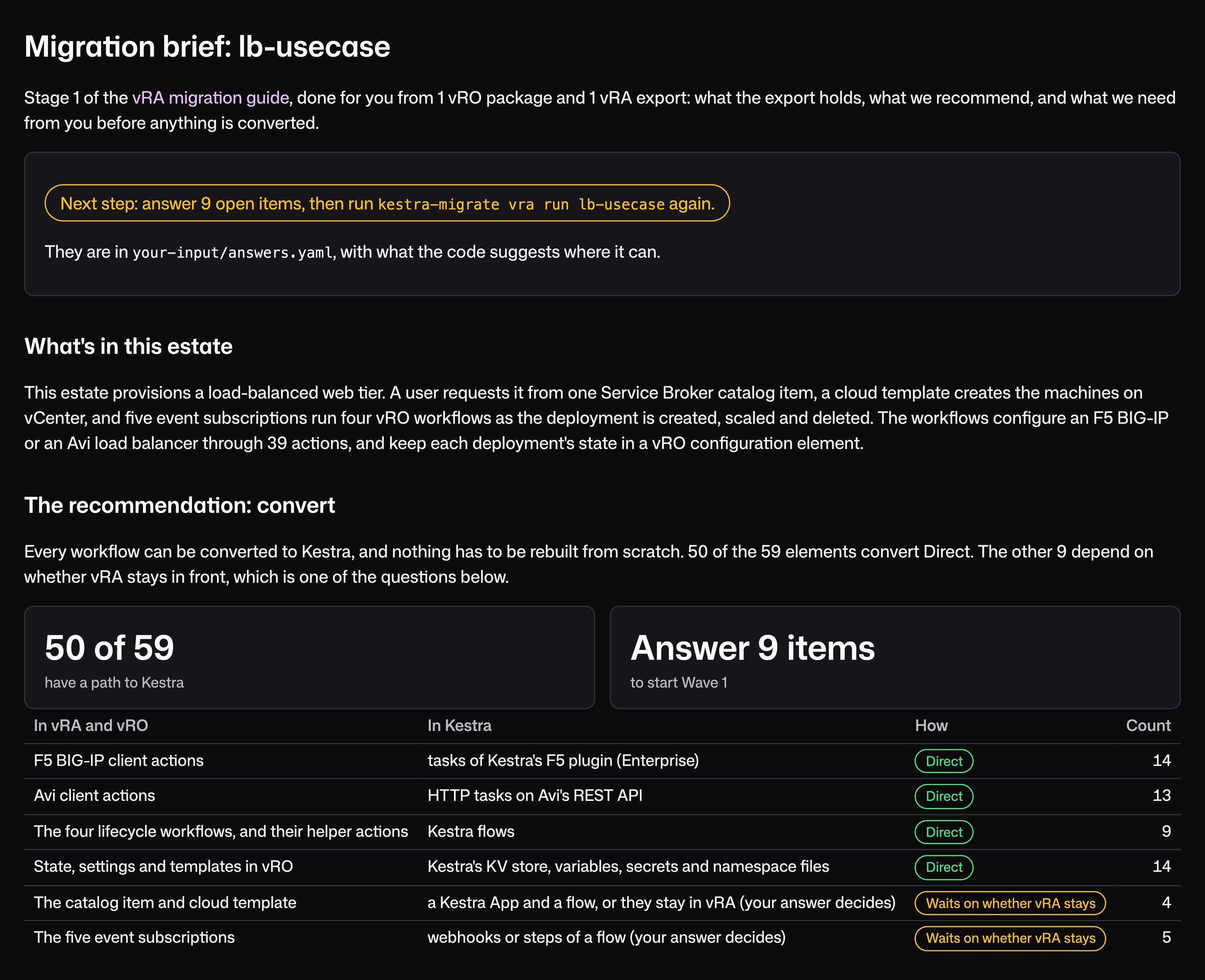
The front page leads with what to do next. The tool stops at the plan: converting the workflows, testing them and verifying each wave before cutover is work Kestra does with you, starting from the brief.
Still deciding? Read the introduction to the guide or try the payback calculator.
How it works
It takes three steps, all on your machine.
- 1
Export
A vRO administrator exports a .package from the Orchestrator client. If vRA starts your workflows, export the vRA content from VMware Build Tools as well, so the brief can see what triggers them. Put both in one folder.
my-estate/├─ lb-usecase.package└─ vra-export/ - 2
Run
The first time, init creates a config file in your home folder where you choose your model and settings. Then run sanitizes the export, maps every workflow and the systems it touches, and writes the brief to a kestra-assessment folder next to the exports.
$ kestra-migrate init$ kestra-migrate vra run ./my-estate - 3
Answer and run again
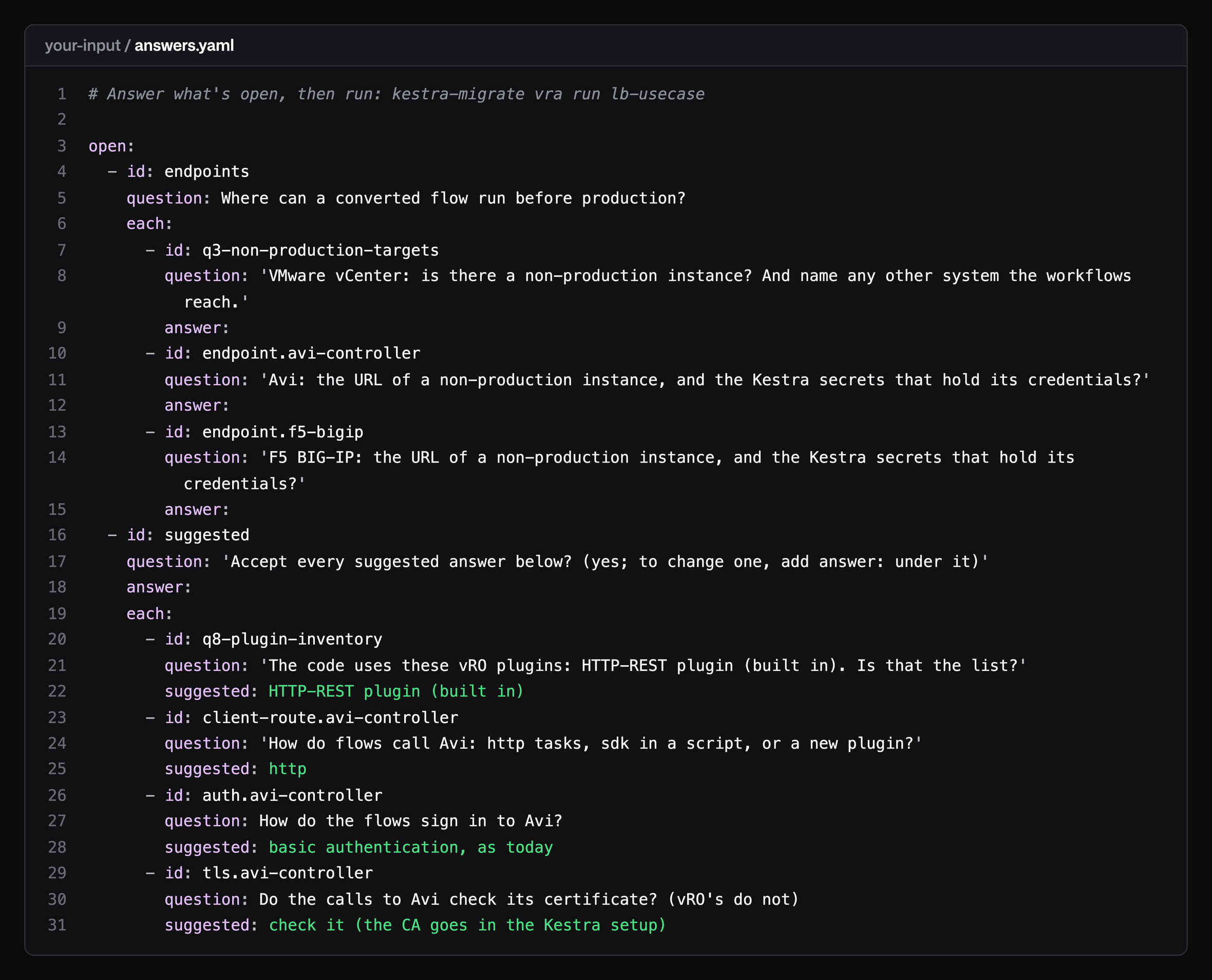
When the exports can't answer something, such as how often a workflow runs or what else starts it, the tool writes the question to answers.yaml, with a suggested answer where the code points to one. Fill in the answers and run the same command again. When there are no open questions left, the plan is final.
- id: auth.avi-controllerquestion: How do the flows sign in to Avi?suggested: basic authentication, as today
Security posture
Runs on your machine
Nothing is sent to Kestra.
Sanitized first
Host names, IP addresses, URLs, emails, accounts and credentials are replaced with placeholders before anything reaches a model, and you get a report to review.
Only model calls leave the machine
No telemetry and no update check.
Your choice of model
Including one you host yourself, or no model at all for a first look.
Guarded against prompt injection
Workflow content reaches the model marked as data to analyze, so a comment in a script that reads like an instruction is treated as part of the code.
Open source
Under Apache 2.0, so your security team can read the code.
Example
A self-service load balancer
A load balancer ordered from the vRA catalog that stays in sync as machines come and go. The brief recommended converting rather than rebuilding. It mapped F5 to Kestra's F5 plugin and Avi to HTTP tasks on Avi's REST API, and proposed two waves.
vRA
A Service Broker catalog item with a 13-field request form, a cloud template that creates the machines and their network, and five event subscriptions.
vRO
Four workflows (create, add machine, remove machine, delete), with 39 actions, four configuration elements and three resource elements behind them.
Targets
An F5 BIG-IP or an Avi load balancer, picked on the request form, and vCenter through the cloud template.
Open questions, answered
Open questions in plain words, with suggested answers.
- The open questions for you to answer
- Suggested answers where we could imply them
- Rerun the assistant after answering
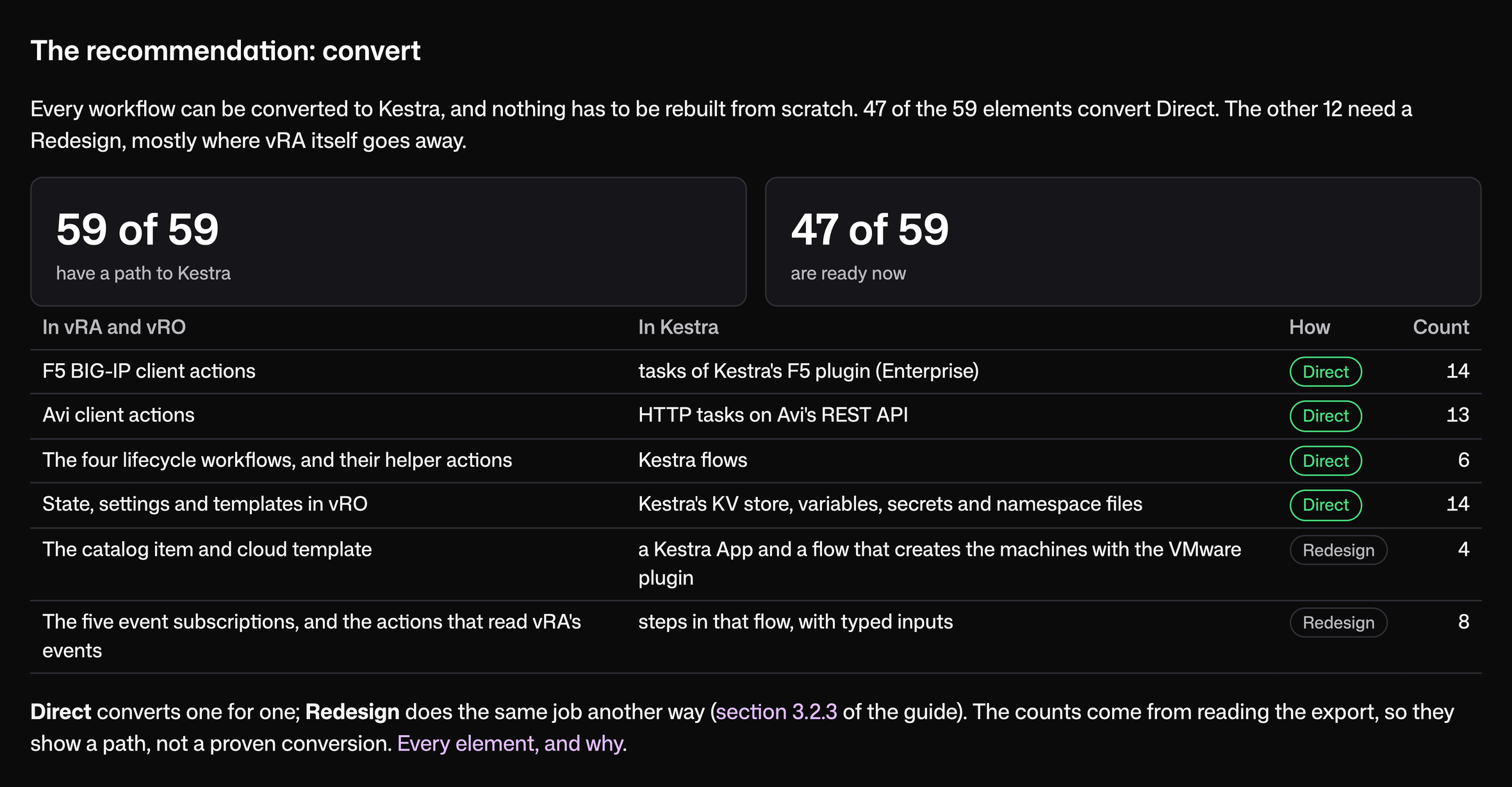
How each part maps to Kestra
Each part of the service, what it becomes in Kestra, and whether it converts directly or needs a redesign. Shown after the open questions were answered.
- Every element has a path to Kestra
- Direct converts one for one
- Redesign is where vRA itself goes away
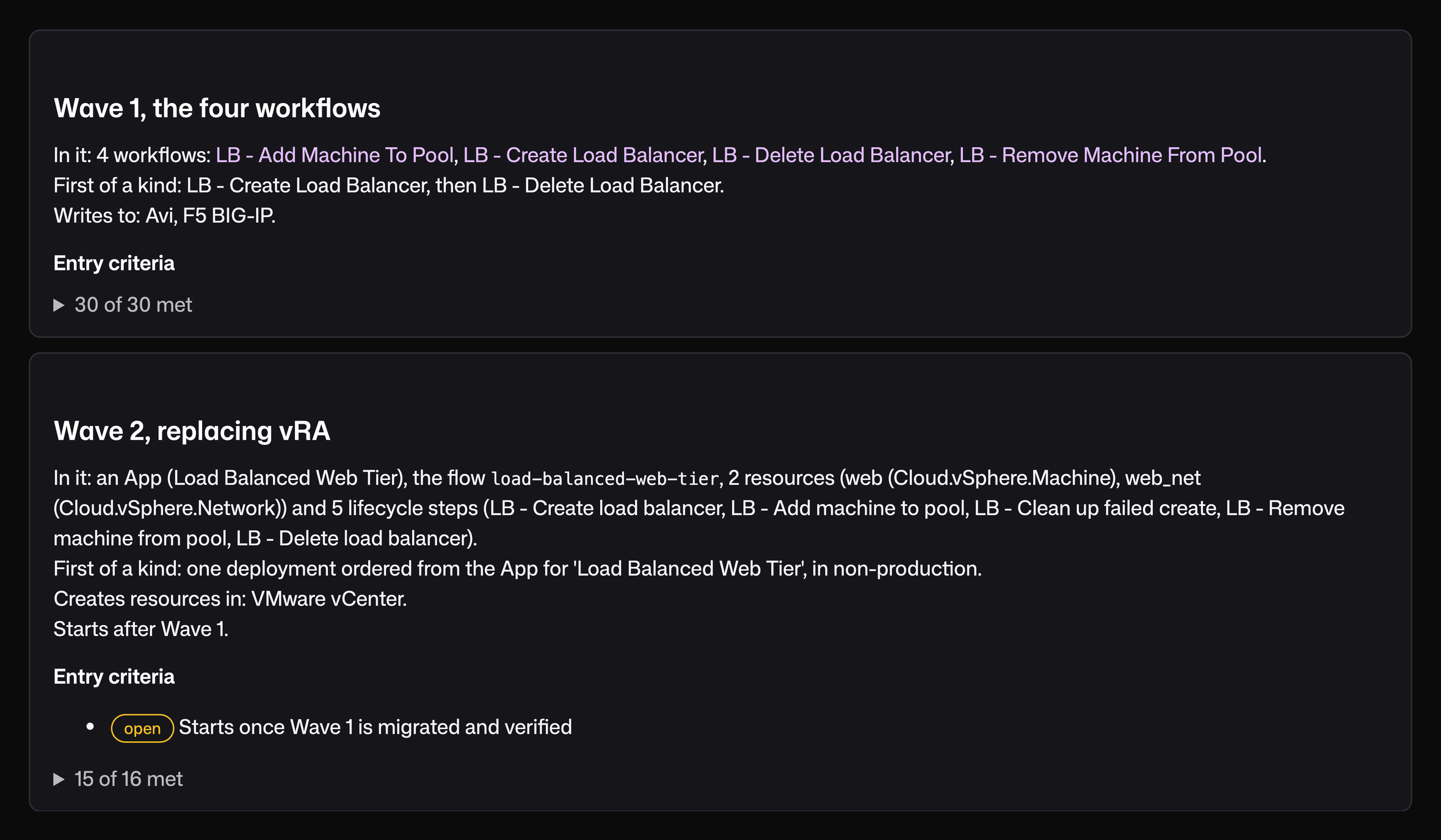
The plan, in two waves
What moves together, and what each wave needs before it starts.
- Wave 1 moves the 4 workflows together, since they share state
- Wave 2 moves the catalog item and cloud template
- Each follow-up wave lists what it needs before it can start
One workflow, end to end
What one workflow does, what starts it and what it touches.
- What it does, in plain words
- What starts it in vRA
- The systems it touches, and the Kestra plugin for each
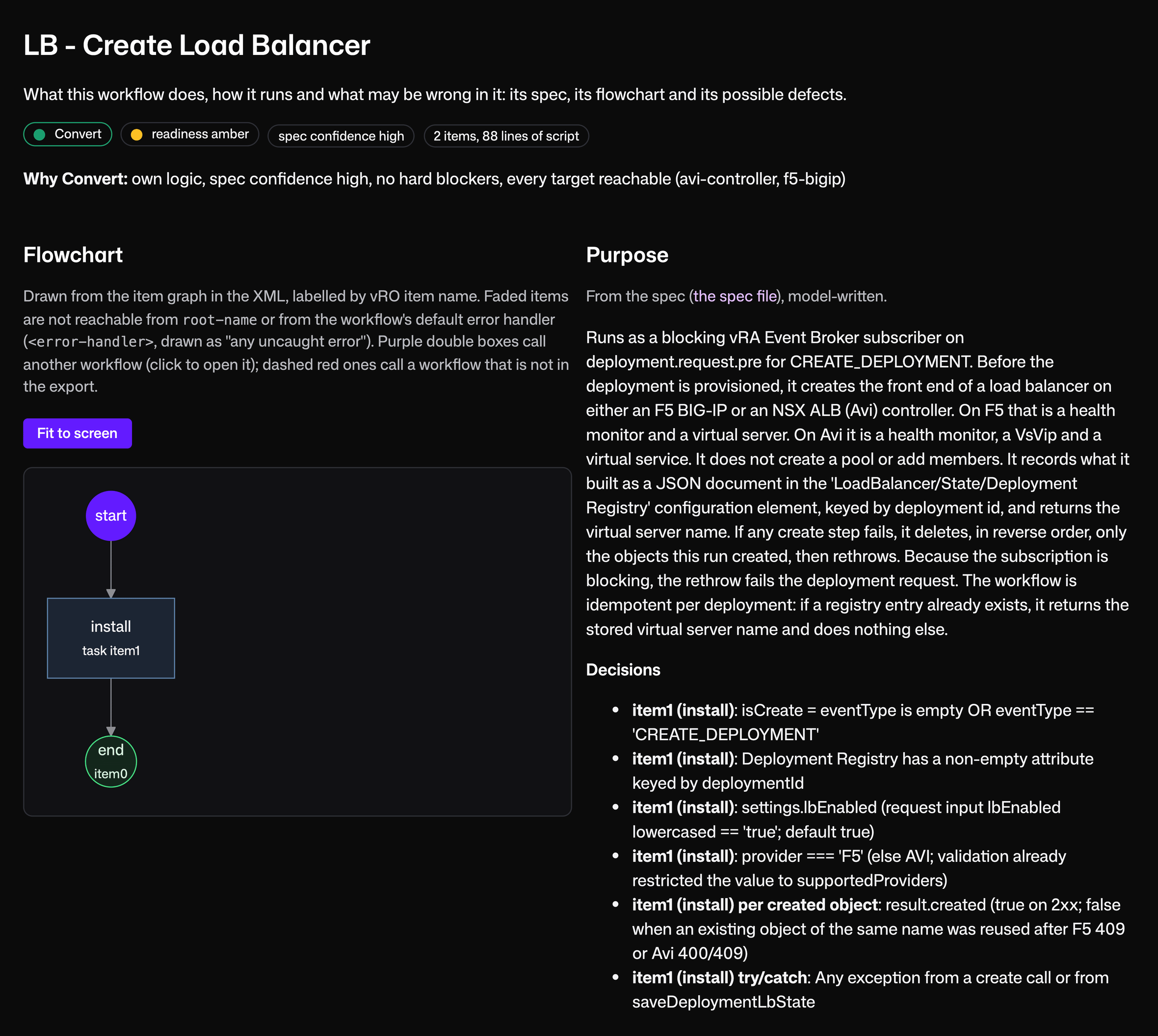
The vRO package and vRA export are free to download, so you can run the Migration Assistant on them before you run it on your own.
Download the use case filesGet the Migration Assistant
Get the Migration Assistant
Free and open source under Apache 2.0. It runs on Linux, macOS and Windows.
With Python 3.10 or later, install it from PyPI:
pipx install kestra-migration-assistantWithout Python, run the container imageghcr.io/kestra-io/migration-assistant(linux/amd64 and arm64); the README has the docker run command.
Source and documentation are at kestra-io/migration-assistant on GitHub.
Get help running it
If you'd rather not run it alone, one of our engineers can run it with you on a call, or run it for you on a sanitized copy of your export.
Questions that come up
Find answers to your questions right here, and don't hesitate to Contact Us if you couldn't find what you're looking for.