Hi! I'm your Kestra AI assistant. Ask me anything about workflows.
EXAMPLE QUESTIONS
How to set up CI/CD for kestra flows?
What are main differences between Open Source and Enterprise?
What is a task runner?
/
Kestra vs. Amazon MWAA: Orchestrate Without the AWS Lock-In
Amazon MWAA brings managed Airflow to AWS-native teams who want to stop running Airflow themselves. Kestra takes a different approach: declarative YAML orchestration that runs in any language on any cloud, covering data pipelines, infrastructure automation, and business processes, without requiring a VPC, S3 bucket, or IAM role before your first workflow runs.
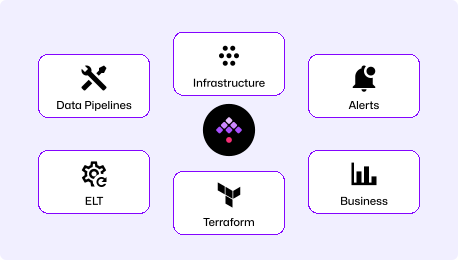
Declarative YAML orchestration that runs on Docker, Kubernetes, or any cloud, in any language: Python, SQL, Bash, R, Go, Node.js. No vendor dependency in the architecture. Workflows define what should run, not how to wire up cloud infrastructure around them.
"How do we orchestrate data, infrastructure, and business workflows without committing to a single cloud vendor?"
Managed Airflow on AWS
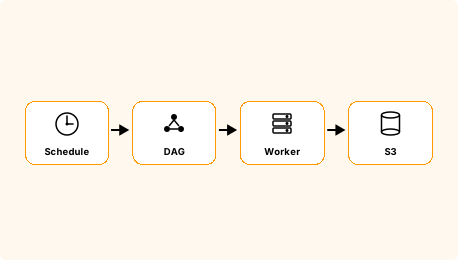
Apache Airflow, fully managed inside your AWS account. MWAA handles scheduler maintenance, worker scaling, and Airflow upgrades. DAGs are stored in S3, workers run in your VPC, and access is controlled through IAM. The AWS integration runs deep, and so does the dependency.
"How do we run Airflow without managing Airflow infrastructure, while staying inside AWS?"
AWS-Bound Pipeline Scheduling vs. Cloud-Agnostic Workflow Orchestration
Universal Workflows, Any Cloud
Data pipelines, infrastructure automation, business processes, AI workflows
Multi-language: Python, SQL, Bash, Go, Node.js, R
Event-driven at core: respond to file arrivals, Kafka, webhooks, database changes
Self-service for non-engineers via Kestra Apps
Runs on AWS, GCP, Azure, on-prem, or your laptop
Amazon MWAA
Managed Airflow Inside AWS
Apache Airflow, managed by AWS inside your VPC
Python DAGs stored in S3, workers in your VPC
Deep AWS integration: CloudWatch, S3 events, IAM
Data engineering scope
AWS-only deployment
MWAA is a strong choice if your team is fully invested in Airflow and all your data lives in AWS. Kestra is the right choice if you need multi-language workflows that run beyond Python DAGs, orchestration that spans cloud providers, or a 5-minute setup path that doesn't require provisioning a VPC first.
Time to First Workflow
MWAA is Amazon's fully managed Airflow service—there is no local or self-hosted install option. This comparison reflects what's required to provision an MWAA environment: an S3 bucket with versioning enabled, a VPC with security groups, an IAM execution role, and environment provisioning that takes 20–30 minutes on its own.
Download the Docker Compose file, spin it up, and you're ready (database and config included). Open the UI, pick a Blueprint, run it. No cloud account, no VPC, no S3 bucket, no IAM role.
# Step 2: Configure VPC, security groups, IAM role...
# Step 3: Create MWAA environment (20-30 min to provision)
# Step 4: Upload DAGs to S3
awss3cpdags/s3://my-mwaa-dags/dags/--recursive
# Now write your DAGs in Python...
Create an S3 bucket with versioning enabled, configure a VPC with security groups, create an IAM execution role, provision the MWAA environment (20-30 min), then upload your DAG files to S3 and wait for the scheduler to pick them up.
messageText: "ETL complete: {{ outputs.extract.vars.result.records }} records processed"
triggers:
- id: daily
type: io.kestra.plugin.core.trigger.Schedule
cron: "0 0 * * *"
YAML is readable on day 1. Our docs are embedded in the UI for easy reference, the AI Copilot writes workflows for you, or start with our library of Blueprints. No Python knowledge required to understand or modify a workflow.
Amazon MWAA
Amazon MWAA: Python DAGs in S3, Airflow in your VPC
from airflow importDAG
from airflow.operators.python import PythonOperator
from airflow.operators.bash import BashOperator
from airflow.providers.slack.operators.slack_webhook import SlackWebhookOperator
from datetime import datetime
defextract_data(**context):
# extraction logic
return {"records": 1000}
with DAG('daily_etl', start_date=datetime(2024, 1, 1), schedule='@daily') as dag:
extract = PythonOperator(
task_id='extract',
python_callable=extract_data,
)
transform = BashOperator(
task_id='transform',
bash_command='dbt run --select staging',
)
notify = SlackWebhookOperator(
task_id='notify',
slack_webhook_conn_id='slack_default',
message='ETL complete',
)
extract >> transform >> notify
DAG files are Python scripts stored in S3. To update a workflow, push a new file to S3 and wait for the scheduler to detect the change. Operators, dependencies, and scheduling are all Python. Non-Python contributors can view runs in the Airflow UI but cannot author or modify workflows.
One Platform for Your Entire Technology Stack
Orchestrate across data pipelines, infrastructure operations, business processes, and AI workflows in one unified platform. Event-driven at its core, with native triggers for S3, webhooks, Kafka, and message queues. Runs on any cloud or on-prem.
Amazon MWAA
A managed Airflow environment inside your AWS account. Excellent for Python-based data pipelines with deep AWS service integration. Infrastructure automation and business process workflows are possible via Python operators but are not first-class use cases. Runs exclusively on AWS.
Kestra vs. Amazon MWAA at a Glance
Amazon MWAA
Workflow definition
Declarative YAML
Python DAGs stored in S3
Languages supported
Any (Python, SQL, R, Bash, Go, Node.js)
Python-first (Bash/SQL via operators)
Cloud dependency
Runs anywhere (AWS, GCP, Azure, on-prem)
AWS only
Setup requirements
Docker Compose (two commands)
S3, VPC, IAM role, MWAA environment (hours)
Architecture
Event-driven at core
Schedule-first (Airflow under the hood)
Airflow version control
Your upgrade timeline
AWS controls Airflow version availability
Multi-tenancy
Namespace isolation + RBAC out-of-box
IAM-based access control, separate environments for strong isolation
Self-service for non-engineers
Kestra Apps
Airflow UI is observability-focused, no self-service authoring
Infrastructure automation
Native support
Possible via Python operators and AWS SDK, not a primary use case
We switched from Airflow because we want engineers solving problems, not coding orchestration. Kestra delivers end-to-end automation with the robustness we need at our scale. Few companies operate at this level, especially in AI/ML.
Kestra runs in two commands on Docker Compose. No S3 bucket to configure, no VPC to provision, no IAM role to get right before you can write a workflow. Teams get a production-shaped environment locally in under 5 minutes, with the same deployment model scaling to Kubernetes in production.
Not tied to a single cloud
Kestra runs on AWS, GCP, Azure, or your own data center. When your data lives in multiple clouds or your team deploys some workloads on-prem, a single orchestrator that connects everywhere is simpler than maintaining separate tooling per environment. Native plugins for every major cloud give your team one control plane regardless of where workloads run.
Upgrade on your timeline
Kestra upgrades are on your schedule: pull a new image, test in staging, and ship when your team is ready. No waiting for a managed service to certify a release or schedule a maintenance window. Roll back instantly if something unexpected surfaces.
The Right Tool for the Right Job
Choose Kestra When
Your team writes Python, SQL, Bash, and dbt, and you want orchestration that doesn't force everyone into Python.
You need workflows that run across AWS, GCP, Azure, or on-prem without being locked to one cloud.
You want a local development environment in under 5 minutes, not an afternoon of VPC and IAM configuration.
Your workflows span data pipelines, infrastructure automation, and business processes.
Non-engineers need to trigger or monitor workflows without writing Python.
Amazon MWAA
Choose Amazon MWAA When
Your team is deeply invested in Airflow and all your data lives in AWS.
You need managed Airflow with AWS-native controls: IAM, CloudWatch, VPC isolation.
AWS compliance requirements (data sovereignty, VPC-only access) make a fully managed AWS service the right choice.
Your existing Python DAG library and Airflow operator investments are too large to migrate near-term.
Frequently asked questions
Find answers to your questions right here, and don't hesitate to Contact Us if you couldn't find what you're looking for.
Kestra doesn't require you to refactor your business logic. Extract Python code from your Airflow DAG files and run it directly as a Script task in Kestra. SQL queries and Shell commands work as-is. Define orchestration in YAML. Most teams migrate incrementally, using Kestra's HTTP trigger to call remaining MWAA DAGs during transition, so there's no hard cutover. For a detailed breakdown of both upgrade and migration paths, see our Airflow 2 EOL guide.
Yes. Kestra has native plugins for S3, SQS, SNS, DynamoDB, Glue, Redshift, Lambda, and more. The S3 trigger lets Kestra react to file arrivals natively, without polling. AWS credentials are managed through Kestra's secrets management, and Kestra deployments on AWS typically run on EKS or ECS with the same IAM-based access patterns your team already uses.
MWAA's supported Airflow versions lag behind the open-source releases. Airflow 3 support on MWAA typically arrives months after the upstream release, and upgrading requires AWS to certify the version first. Kestra upgrades run on your schedule: pull a new image, test in staging, and ship when your team is ready.
Yes. Kestra orchestrates ETL and ELT pipelines, dbt models, data quality checks, warehouse operations, and file transfers. With 1200+ plugins, it covers the same AWS integrations available through Airflow providers: S3, Glue, Redshift, Athena, and more. The difference is YAML task definitions instead of Python operator classes.
Yes. Teams commonly run both during transition. Kestra can trigger MWAA DAGs via the Airflow REST API, so you migrate incrementally: start new workflows in Kestra, move existing pipelines over on your timeline, and keep MWAA running until you're ready to switch off.
Kestra uses namespace isolation out-of-the-box. Teams, environments, and projects get separate namespaces with scoped RBAC, secrets, and execution history. MWAA's access control is IAM-based; strong team isolation typically requires separate MWAA environments, each with its own VPC and cost. Kestra handles this within a single deployment.
Getting Started with Declarative Orchestration
See how Kestra can simplify your data pipelines—and run them on any cloud without the AWS lock-in.