Hi! I'm your Kestra AI assistant. Ask me anything about workflows.
EXAMPLE QUESTIONS
How to receive an alert on flow failure?
How to handle errors & retry on flow?
What are main differences between Open Source and Enterprise?
/
Kestra vs. Databricks Workflows: Universal Orchestration vs. Lakehouse-Native Jobs
Databricks Workflows is the job orchestration layer built into the Databricks lakehouse. Kestra is open-source workflow orchestration for any cloud, any language, and use cases beyond data transformation. One is built to coordinate jobs inside Databricks. The other orchestrates everything your engineering team ships.
Lakehouse Job Scheduling vs. Universal Orchestration
Open-Source Orchestration for Any Stack
Declarative YAML workflows versioned in Git, executed in isolated containers, deployed through CI/CD. Orchestrate data pipelines, infrastructure operations, AI workloads, and business processes across AWS, Azure, GCP, or on-premises without vendor lock-in.
"How do I orchestrate workflows across every part of my stack without tying everything to one platform?"
Databricks-Native Job Orchestration
Multi-task job scheduling built into the Databricks workspace. Chain notebooks, Python scripts, JARs, SQL tasks, and Delta Live Tables pipelines with dependency management and retry logic. Pricing runs on Databricks job compute clusters.
"How do I coordinate my Databricks notebooks and pipelines without leaving the lakehouse?"
Lakehouse Jobs Handle What's Inside Databricks. Universal Orchestration Runs Your Business.
Universal Workflow Orchestration
Data pipelines, infrastructure automation, AI workloads, and business processes
Multi-cloud and on-premises: AWS, Azure, GCP, or hybrid
YAML-first: Git-native, CI/CD-ready, reviewable by any engineer
Open source with 26k+ GitHub stars and 1200+ plugins
Self-service for non-engineers via Kestra Apps
Databricks Workflows
Databricks-Native Job Coordination
Notebooks, Python scripts, JARs, SQL tasks, and Delta Live Tables pipelines
Databricks-only: jobs run on Databricks compute in your cloud account
UI-based job builder or JSON job definitions via the Databricks REST API
Consumption-based pricing on Databricks job compute clusters
No open-source version
Databricks Workflows is the right choice if your entire data workload runs inside Databricks and you want scheduling that lives natively in your lakehouse. Use Kestra when your workflows span systems beyond Databricks, need to coordinate infrastructure and business processes alongside data jobs, and must live in Git with engineers deploying through CI/CD rather than the Databricks UI.
Time to First Workflow
Databricks Workflows runs on Databricks' cloud platform (AWS, Azure, or GCP)—there is no local install option. This comparison reflects what's required to provision a workspace, configure compute, and define your first job.
Download the Docker Compose file, spin it up, and you're ready. Database and config included. Open the UI, pick a Blueprint, run it. No cloud account, no cluster provisioning, no workspace setup.
Databricks Workflows
Hours to
Days
# 1. Provision Databricks workspace (AWS, Azure, or GCP)
# 2. Configure cloud IAM and storage permissions
# 3. Create or select a job cluster (instance type, DBR version)
# 4. Upload notebooks or Python scripts to DBFS or repos
# 5. Define job tasks and dependencies in the UI or via API:
Requires a Databricks workspace, a cloud account with compute permissions, cluster configuration, and either navigating the Jobs UI or writing JSON job definitions via the REST API. Teams also need to package notebooks and scripts into the Databricks environment before scheduling them.
YAML is readable on day 1. Our docs are embedded in the UI for easy reference, the AI Copilot writes workflows for you, or start with our library of Blueprints. Every workflow is a file in your repository, reviewed in pull requests, deployed the same way as application code.
Databricks Workflows
Databricks Workflows: JSON job definitions or UI-built configs
Workflows are defined in the Databricks UI or as JSON via the Jobs REST API. Version control requires manually committing JSON exports or using the Databricks Repos integration. The JSON schema is verbose and Databricks-specific, with cluster configuration embedded in every job definition.
One Platform for Your Entire Technology Stack
Orchestrate data pipelines, infrastructure operations, AI workloads, and business processes across any cloud or on-premises environment. Event-driven at its core, with native triggers for S3, webhooks, Kafka, database changes, and API events. Run Databricks jobs as one step in a broader workflow.
Databricks Workflows
Jobs follow a task graph model: define tasks (notebooks, scripts, SQL, DLT pipelines), set dependencies, attach compute, and schedule or trigger by file arrival. All execution happens on Databricks clusters. Monitoring and logs are in the Databricks workspace UI.
Databricks DBU consumption on job compute clusters
Air-gapped deployment
Supported
Not available (requires Databricks cloud)
Multi-tenancy
Namespace isolation + RBAC out-of-box
Workspace-level isolation with Databricks RBAC
Kestra was the only tool that combined true multi-tenant isolation, metadata-driven orchestration, and easy integration with our existing AWS and Databricks environments. It provided the foundation we needed to scale confidently.
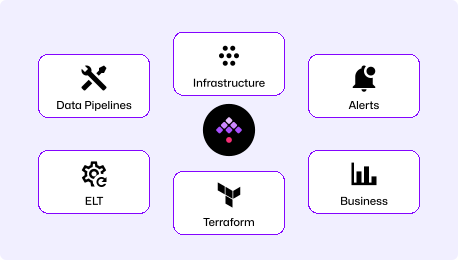
Kestra handles the full pipeline from data ingestion through infrastructure changes and downstream notifications. Trigger Terraform runs after a data load, coordinate cross-team approvals, run dbt on any warehouse, and notify downstream services — all in one YAML file. Every system your team operates becomes one step in a unified workflow.
YAML that engineers can own
Kestra workflows are YAML files from day one: they live in your repo, go through code review, and deploy through CI/CD the same way as application code. Git sync, a Terraform provider, and native CI/CD hooks mean workflow deployment follows the same process as every other piece of infrastructure your team ships.
Multi-cloud without the Databricks dependency
Kestra runs on any infrastructure: Docker, Kubernetes, AWS, Azure, GCP, or on-premises. Trigger Spark jobs when you need distributed compute, and run everything else on your own infrastructure without per-execution overhead. One orchestrator connects every system regardless of where it runs.
The Right Tool for the Right Job
Choose Kestra When
Workflows span systems beyond Databricks: infrastructure, external APIs, non-Spark workloads, and business processes need to run from the same platform.
Engineers need to own workflows through Git, pull requests, and CI/CD, not the Databricks UI.
Your team works across clouds or on-premises and needs orchestration without a Databricks dependency.
Open source and air-gapped deployment are requirements.
Databricks Workflows
Choose Databricks Workflows When
Your entire data workload runs inside Databricks and you want native scheduling with no external orchestrator to operate.
Delta Live Tables pipelines, Unity Catalog, and Databricks-native features are central to your architecture.
Your team is already deep in the Databricks ecosystem and wants orchestration that requires no context switching.
Spark-native compute for every task is a hard requirement.
Frequently asked questions
Find answers to your questions right here, and don't hesitate to Contact Us if you couldn't find what you're looking for.
Map your existing Databricks jobs to Kestra workflows. Each notebook or Python script task stays on Databricks; Kestra takes over the orchestration layer in YAML, triggering those same jobs via the Databricks plugin. Start with net-new pipelines to build familiarity, then port existing jobs incrementally. The transition doesn't require a cutover: Kestra and Databricks Workflows can run in parallel for as long as needed.
Yes. Kestra has a Databricks plugin that triggers job runs, submits new cluster jobs, runs notebooks, and monitors execution status. Route the full pipeline through Kestra: extract from source systems, trigger the Databricks job for Spark-based transformation, run dbt models downstream, and notify teams on completion, all coordinated from one YAML file.
Kestra workflows are YAML files that live in your Git repository from day one. They go through pull requests and deploy through CI/CD. Databricks Workflows are built in the UI or defined as JSON via the REST API. Getting them into version control requires Databricks Repos or manually exporting and committing JSON definitions. Even with that integration, the JSON embeds cluster configuration inline, making it verbose and hard to review in a diff.
Kestra's open-source edition is free: run it on your own infrastructure with 1200+ plugins and no per-execution fees. Enterprise features (RBAC, SSO, audit logs, multi-tenancy) are available on Kestra Enterprise and Kestra Cloud. Databricks Workflows charges Databricks Units (DBUs) for job compute, on top of your underlying cloud compute costs. Teams running high-frequency schedules across many jobs often find those DBU costs significant, particularly when many tasks don't require Spark and could run on cheaper infrastructure.
Yes. Route new workflows through Kestra while existing Databricks jobs continue running. Kestra can trigger those jobs, react to their completion, and chain additional steps outside the lakehouse. Start with net-new orchestration in Kestra, migrate jobs incrementally, and keep Databricks Workflows for the notebook and DLT pipelines that are already stable.
Yes. Kestra orchestrates ETL/ELT pipelines, dbt models, data quality checks, and warehouse operations. Teams running Databricks for Spark compute can keep those jobs exactly as they are and use Kestra to coordinate the pipeline around them. The Databricks plugin triggers jobs, waits for completion, and passes outputs to downstream tasks, including DLT pipeline updates. What you gain is the ability to connect those Spark jobs to the systems before and after them without building custom glue code.
Getting Started with Declarative Orchestration
See how Kestra can simplify your data workflows—and orchestrate across the full stack, not just Databricks.