Getting Started with Declarative Orchestration
See how Kestra can simplify your workflows—and scale beyond legacy enterprise scheduling.
IBM Workload Automation centralizes batch scheduling behind a multi-component infrastructure and an operations team. Kestra lets any engineer build and ship workflows in YAML. No agents, no proprietary licensing, no weeks-long deployments.
Declarative YAML workflows versioned in Git, executed in isolated containers, deployed through CI/CD. Existing scripts, ETL jobs, and batch processes run as-is. Any engineer can build and ship workflows without filing a ticket. No ops team in the critical path.
Enterprise batch scheduler built around a Master Domain Manager, Backup Domain Manager, and agents deployed on every target host. Jobs are defined through the Dynamic Workload Console or command line, scheduled through the engine, and executed by Fault-Tolerant or Dynamic Agents. Changes flow through the operations team.
IBM Workload Automation requires installing a Master Domain Manager, a Backup Domain Manager, a database (Db2 or Oracle), and agents on each target host, then configuring connectivity and security between all components. Kestra's single Docker Compose command stands up everything in a format that's already production-shaped.
curl -o docker-compose.yml \https://raw.githubusercontent.com/kestra-io/kestra/develop/docker-compose.ymldocker compose up
# Open localhost:8080# Pick a Blueprint, run it. Done.Download the Docker Compose file, spin it up, and you're ready (database and config included). Open the UI, pick a Blueprint, run it.
# 1. Provision supported database (Db2 or Oracle)# 2. Install Master Domain Manager (MDM)# 3. Install Backup Domain Manager (BDM) for HA# 4. Install Dynamic Workload Console (monitoring UI)# 5. Install Fault-Tolerant Agents on each target host# 6. Configure agent-engine connectivity and certificates# 7. Set up user roles and security policies# 8. Define job streams and scheduling plans
# For z/OS: install IWA z/OS controller + tracker agents# For cloud: configure Dynamic Agents on cloud VMsProduction deployment requires installing the Master Domain Manager (MDM), optionally a Backup Domain Manager (BDM), a supported database (Db2 or Oracle), and Fault-Tolerant or Dynamic Agents on every target host. Configuration involves network connectivity, security certificates, agent-engine pairing, and user role setup through the Dynamic Workload Console.
YAML is readable on day 1. Our docs are embedded in the UI for easy reference, the AI Copilot writes workflows for you, or start with our library of Blueprints. Engineers deploy through Git, same as application code.
Jobs are defined through the Dynamic Workload Console GUI or via the composer command-line interface using IBM's proprietary job definition language (JSDL). Job streams group related jobs with dependencies, time restrictions, and resource requirements. Modifying scheduling logic typically requires the operations team and familiarity with IBM-specific concepts like workstations, job streams, and scheduling plans.
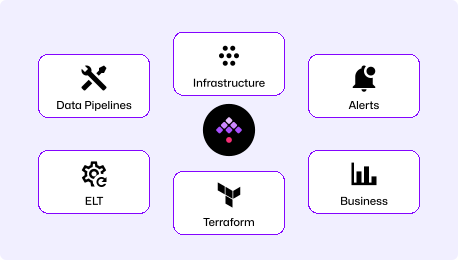
Orchestrate data pipelines, infrastructure operations, business processes, and AI workflows from a single open-source platform. Event-driven at its core, with native triggers for S3, webhooks, Kafka, database changes, and API events. 1200+ open-source plugins.
Enterprise batch workload automation across z/OS mainframe, distributed, and cloud environments. Deep integration with the IBM ecosystem including MQ, Db2, and Cloud Pak for Business Automation. Agent-based architecture with proprietary IBM licensing tied to processor value units.
| | ||
|---|---|---|
| Workflow definition | Declarative YAML | GUI (Dynamic Workload Console) or composer CLI |
| Architecture | Event-driven at core | Schedule-first with agent-based execution |
| Deployment model | Single Docker Compose (self-hosted or Kestra Cloud) | Master Domain Manager + Backup Domain Manager + Agents on each host |
| Licensing | Open source (Enterprise tier available) | Proprietary (IBM PVU-based licensing) |
| Languages supported | Any (Python, SQL, R, Bash, Go, Node.js) | Shell scripts, Python, SQL via job types |
| Self-service for developers | Engineers build and deploy via Git | Ops-mediated through Dynamic Workload Console |
| Self-service for non-engineers | Kestra Apps | Console for monitoring, not self-service triggers |
| Mainframe support | Not a primary use case | Native z/OS job scheduling with JCL support |
| IBM ecosystem integration | Via plugins (JDBC, MQ, cloud providers) | Native integration with MQ, Db2, Cloud Pak, SAP |
| Multi-tenancy | Namespace isolation + RBAC out-of-box | Workstation-based access control (complex multi-tenant setup) |
| Time to production | Minutes (Docker Compose) | Weeks to months (multi-component install) |
IBM Workload Automation requires installing and maintaining Fault-Tolerant or Dynamic Agents on every target host, with changes routed through a central operations team. Kestra runs tasks in isolated Docker containers. Engineers deploy through Git and CI/CD, the same way they deploy application code.
Kestra's open-source core is free with 1200+ plugins. Enterprise features (RBAC, SSO, audit logs) are available without per-job metering. IBM Workload Automation uses proprietary PVU-based licensing, and costs scale with the number of processors running the Master Domain Manager, agents, and connected systems.
Kestra was built event-driven from the start: webhooks, S3 uploads, Kafka messages, database changes, and API events are first-class YAML triggers. Unlimited event-driven workflows in open source. IBM Workload Automation is fundamentally a batch scheduler. While it supports file-based and event-driven triggers, the core architecture is built around scheduling plans, run cycles, and time-based job dependencies.
Find answers to your questions right here, and don't hesitate to Contact us if you couldn't find what you're looking for.
See how Kestra can simplify your workflows—and scale beyond legacy enterprise scheduling.