Kestra vs. n8n: Mission-Critical Orchestration vs. App Automation

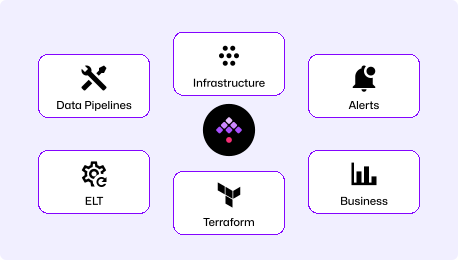
n8n connects apps visually for fast automation. Kestra orchestrates data pipelines, integration workflows, infrastructure, and AI workloads with production-grade reliability built in. One is built to prototype. The other is built to run your business.

Two Platforms, Two Philosophies

Production Orchestration: Code-First, Run Anywhere

Write workflows in YAML. Run tasks in any language. Deploy through Git and CI/CD. Kestra orchestrates data pipelines, infrastructure, and AI workloads with isolated execution and team-level governance built in.

"How do I orchestrate production workflows across teams and environments?"
Visual App Automation

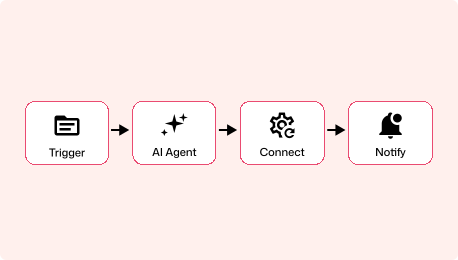
Visual-first workflow automation platform built around a drag-and-drop node editor. Connect SaaS apps, build AI agent workflows, and prototype automations quickly with JavaScript and Python code nodes.

"How do I connect apps and build automations visually?"

App Automation Gets You Started.
Orchestration Handles Mission-Critical Work.

Production-Grade Orchestration
  • Automate data pipelines, integration workflows, infrastructure, and AI workloads
  • Cross-functional: data + platform + DevOps + business
  • Production-grade reliability with retries, concurrency controls, and audit trails
  • Workflows that survive failures: step-level checkpointing, retries, and full execution history
  • Deploy on your own infrastructure, any cloud, or air-gapped networks
App-to-App Automation
  • Connect SaaS apps with a visual drag-and-drop canvas
  • Technical teams and marketing automation
  • Speed of setup and visual iteration
  • Single-team automation workflows
  • Serves individual teams and developers

Time to First Workflow

Both tools start with a single Docker command. The difference isn't setup time. In Kestra, your first workflow is already production-shaped: YAML you can commit, review, and deploy through CI/CD. In n8n, your first workflow lives in the browser and needs reworking before it's production-ready.

~5

Minutes
curl -o docker-compose.yml \
https://raw.githubusercontent.com/kestra-io/kestra/develop/docker-compose.yml
docker compose up
# Open localhost:8080
# Pick a Blueprint, run it. Done.

Start with Docker Compose, open the UI, pick a Blueprint, and run it. Your first workflow is a YAML file, the same format it'll be in six months when it's running across teams with retries, scheduling, and namespace isolation.

~10

Minutes
docker run -it --rm \
-p 5678:5678 \
n8nio/n8n
# Open localhost:5678
# Drag nodes, connect them, execute.

Start with a single Docker command, open the visual editor, and drag nodes together. Fast to prototype, but workflows live in the browser by default, and moving them to version control requires the Enterprise tier.

Code-native vs. Click-to-build

Kestra: Readable, reviewable, deployable

YAML is readable on day 1. Our docs are embedded in the UI for easy reference, the AI Copilot writes workflows for you, or start with our library of Blueprints. Workflows go through pull requests and CI/CD like any other code.

n8n: Visual canvas, browser-based

Workflows are built by dragging nodes onto a canvas and connecting them. Fast for prototyping, but version control is an Enterprise feature and workflows live in the browser by default.

Production Orchestration vs. App Automation

Kestra Image

Orchestrate across data pipelines, infrastructure operations, AI workloads, and business workflows in one unified platform. Distributed, isolated, and built for production.

Competitor Image

Purpose-built for visual app automation and SaaS integrations. Strong AI agent tooling with LangChain, MCP, and 12 vector store integrations. Lacks native version control, container-level task isolation, and namespace governance needed for complex engineering workflows at scale.

Kestra vs. n8n at a Glance

Primary use case Universal workflow orchestration: pipelines, integrations, infrastructure, AI workloads Visual app-to-app automation
Workflow definition Declarative YAML (code-first) Visual canvas (drag-and-drop)
Architecture Distributed, queue-based, horizontally scalable by default Node.js, horizontally scalable via queue mode (Redis + workers)
Languages supported Agnostic (Python, R, Bash, Node.js, Go, Java, SQL & more) JavaScript, Python (code nodes)
Task isolation Container per task Shared Node.js process
Version control Native (Git, CI/CD, Terraform) Enterprise feature (Git-based)
Multi-tenancy Namespace isolation, RBAC per namespace RBAC with project-level roles (no namespace isolation)
Deployment Run on your own servers, any cloud, or air-gapped networks. No dependency on Kestra's infrastructure. Self-hosted or n8n Cloud; air-gapped environments not supported
AI workloads Run AI pipelines in production: persistent execution state, step-level retries, and per-task container isolation Visual AI agent builder (LangChain, MCP, vector stores); built for prototyping, not persistent production execution
Triggers Schedule, webhook, flow, file detection, message queue, polling Schedule, webhook, SSE, Redis, workflow lifecycle, error, app-event
Crash recovery Every completed task is checkpointed; resume or replay from the last successful step Can reconstruct which nodes crashed vs. completed, but crashed workflows must be restarted from scratch
Failure handling Retries with backoff, timeouts, allowed-failure policies, reprocessing Error workflows, retry logic
Secrets management Built-in secrets manager, encrypted variables Encrypted credentials, external secrets integration
License Apache 2.0: fully open-source, no usage restrictions Sustainable Use License: source-available, restricts commercial use
Plugins / Integrations 1,400+ 400+ built-in (1,000+ with community nodes)
Cloud Early access Available (Azure Frankfurt)
Kestra delivers end-to-end automation with the robustness we need at our scale. Few companies operate at this level, especially in AI/ML.
Senior Engineering Manager @ Apple (ML team)
200Engineers onboarded
2xFaster workflow creation
0Pipeline failures

Built for Pipelines That Go to Production

Bring your own scripts

Bring your existing Python, SQL, Shell, Go, and R scripts. Define workflows in declarative YAML. No wrappers, no framework lock-in.

Built for business-critical reliability

When a critical workflow fails mid-run, Kestra picks up where it stopped. No lost work, no starting over from scratch.

Orchestrate anything

Data pipelines, integration workflows, document processing, infrastructure provisioning, and AI workloads. One platform with container-level isolation and RBAC per namespace.

When to Choose Orchestration Over Automation

Choose Kestra When
  • Data pipelines, infrastructure automation, or AI workloads at production scale.
  • File-based and document processing pipelines: extract, parse, and push structured data into enterprise systems like ERPs or databases.
  • Multi-language teams (Python, SQL, Bash, R, Go) that need orchestration beyond JavaScript.
  • Workflows that go through pull requests, CI/CD, and code review.
  • Multi-team environments with namespace isolation and compliance requirements.
  • Business-critical workflows where losing execution state mid-run is not acceptable.
Choose n8n When
  • Point-and-click SaaS trigger automation where visual setup speed is the priority.
  • Visual drag-and-drop workflow building is the team's preferred model.
  • AI agent workflows, chatbots, or RAG pipelines are the primary use case.
  • A lightweight automation tool for a single team, deployable anywhere.

Frequently asked questions

Find answers to your questions right here, and don't hesitate to Contact Us if you couldn't find what you're looking for.

See How

Getting Started with Declarative Orchestration

See how Kestra can simplify your workflows and scale beyond app automation.