Hi! I'm your Kestra AI assistant. Ask me anything about workflows.
EXAMPLE QUESTIONS
How to run Python script?
How to add secrets?
How to write expression for previous tasks outputs?
/
Kestra vs. Tines: Universal Orchestration vs. Security Automation
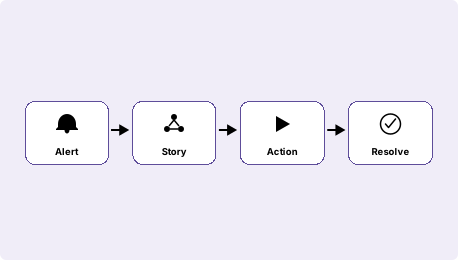
Tines is a no-code workflow platform built for security and IT operations teams. It excels at SOC automation, incident response, and alert triage. Kestra is a general-purpose orchestration platform for engineering teams that need data pipelines, infrastructure automation, and business processes at production scale.
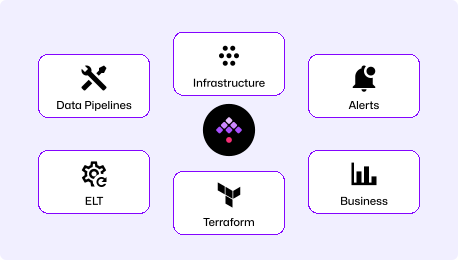
Declarative YAML orchestration platform for engineering teams. Define data pipelines, infrastructure automation, and business workflows in version-controlled YAML. Any language, self-hosted or on Kestra Cloud, with GitOps and full audit trails.
"How do I build production workflows my engineering team can version, deploy, and operate?"
Security and IT Workflow Automation
No-code visual workflow platform purpose-built for security operations and IT teams. Drag-and-drop story builder lets analysts automate threat response, alert triage, and IT incident handling without writing code.
"How do I automate our SOC playbooks without needing an engineer?"
Playbook Automation Protects Teams. Workflow Orchestration Runs Your Business.
Production-Grade Workflow Orchestration
Automate data pipelines, infrastructure, and business processes in one platform
Self-hosted or cloud, with full data residency control
GitOps-native version control, CI/CD, and Terraform for all workflows
RBAC, audit logs, and multi-tenancy for enterprise compliance
Handles 100,000+ concurrent tasks across any language or tool
Tines
Security and IT Playbook Automation
No-code visual builder for security analysts and IT operators
1,000+ pre-built security and IT integrations
Community tier limited to 3 workflows and 1,000 story runs per month
For security and IT teams automating SOC playbooks and incident response without writing code, Tines is the right tool. When you need data pipelines, infrastructure provisioning, cross-functional business workflows, or engineering-grade GitOps, Kestra is built for that scope.
Time to First Workflow
Tines offers both a managed cloud service and a self-hosted deployment. This comparison uses their cloud onboarding path—sign up at tines.com and build in the visual editor—which is their recommended getting-started experience.
Download the Docker Compose file, spin it up, and you're ready (database and config included). Open the UI, pick a Blueprint, run it. No vendor coordination, no infrastructure prerequisites beyond Docker.
Tines
~30
Minutes
# Cloud: sign up at tines.com, build visually
# Self-hosted: coordinate with Tines account team,
Sign up for Tines Cloud and build your first story in the visual editor. Self-hosting requires a Linux server with Docker, PostgreSQL 14+, Redis 7.x, 8 GB RAM, and access granted by your Tines account team.
YAML is readable on day 1. Our docs are embedded in the UI for easy reference, the AI Copilot writes workflows for you, or start with our library of Blueprints. No special training required.
Tines workflows (called Stories) are built by dragging actions onto a canvas. No code required for most integrations. Complex logic uses inline expressions and templates. Exported stories are JSON.
One Platform for Your Entire Technology Stack
Orchestrate data pipelines, infrastructure provisioning, business processes, and event-driven automations in one platform. Self-host with full control or use Kestra Cloud.
Tines
Purpose-built for security operations and IT automation. Excellent at SOC playbooks, incident response, and alert triage. Not designed for data pipelines, infrastructure provisioning, or engineering-team workflows.
Kestra vs Tines at a Glance
Tines
Primary use case
Universal workflow orchestration
Security and IT operations automation
Workflow definition
Declarative YAML
Visual no-code story builder
Target user
Engineers, data teams, platform teams
Security analysts and IT operators
Languages supported
Agnostic (Python, R, Bash, Node.js, SQL & more)
No-code (inline expressions for logic)
Data pipeline support
Native support (ETL, dbt, Spark, Airbyte)
Not designed for data workloads
Infrastructure automation
Native support
Not designed for this
GitOps and CI/CD
Native Git sync, Terraform provider
Story export/import (no GitOps)
Self-service for non-engineers
Kestra Apps
✓ Visual builder for analysts
Multi-tenancy and RBAC
Enterprise namespace isolation
Enterprise plan only
Open source
Open source (Apache 2.0)
Closed source SaaS
We replaced Rundeck after it dropped jobs in HA mode and gave us no visibility. Kestra handles our entire incident automation pipeline—from PagerDuty alert to ITSM closure—with full audit trails and approval gates.
Kestra Is Built for Engineering Teams, Not Just Operations
Code as infrastructure, not just automation
Kestra workflows live in Git, deploy via Terraform, and go through the same CI/CD pipeline as application code. Every change is tracked, reviewed, and auditable. No manual canvas exports, no copy-paste to move a workflow between environments.
Data pipelines and infrastructure in one platform
dbt models, Spark jobs, Kubernetes deployments, and custom scripts all run from the same declarative YAML. Kestra handles compute-intensive workloads that run for minutes or hours, across data pipelines, infrastructure automation, and business processes in one platform.
Language-agnostic execution at scale
Run tasks in Python, SQL, R, Bash, or any language in isolated containers. No wrappers, no decorators, no framework-specific syntax. Bring your existing scripts and orchestrate them without rewriting anything.
The Right Tool for the Right Job
Choose Kestra When
Your team needs data pipelines, ETL, or infrastructure automation alongside event-driven workflows.
Workflows should live in version control and deploy through CI/CD like any other infrastructure.
Your engineers write the workflows. You want YAML and Git, not a visual canvas.
You need self-hosting that doesn't require vendor coordination or a dedicated account team.
Non-engineers need to trigger and monitor workflows through Kestra Apps, not build them.
Tines
Choose Tines When
Your primary use case is SOC automation: alert triage, incident response, threat enrichment.
Your team is security analysts or IT operators who need to build workflows without engineering support.
You want pre-built playbook templates for SIEM, EDR, and threat intelligence tools.
No-code matters more than GitOps. Your team won't write or review YAML.
You're already invested in the Tines ecosystem and security-specific integrations.
Frequently asked questions
Find answers to your questions right here, and don't hesitate to Contact Us if you couldn't find what you're looking for.
Tines Stories are built visually and exported as JSON. In Kestra, you replicate the same flow in declarative YAML, replacing each Tines action with the equivalent Kestra plugin (HTTP requests, script execution, Slack notifications, and more). The API calls, data transforms, and notification steps map directly to Kestra plugins. Most teams migrate incrementally, running Kestra for new workflows while keeping Tines for existing security playbooks during the transition.
Yes. Kestra handles webhook-triggered incident response, API enrichment, alert routing, and Slack or PagerDuty notifications natively. The difference is that Kestra workflows are defined in YAML and require an engineer to build them. There's no visual drag-and-drop builder for security analysts. If your security team needs to build and modify workflows independently without engineering involvement, Tines is better suited for that workflow.
Kestra's HTTP plugin can call any REST API, and Script tasks run Python or Bash against any SDK or CLI tool. So integrations with tools like Splunk, CrowdStrike, Okta, and PagerDuty are possible, but you write the integration logic rather than selecting a pre-built connector. Tines ships with 1,000+ security-specific connectors out of the box. If your primary need is rapid connection to security tooling without custom code, that library gives Tines an edge.
Tines Stories are built in a visual canvas, stored as JSON, and designed for operators who don't write code. Kestra Flows are written in YAML, stored in Git, and designed for engineers who want their workflows to follow software development practices. Both support triggers, conditional logic, and external API calls. Tines optimizes for speed of building; Kestra optimizes for maintainability and auditability over time.
Yes. Many teams use both: Tines for security playbooks built by analysts, Kestra for data pipelines and infrastructure workflows built by engineers. The two tools don't overlap functionally enough to cause conflicts. You can run them in parallel indefinitely, or use Kestra as the central orchestrator that calls Tines via webhook when a security workflow needs to be triggered.
Kestra is event-driven at its core. It supports webhook triggers, scheduled triggers, file arrival triggers (S3, GCS, SFTP), Kafka and Pulsar message queue triggers, database change triggers, and API polling. These are all native capabilities defined in YAML alongside the rest of the workflow. Tines' trigger model is similar but designed around the security operations use case, with tighter integration into SIEM and EDR event streams.
Getting Started with Declarative Orchestration
See how Kestra can simplify your security workflows—and scale beyond SOC automation.