/

Kestra vs. Windmill: Workflow Orchestration at Scale, Not Just Developer Scripts

Windmill is a developer platform for writing scripts, building flows, and creating internal apps, all in code. Kestra is a workflow orchestration platform built around declarative YAML, 1200+ pre-built plugins, and first-class event-driven triggers. Both run workflows; they're built for different teams with different scope requirements.
kestra ui

Two Platforms Built for Different Jobs

Declarative Orchestration: YAML Coordinates, Code Executes

YAML describes what should run, when, and in what order. Business logic lives in your existing Python, SQL, Bash, or dbt scripts. No framework wrappers, no code refactoring required. Kestra handles scheduling, retries, dependencies, and observability as first-class YAML primitives, and scales from a single pipeline to 100,000 concurrent tasks.

"How do we orchestrate data pipelines, infrastructure jobs, and business workflows in a format every engineer and analyst can read?"
Code-First Developer Platform

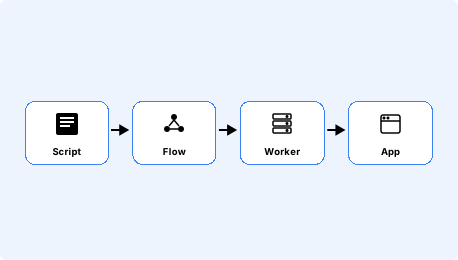
Windmill is an all-in-one platform for scripts, flows, and internal apps. Write steps in Python, TypeScript, Go, or Bash; connect them in a visual DAG editor; optionally build a low-code UI on top. Windmill is built for developer productivity and internal tooling as much as for workflow automation. The authoring model is code throughout.

"How do we let our engineering team write scripts, build lightweight automations, and ship internal tools without a dedicated platform team?"

Internal Developer Tooling vs. Enterprise Workflow Orchestration

Orchestration for Data and Engineering Teams
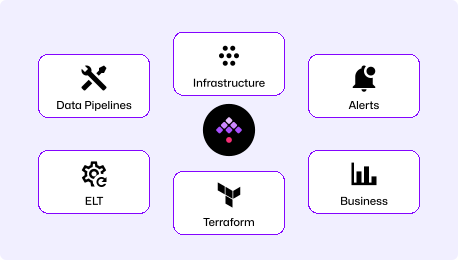
  • Data pipelines, infrastructure automation, business processes, AI workflows
  • 1200+ plugins: dbt, Airbyte, Spark, Snowflake, Kafka, Databricks, and more
  • Event-driven at core: file arrivals, Kafka, webhooks, database changes, schedules
  • YAML-first: any engineer can read, modify, and run a workflow
  • Enterprise RBAC with namespace isolation and SSO/SAML
Scripts, Flows, and Internal Apps
  • Write scripts in Python, TypeScript, Go, Bash, SQL, PHP, Rust, or C#
  • Build flows as DAGs in a visual editor with OpenFlow format
  • Low-code app builder for internal tools with auto-generated UIs
  • Sub-20ms job overhead, designed for speed
  • Limited native data pipeline plugin library

Time to First Workflow

Windmill offers both a cloud service (windmill.dev) and a self-hosted Docker deployment. This comparison uses their cloud path—sign up via SSO, write step code in the web IDE, and wire steps into a flow.

~5

Minutes
curl -o docker-compose.yml \
https://raw.githubusercontent.com/kestra-io/kestra/develop/docker-compose.yml
docker compose up
# Open localhost:8080
# Pick a Blueprint, run it. Done.

Download the Docker Compose file, spin it up, and you're ready (database and config included). Open the UI, pick a Blueprint, run it. No code to write before your first workflow executes.

~15

Minutes
# Cloud: sign up at windmill.dev (free tier available)
# Then in the web IDE:
# Step 1: Write a script step (Python or TypeScript)
# Step 2: Create a flow, add the step
# Step 3: Wire step inputs/outputs
# Step 4: Add a schedule trigger
# Step 5: Run and monitor
# Self-hosted option:
docker compose up -d
# Then go through the same authoring steps...

Sign up via GitHub SSO, enter the web IDE, write your first script step, connect it into a flow, wire inputs and outputs between steps, and run. Each step is code you write; there are no pre-built plugin tasks to drop in for dbt, Airbyte, or Snowflake.

Two Ways to Build a Scheduled Pipeline

Kestra: One file, one workflow

YAML is readable on day 1. Our docs are embedded in the UI for easy reference, the AI Copilot writes workflows for you, or start with our library of Blueprints. No code required to run a dbt model, trigger an Airbyte sync, or load data to Snowflake.

Windmill: Each step is a script, wired in the editor

Windmill flows are built by writing individual script steps and wiring their inputs and outputs in the visual flow editor. Each integration with dbt, Slack, or an external system requires writing and maintaining the connection code yourself. The steps are readable to developers; the flow topology lives in the visual editor or the underlying OpenFlow JSON.

Two Platforms, Two Scopes

Kestra Image

Orchestrate data pipelines, infrastructure operations, business processes, and AI workflows in one unified platform. Event-driven at its core, with native triggers for S3, Kafka, webhooks, and database changes. 1200+ plugins cover the full data and infrastructure stack, all defined in YAML.

Competitor Image

A developer platform that combines script execution, flow orchestration, and internal app building in one workspace. Teams get scripts and lightweight automations alongside a drag-and-drop UI builder. Native data pipeline integrations (dbt, Airbyte, Snowflake) require writing and maintaining connection code rather than dropping in a plugin task.

Kestra vs. Windmill at a Glance

Windmill
Workflow definition Declarative YAML Code (Python, TypeScript, Go, Bash) + visual editor
Native data pipeline plugins
1200+ plugins (dbt, Airbyte, Spark, Snowflake, Kafka)
No pre-built plugin library; integrations require custom code
Event-driven triggers
Native (S3, Kafka, webhooks, database changes, schedules)
Webhooks, schedules, and HTTP routes
Internal app builder
Kestra Apps (workflow trigger forms)
✓ Low-code drag-and-drop app builder
Languages supported Any (scripts run in isolated containers, no SDK required) Python, TypeScript, Go, PHP, Bash, SQL, Rust, C#
Multi-tenancy Namespace isolation + RBAC out-of-box Workspaces with role-based access
Deployment complexity Docker Compose (two commands) Docker Compose or Kubernetes
Infrastructure automation
Native support
Possible via script steps, not a primary use case
Self-service for non-engineers
Kestra Apps with parameter forms
Auto-generated UIs from script signatures
Kestra delivers end-to-end automation with the robustness we need at our scale. Few companies operate at this level, especially in AI/ML.
Senior Engineering Manager @ Apple (ML team)
200Engineers onboarded
2xFaster workflow creation
0Pipeline failures

Kestra Is Built for Teams Who Orchestrate the Full Data Stack

1200+ data and infrastructure plugins, no code required

Kestra ships native plugin tasks for dbt, Airbyte, Spark, Snowflake, BigQuery, Kafka, Databricks, and 1200+ more. Drop one into a YAML workflow and it runs with no connection code to write or API docs to parse. Every integration is a pre-built task type, not custom code your team writes and maintains.

YAML any analyst can read and modify

A Kestra workflow is a YAML file that any team member can read and modify; ops teams can trigger runs from the UI without touching the implementation. Business users interact with workflows through Kestra Apps — no-code forms that trigger, monitor, and collect input without exposing the underlying YAML.

Event-driven triggers as first-class declarations

S3 file arrivals, Kafka message consumption, database row changes, and webhook callbacks are YAML trigger blocks sitting alongside the task list in the same file. Kestra's trigger system covers the reactive patterns data teams actually need without writing any polling code or managing external event listeners.

Two Platforms Built for Different Teams

Choose Kestra When
  • You're orchestrating data pipelines that touch dbt, Airbyte, Snowflake, Spark, or Kafka and want pre-built tasks instead of custom code.
  • Your team includes analysts and data engineers who need to read and modify workflows without a Python background.
  • You need event-driven triggers for S3 arrivals, Kafka messages, or database changes as native YAML declarations.
  • Enterprise RBAC, namespace isolation, audit logs, and SSO/SAML are required.
  • You're orchestrating 100,000+ concurrent tasks and need a platform built for that scale.
Choose Windmill When
  • Your engineering team wants to write scripts in multiple languages and needs a shared platform to run and monitor them.
  • You need to build internal apps and forms on top of automations, and the low-code UI builder is a genuine time-saver.
  • Your workflows are developer-owned scripts where code is the right authoring medium, not YAML.
  • You want a single all-in-one tool for scripts, flows, and internal UIs rather than a dedicated orchestration platform.

Frequently asked questions

Find answers to your questions right here, and don't hesitate to Contact Us if you couldn't find what you're looking for.

See How

Getting Started with Declarative Orchestration

See how Kestra can simplify your workflows—and scale beyond developer scripts.