Kestra vs. Zapier: Universal Orchestration vs. No-Code App Automation

Zapier connects over 7,000 apps with a no-code visual builder and a free tier for simple app-to-app automation. Kestra is a workflow orchestration platform for engineering and data teams that need data pipelines, infrastructure automation, and business processes running at production scale, with version control and the option to self-host.
Zapier

Two Tools, Two Scales of Automation

Production Orchestration: Any Workflow, Any Scale

Declarative YAML orchestration platform for engineering and data teams. Define data pipelines, infrastructure automation, and business workflows in version-controlled YAML. Any event, any language, self-hosted or on Kestra Cloud, with no per-task billing ceiling.

"How do I build production workflows that run at scale without per-task billing cutting me off?"
No-Code App Automation for Individuals and Small Teams

Visual automation platform built for connecting apps without writing code. Triggers and actions map to events in over 7,000 integrated apps. Free tier, fast setup, and a massive app library make it the default starting point for non-technical automation.

"How do I connect these two apps and automate this repetitive task without writing any code?"

App Automation Connects Tools.
Orchestration Runs Your Business.

Production-Grade Workflow Orchestration
  • Automate data pipelines, infrastructure, and business processes in one platform
  • Self-hosted or cloud, with full data residency control
  • GitOps-native: version control, CI/CD, and Terraform for all workflows
  • RBAC, audit logs, and multi-tenancy for enterprise compliance
  • Handles 100,000+ concurrent tasks with no per-task billing ceiling
No-Code App Automation
  • 7,000+ pre-built app integrations (largest library in the category)
  • Free tier limited to 100 tasks/month and 2-step Zaps only
  • Multi-step Zaps and premium apps require a paid plan
  • Every successful action counts as one billable task
  • Cloud-only, no self-hosting available

Time to First Workflow

Zapier is cloud-only SaaS, so there is no infrastructure to configure. The visual builder gets simple two-app Zaps running in minutes. The per-task billing model means cost scales with execution volume from day one.

~5

Minutes
curl -o docker-compose.yml \
https://raw.githubusercontent.com/kestra-io/kestra/develop/docker-compose.yml
docker compose up
# Open localhost:8080
# Pick a Blueprint, run it. Done.

Download the Docker Compose file, spin it up, and you're ready (database and config included). Open the UI, pick a Blueprint, run it. No cloud account required, no per-task billing, no execution limits.

~10

Minutes

Sign up at zapier.com, choose a trigger app and action app, connect via OAuth, and map the fields. Free tier gives 100 tasks/month with 2-step Zaps. Multi-step Zaps require a paid plan.

Version-Controlled Workflows vs. Visual Zap Builder

Kestra: Readable by Your Whole Team

YAML is readable on day 1. Our docs are embedded in the UI for easy reference, the AI Copilot writes workflows for you, or start with our library of Blueprints. Workflows live in Git and deploy through your existing CI/CD pipeline.

Zapier: Visual Zaps for Non-Technical Users

Zapier Zaps are built by selecting a trigger app, an action app, and mapping fields between them in the browser. No code required for standard connections. Multi-step Zaps with paths, filters, and delays require a paid plan. Zap logic lives in Zapier's cloud with no local files.

One Platform for Your Entire Technology Stack

Kestra Image

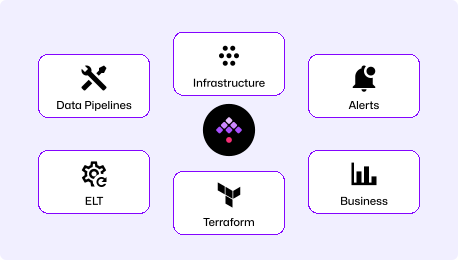
Orchestrate data pipelines, infrastructure provisioning, business processes, and event-driven automations in one platform. No execution ceiling, no per-task billing. Self-host with full control or use Kestra Cloud.

Competitor Image

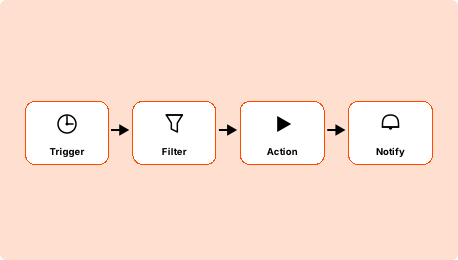
Connect SaaS apps and automate repetitive tasks without writing code. Fast setup, massive app library, and a free tier make it the default starting point for simple automation. Not designed for data pipelines, infrastructure automation, or workflows that need version control.

Kestra vs Zapier at a Glance

Primary use case Universal workflow orchestration No-code app-to-app automation
Workflow definition Declarative YAML (version-controlled) Visual Zap builder (cloud-stored, no files)
Deployment model Self-hosted or Kestra Cloud Cloud-only (no self-hosting)
Languages supported Agnostic (Python, R, Bash, Node.js, SQL & more) No-code (Formatter and Code by Zapier for basic logic)
Data pipeline support
Native support (ETL, dbt, Spark, Airbyte)
Not designed for data pipelines or compute-heavy workloads
Infrastructure automation
Native support
Not designed for this
Self-service for non-engineers
Kestra Apps
✓ Visual builder requires no engineering
Multi-step workflows with logic
Native (conditionals, parallel branches, loops)
Paths and filters available on Professional plan only
GitOps and version control
Native Git sync, Terraform provider
No version control (Zap history only)
Pricing model Infrastructure cost (no per-task billing) Per-task billing; free tier caps at 100 tasks/month
Open source
Open source (Apache 2.0)
Closed source SaaS
Kestra made the data mesh possible. We produce far more data now, and deliver it nearly 10 times faster.
Julien Henrion, CDO @ Leroy Merlin
+900%In data production
+250Active users
+5000Workflows created

Kestra Is Built for Production-Scale Automation

Execution without billing ceilings

Kestra runs on your infrastructure with no per-task billing. A workflow that runs 10,000 times a day costs the same to execute as one that runs once, because the cost model is tied to infrastructure, not execution count. Teams migrating from usage-based platforms often find that their automation cost drops substantially once execution volume stops driving the bill.

Data pipelines run alongside everything else

Native plugins for dbt, Airbyte, Spark, Snowflake, BigQuery, Databricks, and 1,200+ more let data engineers define ETL pipelines in the same YAML they use for event-driven workflows and infrastructure automation. DAG visualization, per-task retry semantics, and built-in observability make data workloads first-class, not an afterthought handled through a generic HTTP call.

Workflows in Git, owned by your team

Every Kestra flow is a YAML file that lives in your repository, deploys through CI/CD, and rolls back like any other code change. Reviewing what a workflow does, comparing versions, and auditing what ran on a specific date are standard git operations. Automation lives in the same source of truth as the rest of your infrastructure.

The Right Tool for the Right Job

Choose Kestra When
  • Your workflows involve data pipelines, ETL, or infrastructure automation beyond app-to-app connections.
  • Execution volume makes per-task billing impractical: hundreds of workflows running daily.
  • Workflows must live in version control, pass code review, and deploy through CI/CD.
  • Self-hosting is required for data residency, compliance, or cost predictability.
  • Your team needs multi-step logic, parallel branches, and error handling without paying for a higher plan tier.
Choose Zapier When
  • Your automation needs are simple: connect two apps, trigger on an event, take an action.
  • Non-technical users need to build and maintain automations independently, without engineering help.
  • You need a specific app integration from the 7,000+ library with no custom development.
  • Low execution volume fits within a task quota without hitting billing ceilings.
  • You want the fastest possible path from idea to working automation with no setup required.

Frequently asked questions

Find answers to your questions right here, and don't hesitate to Contact Us if you couldn't find what you're looking for.

See How

Getting Started with Declarative Orchestration

See how Kestra can simplify your workflows—and scale beyond per-task billing.