Authors

Anna Geller
Anna Geller
We’re thrilled to announce Kestra 0.16.0 which adds a new way to deploy your code to various remote environments, including a.o. Kubernetes, AWS Batch, Azure Batch, and Google Batch. We also introduce flow-level retries, new tasks, and UI improvements.
Let’s dive into the highlights of this release.
Until Kestra 0.15.11, you could configure the script tasks to run in local processes or in Docker containers by using the runner property.
Kestra 0.16.0 introduces a new taskRunner property in Beta, offering more flexibility than runner and allows you to deploy your code to various remote environments, including Kubernetes, Docker,
AWS Batch, Azure Batch, Google Batch, and more coming in the future. Since each taskRunner type is a plugin, you can create your own, fully tailored to your needs.
One of the key advantages of Task Runners is that they make it easy to move from development to production. Many Kestra users develop their scripts locally in Docker containers and then run the same code in a production environment on a Kubernetes cluster. Thanks to task runners, setting this up is a breeze. Below you see an example showing how you can combine taskDefaults with the taskRunner property to use Docker in the development environment and Kubernetes in production — all without changing anything in your code.
Development namespace/tenant/instance:
taskDefaults: - type: io.kestra.plugin.scripts values: taskRunner: type: io.kestra.plugin.scripts.runner.docker.Docker pullPolicy: IF_NOT_PRESENT # in dev, only pull the image when needed cpu: cpus: 1 memory: memory: 512MiProduction namespace/tenant/instance:
taskDefaults: - type: io.kestra.plugin.scripts values: taskRunner: type: io.kestra.plugin.ee.kubernetes.runner.Kubernetes namespace: kestra-prd delete: true resume: true pullPolicy: ALWAYS # Always pull the latest image in production config: username: "{{ secret('K8S_USERNAME') }}" masterUrl: "{{ secret('K8S_MASTER_URL') }}" caCert: "{{ secret('K8S_CA_CERT') }}" clientCert: "{{ secret('K8S_CLIENT_CERT') }}" clientKey: "{{ secret('K8S_CLIENT_KEY') }}" resources: # can be overriden by a specific task if needed request: # The resources the container is guaranteed to get cpu: "500m" # Request 1/2 of a CPU (500 milliCPU) memory: "256Mi" # Request 256 MB of memoryWe envision task runners as a pluggable system allowing you to run any code anywhere without having to worry about the underlying infrastructure.
Note that Task Runners are in Beta so some properties might change in the next release or two. Please be aware that its API could change in ways that are not compatible with earlier versions in future releases, or it might become unsupported. If you have any questions or suggestions, please let us know via Slack or GitHub.
You can now set a flow-level retry policy to restart the execution if any task fails. The retry behavior is customizable — you can choose to:
Flow-level retries are particularly useful when you want to retry the entire flow if any task fails. This way, you don’t need to configure retries for each task individually.
Here’s an example of how you can set a flow-level retry policy:
id: myflownamespace: company.team
retry:  maxAttempt: 3  behavior: CREATE_NEW_EXECUTION # RETRY_FAILED_TASK  type: constant  interval: PT1S
tasks:  - id: fail_1    type: io.kestra.core.tasks.executions.Fail    allowFailure: true
  - id: fail_2    type: io.kestra.core.tasks.executions.Fail    allowFailure: false
The bahavior property can be set to CREATE_NEW_EXECUTION or RETRY_FAILED_TASK. Only with the CREATE_NEW_EXECUTION behavior, the attempt of the execution is incremented. Otherwise, only the failed task run is restarted (incrementing the attempt of the task run rather than the execution).
Apart from the behavior property, the retry policy is identical to the one you already know from task retries.
Sometimes, you may want to programmatically enable or disable a trigger based on certain conditions. For example, when a business-critical process fails, you may want to automatically disable a trigger to prevent further executions until the issue is resolved. The new Toggle task allows you to do just that via a simple declarative task.
id: disable_schedulenamespace: company.teamtasks: - id: disable_schedule type: io.kestra.core.tasks.triggers.Toggle namespace: company.team flowId: http triggerId: http enabled: false # true to reenableSince Kestra 0.16.0, you can use the TemplatedTask task which lets you fully template all task properties using Pebble so that they can be dynamically rendered based on your custom inputs, variables, and outputs from other tasks.
Here is an example of how to use the TemplatedTask to create a Databricks job using dynamic properties:
id: templated_databricks_jobnamespace: company.team
inputs:  - id: host    type: STRING  - id: clusterId    type: STRING  - id: taskKey    type: STRING  - id: pythonFile    type: STRING  - id: sparkPythonTaskSource    type: ENUM    defaults: WORKSPACE    values:      - GIT      - WORKSPACE  - id: maxWaitTime    type: STRING    defaults: "PT30M"
tasks: - id: templated_spark_job type: io.kestra.core.tasks.templating.TemplatedTask spec: | type: io.kestra.plugin.databricks.job.CreateJob authentication: token: "{{ secret('DATABRICKS_API_TOKEN') }}" host: "{{ inputs.host }}" jobTasks: - existingClusterId: "{{ inputs.clusterId }}" taskKey: "{{ inputs.taskKey }}" sparkPythonTask: pythonFile: "{{ inputs.pythonFile }}" sparkPythonTaskSource: "{{ inputs.sparkPythonTaskSource }}" waitForCompletion: "{{ inputs.maxWaitTime }}"Note how in this example, the waitForCompletion property is templated using Pebble even though that property is not dynamic. The same is true for the sparkPythonTaskSource property. Without the TemplatedTask task, you would not be able to pass those values from inputs.
Related to the templated task, there are new Pebble functions to process YAML including the yaml and indent functions that allow you to parse and load YAML strings into objects. Those objects can then be further transformed using Pebble templating.
Big thanks to kriko for contributing this feature!
Thanks to the new ExecutionLabelsCondition condition, you can now trigger a flow based on specific execution labels. Here’s an example:
id: flow_trigger_with_labelsnamespace: company.team
tasks:  - id: run_after_crm_prod    type: io.kestra.core.tasks.debugs.Return    format: "{{ trigger.executionId }}"
triggers:  - id: listenFlow    type: io.kestra.core.models.triggers.types.Flow    conditions:      - type: io.kestra.core.models.conditions.types.ExecutionNamespaceCondition        namespace: company.team        comparison: PREFIX      - type: io.kestra.plugin.core.condition.ExecutionStatusCondition        in:          - SUCCESS      - type: io.kestra.core.models.conditions.types.ExecutionLabelsCondition        labels:          application: crm
The above flow will only be triggered after an execution:
prod namespace,SUCCESS,application: crm.The secret() function now returns null if the secret cannot be found. This change allows you to fall back to an environment variable if a secret is missing. To do that, you can use the secret() function in combination with the null-coalescing operator as follows:
accessKeyId: "{{ secret('AWS_ACCESS_KEY_ID') ?? env.aws_access_key_id }}"To avoid conflicts when multiple users are trying to edit the same flow, we now raise a warning if you edit an outdated version. This way, you can be sure that you’re always working on the latest revision.
You can now save your search filters on the Executions page. This feature is particularly useful when you have complex search queries that you want to reuse.
Note that the name of the search filter can be at most 15-characters-long.
For now, the saved search is only local, i.e. it’s available only to the user who created it. In the near future, we plan to make saved search filters shareable across your organization, so you can easily collaborate with your team members.
Big thanks to Yuri for contributing this feature!
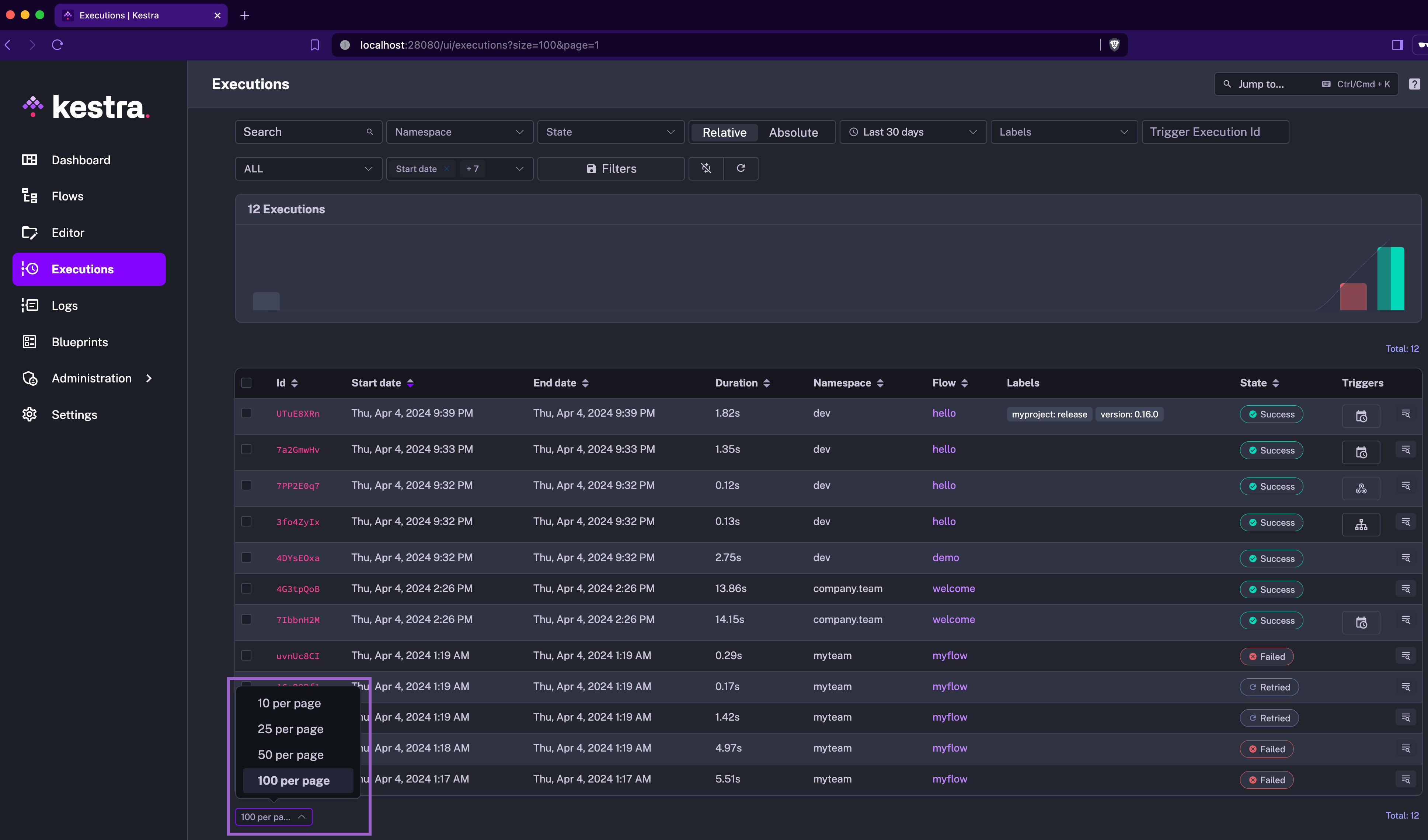
When you change the page size on any UI page containing a table, it will be saved and used as the default page size for all tables. This enhancement is useful when you have a large number of executions and want to see more or fewer executions per page.
Outputs (both files and variable outputs) generated in script tasks are now stored immediately, rather than only after a successful task completion. This change makes outputs accessible from the Outputs tab in the UI as soon as they are generated, providing maximum visibility into your workflow execution.
You will now also see the outputs of failed tasks (i.e. outputs generated up to the point of failure) in the Outputs tab, making troubleshooting easier.
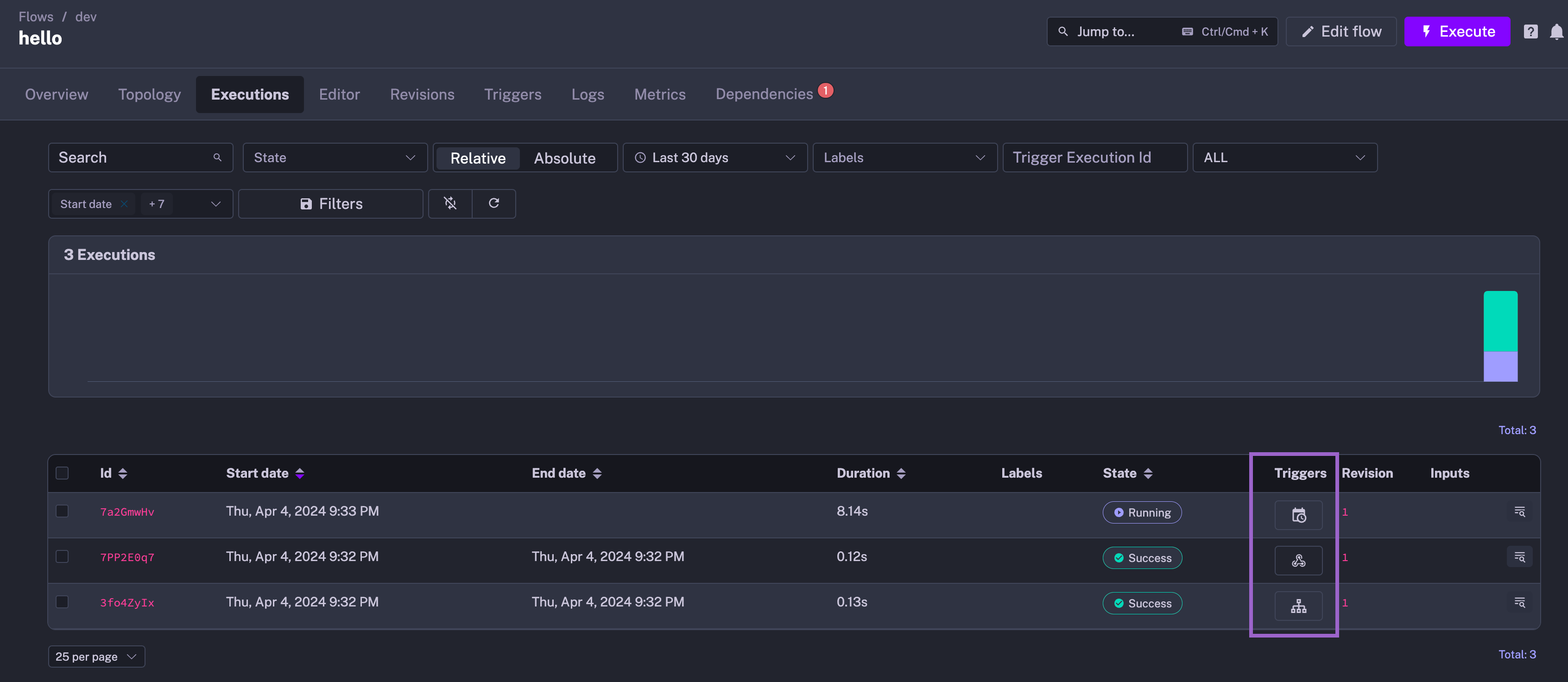
We’ve improved the trigger display in the UI. Instead of only showing the first letter, we now display a friendly icon for each trigger type.
Disabled triggers are now greyed out in the topology view even when they are disabled only via an API call without changing the source code to help you identify which triggers are currently active.
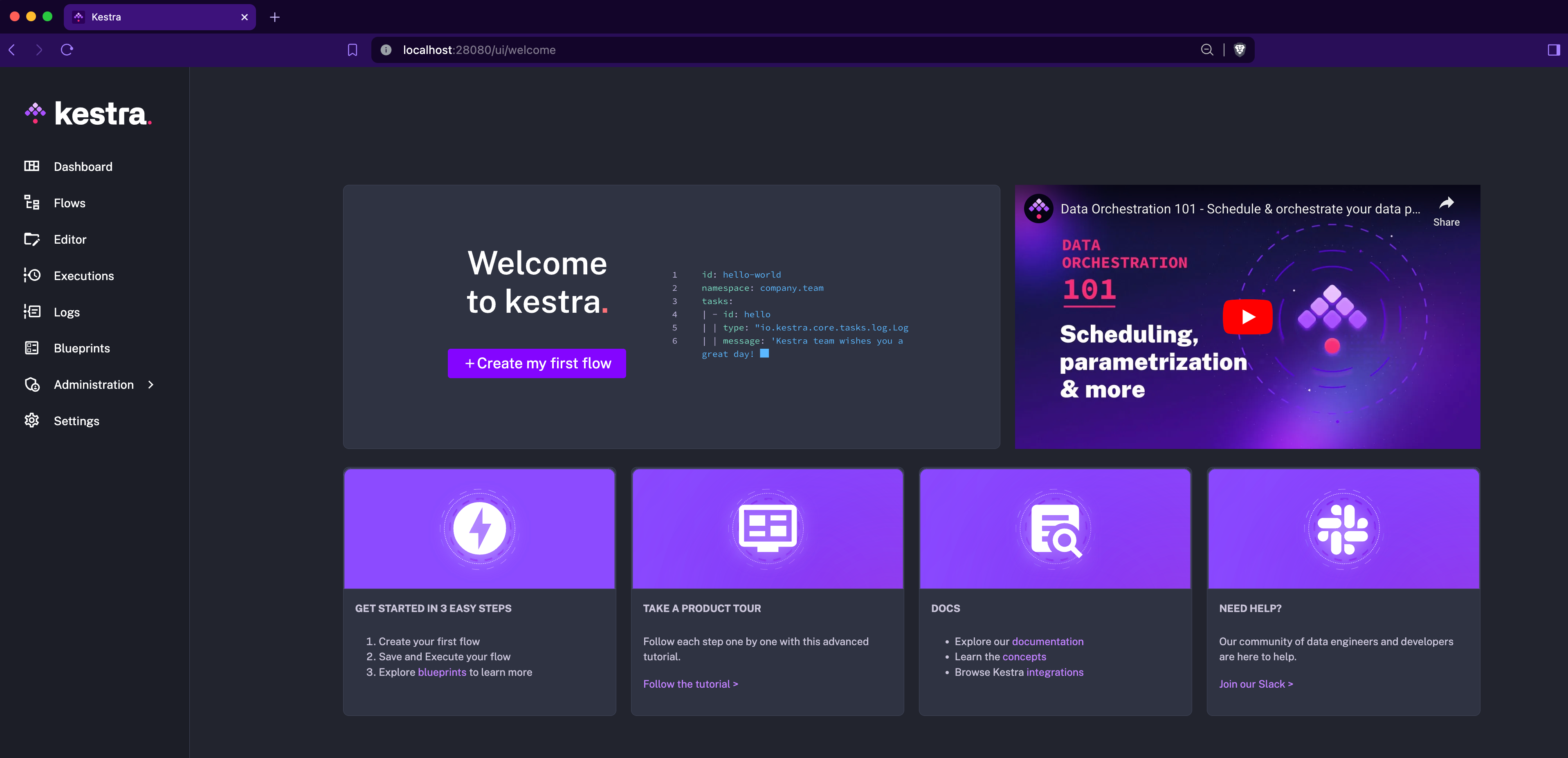
The new Welcome page provides a quick overview of the necessary steps to get started with Kestra. It includes links to the documentation, plugins, guided tour and to the Slack community.
We’ve added a new docker.Run task that allows you to execute Docker commands directly from your flows. While Kestra runs all script tasks in Docker containers by default, the new docker.Run task gives you more control over the commands you want to run. For example, this new task doesn’t include any interpreter, so you have the maximum flexibility to run any command from any Docker image you want.
Here’s an example:
id: dockernamespace: company.team
tasks: - id: docker_run type: io.kestra.plugin.docker.Run containerImage: docker/whalesay commands: - cowsay - helloBy default, the git.Push task pushes all commits as a root user. With the new author property, you can now create personal commits with your username and email.
We’ve added the option to authenticate with AWS services using IAM Roles. This addition is particularly useful when you don’t want to manage access keys e.g. on AWS EKS Kestra deployments.
When you set a custom dbt profile property, that profile set within your Kestra task configuration will now be used to run your dbt commands even if your dbt project has a profiles.yml file. This change is particularly useful for moving between environments without having to change your dbt project configuration in your Git repository.
We’ve added support for IBM AS400 and thus DB2 databases. You can now interact with IBM AS400 and DB2 databases using the db2.Query task and the db2.Trigger trigger.
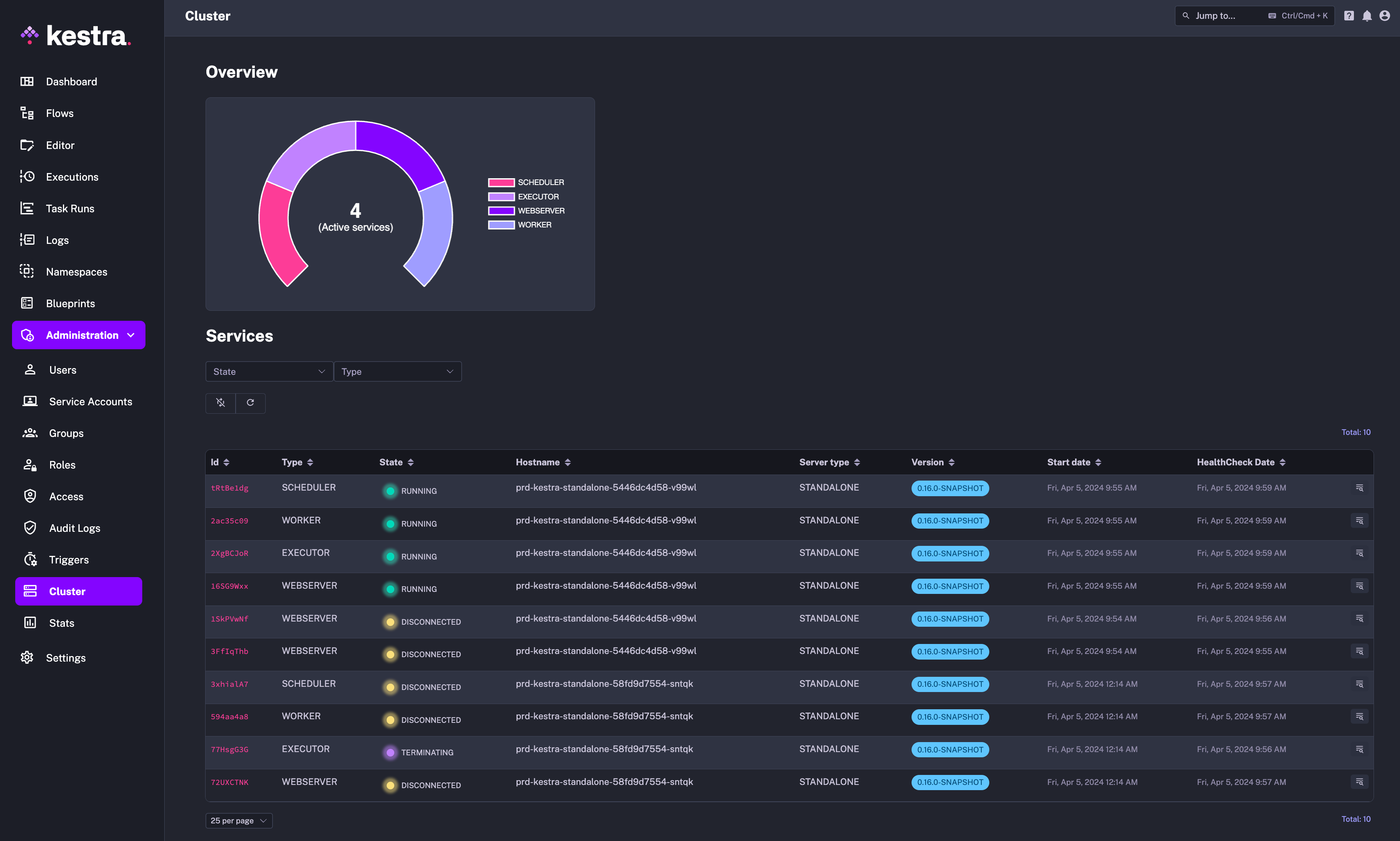
We’ve added a (georgeous!) new cluster monitoring dashboard to the Enterprise Edition. This dashboard provides an overview of your instance health, including the status, configuration and metrics of all worker, executor, scheduler and webserver components.
Using this dashboard, you can centrally monitor your instance health and quickly identify any issues that need attention without having to rely on any additional observability tools.
We’ve added new predefined roles to the Enterprise Edition, including Admin, Editor, Launcher, and Viewer. These roles help standardize user permissions and access control in your organization. Additionally, you can now assign a default role that will be automatically applied to new users unless a specific role is assigned.
Note that you will only see the new predefined roles in tenants created after upgrading to Kestra 0.16.0.
This post covered new features and enhancements added in Kestra 0.16.0. Which of them are your favorites? What should we add next? Your feedback is always appreciated.
If you have any questions, reach out via Slack or open a GitHub issue.
If you like the project, give us a GitHub star and join the community.

Stay up to date with the latest features and changes to Kestra