Authors

Faizan Qazi
Solution Engineer
Faizan Qazi
Solution Engineer
Designing custom silicon is a major engineering challenge. A single RTL bug that reaches manufacturing can cost millions and delay roadmaps by months.
Hardware teams use Electronic Design Automation (EDA) workflows to prevent this. Unlike typical CI/CD pipelines, these involve tens of thousands of simulations, expensive tool licenses (Synopsys, Cadence, Siemens), and compute-intensive synthesis for Power, Performance, and Area (PPA) estimates.
Standard CI tools struggle with demands for massive parallelism, complex artifact management, and long-running stateful processes.
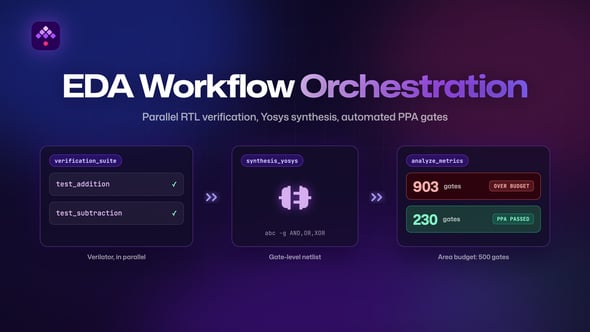
This post covers how Kestra modernizes silicon design by orchestrating a verification and synthesis pipeline for a CPU ALU using Verilator and Yosys: parallel RTL verification, gate-level synthesis, and an automated PPA quality gate that fails the pipeline when a design exceeds its area budget.
Take a hardware team designing a new RISC-V processor core. Every night, they need to ensure that the day’s changes didn’t break existing functionality or blow up the chip’s area budget.
We need a pipeline that performs three critical steps:
Here is how we built this implementation using Kestra.
We designed a Kestra flow that orchestrates Docker containers handling the heavy lifting. We use Kestra’s Namespace Files to manage our Verilog source code (rtl/) and simulation scripts (scripts/) directly within the platform, so the infrastructure is version-controlled alongside the orchestration logic.
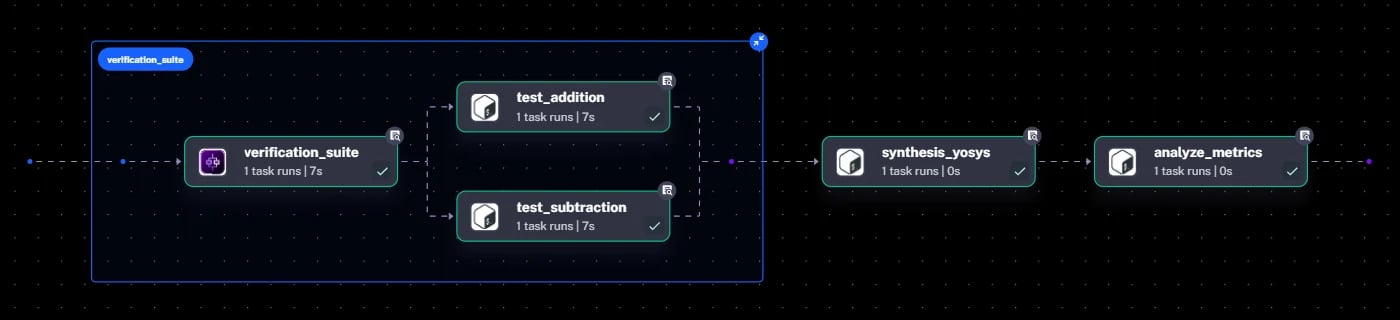
In hardware, you don’t run one test; you run thousands. Kestra’s Parallel task is built for this. It fans out verification jobs across multiple workers.
In our example, we spin up two separate containers running Verilator (a high-speed C++ simulator). One verifies addition logic, the other subtraction. In a production environment, this block would scale to hundreds of parallel tests across a Kubernetes cluster.
- id: verification_suite  type: io.kestra.plugin.core.flow.Parallel  concurrent: 2  tasks:    - id: test_addition      type: io.kestra.plugin.scripts.shell.Script      containerImage: verilator/verilator:latest      # ... commands to compile and run Verilator for ADD opcodes ...
- id: test_subtraction type: io.kestra.plugin.scripts.shell.Script containerImage: verilator/verilator:latest # ... commands to compile and run Verilator for SUB opcodes ...Once verification passes, we need to know the cost of our design. A task running Yosys synthesizes the Verilog, converting human-readable code into a netlist of logic gates (AND, OR, XOR).
We instruct Yosys to log the total gate count, then extract that number into a plain text file (gate_count.txt) which Kestra manages as an internal output artifact.
- id: synthesis_yosys type: io.kestra.plugin.scripts.shell.Script containerImage: hdlc/yosys:latest outputFiles: - gate_count.txt script: | ./scripts/synth_yosys.sh grep "Number of cells:" synth.log | awk '{print $NF}' > gate_count.txtThis is where orchestration proves its value. The final task downloads the artifact from the synthesis step and compares it against a predefined budget.
In our first run, we set a strict budget of 500 gates. Our 32-bit ALU design synthesized to 903 gates, and Kestra failed the execution.
2026-01-14 23:57:16.782 Total Gate Count: 9032026-01-14 23:57:16.782 ❌ Optimization Failed: Area (903) exceeds budget (500).This automatic gatekeeping is vital. It stops unoptimized hardware from progressing further down the chain to even more expensive steps like Place and Route.
Faced with a failed pipeline, the hardware engineer can now act on the data.
To fix the budget issue, we optimized the architecture by reducing the ALU data path from 32-bit down to 8-bit. We modified the Verilog parameter in Kestra’s Namespace Files:
// Before: module alu #(parameter WIDTH = 32) (module alu #(parameter WIDTH = 8) (We re-ran the exact same Kestra flow. Verification passed (our testbench was updated to handle 8-bit overflow), synthesis ran on the new 8-bit code, and the new gate count came in at 230. The pipeline turned green.
2026-01-15 00:15:22.105 Total Gate Count: 2302026-01-15 00:15:22.105 ✅ PPA Check Passed. Design is within budget.This example shows how Kestra addresses a few problems specific to EDA:
Treating hardware workflows as code brings the velocity of modern software development to the rigorous world of silicon design.
id: cpu_pipelinenamespace: company.teamdescription: "EDA Flow: Verilator Simulation and Yosys Synthesis"
tasks:  # ---------------------------------------------------------  # STAGE 1: Parallel Verification  # ---------------------------------------------------------  - id: verification_suite    type: io.kestra.plugin.core.flow.Parallel    concurrent: 2 # Run both ADD and SUB at the same time    tasks:      # Job 1: Verify ADD Operation      - id: test_addition        type: io.kestra.plugin.scripts.shell.Script        containerImage: verilator/verilator:latest        namespaceFiles:          enabled: true        warningOnStdErr: false        script: |          sed -i 's/\r$//' ./scripts/run_verilator.sh          chmod +x ./scripts/run_verilator.sh          # Pass '0' to test ADD opcodes          ./scripts/run_verilator.sh 0
      # Job 2: Verify SUB Operation      - id: test_subtraction        type: io.kestra.plugin.scripts.shell.Script        containerImage: verilator/verilator:latest        namespaceFiles:          enabled: true        warningOnStdErr: false        script: |          sed -i 's/\r$//' ./scripts/run_verilator.sh          chmod +x ./scripts/run_verilator.sh          # Pass '1' to test SUB opcodes          ./scripts/run_verilator.sh 1
  # ---------------------------------------------------------  # STAGE 2: Synthesis (Produces the Gate Count)  # ---------------------------------------------------------  - id: synthesis_yosys    type: io.kestra.plugin.scripts.shell.Script    containerImage: hdlc/yosys:latest    namespaceFiles:      enabled: true    warningOnStdErr: false    # We capture the gate count file as an output artifact    outputFiles:      - gate_count.txt    script: |      sed -i 's/\r$//' ./scripts/synth_yosys.sh      chmod +x ./scripts/synth_yosys.sh      ./scripts/synth_yosys.sh
      # Extract the number to a plain text file so Kestra can      # pass it to the next task.      grep "Number of cells:" synth.log | awk '{print $NF}' > gate_count.txt      cat gate_count.txt
  # ---------------------------------------------------------  # STAGE 3: Metric Analysis (Reads the Gate Count)  # ---------------------------------------------------------  - id: analyze_metrics    type: io.kestra.plugin.scripts.shell.Script    containerImage: ubuntu:latest    # We input the file from the previous task    inputFiles:      gate_count.txt: "{{ outputs.synthesis_yosys.outputFiles['gate_count.txt'] }}"    script: |      GATE_COUNT=$(cat gate_count.txt)
      echo "Total Gate Count: $GATE_COUNT"
if [ "$GATE_COUNT" -gt 500 ]; then echo "❌ Optimization Failed: Area ($GATE_COUNT) exceeds budget (500)." exit 1 else echo "✅ PPA Check Passed." firtl/alu.vmodule alu #(parameter WIDTH = 8) ( input clk, input rst, input [WIDTH-1:0] a_in, input [WIDTH-1:0] b_in, input [2:0] op_in, output reg [WIDTH-1:0] result_out, output reg zero_flag);
always @(posedge clk or posedge rst) begin if (rst) begin result_out <= 0; zero_flag <= 0; end else begin case (op_in) 3'b000: result_out <= a_in + b_in; // ADD 3'b001: result_out <= a_in - b_in; // SUB 3'b010: result_out <= a_in & b_in; // AND 3'b011: result_out <= a_in | b_in; // OR 3'b100: result_out <= a_in ^ b_in; // XOR default: result_out <= 0; endcase zero_flag <= (result_out == 0); end endendmodulescripts/run_verilator.sh#!/bin/bash
set -e
# Arguments: $1 = Opcode to test (0=Add, 1=Sub, etc)TEST_OP=$1
echo "--- Building Verilator Model ---"verilator -Wall --cc --exe --build -j 4 \ -I./rtl \ sim/alu_tb.cpp rtl/alu.v \ -o alu_sim
echo "--- Running Simulation Binary ---"./obj_dir/alu_sim $TEST_OPscripts/synth_yosys.sh#!/bin/bashecho "--- Running Synthesis ---"
# Create a Yosys script on the flycat <<EOT > synthesis.ysread_verilog rtl/alu.vhierarchy -check -top aluproc; opt; fsm; opt; memory; opttechmap; optabc -g AND,OR,XORstatEOT
yosys synthesis.ys | tee synth.log
# Extract the generic gate countCOUNT=$(grep "Number of cells:" synth.log | awk '{print $NF}')echo "::metrics::gate_count::$COUNT"sim/alu_tb.cpp#include "Valu.h"#include "verilated.h"#include <cstdlib>#include <iostream>
vluint64_t main_time = 0;
int main(int argc, char** argv) { Verilated::commandArgs(argc, argv); Valu* top = new Valu;
// Parse test mode from args (0=ADD, 1=SUB) int test_op = 0; if (argc > 1) test_op = atoi(argv[1]);
std::cout << "Starting Simulation for OpCode: " << test_op << std::endl;
// Reset sequence top->clk = 0; top->rst = 1; top->eval(); top->clk = 1; top->rst = 1; top->eval(); top->clk = 0; top->rst = 0; top->eval();
// Run 100 random vectors for (int i = 0; i < 100; i++) { top->clk = !top->clk; if (top->clk) { top->a_in = rand() & 0xFF; top->b_in = rand() & 0xFF; top->op_in = test_op; } top->eval();
// Check results on positive edge if (top->clk) { int expected = 0; if (test_op == 0) expected = (top->a_in + top->b_in) & 0xFF; if (test_op == 1) expected = (top->a_in - top->b_in) & 0xFF;
// Mask to the 8-bit data path before comparing if ((top->result_out != expected) && i > 2) { std::cout << "ERROR: mismatch! A=" << top->a_in << " B=" << top->b_in << " Got=" << top->result_out << " Exp=" << expected << std::endl; return 1; // Return Fail Code } } }
std::cout << "SUCCESS: 100 Vectors Passed." << std::endl; delete top; return 0;}Yes. Kestra orchestrates Electronic Design Automation (EDA) pipelines by running tools like Verilator and Yosys inside Docker containers, fanning out simulations in parallel, passing artifacts such as netlists and gate counts between tasks, and enforcing automated quality gates on PPA metrics. Flows are defined in YAML and version-controlled alongside RTL source code.
Use Kestra’s Parallel task to fan out multiple Verilator jobs simultaneously, each in its own container running a different test scenario or opcode. Each simulation runs as an independent shell script task, and the same pattern scales from a handful of tests locally to hundreds of parallel regressions on a Kubernetes cluster.
Kestra handles hardware verification workloads that strain general-purpose CI tools: massive fan-out parallelism, long-running stateful synthesis jobs, artifact passing between heterogeneous tools, and routing heavy jobs to specialized on-prem machines via Worker Groups, while lightweight tasks run on cloud VMs. Standard CI tools were designed around short software build-test cycles rather than nightly regressions with thousands of simulations.
Run synthesis with Yosys, extract the gate count from the synthesis log into an output artifact, then have a downstream task compare it against a predefined area budget. If the design exceeds the budget, the task exits with an error and Kestra fails the execution automatically, blocking unoptimized RTL from reaching expensive downstream stages like Place and Route.
Yes. Kestra is tool-agnostic: any EDA tool with a command-line interface can run inside a Kestra task, whether open-source (Verilator, Yosys) or commercial (Synopsys, Cadence, Siemens). Retry and queuing mechanisms also help manage contention on floating licenses shared across a team.
Ready to bring modern orchestration to your hardware workflows? Get started with Kestra or explore more use cases, and if you find Kestra useful, give us a star on GitHub.

Stay up to date with the latest features and changes to Kestra