Authors

Emmanuel Darras
CEO & Co-Founder
Emmanuel Darras
CEO & Co-Founder
If you’ve ever tried to understand which workflow updated a table in production, why a downstream job suddenly broke, or what depends on a critical dataset, you’ve seen the limits of orchestration without context. Workflows run, but the knowledge of what they touch and produce is scattered across logs, code, and people’s heads.
Kestra Assets solves this by making governance a byproduct of execution.
This approach is technology-agnostic by design. Whether a workflow runs a SQL query, a Python script, a dbt transformation, an API call, a CLI command, or provisions infrastructure, you can attach asset declarations to any task. Unlike language- or code-centric solutions (such as Python decorators), Kestra Assets are declarative and universal. No matter the tool or language used under the hood, inputs and outputs can be captured as named assets. In short: if your workflow touches it, you can track it.
The result is a catalog you can trust and lineage that reflects reality without manual documentation or guesswork. Data and infrastructure artifacts become discoverable, traceable, and reusable, enabling safer pipelines and better collaboration across data, platform, and engineering teams.
In this post, we’ll explore what Kestra Assets are, how they work (in a language-agnostic way that goes beyond just Python code), and why they matter for building modern, governed platforms.
(Spoiler: Assets unify the best of orchestration and data cataloging. You get automatic data lineage graphs, clear ownership of resources, impact analysis on changes, and much more, all without any manual documentation.)
At its core, a Kestra Asset represents a resource that your workflow interacts with. This could be a table in a database, a file in cloud storage, a VM instance, a dataset, or any resource type you define. Each Asset has:
Table, File, VM, or a custom string for your own category)owner, system, environment, model_layer, etc.)How are assets defined? You declare them directly in your workflow’s tasks. Kestra extends the YAML syntax to allow each task to list which assets it consumes and which assets it produces. We use an assets: block with two sections:
inputs – Assets that the task reads or depends on (but does not modify).outputs – Assets that the task creates or writes to.For example, if a task creates a new database table, you’d list that table as an output asset. If another task reads from an existing table, you’d list that table as an input asset. Kestra then automatically registers those assets in a global inventory and links them to the task (and flow) that used them.
In an analytics platform, data rarely lives in a single place or a single workflow. Raw datasets are ingested, transformed, aggregated, and reused across teams. Without governance, understanding how analytics tables are built, and what depends on them, quickly becomes difficult.
With Kestra Assets, analytics datasets are modeled explicitly as part of the orchestration layer.
A typical pattern looks like this:
id: data-pipeline-assetsnamespace: kestra.company
tasks:  - id: create_staging_layer_asset    type: io.kestra.plugin.jdbc.duckdb.Query    sql: |      CREATE TABLE IF NOT EXISTS trips AS      select VendorID, passenger_count, trip_distance from sample_data.nyc.taxi limit 10;    assets:      inputs:        - id: sample_data.nyc.taxi      outputs:        - id: trips          namespace: "{{flow.namespace}}"          type: io.kestra.plugin.ee.assets.Table          metadata:            model_layer: staging
  - id: for_each    type: io.kestra.plugin.core.flow.ForEach    values:      - passenger_count      - trip_distance    tasks:      - id: create_mart_layer_asset        type: io.kestra.plugin.jdbc.duckdb.Query        sql: SELECT AVG({{taskrun.value}}) AS avg_{{taskrun.value}} FROM trips;        assets:          inputs:            - id: trips          outputs:            - id: avg_{{taskrun.value}}              type: io.kestra.plugin.ee.assets.Table              namespace: "{{flow.namespace}}"              metadata:                model_layer: mart
pluginDefaults: - type: io.kestra.plugin.jdbc.duckdb values: url: "jdbc:duckdb:md:my_db?motherduck_token={{ secret('MOTHERDUCK_TOKEN') }}" fetchType: STORETable asset, enriched with metadata such as model_layer: staging.Table assets with model_layer: mart.Because assets are declared directly in workflow tasks, Kestra automatically builds a complete lineage graph from source to staging to marts. This lineage is always up to date, because it is generated from execution, not documentation.
The impact is immediate:
This approach works regardless of the underlying engine or language. Whether transformations are written in SQL, dbt, Python, or executed via CLI, the asset model remains consistent.
Infrastructure workflows often create and manage long-lived resources such as buckets, VMs, or databases. Traditionally, these resources are provisioned by automation but remain invisible once created, making ownership, reuse, and governance difficult.
Kestra Assets bring the same level of visibility and lineage to infrastructure automation.
For example:
id: infra_assetsnamespace: kestra.company
inputs:  - id: teams    type: MULTISELECT    values:      - Business      - Data      - Finance      - Product
tasks:  - id: for_each    type: io.kestra.plugin.core.flow.ForEach    values: "{{ inputs.teams }}"    tasks:      - id: create_bucket        type: io.kestra.plugin.aws.cli.AwsCLI        commands:          - aws s3 mb s3://kestra-{{ taskrun.value | slugify }}-bucket        assets:          outputs:            - id: kestra-{{ taskrun.value | slugify }}-bucket              type: AWS_BUCKET              metadata:                provider: s3                address: s3://kestra-{{ taskrun.value | slugify }}-bucket
pluginDefaults: - type: io.kestra.plugin.aws values: accessKeyId: "{{ secret('AWS_ACCESS_KEY') }}" secretKeyId: "{{ secret('AWS_SECRET_ACCESS_KEY') }}" region: "{{ secret('AWS_REGION') }}" allowFailure: trueAWS_BUCKET), with metadata describing ownership, provider, and environment.This creates a clear contract between teams:
With this model:
Just like data assets, infrastructure assets are technology-agnostic. Whether a resource is created via a cloud API, a CLI command, or a custom script, it can be tracked the same way.
Kestra Assets elevates workflows from simply running tasks to managing shared knowledge about data and infrastructure.
As workflows execute, Kestra automatically captures what they read and produce, building a live catalog with lineage and dependencies. You can instantly see how datasets, files, and resources are connected, what depends on what, and what will be impacted by a change.
Every asset keeps a full execution history, making ownership and accountability clear without digging through logs. Assets are searchable and reusable across teams, while metadata enforces best practices like modeling layers, ownership, and environments.
The result is governance built directly into orchestration.
Check the video below for a quick overview of the feature.
Kestra’s UI and features make it easy to leverage the Assets system:
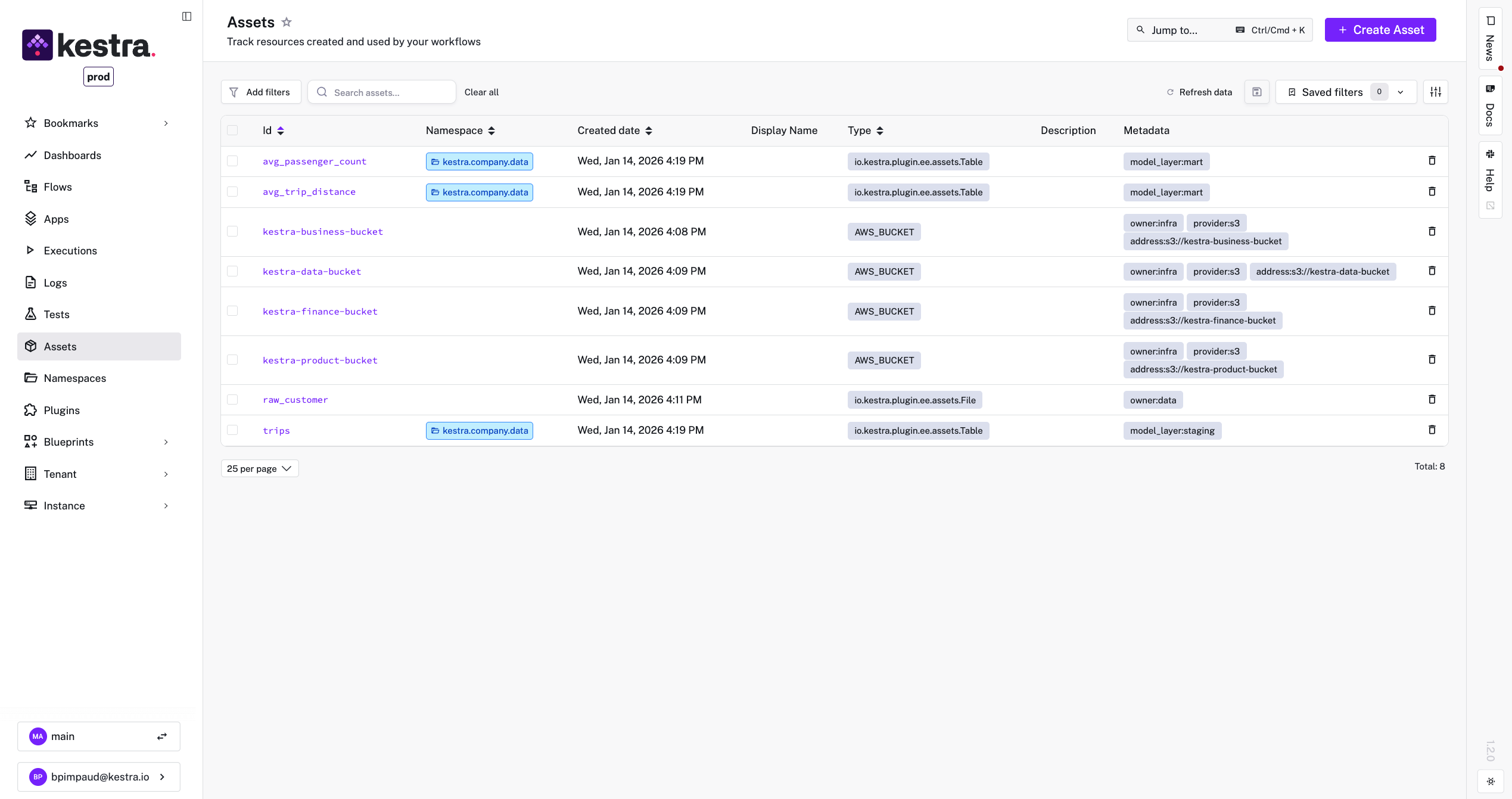
Asset Catalog: A new Assets section in the Kestra UI lists all assets across your tenant (with RBAC enforcement). You can search by ID or filter by type, namespace, or metadata tags.
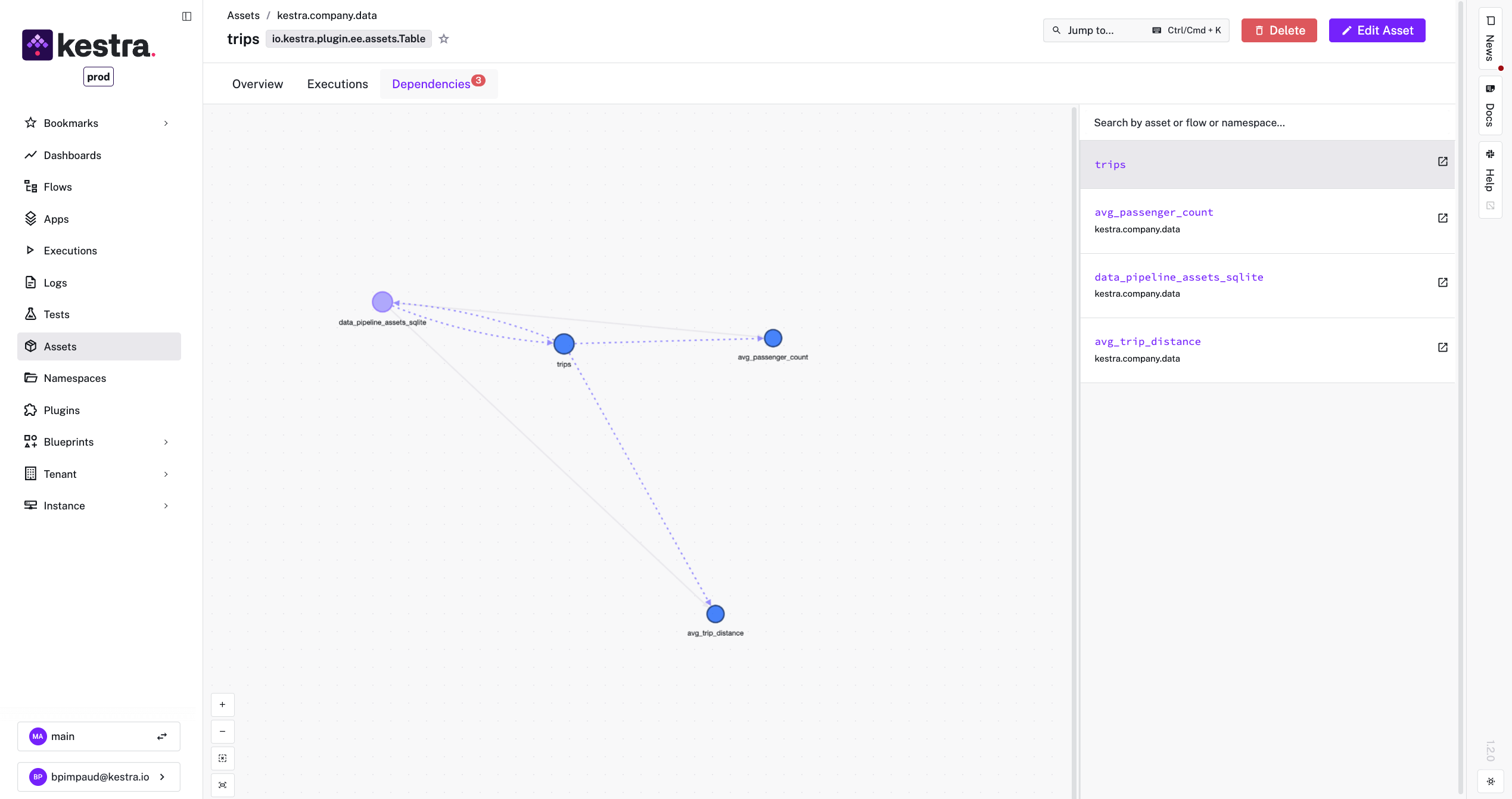
Dependency Graph Visualization: On any asset’s detail page, Kestra displays an interactive lineage graph showing that asset’s upstream and downstream links. This graph updates automatically as flows run. It’s invaluable for quickly understanding the context of an asset. This visual map helps both developers and stakeholders grasp data flows without reading code.
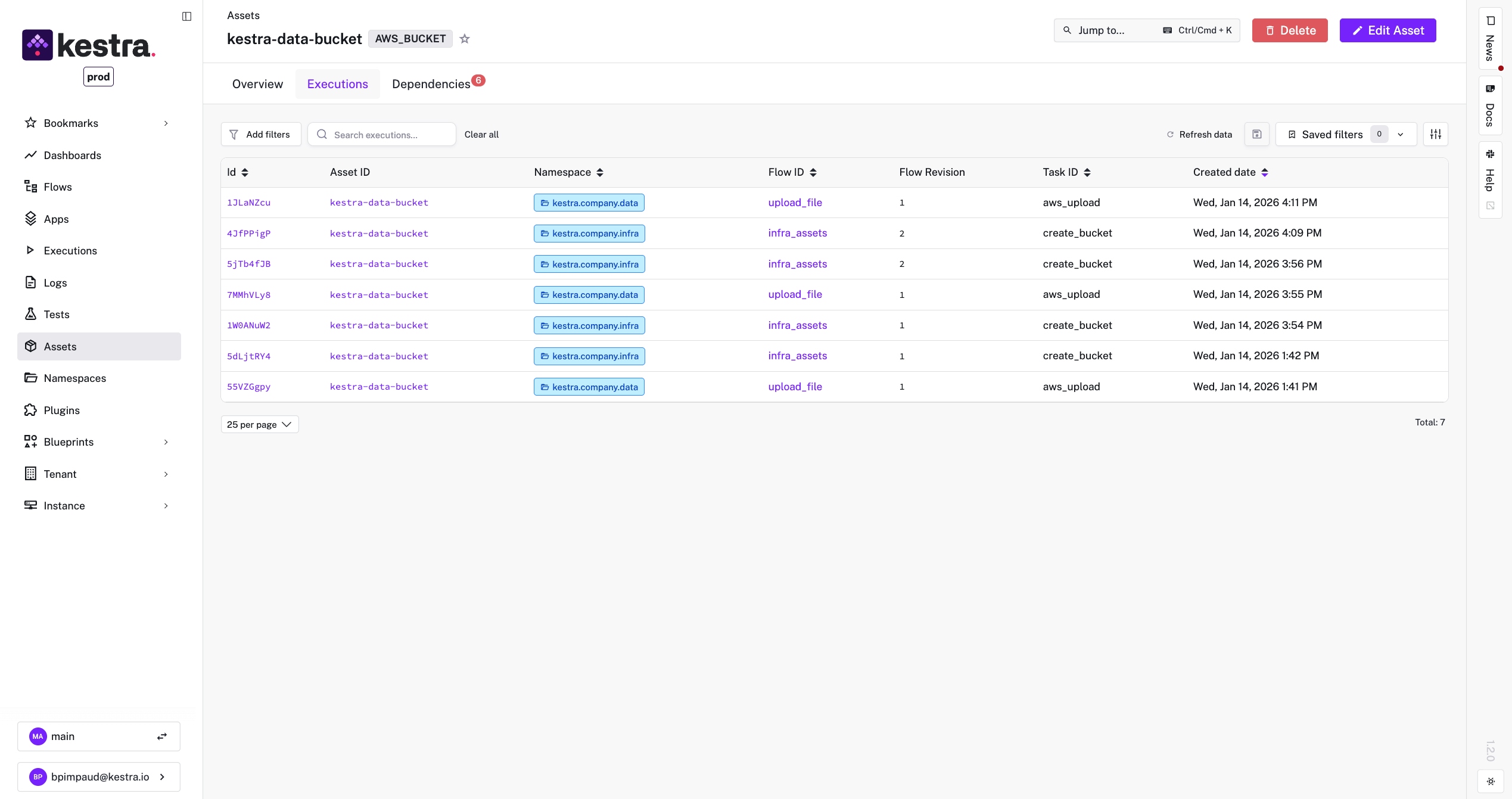
Execution History & Details: Each asset page also lists attributes (ID, type, full namespace, timestamps) and a log of which flow executions touched it. You can click through to the exact flow run for more details. This effectively provides an audit log per asset. If something looks off in a dataset, you can see if maybe an unusual flow run that affected it. For external assets that Kestra references (like an imported dataset), you’ll at least see which Kestra flows have been reading it recently.
Dynamic Asset Queries:
Kestra provides a built-in function assets() for your workflow scripts, so you can query the asset inventory dynamically. For instance, you can populate a dropdown input with all asset IDs of a certain type. This makes your workflows extremely flexible and self-driving based on the current catalog.
id: list_aws_bucketnamespace: kestra.companyinputs: - id: assets type: MULTISELECT expression: "{{ assets(type='AWS_BUCKET') | jq('.[].id') }}"tasks: - id: for_each type: io.kestra.plugin.core.flow.ForEach values: '{{inputs.assets}}' tasks: - id: list_buckets type: io.kestra.plugin.core.log.Log message: "{{ taskrun.value }}"Metadata and Tagging:
Because assets support custom metadata, you can enforce conventions. For example, tag assets with environment: prod vs dev, or owner: team_name, or any classification your organization needs. These tags make search and filtering powerful. More importantly, they provide context to each asset, anyone looking at it knows what it represents. In future releases, we plan to allow programmatic updates to asset metadata via dedicated tasks, which will further integrate assets into automated governance workflows (e.g., auto-tag new tables with a retention policy or sensitivity level).
Kestra’s vision is to make this even more global. We’re working on plugin enhancements to enable certain plugins to automatically emit asset information. For example, a database connector plugin might automatically register a Table asset when a query creates a table, without you specifying it. We’re also exploring triggers and alerts based on assets (imagine a trigger that fires when a particular asset hasn’t been updated in X days, indicating stale data). The Asset system is designed to be a game changer for data quality, monitoring, and even external catalog integrations (indeed, we have an AssetShipper that can export asset metadata to formats like OpenLineage or other catalogs).
Think about the last time someone asked you: “Which pipeline updates this table?” or “What broke when we changed that upstream dataset?” How long did it take you to answer? Minutes? Hours? Days?
With Kestra Assets, the answer is instant.
This isn’t just another feature — it’s a fundamental shift in how we think about orchestration. We’re moving from pipelines that simply execute tasks to platforms that understand and govern your entire data ecosystem. Every table, every file, every resource becomes visible, traceable, and accountable.
The impact is immediate:
No more tribal knowledge. No more archaeological digs through logs and code. No more wondering if you’re using the right version of that critical dataset. Just clear, automatic, always-up-to-date governance baked directly into your orchestration layer.
Kestra Assets don’t just solve today’s problems — they prevent tomorrow’s chaos. This is orchestration evolved. This is governance without the overhead. This is what happens when you stop treating data and infrastructure as invisible byproducts and start managing them as the strategic assets they truly are.
Hello, Assets. Welcome to the future of orchestration.
Ready to Transform Your Orchestration?
Assets is available now in Kestra Enterprise Edition. If you’re serious about bringing transparency, governance, and control to your data platform, we should talk. Schedule a personalized demo to see Assets in action with your own use cases and to discuss implementing this in your Kestra platform.
The question isn’t whether you need governance in your orchestration — it’s whether you can afford to keep operating without it.
→ Schedule a Demo
→ Explore Enterprise Edition
→ Read the Documentation

Stay up to date with the latest features and changes to Kestra