Authors

Anna Geller
Product Lead
Anna Geller
Product Lead
The table below highlights the key features of this release.
| Feature | Description | Edition |
|---|---|---|
| AI Copilot | Generate and iteratively edit declarative flow code with AI-assisted suggestions. | All Editions |
| AI Agents | Add autonomous AI-driven tasks to flows that can think, remember, and dynamically orchestrate tools and tasks. | All Editions |
| AI-Powered Search on the website | Search Kestra’s documentation via natural language, powered by RAG and LLMs. | All Editions |
| Official Kestra MCP Server | Connect Kestra to AI IDEs and agent frameworks via the Model Context Protocol. | All Editions |
| Dynamic Defaults for Flow Inputs | Set default input values dynamically using Pebble expressions, based on other inputs or conditions. | All Editions |
| New Dependency view | Redesigned Flow and Namespace Dependency view that scales to hundreds of nodes with improved navigation. | All Editions |
| Playground (GA) | Iteratively build workflows by running tasks one at a time without re-executing the entire flow. | All Editions |
| Flow-level SLA (GA) | Define SLA rules per workflow to enforce max duration or execution assertions, with automatic actions on breaches. | All Editions |
| New Helm Charts | Deploy Kestra with a production-ready Helm Chart with improved values, and cleaned-up dependencies. | All Editions |
| New Git Sync integration | Sync all Flows, Namespace Files, Apps, Unit Tests and Custom Dashboards with your Git repository using a single task. | All Editions |
| Plugin Versioning (GA) | Run multiple versions of the same plugin in parallel, pin versions per workflow, and upgrade safely. | Enterprise Edition |
| Unit Tests (GA) | Add tests for your flows with improved UI, built-in documentation and dedicated tasks to run Unit Tests from your flows. | Enterprise Edition |
| Multi-Panel Editor for Apps & Tests | Multi-Panel editor for Unit Tests and Apps (now available also in the No-Code mode!). | Enterprise Edition |
| Multiple SemVer tags | Use v0.24 or v1.0 to always pull the latest patch (e.g., 0.24.4 or 1.0.0) without pinning the exact patch version. | Enterprise Edition |
Check the video below for a quick overview of all enhancements:
We’re excited to announce the AI Copilot in Kestra 1.0, designed to help you build and modify flows directly from natural language prompts. Simply describe what you want to accomplish and Copilot will generate the YAML flow code for you. Once your initial flow is created, you can iteratively refine it with Copilot’s help, adding new tasks or adjusting triggers without touching unrelated parts of the flow. The AI Copilot gives you the speed and convenience of AI while keeping everything as code in Kestra’s declarative syntax.
How to get started? Click on the AI Copilot button in the top right corner of the Flow Editor, and you can start typing your prompt, e.g. "Make a REST API call to https://kestra.io/api/mock and allow failure". The AI Copilot will generate the YAML code for you, which you can then accept, reject, or modify as needed.
Check the video below for a demo of how to use AI Copilot:
To simplify orchestration, Kestra 1.0 introduces AI Agents, a new way to bring autonomy and adaptability to your workflows. With AI Agents, workflows are no longer limited to a predefined sequence of tasks. An AI Agent task launches an autonomous process with the help of an LLM, memory, and tools such as web search, task execution, and flow calling, and can dynamically decide which actions to take and in what order. Unlike traditional flows, an AI Agent can loop tasks until a condition is met, adapt to new information, and orchestrate complex multi-step objectives on its own. This enables agentic orchestration patterns in Kestra, where agents can operate independently or collaborate in multi-agent systems, all while remaining fully observable and manageable in code.
To start using this feature, you can add an AI Agent task to your flow. The AI Agent will then use the tools you provide to achieve its goal, leveraging capabilities such as web search, task execution, and flow calling. Thanks to memory, your AI Agent can remember information across executions to provide context for subsequent prompts.
The video below shows how to use AI Agents in Kestra:
At Kestra, we see AI Copilot and AI Agents as a natural evolution of automation and orchestration:
The new AI features preserve the benefits of declarative, code-based orchestration in Kestra, while eliminating the need to write code for each individual action.
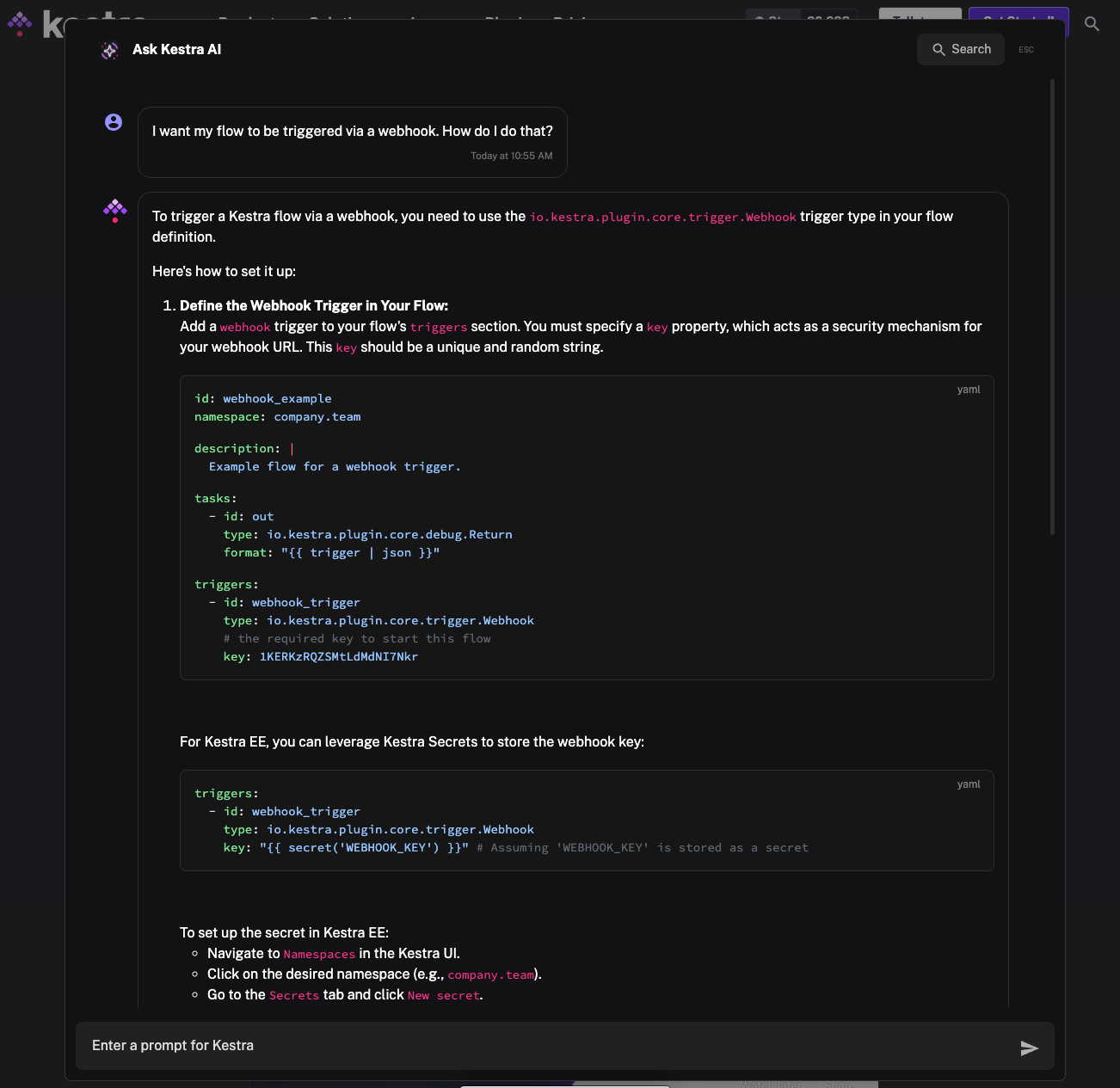
With Kestra 1.0, we’ve also added AI-powered search on the Kestra website, bringing more relevant and contextual answers right where you need them. Built on top of the same AI plugin used by AI Agents, this feature leverages Retrieval-Augmented Generation (RAG) to ground responses in the official Kestra documentation. You can ask questions in natural language, such as “How do I configure a flow schedule?”, and the search will return a summary based on the most relevant docs so you don’t have to manually scan through multiple pages.
As part of the same release, we’re excited to introduce the Kestra MCP Server, making it possible to connect Kestra directly to AI-powered IDEs and agent frameworks that support the Model Context Protocol (MCP). This allows various AI agents to interact with your Kestra environment through a rich set of tools, such as listing flows, running executions, or managing namespace files.
The MCP Server can be run locally or in Docker, and works with both OSS and Enterprise editions. This integration opens the door for tighter collaboration between AI assistants and Kestra, enabling natural language control of your workflows and orchestration platform.
id: kestra_mcp_servernamespace: company.ai
inputs:  - id: prompt    type: STRING    defaults: List namespaces
tasks: - id: agent type: io.kestra.plugin.ai.agent.AIAgent systemMessage: You are an autonomous operator. Complete the task end-to-end without asking the user any questions. prompt: "{{ inputs.prompt }}" provider: type: io.kestra.plugin.ai.provider.OpenAI modelName: gpt-5-mini apiKey: "{{ secret('OPENAI_API_KEY') }}" tools: - type: io.kestra.plugin.ai.tool.DockerMcpClient image: ghcr.io/kestra-io/mcp-server-python:latest env: KESTRA_BASE_URL: http://host.docker.internal:8080/api/v1 KESTRA_TENANT_ID: main KESTRA_MCP_DISABLED_TOOLS: ee KESTRA_USERNAME: admin@kestra.io KESTRA_PASSWORD: "{{ secret('KESTRA_PASSWORD') }}"Starting with Kestra 1.0, you can now dynamically define default values for flow inputs using Pebble expressions. Instead of a static assignment, your input defaults can be dynamically computed based on other input values or conditional logic. For example, you could set a default value for backup_enabled to true only when release_env is PROD, and false otherwise:
id: infrastructure_workflownamespace: company.team
inputs:  - id: release_env    displayName: Release Environment    type: SELECT    autoSelectFirst: true    values:      - DEV      - TEST      - QA      - PROD
  - id: backup_enabled    type: BOOL    defaults: "{{ inputs.release_env == 'PROD' ? true : false }}"    dependsOn:      inputs:        - release_env
tasks: - id: log type: io.kestra.plugin.core.log.Log message: dynamic default {{ inputs.backup_enabled }}Note also the new autoSelectFirst property, which automatically pre-selects the first option for SELECT and MULTISELECT inputs.
Kestra 1.0 ships with a new and improved Flow and Namespace Dependency view, which is built to scale, allowing you to explore even the most complex flows with hundreds of upstream and downstream nodes without performance issues. The redesigned interface combines a clear directional graph with an integrated table view, making it easier to understand data flow, trace dependencies, and navigate directly to related nodes. This view provides complete visibility into all relationships across your flows, from a small number of interdependent workflows to complex dependency chains.
We’re excited to announce that Playground is now generally available and enabled by default starting in Kestra 1.0. Playground lets you build workflows iteratively, one task at a time, without having to rerun the entire flow. While the setting to disable Playground still exists, we recommend keeping it enabled to take full advantage of this interactive workflow creation experience.
With Playground, you can execute individual tasks in sequence, reusing outputs from earlier steps without re-executing them. This is especially helpful when working with data processing flows: start with an extraction task, inspect its output, then add transformation tasks and run them independently, just like working in a Jupyter notebook. Kestra tracks up to 10 recent Playground runs for quick review, and these runs remain separate from production executions to keep your execution history clean.
In summary, Playground gives you a safe, iterative space to prototype new workflows before running them in production.
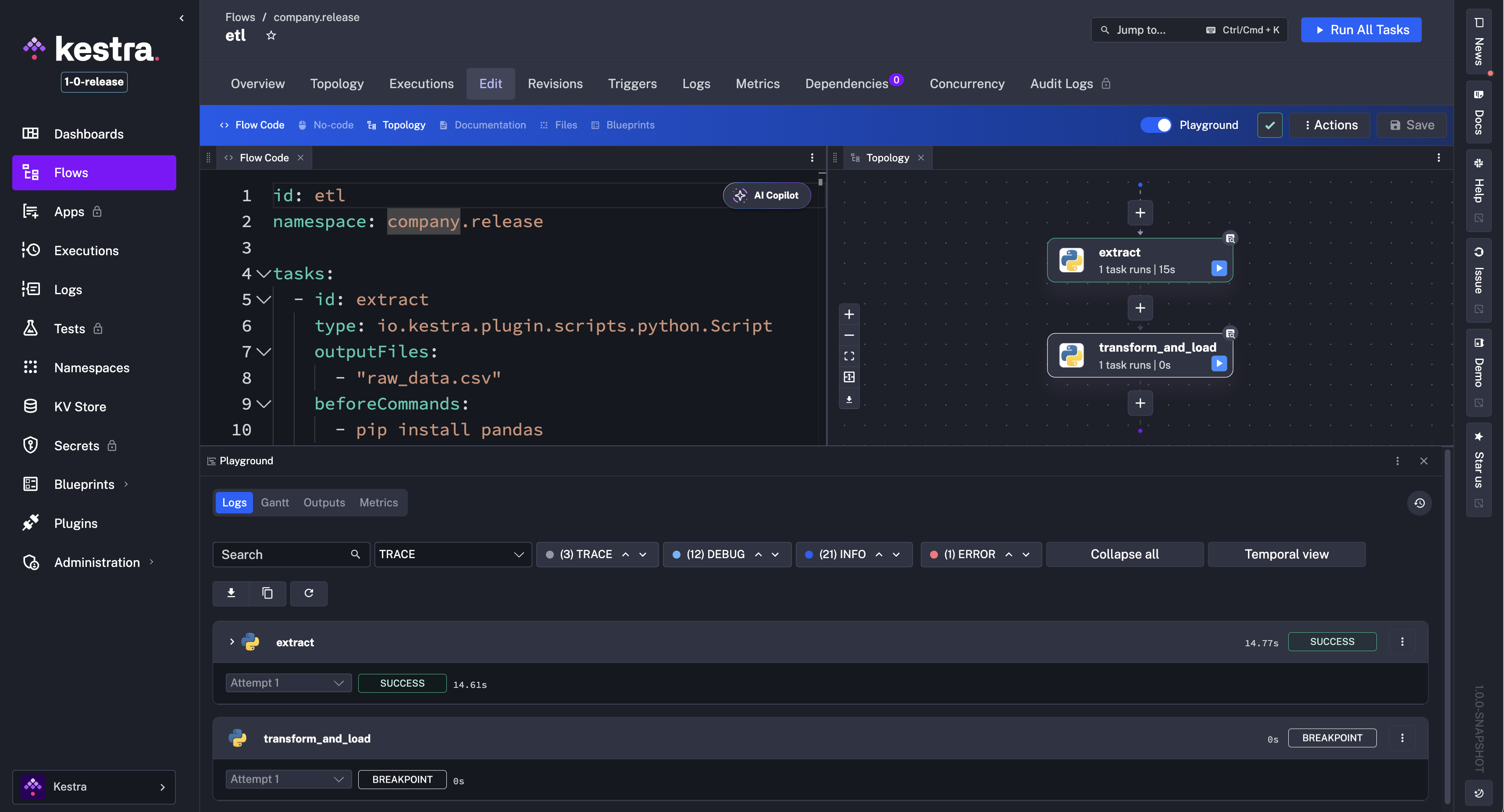
The video below shows how to use Playground to build a flow step by step:
After months of development, Kestra 1.0 delivers Plugin Versioning in General Availability to all Enterprise Edition customers, with significant enhancements since the initial release. This feature lets you run multiple versions of the same plugin side by side, pin tasks to specific plugin versions, and adopt new plugin versions at your own pace while keeping production flows stable.
Since its Beta release, we’ve extended Plugin Versioning to work with plugin defaults, internal storage, and secret managers. The flow editor now includes auto-completion for the version property, making it easier to specify versions directly in YAML. We’ve also improved the Plugins API so you can fetch only plugins compatible with your current Kestra version thanks to a new X-Kestra-Minimal-Core-Version attribute in plugin manifests. Finally, all actions on versioned plugins, such as installing or uninstalling, are now recorded in Audit Logs for full traceability.
Any new or updated plugin version is instantly synchronized across your environment without downtime, ensuring you can upgrade safely and keep full control over your plugin ecosystem.
To further improve the reliability of your flows, Kestra 1.0 brings Unit Tests out of Beta for Enterprise Edition and Kestra Cloud customers, with significant UI enhancements. Unit Tests let you validate your flows in isolation, using fixtures to mock inputs, files, and task outputs, and assertions to check expected behavior without impacting production data or cluttering your main execution history.
Since the initial release, we’ve redesigned the Unit Tests UI to show the test definition, flow code, and documentation side by side, making it easier to write and maintain tests. New UI tabs allow you to track all Test Runs and related Audit Logs.
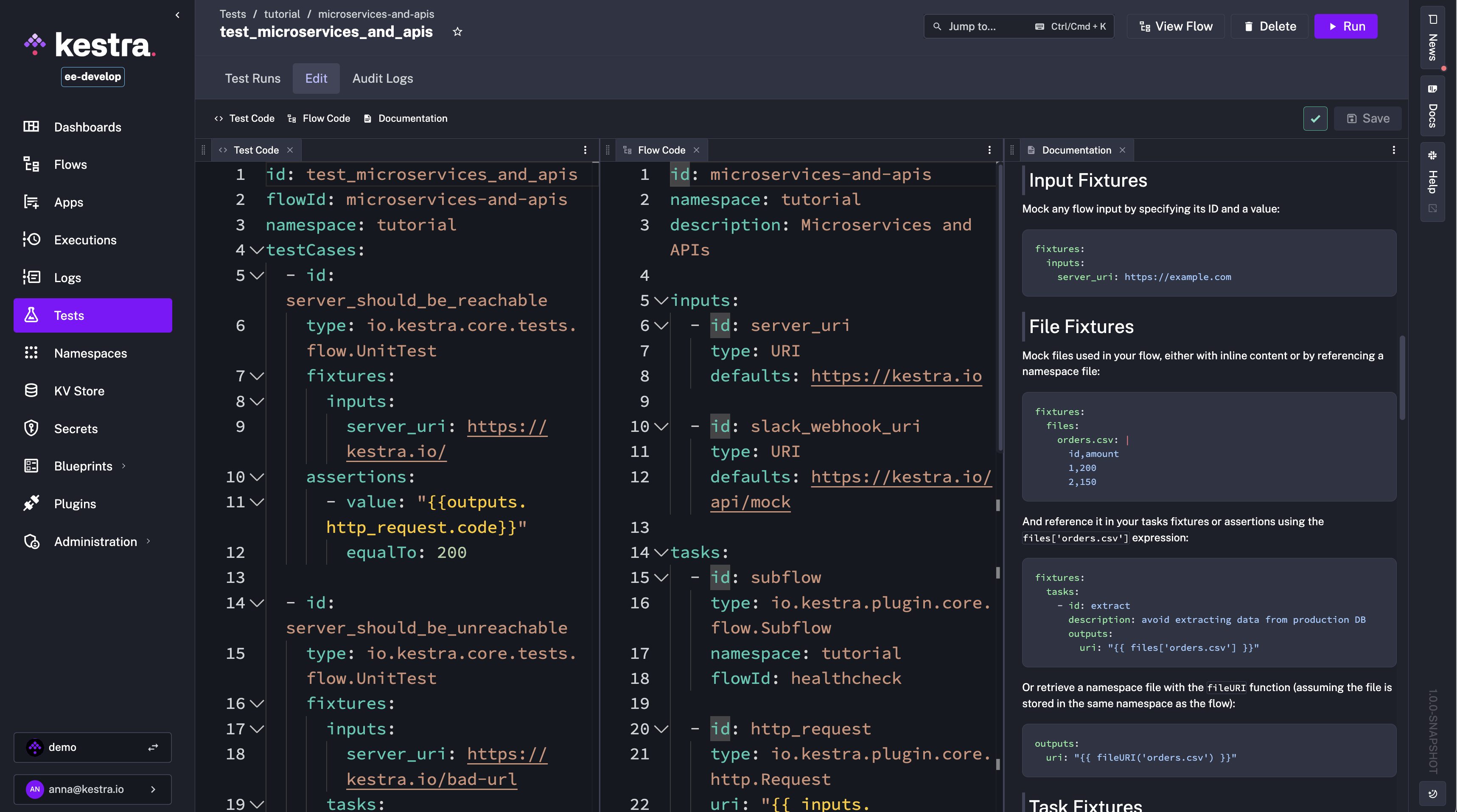
You can now also run tests programmatically from a flow using the new RunTest and RunTests tasks. This allows you to trigger tests on demand for:
Using those new tasks, you can run tests automatically on schedule or after deploying a new release.
id: run_testsnamespace: system
tasks:  - id: run_all_tests    type: io.kestra.plugin.kestra.ee.tests.RunTests    auth:      apiToken: "{{ secret('KESTRA_API_TOKEN') }}"
triggers:  - id: schedule    type: io.kestra.plugin.core.trigger.Schedule    cron: "0 9 * * 1-5" # every weekday at 9am
These enhancements make it easier to ensure your flows stay reliable as they evolve from checking a single change to running large-scale regression suites on a schedule.
The Flow-level SLAs, introduced in 0.20, are now also generally available in Kestra 1.0. This feature lets you define Service Level Agreements directly in your flows, specifying what should happen when an execution runs longer than expected or fails to meet certain conditions. SLAs can be set to automatically cancel, fail, or simply label an execution when breached, allowing you to enforce reliability standards at the workflow level.
Since the Beta launch, we’ve battle-tested SLAs for production use to enforce execution guarantees for your mission-critical workflows.
Here is an example of how to define a Flow-level SLA that cancels the execution if it runs longer than 8 hours and labels it for easy tracking and alerting:
id: sla_examplenamespace: company.team
sla:  - id: maxDuration    type: MAX_DURATION    duration: PT8H    behavior: CANCEL    labels:      sla: miss      reason: durationExceeded
tasks:  - id: start    type: io.kestra.plugin.core.log.Log    message: "Workflow started, monitoring SLA compliance."
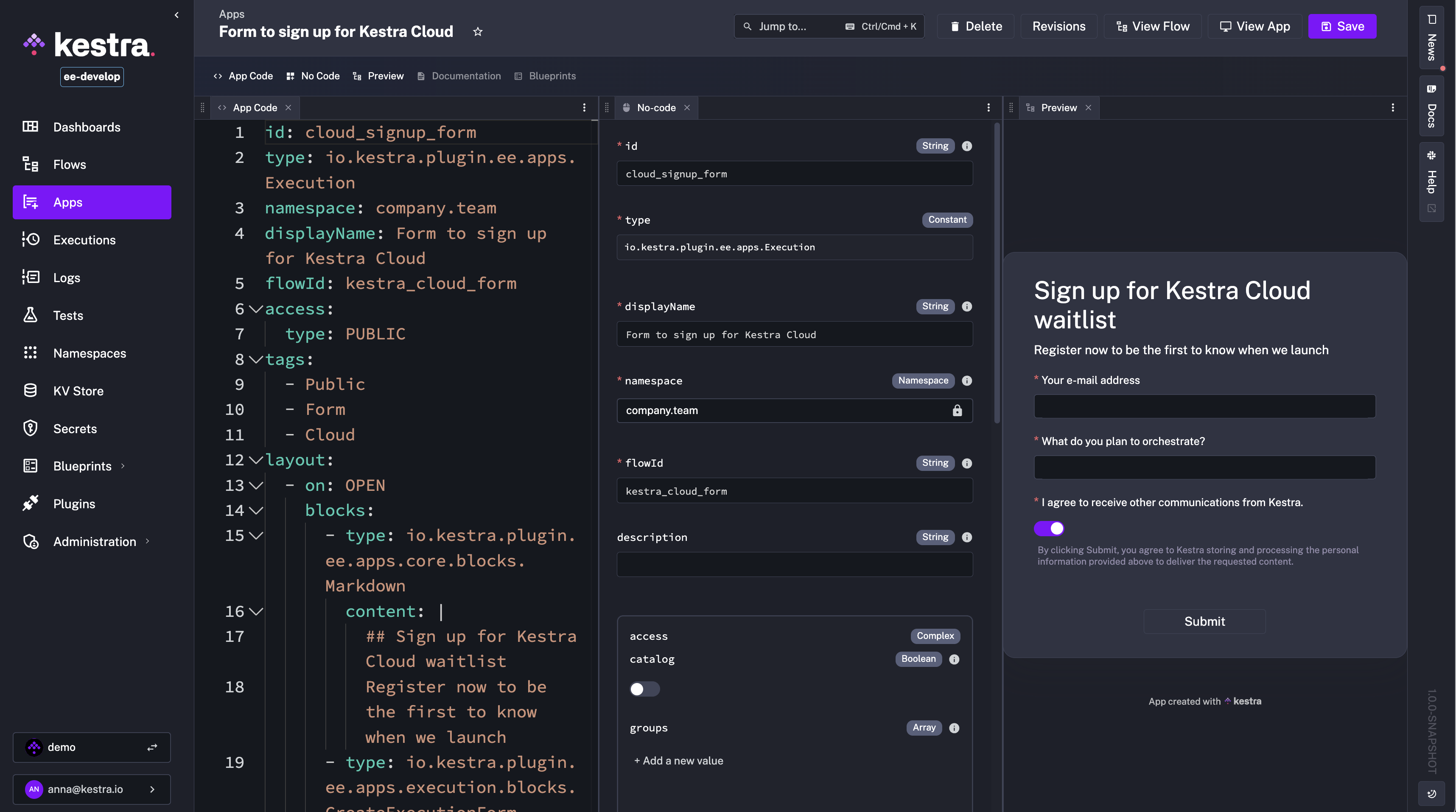
- id: long_task type: io.kestra.plugin.core.flow.Sleep duration: PT9HKestra 1.0 introduces a No-Code Multi-Panel Editor for Apps, bringing the same powerful no-code and split-screen editing experience we introduced for flows in 0.23 to App development. This feature allows you to build and customize Apps directly from the UI, even if you’re not proficient in writing the declarative YAML that defines them.
Traditionally, Apps in Kestra are defined as code, specifying layout blocks and UI interactions in YAML. With the new editor, you can create these elements visually from form-based tabs, while still having the option to open the corresponding code panel to see the generated YAML code in real time. You can switch between App Code and No-Code panels, see live App preview, and reference documentation or examples without leaving the editor.
Just like with the multi-panel Flow Editor, you can open, reorder, and close any combination of panels (incl. No-Code, App Code, Documentation, Preview and Blueprints) to build a personalized workspace. The No-Code form editor simplifies the creation of complex App layouts, making it easier to design interactive Apps for internal tools, dashboards, or data request forms without needing to start from raw YAML.
To help you deploy Kestra more easily, we’re introducing new Helm Charts in Kestra 1.0 with expanded capabilities, important fixes, and a more production-friendly architecture.
Key improvements include:
kestra — production-ready, without embedded dependencies (connect to managed services such as RDS, S3, or Kafka).kestra-starter — includes PostgreSQL and MinIO for quick proof-of-concept or development use.kestra-operator — provides operator-level functionality for advanced setups.common and deployments entries in values.yaml give consistent and granular control over scheduling, tolerations, volumes, and environment variables.configurations entry, removing the need for configurationPath.nameOverride, securityContext, secret handling, and appVersion auto-updates.priorityClassName for Workers to reduce interruptions on long-running workflows.These changes make it easier to:
kestra-starter chart for development or PoCs.kestra chart connected to a managed database and object storage.The new Helm Charts remove friction for both quick evaluations and production-ready deployments. Check the migration guide for details on moving from the old chart to the new ones.
We’ve made a series of smaller but impactful user experience improvements in Kestra 1.0 to streamline day-to-day operations:
Inherited KV Pairs – the KV Store now includes a new “Inherited KV pairs” button, showing keys inherited from parent namespaces. This is powered by a new GET /api/v1/{tenant}/namespaces/{namespace}/kv/inheritance endpoint, making it easier to trace KV pairs stored in multiple namespaces.
Namespace Context in the Flow Editor – The Flow Editor now has a Namespace Context panel showing all Variables, KV pairs, and Secrets available to the flow you’re editing. A Render expression button lets you preview and debug Pebble expressions (e.g., KV or namespace variable lookups) directly in the editor before execution starts.
Replay with Edited Inputs – You can now change the value of a flow’s inputs before starting a Replay, which is especially useful for workflows with long-running or computationally expensive tasks.
Animated Topology View – The Flow Topology view now clearly displays the direction of data flow between tasks with animated arrows and at runtime, each task node shows more clearly its current status (running, succeeded, failed) with color-coded borders.
Kestra 1.0 introduces several new core tasks to simplify your workflows.
New task that will kill an execution and optionally also child executions if propagateKill is set to true:
id: conditional_killnamespace: company.team
inputs:  - id: shouldKill    type: boolean    defaults: false
tasks:  - id: subflow    type: io.kestra.plugin.core.flow.Subflow    flowId: child    namespace: demo    wait: false
- id: kill type: io.kestra.plugin.kestra.executions.Kill runIf: "{{ inputs.shouldKill == true }}" propagateKill: trueThe new PurgeKV core task addresses the issue of expired KV entries not being removed from object storage, such as S3 or GCS. Over time, expired keys can accumulate and occupy significant storage space, even though they are no longer accessible from Kestra.
With the PurgeKV task, you can set up a system flow that runs periodically to clean up expired objects from both:
You can configure it to target specific namespaces or keys using glob patterns and optionally include child namespaces. Example:
id: purge_kv_storenamespace: system
tasks:  - id: purge_kv    type: io.kestra.plugin.core.kv.PurgeKV    expiredOnly: true
triggers:  - id: daily    type: io.kestra.plugin.core.trigger.Schedule    cron: "0 9 * * *" # every day at 9am
By default, the task purges only expired keys from all namespaces, but you can narrow it down to specific patterns. This task can guarantee that your Kestra KV Store remains clean and doesn’t incur unnecessary storage costs.
The 1.0 release includes many plugin enhancements, including new plugins and improvements to existing ones.
We’ve introduced two new Git Sync plugins to give you full control over synchronizing Kestra objects with your Git repository:
TenantSync – synchronizes all namespaces in a tenant, including flows, files, apps, tests, and dashboards.
kestraUrl and auth properties for validation of tenant-wide RBAC.NamespaceSync – synchronizes objects within a single namespace with your Git repository.
namespace property but does not require kestraUrl and auth - it relies on namespace-level RBAC and can be run by any user with sufficient permissions.Both plugins support:
sourceOfTruth (either GIT or KESTRA) to define the update strategy.whenMissingInSource with options DELETE, KEEP, or FAIL to control how missing objects should be handled.protectedNamespaces to ensure your Kestra objects from critical namespaces (such as system) are not accidentally deleted when sourceOfTruth is GIT.branch and optional gitDirectory.dryRun and onInvalidSyntax for safe rollouts and error handling.Example usage of the TenantSync task:
id: tenant_git_syncnamespace: system
tasks:  - id: tenant    type: io.kestra.plugin.git.TenantSync    sourceOfTruth: KESTRA    whenMissingInSource: DELETE    url: https://github.com/org/repo    branch: main    protectedNamespaces:      - system    kestraUrl: http://localhost:8080    auth:      username: admin@kestra.io      password: "{{ secret('KESTRA_PASSWORD') }}"
Example usage of the NamespaceSync task:
id: namespace_git_syncnamespace: system
tasks: - id: namespace type: io.kestra.plugin.git.NamespaceSync namespace: company.team sourceOfTruth: GIT whenMissingInSource: KEEP url: https://github.com/org/repo branch: main protectedNamespaces: - systemThe new GitLab plugin lets your flows interact with GitLab using its REST API. Use it to search issues, open new issues, and create merge requests as part of your pipelines.
The available tasks include:
Create (issues) to open a new issue with title, description, and labelsSearch (issues) to find issues by state and labelsMergeRequest to open a merge request between branches.The example below creates an issue:
id: gitlab_create_issue_examplenamespace: company.team
tasks: - id: create_issue type: io.kestra.plugin.gitlab.issues.Create url: https://gitlab.example.com token: "{{ secret('GITLAB_TOKEN') }}" projectId: "123" title: "Bug report" issueDescription: "Found a critical bug" labels: - bug - criticalWe’ve also added a new Supabase plugin to interact with Supabase Postgres using the REST API and RPC.
The available tasks include:
Select to read rows with filters, sorting, and paginationInsert, Update, Delete to modify dataQuery (RPC) to call stored procedures.The example below selects active users from a table:
id: supabase_select_examplenamespace: company.team
tasks: - id: select_active_users type: io.kestra.plugin.supabase.Select url: https://your-project.supabase.com apiKey: "{{ secret('SUPABASE_API_KEY') }}" table: users select: "id,name,email,created_at" filter: "status=eq.active" order: "created_at.desc" limit: 50The new Trivy CLI plugin can scan a Docker image for vulnerabilities:
id: trivy_cli_imagenamespace: company.team
tasks: - id: trivy_image type: io.kestra.plugin.trivy.cli.TrivyCLI commands: - trivy image --format json nginx:latestThis post highlighted the new features and enhancements introduced in Kestra 1.0. Which updates are most interesting to you? Are there additional capabilities you’d like to see in future releases? We welcome your feedback. You can also learn more about this release in our latest podcast episode:
If you like the project, give us a GitHub star ⭐️.
For questions or feedback, join our Slack community or open an issue on GitHub.

Stay up to date with the latest features and changes to Kestra