Authors

Anna Geller
Anna Geller
We’re thrilled to announce Kestra 0.10.0, which introduces Blueprints and a new script plugin, further enhancing Python, R, Node.js, Shell, and Docker support. We’ve added basic authentication and the secret() function to make Kestra more secure for open-source deployments. The new DAG task automatically resolves the dependency structure so that you don’t even have to think about a DAG — just define upstream dependencies on a per-task basis when needed. Finally, the new worker group feature simplifies remote workflow execution, allowing you to run your tasks on dedicated on-prem and cloud servers.
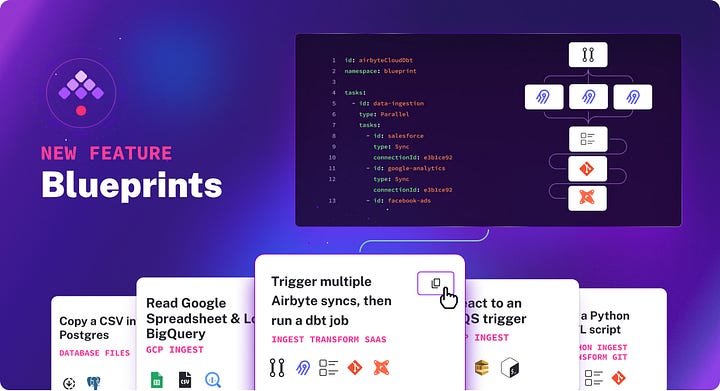
Blueprints provide a curated, organized, and searchable catalog of ready-to-use examples designed to help you kick-start your workflow. Each Blueprint combines code and documentation and can be assigned several tags for easier discoverability.
All blueprints are validated and documented so that they just work. You can easily customize and integrate them into your new or existing flows with a single click on the “Use” button. Blueprints are accessible from two places in the UI:
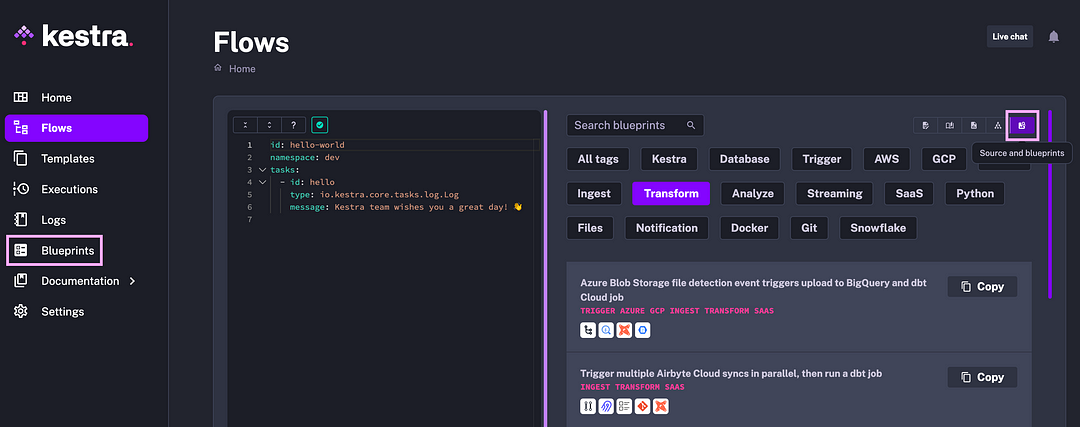
The current blueprint catalog encompasses a wide range of use cases and integrations, e.g., Snowflake, BigQuery, DuckDB, Slack, ETL, ELT, Pandas, GPU, Git, Python, Docker, Redis, MongoDB, dbt, Airbyte, Fivetran, etc.
If you have any suggestions about new Blueprints or improvements to the existing ones, submit a GitHub issue using the following issue template.
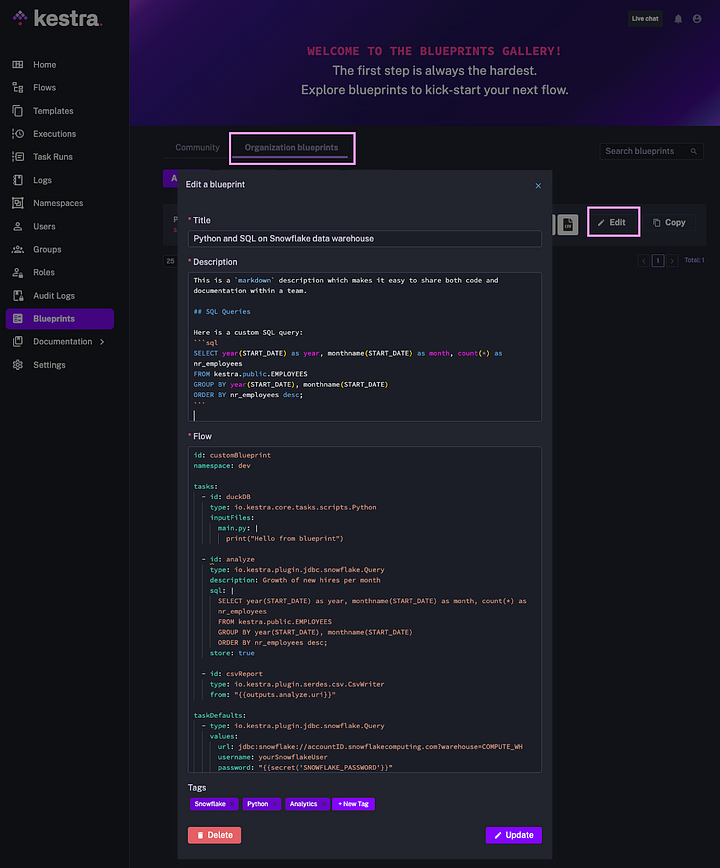
The Enterprise Edition allows the creation of internal Blueprints, helping you share commonly used workflows as reusable components and establish standardized data processing patterns. Custom Blueprints facilitate sharing knowledge about best practices in your team by embedding both code and markdown documentation into the product.
Here is what Custom Blueprints look like in the UI:
We’ve added a new Script plugin making it easier to work with custom Python, R, Node.js, Shell, and Powershell scripts. By default, each task runs in a separate Docker container to ensure environment isolation and simple deployment patterns. You can manage custom dependencies by providing a custom Docker image or installing required packages at runtime. This customizability is possible thanks to the new beforeCommands property, available on each task from the script plugin, allowing you to execute any instructions needed before running the main script.
Kestra provides two types of tasks for each of these languages — Script tasks and Commands tasks.
Script tasksThese tasks are useful for scripts that can be written inline in the YAML flow definition. They are best suited for simple automation tasks, e.g., if you want to run a single Python function fetching data from an API.
id: pythonScriptnamespace: company.team
tasks:  - id: workingDir    type: io.kestra.core.tasks.flows.WorkingDirectory    tasks:      - id: scrapeGitHub        type: io.kestra.plugin.scripts.python.Script        beforeCommands:          - pip install requests        warningOnStdErr: false        script: |          import requests          import json
          response = requests.get("https://api.github.com")          data = response.json()
          with open("output.json", "w") as output_file:              json.dump(data, output_file)
      - id: myresult        type: io.kestra.core.tasks.storages.LocalFiles        outputs:          - output.json
- id: getFileContent type: io.kestra.plugin.scripts.shell.Script script: cat {{outputs.myresult.uris['output.json']}}The new LocalFiles task allows you to output files generated in a script and add new files inline within the YAML workflow definition. The code snippet shown above generates a JSON file as output. You can download that JSON file from the Outputs tab on the Executions page. You can also use that output in downstream tasks (as shown in the getFileContent task), e.g., to load that JSON file to your cloud data warehouse or a data lake using a dedicated plugin.
Commands tasksThe Commands tasks can be wrapped in a WorkingDirectory task for seamless integration with Git and Docker. The example below clones custom code from a Git repository, pulls a base Docker image, installs additional custom dependencies based on the requirements.txt file, and finally, triggers two Python script tasks. One of these tasks generates a CSV file which can be downloaded from the Outputs tab.
id: gitPythonnamespace: company.team
tasks:  - id: directory    type: io.kestra.core.tasks.flows.WorkingDirectory    tasks:      - id: cloneRepository        type: io.kestra.plugin.git.Clone        url: https://github.com/kestra-io/examples # your repo        branch: main
      - id: python        type: io.kestra.plugin.scripts.python.Commands        warningOnStdErr: false        runner: DOCKER        docker:          image: python:3.11-slim # your base image        beforeCommands:          - pip install -r requirements.txt > /dev/null        commands:          - python python-scripts/etl_script.py          - python python-scripts/generate_orders.py
- id: output type: io.kestra.core.tasks.storages.LocalFiles outputs: - orders.csvLabels can help you filter your flows and executions across multiple criteria. Here is an example flow that demonstrates how you can use labels:
id: flowWithLabelsnamespace: company.team
labels:  environment: production  owner: john-doe  project: usage-metrics  team: product  source: github
tasks:  - id: hello    type: io.kestra.core.tasks.log.Log    message: Have a great day!
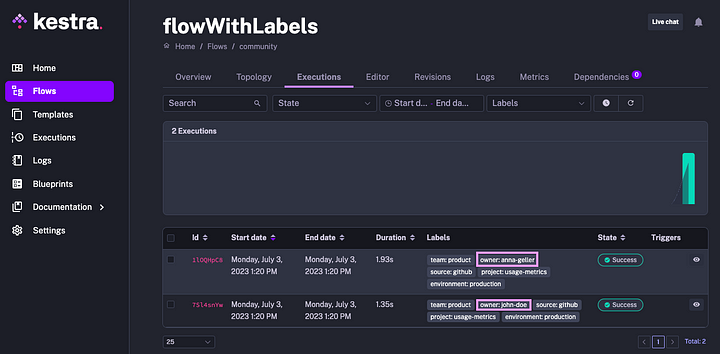
When you execute that flow, the labels will be visible on the Execution page.
So far, modifying existing labels or introducing new ones was only possible by adjusting the workflow code. This release adds the ability to set custom labels for specific Executions. This feature might be helpful if you experiment with various input parameters and want to easily distinguish between multiple workflow runs for auditability and observability.
The labels configured within workflow code are automatically propagated to Execution labels. For instance, if you override the owner label at runtime, the result will be tracked as follows:
Dependencies between tasks in Kestra flows are defined in a declarative way. For instance, running tasks in parallel requires an explicit definition of a Parallel parent task along with child tasks that should run in parallel. Such a precise definition gives you fine-grained control over task dependencies.
However, in certain scenarios, it’s easier to define only the upstream dependencies for each task and let the orchestration engine figure out the optimal execution order. That’s where the new DAG task, introduced in Kestra 0.10.0, comes in handy.
The workflow below demonstrates a simple use case where there are:
dbt).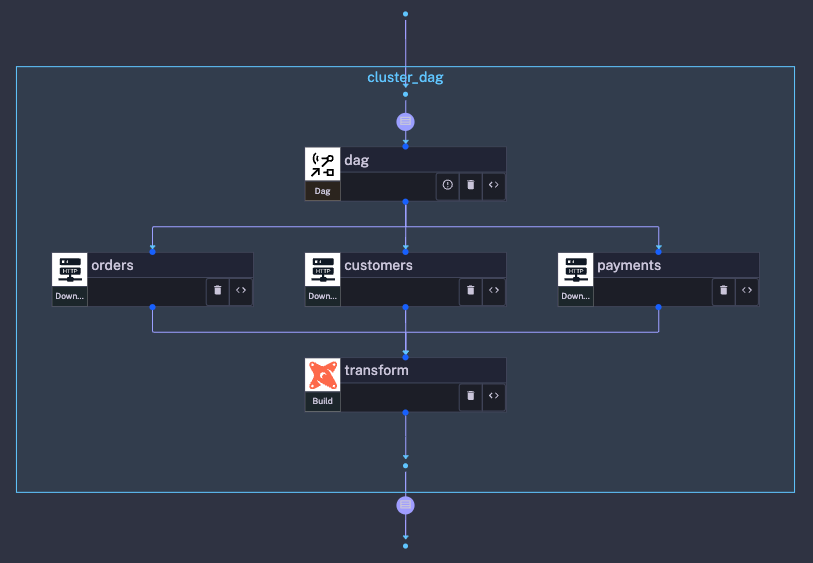
Here is a workflow example that uses the new DAG task:
id: magicDAGnamespace: company.teamtasks: - id: dag type: io.kestra.core.tasks.flows.Dag tasks: - task: id: customers type: io.kestra.plugin.core.http.Download uri: https://raw.githubusercontent.com/dbt-labs/jaffle_shop/main/seeds/raw_customers.csv - task: id: orders type: io.kestra.plugin.core.http.Download uri: https://raw.githubusercontent.com/dbt-labs/jaffle_shop/main/seeds/raw_orders.csv - task: id: payments type: io.kestra.plugin.core.http.Download uri: https://raw.githubusercontent.com/dbt-labs/jaffle_shop/main/seeds/raw_payments.csv - task: id: transform type: io.kestra.plugin.dbt.cli.Build dependsOn: - customers - orders - paymentsWhen comparing the workflow code and the topology view, you can see how the DAG task automatically designated the first three tasks to run in parallel because they have no upstream dependencies. The transformation task must wait for the successful completion of the dependent tasks, defined by referencing the upstream task IDs in the dependsOn property.
This release brings an important addition to Kestra’s open-source version: a basic authentication feature. This enhancement strengthens your instance’s security, making the open-source Kestra server more suitable for production applications.
Here is how to set a basic authentication user in your Kestra configuration:
kestra: server: basic-auth: enabled: false username: admin password: *******Furthermore, we’re introducing a secret() function to securely retrieve sensitive values in your workflows using special environment variables — key-value pairs, where the key starts with the SECRET_ prefix and the value is base64-encoded. The secret() function will look up only environment variables with that prefix, and base64-decode the values at runtime.
The example below uses the secret() function to retrieve the value of a Slack webhook key:
id: getSecretnamespace: company.teamtasks: - id: secret type: io.kestra.core.tasks.debugs.Return format: "{{ secret('SLACK_WEBHOOK_KEY') }}"Even though the environment variable name is prefixed with SECRET_, you only need to reference the key without a prefix in your flow. For more information, check the detailed Managing Secrets guide.
Kestra 0.10.0 significantly improves polling triggers to enhance performance, strengthen privacy, and simplify maintenance. Until now, the trigger evaluation process was handled directly by the Scheduler requiring access to user’s infrastructure by both the Scheduler and the Worker.
From now on, the Scheduler delegates the evaluation of polling triggers to the Worker so that only the Worker needs to interact with external systems. This separation of concerns further enhances privacy when polling user’s internal systems for specific trigger conditions.
Apart from all the exciting open-source features, this release introduces a powerful concept of worker groups to the Enterprise Edition of Kestra. A worker group allows you to execute any task on a remote compute instance or a distributed compute cluster simply by specifying the worker group key on a given task.
Imagine you want to execute a task on a worker with access to a Spark cluster. The example below ensures that a Spark job will be picked up only by Kestra workers that have been started with the key spark:
id: gpuTasknamespace: company.team
tasks:  - id: hello    type: io.kestra.plugin.spark.PythonSubmit    message: this task will be picked up by a worker started with key spark    workerGroup:      key: spark
You can start a new worker from a CLI using the command kestra server worker --worker-group=workerGroupKey --server=your_ee_host --user=your_ee_auth, which points the worker to your Kestra Enterprise server.
Worker groups are beneficial when your tasks require access to specific Operating Systems, libraries, on-prem applications, network resources (such as VPN), and GPUs or when your processes need to run in a particular region to satisfy compliance requirements.
Keep in mind that worker groups are entirely optional. Use them only for complex use cases or demanding computational requirements. Check the Worker Groups documentation for more details.
The new OpenAI plugin allows you to interact with the OpenAI platform from a simple declarative interface in Kestra. It comes with two tasks:
Further enhancements added as part of this release include:
Check the release notes on GitHub for a detailed overview of all changes.
This post covered new features and enhancements added in Kestra 0.10.0 release. We are looking forward to seeing how you use those new features. Your input and feedback help us prioritize future enhancements.
If you have any questions, reach out via Kestra Community Slack or open a GitHub issue.
If you like the project, give us a GitHub star and join the open-source community.

Stay up to date with the latest features and changes to Kestra