Authors

Anna Geller
Anna Geller
We’re happy to announce Kestra 0.12.0. This release significantly improves subflow topology and logs, making navigating complex workflows a breeze. We’ve also added Docker and SurrealDB plugins, and new AWS integrations, including AWS Lambda, Amazon EventBridge, and Amazon Kinesis Data Streams.
Here’s a list of all enhancements in this release:
🔹 New subflow UX bringing modularity and structure to complex workflows
🔹 New plugin to build and push Docker images and automate containerized processes
🔹 New plugin to query and react to events from your applications built with SurrealDB
🔹 New AWS Lambda, Amazon EventBridge, and Amazon Kinesis Data Streams integrations to orchestrate microservices and real-time, event-driven applications running on AWS
🔹 Worker task heartbeats for robust handling of infrastructure downtime when using Kestra on a JDBC architecture without Kafka.
🔹 Improved dbt tasks with the option to turn off parsing dbt DAG
🔹 UI improvements, including read-only display of deleted flows and better display of skipped tasks
🔹 New AWS, GCP, and Azure Secrets Managers in the Enterprise Edition to optionally store Kestra secrets in your chosen cloud provider’s service.
Let’s dive into each of these enhancements in more detail.
Kestra’s subflows are modular components helping to build reusable and maintainable workflows. Subflows allow code reuse across multiple processes, making them easy to change in one place. However, navigating a growing number of tasks and subflows can be challenging. This release brings several enhancements to the subflow UX to provide an excellent overview of the workflow structure, even across large and complex workflows.
🔹 Subflow topology: you can now see the topology of a subflow from the parent flow. This enhancement makes it easier to understand the structure of the subflow and how it fits into the bigger picture.
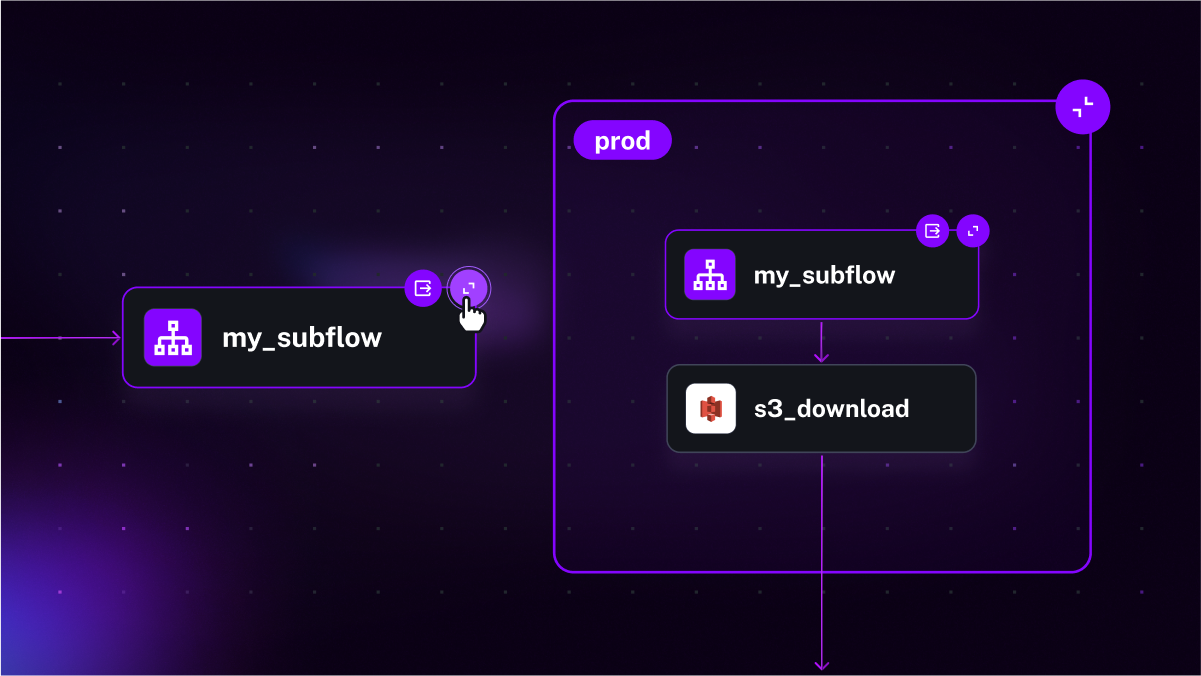
🔹 Zoom in and out: expand the subflow to see more details and collapse it to get a bird’s eye view of the complete workflow comprised of multiple modular components. With this change, you can decompose large workflows into smaller parts.
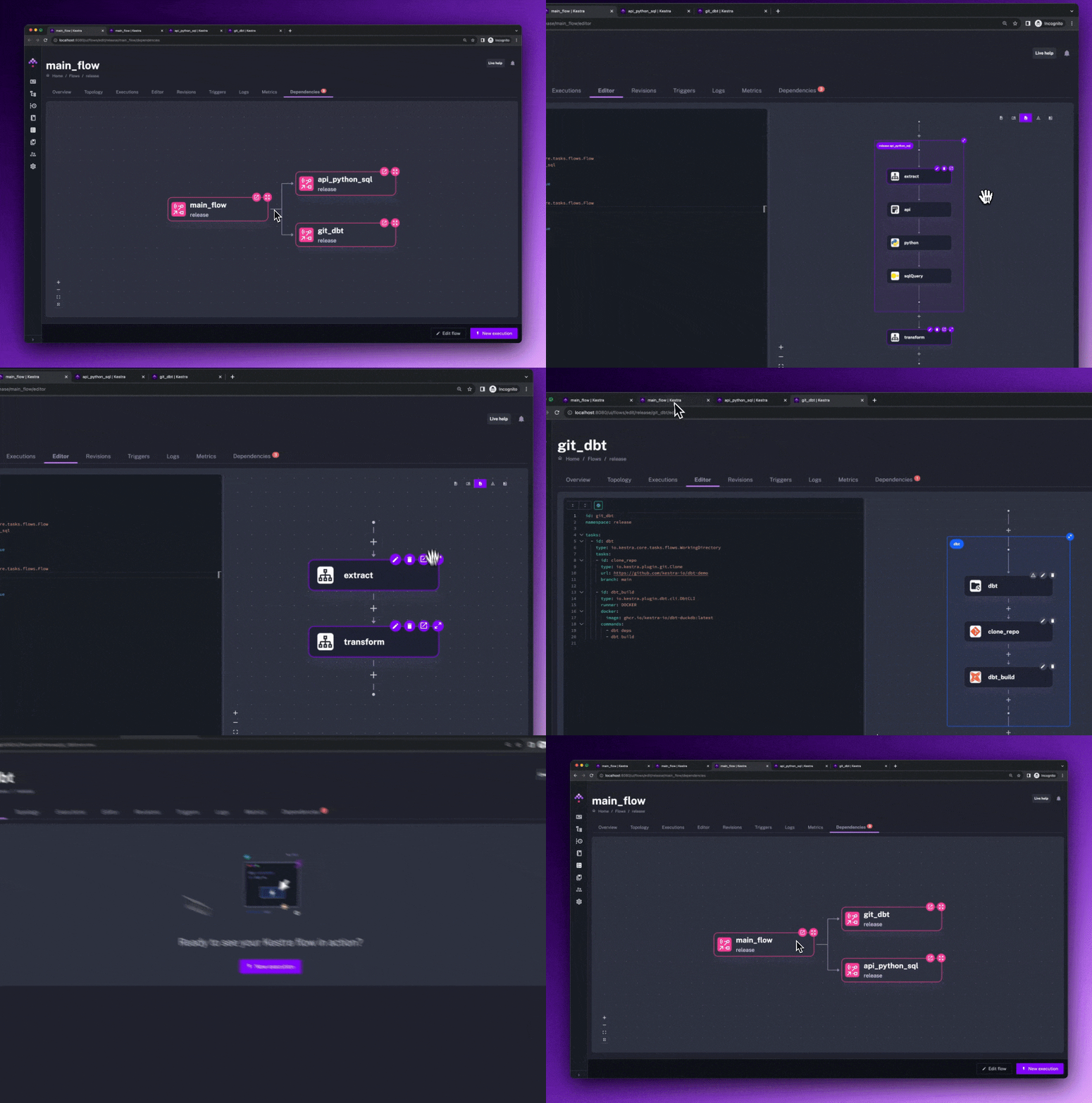
🔹 Subflow labels - subflows now inherit labels from the parent flow. This change is particularly useful to filter executions in the UI.
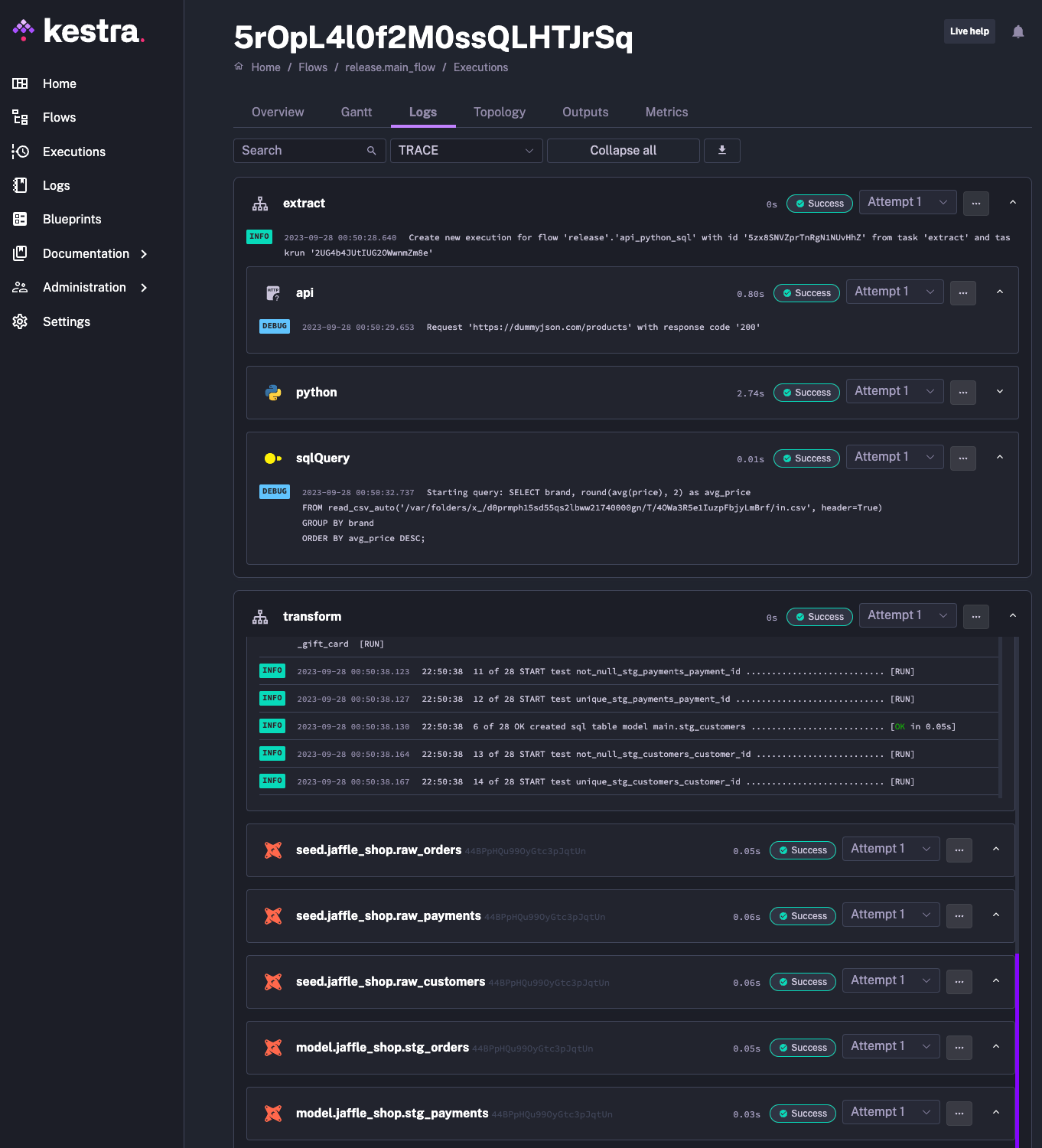
🔹 Subflow logs: you can view subflow logs directly from the parent flow, and they are beautifully formatted. The integration of logs gives you maximum visibility into the execution of complex workflows while maintaining the modularity and composability of the underlying business logic.
This release resolves the challenges related to Zombie Worker Tasks. We have been attentive to the issues raised by our open-source community, particularly users experiencing difficulties with tasks getting stuck in a Running state due to Kubernetes pod restarts.
In our open-source edition, we previously did not support auto-resubmitting tasks terminated due to infrastructure issues such as pod eviction events. Until now, this feature was exclusively available in the Enterprise Edition, which relies on Kafka’s built-in heartbeat mechanism for the implementation. With this release, we are extending this capability to open-source users, allowing Kestra instances with a JDBC setup to detect and automatically resubmit unhealthy worker tasks.
This enhancement ensures that processes such as dbt Cloud jobs or Airbyte syncs will no longer be inaccurately marked as Running due to intermittent pod restarts caused by e.g. autoscaling events. This change is a step forward in our continuous effort to support the open-source community.
We’ve added several new integrations to the AWS plugin, including LambdaInvoke, EventBridge PutEvents, and Kinesis Data Streams PutRecords tasks to orchestrate microservices and applications running on AWS.
Many organizations use AWS Lambda, as it can run code without provisioning or managing servers. This release adds a new integration allowing you to orchestrate microservices and applications built with AWS Lambda. Use the new LambdaInvoke task to invoke serverless functions from Kestra workflows.
This integration allows you to:
🔹 invoke a Lambda function by providing a custom function payload and function ARN
🔹 wait for the function’s completion and retrieve the output and logs of the Lambda function
🔹 (optionally) pass the results of the Lambda function execution to the next task(s) in the workflow.
With this integration, you can seamlessly incorporate serverless functions as part of an end-to-end workflow and orchestrate microservices running on AWS along with on-prem and cloud-native applications and data pipelines.
The following example from a Blueprint library shows how you can trigger multiple AWS Lambda functions in parallel:
id: aws_lambdanamespace: company.team
tasks:  - id: parallel    type: io.kestra.core.tasks.flows.Parallel    tasks:      - id: lambda        type: io.kestra.plugin.aws.lambda.Invoke        functionArn: arn:aws:lambda:us-east-1:12345:function:first
      - id: lambda_with_version        type: io.kestra.plugin.aws.lambda.Invoke        functionArn: arn:aws:lambda:us-east-1:12345:function:second:1        functionPayload:          your_event_input: hello world
      - id: lambda_with_alias        type: io.kestra.plugin.aws.lambda.Invoke        functionArn: arn:aws:lambda:us-east-1:12345:function:third:alias        functionPayload:          your_event_input: event payload
- id: lambda_result type: io.kestra.plugin.scripts.shell.Commands runner: PROCESS commands: - cat {{outputs.lambda.uri}} | jq -r '.body'Amazon EventBridge is a serverless event bus that integrates events from your custom applications, AWS services, and third-party providers. EventBridge routes those events to various targets for processing.
With the new PutEvents task, you can send custom events to the AWS event bus. This way, you can trigger any AWS action based on an event in your custom application, data pipeline or microservice. The automation possibilities here are endless, especially when combined with Kestra’s webhook triggers. For example, you can trigger a workflow any time an EC2 instance gets terminated, an S3 file gets added/modified or deleted, or when there is a new entry in DynamoDB. All that is possible via a webhook trigger reacting to EventBridge events sent automatically via CloudTrail.
Here is a simple usage example:
id: aws_event_bridgenamespace: company.team
tasks:  - id: send_events    type: io.kestra.plugin.aws.eventbridge.PutEvents    entries:      - source: kestra        eventBusName: default        detailType: my-custom-app        detail:          message: this could be any event
The following Blueprint demonstrates additional ways of sending custom events to the AWS event bus using the PutEvents task.
Amazon Kinesis Data Streams is a massively scalable and durable real-time data streaming service that continuously captures data from website clickstreams, database event streams, financial transactions, social media feeds, IT logs, or location-tracking events.
The new PutRecords task lets you send data to Amazon Kinesis Data Streams. This way, you can build end-to-end workflows that extract data from various sources, transform it, and load it to Kinesis for (near) real-time analytics use cases such as anomaly detection, dynamic pricing, and many more.
The following Blueprint example shows how you can orchestrate near-real-time applications using the PutRecords task. Here is a simple example:
id: aws_kinesisnamespace: company.team
tasks: - id: sign_in_events type: io.kestra.plugin.aws.kinesis.PutRecords streamName: kestra records: - data: sign-in partitionKey: user1 - data: sign-out partitionKey: user1Kestra 0.12 brings several new integrations, including new Docker and SurrealDB plugins, and a useful change to the dbt tasks.
Based on several user requests, we have added a dedicated Docker plugin. Based on a custom Dockerfile and build arguments, this plugin will build and push a Docker image to a remote container registry such as AWS Elastic Container Registry (ECR), Google Artifact Registry, Azure Container Registry, GitHub Container Registry, and DockerHub.
This infrastructure automation plugin is convenient for packaging custom applications before orchestrating them in Kestra, enabling much faster feedback loops. The new, improved credentials handling on script tasks will be helpful when using this plugin.
This plugin provides an additional mechanism to build decoupled workflows. For example, one process can build and push the image, and another can pull it from the registry before running a given task. It allows you to easily pass the registry and reference the credentials, such as username and password stored as Secrets, or pass the authentication token retrieved in a previous task.
You can also use it to build and push images as part of CI/CD pipelines orchestrated with Kestra, especially when combined with the GitHub Webhook used as a trigger.
Search for blueprints with the Docker tag to see examples leveraging this plugin in combination with various container registries. Below is one of such examples, which builds and pushes a Docker image to GitHub Container Registry. The dockerfile parameter is a multiline string with the Dockerfile content. However, it can also be a path to a file. The tags parameter is a list of tags of the image to build. Make sure to replace the credentials below to match your GitHub username or organization. The push parameter is a boolean that indicates whether to push the image to GitHub Container Registry. Finally, make sure to securely store your GitHub Access Token as a secret.
id: build_github_container_imagenamespace: company.team
tasks:  - id: build    type: io.kestra.plugin.docker.Build    dockerfile: |      FROM python:3.10      RUN pip install --upgrade pip      RUN pip install --no-cache-dir kestra requests "polars[all]"    tags:      - ghcr.io/kestra/polars:latest    push: true    credentials:      username: kestra      password: "{{ secret('GITHUB_ACCESS_TOKEN') }}"
SurrealDB is a cloud-native database for modern web, mobile, and serverless applications. It supports multiple querying languages, including SQL, GraphQL, ACID transactions, WebSocket connections, structured and unstructured data, and full-text indexing.
The SurrealDB plugin allows you to run SurrealQL queries and react to events from your application via the SurrealDB trigger — type SurrealDB in the blueprints search bar to see examples of how to use this plugin.
The dbt tasks now have the option to turn off parsing dbt DAG with the parseRunResults flag, a boolean property allowing disabling parsing of the dbt manifest. If your dbt project is large, with hundreds or thousands of models and tests, parsing the manifest may be unnecessary. This flag allows you to turn off parsing the manifest and still get the results of the dbt job by inspecting the execution logs.
Here is how you can use this flag:
id: dbtnamespace: company.team
tasks:  - id: dbt    type: io.kestra.core.tasks.flows.WorkingDirectory    tasks:    - id: cloneRepository      type: io.kestra.plugin.git.Clone      url: https://github.com/kestra-io/dbt-demo      branch: main
- id: dbt-build type: io.kestra.plugin.dbt.cli.DbtCLI parseRunResults: false runner: DOCKER docker: image: ghcr.io/kestra-io/dbt-duckdb:latest commands: - dbt deps - dbt buildApart from new features and integrations, we’ve also made several improvements to the UI. Here are some of the highlights:
🔹 Improved display of the execution logs: the task run logs have been redesigned to allow drilling down into subflow child executions; the logs tab includes a dedicated dropdown for each task run attempt, making it easier to identify the root cause of any issues and fix them faster.
🔹 The Gantt view now displays iteration value as a name for each child task: this simple change leads to a significant UX improvement, providing more visibility into the status of each parallel task.
🔹 Read-only display of deleted flows: deleted flows are now marked as read-only, and you’ll see the flow’s revision in the Execution URL (query parameter).
🔹 Improved display of JSON columns in the output preview: the output preview can now display a table with JSON columns - this feature is handy when working with API calls and JSON data, e.g., when using the new Amazon EventBridge and Kinetic Data Streams integrations.
🔹 Warnings when using deprecated properties: we now display deprecation warnings in the editor for deprecated properties and tasks. We never deprecate any features overnight, so you have plenty of time to update your workflows before any deprecated feature is removed. However, the warning will help you stay on top of the changes and avoid surprises.
🔹 Better display of skipped tasks in the execution topology view: we’ve changed how skipped tasks are displayed to make it easier to understand which tasks were executed and skipped.
🔹 UI logs now only display the last 7 days: to improve performance and reliability of large-scale workflows, the UI logs now only display the last 7 days instead of 30 days. This change makes the UI logs page load faster. You can still view older logs when needed by adjusting the date range in the UI filter.
🔹 Boolean-type input improvements: boolean inputs now have a more explicit form, making it even easier to spot whether a given input has a default value of true/false or whether it’s undefined (i.e., no default values provided).
This release also adds several new features to the Enterprise Edition, including:
🔹 Azure Key Vault allows you to store your Kestra secrets in Azure Key Vault.
🔹 AWS Secrets Manager allows you to store your Kestra secrets in AWS Secrets Manager.
🔹 Google Secrets Manager allows you to store your Kestra secrets in Google Secrets Manager.
Apart from those changes, the task runs page now also displays execution labels and attempt numbers.
When it comes to infrastructure, this release adds the following enhancements:
🔹 New S3 storage configuration
🔹 Allow defining worker groups in Kestra’a helm charts
🔹 Fix to labels in Kestra’s Terraform provider.
This post covered new features and enhancements added in Kestra 0.12.0. Which of them are your favorites? What should we add next? Your feedback is always appreciated.
If you have any questions, reach out via Slack or open a GitHub issue.
If you like the project, give us a GitHub star and join the community.

Stay up to date with the latest features and changes to Kestra