Authors

Anna Geller

Anna Geller
YAML is a language-agnostic, human-readable data serialization language commonly used for configuring Kubernetes resources, CI/CD pipelines, dbt projects, and various cloud services.
In contrast to JSON or XML which are primarily used for communication between applications, YAML is designed to be easy to read and write by both humans and machines. In fact, YAML is a superset of JSON — any valid JSON document is also a valid YAML document.
Despite all its benefits, some consider YAML to be error-prone or difficult to use. That criticism is, in many ways, justifiable. Without proper tooling, YAML files in their raw format can be frustrating to work with, including issues such as:
0123 as an octal number, while others will treat it as a stringHowever, it’s worth looking at those issues in the context of a specific tool. At Kestra, we’ve solved all of the common YAML challenges through our API, and we’re confident that YAML is the right choice for a declarative definition of orchestration logic as long as it’s built on top of robust schemas with proper validation mechanisms built into the framework. This blog post explains how we addressed the most common YAML pitfalls in our platform.
YAML Syntax 101: YAML syntax is based on key-value pairs that can accept lists, scalar values and other key-value pairs organized into hierarchies based on indentation. It natively supports various data structures and types, including strings, integers, floats, timestamps, nulls, booleans, arrays, and maps. If you are new to YAML, read our YAML Crash Course, and for a detailed introspection, check the official language specification.
The primary complaints about YAML center around:
These complaints often result from YAML being applied in the context of Kubernetes and CI/CD tools, which natively don’t offer sufficient validation and troubleshooting mechanisms.
Let’s discuss each of these critical remarks in detail and explain why they don’t apply to Kestra.
Many of the YAML pitfalls can be overcome by installing one of the many YAML extensions available for popular IDEs including VS Code, IntelliJ, PyCharm, Sublime Text, Eclipse, vim, TextMate, Notepad++, and more. If you use VS Code, we recommend installing RedHat’s YAML VS Code extension, which provides a rich set of features for writing YAML files, including real-time syntax validation against a schema you select (such as a schema for your Kestra server), error detection, a formatter with auto-indentation, document outlining, auto-completion, invalid key node and invalid type validation, documentation when hovering over any key property, as well as syntax checking for Kubernetes YAML files. It’s a verified and officially supported extension with over 14 million downloads at the time of writing.
The most common complaints about YAML are related to indentation. Similarly to Python, YAML uses indentation to define the structure of a document, which can make it error-prone, as small mistakes, such as a single missing space, can lead to misconfigurations.
❓Why this doesn’t apply to Kestra?
As long as your workflow syntax passes validation made by Kestra’s API, the indentation doesn’t matter. The image below demonstrates how the flow passes validation even though the list elements are over-indented.
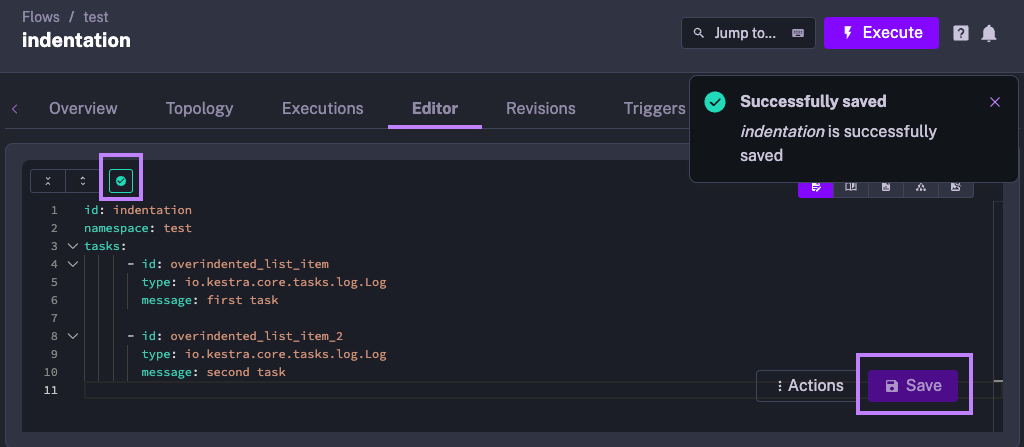
The validation passes because indentation is consistent. That’s enough for Kestra to understand the structure of the flow, even if it’s not properly formatted.
However, in another example shown below, you can see that the indentation is inconsistent - the first and the second tasks have different indentation levels. As a result, the flow fails validation and can’t be saved.
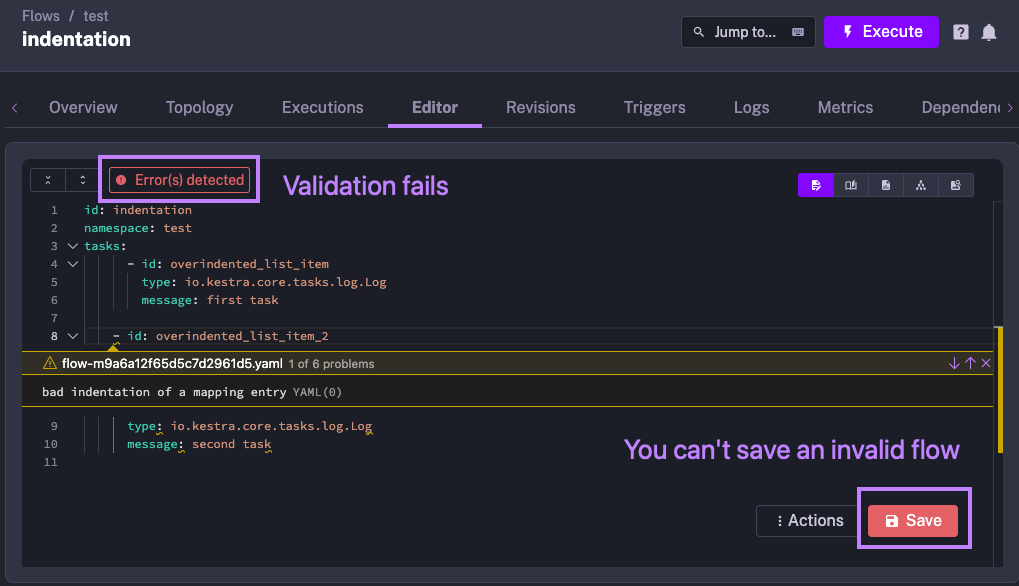
Thanks to the built-in syntax validation, Kestra’s API doesn’t allow you to save an invalid flow. There are no surprises at runtime because the flow is validated during its creation, i.e. at build time. This constrained (yet robust) approach offers an advantage over more flexible (yet more fragile) Python scripts, where indentation errors can lead to unexpected behavior at runtime.
TL;DR: The claim of YAML being error-prone due to indentation is an old misconception established when tools such as RedHat’s YAML VS Code extension didn’t exist yet, and you had to rely on manual YAML parsing to detect errors. Kestra’s API continuously validates the syntax before saving any flow, ensuring that your code is valid before you deploy or run it.
Many believe that YAML doesn’t scale well to larger files. If you reach a certain size of hundreds or thousands of lines in your configuration file, it can be difficult to maintain and edit.
The criticism of “large script doesn’t scale well” is true to almost any language or format, not only to YAML. If you have a Python or Node.js script or a SQL query with thousands of lines, chances are you’d be better off splitting it into smaller components.
Still, that criticism is valid, as YAML doesn’t natively provide any solution to that modularity problem. While programming languages have functions, classes, modules, and packages to modularize code, plain YAML doesn’t have any of those.
❓Why this doesn’t apply to Kestra?
Kestra encourages small, modular and reusable components, and it provides multiple ways to split a flow into smaller building blocks that can be referenced in the same way as functions in a programming language.
In short, Kestra encourages modular, decoupled components built on top of a simple orchestration syntax defined in YAML.
TL;DR: If you follow engineering best practices and modularize your logic into smaller, reusable components, Kestra flows built with YAML scale well to support large and complex workloads. Kestra provides multiple ways to split any workflow into smaller building blocks that can be referenced in the same way as functions in a programming language.
YAML files can be difficult to debug. For example, running a GitHub Actions pipeline can be a frustrating experience if all steps of your workflow succeed, but the final step fails due to a syntax error.
❓Why this problem doesn’t apply to Kestra?
YAML-based workflows are usually difficult to debug in systems that lack validation and troubleshooting mechanisms. Many IDEs, including Kestra’s UI Editor and RedHat’s YAML VS Code extension, provide debugging capabilities for YAML out of the box. The error in the CI/CD pipeline mentioned above would have been identified in your IDE if you had used Kestra instead of GitHub Actions. Kestra’s API validates the syntax before saving the flow, ensuring that the flow is syntactically correct before you deploy or run it.
Additionally, Kestra makes it transparent which inputs and outputs are expected for each task. If a specific step of your pipeline fails, you can easily identify the source of the problem by inspecting the inputs and outputs of each task. And if finding the root cause requires more time than anticipated, you can always disable any task, trigger or even an entire flow by setting the disabled flag to true in the flow definition.
Kestra also provides DEBUG and TRACE log levels, which can be used for debugging purposes. You don’t need to do anything special to enable these log levels — just select the desired log level in the UI’s logs page.
TL;DR: The claim of YAML being difficult to debug is a misconception born out of systems such as GitHub Actions, where the validation happens after you deploy your code, which is simply too late. Syntax errors should be caught as early as possible, ideally when you’re writing the code. Kestra’s API validates the syntax before saving the flow and provides additional debugging capabilities such as log levels, inputs and outputs for each task, and the ability to disable any task, trigger or flow for iterative debugging.
The complaints about YAML, while often valid, represent scenario-specific viewpoints and should not be generalized to dismiss YAML’s overall utility. Like any tool or language, YAML has its strengths and weaknesses, and its suitability varies depending on the context.
In the context of Kestra, we are confident that in order to enable language-agnostic declarative orchestration, we can’t rely on a single programming language. Enabling a company-wide orchestration platform requires a language that is easy to learn and that can be simultaneously used by engineers across different tech stacks and domain experts with no programming experience. Kestra has solved all YAML pitfalls mentioned in this post through our robust APIs and validation mechanisms built into the framework, and the YAML support across modern IDEs allowed us to create a user-friendly DSL for writing and debugging YAML-based orchestration logic with all productivity features you’d expect from a full-fledged programming language.
If you have any questions, reach out via Slack or open a GitHub issue.
If you like the project, give us a ⭐️ GitHub star and join 🫶 the community.

Stay up to date with the latest features and changes to Kestra