Authors

Loïc Mathieu
Loïc Mathieu
A few weeks ago, Google introduce Gemini, a new addition to Generative AI. What sets Gemini apart is its ability to handle multi-modal completions combining text, images, and other content types into a single response. This capability moves us closer to human-like analysis of diverse information sources simultaneously.
Built on large language models (LLMs), Gemini is accessible through the Google Vertex AI API.
Kestra now includes a task specifically designed to integrate with Gemini’s LLM. The task allows you to incorporate Gemini’s AI capabilities into your workflows. To give you an idea of its potential, let’s start with something simple: as I love jokes (I already told you that in my How to Use Google’s PaLM 2 Bard AI to Start Your Day with a Smile article that introduce Bard, the previous generation of Google’s LLM), I’ll ask Gemini to tell me one.
id: gemininamespace: company.team
tasks:  - id: ask-for-jokes    type: io.kestra.plugin.gcp.vertexai.MultimodalCompletion    region: "{{vars.gcpRegion}}"    projectId: "{{vars.gcpProjectId}}"    contents:      - content: Can you tell me a good joke?
This task will output Gemini’s response in the form of a prediction.
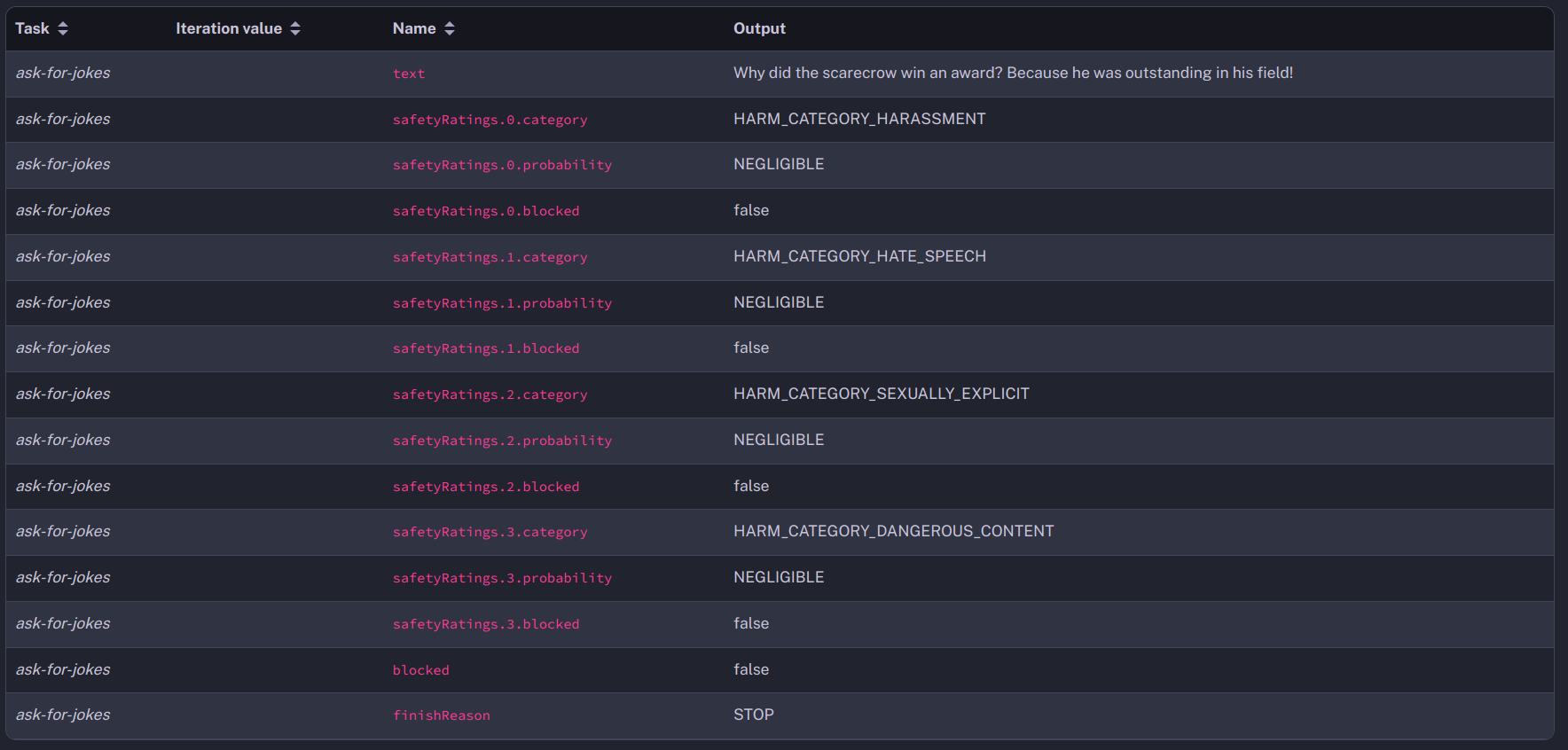
The task interacts with Gemini to generate responses across various modalities, outputting predictions that include both the generated content and safety ratings. While initially similar to what we’ve seen with previous AI models like Bard, Gemini take a step further with its multimodal completion capability. This function allows it to process and generate content that spans text, audio, and video within a single query.
Here is a more complex example that ask to describe an image and a video passed to the flow as inputs. It add two contents, one is the question as a text, the other is the image or the video. You must set the mimeType attribute to the mime type of the image or video content so Gemini can analyse it.
id: gemininamespace: company.team
inputs:  - id: image    type: FILE  - id: video    type: FILE
tasks:  - id: describe-image    type: io.kestra.plugin.gcp.vertexai.MultimodalCompletion    region: "{{vars.gcpRegion}}"    projectId: "{{vars.gcpProjectId}}"    contents:      - content: Can you describe this image?      - mimeType: image/jpeg        content: "{{inputs.image}}"
- id: describe-video type: io.kestra.plugin.gcp.vertexai.MultimodalCompletion region: "{{vars.gcpRegion}}" projectId: "{{vars.gcpProjectId}}" contents: - content: Can you describe this video? - mimeType: video/mpeg4 content: "{{inputs.video}}"This is the generated text for the description of the image.

The image was indeed a schema of the Java classloader system, the answer is pretty good, but we can see that it is truncated.
If we look at the outputs of the task, there is a finishReason that has the value MAX_TOKENS. The answer was truncated because it reach the completion max tokens limit, it can be increased by configuring the task with a higher max output tokens.
- id: describe-image type: io.kestra.plugin.gcp.vertexai.MultimodalCompletion region: "{{vars.gcpRegion}}" projectId: "{{vars.gcpProjectId}}" contents: - content: Can you describe this image? - mimeType: image/jpeg content: "{{inputs.image}}" parameters: maxOutputTokens: 1024 temperature: 0.2 topP: 0.95 topK: 40With this configuration, the description of the image is no more truncated.
This is the generated text for the description of the video, the video was a screencast of Kestra, the description is not very accurate except for the black color as I used Kestra’s dark theme.

Gemini has security safety included, and it works for all type of content.
For example, if you ask Gemini to describe a photo of an identity card, the answer will be blocked for a safety reason and the task ends in WARNING.
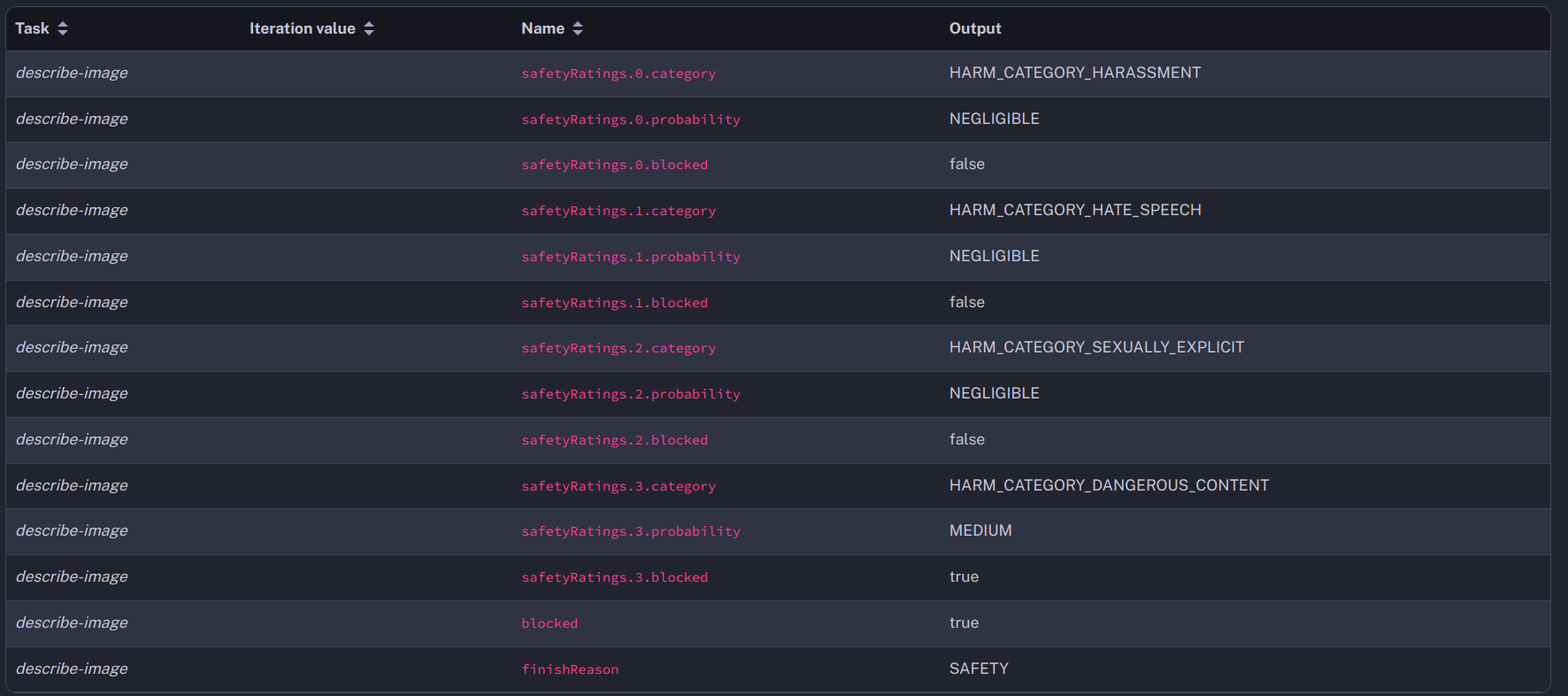
You can see in the outputs that the safety category HARM_CATEGORY_DANGEROUS_CONTENT was evaluated as MEDIUM and blocked the answer.
Now that you saw how to leverage Vertex AI Gemini model with Kestra, you can play with it and integrate it to others workflows!
Check out others tasks related to Generative AI that we support with Kestra:
For more information, you can have a look at the Google Quickstarts for Generative AI and the documentation of the TestCompletion and ChatCompletion tasks.
If you have any questions, reach out via Kestra Community Slack or open a GitHub issue.
If you like the project, give us a GitHub star and join the open-source community.

Stay up to date with the latest features and changes to Kestra