Authors

Shruti Mantri

Shruti Mantri
This blog post dives into Kestra’s integrations for AWS, with an example of a real-world data pipeline I used in my daily work as a data engineer. The data pipeline consists of multiple AWS services, including DynamoDB, S3, and Redshift, which are orchestrated using Kestra.
AWS offers a vast array of cloud services, including computing power, storage, database solutions, networking and more. This extensive portfolio of service offerings is one of the key advantages of using AWS. AWS also offers a pay-as-you-go pricing model, allowing organizations to pay only for the resources they consume, thereby reducing costs and optimizing resource utilization. With these features, AWS has become the backbone of many businesses, from startups to enterprises, providing them with scalable and reliable infrastructure to innovate and grow.
Kestra is a powerful orchestration engine with a rich set of plugins. Kestra seamlessly integrates with multiple AWS services making it easy to orchestrate AWS services based data pipelines.
In this blog post, we will develop a data pipeline that has data about products and orders. We start with both the data sets being present as CSV files. Our final aim is to join these two data sets and have detailed orders, where each order record has complete product information, in the CSV format.
In the actual world, dimension data like products would be present in databases like RDS or DynamoDB, while fact data like orders will be present on file systems like S3. Taking this into consideration, we will have a data preparation phase where we would load the products CSV file onto DynamoDB, and orders CSV file onto S3 using Kestra.
Then, we will proceed to create the data pipeline. We will load the product data from DynamoDB onto Redshift and load order data from S3 onto Redshift. We’ll join these two tables from Redshift and upload the detailed orders to S3.
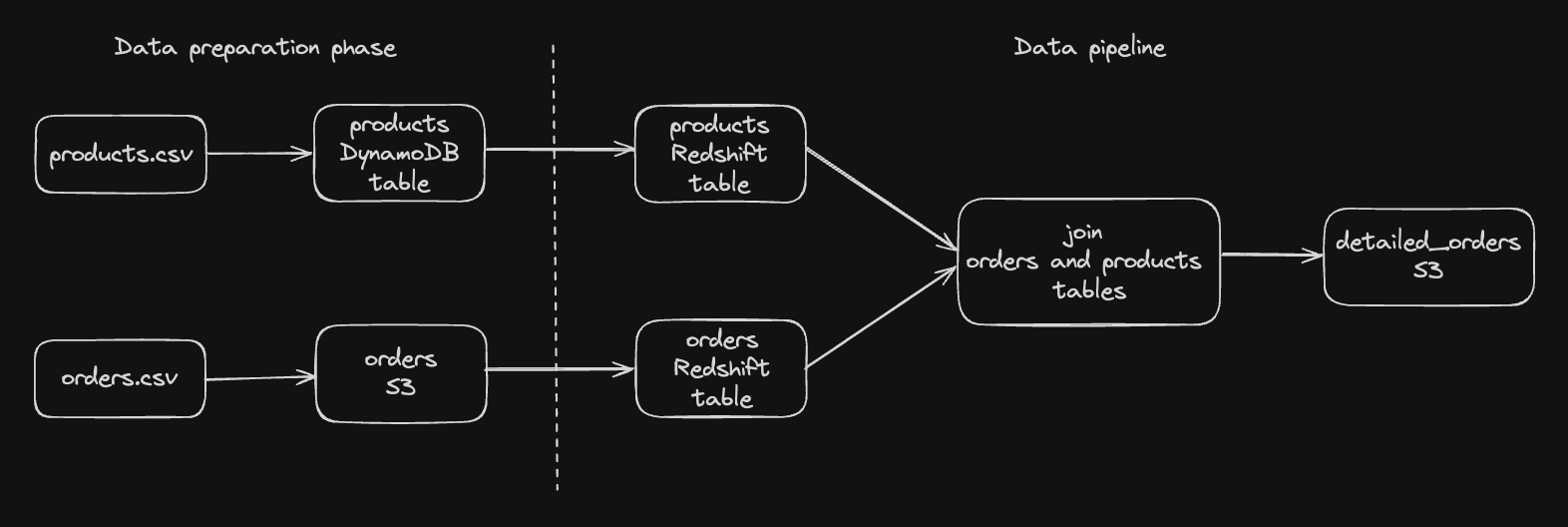
As part of the data preparation phase, we will have a Kestra flow that downloads the products file and orders file from HTTP, and then loads products onto DynamoDB, and uploads the orders file onto S3.
For uploading data onto DynamoDB, we will first create the products table in DynamoDB.
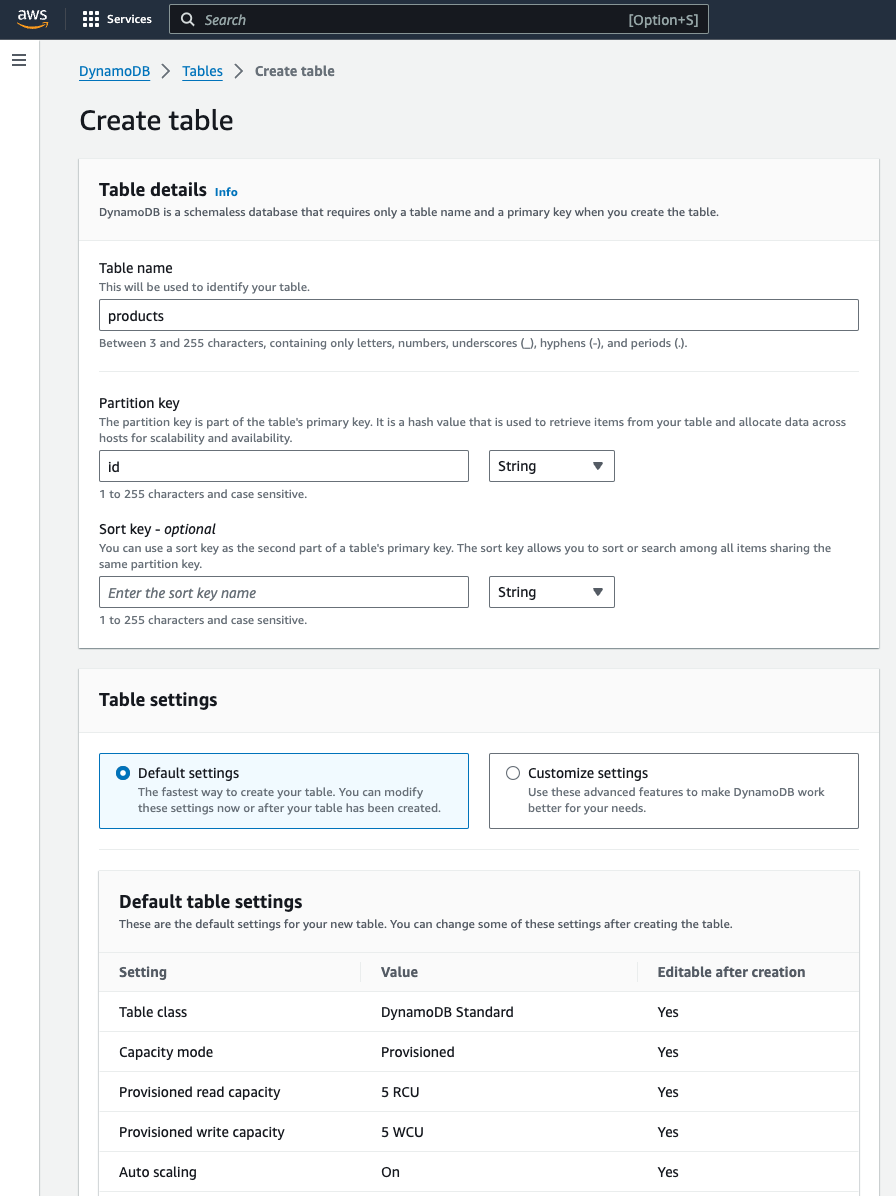
In order to upload the product records, we will call the PutItem task on DynamoDB for each of the product records from the products CSV file. Hence, we will have a product_upload flow that converts each incoming product record into JSON, and then writes the record onto DynamoDB using PutItem task.
id: product_uploadnamespace: company.team
inputs:  - id: product    type: STRING
tasks:  - id: json    type: io.kestra.plugin.serdes.json.IonToJson    from: "{{ inputs.product }}"
  - id: put_item    type: io.kestra.plugin.aws.dynamodb.PutItem    accessKeyId: "{{ secret('AWS_ACCESS_KEY_ID') }}"    secretKeyId: "{{ secret('AWS_SECRET_KEY_ID') }}"    region: "eu-central-1"    tableName: "products"    item:      id: "{{ read(outputs.json.uri) | jq('.product_id') | first | number }}"      name: "{{ read(outputs.json.uri) | jq('.product_name') | first }}"      category: "{{ read(outputs.json.uri) | jq('.product_category') | first }}"      brand: "{{ read(outputs.json.uri) | jq('.brand') | first }}"
The main data preparation flow, data_preparation, would download the products file (task: http_download_products), read the products CSV file as ion (task: csv_reader_products), call the product_upload flow for each of the product records (task: for_each_product), download the orders file (task: http_download_orders), and then upload the orders CSV file onto S3 (task: s3_upload_orders).
id: data_preparationnamespace: company.teamtasks: - id: http_download_products type: io.kestra.plugin.core.http.Download uri: https://huggingface.co/datasets/kestra/datasets/raw/main/csv/products.csv - id: csv_reader_products type: io.kestra.plugin.serdes.csv.CsvToIon from: "{{ outputs.http_download_products.uri }}" - id: for_each_product type: io.kestra.plugin.core.flow.ForEachItem items: "{{ outputs.csv_reader_products.uri }}" batch: rows: 1 namespace: company.team flowId: product_upload wait: true transmitFailed: true inputs: product: "{{ taskrun.items }}" - id: http_download_orders type: io.kestra.plugin.core.http.Download uri: https://huggingface.co/datasets/kestra/datasets/raw/main/csv/orders.csv - id: s3_upload_orders type: io.kestra.plugin.aws.s3.Upload accessKeyId: "{{ secret('AWS_ACCESS_KEY_ID') }}" secretKeyId: "{{ secret('AWS_SECRET_KEY_ID') }}" region: "eu-central-1" from: "{{ outputs.http_download_orders.uri }}" bucket: "kestra-bucket" key: "kestra/input/orders.csv"You can now check that the DynamoDB products table should contain 20 rows. The S3 bucket should have orders.csv file in the appropriate location.
We will now proceed to the data pipeline. We need to load the products from DynamoDB in products Redshift table, and orders from S3 in orders Redshift table. For that, we would create the corresponding tables in case they do not exist (tasks: redshift_create_table_products and redshift_create_table_products). Then, we would insert the product records from DynamoDB and orders from S3 into Redshift in their corresponding tables using COPY command (tasks: redshift_insert_into_products and redshift_insert_into_orders). We would join these two Redshift tables using the Redshift Query task (task: join_orders_and_products). The resulting detailed order results are converted into CSV format (task: csv_writer_detailed_orders), and this CSV file is then uploaded onto S3 (task: s3_upload_detailed_orders). The complete Kestra flow would look like follows:
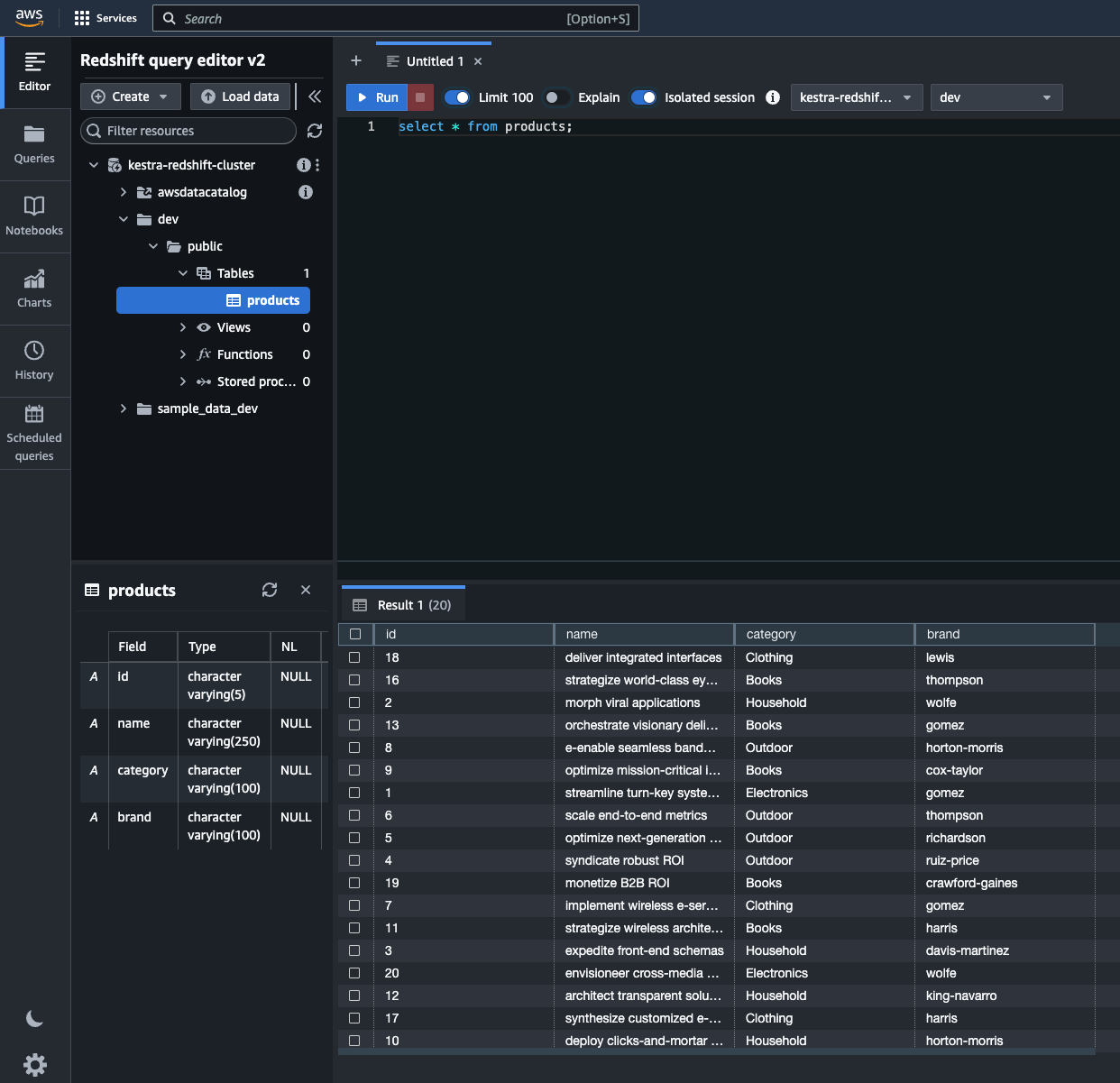
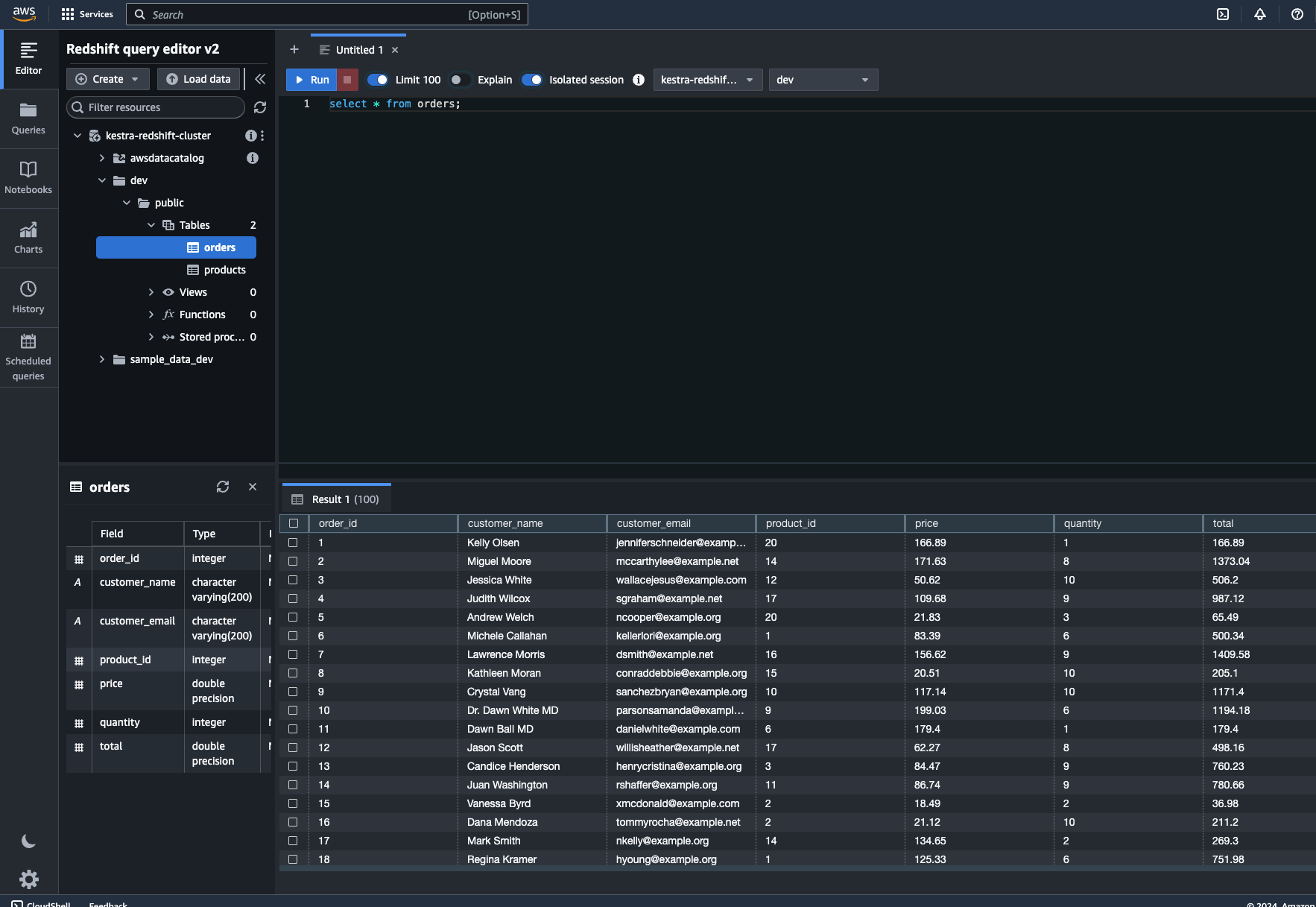
id: aws_data_pipelinenamespace: company.teamtasks: - id: redshift_create_table_products type: io.kestra.plugin.jdbc.redshift.Query url: jdbc:redshift://<redshift-cluster>.eu-central-1.redshift.amazonaws.com:5439/dev username: redshift_username password: redshift_passwd sql: | create table if not exists products ( id varchar(5), name varchar(250), category varchar(100), brand varchar(100) ); - id: redshift_create_table_orders type: io.kestra.plugin.jdbc.redshift.Query url: jdbc:redshift://<redshift-cluster>.eu-central-1.redshift.amazonaws.com:5439/dev username: redshift_username password: redshift_passwd sql: | create table if not exists orders ( order_id int, customer_name varchar(200), customer_email varchar(200), product_id int, price float, quantity int, total float ); - id: redshift_insert_into_products type: io.kestra.plugin.jdbc.redshift.Query url: jdbc:redshift://<redshift-cluster>.eu-central-1.redshift.amazonaws.com:5439/dev username: redshift_username password: redshift_passwd sql: | copy products from 'dynamodb://products' credentials 'aws_access_key_id=<access-key>;aws_secret_access_key=<secret-key>' readratio 50; - id: redshift_insert_into_orders type: io.kestra.plugin.jdbc.redshift.Query url: jdbc:redshift://<redshift-cluster>.eu-central-1.redshift.amazonaws.com:5439/dev username: redshift_username password: redshift_passwd sql: | copy orders from 's3://smantri-test-bucket/kestra/input/orders.csv' credentials 'aws_access_key_id=<access-key>;aws_secret_access_key=<secret-key>' ignoreheader 1 csv; - id: join_orders_and_products type: io.kestra.plugin.jdbc.redshift.Query url: jdbc:redshift://<redshift-cluster>.eu-central-1.redshift.amazonaws.com:5439/dev username: redshift_username password: redshift_passwd sql: | select o.order_id, o.customer_name, o.customer_email, p.id as product_id, p.name as product_name, p.category as product_category, p.brand as product_brand, o.price, o.quantity, o.total from orders o join products p on o.product_id = p.id store: true - id: csv_writer_detailed_orders type: io.kestra.plugin.serdes.csv.IonToCsv from: "{{ outputs.join_orders_and_products.uri }}" - id: s3_upload_detailed_orders type: io.kestra.plugin.aws.s3.Upload accessKeyId: "{{ secret('AWS_ACCESS_KEY_ID') }}" secretKeyId: "{{ secret('AWS_SECRET_KEY_ID') }}" region: "eu-central-1" from: "{{ outputs.csv_writer_detailed_orders.uri }}" bucket: "kestra-bucket" key: "kestra/output/detailed_orders.csv"Once you execute this flow, you can check that the Redshift has products and orders tables with the corresponding data. You can use Redshift Query editor for this purpose.
You can also check the detailed orders by going to the Outputs tab and using the Preview function on the uri attribute of the csv_writer_detailed_orders task. Also, you can check that this CSV file has been uploaded to the appropriate location in S3.
This example demonstrated how we can orchestrate data pipelines using Kestra. Kestra can orchestrate any kind of workflow, exposing a rich UI that monitors all executions.
Join the Slack community if you have any questions or need assistance. Follow us on Twitter for the latest news. Check the code in our GitHub repository and give us a star if you like the project.

Stay up to date with the latest features and changes to Kestra