Authors

Benoit Pimpaud
Benoit Pimpaud
If you’re into automation you know cron schedule and file system event listening are the basics. We need to run jobs on a daily schedule and listen to new files arriving on the FTP or S3 buckets. But what is the second most important part of automation?
Connecting to third-party API.
Nowadays it’s common to monitor and manage many different tools, operating on various company domains. Kestra already provides a control plane to manage dependencies between these. But connecting to any API tool while keeping with a simple semantic is the crux.
And this is exactly what we are going to show you in this blog post.
The ultimate goal of automation is to trigger action based on business events. What happens when the product stock is too low to support new orders? How to deal with unused analytics dashboards and improve data governance in the company, how to scale the underlying application infrastructure when traffic is unusual during pics of activity?
Let’s dive into 3 examples of Kestra’s HTTP trigger task that allows triggering workflows based on API status.
Supply management is a complicated job. Aligning stock with order provisions is always a tough exercise. It’s often based on manual monitoring and human processes.
Adding automation here is the way to go. Being able to trigger any workflow based on the real events happening in the warehouse is possible in Kestra thanks to the http.Trigger task.
id: http_stock_alertnamespace: company.team
tasks:  - id: send_whatsapp_message    type: io.kestra.plugin.meta.whatsapp.WhatsAppIncomingWebhook    url: "{{ secret('WHATSAPP_WEBHOOK') }}"    payload: |      {        "profileName": "Warehouse",        "whatsAppIds": ["IdOfFieldManager, IdOfSupplyManager"],        "from": 380999999999,        "messageId": "Stock in the warehouse is below 10 units!"      }
triggers:  - id: http    type: io.kestra.plugin.core.http.Trigger    uri: https://warehouse.company.io/api/stock?product_id=1    responseCondition: "{{ json(response.body).stock_value <= 10 }}"    interval: PT2M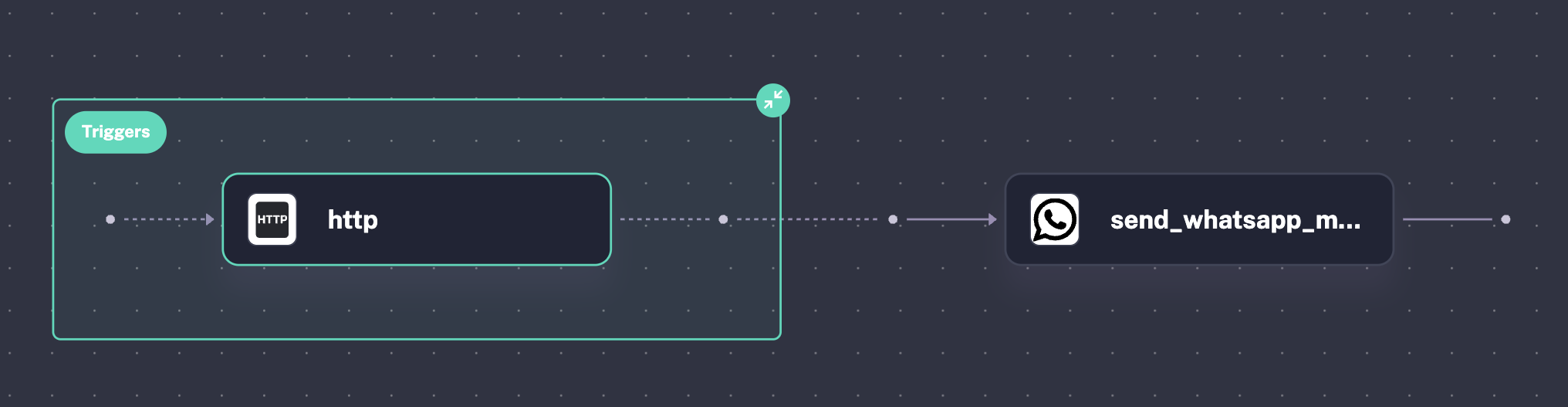
In the above example, we have an API endpoint exposed by the service managing our warehouse facility. This endpoint allows gathering information such as stock information for certain products.
The Kestra flow checks every 2 minutes if the product stock is below a threshold. Based on this value, we want to trigger a What’s App message to the field manager and supply manager to let them know a product needs to be supplied as soon as possible.
Another example of an event-driven workflow can be applied in data governance.
It’s not rare to see hundreds of dashboards aggregating within a Business Intelligence tool. Data analysts are being asked to create dashboards all year, but sometimes the monthly average usage of these charts is very low, sometimes non-existent.
Therefore it’s important to clean up and warn the data product manager and data analysts that some insights are not used or that there is a need for an update somewhere.
The example above shows how to look for Tableau management API to find dashboards that are not used. Whenever a dashboard has not been used for 14 days, the flow tags the Tableau workbook as “archived” and sends a notification to the data product manager.
This will allow him to trigger a discussion with end stakeholders. How much do they rely on data to make decisions? How much do they need a dashboard or not? How much of an update is needed?
id: tableau-governancenamespace: company.team
variables:  workbook_luid: 6345964502
tasks:
  - id: auth-tableau-api    type: io.kestra.plugin.core.http.Request    uri: https://tableau.example.com/api/3.22/auth/signin    body: |      {        "credentials": {          "personalAccessTokenName": "{{ secret('TABLEAU_ACCESS_TOKE_NAME') }}",          "personalAccessTokenSecret": "{{ secret('TABLEAU_ACCESS_TOKE_SECRET') }}",        }      }
  - id: add_tag    type: io.kestra.plugin.core.http.Request    uri: https://tableau.example.com/api/api-version/sites/site-id/workbooks/workbook-id/tags    method: PUT    headers:      X-Tableau-Auth: "{{ json(response.body).token }}"    body: |      <tsRequest>        <tags>          <tag label="tag" />            archived          </tags>      </tsRequest>
  - id: send_slack_alert    type: io.kestra.plugin.slack.notifications.SlackIncomingWebhook    url: "{{ secret('SLACK_WEBHOOK') }}"    payload: |      {        "channel": "#alerts",        "text": "The Tableau workbook {{ vars.workbook_luid }} hasn't been usued in the last two weeks! It's has been tagged as 'archived' "      }
triggers:  - id: http    type: io.kestra.plugin.core.http.Trigger    uri: https://tableau.example.com/api/-/content/usage-stats/workbooks/{vars.workbook_luid}    responseCondition: "{{ json(response.body).hitsLastTwoWeeksTotal <= 10 }}"    interval: PT1M
Incident management is usually spread over diverse teams and responsibilities. Some engineers have to be on duty. Some managers would like to get notified and stick to the last incident events. You usually want what’s called a “war room”, to create a short-lived communication channel and gather all those responsible for managing the issue.
This involves several tools and processes. Depending on the the level of maturity and complexity of the company it can be hard to streamline the “war room” process and improve the Mean Time To Repair metric. An automation platform like Kestra allows to manage all this setup and interconnect all the necessary tools during the process.
Here is an example of Kestra flow that listens to Grafana metrics critical to the underlying business. When a metric is larger than the SLA threshold, it will automatically trigger a war room setup by creating a ticket with Service Now, creating a dedicated “war room channel” in Slack, and sending an alert through Pager Duty to easily head up the engineer in duty while managing team rotation.
id: war-room-setupnamespace: company.team
tasks:
  - id: service_now_post    type: io.kestra.plugin.servicenow.Post    domain: "{{ secret('SERVICE_NOW_DOMAIN') }}"    username: "{{ secret('SERVICE_NOW_USERNAME') }}"    password: "{{ secret('SERVICE_NOW_PASSWORD') }}"    clientId: "{{ secret('SERVICE_NOW_CLIENT_ID') }}"    clientSecret: "{{ secret('SERVICE_NOW_CLIENT_SECRET') }}"    table: incident    data:      short_description: CPU usage hits set threshold.      requester_id: f8266e2adb16fb00fa638a3a489619d2      requester_for_id: a7ec77cbdefac300d322d182689619dc      product_id: 01a2e3c1db15f340d329d18c689ed922
  - id: create_war_room_slack    type: io.kestra.plugin.core.http.Request    method: POST    uri: https://slack.com/api/conversations.create    headers:      Authorization: "{{ secret('SLACK_TOKEN') }}"    formData:      name: war_room
  - id: invite_users    type: io.kestra.plugin.core.http.Request    method: POST    uri: https://slack.com/api/conversations.invite    headers:      Authorization: "{{ secret('SLACK_TOKEN') }}"    formData:      users: "W1234567890,U2345678901,U3456789012"      channel_id: "{{ json(outputs.create_war_room_slack.body).channel.id }}"
  - id: send_pagerduty_alert    type: io.kestra.plugin.pagerduty.PagerDutyAlert    url: "{{ secret('PAGERDUTY_URL') }}"    payload: |      {        "dedup_key": "<samplekey>",        "routing_key": "<samplekey>",        "event_action": "acknowledge"      }
triggers:  - id: http    type: io.kestra.plugin.core.http.Trigger    uri: https://your-grafana.com/api/datasources/name/prometheusmetrics?target=cpu.usage    headers:      Authorization: "Bearer {{ secret('GRAPHANA_API_KEY') }}"    responseCondition: "{{ json(response.body).result.metric.value >= 0.8 }}"    interval: PT5M
The more we can automate tasks, the more time we have for important things that help the business. It’s like a never-ending race to make things faster and smoother!
The key is to connect with the things that make your applications run, often through APIs. Kestra makes it easy to connect to any API and even start workflows based on real-world events!
So, what tasks can you automate? What tools would make your life easier?
Join the Slack community where developers share ideas, request new features, and help each other out!
Follow us on Twitter for the latest news. Check the code in our GitHub repository and give us a star if you like the project.

Stay up to date with the latest features and changes to Kestra