Authors

Florian Hussonnois

Florian Hussonnois
Kestra’s servers use a heartbeat mechanism to periodically send their current state to the Kestra backend, indicating their liveness. That mechanism is crucial for the timely detection of server failures and for ensuring seamless continuity in workflow executions.
We introduced a new liveness and heartbeat mechanism for Kestra services with the aim to continue improving the reliability of task executions, especially when using the JDBC backend. This post introduces the benefits of the new heartbeat mechanism, and the problems it solves.
Before delving into the details, let’s take a moment to touch upon the concept of reliability which is a complex and fascinating engineering subject. According to Wikipedia, Reliability refers to the ability of a system or component to function under stated conditions for a specified period of time. In the context of Kestra and orchestration platforms in general, we can define it as the reliability and constancy of the system to run and complete all the tasks for a Flow without failure. To achieve this objective, Kestra implements different fault-tolerance strategies and mechanisms to mitigate various failure scenarios, minimize downtime, and provide the ability to recover gracefully from routine outages. One of those strategies is the capability to deploy redundant instances of Kestra’s services.
As a quick reminder, Kestra operates as a distributed platform with multiple services, each having specific responsibilities (comparable to a microservices architecture). Among these services, the two most important are the Workers and Executors. Executors oversee flow executions, deciding which tasks to run, while Workers handle the actual execution of these tasks.
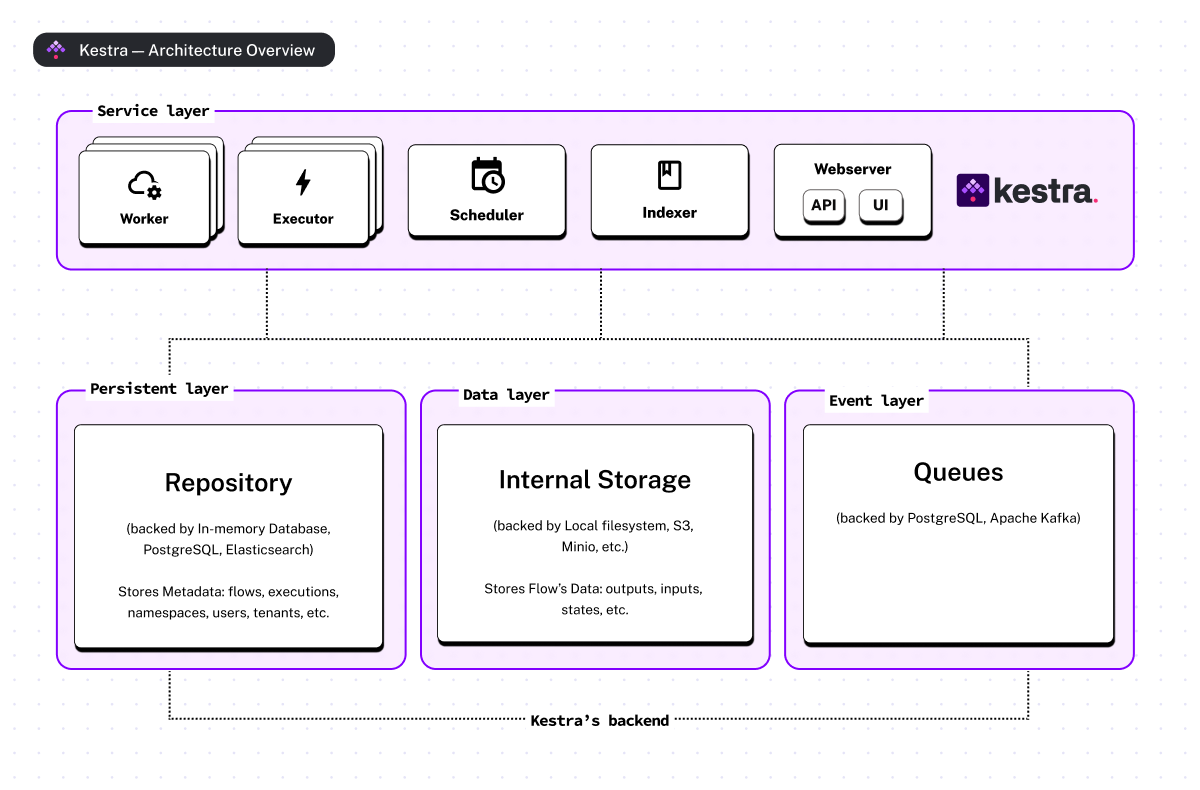
In Kestra, you can deploy as many workers and executors as you need. This not only allows you to scale your platform to handle millions of executions efficiently but also to ensure service redundancy. In fact, having multiple instances of the same service helps reduce downtime and guarantees uninterrupted workflow executions in the face of errors. Being able to deploy multiple instances of any service also reduces the risk of overloading resources as the load is distributed over more than one instance.
However, despite numerous advantages of fault tolerance and scalability mechanisms, this approach introduces new challenges and increased complexity, especially within a distributed system..
Having a bunch of distributed workers, each executing thousands of tasks in parallel, for whom it is necessary to always guarantee correct execution can be challenging. As they say: “The first rule of distributed systems is don’t distribute your system”. Things can go wrong at any time.
For example, a worker may be killed, restarted after a failure, disconnected from the cluster due to a transient network failure, or even unresponsive due to a JVM full garbage collection (GC), etc.
For any of these scenarios, we need to be able to provide fail-safe mechanisms to ensure the reliability of task execution and to be able to re-execute uncompleted tasks in the event of a worker failure. To handle these scenarios, we’ve introduced a failure detection mechanism to support our JDBC deployment mode. Kestra’s Enterprise Edition (EE) was not directly affected by these changes, as Apache Kafka, natively provides durability and reliability of task executions.
In distributed systems, a relatively standard pattern to periodically check the availability of services is the use of Heartbeat messages. In Kestra, we used that mechanism to report the liveness of Workers to Executors, timely detect unresponsive workers, and automatically re-emit any uncompleted tasks, ensuring seamless continuity in workflow executions.
In our initial approach, Kestra’s Workers could be considered either as UP or DEAD at any point in time. At regular intervals, workers send a message to the Kestra’s backend to signal their health status (i.e., kestra.heartbeat.frequency:).
Then, the Executors are responsible for detecting missing heartbeats, acknowledging workers as dead as soon as a limit is reached, and immediately rescheduling tasks for unhealthy workers (i.e., kestra.heartbeat.heartbeat-missed). Finally, the worker is removed from the cluster metadata.
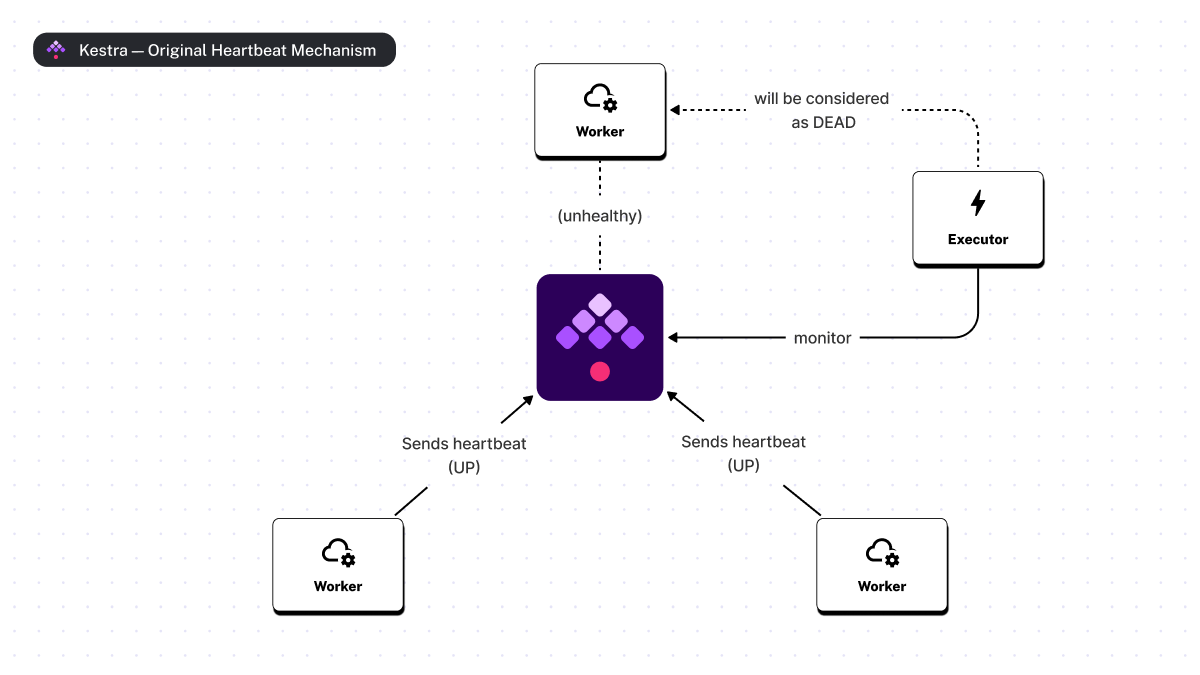
If a worker is alive but unable to send a heartbeat for a short period of time (e.g., in the event of a transient network failure or saturation of the JVM’s garbage collector), it will detect that it has been marked as DEAD or evicted and shut down automatically.
This approach was successful in most deployment scenarios. However, in more complex contexts and for a few corner cases, this strategy had a few drawbacks.
One of the first disadvantages was that the heartbeat configuration had to be the same for all workers. This configuration was managed globally by the Executor service, which was responsible for detecting unhealthy workers by applying the same rule to all. However, all workers don’t necessarily have the same load, the same type of processing or being deployed in the same network. As a result, some workers may be more prone to resource saturation, leading to thread starvation or even network disconnection due to reduced bandwidth.
As an example, Kestra Edition Enterprise provides the Worker Group feature, which allows you to create logical groups of Workers. Those groups can then be targeted for specific task executions. Worker groups come in handy when you need a task to be executed on a worker having specific hardware configurations (GPUs with preconfigured CUDA drivers), in a specific network availability zone, or when you want to isolate long-running and resource-intensive workloads. In such a context, you can relax the heartbeat mechanism and tolerate more missing heartbeats to avoid considering a worker dead when it is not.
Another problem was the risk of duplicate executions when a worker was considered dead due to temporary unavailability. In this scenario, an executor could resubmit the execution of the tasks for this worker, with no guarantee that the worker would actually be stopped. This is a very hard problem, because from the executor’s point of view, it’s impossible to know whether the worker is dead. Therefore, a reasonable option is to assume that the worker is dead after a certain period of inactivity. How long should this period be? Well, “it depends!”. This brings us back to our first limitation, and the necessity to manage each worker independently.
Finally, in very rare situations, certain tasks can operate as veritable time bombs. Let’s imagine that a user of your platform writes a simple Flow to download, decompress, and query a very large Parquet file. If the file turns out to be too large your worker can run out of disk space and crash. Unfortunately, the task will be rescheduled to another worker, which will eventually fail itself, creating a cascading failure. To avoid this, it might be useful to be able to isolate unstable tasks in a worker group for which tasks are not re-emit in case of failure.
To resolve these limitations and offer additional functionalities, we came up with a new mechanism that would offer our users greater flexibility..
The Kestra Liveness Mechanism has now been extended to all Kestra service components, and is no longer just reserved for Workers. We have also moved from the binary state (UP or DEAD) used for the worker to a full lifecycle, enabling us to improve the way services are managed by the cluster according to their state.
The diagram below illustrates the various states in the lifecycle of each service
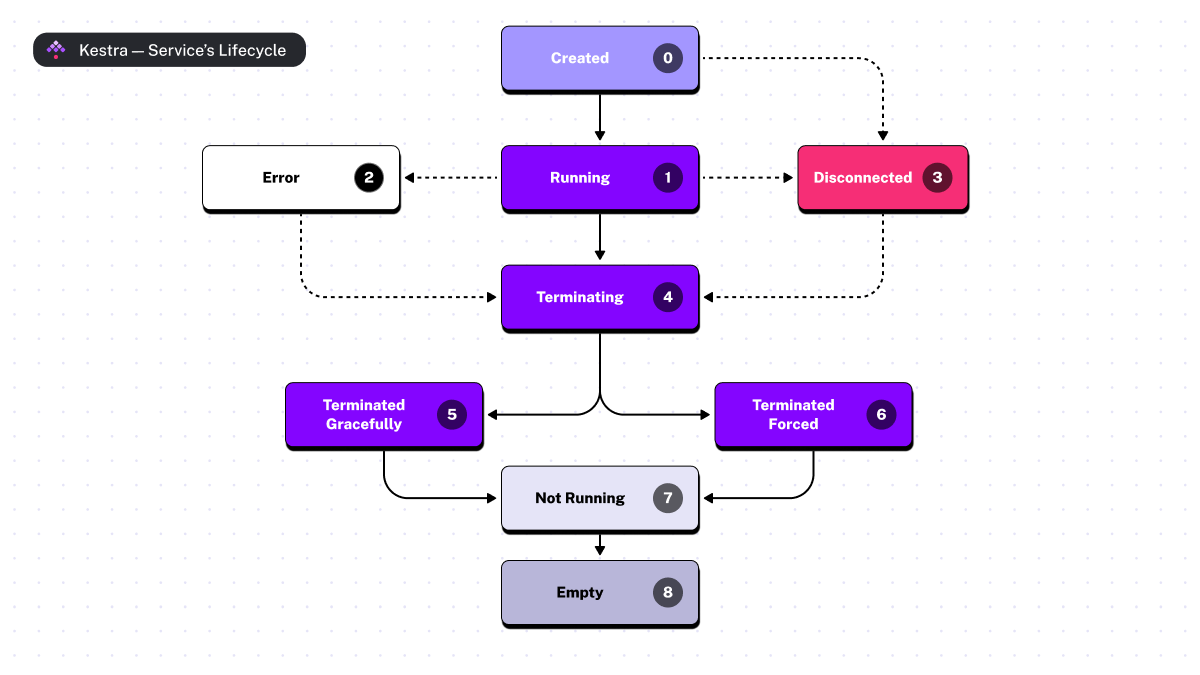
First, a service always starts in the CREATED state before switching almost immediately to the RUNNING state as soon as it is operational. Then, when a service stops, it switches to the TERMINATING and then the TERMINATED GRACEFULLY states (when a worker is forced to stop, there is also the TERMINATED FORCED state). Finally, the two remaining states, NOT_RUNNING and EMPTY, are handled by Executors to finalize the service’s removal from the cluster.
In addition to these states, a service can be switched to the DISCONNECTED state. At this point, Kestra’s liveness mechanism comes into play.
The Kestra liveness mechanism relies on heartbeat signals from the services to the Kestra’s backend. Although this approach is similar to the initial implementation, we now use a configurable timeout to detect client failures instead of a number of missing heartbeats. On each client, a dedicated thread, called Liveness Manager, is responsible for propagating all state transitions and the current state of services at fixed intervals. If, at any time, an invalid transition is detected, the service will automatically start to shut down gracefully (i.e., it switches to Terminating). Therefore it is not possible for a service to transition from a DISCONNECTED state to a RUNNING state.
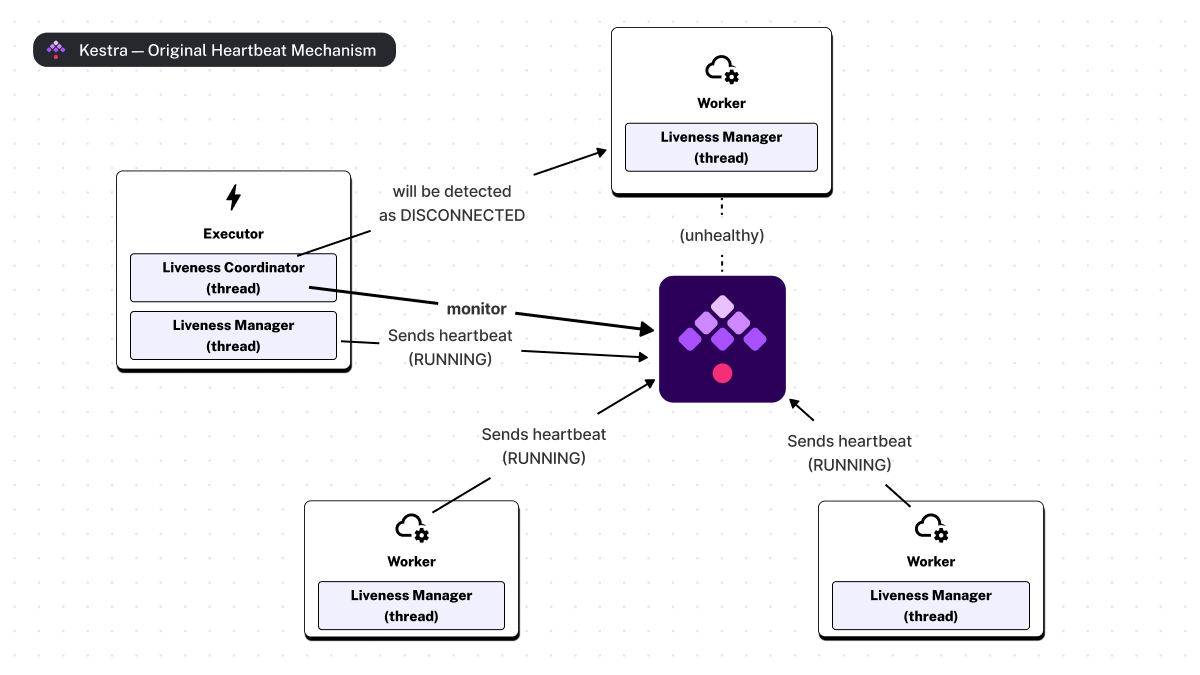
Next, Executors are responsible for detecting unhealthy or unresponsive services. This is handled by a dedicated thread called the Liveness Coordinator. If no status update is detected within a timeout period, the Liveness Coordinator automatically transitions the service to the DISCONNECTED state. In some situations, workers also have dedicated logic to proactively switch to “DISCONNECTED” mode, e.g. when they have been disconnected from the backend for too long or when updating the status is not possible.
The data model of the heartbeat signal was designed to hold not only the state of the service but also its liveness configuration so that the liveness coordinator can monitor each service.
By default, Executors will not immediately re-emit tasks for a DISCONNECTED worker. Instead, an Executor will wait until a grace period is exhausted. That grace period corresponds to the expected time a service will complete all of its tasks before completing a graceful shutdown. We use this mechanism to allow a worker that has been disconnected but has not failed to perform a graceful shutdown. If a worker fails to complete within that grace period, it shuts down immediately and switches to the TERMINATED_FORCED state. In that situation, an executor will manage the remaining uncompleted tasks.
Now that we have a better understanding of the lifecycle of services and how the liveness mechanism works, let’s explore the available configuration properties that you can use to tune Kestra for your operational context.
Starting from Kestra 0.16.0, the liveness and heartbeat mechanism can be configured individually for each service through the properties under kestra.server.liveness. This means you can now adapt your configuration depending on the service type, the service load, or even your Worker Group.
Without going into too much detail, here is the default and recommended configuration for a Kestra JDBC deployment.
kestra:
server:
liveness:
# Enable/Disable scheduled state updates (a.k.a, heartbeat)
enabled: true
# The expected time between liveness probe.
interval: 3s
# The timeout used to detect service failures.
timeout: 45s
# The time to wait before executing a liveness probe.
initialDelay: 45s
# The expected time between service heartbeats.
heartbeatInterval: 3sThe two most important settings are:
kestra.server.liveness.heartbeatInterval that defines the interval between heartbeatskestra.server.liveness.timeout defines the period after which a service is considered unhealthy because there was no heartbeat or state update within the timeout period.In addition, you can now configure after which initial delay an service will start to be managed by an Executor. During this initial delay a worker cannot be considered as DISCONNECTED. In practice, increasing this property can be useful when bootstrapping a new worker on a platform with very intensive workloads.
Finally, it’s worth mentioning that liveness can be disabled by setting kestra.server.liveness.enabled=false. However, disabling it is not recommended for production environments, as workers will never be detected as disconnected, and tasks will not be restarted in the event of failure. For this reason, this property is mainly intended for development and testing.
NOTE: For Kestra EE and an Apache Kafka-based deployment, we recommend configuring the timeout and initial delay to one minute. The reason behind these values is that liveness is directly handled by the Kafka protocol itself.
We have also introduced the concept of a grace period for Kestra services. The termination grace period defines the allowed period of time for a service to stop gracefully. By default, it’s set to 5 minutes.
If your service finishes shutting down and exits before the terminationGracePeriod is done, it will switch to the TERMINATED_GRACEFULLY. Otherwise, it will be TERMINATED_FORCED.
As mentioned in the configuration properties above, the terminationGracePeriod can be configured per service instance.
For example, if you know that your workers only perform short-term tasks, you can use the following configuration to change it to 60 seconds
kestra:
server:
terminationGracePeriod: 60 seconds.
The terminatioGracePeriod is used when your service instance receives a SIGTERM signal. Therefore, if you plan to deploy Kestra in Kubernetes, this property should be slightly less than the termination grace period configured for your pods as a safety measure. If Kubernetes forcibly stops one of your workers via a SIGKILL signal, then an Executor will automatically detect it as DISCONNECTED. This is how we accomplish the objective of tasks always running till completion, no matter what!
The termination grace period plays a crucial role in the execution of your tasks and defines the maximum time within which tasks can be resumed in the event of a worker failure. In practice, if the grace period is set too high, this can result in a delay in task execution. Let’s explore that subject and see what options are available in the next section.
If you have already worked with NoSQL databases, you may be familiar with the CAP theorem. The CAP theorem introduces the principle that any distributed data store can provide only two of the following three guarantees: Consistency, Availability, and Partition tolerance.
Because any distributed system must be fault-tolerant to network partitioning, a system can be either available but not consistent or consistent but not available under network partitions. It is therefore common to see certain databases to be called CP or AP.
Although the CAP theorem is sometimes controversial or misunderstood, it remains an excellent tool for explaining the compromises that can be made when designing or configuring a distributed system.
As Kestra is a distributed platform, the same principles (or notions) can be applied to it. However, in our context, we’re going to adapt and transpose them to the execution of workers’ tasks (in other words, we’re not using the strict definitions of the CAP theorem).
Therefore, in our context, “Availability” refers to Kestra’s ability to execute and complete a task within a reasonable time once it has been scheduled, while “Consistency” is the guarantee that a task will be executed exactly once, even in the event of failure.
At Kestra, we think that deciding between Availability and Consistency of executions must not be a technical choice. In fact, the trade-off between both depends on the business use cases of our users.
That’s why we have decided to introduce a new property called kestra.server.workerTaskRestartStrategy that accepts the following values:
NEVER: Tasks are never restarted on worker failure (i.e., tasks are run at most once).IMMEDIATELY: Tasks are restarted immediately on worker failure, i.e., as soon as a worker is detected as DISCONNECTED. This strategy is used to reduce task recovery times at the risk of introducing duplicate executions (i.e., tasks are run at least once).AFTER_TERMINATION_GRACE_PERIOD(recommended): Tasks are restarted on worker failure after the termination grace period is elapsed. This strategy should prefer to reduce the risk of task duplication (i.e., tasks are run exactly once in best effort).Finally, by using both that property and the terminationGracePeriod you can place the cursor between the guarantees that matter for your operations. For example, if you need to ensure the availability of your task executions, you may opt for the IMMEDIATELY strategy. This will be to the detriment of the consistency as duplicate task executions may happen in the event of failures. Instead, you could opt for the AFTER_TERMINATION_GRACE_PERIOD strategy to minimize the risk of duplicates, but increasing the end-to-end latency of an execution.
It’s up to you to find the configuration that suits your context. But, once again, this decision can be made according to the use of your workers. Using Worker Groups, you can easily mix these different strategies within a Kestra cluster.
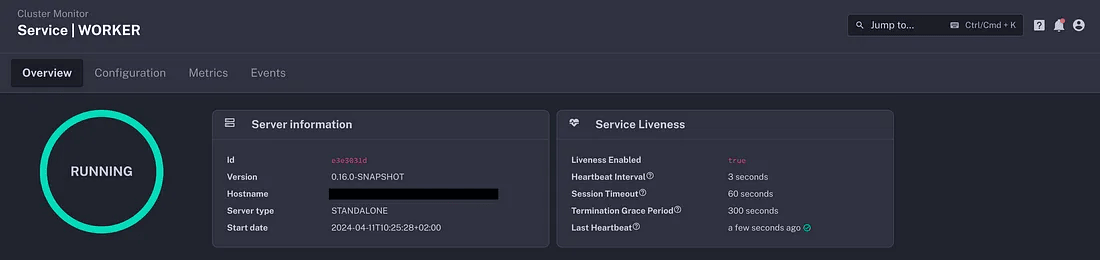
To provide more visibility into the new service lifecycle and heartbeat mechanism, Kestra EE offers a Cluster Monitor dashboard, giving you all information about the uptime of your cluster services at a glance.
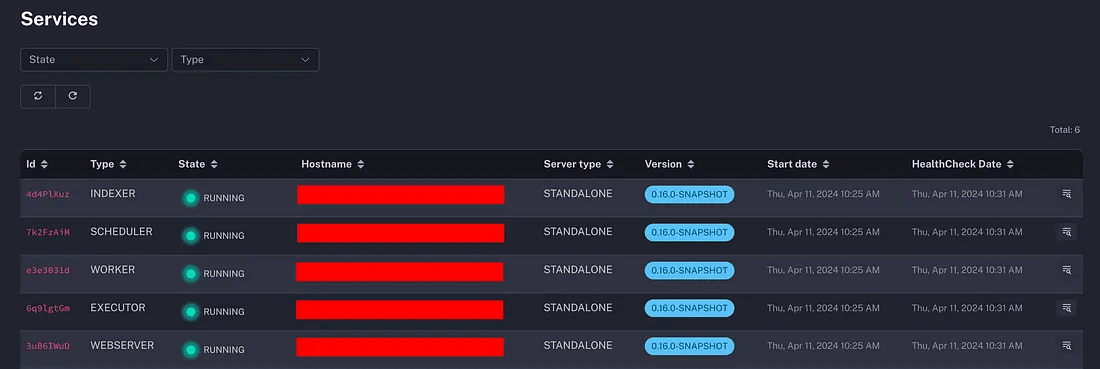
The dashboard provides access to the current state of each service, as well as, to the important liveness configuration. without having to dig into your deployment configuration files.
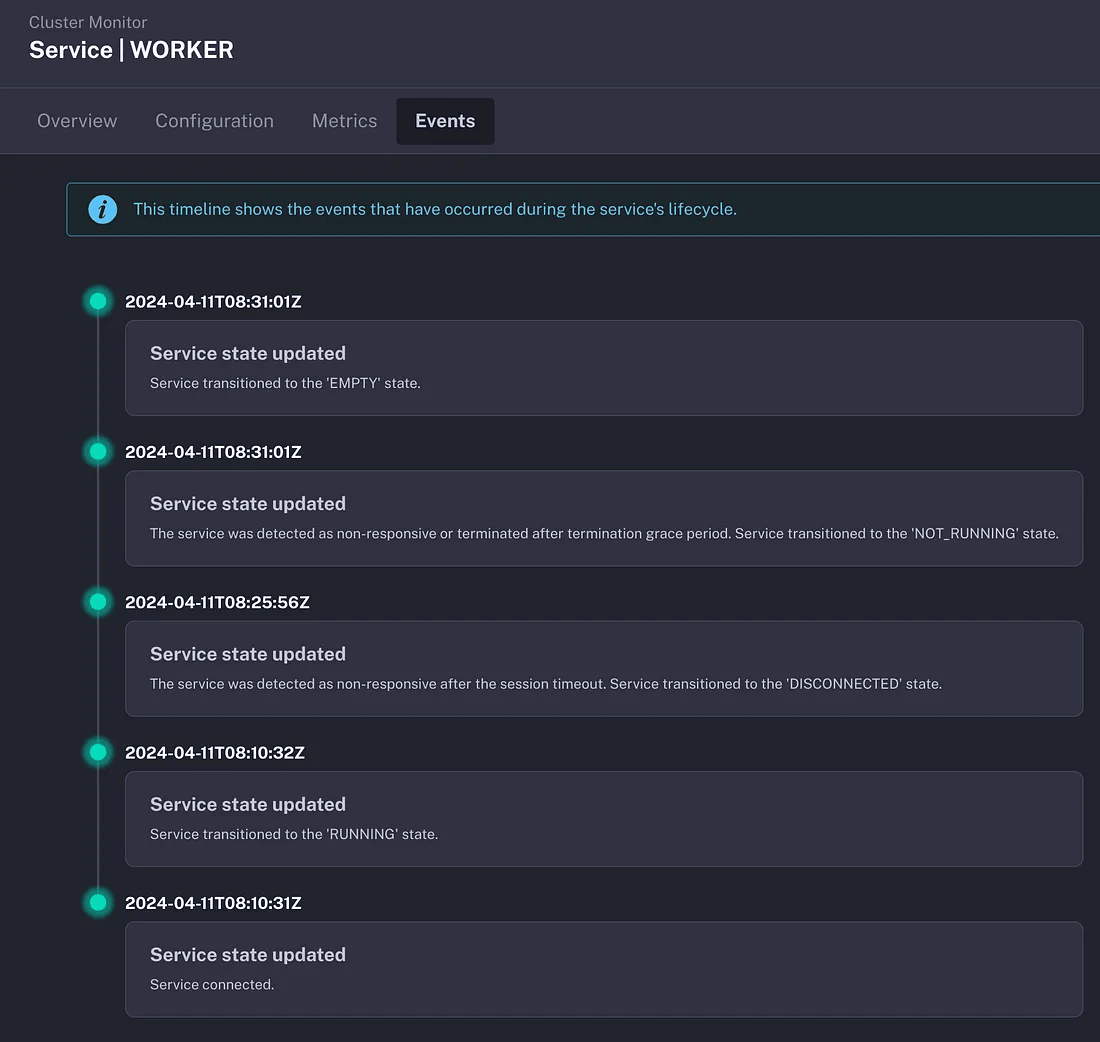
Moreover, users can now access the state transition history of each service, making it easier to understand the actual state of the cluster.
Reliability is not just a desirable feature but a fundamental principle for any distributed system. It encompasses many aspects including fault-tolerance, availability, and resilience that instill trust and ensure a seamless experience. At Kestra, we are committed to building a trustworthy and reliable orchestration platform to empower organizations to confidently build and operate business-critical workflows. This new liveness mechanism is another step in our mission to simplify and unify orchestration for all engineers.
Stay tuned for more insights on our engineering journey!
this blog post was originally posted in my personal Medium you can check it here
If you have any questions, reach out via Slack or open a GitHub issue.
If you like the project, give us a GitHub star and join the community.

Stay up to date with the latest features and changes to Kestra