Authors

Roman Acevedo
Software Engineer
Roman Acevedo
Software Engineer
Every Tuesday, we ship bug fixes across multiple maintained versions at once — LTS, latest, and sometimes older releases. At peak, that’s four parallel releases on the same day.
For a while, coordinating those releases required a lot of manual actions and mental bandwidth between GitHub repositories.
We build orchestration software, so fixing this with Kestra was an obvious move. I’ll walk through what that looked like, what I built to fix it, and what happened after I rolled it out.
A release used to go like this:
The jobs run for an hour, sometimes longer on older releases with more accumulated test debt. So I’d context-switch back to whatever I was working on, try to get something done, and check back in 15 minutes to see where things stood.
If both main workflows passed, great. Trigger our Docker image publication.
If a flaky test failed (and they do, on every release, at some frequency), or a transient network error happened (reaching Maven Central, installing Ubuntu libs…), I’d relaunch the job manually and start the waiting cycle again. Then repeat the whole thing for each version being released. Four versions means four cycles of this, running in loose parallel, all of them needing attention at unpredictable intervals.
With these many interruptions, real work got fragmented into whatever I could fit between status checks. So I started automating it.
My first pain point was having to navigate in GitHub UI to check the main CIs of my ongoing releases, that was 2 to 8 CI jobs to monitor.
My initial solution was to create a simple JS CLI command that would: check the status of a given GitHub workflow, retry once, and visually display the status with colors in my terminal. It looked something like this:
while true; do npx --yes @kestra-io/kestra-devtools checkWorkflowStatus pre-release.yml --repo=kestra --branches='v{{inputs.VERSION_TO_RELEASE}}' --retry=1; sleep 10; doneI would run that in multiple terminals, and visually check from time to time if everything was green.
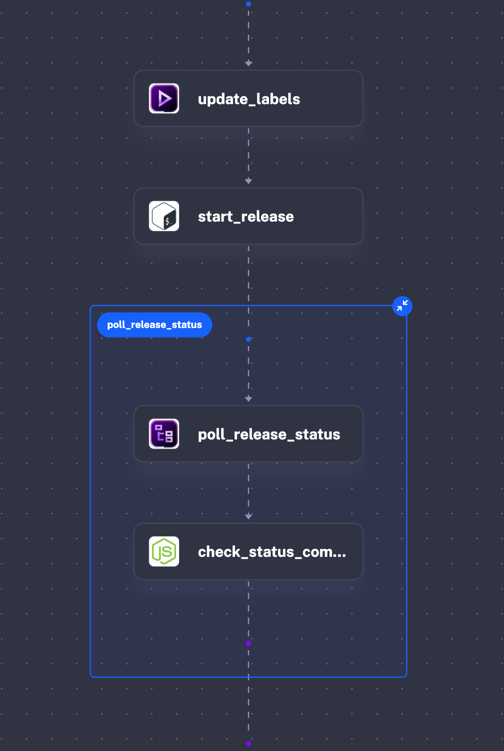
A few releases later, after a few fixes on my CLI tool, I went further and created the initial Kestra Flow of this project: a simple Flow that loops on the same command I used locally until GitHub workflow is green
Nothing fancy:
id: release-ossnamespace: kestra.engineering.release
inputs:    - id: VERSION_TO_RELEASE      type: STRING      description: 'The OSS Kestra version you want to release, example: 0.22.12332, 1.0.32324'
tasks:  - id: update_labels    type: io.kestra.plugin.core.execution.Labels    labels:      release: "{{ inputs.VERSION_TO_RELEASE }}"  - id: start_release    type: io.kestra.plugin.scripts.shell.Script    script: |
      # install GH CLI      (type -p wget >/dev/null || (apt update && apt install wget -y)) \      && mkdir -p -m 755 /etc/apt/keyrings \      && out=$(mktemp) && wget -nv -O$out https://cli.github.com/packages/githubcli-archive-keyring.gpg \      && cat $out | tee /etc/apt/keyrings/githubcli-archive-keyring.gpg > /dev/null \      && chmod go+r /etc/apt/keyrings/githubcli-archive-keyring.gpg \      && mkdir -p -m 755 /etc/apt/sources.list.d \      && echo "deb [arch=$(dpkg --print-architecture) signed-by=/etc/apt/keyrings/githubcli-archive-keyring.gpg] https://cli.github.com/packages stable main" | tee /etc/apt/sources.list.d/github-cli.list > /dev/null \      && apt update \      && apt install gh -y
      export GH_TOKEN={{secret("GITHUB_TOKEN")}}
      echo "check that the tag does not exist"      if gh api repos/kestra-io/kestra/git/ref/tags/v{{inputs.VERSION_TO_RELEASE}} --jq .ref >/dev/null 2>&1; then        echo "❌ Tag already exists"        exit 1      else        echo "✅ Tag does not exist"      fi
      gh workflow run global-start-release.yml --repo kestra-io/kestra -f releaseVersion={{inputs.VERSION_TO_RELEASE}}
- id: poll_release_status type: io.kestra.plugin.core.flow.LoopUntil condition: "{{ outputs.check_status_command.exitCode == 0 }}" failOnMaxReached: true checkFrequency: interval: PT5M maxDuration: PT6H tasks: - id: check_status_command type: io.kestra.plugin.scripts.node.Commands allowFailure: true commands: - npx --yes @kestra-io/kestra-devtools checkWorkflowStatus pre-release.yml --repo=kestra --branches=v{{inputs.VERSION_TO_RELEASE}} --retry=1 --require-success --githubToken={{secret("GITHUB_TOKEN")}}I now had a Flow I could easily share with my colleagues, with logs and everything. I could go on a lunch break at the office without having to force my laptop to stay awake. Yes, I once kept it running with a 24-hour YouTube video just so it wouldn’t sleep.
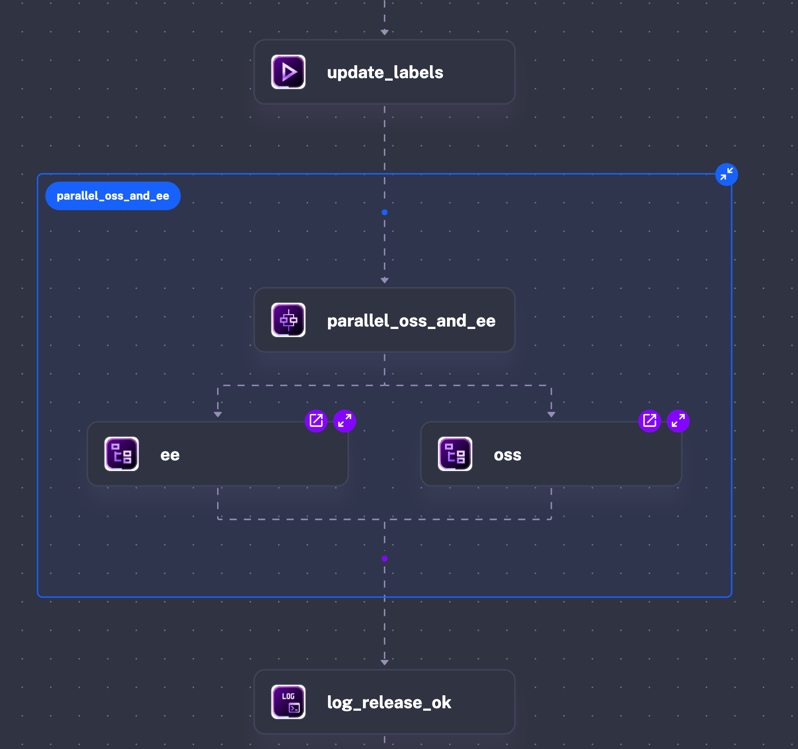
I quickly realised after a few other releases that I could easily duplicate release-oss Flow for our EE (Enterprise Edition) release, and run them in parallel.
Orchestrating with core Kestra tasks:
Retry logic for flaky tests lives in a dedicated subflow that the main flow calls per version. When a test fails, the subflow retries without any input from me. I don’t have to watch for it.
id: release-oss-and-eenamespace: kestra.engineering.releasedescription: automation and orchestration of manual micro-release
inputs:    - id: VERSION_TO_RELEASE      type: STRING      description: 'The OSS and EE Kestra version you want to release, example: 0.22.12, 1.0.3'
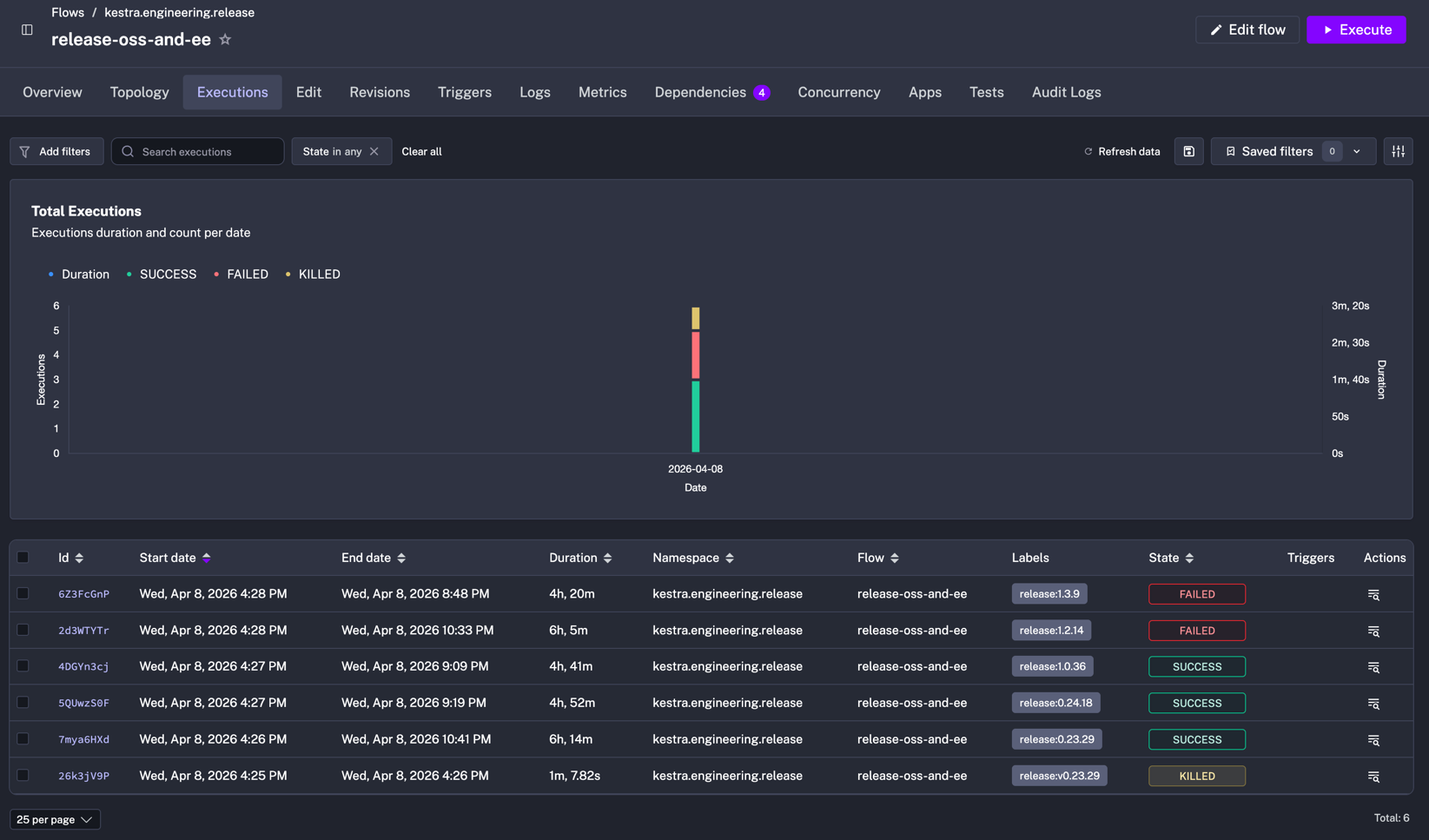
tasks: - id: update_labels type: io.kestra.plugin.core.execution.Labels labels: release: "{{ inputs.VERSION_TO_RELEASE }}" - id: parallel_oss_and_ee type: io.kestra.plugin.core.flow.Parallel tasks: - id: oss type: io.kestra.plugin.core.flow.Subflow flowId: release-oss namespace: kestra.engineering.release inputs: VERSION_TO_RELEASE: "{{ inputs.VERSION_TO_RELEASE }}" wait: true - id: ee type: io.kestra.plugin.core.flow.Subflow flowId: release-ee namespace: kestra.engineering.release inputs: VERSION_TO_RELEASE: "{{ inputs.VERSION_TO_RELEASE }}" wait: true - id: log_release_ok type: "io.kestra.plugin.core.log.Log" level: INFO message: "Kestra {{inputs.VERSION_TO_RELEASE}} github, maven and docs released"I could now quickly visually check 80% of my release process in Kestra by just looking at past Executions
Anyone on the team can run, modify, or debug the flow without a handoff. It doesn’t depend on me being around to explain it.
Before I describe the full flow, I should address the obvious concern: if Kestra’s infrastructure is down, doesn’t using Kestra to run your releases mean you can’t fix it?
My answer: in this usecase, the flow is just a YAML file describing this manual procedure. If the instance goes down, an engineer opens the file, reads the steps, and runs them manually. The orchestrator adds automation, not a dependency you can’t escape.
Remember I said the previous Flow was handling 80% of the release process? We still had one manual action to run to publish our Dockers images: another GitHub workflow.
I didn’t initially include it in the Flow because it didn’t seem that useful. But we kept forgetting to run it manually, so I eventually automated it.
I added a new docker-publish Flow, almost identical to release-oss, and used the same Parallel + SubFlow pattern, to finally have the full release orchestrated by Kestra.
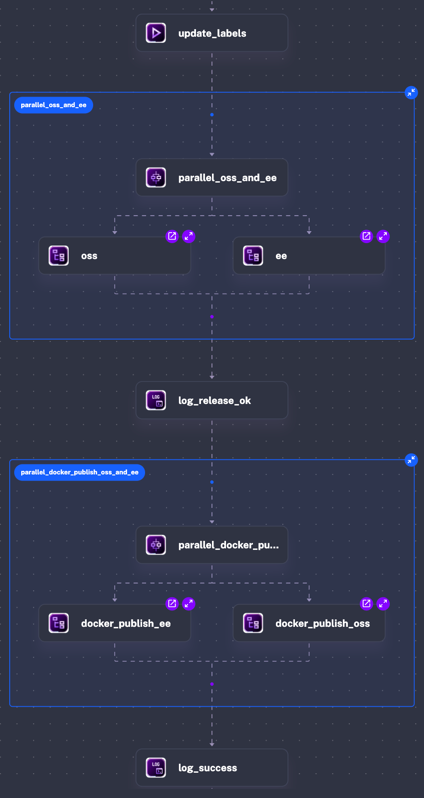
id: release-oss-and-eenamespace: kestra.engineering.releasedescription: automation and orchestration of manual micro-release
inputs:    - id: VERSION_TO_RELEASE      type: STRING      description: 'The OSS and EE Kestra version you want to release, example: 0.22.12, 1.0.3'
tasks: - id: update_labels type: io.kestra.plugin.core.execution.Labels labels: release: "{{ inputs.VERSION_TO_RELEASE }}" - id: parallel_oss_and_ee type: io.kestra.plugin.core.flow.Parallel tasks: - id: oss type: io.kestra.plugin.core.flow.Subflow flowId: release-oss namespace: kestra.engineering.release inputs: VERSION_TO_RELEASE: "{{ inputs.VERSION_TO_RELEASE }}" wait: true - id: ee type: io.kestra.plugin.core.flow.Subflow flowId: release-ee namespace: kestra.engineering.release inputs: VERSION_TO_RELEASE: "{{ inputs.VERSION_TO_RELEASE }}" wait: true - id: log_release_ok type: "io.kestra.plugin.core.log.Log" level: INFO message: "Kestra {{inputs.VERSION_TO_RELEASE}} github, maven and docs released" - id: parallel_docker_publish_oss_and_ee type: io.kestra.plugin.core.flow.Parallel tasks: - id: docker_publish_oss type: io.kestra.plugin.core.flow.Subflow flowId: docker-publish namespace: kestra.engineering.release inputs: VERSION_TO_RELEASE: "{{ inputs.VERSION_TO_RELEASE }}" IS_EE: false wait: true - id: docker_publish_ee type: io.kestra.plugin.core.flow.Subflow flowId: docker-publish namespace: kestra.engineering.release inputs: VERSION_TO_RELEASE: "{{ inputs.VERSION_TO_RELEASE }}" IS_EE: true wait: true - id: log_success type: "io.kestra.plugin.core.log.Log" level: INFO message: "Kestra {{inputs.VERSION_TO_RELEASE}} was released successfully"Before, release days meant trying to not get lost between all the GitHub workflows for each release and staying on standby, so getting anything else done was basically impossible. Now I start a release in a few clicks and get back to work. The flow handles the intermediate state.
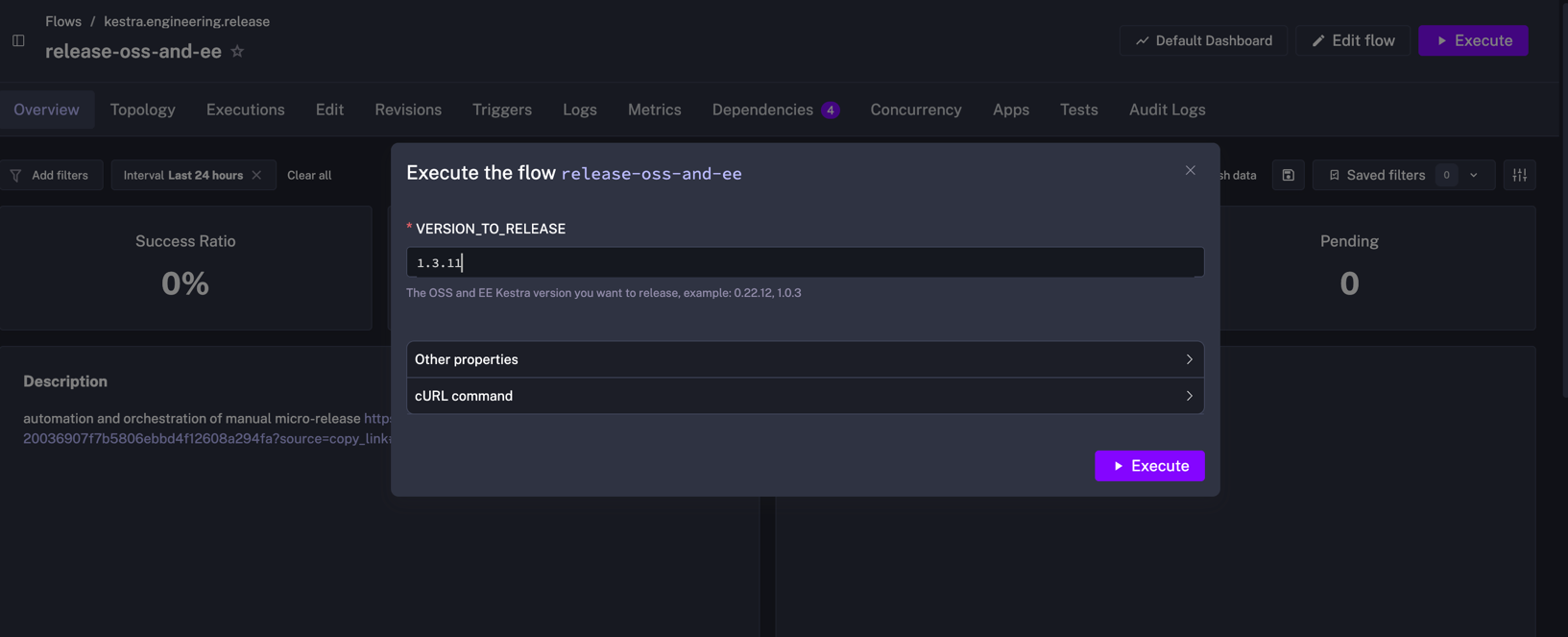
It also made us realise that what we thought was a quick fire-and-forget manual process could become a 4-hour waiting game when transient network errors or flaky test failures stacked up.
I was genuinely surprised by how long the whole process took once I saw the final duration in one of the first executions of that Flow.
Another bonus: we could start releases from our restaurant table on our phones at lunchtime.
I built this for myself initially, running it during support duty when I had the bandwidth to iterate on it. Once I was confident it worked reliably, I shared it with the team.
My colleague Brian picked it up almost immediately. He saw the pattern and applied it to something that had been bothering him too: the manual checklist work that follows a major release. Opening PRs to downstream repos, updating changelogs, the small but error-prone steps that nobody wants to own. He built a second flow that handles all of it.
And there’s now a third flow: nightly CI runs on production branches. Every night, a Flow run GitHub workflows against the active branches. Engineers start in the morning with a health signal. If a branch is red, it’s almost certainly regression introduced overnight, not a flaky test. Knowing that before you start your day is different from discovering it mid-PR review.
None of this required a meeting or a formal handoff. I built a flow, shared it, and the team saw what was possible and proactively added more. The YAML is readable enough that picking it up takes minutes.
GitHub Actions is excellent for CI steps. It’s less suited for coordinating across multiple Workflows runs and handling retries at the orchestration layer.
A shell script could do the polling, but it’s fragile and invisible. There’s no DAG view, execution history, or failure alerts. You’d be replacing one manual process with a brittle automated one. The moment something goes wrong, you’d be debugging a script with no observability instead of reading an execution log.
Kestra gives you coordination and execution history out of the box. When something breaks in a different way every week, having execution history and a DAG view isn’t a nice-to-have — it’s the whole point.
Once I put it in a Flow, engineers stopped checking GitHub workflows every 15 minutes on Tuesdays.
If your release days look anything like ours did, a few dozen lines of YAML might save you a lot of Tuesday afternoons. We run this on Kestra Enterprise, the same stack that ships Kestra itself every Tuesday. Start with Kestra OSS, or go straight to Enterprise if you need it in production.

Stay up to date with the latest features and changes to Kestra