Authors

Anna Geller
Product Lead
Anna Geller
Product Lead
The 0.23 release introduces a major addition to the Kestra platform: Unit Tests for Flows. With this new feature, you can verify the logic of your flows in isolation, helping you catch regressions early and maintain reliability as your automations evolve.
Automated testing is critical for any robust workflow automation. Flows often touch external systems, such as APIs, databases, or messaging tools, which can create side effects when you test changes. Running production flows for testing might unintentionally update data, send messages, or trigger alerts. Unit Tests make it possible to safely verify workflow logic without triggering side effects or cluttering your main execution history.
With Unit Tests, you can:
ExecutionIdUnit Tests in Kestra let you validate that your flows behave as expected, with the flexibility to mock inputs, files, and specific task outputs. This means that you can:
Each Test in Kestra contains one or more test cases. Each test case runs in its own transient execution, allowing you to run them in parallel as often as you want without cluttering production executions.
Each test includes:
id for unique identificationnamespace and flowId being testedtestCases — each test case can define:
id, type (currently only UnitTest), and optional description or disabled flagfixtures to mock inputs, files, or task outputs/statesassertions to check actual values from the execution against expectations.The image below visualizes the relationship between a flow, its tests, test cases, fixtures and assertions.
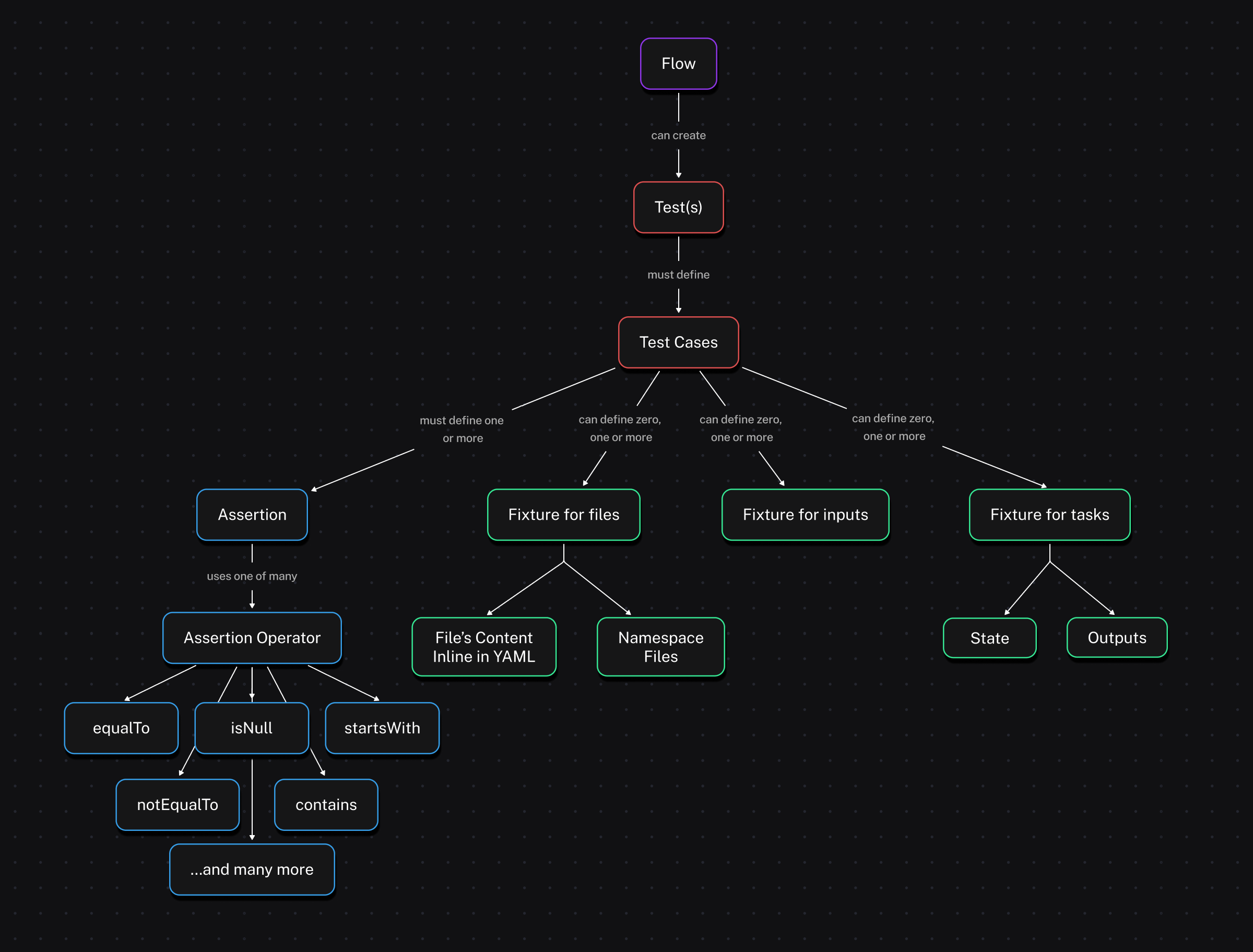
Fixtures let you control mock data injected into your flow during a test. You can mock:
outputs (and optionally a state), which skips execution and immediately returns your output values; this is ideal for tasks that interact with external systems and produce side effects.Here is an example of a task fixture with outputs:
fixtures: tasks: - id: extract description: mock extracted data file outputs: uri: "{{ fileURI('products.json') }}"Simply listing task IDs under tasks (without specifying outputs) will cause those tasks to be skipped and immediately marked as SUCCESS during the test, without executing their logic:
fixtures: tasks: # those tasks won't run - id: extract - id: transform - id: dbtAssertions are conditions tested against outputs or states to ensure that your tasks behave as intended. Supported operators include equalTo, notEqualTo, contains, startsWith, isNull, isNotNull, and many more (see the table below).
Each assertion can specify:
value to check (usually a Pebble expression)equalTo: 200)taskId it’s associated with (optional)If any assertion fails, Kestra provides clear feedback showing the actual versus expected value.
| Operator | Description of the assertion operator |
|---|---|
| isNotNull | Asserts the value is not null, e.g. isNotNull: true |
| isNull | Asserts the value is null, e.g. isNull: true |
| equalTo | Asserts the value is equal to the expected value, e.g. equalTo: 200 |
| notEqualTo | Asserts the value is not equal to the specified value, e.g. notEqualTo: 200 |
| endsWith | Asserts the value ends with the specified suffix, e.g. endsWith: .json |
| startsWith | Asserts the value starts with the specified prefix, e.g. startsWith: prod- |
| contains | Asserts the value contains the specified substring, e.g. contains: success |
| greaterThan | Asserts the value is greater than the specified value, e.g. greaterThan: 10 |
| greaterThanOrEqualTo | Asserts the value is greater than or equal to the specified value, e.g. greaterThanOrEqualTo: 5 |
| lessThan | Asserts the value is less than the specified value, e.g. lessThan: 100 |
| lessThanOrEqualTo | Asserts the value is less than or equal to the specified value, e.g. lessThanOrEqualTo: 20 |
| in | Asserts the value is in the specified list of values, e.g. in: [200, 201, 202] |
| notIn | Asserts the value is not in the specified list of values, e.g. notIn: [404, 500] |
If some operator you need is missing, let us know via a GitHub issue.
There are two main ways to create and manage tests in Kestra:
From these UI pages, you can define tests in YAML, run them and observe their results.
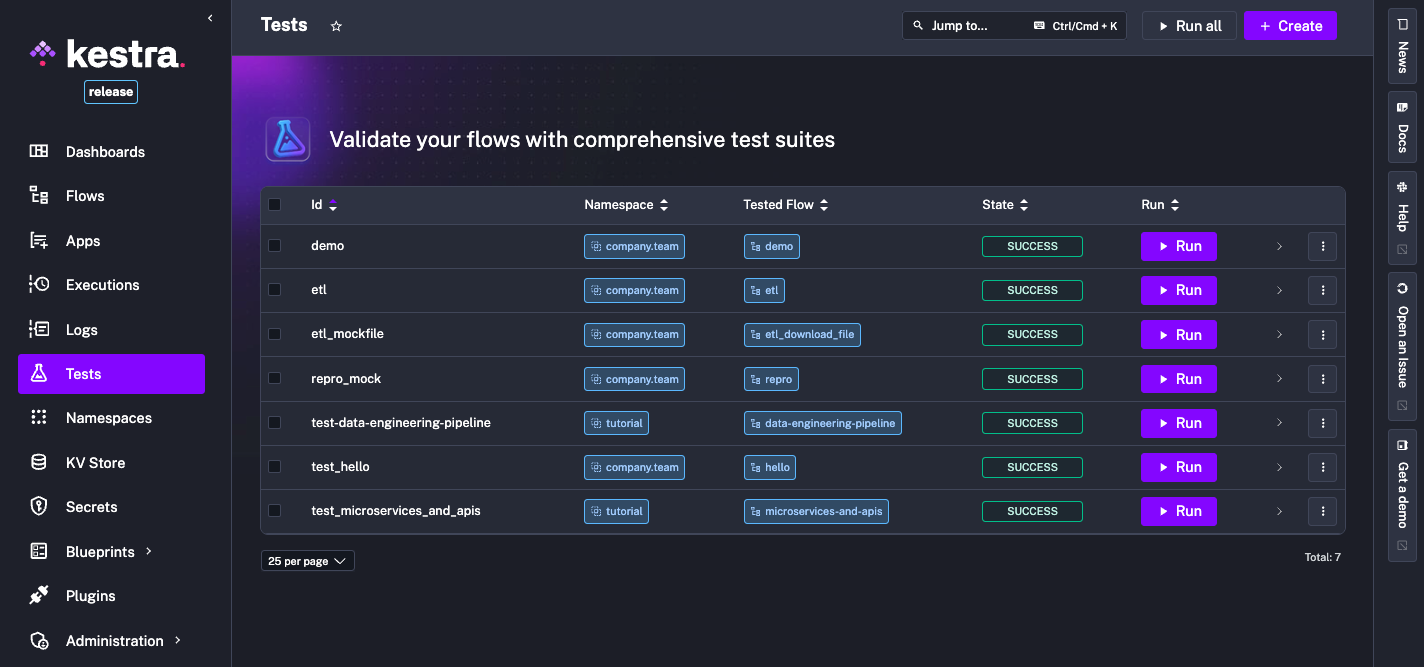
Currently, tests are executed through the UI or via the API. In future releases, you’ll be able to:
Let’s look at a simple flow checking if a server is up and sending a Slack alert if it’s not:
id: microservices-and-apisnamespace: tutorialdescription: Microservices and APIs
inputs:  - id: server_uri    type: URI    defaults: https://kestra.io
  - id: slack_webhook_uri    type: URI    defaults: https://kestra.io/api/mock
tasks:  - id: http_request    type: io.kestra.plugin.core.http.Request    uri: "{{ inputs.server_uri }}"    options:      allowFailed: true
- id: check_status type: io.kestra.plugin.core.flow.If condition: "{{ outputs.http_request.code != 200 }}" then: - id: server_unreachable_alert type: io.kestra.plugin.slack.notifications.SlackIncomingWebhook url: "{{ inputs.slack_webhook_uri }}" payload: | { "channel": "#alerts", "text": "The server {{ inputs.server_uri }} is down!" } else: - id: healthy type: io.kestra.plugin.core.log.Log message: Everything is fine!Here’s how you might write tests for it:
id: test_microservices_and_apisflowId: microservices-and-apisnamespace: tutorialtestCases:  - id: server_should_be_reachable    type: io.kestra.core.tests.flow.UnitTest    fixtures:      inputs:        server_uri: https://kestra.io    assertions:      - value: "{{outputs.http_request.code}}"        equalTo: 200
- id: server_should_be_unreachable type: io.kestra.core.tests.flow.UnitTest fixtures: inputs: server_uri: https://kestra.io/bad-url tasks: - id: server_unreachable_alert description: no Slack message from tests assertions: - value: "{{outputs.http_request.code}}" notEqualTo: 200You can also use namespace files to mock file-based data in tests. For example, download the orders.csv file and upload it to company.team namespace from the built-in editor in the UI or using the UploadFiles task.
id: ns_files_demonamespace: company.team
tasks:  - id: extract    type: io.kestra.plugin.core.http.Download    uri: https://huggingface.co/datasets/kestra/datasets/raw/main/csv/orders.csv
  - id: query    type: io.kestra.plugin.jdbc.duckdb.Query    inputFiles:      orders.csv: "{{ outputs.extract.uri }}"    sql: |      SELECT round(sum(total),2) as total, round(avg(quantity), 2) as avg      FROM read_csv_auto('orders.csv', header=True);    fetchType: FETCH
  - id: return    type: io.kestra.plugin.core.output.OutputValues    values:      avg: "{{ outputs.query.rows[0].avg }}" # 5.64      total: "{{ outputs.query.rows[0].total }}" # 56756.37
- id: ns_upload type: io.kestra.plugin.core.namespace.UploadFiles namespace: "{{ flow.namespace }}" filesMap: orders.csv: "{{ outputs.extract.uri }}"The test for this flow can use a fixture referencing that namespace file by its URI {{fileURI('orders.csv')}}:
id: test_ns_files_demoflowId: ns_files_demonamespace: company.teamtestCases:  - id: validate_query_results    type: io.kestra.core.tests.flow.UnitTest    fixtures:      tasks:        - id: extract          description: mock extracted data file          outputs:            uri: "{{ fileURI('orders.csv') }}"
    assertions:      - taskId: query        description: Validate AVG quantity        value: "{{ outputs.query.rows[0].total }}"        greaterThanOrEqualTo: 56756
- taskId: query description: Verify total sum value: "{{ outputs.query.rows[0].avg }}" greaterThanOrEqualTo: 5 lessThanOrEqualTo: 6 errorMessage: Unexpected value rangeLet’s assume that you want to add a Unit Test for the data-engineering-pipeline tutorial flow.
This flow uses multiple file operations:
transform taskquery taskWith the files fixtures, you can mock file content inline and reference it in tasks fixtures or assertions using the {{files['filename']}} Pebble expression:
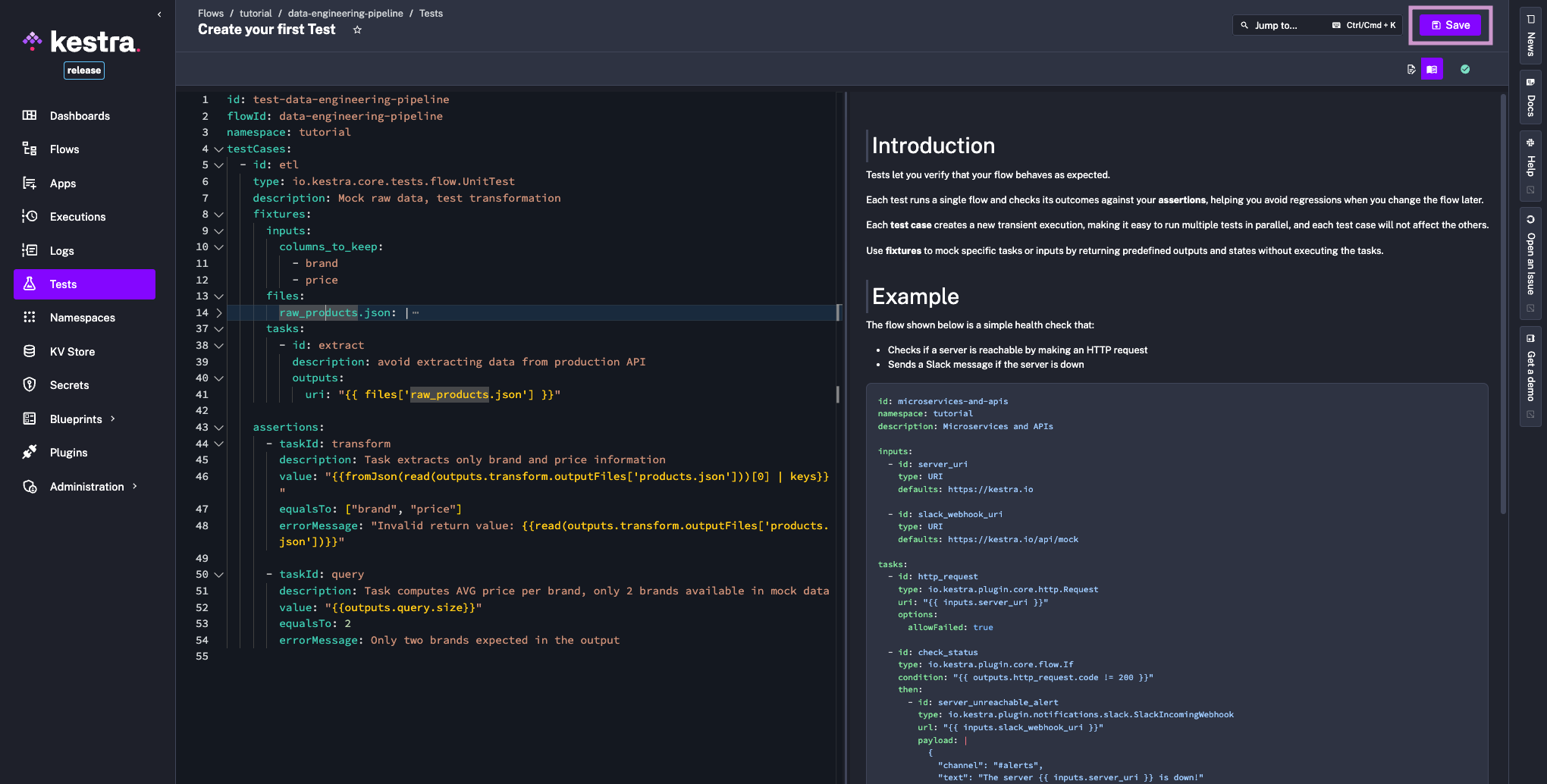
id: test-data-engineering-pipelineflowId: data-engineering-pipelinenamespace: tutorialtestCases:  - id: etl    type: io.kestra.core.tests.flow.UnitTest    description: Mock raw data, test transformation    fixtures:      inputs:        columns_to_keep:          - brand          - price      files:        raw_products.json: |          {            "products": [              {                "id": 1,                "title": "Essence Mascara Lash Princess",                "category": "beauty",                "price": 9.99,                "discountPercentage": 10.48,                "brand": "Essence",                "sku": "BEA-ESS-ESS-001"              },              {                "id": 2,                "title": "Eyeshadow Palette with Mirror",                "category": "beauty",                "price": 19.99,                "discountPercentage": 18.19,                "brand": "Glamour Beauty",                "sku": "BEA-GLA-EYE-002"              }            ]          }      tasks:        - id: extract          description: avoid extracting data from production API          outputs:            uri: "{{ files['raw_products.json'] }}"
    assertions:      - taskId: transform        description: Keep only brand and price        value: "{{fromJson(read(outputs.transform.outputFiles['products.json']))[0] | keys}}"        equalTo: ["brand", "price"]        errorMessage: "Invalid return value: {{read(outputs.transform.outputFiles['products.json'])}}"
- taskId: query description: Task computes AVG price per brand, only 2 brands available in mock data value: "{{outputs.query.size}}" equalTo: 2 errorMessage: Only two brands expected in the outputFinally, let’s look at the process of creating and running tests from the Kestra UI.
First, open any flow and switch to the Tests tab. Here, you can create and manage your test suite:
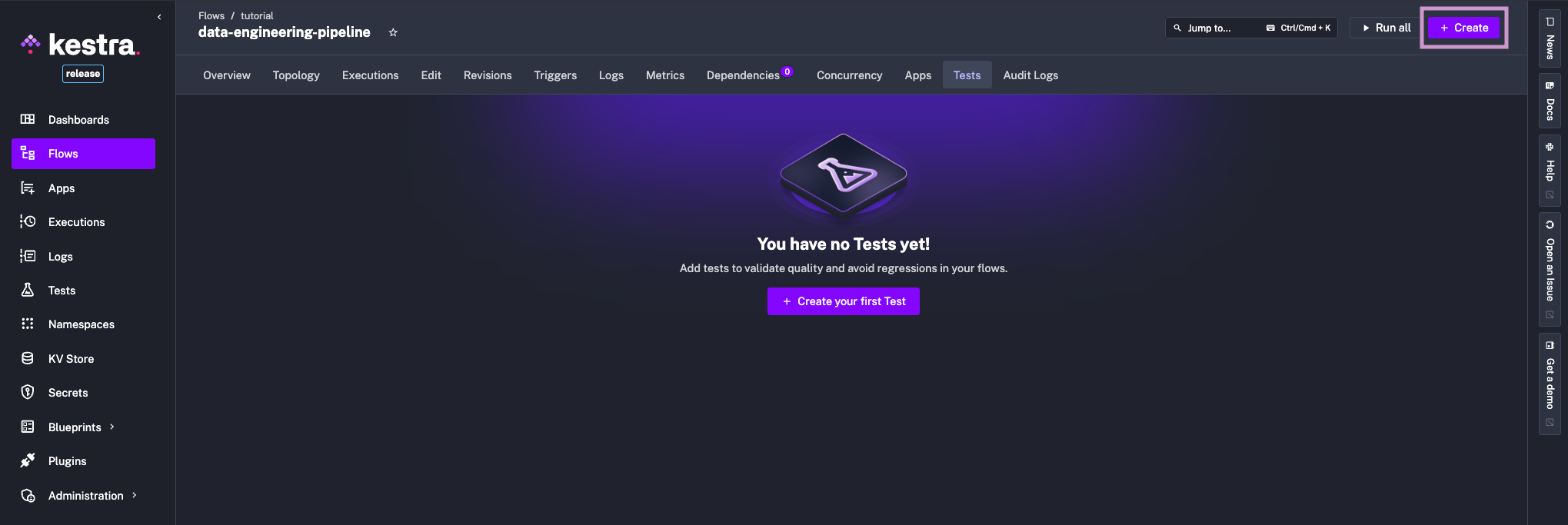
Define your test cases in YAML and save the test.
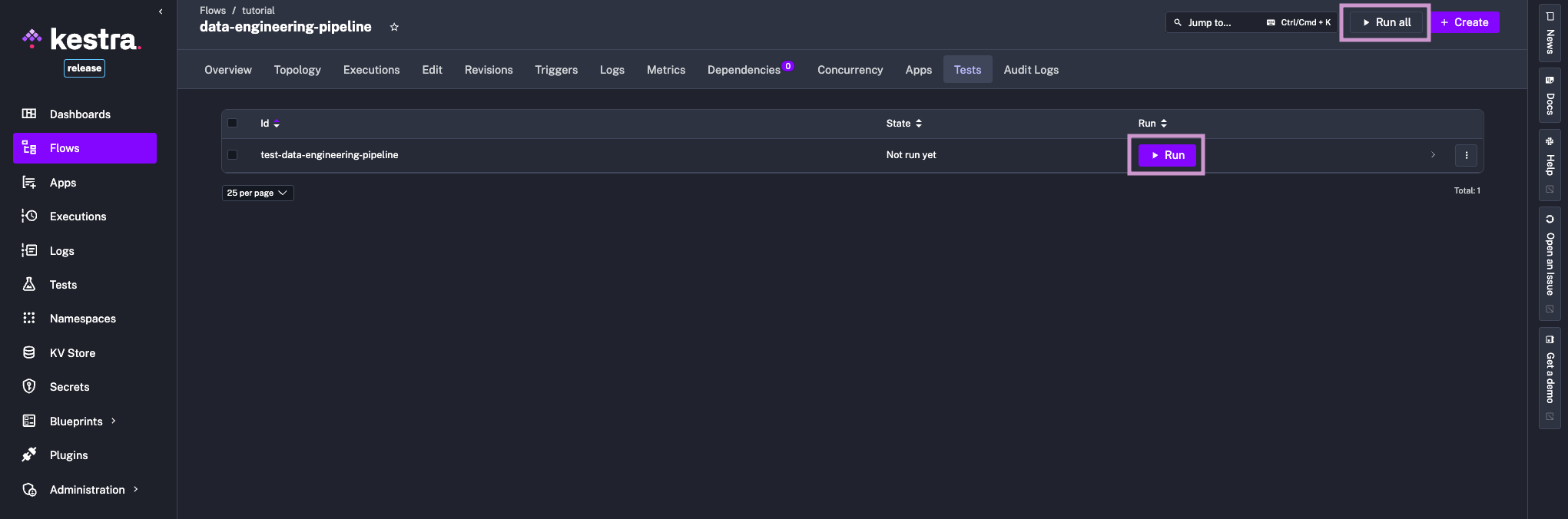
Now if you navigate back to the Tests tab, you can see your test listed. Click on the Run button to execute it. If you have multiple tests, you can use the Run All button to execute all tests in parallel.
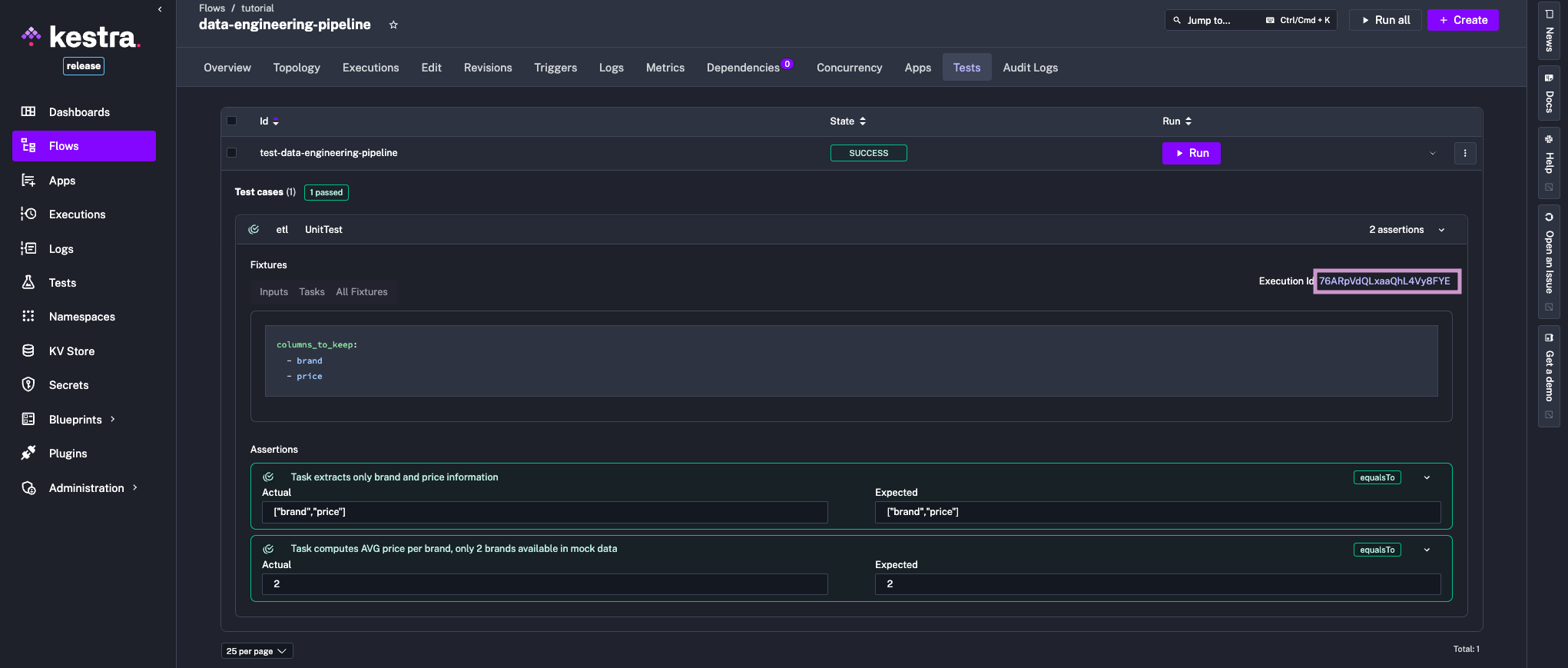
Now you can inspect results directly from the UI. Additionally, clicking on the ExecutionId link will take you to the execution details page, where you can troubleshoot any issues that may have occurred during the test run.
Unit Tests are available in the Enterprise Edition and Kestra Cloud starting from version 0.23. To learn more, see our Unit Tests documentation or request a demo. If you have questions, ideas, or feedback, join our Slack community and share your perspective.
If you find Kestra useful, give us a star on GitHub.
Happy testing!

Stay up to date with the latest features and changes to Kestra