Authors

Benoit Pimpaud
Benoit Pimpaud
Kestra 1.3 brings production-grade controls to enterprise teams, native CI/CD tooling to developers, and new infrastructure plugins to teams managing bare-metal, VM, and cloud networking environments.
Here’s what’s in 1.3:
| Feature | What & Why | Edition |
|---|---|---|
| Kill Switch | When something breaks in production, you need to act immediately. CLI-only commands are too slow and limited to server admins. Kill Switch lets administrators stop or contain problematic executions from the UI, scoped to tenant, namespace, flow, or execution, with a full audit trail. | Enterprise Edition |
| Credentials | OAuth tokens scattered across flows are brittle, hard to rotate, and slow to fix during incidents. Credentials lets you configure server-to-server authentication once and reference it everywhere with credential(). | Enterprise Edition |
| Assets | Tracking assets isn’t enough — teams need to manage them imperatively and react to lifecycle events in real time. Assets 1.3 adds Set, List, and Delete tasks plus event-driven and freshness triggers for SLA and governance automation. | Enterprise Edition |
| AI Copilot Enhancements | AI tools need permission guardrails before enterprise teams can adopt them broadly. This release adds RBAC controls, wider UI coverage (apps, tests, dashboards), speech-to-text input, and model selection. | Enterprise Edition |
| kestractl | Custom API scripts for flow deployment are error-prone and inconsistent across dev, staging, and prod. kestractl is a dedicated CLI for flows, executions, namespaces, and namespace files — the same commands locally and in CI. | All Editions |
| New GitHub Action | Custom CI scripts for Kestra are fragile and hard to maintain across repositories. Three composite actions — validate-flows, deploy-flows, deploy-namespace-files — built on kestractl, keep pipelines consistent. | All Editions |
| Plugin Defaults UI | YAML-only plugin defaults are hard to discover, share, and onboard new team members to. The new namespace page UI lets you manage defaults with a guided form while keeping them versionable. | Enterprise Edition |
| New Plugins | Infrastructure and policy integrations, including MAAS, NetBox, Nutanix, OPA, and many more. | All Editions |
Check the video below for a quick overview of all enhancements.
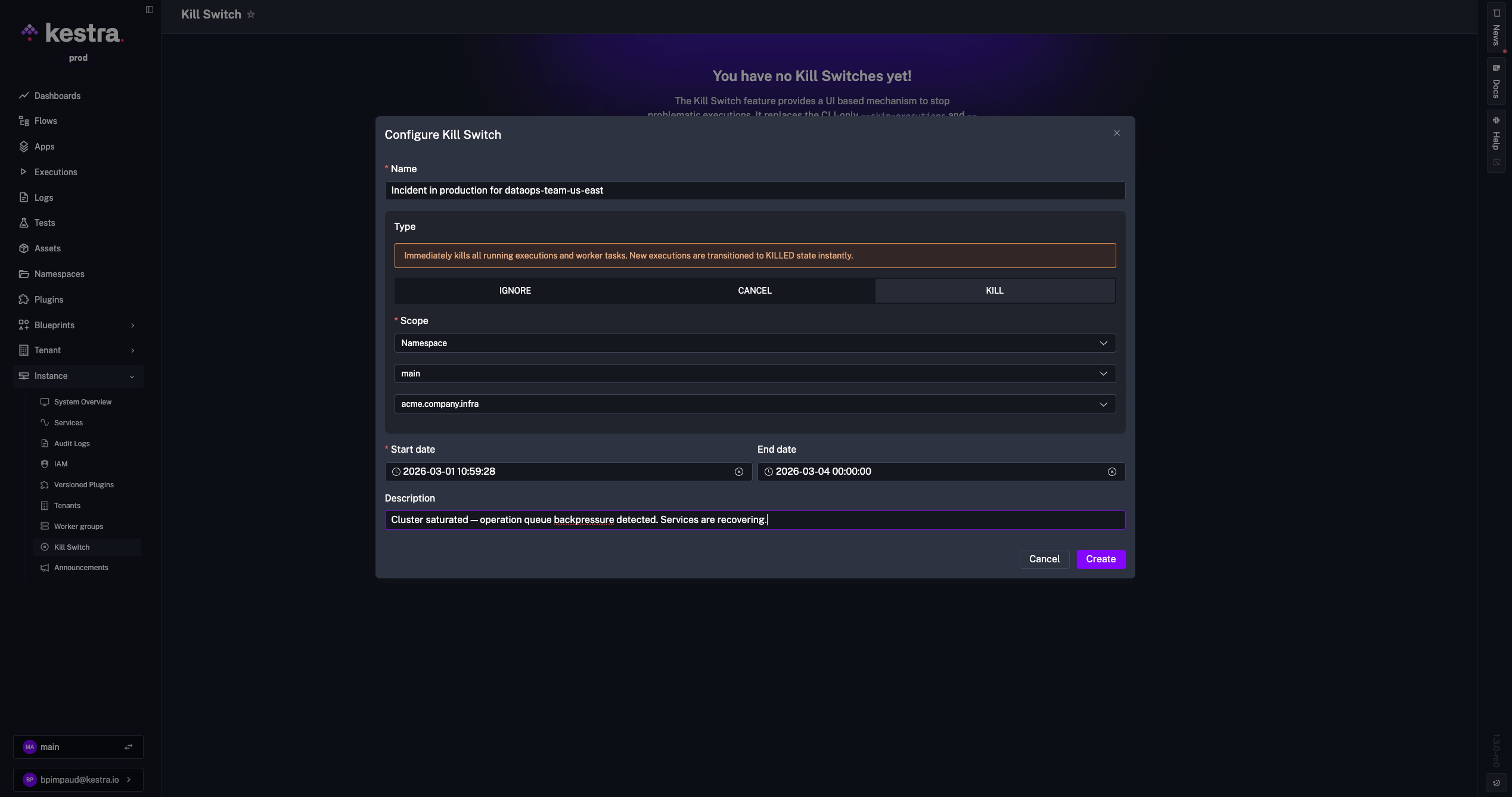
When production incidents happen, relying on CLI-only skip commands is slow, confusing, and limited to server admins.
Kill Switch introduces a UI-based mechanism to stop or contain problematic executions, designed for administrators. It provides a comprehensive administration interface and ensures every action is visible and auditable. Any admin can respond immediately, and every action lands in the audit log.
You can access it under Instance > Kill Switch, where you can create new Kill Switches and review active or archived ones. Three types are available:
| Type | Behavior |
|---|---|
| KILL | Immediately kills running executions and worker tasks. New executions transition to KILLED instantly. |
| CANCEL | Cancels new executions and lets current task runs finish before transitioning to CANCELLED. |
| IGNORE | Ignores all execution messages. Use as a last resort for executions that cannot be killed. |
Kill Switches can target a tenant, namespace, flow, or execution. They support scheduling with a mandatory start date and optional end date, and include an optional reason to document why the switch was applied. All actions are recorded in Audit Logs, and deletions are soft-deleted to preserve history.
An announcement banner is displayed based on scope: namespace-level switches are shown only to users working in that namespace, while tenant-level switches appear for all users in the tenant.
The CLI remains available for power users and administrators who prefer terminal workflows, with the commands renamed to align with behavior:
--ignore-executions--ignore-flowsTeams struggle to connect workflows to modern APIs because credentials are scattered, brittle, and hard to rotate across environments. Managing authentication separately in each integration slows delivery and makes incidents harder to fix. Fewer 2 AM incidents from expired tokens, and less time hunting down which flow broke when a credential rotated.
Credentials provide reusable server-to-server (machine-to-machine) authentication for flows. You configure authentication once and reference it in workflows with a simple expression, while Kestra handles token retrieval and refresh centrally.
Use the credential() function to retrieve an access token at runtime:
id: api_callnamespace: company.team
tasks:  - id: request    type: io.kestra.plugin.core.http.Request    uri: https://api.example.com/v1/ping    method: GET    options:      auth:        type: BEARER        token: "{{ credential('my_oauth') }}"
Supported credential types include OAuth2 client_credentials, OAuth2 JWT Bearer (jwt_bearer), OAuth2 private_key_jwt, and GitHub App.
Kestra 1.3 brings the second iteration of Assets, building on the foundation introduced in Kestra 1.2.
In Kestra 1.2, Assets introduced a stateful inventory and lineage model directly in workflows. In 1.3, Assets becomes more operational: teams can now manage assets imperatively, react to lifecycle events in real time, monitor freshness, and automate remediation and governance workflows with richer filters and trigger outputs. Stale assets trigger remediation automatically, without waiting for a broken report to surface the problem.
What this means in practice:
Set, List, Delete).EventTrigger to react on asset lifecycle events (CREATED, UPDATED, DELETED, USED).FreshnessTrigger).event, eventTime, lastUpdated, staleDuration, and checkTime to drive alerts, routing, and recovery actions.id: asset_event_driven_pipelinenamespace: company.data
tasks: - id: transform_to_mart type: io.kestra.plugin.core.flow.Subflow namespace: company.data flowId: create_mart_tables inputs: source_asset_id: "{{ trigger.asset.id }}" source_event: "{{ trigger.asset.event }}" event_time: "{{ trigger.asset.eventTime }}"
triggers: - id: staging_table_event type: io.kestra.plugin.ee.assets.EventTrigger namespace: company.data assetType: io.kestra.plugin.ee.assets.Table events: - CREATED - UPDATED metadataQuery: - field: model_layer type: EQUAL_TO value: stagingid: audit_asset_deletionsnamespace: company.security
tasks: - id: log_deletion type: io.kestra.plugin.jdbc.postgresql.Query sql: | INSERT INTO audit_log (asset_id, asset_type, namespace, event, event_time) VALUES ( '{{ trigger.asset.id }}', '{{ trigger.asset.type }}', '{{ trigger.asset.namespace }}', '{{ trigger.asset.event }}', '{{ trigger.asset.eventTime }}' )
triggers: - id: asset_deletion_event type: io.kestra.plugin.ee.assets.EventTrigger events: - DELETEDid: stale_assets_monitornamespace: company.monitoring
tasks: - id: log_stale type: io.kestra.plugin.core.log.Log message: > Found {{ trigger.assets | length }} stale assets. First asset: {{ trigger.assets[0].id ?? 'n/a' }}. Stale for: {{ trigger.assets[0].staleDuration ?? 'n/a' }}.
triggers: - id: stale_assets type: io.kestra.plugin.kestra.ee.assets.FreshnessTrigger maxStaleness: PT24H interval: PT1Hid: prod_assets_freshnessnamespace: company.monitoring
tasks: - id: trigger_remediation type: io.kestra.plugin.core.flow.Subflow namespace: company.data flowId: refresh_marts inputs: asset_id: "{{ trigger.assets[0].id }}" last_updated: "{{ trigger.assets[0].lastUpdated }}" stale_duration: "{{ trigger.assets[0].staleDuration }}"
triggers: - id: stale_prod_marts type: io.kestra.plugin.kestra.ee.assets.FreshnessTrigger namespace: company.data assetType: TABLE maxStaleness: PT6H interval: PT30M metadataQuery: - field: environment type: EQUAL_TO value: prod - field: model_layer type: EQUAL_TO value: martid: asset_lifecycle_opsnamespace: company.data
tasks: - id: upsert_asset type: io.kestra.plugin.kestra.ee.assets.Set namespace: assets.data assetId: customers_by_country assetType: TABLE displayName: Customers by Country assetDescription: Customer distribution by country metadata: owner: data-team environment: prod
- id: list_assets type: io.kestra.plugin.kestra.ee.assets.List namespace: assets.data types: - TABLE metadataQuery: - field: owner type: EQUAL_TO value: data-team fetchType: FETCH
- id: delete_asset type: io.kestra.plugin.kestra.ee.assets.Delete assetId: customers_by_countrySome plugins now support automatic asset generation when you set assets.enableAuto: true on a task. This removes the need to manually declare assets.inputs and assets.outputs — the plugin inspects its execution context and emits assets automatically:
CREATE TABLE statements and emits a Table output; the JDBC URL populates system and database.io.kestra.core.models.assets.External, marking the infrastructure targets the playbook runs against.manifest.json to emit each model as a Table output with database, schema, name, and lineage edges based on depends_on.id: jdbc_create_tripsnamespace: company.team
tasks: - id: create_trips_table type: io.kestra.plugin.jdbc.sqlite.Query url: jdbc:sqlite:myfile.db outputDbFile: true sql: | CREATE TABLE IF NOT EXISTS trips ( VendorID INTEGER, passenger_count INTEGER, trip_distance REAL ); assets: enableAuto: trueid: ansible_playbooknamespace: company.team
tasks: - id: ansible_task type: io.kestra.plugin.ansible.cli.AnsibleCLI inputFiles: inventory.ini: | localhost ansible_connection=local myplaybook.yml: | --- - hosts: localhost tasks: - name: Print Hello World debug: msg: "Hello, World!" assets: enableAuto: true commands: - ansible-playbook -i inventory.ini myplaybook.ymlid: dbt_build_duckdbnamespace: company.team
tasks: - id: dbt type: io.kestra.plugin.core.flow.WorkingDirectory tasks: - id: clone_repository type: io.kestra.plugin.git.Clone url: https://github.com/kestra-io/dbt-example branch: main
- id: dbt_build type: io.kestra.plugin.dbt.cli.DbtCLI taskRunner: type: io.kestra.plugin.scripts.runner.docker.Docker containerImage: ghcr.io/kestra-io/dbt-duckdb:latest commands: - dbt deps - dbt build - dbt run profiles: | my_dbt_project: outputs: dev: type: duckdb path: ":memory:" fixed_retries: 1 threads: 16 timeout_seconds: 300 target: dev assets: enableAuto: trueAI assistants are most useful when teams can control where and how they are used. In many organizations, administrators need permission boundaries, predictable model behavior, and simple input options before enabling copilots broadly. Enterprise admins who previously blocked broad rollout for lack of governance controls now have what they need to enable it.
Kestra 1.3 expands AI Copilot capabilities for enterprise teams with better governance and day-to-day usability:
Teams often need to automate flow deployment and operations across multiple environments, but relying only on the UI or custom API scripts is error-prone and inconsistent. A dedicated CLI makes those workflows repeatable in local and CI environments. The same commands work locally and in CI, which closes the gap between how developers deploy locally and how CI deploys to production.
Kestra 1.3 introduces kestractl, a command-line interface focused on API-driven workflow operations.
Use kestractl to interact with the Kestra host API for flows, executions, namespaces, and namespace files.
For server components, plugins, and system maintenance commands, see the Kestra Server CLI.
The Kestra Server CLI is the original CLI many teams already know and trust, and it remains the right choice for server administration. Kestractl is the new companion focused on direct host operation.
curl -fsSL https://raw.githubusercontent.com/kestra-io/kestractl/main/install-scripts/install.sh | bashConfigure your Kestra instance and credentials:
# Enterprise (API token)kestractl config add default https://kestra.example.com production --token YOUR_TOKEN --default
# Open Source (basic auth)kestractl config add default http://localhost:8080 main --username YOUR_USERNAME --password YOUR_PASSWORD --default
You can manage multiple contexts (dev, staging, prod) and switch between them with kestractl config use.
flows — list, get, deploy (single file or directory), and validate flowsexecutions — trigger executions and wait for completionnamespaces — list and filter namespacesnsfiles — list, get, upload, and delete namespace filesconfig — manage multiple authentication contexts# Deploy all flows in a directory to the prod namespacekestractl flows deploy ./flows --namespace prod --override --fail-fast
# Trigger a flow and wait for completion, output as JSONkestractl executions run prod nightly-refresh --wait --output json
# Sync namespace fileskestractl nsfiles upload prod ./assets --path resources --override| CLI | Best for | Scope |
|---|---|---|
kestractl | Day-to-day platform operations through the API | Flows, executions, namespaces, namespace files — anything the Kestra API supports |
kestra (Server CLI) | Runtime and infrastructure operations | Server startup, system/database operations, plugin lifecycle, and maintenance tasks requiring direct runtime access |
In short, use kestractl for API-level resource management and automation, and use the Kestra Server CLI for server, process, or database operations. See the full kestractl reference and Kestra Server CLI reference for details.
Teams often rely on custom scripts to deploy and validate flows in CI, which leads to inconsistent pipelines and hard-to-maintain automation. A dedicated action makes these workflows repeatable across repositories. Flow deployments go through the same review and automation as application code, rather than being a separate manual step.
Kestra 1.3 introduces a refreshed GitHub Action built on kestractl, so you can reuse the same commands in CI that you run locally. Three composite actions are available:
validate-flows — validate flow definitions against the Kestra API before deployingdeploy-flows — deploy flows from a directory, with optional namespace overridedeploy-namespace-files — upload namespace files or folders to a target pathname: Kestra CI/CDon: [push]
jobs: validate: runs-on: ubuntu-latest steps: - uses: actions/checkout@v4 - uses: kestra-io/github-actions/validate-flows@main with: directory: ./kestra/flows server: ${{ secrets.KESTRA_HOSTNAME }} apiToken: ${{ secrets.KESTRA_API_TOKEN }}
deploy: runs-on: ubuntu-latest needs: validate steps: - uses: actions/checkout@v4 - uses: kestra-io/github-actions/deploy-flows@main with: directory: ./kestra/flows server: ${{ secrets.KESTRA_HOSTNAME }} apiToken: ${{ secrets.KESTRA_API_TOKEN }} override: true
upload-ns-files: runs-on: ubuntu-latest steps: - uses: actions/checkout@v4 - uses: kestra-io/github-actions/deploy-namespace-files@main with: localPath: ./config namespace: engineering namespacePath: config server: ${{ secrets.KESTRA_HOSTNAME }} apiToken: ${{ secrets.KESTRA_API_TOKEN }}Store credentials (KESTRA_HOSTNAME, KESTRA_API_TOKEN) as GitHub Secrets. For Enterprise Edition, supply apiToken and tenant; for Open Source, use user and password instead.
Plugin defaults are essential for consistent configurations, but managing them only in YAML makes them harder to discover, edit, and share across teams. This often slows down onboarding and pushes configuration drift into production. New team members can discover and edit defaults from the UI, and the YAML export keeps them versionable.
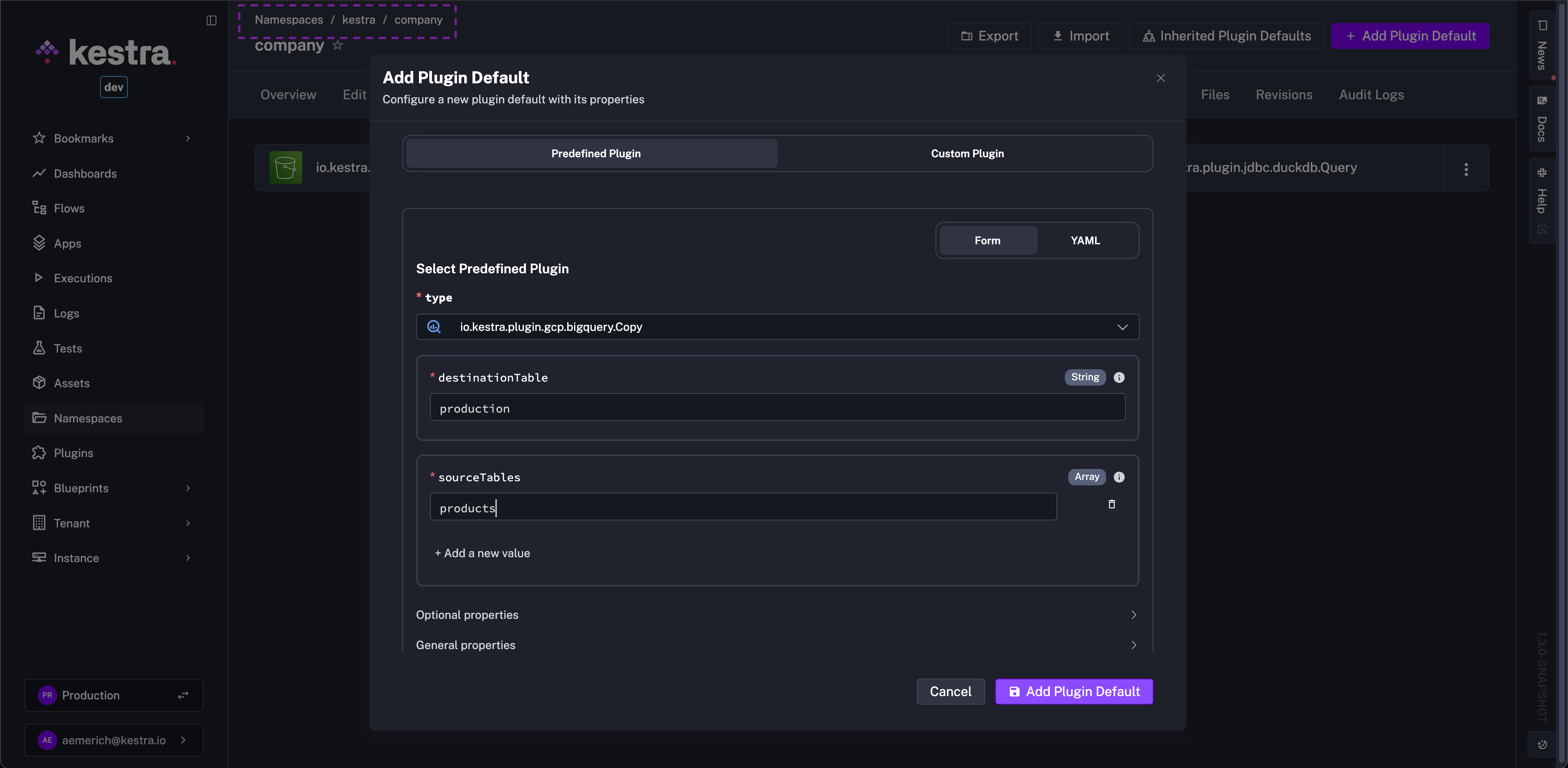
Kestra 1.3 adds a dedicated Plugin Defaults UI on the namespace page so you can fully manage these settings from the UI while keeping them versionable. Create new defaults with an Add plugin default button, select the plugin from a dropdown, and fill a form that clearly separates required and optional fields, with the option to switch to YAML at any time.
storage-seaweedfs as an internal storage backend, giving teams an OSS-friendly option as the OSS MinIO server repository (minio/minio) is archived and no longer maintained.secret-beyondtrust as a new secret manager integration for secure credential retrieval.Consume, Trigger, RealtimeTrigger).Seven new plugins extend Kestra to infrastructure teams managing hardware fleets, VM environments, and cloud networking. These teams typically run that automation through Ansible playbooks, custom scripts, and cron jobs, separate from any data pipeline observability. Running both through Kestra gives infrastructure and data teams shared execution history, logs, and observability.
Sync, Status).Create, Update, Delete, Get, List, Upsert, Batch; cache: Purge; WAF access rules: Create, Delete, List; Workers KV: Get, Write; compute namespaces: Create; zones: Get, List).ListMachines, EnlistMachine, CommissionMachine, DeployMachine, PowerControlMachine).ListVms, CreateVm, UpdateVm, StartVm, StopVm, DeleteVm).ListSites, ListDevices, CreateDevice, UpdateDevice, AssignIpAddress).ListVms, CreateVm, UpdateVm, StartVm, StopVm, RebootVm, ResetVm, DeleteVm, CloneVm, CloneTemplate, ConvertVmToTemplate, ConvertTemplateToVm, CreateVmSnapshot, ListVmSnapshots, RestoreVmSnapshot, DeleteVmSnapshot).LogExporter).Upload, List, Compile, Evaluate, Delete).RunPipeline).CreateProgram, CallJob, SubmitJob).Create, Update, Move, Comment, Trigger).AIAgent via OpenTelemetry OTLP with opt-in export of traces, spans, and metadata (flow/task/execution context, provider/model attributes, prompt/output capture), enabling teams to monitor and debug AI agent behavior in production workflows.This post highlighted the new features and enhancements introduced in Kestra 1.3. Which updates are most exciting to you? Are there additional capabilities you’d like to see in future releases? We welcome your feedback.
If you have any questions, reach out via Slack or open a GitHub issue.
If you like the project, give us a GitHub star and join the community.

Stay up to date with the latest features and changes to Kestra