Authors

Benoit Pimpaud
Benoit Pimpaud
Following user feedback, we’ve introduced enterprise-grade Asset management, Templated Custom Blueprints, comprehensive Revision History for Namespace Files, and the ability to run Concurrent Executions from any trigger.
The table below highlights the key features of this release.
| Feature | Description | Edition |
|---|---|---|
| Assets | Maintain a stateful inventory of external resources (table, VMs, etc.) with identity and metadata for unified resource management and workflow reactivity | Enterprise Edition |
| Templated Custom Blueprints | Create new flows from templates by filling in templated values, allowing business users to generate complete workflows without boilerplate | Enterprise Edition |
| Revision History for Namespace Files | Track and restore previous versions of namespace files with comprehensive revision history | All Editions |
| Checks Feature | Add validation checks to prevent execution creation when specified conditions aren’t met | All Editions |
| Concurrent Execution for Trigger | Enable multiple concurrent executions to be triggered simultaneously from any trigger type | All Editions |
| New Design for the Execution Overview Page | Redesigned execution overview page with improved layout, better spacing, and organized sections | All Editions |
Check the video below for a quick overview of all enhancements.
Kestra 1.2 introduces Assets, a powerful new Enterprise Edition feature that maintains a stateful inventory of external resources (tables, VMs, databases, inventory, etc.) that workflows interact with.
Assets are declared directly in your workflow tasks, establishing clear relationships between resources and the workflows that manage them. Each asset has a unique identity (id), a type, and optional metadata for categorization and filtering.
In your workflows, you declare assets as inputs and outputs at the task level:
This declaration automatically creates the asset in Kestra’s inventory and establishes dependency relationships. The system tracks which workflows and executions interact with each asset, providing complete lineage and traceability.
Here’s a more complete example showing how assets enable data pipeline orchestration with automatic dependency tracking:
id: data_pipeline_assetsnamespace: kestra.company.data
tasks:  - id: create_staging_layer_asset    type: io.kestra.plugin.jdbc.duckdb.Query    sql: |      CREATE TABLE IF NOT EXISTS trips AS      select VendorID, passenger_count, trip_distance from sample_data.nyc.taxi limit 10;    assets:      inputs:        - id: sample_data.nyc.taxi      outputs:        - id: trips          namespace: "{{flow.namespace}}"          type: io.kestra.plugin.ee.assets.Table          metadata:            model_layer: staging
- id: for_each type: io.kestra.plugin.core.flow.ForEach values: - passenger_count - trip_distance tasks: - id: create_mart_layer_asset type: io.kestra.plugin.jdbc.duckdb.Query sql: SELECT AVG({{taskrun.value}}) AS avg_{{taskrun.value}} FROM trips; assets: inputs: - id: trips outputs: - id: avg_{{taskrun.value}} type: io.kestra.plugin.ee.assets.Table namespace: "{{flow.namespace}}" metadata: model_layer: martpluginDefaults: - type: io.kestra.plugin.jdbc.duckdb values: url: "jdbc:duckdb:md:my_db?motherduck_token={{ secret('MOTHERDUCK_TOKEN') }}" fetchType: STOREThis workflow demonstrates:
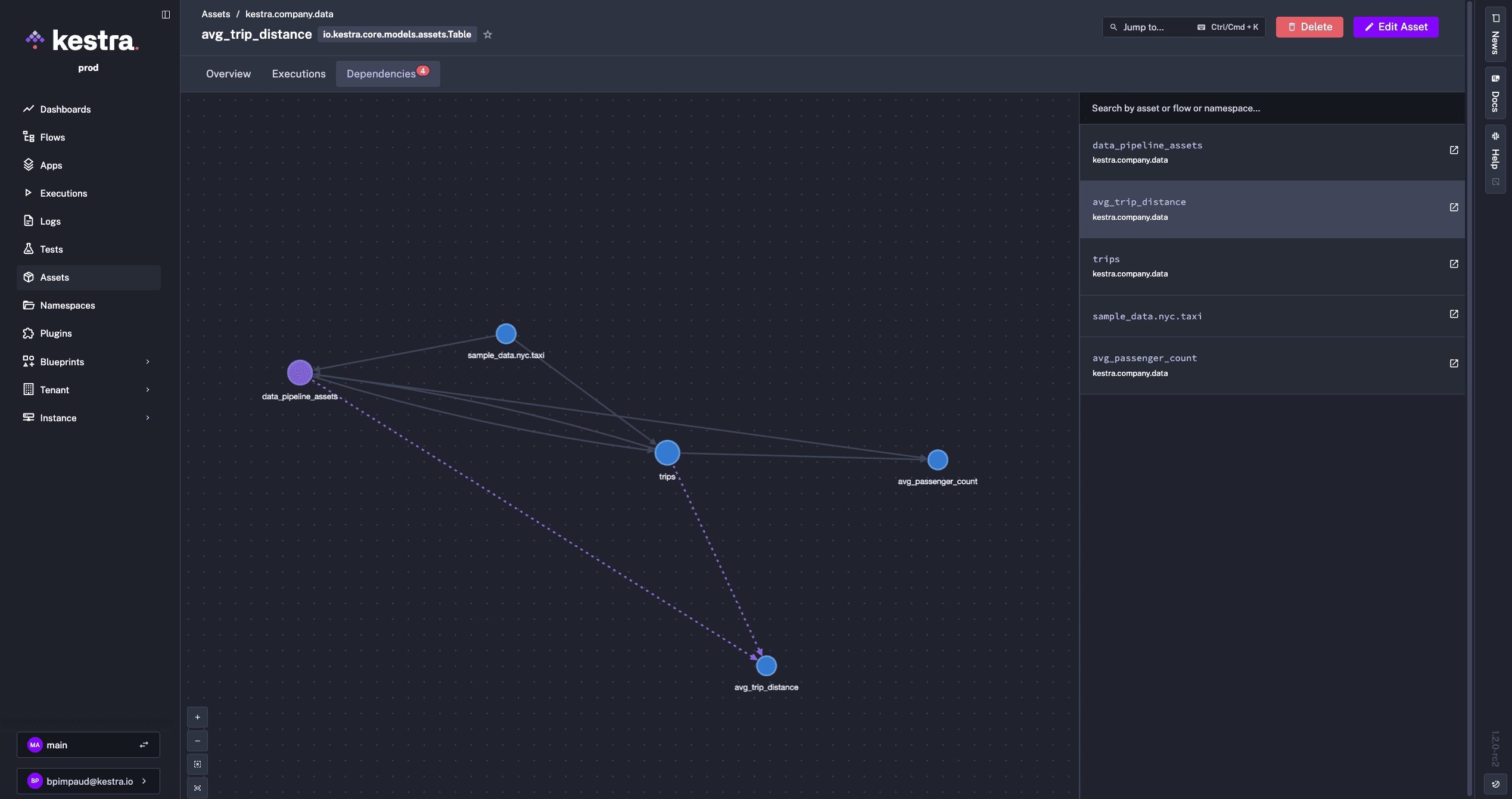
sample_data.nyc.taxi is referenced as an input, representing an external data sourcetrips table is created and registered as an Table type asset with model_layer: staging metadataavg_passenger_count, avg_trip_distance) are created from the staging layerThe Assets UI provides an interactive dependency graph visualizing upstream and downstream relationships, complete execution history tracking for each asset, and a unified inventory searchable by namespace, type, or metadata.
You can also automatically populate dropdowns in flow inputs by referencing assets directly in expressions using Pebble templates:
id: select_assetsnamespace: company.team
inputs:  - id: assets    type: MULTISELECT    expression: '{{ assets(type="io.kestra.plugin.ee.assets.Table") | jq(".[].id") }}'
tasks:  - id: for_each    type: io.kestra.plugin.core.flow.ForEach    values: "{{inputs.assets}}"    tasks:      - id: log        type: io.kestra.plugin.core.log.Log        message: "{{taskrun.value}}"
Common use cases include data pipeline orchestration with automatic lineage tracking, infrastructure as code management, multi-environment resource management via metadata tagging, and data governance initiatives that require complete audit trails.
This first release establishes a foundation for resource management, with future updates planned to bring new capabilities such as trigger on asset freshness or auto-emit assets for plugins, along with additional integrations. For more documentation and examples, see the Assets documentation.
Enterprise Edition users can now create reusable, configurable workflows that users can instantiate without editing YAML. Instead of copying and modifying blueprints, users fill in guided inputs and Kestra generates the complete flow automatically.
How It Works: Templated Blueprints use Pebble templating, with custom delimiters to avoid conflicts with Kestra expressions.
Template arguments define the inputs users must provide:
extend: templateArguments: - id: values displayName: An array of values type: MULTISELECT values: - value1 - value2 - value3All Kestra input types are supported. These arguments automatically generate a guided UI form.
Use << >> delimiters to inject arguments into your flow:
message: Hello << arg.values >>For more advanced use cases, you can add logic using Pebble control blocks with <% %> syntax for:
if / else)for)For example:
tasks: <% for value in arg.values %> - id: log_<< value >> type: io.kestra.plugin.core.log.Log message: Hello << value >> <% endfor %>This lets you dynamically generate tasks, conditionally include steps, and build complex workflows from simple inputs.
Solutions such as templatized Terraform configurations or using the Python SDK to make DAG factories are still valid ways to address similar templating needs. Templated Custom Blueprints offer a more direct, simpler and integrated approach within the Kestra platform, streamlining the process and enhancing the user experience.
Here’s an example showing a templated blueprint that generates data ingestion workflows based on user selections:
id: data-ingestnamespace: kestra.data
extend:  templateArguments:    - id: domains      displayName: Domains      type: MULTISELECT      values:        - Online Shop        - Manufacture        - HR        - Finance
    - id: target      type: SELECT      values:        - Postgres        - Oracle
    - id: env      type: SELECT      values:        - dev        - staging        - prod
tasks:  - id: parallel_<< arg.env >>    type: io.kestra.plugin.core.flow.Parallel    tasks:<% for domain in arg.domains %>      - id: sequential_<< domain | slugify >>        type: io.kestra.plugin.core.flow.Sequential        tasks:        - id: << domain | slugify >>-download          type: io.kestra.plugin.jdbc.postgresql.CopyOut          sql: SELECT * FROM public.<< domain | slugify >>        - id: << domain | slugify >>-ingest          <% if arg.target == 'Oracle' %>          type: io.kestra.plugin.jdbc.oracle.Batch          from: "{{ << domain | slugify >>-download.uri }}"          table: public.<< domain | slugify >>          <% elseif arg.target == 'Postgres' %>          type: io.kestra.plugin.jdbc.postgresql.CopyIn          from: "{{ outputs.<< domain | slugify >>-download.uri }}"          url: jdbc:postgres://sample_<< arg.target | lower>>:5432/<<arg.env>>          table: public.<< domain | slugify >>          <% endif %><% endfor %>
pluginDefaults:  - type: io.kestra.plugin.jdbc.postgresql    values:      url: jdbc:postgresql://sample_postgres:5432/<<arg.env>>      username: '{{ secret("POSTGRES_USERNAME") }}'      password: '{{ secret("POSTGRES_PASSWORD") }}'      format: CSV
- type: io.kestra.plugin.jdbc.oracle.Batch values: url: jdbc:oracle:thin:@<< arg.env >>:49161:XE username: '{{ secret("ORACLE_USERNAME") }}' password: '{{ secret("ORACLE_USERNAME") }}'After selecting env: dev, domains: [HR, Manufacture], and target: Oracle, the template generates this complete workflow:
id: data-ingestnamespace: kestra.data
tasks:  - id: parallel_dev    type: io.kestra.plugin.core.flow.Parallel    tasks:      - id: sequential_hr        type: io.kestra.plugin.core.flow.Sequential        tasks:        - id: hr-download          type: io.kestra.plugin.jdbc.postgresql.CopyOut          sql: SELECT * FROM public.hr        - id: hr-ingest          type: io.kestra.plugin.jdbc.oracle.Batch          from: "{{ hr-download.uri }}"          table: public.<< domain | slugify >>
      - id: sequential_manufacture        type: io.kestra.plugin.core.flow.Sequential        tasks:        - id: manufacture-download          type: io.kestra.plugin.jdbc.postgresql.CopyOut          sql: SELECT * FROM public.manufacture        - id: manufacture-ingest          type: io.kestra.plugin.jdbc.oracle.Batch          from: "{{ manufacture-download.uri }}"          table: public.<< domain | slugify >>
pluginDefaults:  - type: io.kestra.plugin.jdbc.postgresql    values:      url: jdbc:postgresql://sample_postgres:5432/dev      username: '{{ secret("POSTGRES_USERNAME") }}'      password: '{{ secret("POSTGRES_PASSWORD") }}'      format: CSV
- type: io.kestra.plugin.jdbc.oracle.Batch values: url: jdbc:oracle:thin:@dev:49161:XE username: '{{ secret("ORACLE_USERNAME") }}' password: '{{ secret("ORACLE_USERNAME") }}'This approach democratizes workflow creation by letting platform teams build reusable templates once while enabling business users to generate production-ready workflows through a simple form interface. The templating system supports all standard input types including text fields, dropdowns, multi-select options, and more. This eliminates the repetitive boilerplate work of creating similar workflows while maintaining consistency and best practices across your organization.
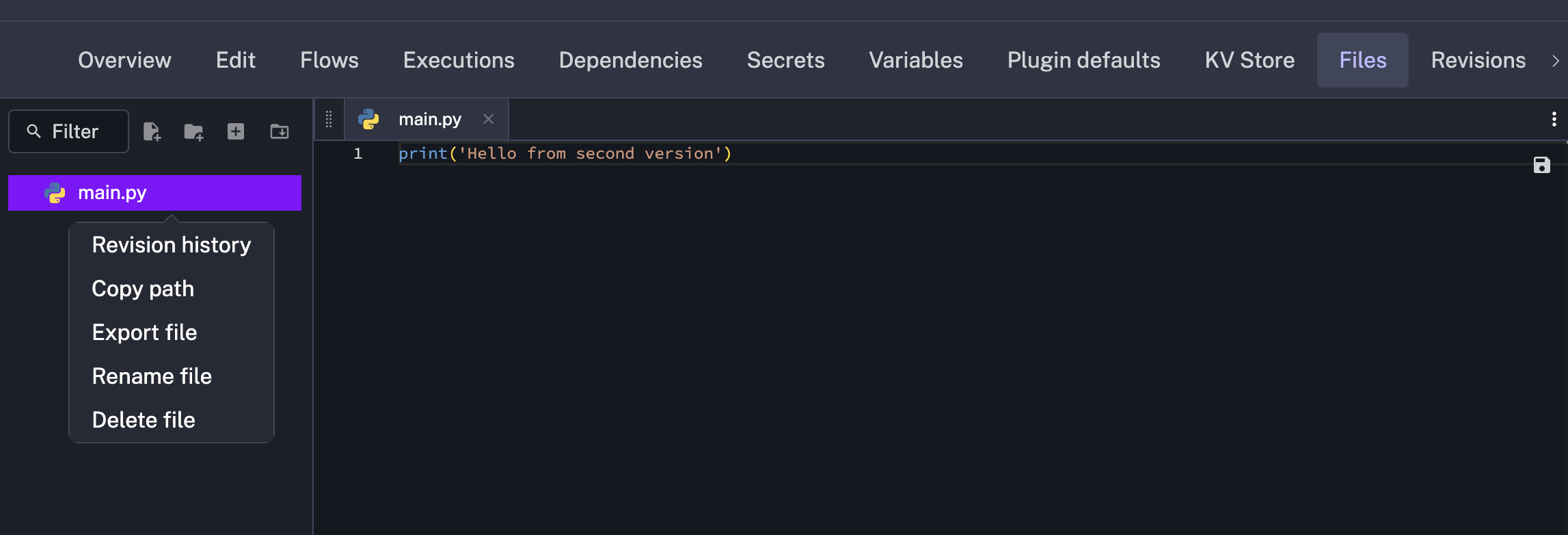
Namespace Files in Kestra 1.2 now support comprehensive version control with revision history. You can track changes, restore previous versions, and maintain audit trails for all namespace files. The example below shows how to reference specific versions of namespace files in your workflows:
id: namespace_file_versioningnamespace: company.team
tasks: - id: use_specific_version type: io.kestra.plugin.core.log.Log message: "{{ read('config.txt', version=3) }}"Kestra 1.2 introduces flow-level checks that validate conditions each time inputs are validated. This validation layer ensures workflows only run when prerequisites are satisfied, preventing invalid or inappropriate executions from starting.
Checks support multiple styles (SUCCESS, WARNING, INFO, ERROR; default INFO) and behaviors:
BLOCK_EXECUTION – Prevents execution creation when the condition is metFAIL_EXECUTION – Allows execution to start but marks it as failed if the condition is metCREATE_EXECUTION – Creates the execution regardless (default behavior)Here is an example checking on the KV Store before running the flow execution:
id: vm_provisioningnamespace: company.team
checks:  - when: "{{ kv('VMs') | length < 2 }}"    message: "You have provisioned too many VMs"    style: ERROR    behavior: BLOCK_EXECUTION
tasks: - id: VM_numbers type: io.kestra.plugin.core.log.Log message: "Here are the provisioned VMs: {{ kv('VMs') }}"Any trigger in Kestra 1.2 can now support concurrent executions, allowing multiple instances of the same workflow to run simultaneously. This removes previous limitations where certain trigger types could only run one execution at a time, enabling more flexible and scalable workflow patterns.
For example, consider a workflow that takes 60 seconds to complete but is triggered every second. By default, with allowConcurrent: false, only one execution can run at a time. If a trigger fires while a previous execution is still running, the new execution will be skipped:
id: sleep_concurrentnamespace: company.team
tasks:  - id: sleep    type: io.kestra.plugin.core.flow.Sleep    duration: PT60S
triggers:  - id: schedule    type: io.kestra.plugin.core.trigger.Schedule    cron: "* * * * * *"    withSeconds: true    allowConcurrent: false
In this example, even though the Schedule trigger fires every second, only one execution will run at a time. Setting allowConcurrent: true would allow multiple executions to run simultaneously.
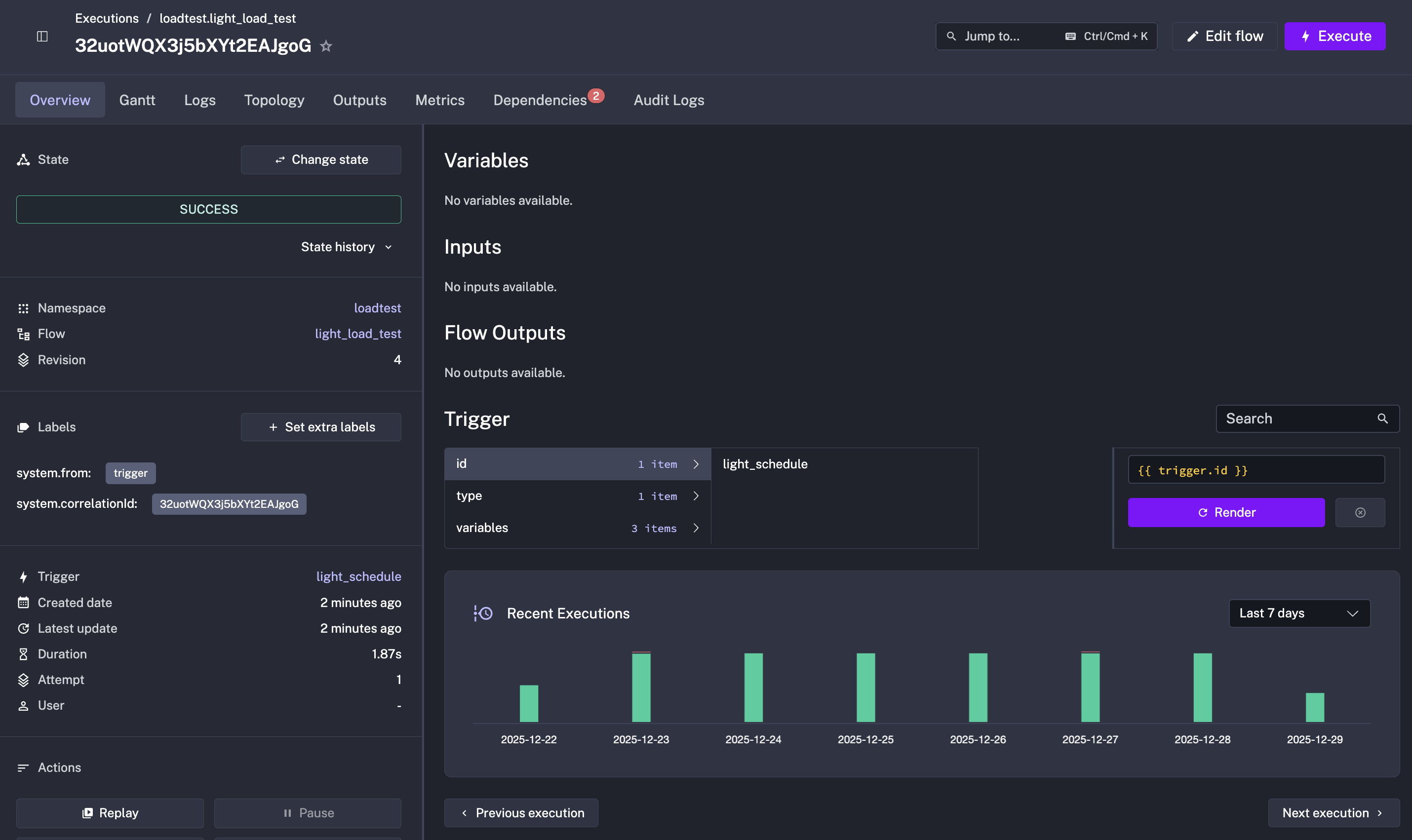
The Execution Overview page has been completely redesigned with improved visual hierarchy and better information density. Key improvements include:
Kestra Open Source is now available on both AWS Marketplace and Azure Marketplace, making it easier than ever to deploy Kestra in your cloud environment.
Deploy Kestra on AWS with a single CloudFormation template that automatically provisions:
The deployment completes in approximately 10 minutes, with Kestra automatically launched and ready to use. Access the web UI via the EC2 instance’s public IP address and start building workflows immediately—no manual setup required.
Kestra is also available on Azure Marketplace, providing the same streamlined deployment experience for Azure users. Deploy Kestra with integrated Azure services for a production-ready orchestration platform.
Both marketplace offerings are free (no software charges), with only standard cloud infrastructure costs applying.
--flow-path flag to the Kestra startup command, allowing flows to be pre-loaded from a directory at server initialization (e.g., --flow-path /app/myflows/). This means workflows are available immediately upon startup.CheckMount, List, Copy, Move, and Delete operations for managing files across network-attached storage.EventCreatedTrigger to automatically trigger workflows when new calendar events are created.SheetModifiedTrigger to monitor and react to changes in Google Sheets documents.Version 1.2 changes how Namespace Files metadata are handled: the backend now indexes this metadata to optimize search and scalability, replacing the previous approach of fetching all stored files directly from storage. Additionally, Namespace Files can now be versioned and restored.
To index existing Namespace Files metadata run the following migration command:
/app/kestra migrate metadata nsfilesFor Docker Compose setups, replace the command with the following:
kestra: image: registry.kestra.io/docker/kestra:latest command: migrate metadata nsfilesAfter the migration completes, revert to the standard startup command to run the server, e.g., server standalone --worker-thread=128.
For Kubernetes deployments, create a one-time pod to run the same migration commands before restarting your regular Kestra server pods.
Check the migration guide for complete upgrade instructions.
This post highlighted the new features and enhancements introduced in Kestra 1.2. Which updates are most exciting to you? Are there additional capabilities you’d like to see in future releases? We welcome your feedback.
If you have any questions, reach out via Slack or open a GitHub issue.
If you like the project, give us a GitHub star ⭐️ and join the community.

Stay up to date with the latest features and changes to Kestra