Authors

Anna Geller
Product Lead
Anna Geller
Product Lead
The table below highlights the key features of this release.
| Feature | Description | Edition |
|---|---|---|
| Playground (Beta) | Create workflows iteratively, one task at a time. | All Editions |
| Task Caching | Cache the status and outputs of computationally expensive operations. | All Editions |
| Dynamic dropdowns | Make your dropdowns more dynamic with the new HTTP function. | All Editions |
| Java, Python, JavaScript, and Go SDKs | Build on top of Kestra’s API using the official language SDKs. | All Editions |
| Kestra Plugin | Interact with Kestra’s API directly from your tasks. | All Editions |
| Improved Slack integration | Send beautifully-formatted Slack updates with results from your tasks. | All Editions |
| New Execution dependency view | Follow execution dependencies from the first parent to the last child flow | All Editions |
| CSV Export | Export tabular data from any dashboard into a CSV file for reporting | All Editions |
| New universal file protocol | Leverage the new protocol for consistent access to local and namespace files | All Editions |
| Lots of new plugins! | New plugins for managing VMs, Notion, Mistral, Anthropic, Perplexity, and more. | All Editions |
| Apps catalog | Showcase your Apps to the entire company in a new Catalog view. | Enterprise Edition |
| Custom UI Links | Add custom UI links to the Kestra UI sidebar | Enterprise Edition |
| Unit Test Improvements | Assert on execution outputs and view past test runs | Enterprise Edition |
| Mandatory Authentication in OSS | Secure your open-source instance with basich auth and a new login screen | Open Source Edition |
Check the video below for a quick overview of all enhancements.
We’re excited to introduce the new Playground mode in Kestra, which allows you to build workflows iteratively, one task at a time. This feature is especially useful when building data processing flows, where you typically start with a task extracting data, and you need to inspect the output before knowing what kind of transformation might be required. Then, you can work on that transformation task without having to rerun the extraction task again.
If you’ve ever worked with a Jupyter notebook, you might be familiar with this pattern: you run the first cell to extract data, then you run the second cell to transform that data, and you can rerun the second cell multiple times to test different transformations without having to rerun the first cell again. Kestra’s Playground mode allows you to do the same within your flows.
How does it work?
Kestra tracks up to 10 recent playground runs, so you can go back to inspect the outputs of previously executed tasks. Older runs are purged automatically. Playground runs won’t show up in the regular execution list to avoid confusion with production executions.
Note that Playground mode requires a DAG (Directed Acyclic Graph) structure. Therefore, you cannot run the second task before the first task has been played. Also, if you change the flow-level inputs, variables, pluginDefaults, or outputs properties while in Playground mode, the existing task runs will be automatically reset, and you will need to rerun them. Kestra does it to ensure that the outputs of the tasks are consistent with the flow-level properties.
To see Playground in action, check out the demo below.
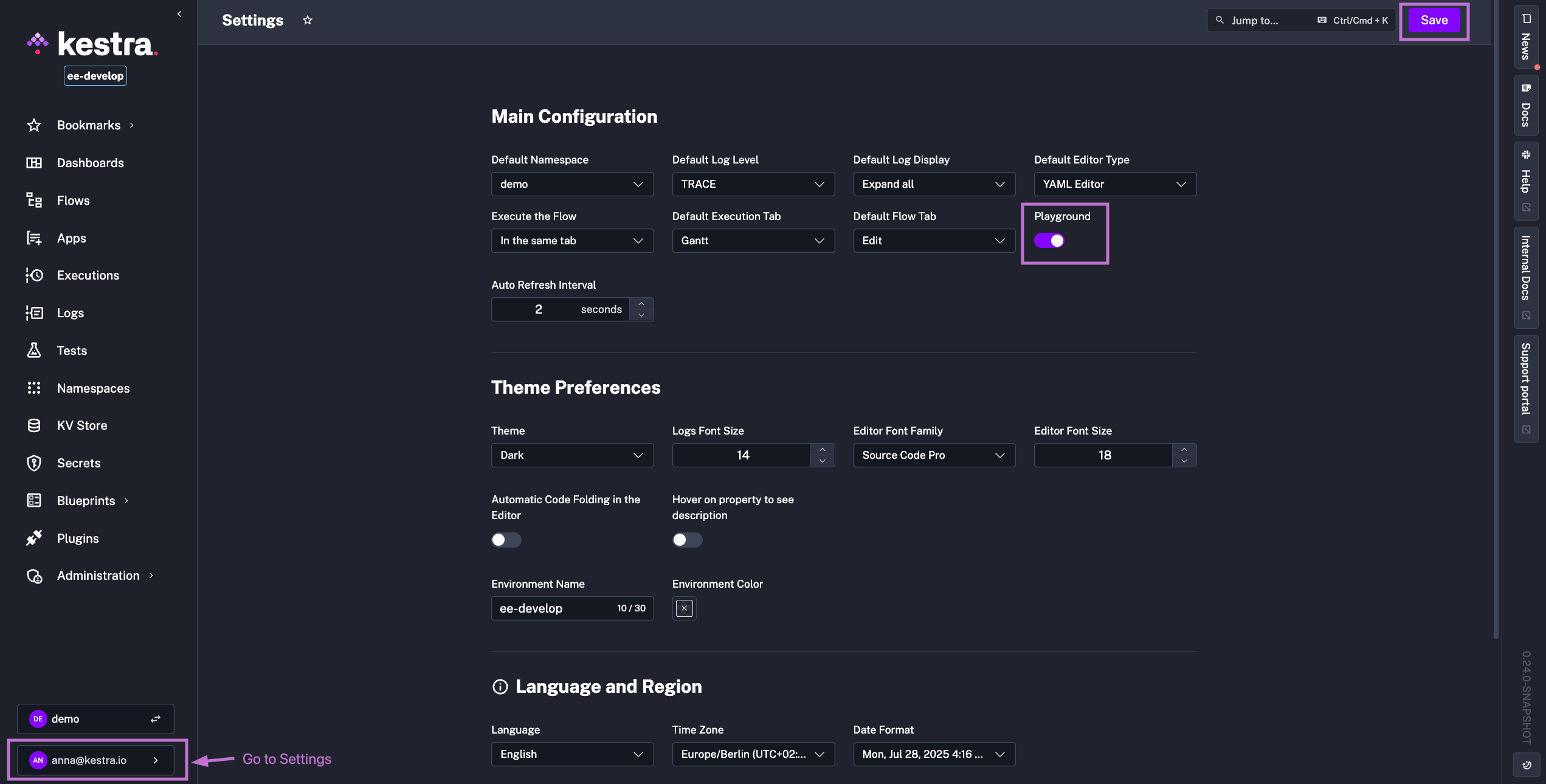
Note that Playground mode is currently in Beta, and we welcome your feedback and suggestions for improvements. You can enable it directly from the Kestra UI from the Settings page simply by toggling on the Playground button:
The new core task property taskCache allows you to cache the status and outputs of computationally expensive operations. Tasks that benefit from caching include:
When you enable task caching, Kestra will store the task’s status and outputs in the database. If you run the same task again with the same inputs, Kestra will skip execution and return the cached outputs instead. This can significantly speed up your workflows and reduce resource consumption.
The syntax of the taskCache property is as follows:
taskCache: enabled: true ttl: PT1H # Duration in ISO 8601 format, e.g., PT1H for 1 hourNote how the ttl (time-to-live) property allows you to specify how long the cached outputs should be kept before they are purged. You can set it to any duration in ISO 8601 format, such as PT1H for 1 hour, PT24H for 24 hours, or P7D for 7 days.
Expand the block below for an example flow that caches the outputs of a computationally expensive task extracting a large dataset from a production database. The flow downloads the infrequently-changing data only once per day, caches it for 24 hours, and then uses it in subsequent tasks to join with frequently changing transaction data.
id: cachingnamespace: company.team
tasks:  - id: transactions    type: io.kestra.plugin.core.http.Download    uri: https://huggingface.co/datasets/kestra/datasets/resolve/main/csv/cache_demo/transactions.csv
  - id: products    type: io.kestra.plugin.core.http.Download    uri: https://huggingface.co/datasets/kestra/datasets/resolve/main/csv/cache_demo/products.csv    description: This task pulls the full product catalog once per day. Because the catalog changes infrequently and contains over 200k rows, running it only once per day avoids unnecessary strain on a production DB, while ensuring downstream joins always use up-to-date reference data.    taskCache:      enabled: true      ttl: PT24H
- id: duckdb type: io.kestra.plugin.jdbc.duckdb.Query store: true inputFiles: products.csv: "{{ outputs.products.uri }}" transactions.csv: "{{ outputs.transactions.uri }}" sql: |- SELECT t.transaction_id, t.timestamp, t.quantity, t.sale_price, p.product_name, p.category, p.cost_price, p.supplier_id, (t.sale_price - p.cost_price) * t.quantity AS profit FROM read_csv_auto('transactions.csv') AS t JOIN read_csv_auto('products.csv') AS p USING (product_id);Kestra provides SELECT and MULTISELECT input types that turn into dropdown menus when executing the flow from the UI. To dynamically populate these dropdowns, you can use the expression property to fetch options from your KV Store using the {{ kv(...) }} function. However, this approach requires a scheduled flow that regularly updates the KV Store values to keep the dropdown menus fresh.
With the new HTTP function, you can now make these dropdowns dynamic by fetching options from an external API directly. This proves valuable when your data used in dropdowns changes very frequently, or when you already have an API serving that data for existing applications.
The example below demonstrates how to create a flow with two dynamic dropdowns: one for selecting a product category and another for selecting a product from that category. The first dropdown fetches product categories from an external HTTP API. The second dropdown makes another HTTP call to dynamically retrieve products that match your selected category.
id: dynamic_dropdownsnamespace: company.team
inputs:  - id: category    type: SELECT    expression: "{{ http(uri = 'https://dummyjson.com/products/categories') | jq('.[].slug') }}"
  - id: product    type: SELECT    dependsOn:      inputs:        - category    expression: "{{ http(uri = 'https://dummyjson.com/products/category/' + inputs.category) | jq('.products[].title') }}"
tasks:  - id: display_selection    type: io.kestra.plugin.core.log.Log    message: |      You selected Category: {{ inputs.category }}      And Product: {{ inputs.product }}
Check out the video below to see how it works in action.
We’re excited to announce the official Kestra SDKs for Java, Python, JavaScript, and Go. These SDKs provide a convenient way to interact with Kestra’s API and build custom applications on top of it.
To demonstrate how to use the SDKs, let’s create a simple flow that logs a message. This example assumes you have a Kestra instance running and accessible via the KESTRA_HOST environment variable, along with your username and password set in a .env file, e.g.:
KESTRA_HOST=http://localhost:8080KESTRA_USERNAME=admin@kestra.ioKESTRA_PASSWORD=Admin1234First, create a virtual environment and install the Python SDK:
uv venvsource .venv/bin/activateuv pip install kestrapyuv pip install python-dotenv # For loading auth environment variables from the .env fileNow, you can use the following Python script to create or update a flow that logs a message:
import kestra_api_clientfrom dotenv import load_dotenvimport osimport json
load_dotenv()
configuration = kestra_api_client.Configuration(    host = os.environ.get("KESTRA_HOST"),    username = os.environ.get("KESTRA_USERNAME"),    password = os.environ.get("KESTRA_PASSWORD"))
api_client = kestra_api_client.ApiClient(configuration)api_instance = kestra_api_client.FlowsApi(api_client)
tenant = 'main'flow_id = 'sdk'namespace = 'demo'
body = f"""id: {flow_id}namespace: {namespace}
tasks:  - id: hello    type: io.kestra.plugin.core.log.Log    message: Hello from the SDK! 👋"""
try: api_response = api_instance.create_flow(tenant, body) print(api_response)except kestra_api_client.rest.ApiException as e: if e.status == 422 and "Flow id already exists" in json.loads(e.body).get("message", ""): try: api_response = api_instance.update_flow(flow_id, namespace, tenant, body) print(api_response) except ValueError: print("Flow updated successfully") else: print(e)Check out the video below to see how it works in action.
Based on the newly introduced Java SDK, we created a dedicated Kestra plugin that allows you to interact with flows and namespaces via tasks. This plugin provides tasks to interact with Kestra’s own metadata, such as listing all flows in a namespace or exporting flow definitions. To see it in action, you can use the following example flow that lists all namespaces and their flows, and then logs the output.
id: kestra_pluginnamespace: company.team
tasks:  - id: list_namespaces    type: io.kestra.plugin.kestra.namespaces.List
  - id: loop    type: io.kestra.plugin.core.flow.ForEach    values: "{{ outputs.list_namespaces.namespaces }}"    tasks:      - id: list_flows        type: io.kestra.plugin.kestra.flows.List        namespace: "{{ taskrun.value }}"
  - id: log_output    type: io.kestra.plugin.core.log.Log    message: "{{ outputs.list_flows | jq('[.[] .flows[] | {namespace: .namespace, id: .id}]') | first }}"
pluginDefaults: - type: io.kestra.plugin.kestra values: kestraUrl: http://host.docker.internal:8080 auth: username: admin@kestra.io # pass your Kestra username as secret or KV pair password: Admin1234 # pass your Kestra password as secret or KV pairCheck the video below to see how it works:
The Slack plugin has been enhanced to support sending well-formatted Slack updates with results from your tasks. The new messageText property in the SlackIncomingWebhook task accepts an arbitrary string, which can include markdown syntax with links, bold text or numbered lists — the plugin will render it without you having to worry about escaping special characters or manually constructing a JSON payload with Slack’s blocks.
The example below demonstrates how to use the new messageText property to send a message with AI-generated news summaries to a Slack channel.
id: fetch_local_newsnamespace: company.team
inputs:  - id: prompt    type: STRING    defaults: Summarize top 5 technology news from my region.  - id: city    type: STRING    defaults: Berlin  - id: country_code    type: STRING    defaults: DE
tasks:  - id: news    type: io.kestra.plugin.openai.Responses    apiKey: "{{ secret('OPENAI_API_KEY') }}"    model: gpt-4.1-mini    input: "Today is {{ now() }}. {{ inputs.prompt }}"    toolChoice: REQUIRED    tools:      - type: web_search_preview        search_context_size: low  # low, medium, high        user_location:          type: approximate          city: "{{ inputs.city }}"          region: "{{ inputs.city }}"          country: "{{ inputs.country_code }}"
  - id: send_via_slack    type: io.kestra.plugin.slack.notifications.SlackIncomingWebhook    url: "{{ secret('SLACK_WEBHOOK_URL') }}"    messageText: "Current news from {{ inputs.city }}: {{ outputs.news.outputText }}"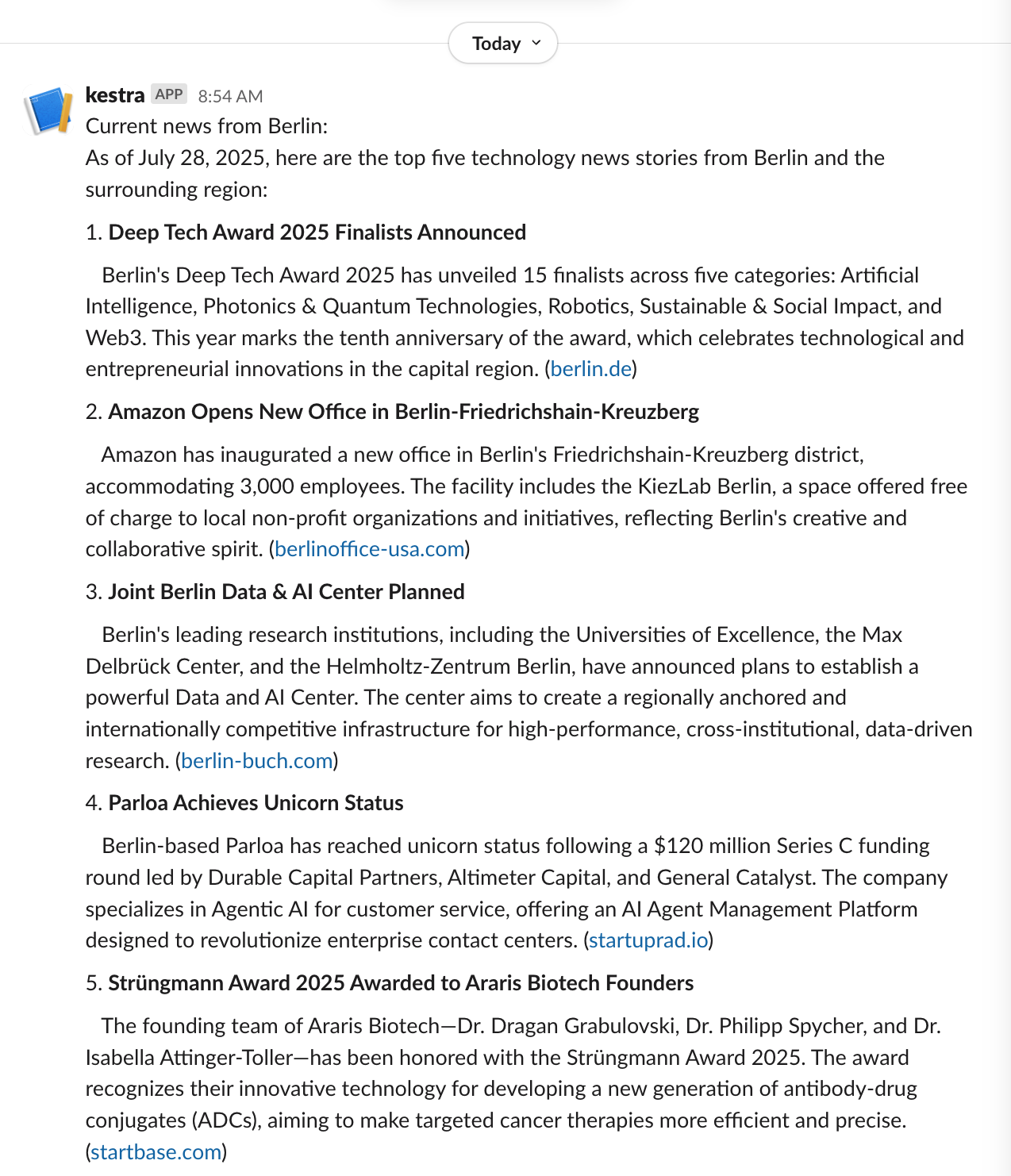
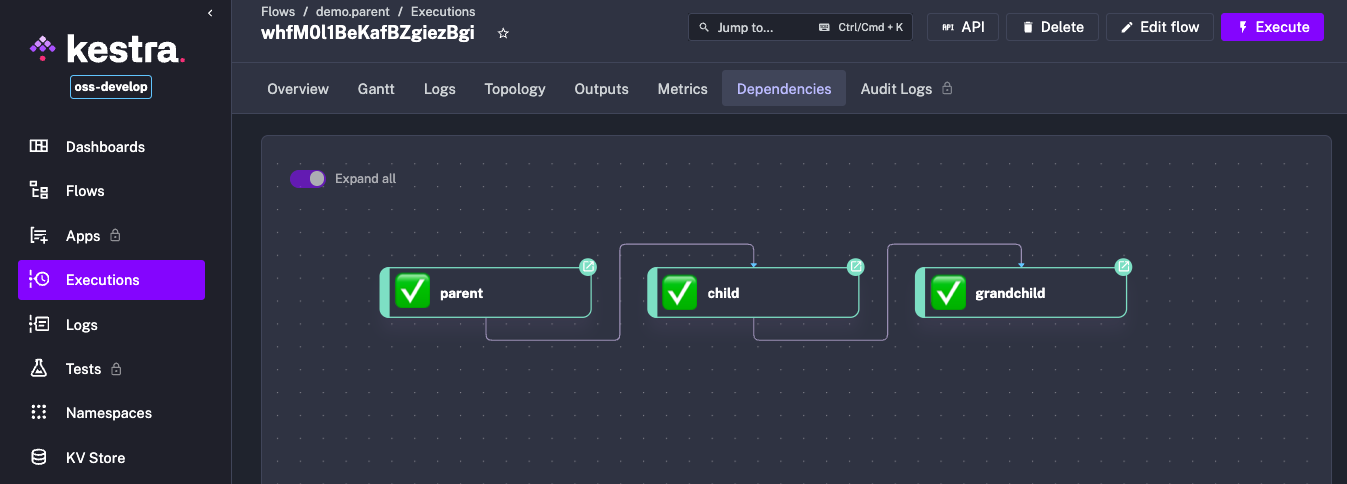
The new Execution dependency view allows you to follow runtime dependencies from the first parent to the last child flow. It simplifies troubleshooting long execution chains by providing a clear overview of the relationships between each execution and those that precede or follow it.
Speaking of flow dependencies, we’ve also added a new backend endpoint /api/v1/dependencies that lists all flow dependencies across all namespaces in a tenant. This is useful for understanding how flows are interconnected on a tenant-level and can help you identify dependencies across different projects or teams.
When running Kestra locally, you can access the documentation for this endpoint at: http://localhost:8080/api#get-/api/v1/-tenant-/dependencies.
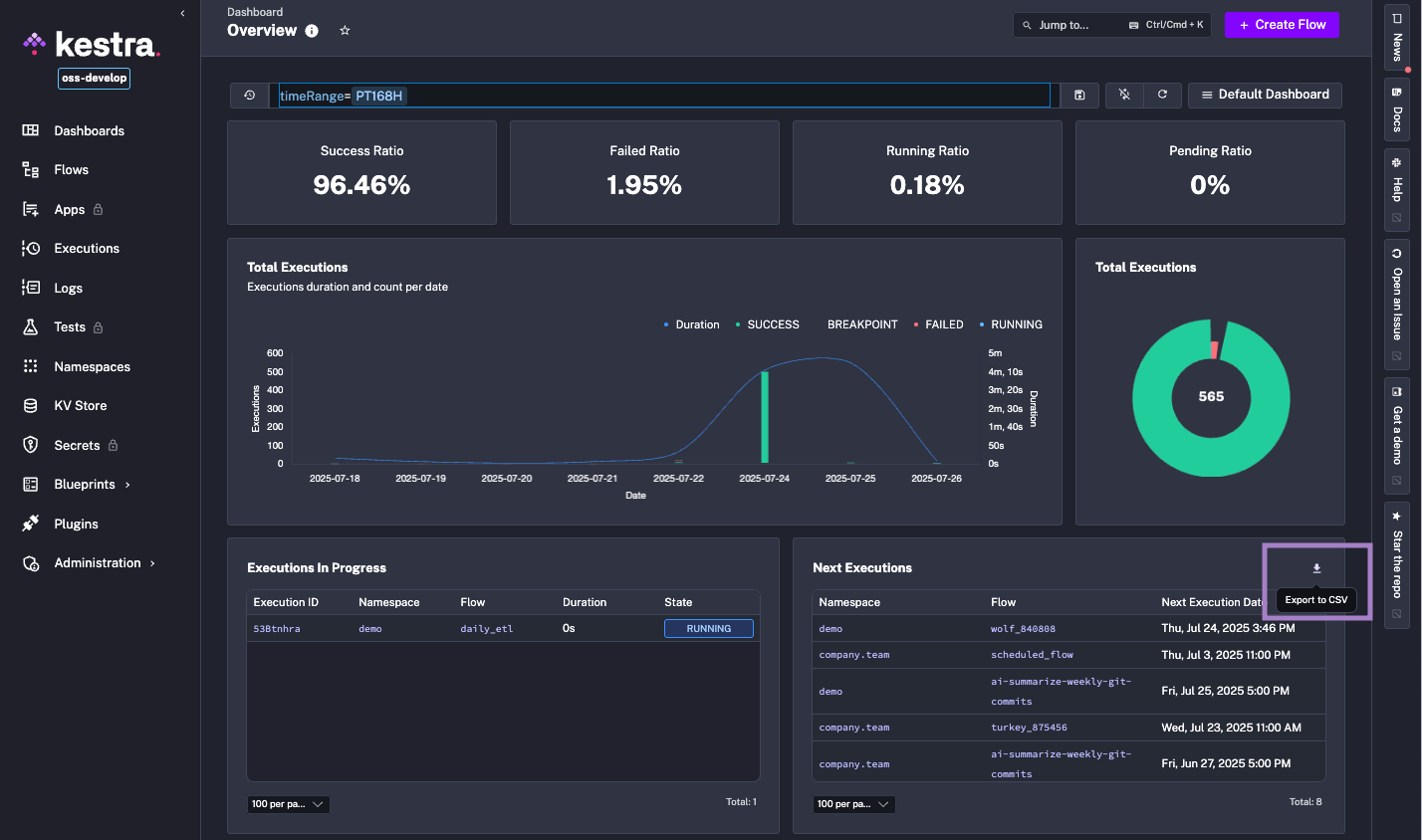
The new CSV Export is a handy feature that allows you to export tabular data from any dashboard into a CSV file for reporting and daily operations. You can use it to analyze data in Excel or Google Sheets, or to share data with stakeholders who work with spreadsheets.
Starting from 0.24, Kestra supports a new universal file protocol that simplifies how you can reference files in your flows. This new protocol allows more consistent and flexible handling of local and namespace files in your flows.
You can still reference files inline by defining the filename and its content directly in YAML, but you can now also use nsfile:/// and file:/// URIs to reference files stored as namespace files or on the host machine:
id: protocolnamespace: company.team
tasks:  - id: inline_file    type: io.kestra.plugin.scripts.python.Commands    inputFiles:      hello.py: |        x = "Hello world!"        print(x)
  - id: local_file    type: io.kestra.plugin.scripts.python.Commands    inputFiles:      hello.py: file:///scripts/hello.py
  - id: namespace_file_from_the_same_namespace    type: io.kestra.plugin.scripts.python.Commands    inputFiles:      hello.py: nsfile:///scripts/hello.py
  - id: namespace_file_from_other_namespace    type: io.kestra.plugin.scripts.python.Commands    inputFiles:      hello.py: nsfile://company/scripts/hello.py
pluginDefaults:  - type: io.kestra.plugin.scripts.python.Commands    values:      taskRunner:        type: io.kestra.plugin.core.runner.Process      commands:        - python hello.py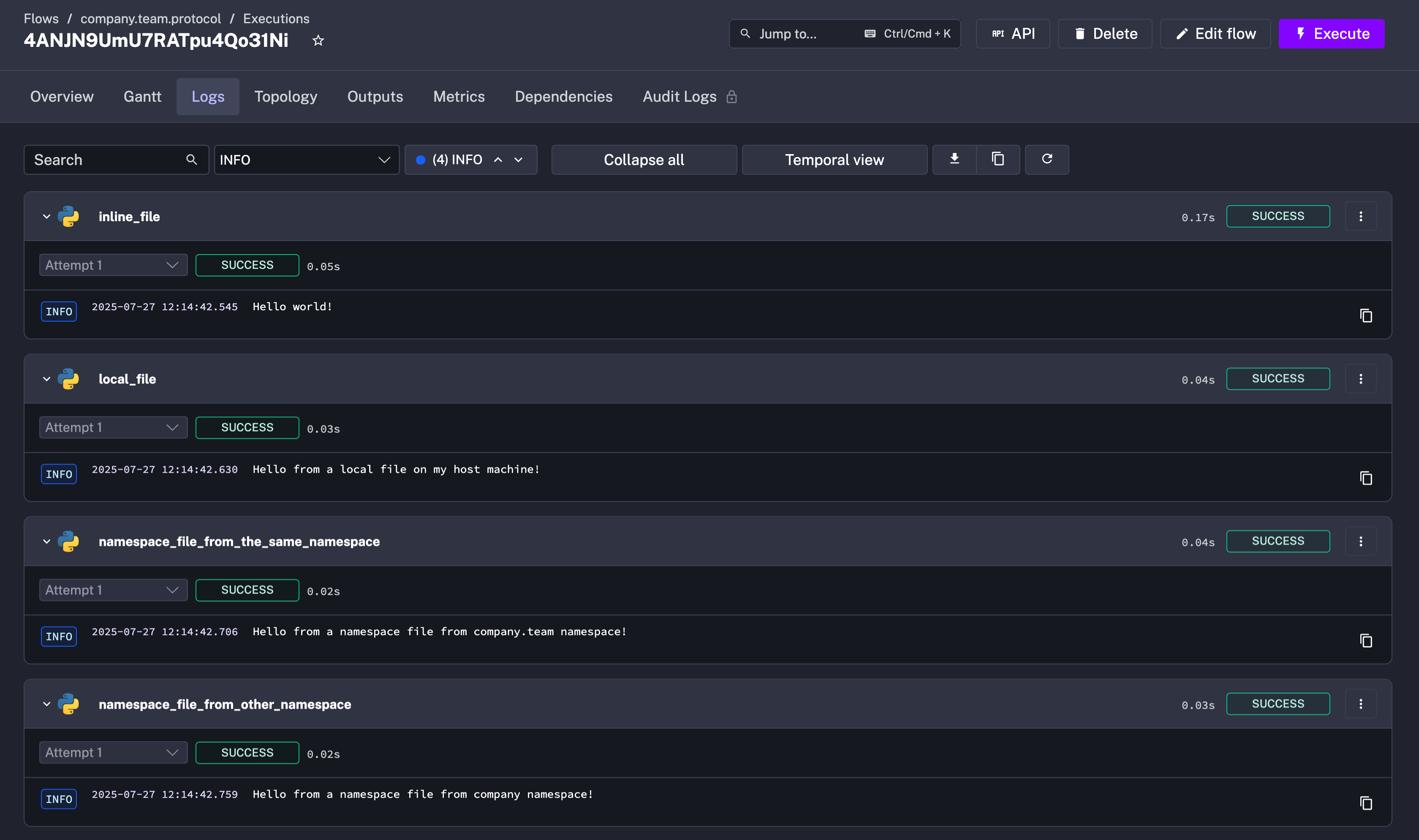
Note that to use the file:/// scheme, you will need to bind-mount the host directory containing the files into the Docker container running Kestra, as well as set the kestra.local-files.allowed-paths configuration property to allow access to that directory. For example, if you want to read files from the scripts folder on your host machine, add the following to your kestra.yml configuration:
kestra: image: kestra/kestra:latest volumes: - /Users/yourdir/scripts:/scripts # Bind-mount the host directory ... environment: # Allow access to the /scripts directory in Kestra container KESTRA_CONFIGURATION: | kestra: local-files: allowed-paths: - /scriptsKeep in mind that if you see the following error:
java.lang.SecurityException: The path /scripts/hello.py is not authorized. Only files inside the working directory are allowed by default, other paths must be allowed either globally inside the Kestra configuration using the `kestra.local-files.allowed-paths` property, or by plugin using the `allowed-paths` plugin configuration.`.It means that you have not configured the allowed paths correctly. Make sure that the host directory is bind-mounted into the container and that the kestra.local-files.allowed-paths configuration property includes the path to that directory.
Here is a reference of the new file protocol:
file:///path/to/file.txt to reference local files on the host machine from explicitly allowed paths.nsfile:///path/to/file.txt to reference files stored in the current namespace. Note that this protocol uses three slashes after nsfile:// to indicate that you are referencing a file in the current namespace. The namespace inheritance doesn’t apply here, i.e. if you specify nsfile:///path/to/file.txt in a flow from company.team namespace and Kestra can’t find it there, Kestra won’t look for that file in the parent namespace, i.e. the company namespace, unless you explicitly specify the parent namespace in the path, e.g. nsfile://company/path/to/file.txt.nsfile://your.infinitely.nested.namespace/path/to/file.txt to reference files stored in another namespace, provided that the current namespace has permission to access it. Note how this protocol uses two slashes after nsfile://, followed by the namespace name, to indicate that you are referencing a file in a different namespace. Under the hood, Kestra EE uses the Allowed Namespaces concept to check permissions to read that file.kestra:/// scheme for internal storage files. If you need to reference files stored in the internal storage, you can use kestra:///path/to/file.txt protocol.read() functionNote that you can also use the read() function to read namespace files or local files in tasks that expects a content rather than a path to a script or a SQL query. For example, if you want to read a SQL query from a namespace file, you can use the read() function as follows:
id: querynamespace: company.team
tasks:  - id: duckdb    type: io.kestra.plugin.jdbc.duckdb.Query    sql: "{{ read('nsfile:///query.sql') }}"
For local files on the host, you can use the file:/// scheme:
id: querynamespace: company.team
tasks: - id: duckdb type: io.kestra.plugin.jdbc.duckdb.Query sql: "{{ read('file:///query.sql') }}"One of the benefits of this protocol is that you can now reference Namespace Files as default FILE-type inputs in your flows. See the example below that reads a local file hello.txt from the company.team namespace and logs its content.
id: file_inputnamespace: company.team
inputs:  - id: myfile    type: FILE    defaults: nsfile:///hello.txt
tasks: - id: print_file_content type: io.kestra.plugin.core.log.Log message: "{{ read(inputs.myfile) }}"We’ve introduced a new Apps Catalog to the Enterprise Edition, which allows you to showcase your Apps to the entire company in a new list or gallery view. This feature is designed to help teams discover and share Apps, making it easier to build workflows and automate processes across the organization.
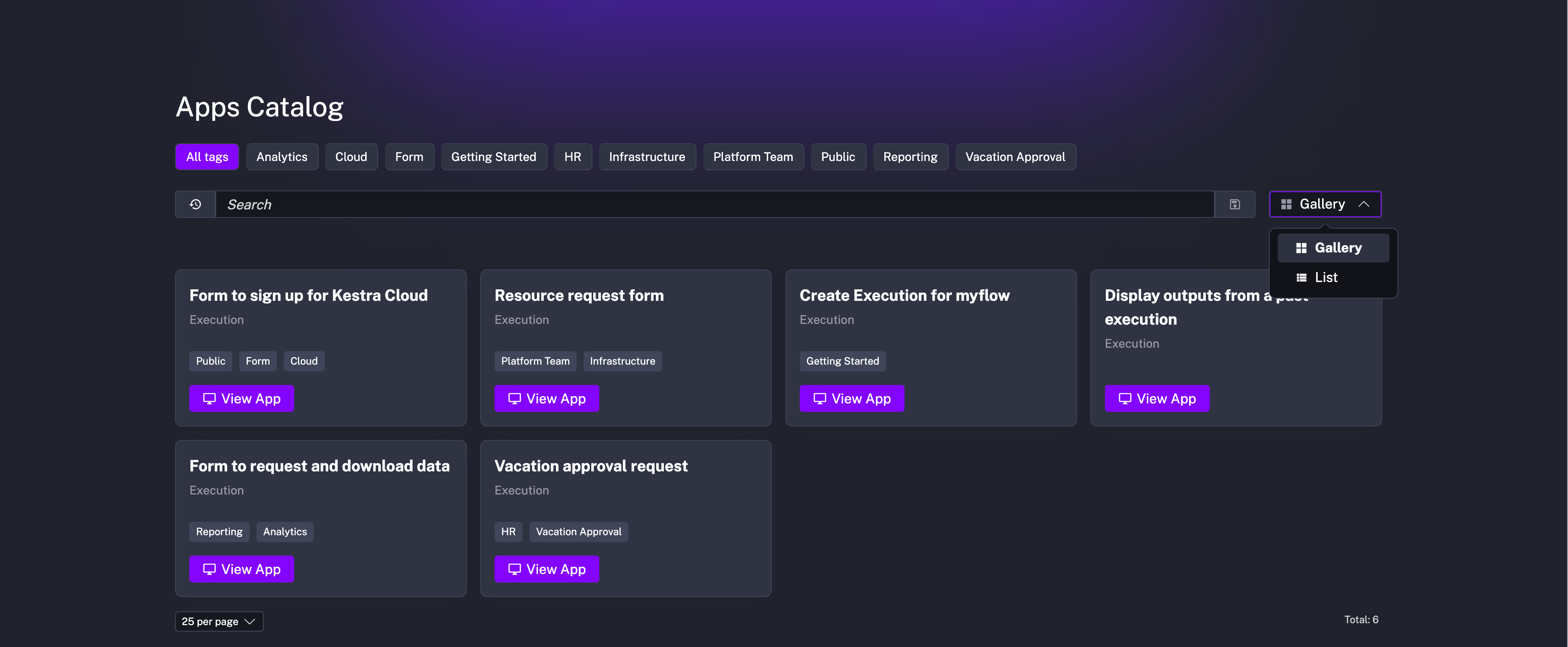
The Apps catalog is offered as a dedicated page without showing any typical Kestra UI elements, such as the sidebar or header. This makes it easy to share the catalog with non-technical users who may not be familiar with Kestra. The catalog is accessible via a dedicated URL in the format http://your_host/ui/your_tenant/apps/catalog, which can be shared with anyone in your organization who has at least APP-Read and APPEXECUTION-Read permissions in that Kestra tenant (adding all APPEXECUTION permissions is recommended).
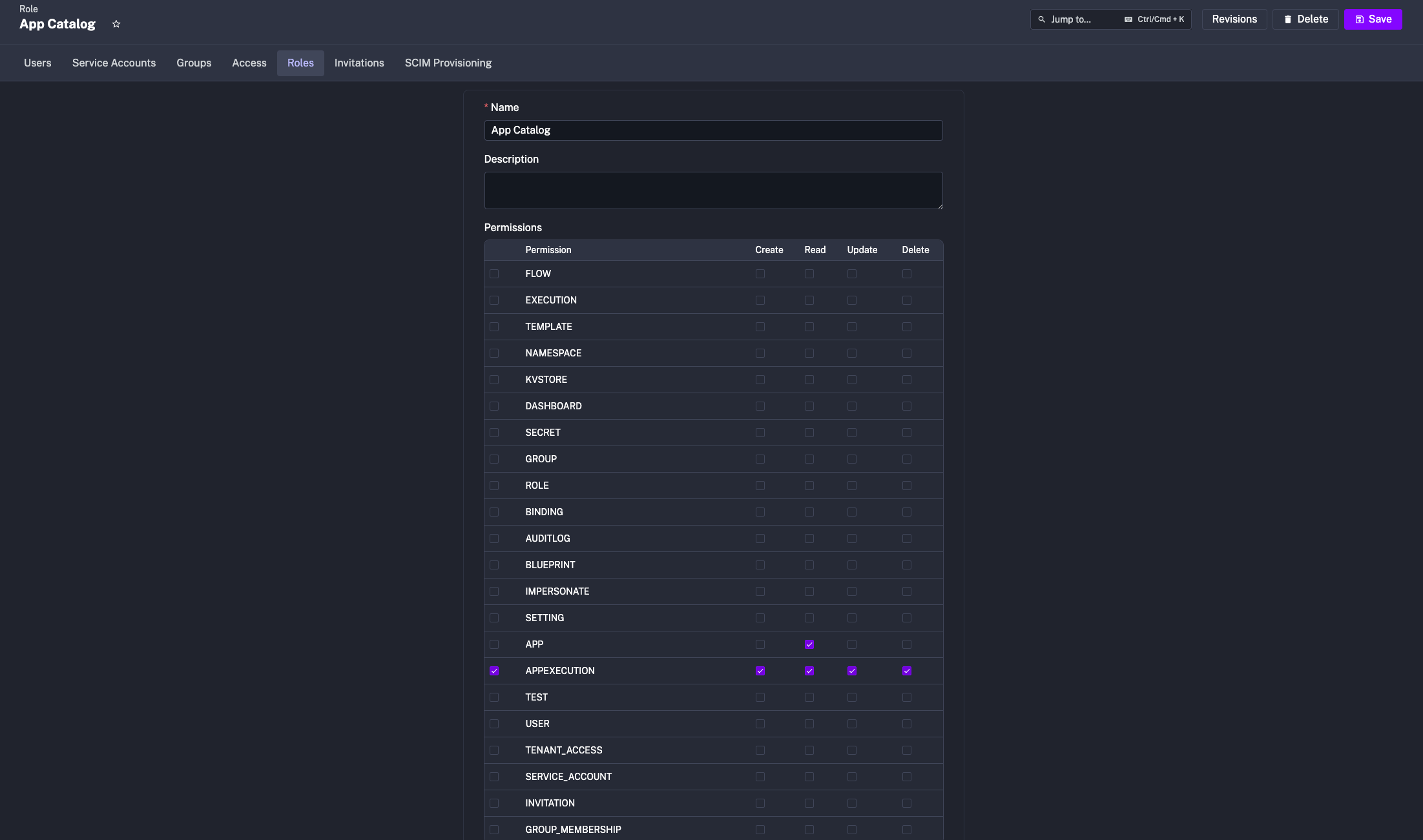
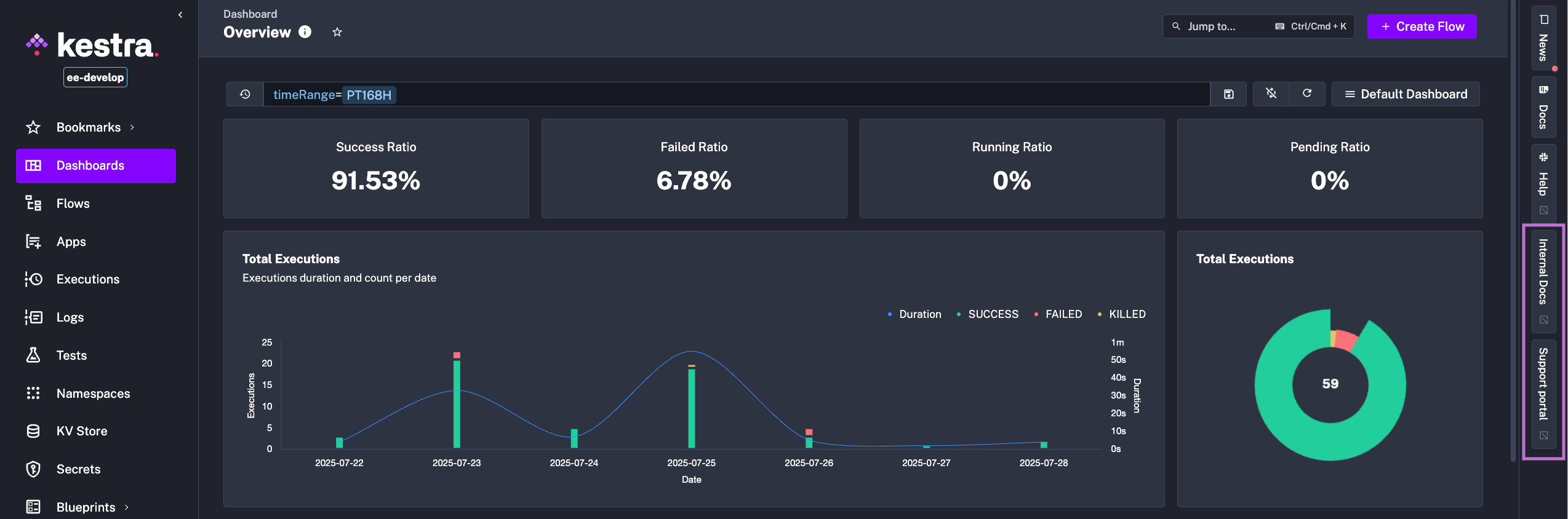
In the Enterprise Edition, admins can add custom links that will be displayed in Kestra’s UI sidebar. These links can point to internal documentation, support portals, or other relevant resources. You can set this up in your Kestra configuration file as follows:
kestra: ee: right-sidebar: custom-links: internal-docs: title: "Internal Docs" url: "https://kestra.io/docs/" support-portal: title: "Support portal" url: "https://kestra.io/support/"The kestra.ee.right-sidebar.custom-links property is an arbitrary map, so you can name the link properties as you like (as long as each includes the title and url properties):
kestra: ee: right-sidebar: custom-links: internal-docs: title: "Internal Docs" url: "https://kestra.io/docs/" support-portal: title: "Support Portal" url: "https://kestra.io/support/"The links will show up in the sidebar, allowing users to quickly access important resources without leaving the Kestra UI.
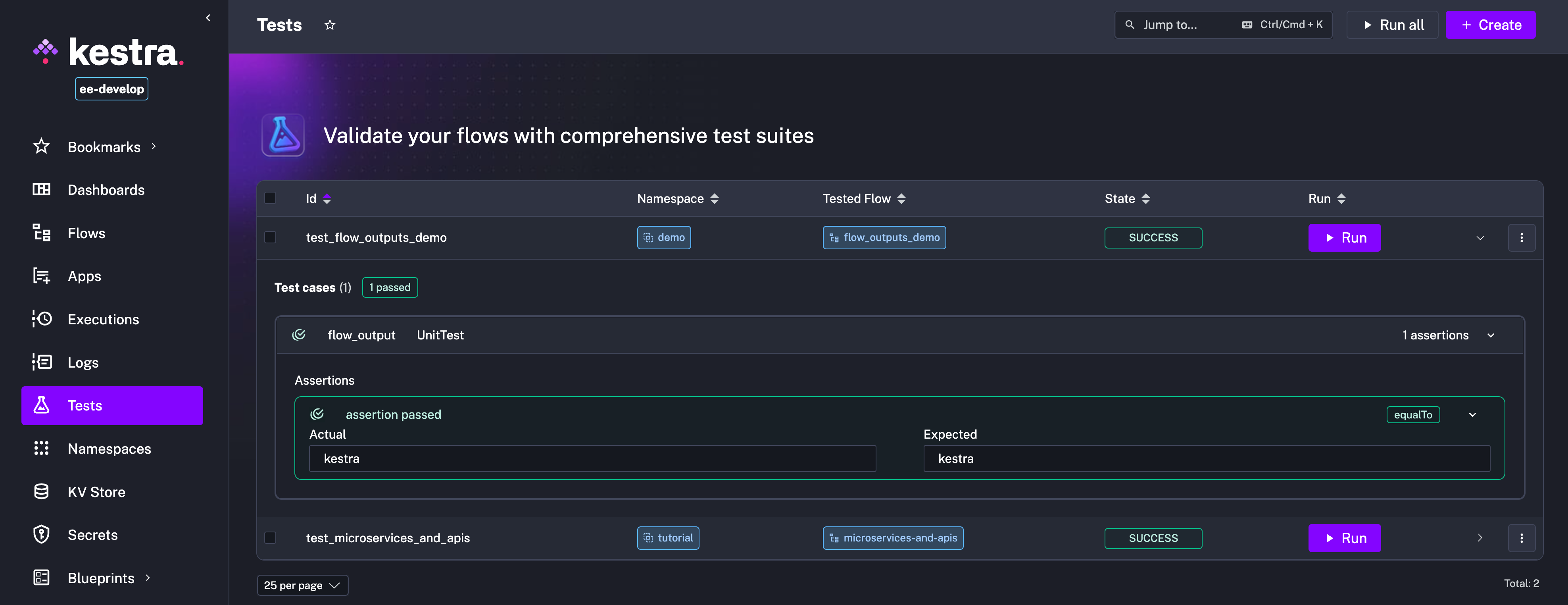
The Unit Tests feature has been enhanced with several improvements, including the ability to assert on execution outputs and view past test runs.
To assert on execution outputs, use the {{ execution.outputs.your_output_id }} syntax in your test assertions. This allows you to verify that the outputs of your tasks match the expected values.
Assume you have a flow that outputs a value:
id: flow_outputs_demonamespace: company.team
tasks:  - id: mytask    type: io.kestra.plugin.core.output.OutputValues    values:      myvalue: kestra
outputs:  - id: myvalue    type: STRING    value: "{{ outputs.mytask.values.myvalue }}"
You can then create a unit test for this flow that asserts the output value as follows:
id: test_flow_outputs_demoflowId: flow_outputs_demonamespace: company.team
testCases:  - id: flow_output    type: io.kestra.core.tests.flow.UnitTest    assertions:      - value: "{{ execution.outputs.myvalue }}"        equalTo: kestra
When you run this test, Kestra will execute the flow and verify that the output value matches the expected value. If the assertion fails, the test will be marked as failed, and you can inspect the execution logs to see what went wrong.
In this release, we introduced a mandatory login screen for the open-source version of Kestra to improve security. This means that all users must log in to access the Kestra UI and API, even if they are running Kestra locally or in a development environment.
This change is designed to prevent unauthorized access to your Kestra instance and ensure that only authenticated users can view and manage flows. The login screen requires a username and password.
If you haven’t set up authentication yet, you will be prompted to do so when you first access the Kestra UI after upgrading to this version. For more details, check out the migration guide.
The 0.24 release includes many plugin enhancements, incl. new plugins and improvements to existing ones. Here are some highlights:
CreateVm, DeleteVm, ListVms, RebootVm, ResetVm, StartVm, StopVm, SuspendVm, UpdateVm tasks for both ESXi and vCenterTrigger for both ESXi and vCenterCreateVmSnapshot, DeleteVmSnapshot, ListVmSnapshots, RestoreVmFromSnapshot for both ESXi and vCenterCloneTemplate, ConvertTemplateToVm, CloneVm, ConvertVmToTemplate for vCenter onlyCreate, Read, Update, and Archive pagesChatCompletion taskChatCompletion taskChatCompletion taskChatCompletion taskChatCompletion taskCommands and Script) for PHP, Perl, Lua, Deno, Groovy, and BunDatabricksCLI for running Databricks CLI commandsCheck the video below to see the new language tasks in action.
Additionally, we have made numerous improvements to existing plugins, including better error handling, fixed bugs, and enhanced documentation. Expand the block below to see the full list of plugin improvements.
python.Commands (uv instead of Conda), and better support for PodmanFindGetTrigger and RealtimeTriggerQuery and DeleteQuerySlackIncomingWebhook, TelegramExecution, TelegramSend, MailSend, SlackExecution, TwilioExecution, TeamsExecution, DiscordExecutionMemory support for RAG,ChatCompletion, Classification and JSONStructuredExtraction tasksOllamaCLIIonToJson, ExcelToIonpubsub.Publish,
pubsub.Consume, bigquery.QueryVfsService, all vfs tasksPodCreate and default apiGroup for Apply, Delete and GetArchiveDecompressDbtCLI, tasks using YAML DSL have been deprecatedAbstractSubmitSyncPushNamespaceFiles, AbstractSyncTask + allow self hosted repo for most tasksThis post highlighted the new features and enhancements introduced in Kestra 0.24.0. Which updates are most interesting to you? Are there additional capabilities you’d like to see in future releases? We welcome your feedback.
If you have any questions, reach out via Slack or open a GitHub issue.
If you like the project, give us a GitHub star ⭐️ and join the community.
Lastly, if you’d like to listen to a podcast episode discussing the new features, check out this episode of the Kestra Podcast:

Stay up to date with the latest features and changes to Kestra