Authors

Anna Geller

Anna Geller
Recently, we’ve released the Dremio and Arrow Flight SQL plugins, which allow you to automate Dremio data workflows with Kestra. This post will dive into how you can leverage Dremio, dbt, Python and Kestra to orchestrate processes built on top of a data lakehouse.
Dremio is a data lakehouse platform that simplifies big data analytics. It allows you to directly access data from various sources, such as Postgres, S3 and Azure Data Lake Storage, without needing to copy or move the data. Its key features include a fast query engine, a semantic layer to help manage and share data, a catalog for Iceberg tables, and reflections — a market-leading query acceleration technology that delivers sub-second query response times. Designed to work with SQL and common BI tools, Dremio provides self-service analytics and data management for BI workloads with the best price performance and lowest cost.
Kestra is a universal orchestration platform for business-critical operations. It allows you to automate data workflows across multiple systems, including Dremio. It’s designed to reliably manage complex workflows, be it event-driven pipelines, scheduled batch data transformations, or API-driven automations. Kestra is built with a modular architecture that allows you to easily extend its functionality with plugins, including among others dbt, Python, Dremio and the Arrow Flight SQL plugins. These plugins allow you to execute custom scripts and SQL queries, trigger actions based on data changes, and much more.
With the Dremio plugin, you can interact with Dremio data sources via JDBC. This plugin includes:
For broader compatibility with databases using Apache Arrow, Kestra offers the Arrow Flight SQL plugin. It includes:
Let’s look at a practical application of Kestra and Dremio for data lakehouse orchestration. The workflow involves data transformation with dbt, then fetching transformed data from a Dremio lakehouse using SQL, and finally processing it with Polars in a Python task.
https://app.dremio.cloud/sonar/ead79cc0-9e93-4d50-b364-77639a56d4a6, then your project ID is the last string ead79cc0-9e93-4d50-b364-77639a56d4a6.Transforming Data with dbt:
io.kestra.plugin.git.Clone task clones the Jaffle Shop repository, which contains a sample dataset in the seeds directory, and dbt models in the models directory.io.kestra.plugin.dbt.cli.DbtCLI task runs a dbt command to build models and run tests.Querying Data from Dremio:
io.kestra.plugin.jdbc.dremio.Query task queries the Dremio data source using JDBC.Convert Ion to CSV:
io.kestra.plugin.serdes.csv.IonToCsv task converts the Ion file into a CSV file. This task saves us many lines of code to transform between data formats because the Polars library, used in the next task, does not support Amazon Ion files as input yet.Processing Data with Python:
io.kestra.plugin.scripts.python.Script task utilizes a Docker image with Polars.
Here is the full workflow code for this example:
id: dremio_sql_pythonnamespace: dremio.analytics
variables:  user: rick.astley@kestra.io  project_id: ead79cc0-9e93-4d50-b364-77639a56d4a6
tasks:  - id: wdir    type: io.kestra.plugin.core.flow.WorkingDirectory    tasks:    - id: cloneRepository      type: io.kestra.plugin.git.Clone      url: https://github.com/dbt-labs/jaffle_shop      branch: main
    - id: dbt      type: io.kestra.plugin.dbt.cli.DbtCLI      docker:        image: ghcr.io/kestra-io/dbt-dremio:latest      profiles: |        jaffle_shop:          outputs:            dev:              type: dremio              threads: 16              cloud_host: api.dremio.cloud              cloud_project_id: "{{ vars.project_id }}"              user: "{{ vars.user }}"              pat: "{{ secret('DREMIO_TOKEN') }}"              use_ssl: true          target: dev      commands:        - dbt build
  - id: query    type: io.kestra.plugin.jdbc.dremio.Query    disabled: false    url: "jdbc:dremio:direct=sql.dremio.cloud:443;ssl=true;PROJECT_ID={{vars.project_id}};"    username: $token    password: "{{ secret('DREMIO_TOKEN') }}"    sql: SELECT * FROM "@{{ vars.user }}"."stg_customers";    store: true
  - id: to_csv    type: io.kestra.plugin.serdes.csv.IonToCsv    from: "{{ outputs.query.uri }}"
  - id: python    type: io.kestra.plugin.scripts.python.Script    warningOnStdErr: false    docker:      image: ghcr.io/kestra-io/polars:latest    inputFiles:      data.csv: "{{ outputs.to_csv.uri }}"    script: |      import polars as pl      df = pl.read_csv("data.csv")
print(df.glimpse())This flow clones a Git repository with dbt code, and runs dbt models and tests. Then, it fetches that transformed data from Dremio and passes the query results to a downstream Python task that further transforms fetched data using Polars.
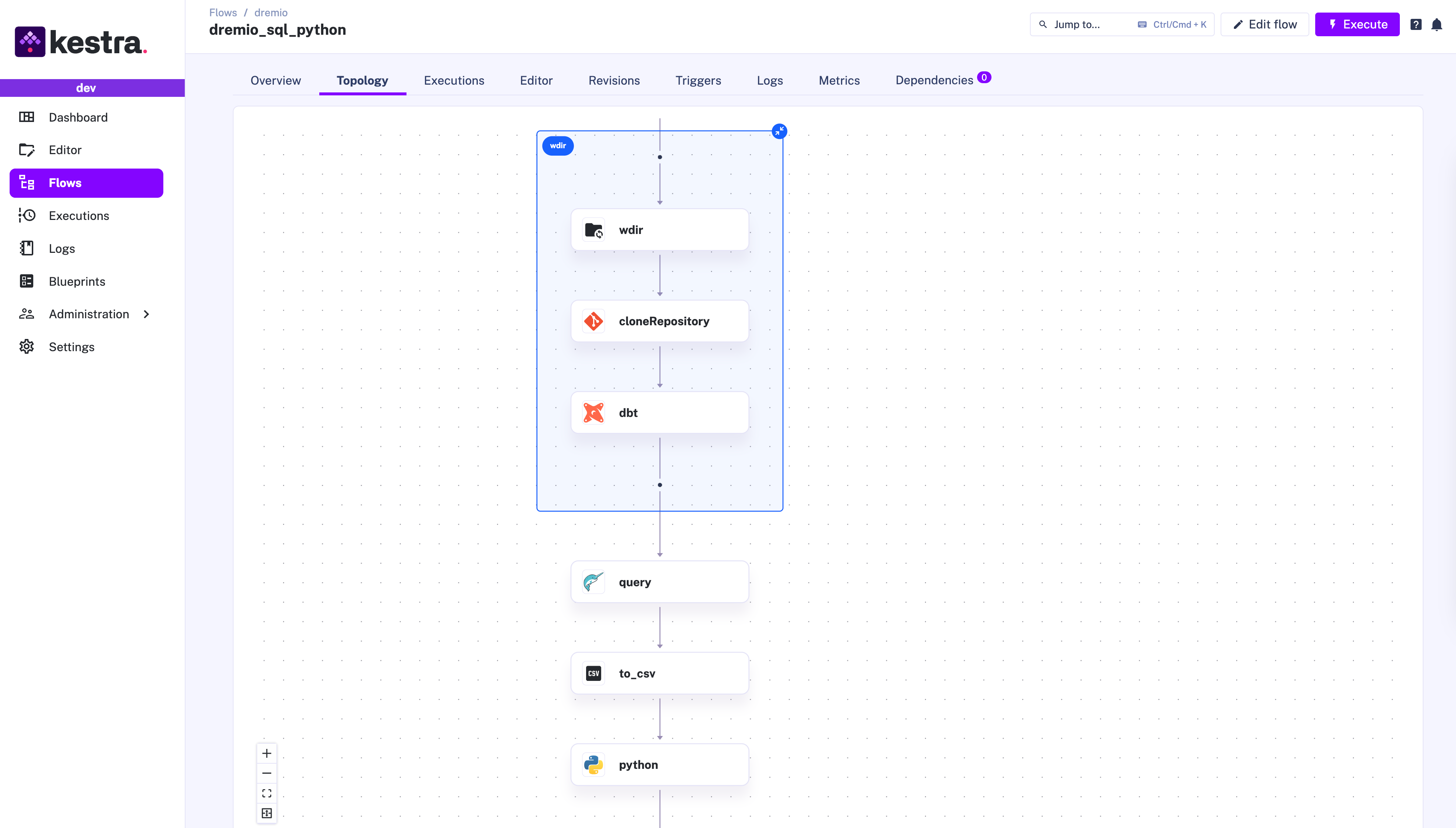
This use case is deliberately simple to demonstrate the basic usage of these plugins. However, you can easily extend it to accommodate more complex data processing requirements. For example, if you need to automate business-critical operations for each row from a large dataset, add a ForEachItem task. That task allows you to iterate over a list of items fetched from your data lakehouse and reliably execute downstream tasks in parallel for each row.
Integrating Dremio with Kestra offers a powerful solution for analytical workflows and scenarios involving complex data transformations and business-critical operations. The simple example covered in this post can be easily customized based on your requirements. If you like Kestra, give us a star on GitHub and join the community. If you want to learn more about Dremio, visit https://www.dremio.com for more information.

Stay up to date with the latest features and changes to Kestra