Authors

Martin-Pierre Roset
Martin-Pierre Roset
We are excited to introduce a fully redesigned version control integration that takes your GitOps capabilities to new heights. This blog post explores how these new features can enhance productivity and collaboration.
With our new Git tasks, committing and pushing your saved work to a Git repository is as simple as adding a few YAML lines. The PushFlows task makes this a reality, allowing you to effortlessly move all your work from a development environment to a Git repository. The result? You save valuable time and reduce the risk of human error.
For example, when you’ve developed a new data pipeline flow, with PushFlows, you can push this flow to your Git repository with just a few lines of configuration. This ensures your code is versioned and safely stored, ready for review and deployment.
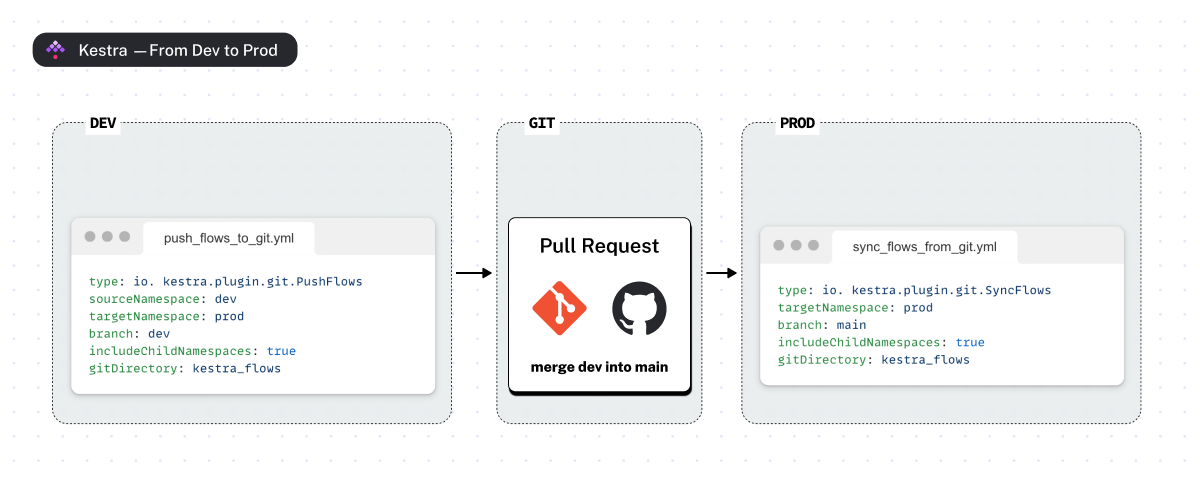
But we didn’t stop there. The SyncFlows task automatically checks for changes in your Git branch and deploys them to your Kestra namespaces. This continuous synchronization means you no longer need to manually update your production environment. Whether you schedule it to run hourly or trigger it whenever changes are merged into a specific Git branch, SyncFlows ensures that your environments are always up-to-date and consistent.
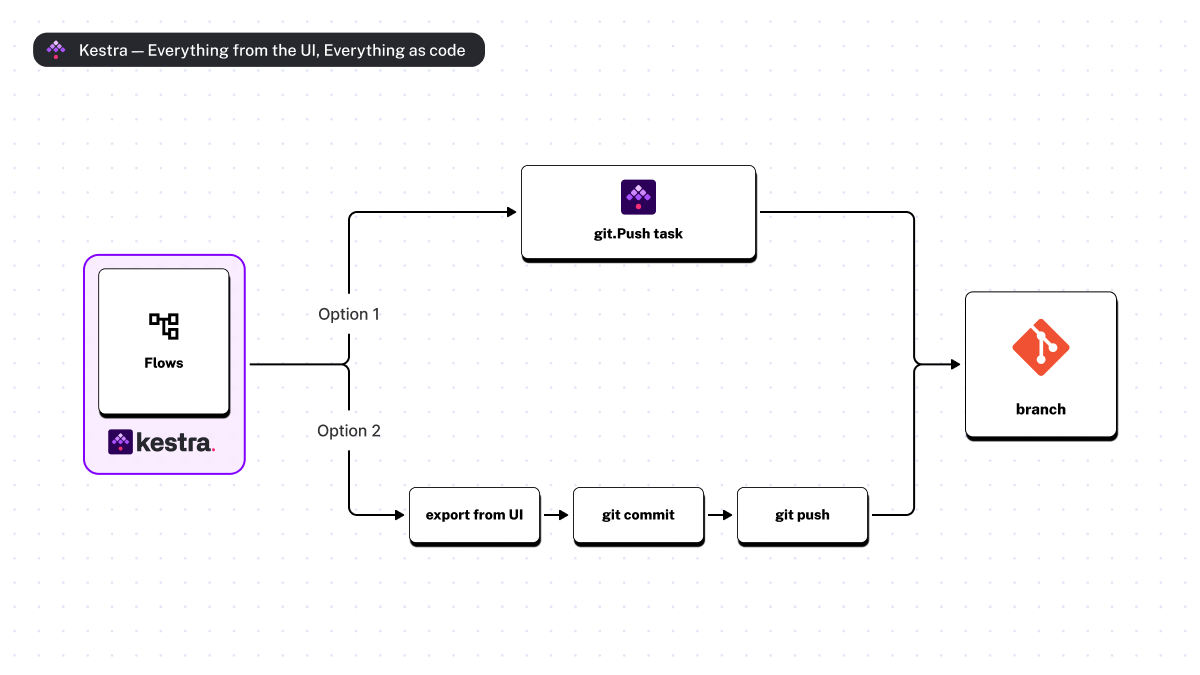
If you have a production environment that needs to stay updated with the latest approved changes, you can configure SyncFlows to automatically sync any changes merged into your main branch to your Kestra namespaces. This keeps your production environment up-to-date without configuring tedious CI/CD pipelines or manual intervention.
With the ability to target specific flows or namespace files, you can ensure that only the necessary changes are committed.
If you’re working on a major feature branch and only want to push changes related to a particular flow, the PushNamespaceFiles task makes it easy.
By combining the PushFlows and SyncFlows tasks, you can create a comprehensive Git workflow that covers the full software development lifecycle for your workflows.
Here is how that works:
One of the standout features of our new Git tasks is the dryrun mode. Dry-run allows you to validate your workflows before committing any changes, giving you a preview of what will happen without making actual modifications. This way, you can be sure that only flows and files you want are included in your commit, and you can validate which changes will be synced to production before it happens.
Kestra supports various patterns to suit different workflows and preferences, ensuring that you can choose the one that best fits your needs:
Whether you prefer using a built-in editor or an external IDE, our new Git tasks offer the flexibility to suit your workflow. For those who enjoy the convenience of a graphical interface, the Git Push pattern allows you to edit flows and namespace files directly from the UI and commit changes regularly. On the other hand, if you are managing CI/CD pipelines independently, our tools integrate seamlessly with platforms like GitHub Actions or Terraform, allowing you to maintain Git as your single source of truth.
With Kestra’s new Git integration features, managing your version control has never been easier. To help you get started, we’ve created detailed guides in the documentation and a YouTube playlist that will walk you guide you through using these new Git tasks.
Ready to Unlock Your GitOps Superpowers?
Join the Slack community if you have any questions or need assistance. Follow us on Twitter for the latest news. Check the code in our GitHub repository and give us a star if you like the project.

Stay up to date with the latest features and changes to Kestra