Authors

Shruti Mantri

Shruti Mantri
Kestra 0.17.0 introduced the concept of Realtime Triggers, which allows you to react to events instantly without polling. With this feature, Kestra triggers the execution of a flow immediately for every incoming event. This post demonstrates how you can leverage real-time triggers in a real-world scenario.
Before 0.17.0 release, Kestra had support for Triggers only. Triggers in Kestra can listen to external events and start a workflow execution when the event occurs. Most of these triggers poll external systems for new events at regular intervals e.g. every second. This works well for data processing use cases. However, business-critical workflows often require reacting to events as they happen with millisecond latency and this is where Realtime Triggers come into play.
Kestra supports Realtime Triggers for most of the queuing systems like Apache Kafka, Apache Pulsar, AMQP queues (RabbitMQ), and MQTT. It also supports Realtime Triggers for cloud-based queuing services like AWS SQS, GCP Pub/Sub and Azure Eventhubs. Kestra can also capture real-time events for change data capture using Debezium for MySQL, Postgres, and SQLServer.
As soon as you add a Realtime Trigger to your workflow, Kestra starts an always-on thread that listens to the external system for new events. When a new event occurs, Kestra starts a workflow execution to process the event.
Using Realtime Triggers, you can orchestrate business-critical processes and microservices in real time. This covers scenarios such as:
In addition, Realtime Triggers can be used for data orchestration, especially for Change Data Capture use cases. The Debezium RealtimeTrigger plugin can listen to changes in a database table and start a workflow execution as soon as a new row is inserted, updated, or deleted.
Let us now see Realtime Trigger in action. We will take an example from ecommerce domain, and use RealtimeTrigger with Apacke Kafka. Let us say, we have an incoming stream of order events, each event being generated when the order is placed by the customer. We will use a simulation code to generate this stream of order events. Each order corresponds to a single product, and contains the product_id which can be used to reference the product. We have the product details present in Cassandra. With every incoming order event, we want to create a detailed_order record by appending the product information to the record, and insert this detailed order into MongoDB. Let us understand this in more detail.
We will be using the Kestra’s data sets powered by Hugging Face. We will fetch the orders data from orders.csv, and generate JSON events from it as follows:
{"order_id": "1", "customer_name": "Kelly Olsen", "customer_email": "jenniferschneider@example.com", "product_id": "20", "price": "166.89", "quantity": "1", "total": "166.89"}The event has all the order details like order_id, customer_name, customer_email, etc. It also has product_id corresponding to the order.
We will be using products.csv to populate the data in Cassandra. The product details are present in Cassandra as follows:
product_id | brand | product_category | product_name------------+------------------------------------------+------------------+----------------- 1 | streamline turn-key systems | Electronics | gomez 2 | morph viral applications | Household | wolfe . . . 18 | deliver integrated interfaces | Clothing | lewis 19 | monetize B2B ROI | Books | crawford-gaines 20 | envisioneer cross-media convergence | Electronics | wolfeIn the flow, we want to enrich the order event by putting the product information to it, and generate the detailed record as follows:
{ "order_id": "1", "customer_name": "Kelly Olsen", "customer_email": "jenniferschneider@example.com", "product_id": "20", "price": "166.89", "quantity": "1", "total": "166.89", "product": { "id": "20", "name": "wolfe", "brand": "envisioneer cross-media convergence", "category": "Electronics" }}We will insert this detailed order record in a collection in MongoDB. This is how the architecture will look like:
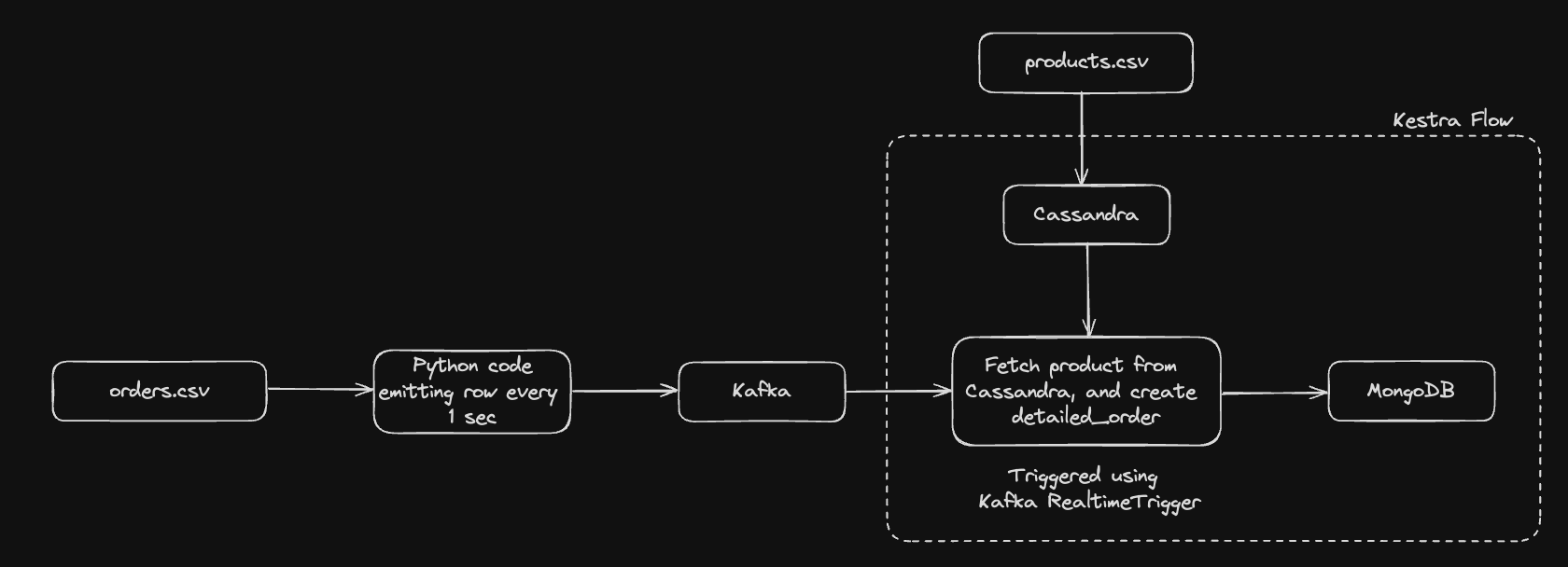
We will be using the orders.csv data for generating the order records. We will write a simple python script that reads the csv file, converts it into json records, and regularly dumps these records one by one onto Kafka topic. This is how the python script will look like:
import csvimport jsonimport timefrom kafka import KafkaProducer
producer = KafkaProducer(bootstrap_servers=['localhost:9092'])
with open('orders.csv', mode ='r')as file:  csvReader = csv.DictReader(file)  for row in csvReader:      json_row = json.dumps(row)      print(json_row)      producer.send('orders', value=json_row.encode('utf-8'))      time.sleep(1)
This script will generate order events every second in a Kafka topic named orders.
We will need a Cassandra cluster in which we will be putting in the product details. We will be using the products.csv data to populate the products table. We can use the following CQL commands for generating the products table:
# Create a keyspaceCREATE keyspace IF NOT EXISTS kestra WITH replication = {'class' : 'SimpleStrategy', 'replication_factor' : 1};
# Use the newly created keyspaceUSE kestra;
# Create the `products` tableCREATE TABLE kestra.products (   product_id int,   product_name text,   product_category text,   brand text,   PRIMARY KEY (product_id));
# Populate the `products` table from the csvCOPY kestra.products FROM 'products.csv' WITH DELIMITER=',' AND HEADER=TRUE;Our final collection detailed_orders will reside in MongoDB, whose each document consists of the complete details about the order and the product corresponding to that order. For that, we will require a MongoDB, and have a database named kestra, under which we will create a collection named detailed_orders. Below is the screenshot for creating the appropriate database and collection using MongoDB Compass:
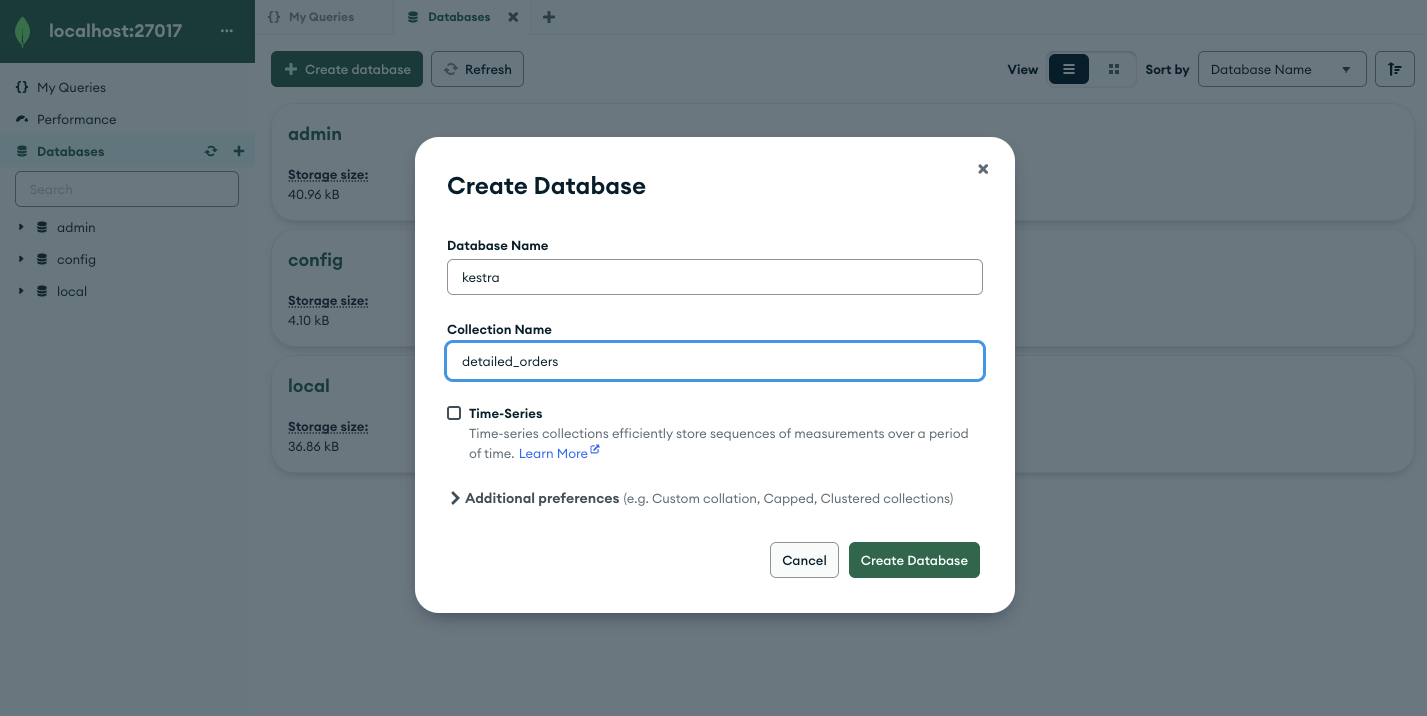
With this, all the pre-requisites are in place, and we can move on to create the Kestra flow.
We will now create the Kestra flow with the Kafka RealtimeTrigger to trigger the flow every time the order event lands in the orders topic. The flow will have two tasks in it. The first task get_product_from_cassandra will fetch the product details corresponding to the product_id in the event from the Cassandra’s kestra.products table. The second task insert_into_mongodb will insert a detailed order document containing the order and the product details into the MongoDB’s kestra.detailed_orders collection. Here is the Kestra flow for achieving this:
id: get_detailed_ordernamespace: dev
tasks:  - id: get_product_from_cassandra    type: io.kestra.plugin.cassandra.Query    session:      endpoints:        - hostname: docker.host.internal          port: 9042      localDatacenter: datacenter1    cql: SELECT * FROM kestra.products WHERE product_id = {{ trigger.value | jq('.product_id') | first }}    fetchOne: true
  - id: insert_into_mongodb    type: io.kestra.plugin.mongodb.InsertOne    connection:      uri: "mongodb://username:password@docker.host.internal:27017/?authSource=admin"    database: "kestra"    collection: "detailed_orders"    document: |      {        "order_id": "{{ trigger.value | jq('.order_id') | first }}",        "customer_name": "{{ trigger.value | jq('.customer_name') | first }}",        "customer_email": "{{ trigger.value | jq('.customer_email') | first }}",        "product_id": "{{ trigger.value | jq('.product_id') | first }}",        "price": "{{ trigger.value | jq('.price') | first }}",        "quantity": "{{ trigger.value | jq('.quantity') | first }}",        "total": "{{ trigger.value | jq('.total') | first }}",        "product": {          "id": "{{ outputs.get_product_from_cassandra.row.product_id }}",          "name": "{{ outputs.get_product_from_cassandra.row.product_name }}",          "brand": "{{ outputs.get_product_from_cassandra.row.brand }}",          "category": "{{ outputs.get_product_from_cassandra.row.product_category }}"        }      }
triggers: - id: daily type: io.kestra.plugin.kafka.RealtimeTrigger topic: orders properties: bootstrap.servers: docker.host.internal:9092 serdeProperties: valueDeserializer: JSON groupId: kestraConsumerOnce the Kestra flow is saved, we can run the Python script and see the flow executions getting triggered for each order event. We can then move to MongoDB and check if we get the detailed orders in the collection. You can note that the execution gets triggered immediately as the order event lands on the Kafka topic, thus reacting to the events in real time.
As you can see, Real-Time Triggers offer a powerful solution for low-latency automation and orchestration use cases. They are fast and easy to set up, as everything else in Kestra 🚀
Join the Slack community if you have any questions or need assistance. Follow us on Twitter for the latest news. Check the code in our GitHub repository and give us a star if you like the project.

Stay up to date with the latest features and changes to Kestra