Authors

Federico Trotta

Federico Trotta
If you’re an engineer looking to scale your automation - maybe because your company is growing rapidly — then this article is definitely for you.
Here, we’ll break down what an orchestrator is, why you might need one, and provide a practical example using Kestra.
Let’s dive in!
In software engineering and data management, an orchestrator is a tool that automates, manages, and coordinates various workflows and tasks across different services, systems, or applications.
Think of it like a conductor of an orchestra, making sure all components perform in harmony, following a predefined sequence or set of rules. Whether you’re dealing with data pipelines, microservices, or CI/CD systems, an orchestrator ensures everything runs reliably without manual intervention.
What’s the difference between automation and orchestration? These two concepts are related but not quite the same:
Automation refers to the execution of individual tasks or actions without manual intervention. For example, automatically triggering a test suite after a pull request is opened.
Orchestration goes beyond automation by managing the flow of multiple interconnected tasks or processes. It defines not only what happens but also when and how things happen, ensuring that all tasks (whether automated or not) are executed in the correct order, with the right dependencies and error handling in place.
In essence, while automation focuses on individual tasks, orchestration ensures all those tasks are arranged and managed within a broader, cohesive system. This matters if you need to reliably handle complex processes with many interdependent steps.
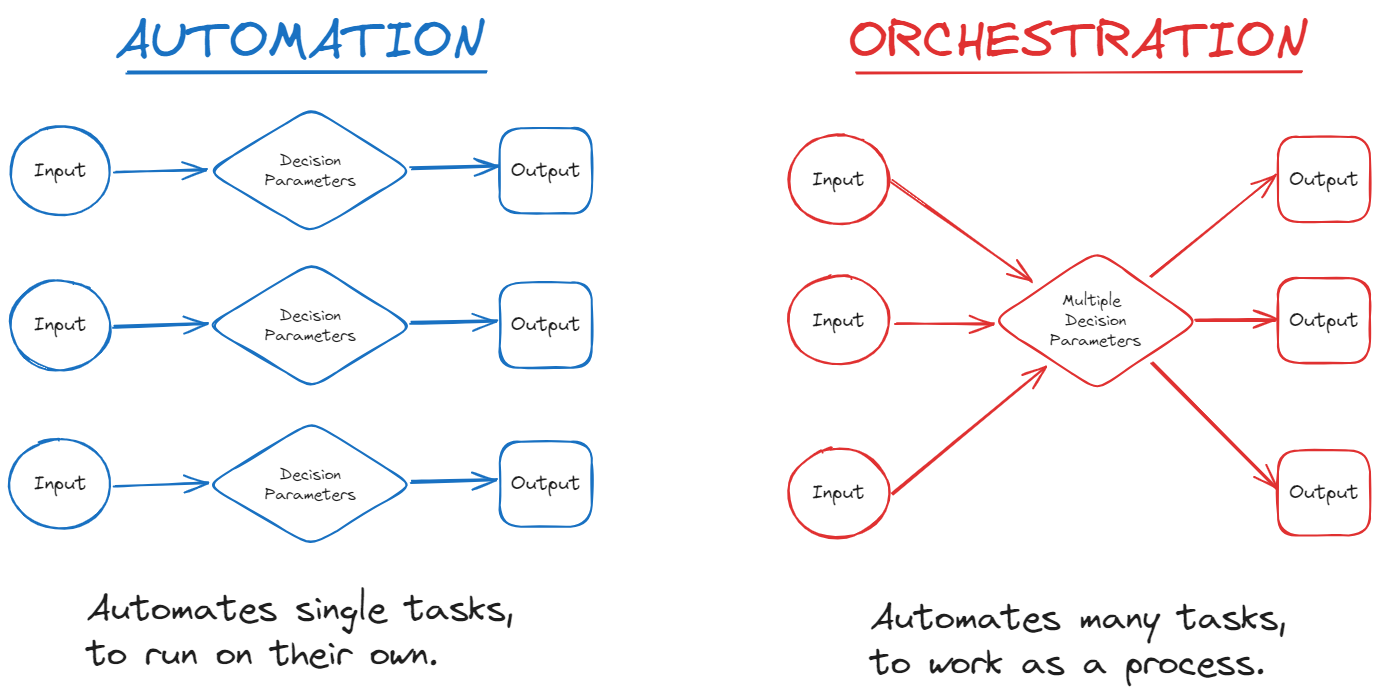
To explain the difference even further, let’s look at some practical examples.
Here are a few common examples of task automation:
Automated testing after code commits: When a developer pushes new code to a repository, an automated test suite runs without manual intervention. This ensures that the code is tested for errors, performance, or adherence to standards every time a change is made.
Automated backups: A scheduled task automatically triggers data backups at a specific time, like every night at midnight. The system takes a snapshot of databases and stores it in a safe location without requiring manual action from an admin.
Automated email notifications: In customer support systems, an automated task might send an email notification to users once their support ticket status is updated. The system detects the change and triggers the email automatically.
Now, let’s check out some orchestration examples:
Data pipeline orchestration: Consider an ETL workflow where data is extracted from a source, transformed, and then loaded into a database. The orchestrator ensures these steps happen in sequence: first extracting the data, then transforming it, and finally loading it into the database. If one step fails, the orchestrator can retry or trigger an error-handling process.
CI/CD pipeline orchestration: In a CI/CD pipeline, orchestration involves tasks like compiling code, running tests, deploying to a staging environment, and triggering manual approval for production deployment. The orchestrator ensures that each task runs in the correct order and only when the previous task has been successfully completed.
Cloud infrastructure orchestration: When deploying a new environment in the cloud, an orchestrator manages the provisioning of servers, databases, and network configurations. It ensures that all resources are created in the right order, handling dependencies such as setting up the network before deploying a database.
As IT environments become more complex, managing workflows manually becomes harder and prone to errors. An orchestrator simplifies this by offering a standardized way to schedule, run, and monitor workflows, making everything more predictable and manageable.
So, here are some key benefits of using an orchestrator:
Faster time to value: With a consistent way to schedule and run workflows, you avoid reinventing the wheel each time. This speeds up execution and helps your team focus on delivering outcomes faster.
Scalability: Orchestrators can handle workflows across multiple systems and scale as your operations grow. Whether you’re managing thousands of microservices or large-scale data processing tasks, an orchestrator ensures smooth operation with built-in scaling features.
Error handling and resiliency: Orchestrators are designed to manage failures, retries, and dependencies. If a task fails, the orchestrator can automatically retry it, send alerts, or trigger a recovery process—ensuring resiliency in complex systems.
Improved monitoring and control: Most orchestrators provide real-time monitoring and logs, giving engineers insights into each task’s status, performance, and any bottlenecks. This visibility helps in troubleshooting and optimizing workflows.
Process standardization: Orchestrators allow companies to standardize processes across systems and services, improving consistency and making it easier to introduce and scale new processes.
Now that we’ve covered what an orchestrator is and its benefits, let’s look at some common use cases:
Data engineering and ETL pipelines: In data-driven environments, orchestrators automate the process of extracting, transforming, and loading data from various sources. For example, a data orchestrator can trigger a pipeline to extract data from a database, transform it, and then load it into a data warehouse like Snowflake or Google BigQuery.
CI/CD pipelines: Orchestrators help automate the continuous integration and deployment process by managing tasks such as code building, testing, and deployment. Engineers define the pipeline steps in configuration files, and the orchestrator executes them automatically whenever new code is pushed.
Microservices orchestration: In distributed systems, microservices need to communicate and coordinate with each other. Orchestrators manage the lifecycle of these services, ensuring they start, stop, and scale according to predefined rules, improving service-to-service interactions.
Cloud infrastructure management: Orchestrators automate the provisioning of cloud infrastructure, such as virtual machines, databases, and networking configurations, often working alongside continuous delivery pipelines.
Let’s look at a practical example using Kestra, an event-driven orchestration platform that governs business-critical workflows as code or from the UI.
Now that we’we gone through the theory, let’s show some practice.
Suppose we have a CSV file containing a column that reports revenues, and suppose you want to analyze this everyday by summing the values using Python. The Python script could be something like that:
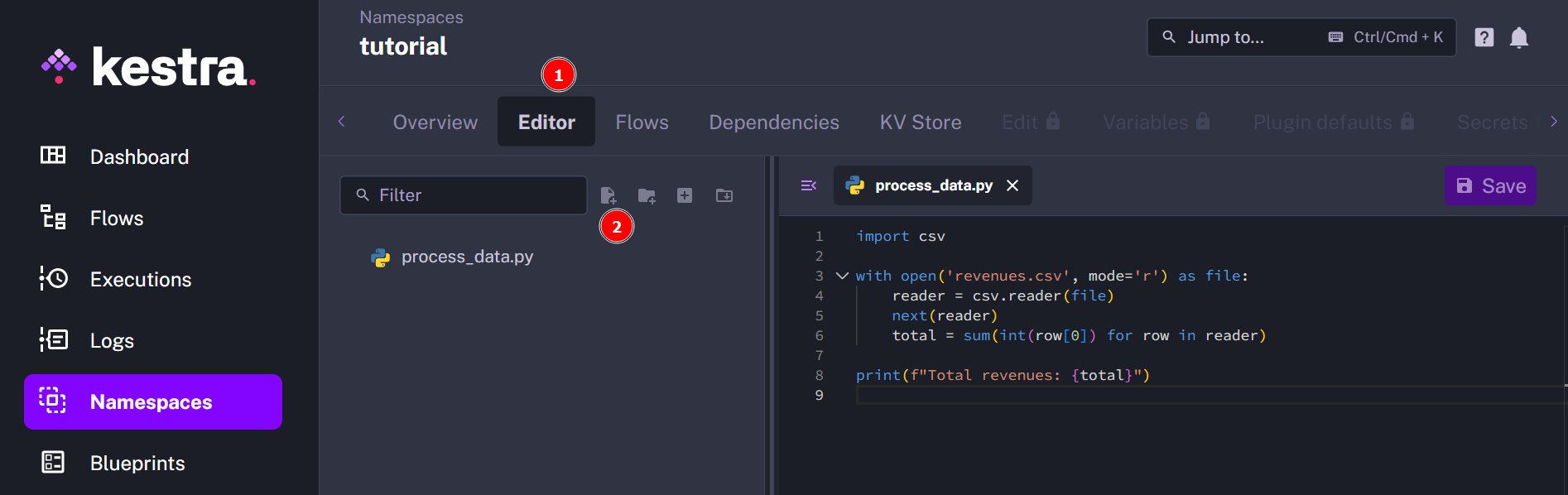
import csv
with open('revenues.csv', mode='r') as file:    reader = csv.reader(file)    next(reader)    total = sum(int(row[0]) for row in reader)
print(f"Total revenues: {total}")
This process could be done both with the automation or the orchestration approach.
Let’s show them both.
To automate this process, you could create a repository in GitHub like as follows:
your-repo/│├── .github/│ └── workflows/│ └── analyze_csv.yml│├── process_data.py├── requirements.txt└── data.csvThe analyze_csv.yml could be something like that:
name: Analyze CSV with Python
on:  workflow_dispatch:  schedule:    - cron: '0 10 * * *'
jobs:  analyze_csv:    runs-on: ubuntu-latest
    steps:      - name: Checkout repository        uses: actions/checkout@v3
      - name: Set up Python        uses: actions/setup-python@v4        with:          python-version: '3.10'
      - name: Install dependencies        run: pip install -r requirements.txt
      - name: Upload CSV file        run: echo "${{ secrets.CSV_FILE }}" > data.csv
- name: Run Python script to analyze CSV run: | python process_data.py cat analysis_result.txtThis YAML file uses workflow_dispatch for manual execution and a cron schedule for automated runs (the job is scheduled each day of the week, at 10 am.).
So, as you can see, this requires:
Let’s now show the orchestration approach.
To reproduce this example, make sure you have Kestra installed. You can follow the installation guide to get started.
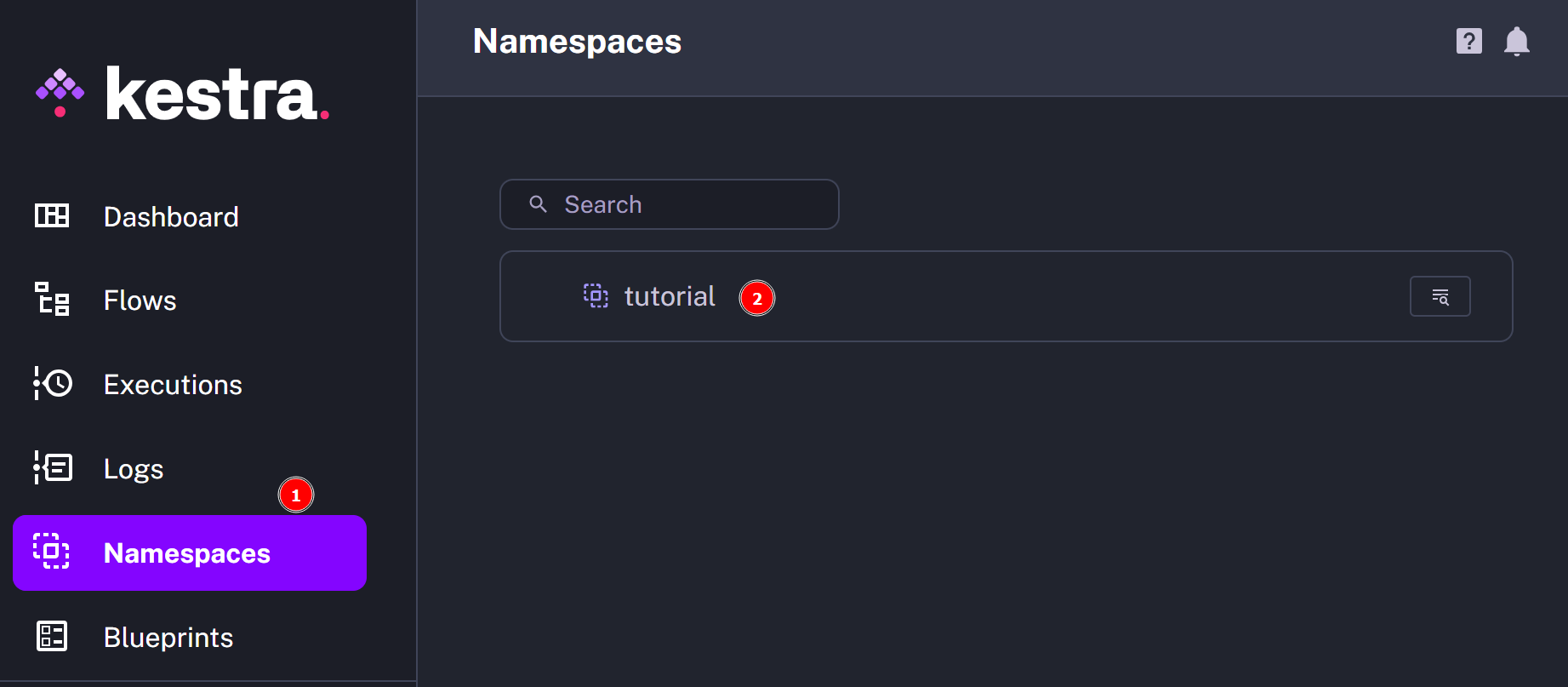
To use Kestra for our purpose, click on Namespaces > Tutorial:
Under Editor, click on Create file and give it a name and an extension. For example, let’s call it process_data.py:
Now, in Flows click on Create and fill in the YAML file as follows:
id: python_testnamespace: tutorial
inputs:  - id: data    type: FILE
tasks:  - id: process    type: io.kestra.plugin.scripts.python.Commands    namespaceFiles:      enabled: true    inputFiles:      data.csv: "{{ inputs.data }}"    commands:      - python process_data.py
triggers:  - id: schedule_trigger    type: io.kestra.plugin.core.trigger.Schedule    cron: 0 10 * * *
errors: - id: alert type: io.kestra.plugin.slack.notifications.SlackExecution channel: "#general" url: "{{ secret('SLACK_WEBHOOK') }}":::$1$2 :::
When you’ve done, click on Execute: you’ll be asked to load the CSV file containing the data. When the job is done, in the logs section you’ll see the results:
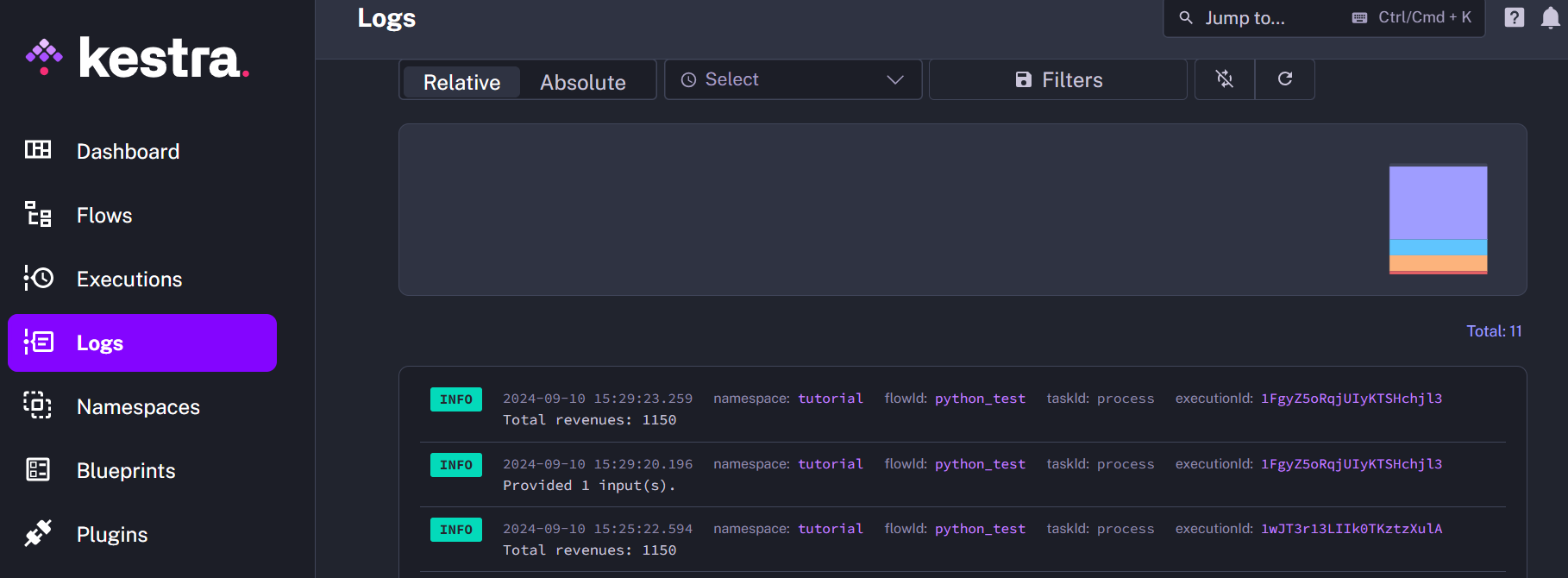
As you can see:
The YAML is shorter and simpler than the one used for GitHub Actions.
You can manage errors.
You don’t need to create a repository in GitHub, as everything happens in Kestra’s UI.
Plus, Kestra provides hundreds of plugins that allow you to connect with your preferred tools.
To sum up, an orchestrator is a tool or a platform for automating, managing, and scaling workflows across various domains, from data engineering to microservices and cloud infrastructure. With the right orchestrator, you can focus on building and optimizing systems rather than managing them manually.

Stay up to date with the latest features and changes to Kestra