Authors

Anna Geller
Anna Geller
YAML is a data serialization language known for its human-readable format. This format has been widely adopted in software development, DevOps, and cloud infrastructure.
YAML is extensively used in Kubernetes, Kustomize, GitHub Actions, Docker Compose, OpenAPI, AWS CloudFormation, Serverless Framework, GitLab CI, TravisCI, CircleCI, Ansible, Argo, Azure DevOps, and many more.
Kestra also relies on YAML for defining flows declaratively as well as for configuring Kestra itself.
Given the versatility and popularity of this configuration language, knowing how to work with YAML is a must-have skill for any engineering professional. This post provides a YAML crash course with practical Kestra flow examples.
The fundamental structure of YAML consists of key-value pairs, which can be scalars (single values), lists, or other nested key-value pairs.
YAML is case-sensitive and relies on indentation to structure data into hierarchies, either for nested lists or maps (dictionaries).
Here is a simple YAML example:
id: myflownamespace: company.teamdescription: this is a simple Kestra flowtasks: - this is a list of tasks - each list item is a map - with key-value pairs defining task propertiesthis_is_also_a_list: ["item1", "item2"]you_can_mix_data_types: ["item1", 42, true, 4.2, null]labels: this_is_a_map: of values key1: value1 key2: value2this_is_also_a_map: { "key1": "value1", "key2": "value2" }YAML uses Python-style indentation to structure key-value pairs into arbitrarily nested hierarchies.
The indentation is always two spaces rather than tabs for portability reasons. This is a deliberate design choice to avoid issues with different tab sizes on different systems. Therefore, two whitespaces (literal space characters) are used instead of tabs for indentation.
For example, the following YAML snippet defining which Namespace Files should be included or excluded in a Python script task has two levels of indentation — one for the namespaceFiles property and another for the include and exclude child properties:
id: namespace_filesnamespace: company.teamtasks: - id: python_and_sql type: io.kestra.plugin.scripts.python.Commands namespaceFiles: enabled: true include: - "scripts/*.py" - "queries/*.sql" exclude: - "scripts/WIP.py" commands: - python scripts/etl.pyYAML supports single-line comments initiated with #, which are ignored by the parser.
# This is a comment in my flowid: myflownamespace: company.teamScalars are single unquoted values which can represent various data types, including string, timestamp, boolean, int, or float, as well as null values. ISO-formatted date and datetime literals are parsed as timestamp data types. Scientific, hexadecimal, and octal notation formats are also natively supported in YAML.
Note how the example below deliberately uses both camelCase and snake_case formats to demonstrate that YAML supports both.
At Kestra, we follow the camelCase convention for all YAML properties. However, since YAML is case-sensitive, you can use both camelCase and snake_case formats in your configuration files.
unquotedString: Rick Astley # simple scalar valuesingle_quoted_string: '123 Main Street, Apt. #42'doubleQuotedStringKey: "123 Main Street, Apt. #42"
so_true: true # true, false, yes, no, on, off are valid boolean valuesbugs_found: null # null is a special value in YAML
release_date: 2024-04-24 # YAML supports datesrelease_datetime: 2024-04-24T12:00:00Z # ...and datetimes
scientific_nr: 1e+14 # evaluates to 100 trillionhexadecimal_notation: 0xFF01  # evaluates to 65,281octal_notation: 01234 # evaluates to 668 in decimal notation
# nested mapsong: title: Never Gonna Give You Up artist: Rick Astley release_year: 1987 # integer value float_number: 4.2 # float valueYAML supports true, false, yes, no, on, and off as boolean values. In contrast to many programming languages, YAML does not interpret 1 or 0 as boolean values. If you use 1 or 0, the YAML parser in Kestra will interpret both as false.
You can try it out using the following flow:
id: boolean_testnamespace: company.team
inputs:  - id: mybool    type: BOOLEAN    defaults: yes # true, on
tasks: - id: true_or_false type: io.kestra.plugin.core.log.Log message: "{{ inputs.mybool }}"YAML also supports explicit data type tags which follow the syntax !![type] [value]:
tagged_string: !!str 0.5tagged_boolean: !!bool truetagged_null: !!null nulltagged_int: !!int 42tagged_float: !!float -42.2tagged_datetime: !!timestamp 2024-04-24T02:42:00+02:00Since Kestra natively supports strongly typed inputs and task properties, usually you don’t need to use these data type tags. However, if you use it, Kestra will correctly parse the value as the specified data type.
Here is an example you can use to validate how Kestra parses various data types:
id: explicit_data_typesnamespace: company.team
inputs:  - id: mybool    type: BOOLEAN    defaults: true
  - id: mybool_explicit    type: BOOLEAN    defaults: !!bool true
  - id: myint    type: INT    defaults: 42
  - id: myint_explicit    type: INT    defaults: !!int 42
  - id: myfloat    type: FLOAT    defaults: 42.2
  - id: myfloat_explicit    type: FLOAT    defaults: !!float 42.2
  - id: mystring    type: STRING    defaults: hello
  - id: mystring_explicit    type: STRING    defaults: !!str hello
  - id: mydatetime    type: DATETIME    defaults: 2024-04-24T02:42:00+02:00
  - id: mydatetime_explicit    type: DATETIME    defaults: !!timestamp 2024-04-24T02:42:00+02:00
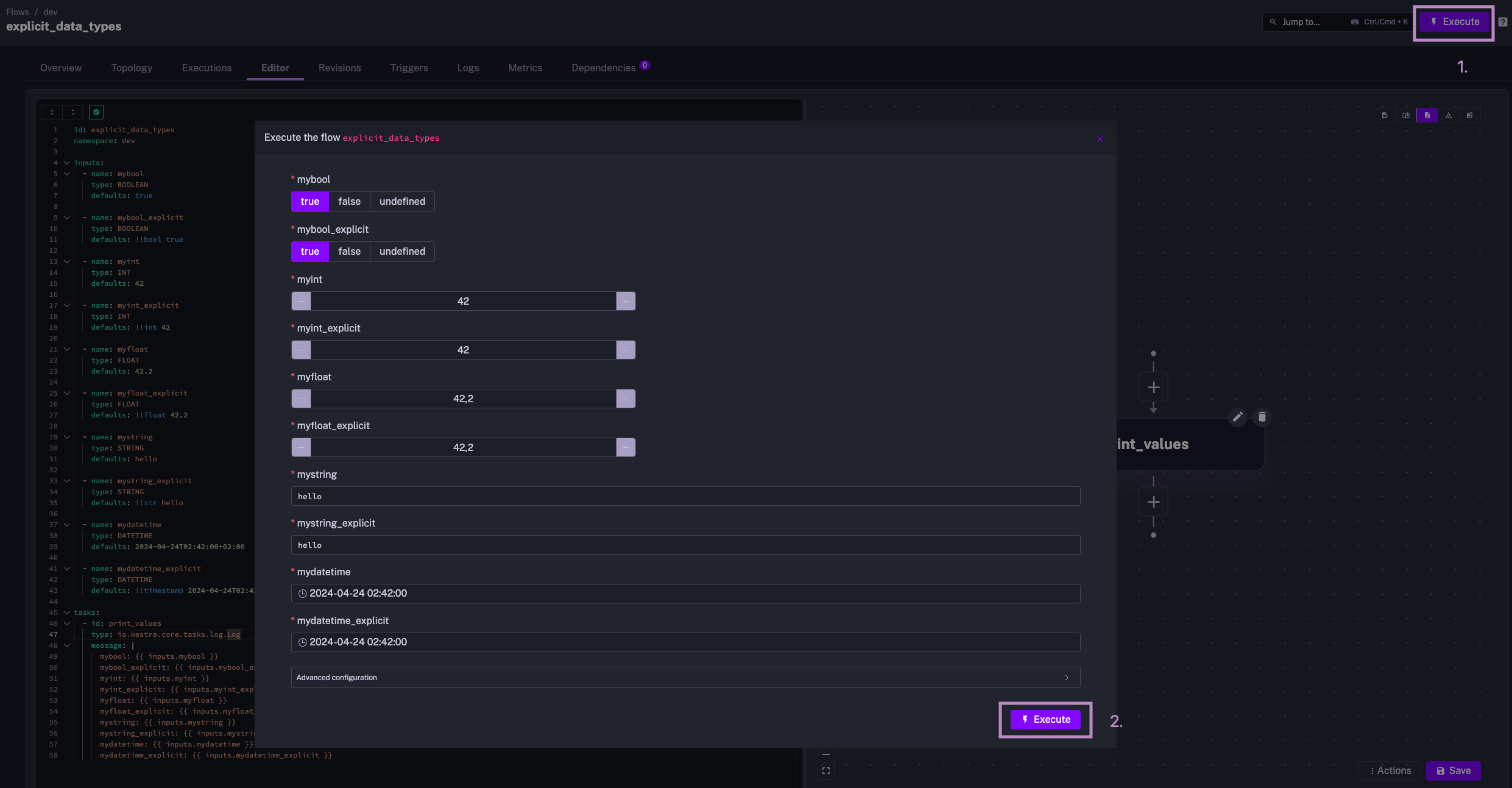
tasks: - id: print_values type: io.kestra.plugin.core.log.Log message: | mybool: {{ inputs.mybool }} mybool_explicit: {{ inputs.mybool_explicit }} myint: {{ inputs.myint }} myint_explicit: {{ inputs.myint_explicit }} myfloat: {{ inputs.myfloat }} myfloat_explicit: {{ inputs.myfloat_explicit }} mystring: {{ inputs.mystring }} mystring_explicit: {{ inputs.mystring_explicit }} mydatetime: {{ inputs.mydatetime }} mydatetime_explicit: {{ inputs.mydatetime_explicit }}The image below shows how you can overwrite various input values before starting an Execution. This is extremely useful for experimenting with different values.
Strings in YAML don’t need to be quoted unless they contain special characters like spaces in keys or colons in values. For example, the following YAML snippet is valid:
simple_key: simple valuequoted_value: "namespace: company.team" # string with a colon has to be quoted"quoted key": the key contains a space so it has to be quotedIn practice, you’ll rarely see quoted keys — most applications standardize on either the camelCase or snake_case convention without allowing special characters in keys. However, if your key requires a space or a special character, you need to quote it.
Kestra doesn’t use spaces or special characters in keys. Instead, we follow the camelCase convention without spaces or special characters in keys.
String values can contain spaces, but special characters, incl. :, ?, [, ], {, }, ,, &, *, #, !, |, >, ', ", %, @, ` are reserved and must be quoted.
Usually, scalar values are parsed by YAML into the matching int, float, string, timestamp, null, or boolean data types. If you put those in quotes, they will be parsed as strings instead:
string_value_with_int_nr: "42"int_value: 42
string_value_with_float_nr: "42.2"float_value: 42.2
string_value_with_boolean: "true"boolean_value: trueYou can use | for a literal block, where line breaks are preserved, or > for a folded block, where each newline is replaced with a single space.
Typically, | is used in most scenarios in Kestra, as it preserves the original structure of a string block, incl. line breaks and indentation.
literal: | line1 line2folded: > line1 line2When using | or > for multi-line strings, you can choose whether to keep the trailing newline or not. In YAML, |-, |+, >-, and >+ are used to provide an explicit indication of how to handle trailing newlines in multi-line strings.
Here are the differences:
|- is used to preserve newline characters except for the final one. The final newline character is stripped. The example below results in the string "first line\nsecond line", with no trailing newline.
multi_line: |- first line second line|+ is similar to |-, but it keeps the final newline. The example below results in the string "first line\nsecond line\n", preserving the trailing newline.
multi_line: |+ first line second lineWith >-, newlines become spaces unless there are two or more consecutive newlines, in which case one is kept. This results in "first line second line\nnew paragraph", with no trailing newline after “new paragraph”.
folded: >-  first line  second line
  new paragraph
>+ is similar to >-, but it keeps the final newline. This will return "first line second line\nnew paragraph\n", including the trailing newline.
folded: >+  first line  second line
  new paragraph
To sum up multi-line strings, the | character preserves newlines as they are, and > is for folded blocks converting newlines to spaces. The + keeps the trailing newline, while - removes it.
You can apply what you’ve learned about YAML to define tasks, inputs, labels, pluginDefaults, triggers, and the flow structure of a Kestra workflow.
Here is a flow example combining everything you’ve learned so far:
id: getting_startednamespace: company.team
description: >  This flow has two tasks: one prints a message,  and the other makes an HTTP request.  This description property is a folded multi-line string.
# example of a map i.e. nested key-value pairslabels:  owner: rick.astley  project: never-gonna-give-you-up
# example of a list of mapsinputs:  - id: user    type: STRING    defaults: Rick Astley
  - id: api_url    type: STRING    defaults: https://dummyjson.com/products
tasks:  - id: print_inputs    type: io.kestra.plugin.scripts.shell.Commands    runner: PROCESS    commands:      - echo "Hey there, {{ inputs.user }} from flow {{ flow.id }}!"    description: |      ## Multi-line string example to add a markdown description      which will preserve line breaks and indentation.
      This task will greet a `user` from a flow.
  - id: api    type: io.kestra.plugin.core.http.Request    uri: "{{ inputs.api_url }}"
pluginDefaults:  - type: io.kestra.plugin.scripts.shell.Commands    values:      env:        ENV_VARIABLE: variable needed in all Shell tasks      docker:        image: ubuntu:latest # image for all Shell tasks
triggers: - id: hourly_schedule type: io.kestra.plugin.core.trigger.Schedule disabled: true # boolean to temporarily disable the schedule cron: "@hourly" # special character @ requires using quotesIn this example:
id within a namespace. Both are simple scalar values.labels are optional and can be used to add metadata to the flow, which is useful to filter executions. Note how the labels are defined as a map with key: value pairs.inputs is a list of strongly-typed variables that can be used in the flow. Each input has a name, type, and defaults child properties.tasks property is a list of tasks, each with its id and type. The tasks will be executed in the order they are defined in the list.message with a template variable {{ inputs.user }} and has a multi-line description property for an arbitrarily long markdown description to document the task.api_url defined in the inputs.pluginDefaults property is a list of default values for all tasks of a specific type. In this example, all Shell tasks will have the same env and docker properties to avoid repeating them in each task.triggers property is a list of triggers that can be used to automatically start the flow. In this example, the flow has a Schedule trigger that runs the flow every hour. The disabled boolean property is used to temporarily disable the trigger.When writing YAML, especially for complex Kestra workflows, make sure to follow best practices mentioned below for readability and maintainability.
First, ensure consistent indentation. Remember that two spaces are used for indentation rather than tabs.
Next, use comments sparingly. Comments can clarify the purpose of various sections or tasks, but when they are overused, the flow may become less readable. Consider using the description property to add a markdown description to your Kestra flows, tasks or triggers. This is a better alternative to comments because it allows multi-line markdown strings, which are rendered in the UI.
Finally, validate YAML syntax before using it in production. This will help you catch syntax errors and avoid runtime issues. Kestra ⚡️ automatically performs syntax validation ⚡️ when you use the built-in editor or Kestra’s VS Code extension. Kestra highlights syntax errors live as you type, and displays warnings when using deprecated properties.
YAML is a versatile, language-agnostic, and user-friendly format for configuring applications, including Kestra flows. In just a couple of minutes, anyone in your organization can learn the basics of YAML syntax and start building workflows directly from the embedded editor in the Kestra UI.
If you have any questions, reach out via Slack or open a GitHub issue.
If you like the project, give us a ⭐️ GitHub star and join 🫶 the community.

Stay up to date with the latest features and changes to Kestra