Authors

Martin-Pierre Roset
Martin-Pierre Roset
When using dbt, you often need tools that can handle large, complex workflows and automate tasks across different environments. At Kestra, we’ve built a suite of features to manage dbt projects in the best way possible, from syncing code with Git, scaling your dbt workflows on-demand with Task Runners to flexible code management using Namespace Files. Here’s how Kestra can simplify your dbt workflows and make data transformation more scalable.
With Kestra, you can sync your dbt projects directly from Git repositories, giving you instant access to view and edit code without leaving the Kestra platform. This setup keeps your dbt codebase updated in real-time and lets you manage files across different environments. Here’s how you can configure a flow that clones a dbt project from Git and uploads it to your Kestra namespace:
id: upload_dbt_projectnamespace: company.datateam.dbtdescription: |  Downloads the latest dbt project from Git and uploads it to Kestra,  allowing you to develop directly in the Kestra UI.tasks:  - id: wdir    type: io.kestra.plugin.core.flow.WorkingDirectory    tasks:      - id: git_clone        type: io.kestra.plugin.git.Clone        url: https://github.com/kestra-io/dbt-example        branch: master
      - id: upload        type: io.kestra.plugin.core.namespace.UploadFiles        namespace: "{{ flow.namespace }}"        files:          - "glob:**/dbt/**"
With this flow, you can quickly sync code changes from Git, modify them directly in the Kestra UI, and then use PushNamespaceFiles to update your repository. This makes it easy to work on dbt code in real time, similar to what you’d get with dbt Cloud—right from the Kestra OSS platform.
For teams managing large, complex data workflows, Kestra provides task runners that allow you to allocate resources to your dbt runs dynamically. This way, you can optimize performance without over-provisioning, all while ensuring your workflows are as responsive and efficient as possible.
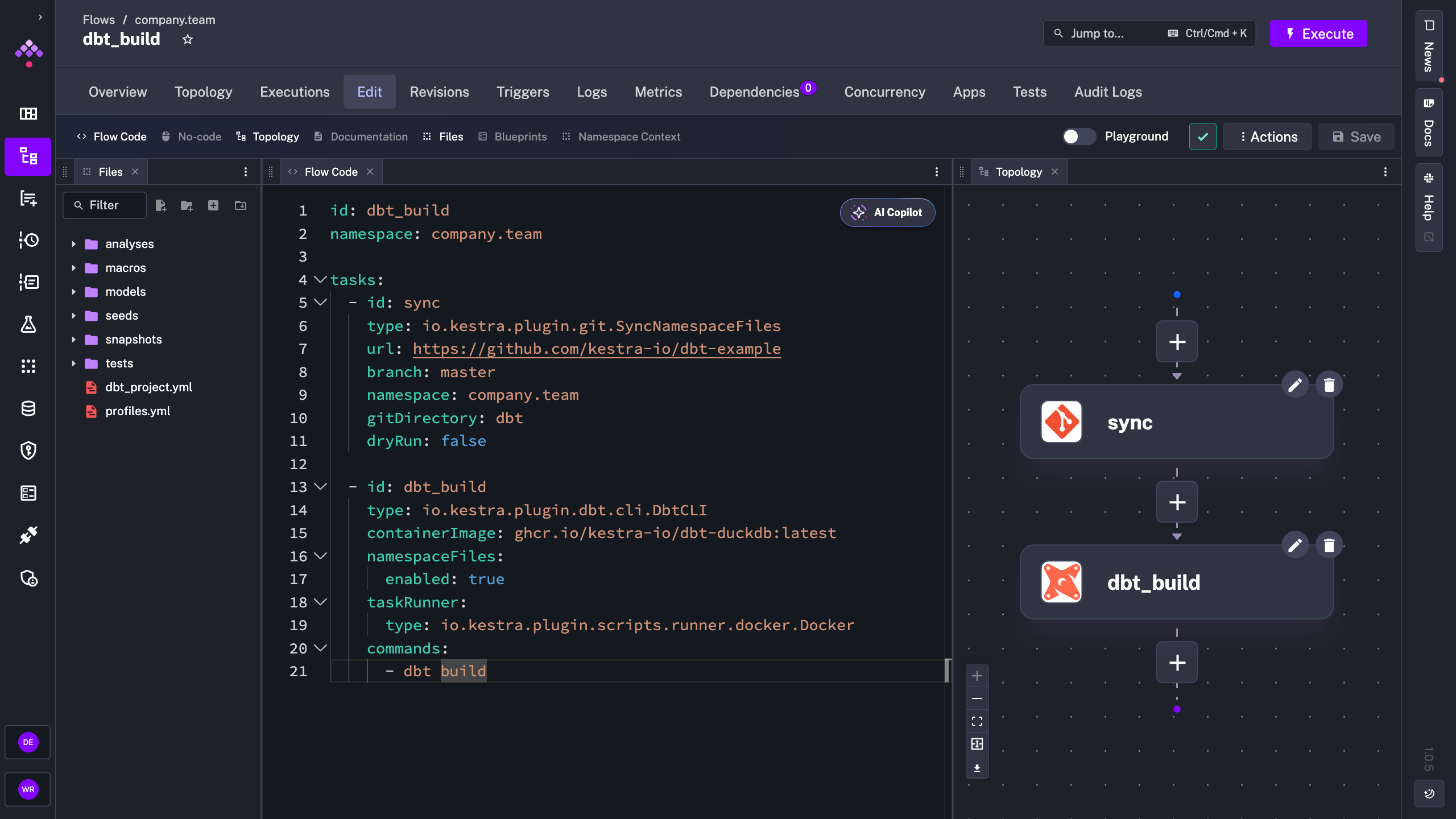
Here’s a quick example of how to set up task runners in Kestra to manage dbt workflows with isolated execution environments:
id: dbt_buildnamespace: company.team
tasks:  - id: sync    type: io.kestra.plugin.git.SyncNamespaceFiles    disabled: true    url: https://github.com/kestra-io/dbt-example    branch: master    namespace: company.team    gitDirectory: dbt    dryRun: false
- id: dbt_build type: io.kestra.plugin.dbt.cli.DbtCLI containerImage: ghcr.io/kestra-io/dbt-duckdb:latest namespaceFiles: enabled: true taskRunner: type: io.kestra.plugin.scripts.runner.docker.Docker commands: - dbt buildIn the example above:
sync task retrieves the latest version of a dbt project from Git, making it accessible within your Kestra namespace. Since disabled is set to true, this step is only run if enabled.dbt_build task then launches a dbt build command in a Docker container, which provides an isolated, consistent environment for running dbt. This approach ensures your build processes remain portable and repeatable.By default, Docker is used here as the task runner, meaning each dbt build task runs in a controlled, containerized environment. This setup is ideal for standard dbt workloads, providing the necessary dependencies without affecting your underlying infrastructure.
For larger workloads, such as dbt projects with hundreds of models or more complex data transformations, you can switch to Kubernetes for on-demand resource scaling:
- id: dbt_build type: io.kestra.plugin.dbt.cli.DbtCLI containerImage: ghcr.io/kestra-io/dbt-duckdb:latest namespaceFiles: enabled: true taskRunner: type: io.kestra.plugin.ee.kubernetes.runner.Kubernetes commands: - dbt buildThis configuration allows you to allocate CPU and memory resources dynamically, reducing runtime by scaling up infrastructure only when needed. By running on Kubernetes, you ensure your dbt workflows have access to the necessary compute power, even for the most resource-intensive tasks. As your dbt project scales, Kubernetes can grow with it, providing an efficient way to handle peak loads without requiring a permanent increase in infrastructure.
With the UploadFiles, DownloadFiles, and DeleteFiles tasks, Kestra lets you manage namespace files more flexibly. For example, DownloadFiles allows you to pull namespace files from one project into another, making it easy to share code across projects and teams.
Here’s how you can set up namespace file management:
tasks:  - id: download    type: io.kestra.plugin.core.namespace.DownloadFiles    namespace: "company.team.other"    files:      - "glob:**/dbt/**"
  - id: delete    type: io.kestra.plugin.core.namespace.DeleteFiles    namespace: "company.team.other"    files:      - "glob:**/dbt/temp/**"
This flexibility allows you to easily share code, manage updates, and ensure that development environments stay synchronized with production. For example, use the UploadFiles task to automatically upload the latest version of your dbt code to your Kestra instance, and use DeleteFiles to keep everything organized and up-to-date.
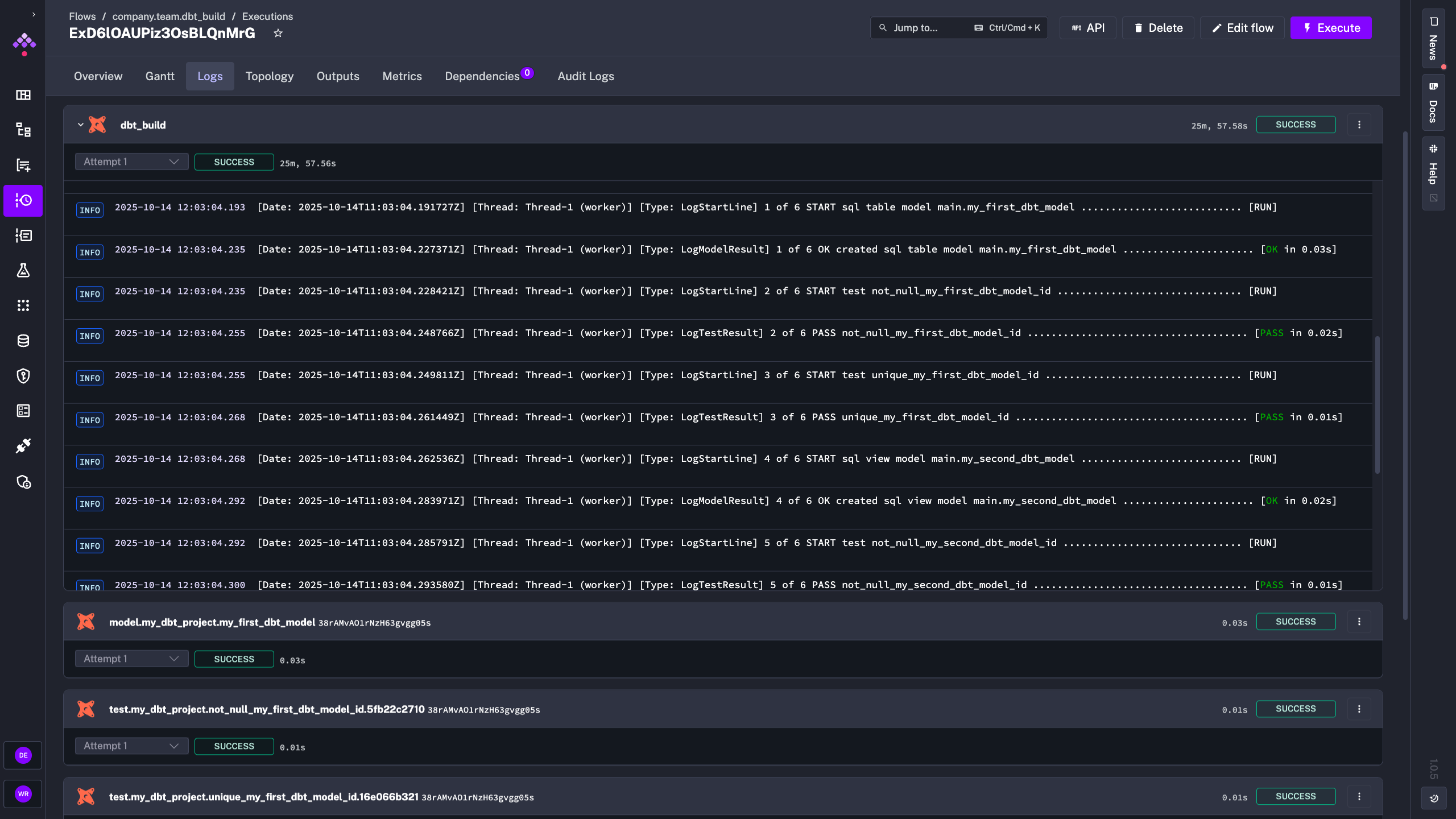
Managing a dbt project with hundreds of models means handling a significant amount of log data. Kestra provides enhanced logging options that make it easy to filter by log level and navigate the information you need. This feature is especially helpful for pinpointing issues in large projects, allowing you to identify and address errors more quickly.
With Kestra’s logging, you can drill down into logs in real-time and avoid digging through unnecessary information, helping you maintain visibility into your dbt workflows even as they grow in complexity.
With Kestra, you get a complete platform for orchestrating and scaling dbt workflows. From syncing code with Git and scaling runs dynamically to event-driven triggers and reliable code versioning, Kestra provides the tools you need to handle even the most complex dbt projects.
Whether you’re a data engineer looking for more control over resource allocation or an analytics engineer wanting a straightforward way to edit dbt code with Git integration, Kestra has you covered. Check out our dbt plugin documentation for more details.
If you have any questions, reach out via Slack or open a GitHub issue. If you like the project, give us a GitHub star and join the community.

Stay up to date with the latest features and changes to Kestra