Authors

Parham Parvizi
Solutions Engineer

Parham Parvizi
Solutions Engineer
Kestra 1.2 introduces Assets, a way to track both data artifacts (tables, datasets, files) and infrastructure resources (buckets, VMs, compute) in a single inventory. Every workflow declares what it consumes and produces, and Kestra builds the dependency graph automatically.
Here’s why this matters: You’re a data engineer and your DevOps team moves an on-prem ETL node to a different subnet. Which pipelines are now failing to connect? Or a team member provisions a new S3 bucket for customer data. How do you track which workflows are writing to it?
These scenarios share a common problem: the thing that changed includes both data and infrastructure, but your orchestrator only tracks task execution order. You can see that “Task A runs before Task B,” but you can’t see what they actually touch. When something breaks, you’re left tracing dependencies manually.
Assets solve this by letting you declare what each task reads and writes, whether that’s a database table, a cloud bucket, a file, or a provisioned VM.
Modern orchestration tools, even forward-thinking ones, assume that “asset” means “data asset,” like tables, views, and datasets.
This is a fundamental architectural limitation. These tools were designed around the assumption that orchestration means scheduling SQL transformations, so they track what happens between databases, not what happens between systems.
This works well enough for transformation-heavy workflows where every step reads a table and writes another table. But production data pipelines rarely stay that clean. A typical analytics workflow might:
Steps 1, 2, and 5 involve infrastructure, not just data. If your lineage tool only tracks tables, you lose visibility into the bucket that holds your raw data, the API that feeds it, and the export job that delivers it. When something breaks, you’re missing context. And when you’re planning changes, you can’t predict the impact across systems.
Kestra’s Assets solve this by treating data and infrastructure as first-class citizens in the orchestrator itself. Tables, buckets, file uploads, and provisioned VMs are assets. A table is an asset. A bucket is an asset. A file upload is an asset. They all live in the same inventory, with the same lineage tracking, built into execution.
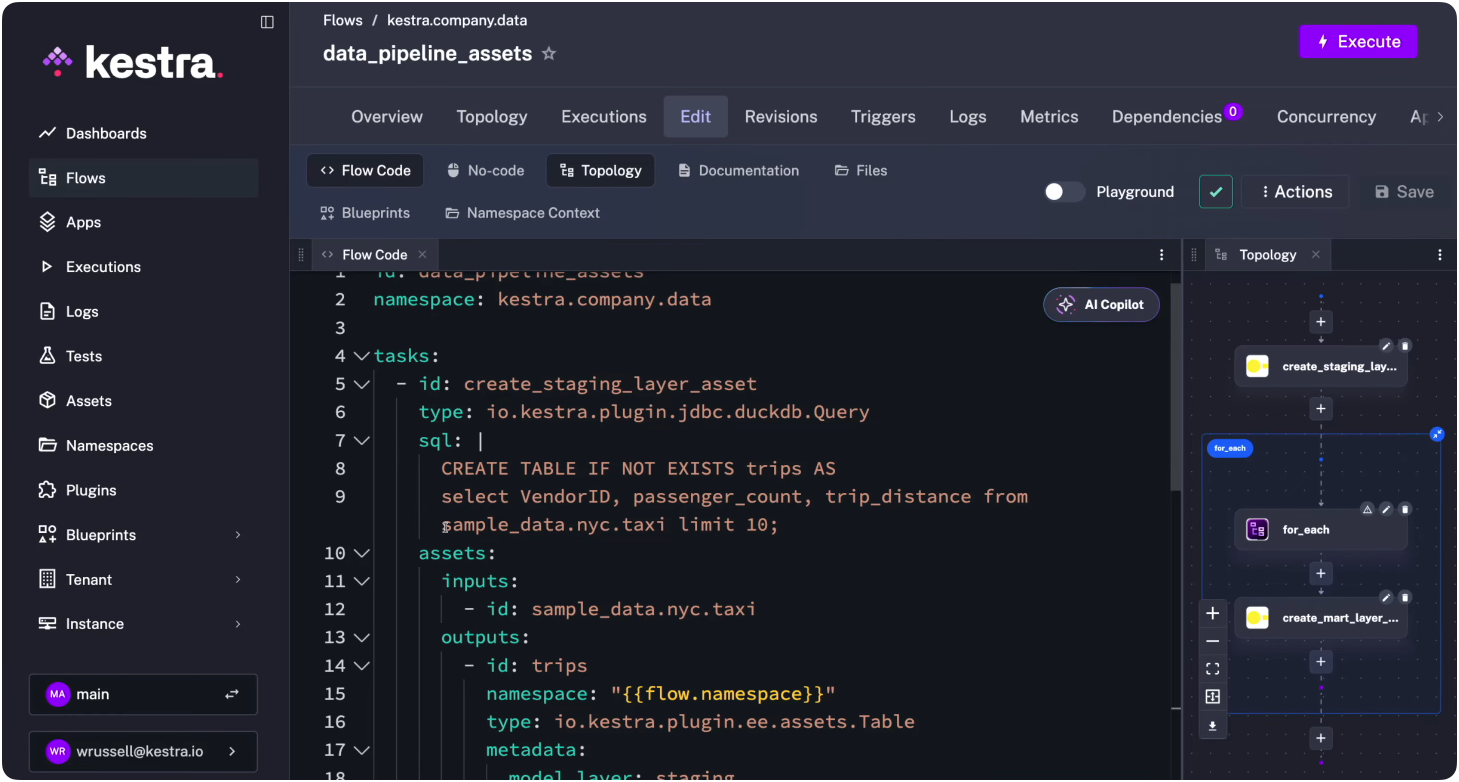
You declare assets directly on workflow tasks using the assets property. Each task can specify inputs (resources it reads) and outputs (resources it creates or modifies).
Here’s a simple example that creates a staging table:
id: data_pipeline_assetsnamespace: kestra.company.data
tasks:  - id: create_staging_layer_asset    type: io.kestra.plugin.jdbc.duckdb.Query    sql: |      CREATE TABLE IF NOT EXISTS trips AS      select VendorID, passenger_count, trip_distance from sample_data.nyc.taxi limit 10;    assets:      inputs:        - id: sample_data.nyc.taxi      outputs:          - id: trips            namespace: "{{flow.namespace}}"            type: io.kestra.plugin.ee.assets.Table            metadata:              model_layer: staging
pluginDefaults:  - type: io.kestra.plugin.jdbc.duckdb    values:      url: "jdbc:duckdb:md:my_db?motherduck_token={{ secret('MOTHERDUCK_TOKEN') }}"      fetchType: STORE
The task declares sample_data.nyc.taxi as an input (an external source managed outside this workflow) and trips as an output. Kestra registers both in its inventory and draws the dependency line between them.
The metadata field is flexible. You can tag assets by model layer (staging, mart), owner, environment, or any dimension that helps you filter and organize. This becomes useful when you have hundreds of assets and need to answer questions like “show me all staging tables owned by the data team.”
The classic analytics pattern: staging layer reads from external sources, mart layer aggregates for reporting. With Assets, you track the complete chain.
id: data_pipeline_assetsnamespace: kestra.company.data
tasks:  - id: staging    type: io.kestra.plugin.jdbc.duckdb.Query    sql: |      CREATE TABLE trips AS      SELECT * FROM sample_data.nyc.taxi LIMIT 10;    assets:      inputs:        - id: sample_data.nyc.taxi      outputs:        - id: trips          type: io.kestra.plugin.ee.assets.Table          metadata:            model_layer: staging
- id: mart type: io.kestra.plugin.jdbc.duckdb.Query sql: SELECT AVG(trip_distance) AS avg_distance FROM trips; assets: inputs: - id: trips outputs: - id: avg_trip_distance type: io.kestra.plugin.ee.assets.Table metadata: model_layer: martKestra builds the lineage graph automatically: sample_data.nyc.taxi -> trips -> avg_trip_distance. In the image below, Kestra’s graph shows you the dependencies between the trips asset and the avg_trip_distance asset. Blue represents Asset objects, grey represents the Flows.
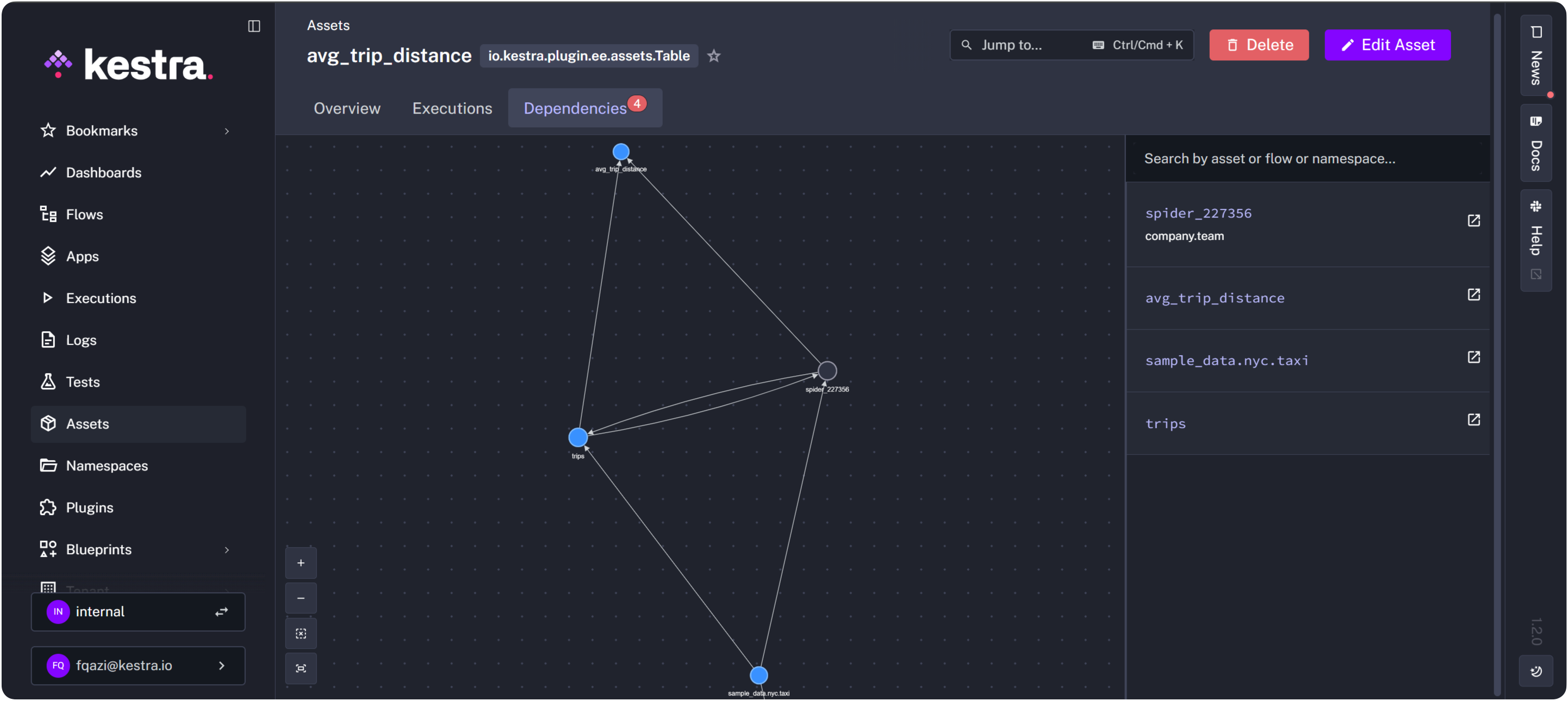
If the external source schema changes, you can trace the impact downstream. If a mart table looks wrong, you can trace it back to its staging dependencies.
Many data teams do more than transform data; they also provision the infrastructure that holds it. When your platform team creates S3 buckets for different domains, those buckets become dependencies for downstream workflows.
id: provision_team_bucketsnamespace: company.infra
inputs:  - id: teams    type: MULTISELECT    values: [Business, Data, Finance, Product]
tasks:  - id: create_buckets    type: io.kestra.plugin.core.flow.ForEach    values: "{{ inputs.teams }}"    tasks:      - id: create_bucket        type: io.kestra.plugin.aws.cli.AwsCLI        commands:          - aws s3 mb s3://kestra-{{ taskrun.value | slugify }}-bucket        assets:          outputs:            - id: kestra-{{ taskrun.value | slugify }}-bucket              type: AWS_BUCKET              metadata:                provider: s3                team: "{{ taskrun.value }}"
The full code example, including credentials, can be found here.
Later, when the data team uploads files to their bucket, they reference it as an input asset:
id: upload_filenamespace: kestra.company.data
tasks:  - id: download    type: io.kestra.plugin.core.http.Download    uri: https://huggingface.co/datasets/kestra/datasets/raw/main/jaffle-csv/raw_customers.csv
  - id: aws_upload    type: io.kestra.plugin.aws.s3.Upload    bucket: kestra-data-bucket    from: '{{ outputs.download.uri }}'    key: raw_customer.csv    assets:      inputs:        - id: kestra-data-bucket      outputs:        - id: raw_customer          type: io.kestra.plugin.ee.assets.File          metadata:            owner: data
pluginDefaults: - type: io.kestra.plugin.aws values: accessKeyId: "{{ secret('AWS_ACCESS_KEY') }}" secretKeyId: "{{ secret('AWS_SECRET_ACCESS_KEY') }}" region: "{{ secret('AWS_REGION') }}"Now your lineage graph connects infrastructure provisioning to data workflows. You can answer questions like: “Which teams are using which buckets?” and “What files have been uploaded to each bucket?”
You can see your assets globally across Kestra on the Assets page:
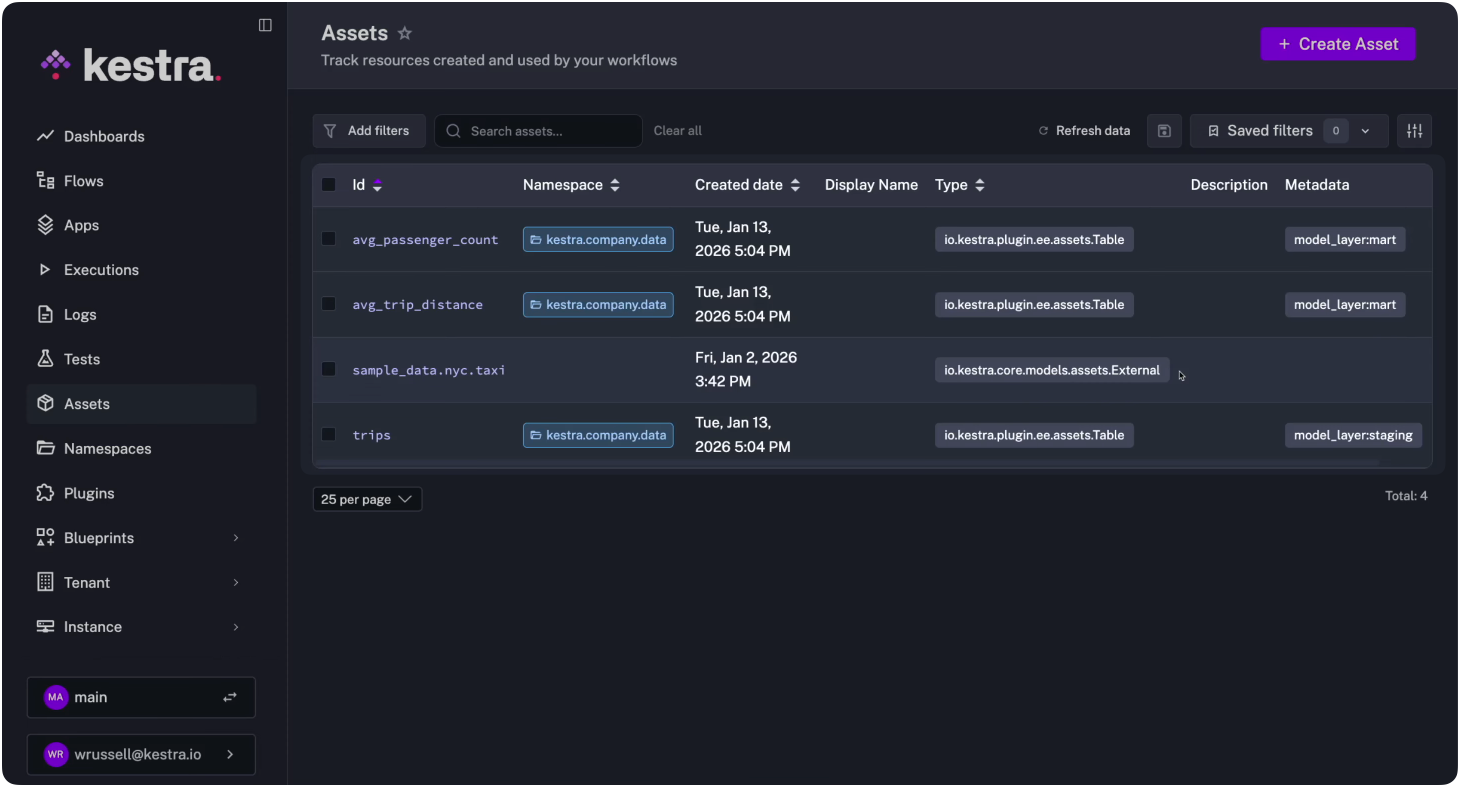
And you can reference them dynamically in other workflows with the assets() function, which queries your inventory and returns matching assets for when you need to target infrastructure operations at scale.
id: upgrade_pythonnamespace: team.infra
tasks:  - id: upgrade_python_on_machines    type: io.kestra.plugin.core.flow.ForEach    values: '{{ assets(metadata={"nodes": "python"}) | jq(".[].id") }}'    tasks:      - id: upgrade_python        type: io.kestra.plugin.scripts.shell.Commands        description: "upgrades Python to 3.14, and checks the version."        commands:          - "ssh user@{{ taskrun.value }} 'sudo apt-get update && sudo apt-get install -y python3.14'"          - "echo 'Python upgrade and check completed for {{ taskrun.value }}'"
This workflow queries the asset inventory for all machines tagged with "nodes": "python" and runs the upgrade across each one. The inventory stays current because it’s populated by the workflows that provision the infrastructure.
If you’re already using OpenLineage-compatible tools (Marquez, DataHub, Atlan), Assets integrates with them. The AssetShipper task exports your asset metadata to external lineage providers in either ION or JSON formats:
id: ship_asset_to_filenamespace: kestra.company.data
tasks:  - id: export_assets    type: io.kestra.plugin.ee.assets.AssetShipper    assetExporters:      - id: file_exporter        type: io.kestra.plugin.ee.assets.FileAssetExporter        format: JSON
This lets you maintain a single source of truth in Kestra while pushing lineage data to specialized catalogs for discovery and governance.
Kestra’s Templated Blueprints lets you create reusable workflow templates that users can instantiate by filling out a form, no YAML editing required. Platform teams define the template once (including asset declarations), and other teams generate production-ready workflows by selecting options from dropdowns.
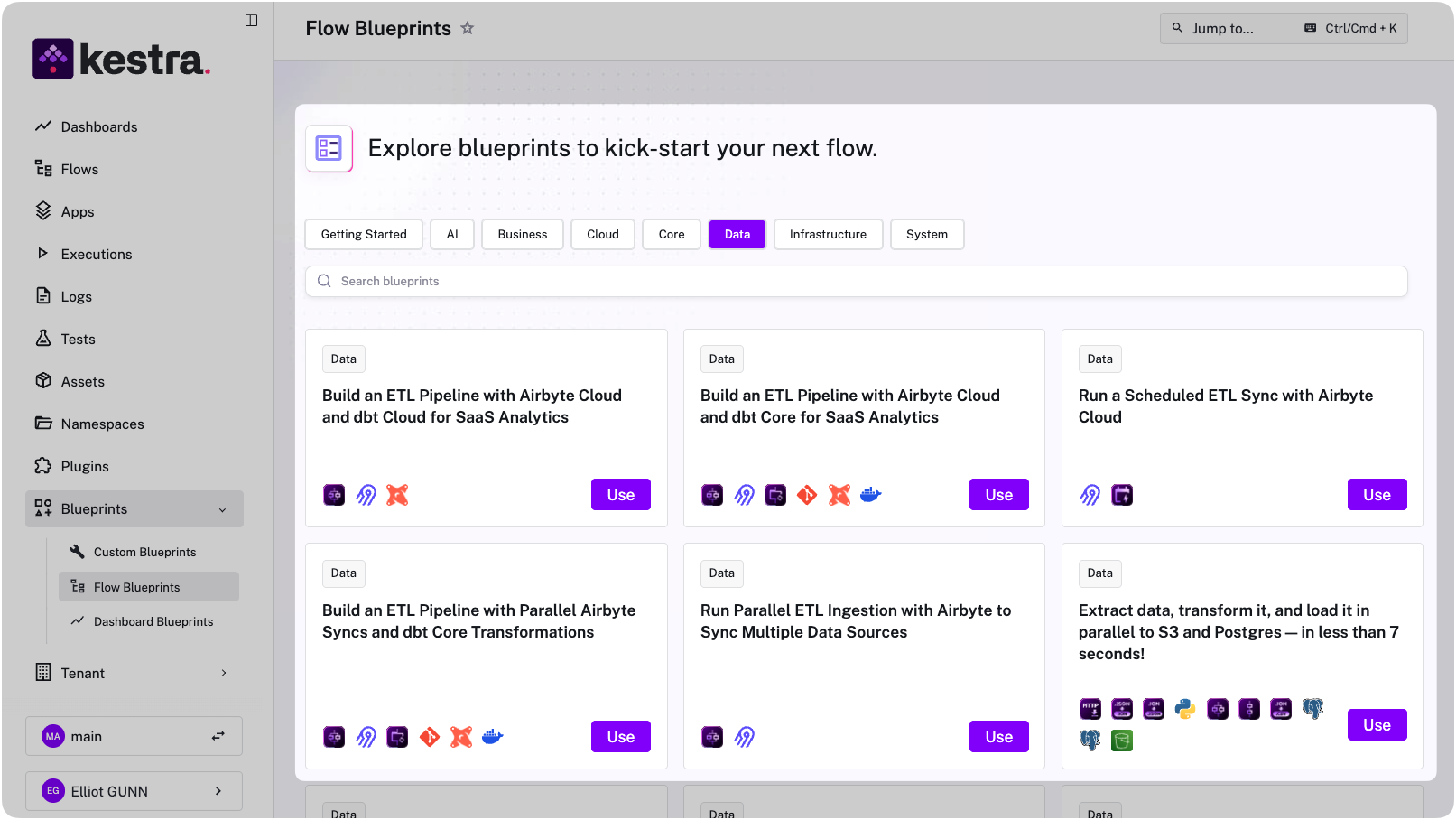
These blueprints let teams adopt asset tracking without writing YAML from scratch. Fill in the form, get a workflow with complete lineage built in.
Most lineage tools only track data assets. Kestra’s Assets track everything your pipelines touch: the tables, the buckets, the files, the infrastructure. When you declare inputs and outputs on every task, Kestra builds the dependency graph that shows how it all connects.
The result is lineage that reflects what you work on each day, not just the data transformation layer. When something breaks, you can trace the full chain. When you’re planning changes, you can see the impact across data and infrastructure.
Assets are available in Kestra Enterprise Edition 1.2+. Check out our docs or get in touch for a demo.

Stay up to date with the latest features and changes to Kestra