Authors

Loïc Mathieu
Lead Developer
Loïc Mathieu
Lead Developer
Generative AI tools are great. However, relying purely on generative models can lead to outputs that feel generic, inaccurate, or outdated. This is where Retrieval-Augmented Generation (RAG) comes in, combining the creativity of Generative AI with real-time, accurate context sourced from custom data.
We just introduced the Langchain4J plugin that allows users to create complex Generative AI workflows in an AI provider-agnostic way. This plugin also provides all the tasks needed to create a RAG pipeline.
In this post, you’ll learn how to build an advanced RAG pipeline using Google Gemini AI and Kestra’s new Langchain4J plugin, which leverages precise, context-aware AI generation. We’ll cover document ingestion, embedding creation, retrieval strategies, and finally, demonstrate a full end-to-end RAG example.
The new Langchain4J plugin simplifies the implementation of RAG by handling document ingestion, embedding creation, retrieval, and generation tasks.
Here’s a high-level overview of the workflows you’ll create:
The first step is to create embeddings based on our own document. These embeddings will be stored to be retrieved later at generation time.
But first, what is an embedding?
To ingest a document, you split it into segments and call an embedding AI model for each segment, transforming each into a vector representation stored in an embedding store, typically a vector database. Simply put, an embedding is a vector representation of a segment of a document.
The io.kestra.plugin.langchain4j.rag.IngestDocument task will do this for you!
id: ingest-documentsnamespace: company.team
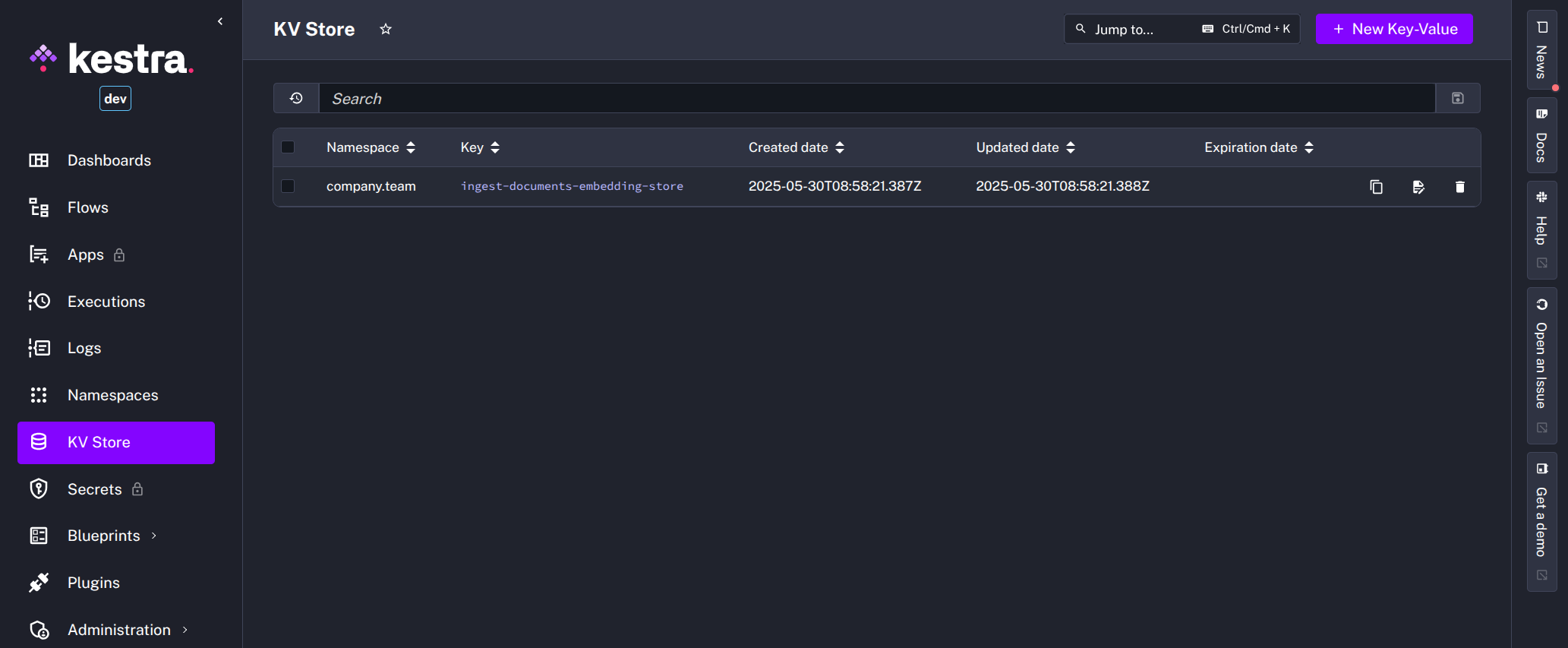
tasks: - id: ingest type: io.kestra.plugin.langchain4j.rag.IngestDocument provider: #1 type: io.kestra.plugin.langchain4j.provider.GoogleGemini modelName: gemini-embedding-exp-03-07 apiKey: "{{secret('GEMINI_API_KEY')}}" embeddings: #2 type: io.kestra.plugin.langchain4j.embeddings.KestraKVStore fromExternalURLs: #3 - https://raw.githubusercontent.com/kestra-io/docs/refs/heads/main/src/contents/blogs/release-0-22/index.md - https://raw.githubusercontent.com/kestra-io/docs/refs/heads/main/src/contents/blogs/release-0-21/index.md - https://raw.githubusercontent.com/kestra-io/docs/refs/heads/main/src/contents/blogs/release-0-20/index.md - https://raw.githubusercontent.com/kestra-io/docs/refs/heads/main/src/contents/blogs/release-0-19/index.md drop: true #4io.kestra.plugin.langchain4j.provider.GoogleGemini model provider to use the embedding model from Google Gemini. We must use the same model at generation time. Kestra supports many large language models (LLM), and more will be supported soon.io.kestra.plugin.langchain4j.embeddings.KestraKVStore embedding store. This is a convenient store that will store embeddings inside a KeyValue store and load them all in memory at generation time. For a large number of documents, you would typically use a vector database instead, like PGVector or Elasticsearch.fromExternalURLs to define a list of documents to ingest from external URLs; here, the blog posts for Kestra releases 0.19 to 0.22. We will go into detail for other ways to define documents to ingest later.drop: true to recreate the embedding store each time the flow is executed.After executing the flow, you will be able to see a new KV store entry with the serialized form of the computed embeddings.
Depending on your use case, you can use different task properties to define documents from multiple types of sources:
fromPath: from a working directory path, usually used in tandem with a WorkingDirectory task, each file in the directory will create a document.fromInternalURIs: from a list of internal storage URIs.fromExternalURLs: from a list of external URLs.fromDocuments: from a list of documents defined inside the task itself.Document metadata allows the defining of additional information to the large language model. Some metadata is automatically added to documents at ingestion time, such as the URL of the document if using fromExternalURLs or the name of the file if using fromPath.
You can set additional metadata via the metadata property.
Documents are split into segments to feed the large language model. Document splitting is an important step, as each segment will create an embedding vector, so the embedding retrieval performance and accuracy will depend on how you split the documents.
By default, we split documents using a RECURSIVE splitter that tries to split documents into paragraphs first and fits as many paragraphs into a single text segment as possible. If some paragraphs are too long, they are recursively split into lines, then sentences, then words, and then characters until they fit into a segment. This is usually a good strategy, but you can specifically declare to split at the PARAGRAPH, LINE, SENTENCE, or WORD level as needed.
When splitting, you can define the maximum size of the segments using the maxSegmentSizeInChars property and the maximum size of the overlap to feed a full sentence into a segment even if it overlaps the maximum segment size using the maxOverlapSizeInChars property.
Here is an example that splits documents by paragraph only and with a maximum size of 4KB.
id: ingest-documentsnamespace: company.team
tasks: - id: ingest type: io.kestra.plugin.langchain4j.rag.IngestDocument # [...] documentSplitter: splitter: PARAGRAPH maxSegmentSizeInChars: 4096This second flow will use the embedding store created by the first flow to retrieve documents based on the prompt passed into the flow inputs and use these documents to augment the large language model contextual information. The flow components are described in detail below and designated by a numbered comment in the YAML.
id: rag-completionnamespace: company.team
inputs:  - id: prompt    type: STRING    defaults: What's new in Kestra 0.22?
tasks: - id: completion type: io.kestra.plugin.langchain4j.rag.Chat embeddings: #1 type: io.kestra.plugin.langchain4j.embeddings.KestraKVStore kvName: ingest-documents-embedding-store chatProvider: #2 type: io.kestra.plugin.langchain4j.provider.GoogleGemini modelName: gemini-3.5-flash-lite apiKey: "{{secret('GEMINI_API_KEY')}}" embeddingProvider: #3 type: io.kestra.plugin.langchain4j.provider.GoogleGemini modelName: gemini-embedding-exp-03-07 apiKey: "{{secret('GEMINI_API_KEY')}}" contentRetrieverConfiguration: #4 maxResults: 3 minScore: 0.5 prompt: "{{ inputs.prompt }}" #5ingest-documents flow. We must set the name of the KV entry, as we are not in the same flow, and the name of the KV entry is, by default, the name of the flow suffixed by embedding-store.io.kestra.plugin.langchain4j.provider.GoogleGemini large language model provider configured to use the Google Gemini Flash 2.5 model.io.kestra.plugin.langchain4j.provider.GoogleGemini large language model provider for embeddings; this must be the same as the one used to ingest documents into the embedding store.We use the Google Gemini 2.5 Flash model via the Google Cloud plugin. This model is convenient for such use cases as it has a large context window of one million tokens. This is important for retrieval augmented generation, as retrieved documents will be added to the context window. This model is also cost-effective and quick to answer, making it a good fit for automated workflows.
If you execute this flow with the default prompt, it will answer something like the following:
Kestra 0.22 introduces several powerful new features and enhancements focused on enterprise-grade management, developer experience, and new plugin capabilities.
Here's what's new in Kestra 0.22:
[...].
We’ll spare you the long list of 0.22 features here, but if you missed it, they can be seen in the 0.22 blog post. Or, take the example above with your own Gemini API Key and enjoy the results!
Moving on, even more interestingly, we can ask it for information across documents and include its sources!
For example, try the following prompt: What are the most interesting new features in Kestra? Include your sources with links.
It should answer something like the response below, with the source of each new feature!
Kestra has introduced several interesting new features across its recent releases (0.20, 0.21, and 0.22), focusing on enhancing enterprise-grade management, developer experience, and operational capabilities.
Here are some of the most interesting new features:
1.  **Apps: Custom UIs for Your Flows (Kestra 0.20)**    This feature allows users to build custom interfaces for interacting with Kestra workflows. It democratizes access to workflows by providing simple forms, output displays, and approval buttons, enabling non-technical business users to trigger, pause, or submit data to automated processes without needing to understand the underlying code. Flows act as the backend, while Apps serve as the frontend.    *   **Source:** [Kestra 0.20 adds SLAs, Invites, User-Facing Apps, Isolated Storage and Secrets per Team, and Transactional Queries](../release-0-20/index.md#apps-custom-uis-for-your-flows)
[...]The prompt is first used to create an embedding vector. This vector will be used to search for the most relevant segments in the embedding store. Here, we ask that three documents be retrieved with a minimal score of 0.5.
Then, these documents are sent into the context window of the LLM with the prompt for generation.
At ingestion time, each document will be indexed with metadata, including the document URL, as the external URLs property retrieved it. The LLM can then include these URLs as the source of the information used for the generation.
RAG significantly enhances generative AI, providing context-rich, accurate, and up-to-date responses tailored to your specific data. With Kestra’s LangChain4J plugin and Google Gemini, building AI workflows becomes straightforward and effective.
To go further, check the AI plugin docs for the full task reference, or explore the AI Agents announcement to see how Kestra extends beyond RAG into fully autonomous agentic workflows.
If you have any questions, reach out via Slack or open a GitHub issue.
If you like the project, give us a GitHub star and join the community.

Stay up to date with the latest features and changes to Kestra