Authors

Benoit Pimpaud
Benoit Pimpaud
The table below highlights the key features of this release.
| Feature | Description | Edition |
|---|---|---|
| Multi-Panel Editor | New split-screen Flow Editor that lets you open, reorder, and close multiple panels, including Code, No-Code, Files, Docs, and more side by side | All Edition |
| No-Code Forms | Create Kestra flows from the new form-based UI tabs without writing code — included as a dedicated view in the new Multi-Panel Editor | All Edition |
| Unit Tests for Flows | With Unit Tests, we’re introducing a language-agnostic, declarative syntax to test your flows with fixtures and assertions, allowing you to run tests directly from the UI and catch regressions before they reach production. | Enterprise Edition |
| New UI Filters | UI filters now have a faster autocompletion and are editable as plain text | All Edition |
| Tenant-based Storage Isolation | Persist workflow outputs and inputs in isolated internal storage for complete data separation across tenants — a highly requested feature for Enterprise environments with strict isolation requirements. | Enterprise Edition |
| Customizable dashboards | Configure your own default dashboard with new customizable KPI charts and adjustable chart widths | All Edition |
| Python Dependency Caching | Speed up your workflows with automatic caching of script dependencies across executions - just define your dependencies and Kestra handles the rest | All Edition |
| Manage Apps & Dashboard with Git | Version control your dashboards and apps with Git tasks | All Edition |
Check the video below for a quick overview of all enhancements.
Let’s dive into these highlights and other enhancements in more detail.
We’re excited to introduce the new split-screen Flow Editor that lets you open, reorder, and close multiple panels, including Code, No-Code, Files, Docs, Topology, and Blueprints side by side.
Since everything is a view that you can open in a tab, this feature enables using Code and No-Code at the same time. The familiar topology view, and built-in documentation and blueprints are integrated in the same way — you simply open them as tabs and reorder or close them however you like.
With this flexible Editor interface, you can:
You can customize your experience by opening only the panels you need, creating a fully personalized workspace that matches your workflow development style.
The new Multi-Panel editor ships with a significant update to the No-Code Forms. When you open the No-Code view, you can add new tasks, triggers, or flow properties from form-based tabs without writing any YAML code.
Adding any new task or trigger opens a new No-Code tab, allowing you to edit multiple workflow components at the same time.
Key improvements include:
As workflows grow in complexity, so does the need to test them reliably. Kestra introduces native support for Unit Tests in YAML, allowing you to validate your flows and detect regressions early. Until now, users could write unit tests in Java, but with the new YAML-based Unit Test support, you can now define expected outcomes, isolate tasks, and detect regressions early—directly inside Kestra using the same YAML format as your flows.
Key components of a Unit Test:
equalTo, notEqualTo, greaterThan, startsWith, and more. This helps ensure your flow behaves correctly under different conditions.Let’s look at a simple flow checking if a server is up and sending a Slack alert if it’s not:
id: microservices-and-apisnamespace: tutorialdescription: Microservices and APIsinputs: - id: server_uri type: URI defaults: https://kestra.io - id: slack_webhook_uri type: URI defaults: https://kestra.io/api/mocktasks: - id: http_request type: io.kestra.plugin.core.http.Request uri: "{{ inputs.server_uri }}" options: allowFailed: true - id: check_status type: io.kestra.plugin.core.flow.If condition: "{{ outputs.http_request.code != 200 }}" then: - id: server_unreachable_alert type: io.kestra.plugin.slack.notifications.SlackIncomingWebhook url: "{{ inputs.slack_webhook_uri }}" payload: | { "channel": "#alerts", "text": "The server {{ inputs.server_uri }} is down!" } else: - id: healthy type: io.kestra.plugin.core.log.Log message: Everything is fine!Here’s how you might write tests for it:
id: test_microservices_and_apisflowId: microservices-and-apisnamespace: tutorialtestCases: - id: server_should_be_reachable type: io.kestra.core.tests.flow.UnitTest fixtures: inputs: server_uri: https://kestra.io assertions: - value: "{{outputs.http_request.code}}" equalTo: 200 - id: server_should_be_unreachable type: io.kestra.core.tests.flow.UnitTest fixtures: inputs: server_uri: https://kestra.io/bad-url tasks: - id: server_unreachable_alert description: no Slack message from tests assertions: - value: "{{outputs.http_request.code}}" notEqualTo: 200UI filters now have faster autocompletion and are editable as plain text!
We’ve heard your feedback that the prior filtering experience has sometimes been a bit slow and tedious to configure. The new filters have been rebuilt from the ground up and are now built on top of our workflow editor. You can now configure even complex filters as simple text with super-fast autocompletion and immediate feedback on syntax errors.
Since the filter configuration is just text, you can easily copy-paste a filter configuration from one flow or namespace to another, and it will just work!
Kestra 0.23 introduces the ability to store flow outputs in the Internal Storage instead of the default database. This feature is especially valuable for organizations with multiple teams or business units, as it ensures that outputs are only accessible to the relevant segment, providing stronger data separation and privacy.
By default, all flow outputs are stored in the shared metadata database. With this new configuration, you can isolate outputs for each tenant or namespace, making sure that sensitive data is not accessible outside its intended scope.
To enable output storage in Internal Storage for a specific tenant or namespace, add the following to your Kestra configuration file:
kestra: ee: outputs: store: enabled: true # the default is falseIf you want to enforce this setting globally for all tenants and namespaces, use the following configuration instead:
kestra: ee: outputs: store: force-globally: true # the default is falseWith these configuration options, you can control where flow outputs and inputs are stored, improving data governance and compliance for organizations with strict separation requirements.
Note that this comes with some tradeoffs — storing that data in the internal storage backend such as S3 rather than in the backend database (like Postgres or Elasticsearch) introduces some additional latency, especially visible with inputs stored and fetched from internal storage.
Currently, the UI is limited and outputs will not be directly visible if using internal storage. You need to preview them or download them as they are not automatically fetched from the internal storage.
This release allows you to personalize your default dashboard with new customizable KPI charts and adjustable chart widths. You can now control what charts and metrics you see when you first log in.
With improved custom dashboards, you can:
Kestra 0.23 introduces Python dependency caching, bringing significant improvements to the execution of Python tasks. With this feature, execution times for Python tasks are reduced, as dependencies are cached and reused across runs. You can now use official Python Docker images, and multiple executions of the same task will consistently use the same library versions. There is no need to use virtual environments (venv) for installing requirements, simplifying setup and maintenance.
Under the hood, Kestra uses uv for fast dependency resolution and caching. This ensures both speed and compatibility with the Python ecosystem.
Before this release, the only way to dynamically install Python dependencies at runtime was to use the beforeCommands property or a custom Docker image. For example:
id: pythonnamespace: company.team
tasks:  - id: python    type: io.kestra.plugin.scripts.python.Script    containerImage: ghcr.io/kestra-io/pydata:latest    taskRunner:      type: io.kestra.plugin.scripts.runner.docker.Docker    beforeCommands:      - pip install pandas    script: |      from kestra import Kestra      import pandas as pd      data = {        'Name': ['Alice', 'Bob', 'Charlie'],        'Age': [25, 30, 35]      }      df = pd.DataFrame(data)      print(df)      print("Average age:", df['Age'].mean())      Kestra.outputs({"average_age": df['Age'].mean()})
With the new release, you can still use beforeCommands as above, but on top of that, you have one more tool at your disposal — the new dependencies property, allowing you to declaratively define your required Python packages and let Kestra handle installation and caching automatically:
id: pythonnamespace: company.team
tasks:  - id: python    type: io.kestra.plugin.scripts.python.Script    containerImage: python:3.13-slim    taskRunner:      type: io.kestra.plugin.scripts.runner.docker.Docker    dependencies:      - pandas      - kestra    script: |      from kestra import Kestra      import pandas as pd      data = {        'Name': ['Alice', 'Bob', 'Charlie'],        'Age': [25, 30, 35]      }      df = pd.DataFrame(data)      print(df)      print("Average age:", df['Age'].mean())      Kestra.outputs({"average_age": df['Age'].mean()})
A new dependencyCacheEnabled flag (boolean) allows you to enable or disable caching in the worker directory, so dependencies can be quickly retrieved the next time the task runs.
Again, the beforeCommands property is still supported for advanced use cases or custom installation steps.
Kestra 0.23.0 introduces Git integration for Dashboards and Apps, enabling version control and collaborative management of these resources through familiar Git workflows. You can now:
git.SyncDashboard, git.PushDashboard, git.SyncApps, and git.PushApps tasksThe following flow allows pulling the configuration of Apps from a GitHub repository and deploying it to the Kestra instance:
id: sync_apps_from_gitnamespace: systemtasks: - id: git type: io.kestra.plugin.ee.git.SyncApps delete: true # optional; by default, it's set to false to avoid destructive behavior url: https://github.com/kestra-io/apps # required branch: main username: "{{ secret('GITHUB_USERNAME') }}" password: "{{ secret('GITHUB_ACCESS_TOKEN') }}"triggers: - id: every_full_hour type: io.kestra.plugin.core.trigger.Schedule cron: "0 * * * *"Ion data format support with new IonToParquet and IonToAvro tasks for data conversion, plus InferAvroSchemaFromIon for schema generation.
Pause Task: The Pause task now uses a pauseDuration property, replacing delay and removing timeout because timeout is a core property available to all tasks incl. Pause. When the pauseDuration ends, the task proceeds based on the behavior property: RESUME (default), WARN, FAIL, or CANCEL. Manually resumed tasks always succeed. Finally, the new onPause property allows you to easily define a task that should run whenever the task enters a PAUSED state, which is especially useful for sending alerts on paused workflows waiting for approval (i.e. waiting to be manually resumed).
Plugin Usage Metrics: Kestra now provides plugin usage metrics based on an execution count. These metrics are compatible with internal metrics and Prometheus, helping you track how plugins are used in your organization.
Data Backup: We now support full Backup & Restore, including backup of executions and logs data, ensuring you can recover all execution-related information for disaster recovery.
Account Navigation: Settings and User Profile are now located under the Account settings in the bottom left corner, just below the Tenant switcher.
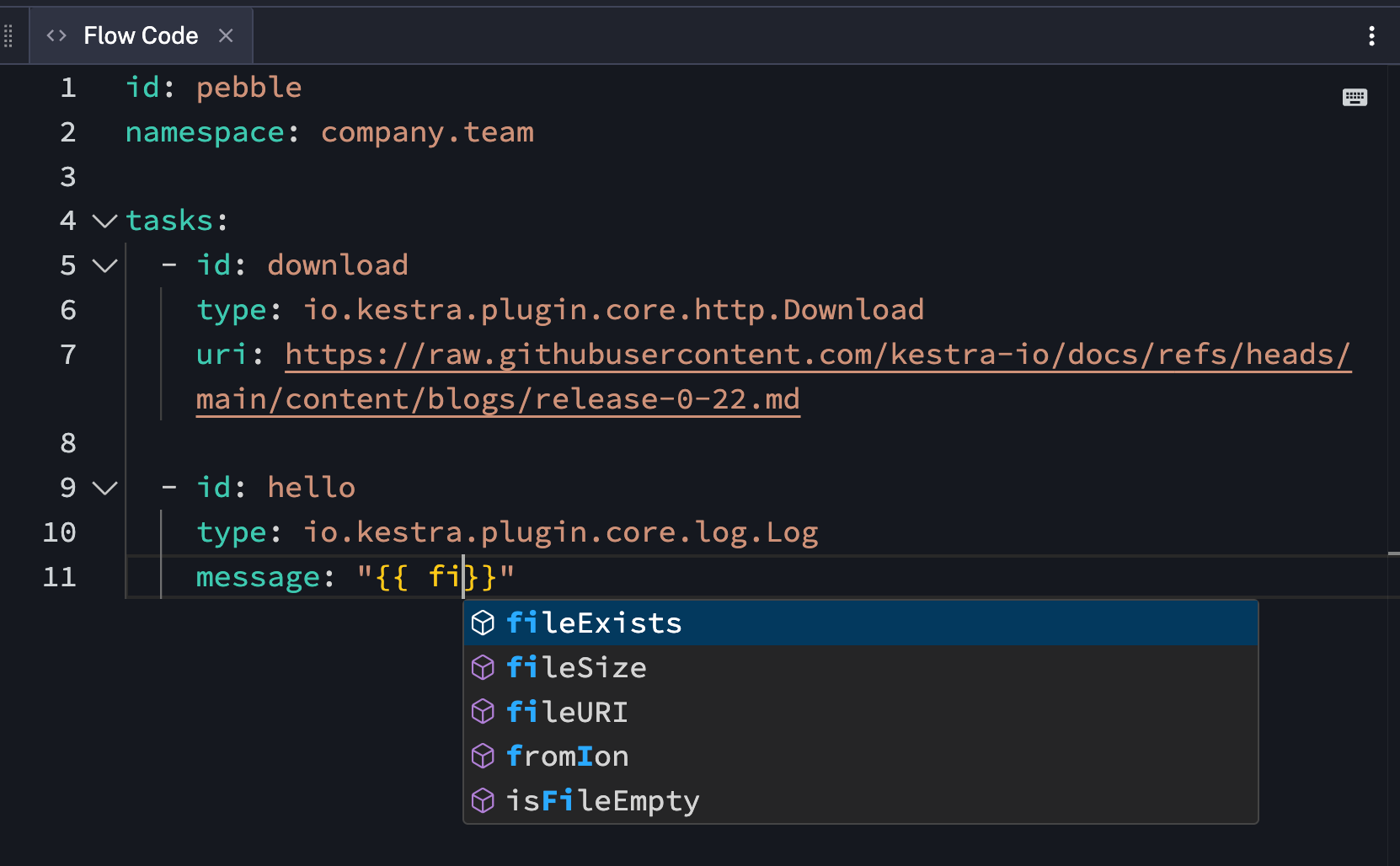
Pebble Function Autocompletion: When editing Pebble expressions ({{ ... }}), function names autocomplete as you type.
Worker Information in Task Execution: Task execution details now show the worker ID, hostname, version, and state. Example: bbbe25da-06fe-42c2-b50f-4deeba2bb3ba: Hostname=postgres-ee-preview-67c9bbcd56-4fnvr, Version=0.23.0-SNAPSHOT, State=RUNNING.
Secret Filtering: For Google Cloud Secret Manager, Azure Key Vault, and AWS Secrets Manager, the new filter-on-tags property lets you filter secrets by tags and sync only those that match.
We’ve introduced a new enterprise Salesforce plugin: the plugin includes tasks for creating, updating, deleting, and querying Salesforce objects, allowing you to seamlessly integrate Salesforce operations into your Kestra workflows.
id: salesforce-postgres-syncnamespace: company.teamtasks:  - id: each    type: io.kestra.plugin.core.flow.ForEach    values: "{{ trigger.rows }}"    tasks:      - id: create_contacts_in_salesforce        type: io.kestra.plugin.ee.salesforce.Create        connection:          username: "{{ secret('SALESFORCE_USERNAME') }}"          password: "{{ secret('SALESFORCE_PASSWORD') }}"          authEndpoint: "{{ secret('SALESFORCE_AUTH_ENDPOINT') }}"        objectName: "Contact"        records:          - FirstName: "{{ json(taskrun.value).FirstName }}"            LastName: "{{ json(taskrun.value).LastName }}"            Email: "{{ json(taskrun.value).Email }}"
triggers: - id: postgres_trigger type: io.kestra.plugin.jdbc.postgresql.Trigger url: "{{ secret('POSTGRES_URL') }}" username: "{{ secret('POSTGRES_USERNAME') }}" password: "{{ secret('POSTGRES_PASSWORD') }}" sql: | SELECT first_name as "FirstName", last_name as "LastName", email as "Email" FROM customers WHERE updated_at > CURRENT_DATE - INTERVAL '1 day' AND (processed_at IS NULL OR processed_at < updated_at) interval: PT5M fetchType: FETCHWe’ve introduced a comprehensive HubSpot plugin with tasks for managing companies, contacts, and deals. The plugin provides a complete set of operations (Create, Get, Update, Delete, Search) for each entity type, allowing you to seamlessly integrate HubSpot CRM operations into your Kestra workflows with proper authentication and consistent property handling.
id: hubspot-query-companynamespace: company.teamtasks: - id: search_companies type: io.kestra.plugin.hubspot.companies.Search apiKey: "{{ secret('HUBSPOT_API_KEY') }}" properties: - name - domain - industry limit: 10 sorts: - propertyName: "createdate" direction: "DESCENDING"We’re excited to introduce the new Ollama plugin, which allows you to run Ollama CLI commands directly from your Kestra workflows. This integration can help you pull open-source LLMs into your local environment, interact with them via prompts in your AI pipelines, and shut them down when no longer needed.
With the Ollama CLI task, you can:
id: ollama_flownamespace: company.teamtasks: - id: ollama_cli type: io.kestra.plugin.ollama.cli.OllamaCLI commands: - ollama pull llama2 - ollama run llama2 "Tell me a joke about AI" > completion.txt outputFiles: - completion.txtWe’ve added a new Responses task integrating OpenAI’s latest Responses API, allowing you to use tools such as e.g. web search, function calling and structured outputs directly within your AI workflows.
The task supports all of OpenAI’s built-in tools, including:
You can also format outputs as structured JSON, making it easy to parse and use the generated content in downstream tasks. This is particularly valuable for transforming unstructured requests into structured data that can be directly utilized in your data pipelines.
id: web_searchnamespace: company.team
inputs:  - id: prompt    type: STRING    defaults: List recent trends in workflow orchestration
tasks:  - id: trends    type: io.kestra.plugin.openai.Responses    apiKey: "{{ secret('OPENAI_API_KEY') }}"    model: gpt-4.1-mini    input: "{{ inputs.prompt }}"    toolChoice: REQUIRED    tools:      - type: web_search_preview
- id: log type: io.kestra.plugin.core.log.Log message: "{{ outputs.trends.outputText }}"We are excited to announce the Beta release of several LangChain4j plugins. We encourage you to try them and share your feedback via GitHub issues or our Slack community.
These plugins introduce a wide range of AI-powered tasks, including:
For embeddings, you can choose from several backends, including Elasticsearch, KVStore, and pgvector, allowing you to tailor your RAG workflows to your infrastructure. More embedding backends will be added in future releases.
The plugins support multiple providers, such as OpenAI, Google Gemini, and others, giving you flexibility to select the best model for your use case.
id: rag_demonamespace: company.team
tasks:  - id: ingest    type: io.kestra.plugin.langchain4j.rag.IngestDocument    provider:      type: io.kestra.plugin.langchain4j.provider.GoogleGemini      modelName: gemini-embedding-exp-03-07      apiKey: xxx    embeddings:      type: io.kestra.plugin.langchain4j.embeddings.KestraKVStore    drop: true    fromExternalURLs:      - https://raw.githubusercontent.com/kestra-io/docs/refs/heads/main/content/blogs/release-0-22.md
  - id: hallucinated_answer    type: io.kestra.plugin.langchain4j.TextCompletion    provider:      type: io.kestra.plugin.langchain4j.provider.GoogleGemini      modelName: gemini-1.5-flash      apiKey: xxx    prompt: Which features were released in Kestra 0.22?
- id: correct_response_with_rag type: io.kestra.plugin.langchain4j.rag.ChatCompletion chatProvider: type: io.kestra.plugin.langchain4j.provider.GoogleGemini modelName: gemini-1.5-flash apiKey: xxx embeddingProvider: type: io.kestra.plugin.langchain4j.provider.GoogleGemini modelName: gemini-embedding-exp-03-07 apiKey: xxx embeddings: type: io.kestra.plugin.langchain4j.embeddings.KestraKVStore prompt: Which features were released in Kestra 0.22?We’re introducing a new GitHub Actions Workflow plugin that allows you to trigger GitHub Actions workflows directly from your Kestra flows.
With the GitHub Actions Workflow plugin, you can:
io.kestra.plugin.github.actions.RunWorkflow taskid: github_runworkflow_flownamespace: company.teamtasks: - id: run_workflow type: io.kestra.plugin.github.actions.RunWorkflow oauthToken: "{{ secret('OAUTH_TOKEN ')}}" repository: owner/repository workflowId: your_workflow_id ref: your_branch_or_tag_name inputs: foo:barWe’re introducing a new Jenkins plugin that enables seamless integration with Jenkins CI/CD pipelines directly from your Kestra workflows. This integration is ideal for teams looking to unify their CI/CD automation and workflow orchestration, enabling end-to-end automation from code to deployment.
With the Jenkins plugin, you can:
io.kestra.plugin.jenkins.JobBuild taskio.kestra.plugin.jenkins.JobInfo taskid: jenkins_job_triggernamespace: company.teamtasks: - id: build type: io.kestra.plugin.jenkins.JobBuild jobName: deploy-app serverUri: http://localhost:8080 username: admin api_token: "{{ secret('API_TOKEN') }}" parameters: branch: main environment: - stagingKestra 0.23 introduces powerful new capabilities for running Go code with the addition of two dedicated Go script tasks:
Script task (io.kestra.plugin.scripts.go.Script) - for inline codeCommands task (io.kestra.plugin.scripts.go.Commands) - for code stored in Namespace Files or passed from a local directory (e.g. cloned from a Git repository) which can be executed using the go run command.id: go_scriptnamespace: company.teamtasks: - id: script type: io.kestra.plugin.scripts.go.Script allowWarning: true # cause golang redirect ALL to stderr even false positives script: | package main import ( "os" "github.com/go-gota/gota/dataframe" "github.com/go-gota/gota/series" ) func main() { names := series.New([]string{"Alice", "Bob", "Charlie"}, series.String, "Name") ages := series.New([]int{25, 30, 35}, series.Int, "Age") df := dataframe.New(names, ages) file, _ := os.Create("output.csv") df.WriteCSV(file) defer file.Close() } outputFiles: - output.csv beforeCommands: - go mod init go_script - go get github.com/go-gota/gota/dataframe - go mod tidyWe’re excited to introduce our new InfluxDB plugin, which provides comprehensive integration with InfluxDB time series database. This plugin enables you to write data to InfluxDB and query it using both Flux and InfluxQL languages, making it perfect for time series data processing and monitoring workflows.
The plugin includes several powerful tasks:
io.kestra.plugin.influxdb.Write) - Write data to InfluxDB using InfluxDB line protocol format.io.kestra.plugin.influxdb.Load) - Load data points to InfluxDB from an ION file where each record becomes a data point.io.kestra.plugin.influxdb.FluxQuery) - Queries InfluxDB using the Flux language, with options to output results as ION internal storage or directly in the execution.io.kestra.plugin.influxdb.InfluxQLQuery) - Queries InfluxDB using the InfluxQL language, with the same output options as FluxQueryio.kestra.plugin.influxdb.FluxTrigger) - Automatically triggers workflow executions when a Flux query returns resultsThis integration is particularly useful for IoT data processing, monitoring metrics, and any workflow that involves time series data analysis.
We’ve introduced a new GraphQL plugin that enables integration with GraphQL APIs in your data workflows. The plugin features a Request task that allows you to execute GraphQL queries and mutations against any GraphQL endpoint, with full support for authentication headers, variables, and complex queries.
This plugin is particularly valuable for integrating with modern API-driven services that use GraphQL, allowing you to fetch exactly the data you need without over-fetching or under-fetching. Whether you’re connecting to GitHub, Shopify, or any custom GraphQL API, this plugin provides a streamlined way to incorporate that data into your orchestration workflows.
id: graphql-query-githubnamespace: blueprintstasks: - id: get_github_issues type: io.kestra.plugin.graphql.Request uri: https://api.github.com/graphql headers: Authorization: "Bearer {{ secret('GITHUB_TOKEN') }}" query: | query { repository(owner: "kestra-io", name: "kestra") { issues(last: 20, states: CLOSED) { edges { node { title url labels(first: 5) { edges { node { name } } } } } } } }We’ve added a new Databricks SQL CLI task that allows you to execute SQL commands directly against Databricks SQL warehouses. This task leverages the official Databricks SQL CLI tool to provide seamless integration with your Databricks environment, enabling you to run queries, manage data, and automate SQL operations within your Kestra workflows.
We’ve enhanced our Redis plugin with a new Increment task that allows you to atomically increment the value of a key in a Redis database and return the new value. This is particularly useful for implementing counters, rate limiters, or any scenario where you need atomic incrementation of numeric values stored in Redis.
We’ve expanded the ServiceNow plugin with two new tasks:
With this release, we’ve taken the opportunity to introduce several important breaking changes designed to improve reliability, maintainability, and long-term robustness of Kestra. These changes pave the way for a more secure and future-proof platform. For full migration scripts and details, please refer to our dedicated migration guide.
Tenant is now required; defaultTenant (null tenant) is no longer supported. Kestra now always requires a tenant context in both OSS and Enterprise editions. A migration is required to upgrade to 0.23:
Key changes include:
All editions:
defaultTenant (null tenant) is no longer supported. Kestra now always requires a tenant context in both OSS and Enterprise editions.LoopUntil task: Changed default values for checkFrequency for more predictable behavior.BOOLEAN-type input is deprecated in favor of BOOL.KESTRA_ to ENV_ for improved security.pullPolicy for Docker-based tasks has changed.PAUSED state by default.python:3-13-slim image.WARNING state when ERROR logs are present—these are now treated as errors.autocommit property has been removed from JDBC Query and Queries tasks.Enterprise Edition:
Superadmin property.For a complete list of changes and migration instructions, check the migration guide and the Breaking Changes section in Release Notes on GitHub.
Thank you to everyone who contributed to this release through feedback, bug reports, and pull requests. If you want to become a Kestra contributor, check out our Contributing Guide and the list of good first issues. With the DevContainer support, it’s easier than ever to start contributing to Kestra.
This post covered new features and enhancements added in Kestra 0.23.0. Which of them are your favorites? What should we add next? Your feedback is always appreciated.
If you have any questions, reach out via Slack or open a GitHub issue.
If you like the project, give us a GitHub star ⭐️ and join the community.

Stay up to date with the latest features and changes to Kestra