Authors

Fernando Mattos
Solutions Marketing Lead
Fernando Mattos
Solutions Marketing Lead
Most teams planning to leave VMware start with the hypervisor. They compare Nutanix and Proxmox, price out the move, and plan how to get the VMs across. What very few plan is the automation that runs on top of it: the vRA catalog people request machines from, the vRO workflows behind every request, and the Day 2 actions that keep the environment running. The teams we talk to, and the partners who help them migrate, describe the same thing. The hypervisor move gets a plan, and the automation gets discovered halfway through.
In our November 4 webinar, Faizan Qazi and I made the case for starting with the orchestrator instead, and showed what that looks like with Kestra. Below are the key moments, with the full recording at the end.
Key takeaways
If you run VMware, vRA and vRO are most likely your orchestration layer, and they were built for vSphere. Every catalog request, lifecycle event and Day 2 action runs through them, along with the integrations to ServiceNow, Terraform, Ansible and your CMDB. That layer is what ties you to vSphere, and it’s increasingly priced and scoped by VMware. vRA is now sold only as part of VMware Cloud Foundation, licensed per core on subscription, so the automation is now priced as part of the hypervisor. What it can reach is VMware’s call too: several vRO plugins were deprecated in VCF 9, and native AWS, Azure and GCP management were deprecated and switched off by default.
Replacing the orchestrator first turns the hypervisor into a separate decision, and an easier one. With Kestra running your automation, ServiceNow, Terraform, Ansible and your CMDB stay where they are, and you can keep vSphere, move some workloads to Nutanix or Proxmox, or move all of them, on your own schedule. If you’re still choosing the hypervisor, Diego Arias compares seven VMware alternatives, scored for your scenario. If you move the hypervisor first, the VMs move but the vRO workflows that provisioned and patched them don’t, so you still have to replace the orchestrator, just later and under more pressure.
"The big thing that teams miss is that the reason they're stuck with VMware is the orchestration layer."
Fernando Mattos, Solutions Marketing Lead at Kestra, in the webinar
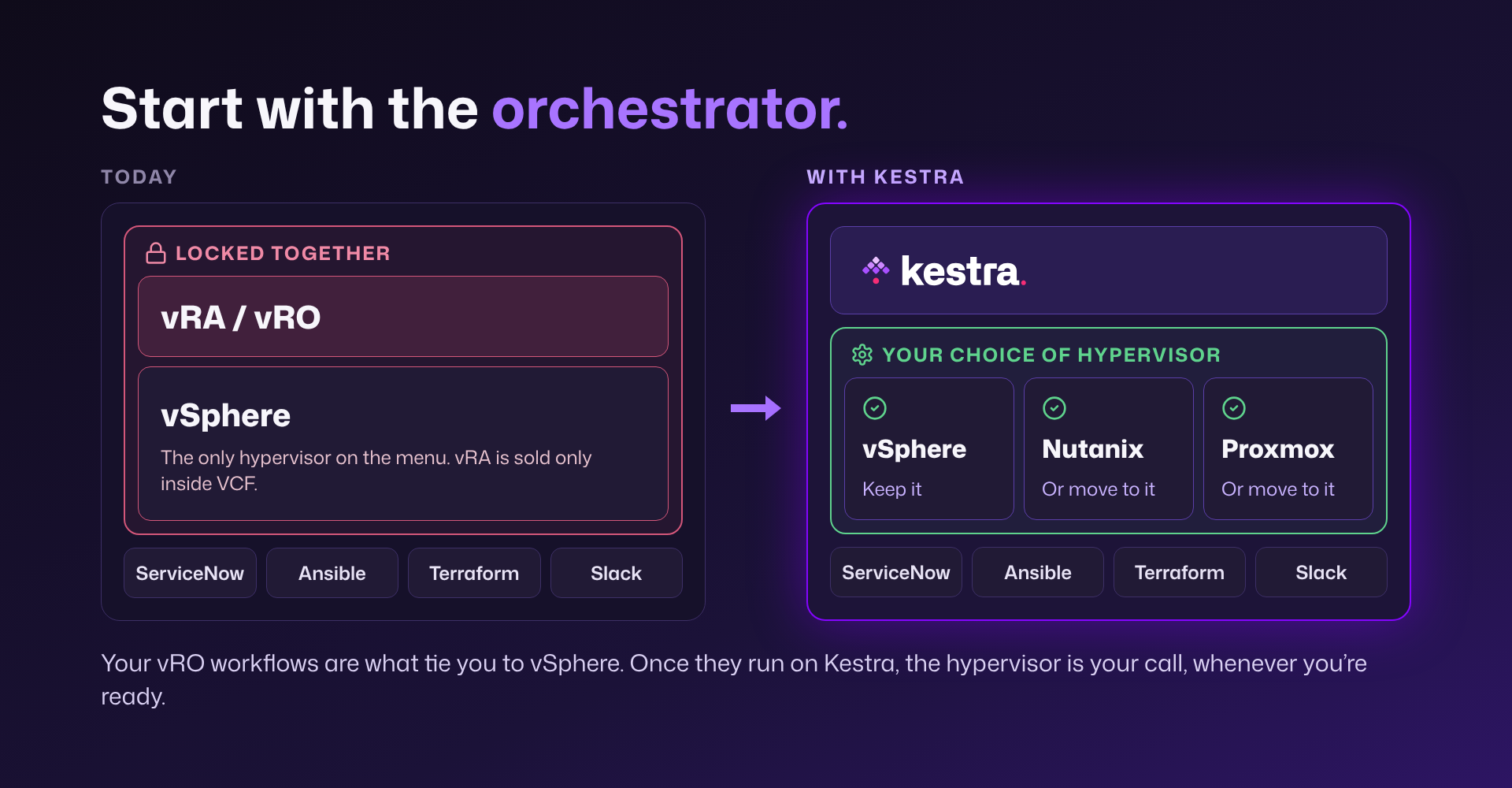
Moving the VMs themselves is well understood, and there are tools for it. The automation is what makes the move feel impossible. Every vRO workflow that provisions, patches or decommissions a machine has to be recreated for the new platform, the old and new setups have to run side by side until the move is done, and most teams don’t know where to start because they aren’t sure what they have. In most environments we see some version of the same picture:
So teams stay. The will to leave is usually there, and what holds them back is the risk of breaking automation they don’t fully understand. The teams we talk to tell us they don’t see vRO as a long-term option, and the alternative many of them have landed on is writing their own scripts. Scripts can recreate the provisioning, but not what vRA gave you around it: a catalog people request from, a record of who ran what, and an inventory of what was provisioned.
Kestra is an open source orchestrator (Apache 2.0), with an Enterprise edition built on the same engine, and it runs in production at companies like Apple, JPMorgan Chase and Dataport. Flows are declared in YAML, so they live in Git and get reviewed like any other code, and plugins connect them to the tools you already run. It replaces both VMware layers, the vRO workflow engine and the vRA catalog, deployments and Day 2 actions. Here’s how the pieces map:
| In vRA and vRO | In Kestra |
|---|---|
| Workflows and scriptable tasks | Flows declared in YAML, kept in Git and promoted like code |
| Package files exported and imported by hand | Git, with review and promotion between environments |
| Actions and vRO plugins | Kestra plugins for vSphere, Nutanix, Proxmox, ServiceNow, public clouds and more |
| Configuration elements | Namespaces, the KV store, and secrets from the vault you already use |
| Service Broker catalog items | Kestra Apps with dynamic forms |
| Deployments | Assets that track what was provisioned |
| Day 2 actions | Flows that act on assets, run from an App, on a schedule, or when an asset changes |
| ServiceNow, Terraform, Ansible, your CMDB, IPAM and vault | They stay where they are, and Kestra calls them through plugins |
Note: The vSphere and Nutanix plugins, Apps and external secrets managers in this mapping are Kestra Enterprise features.
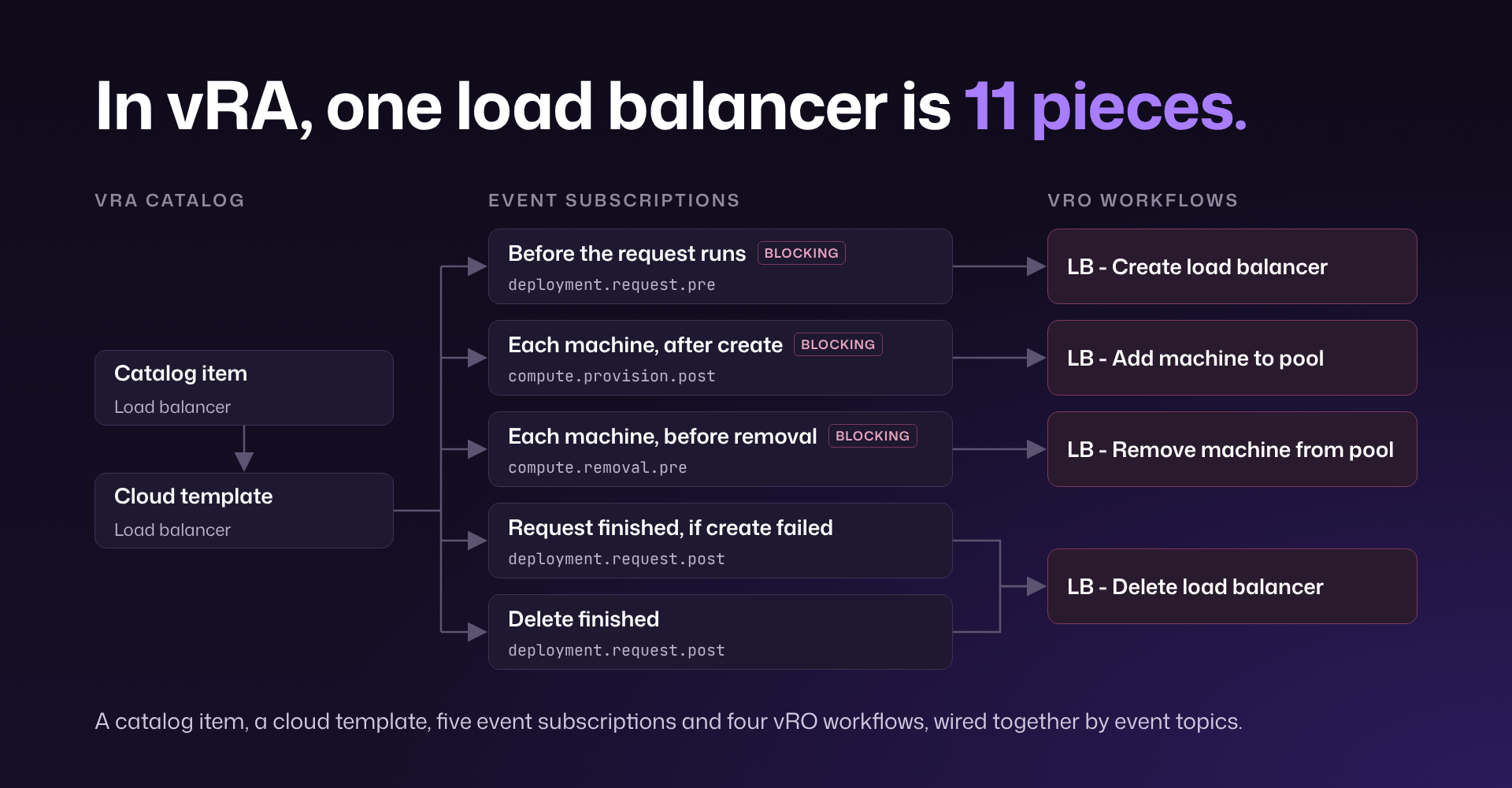
In the webinar, we walked through one load balancer’s full lifecycle in vRA and vRO, from creating it to adding and removing machines and deleting it. Here’s what that takes in vRA:
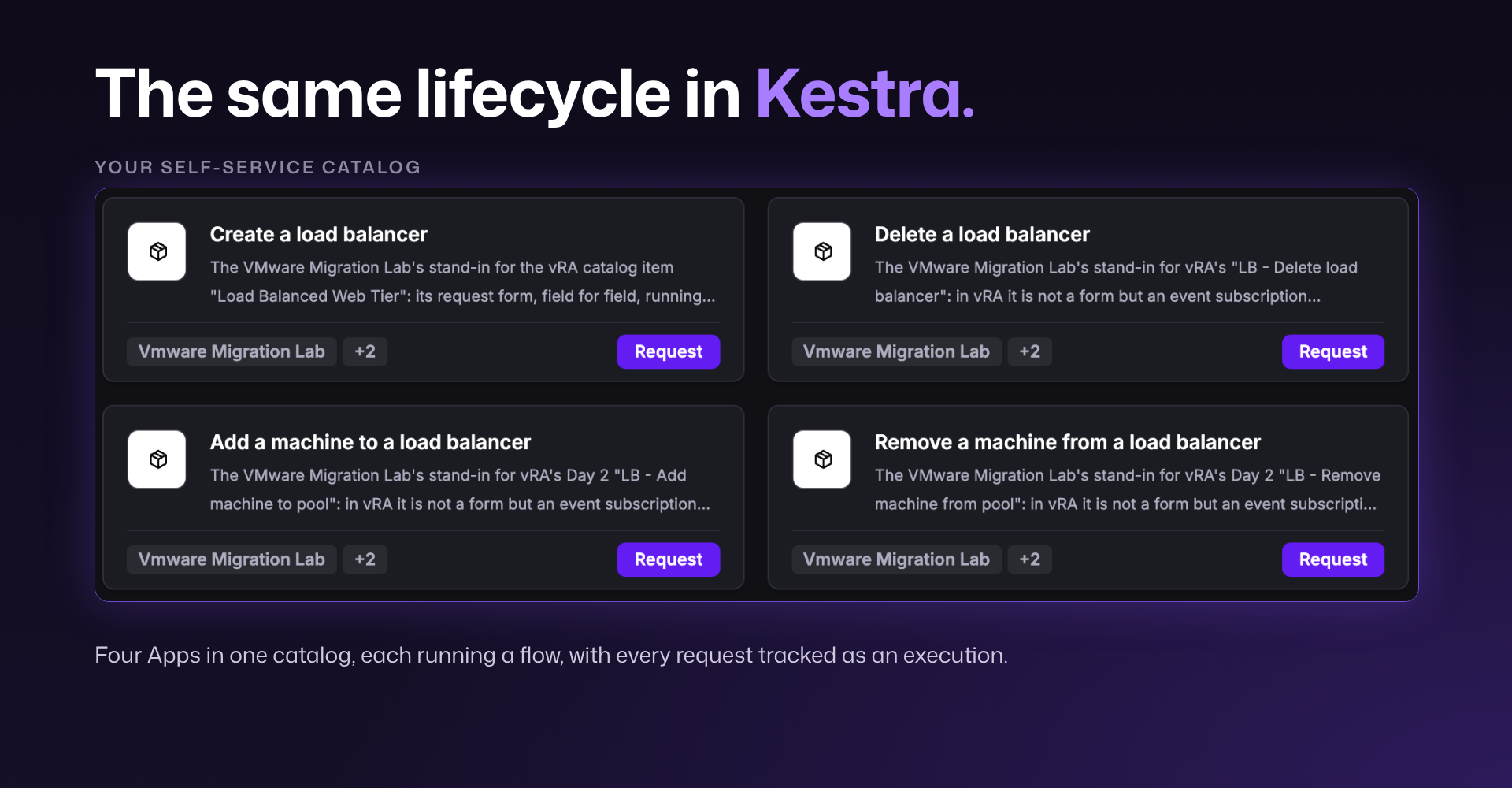
And here’s the exact same lifecycle in Kestra, where each step is an App:
The first step is finding out what you have. The open source Kestra Migration Assistant reads your vRO package export (and your vRA export, if you have one) on your own machine and produces a brief your team can plan from:
It was built to be safe to run in a locked-down environment. It sanitizes secrets and IP addresses before anything goes to a model, sends no telemetry, works with whichever model your company has approved (or with no model at all), and doesn’t need Kestra installed.
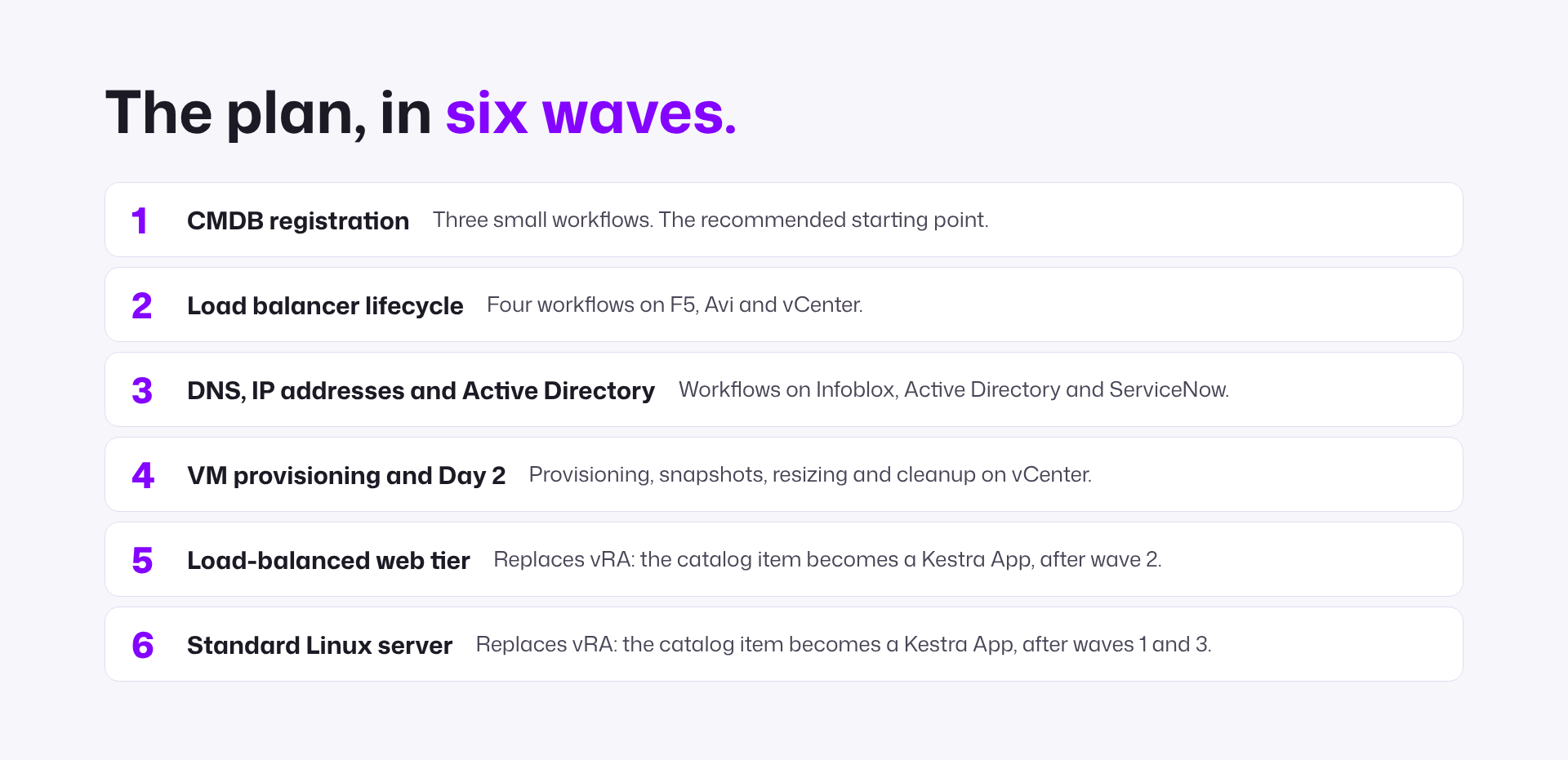
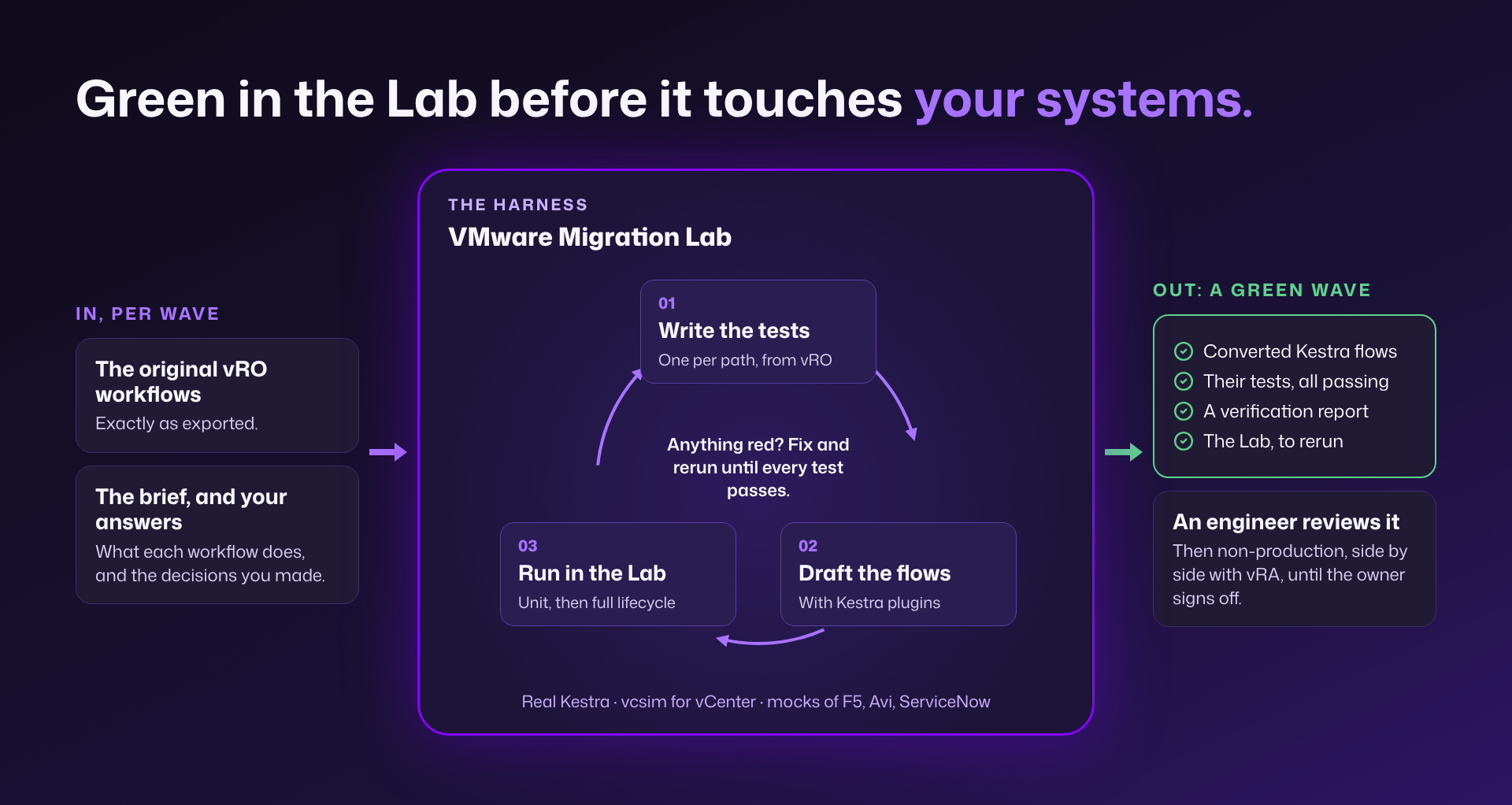
From there the move goes wave by wave, with vRA still running everything that hasn’t moved yet. The conversion is the other half of the Migration Assistant, and we run it with your team. Each wave is converted and verified before it touches your systems. Tests are written from the original workflows first, the converted flows run in a lab that simulates vCenter and mocks the systems your workflows call (F5, Avi, ServiceNow and others), and the results are checked against what the vRO workflows did. The next wave starts once the last one is verified in production.
Some teams skip conversion and rebuild instead, and that’s easier than it sounds when catalog items become Apps and plugins replace most of the custom JavaScript. One EU federal agency with roughly 1,600 vRO workflows chose to rebuild rather than convert. Most environments end up with a mix: convert the workflows that are clean, rebuild the ones that are messy, and retire the ones nobody uses.
Talk to us and we’ll walk through the assessment with you, or run the Migration Assistant yourself first.
Replacing the orchestrator is also a chance to get things vRA and vRO never offered.
An inventory you can reason about. Every deployment is an asset with its dependencies, so before you update the certificate on a load balancer’s virtual server, you can see which machines the change would affect. Asset lifecycle events can also trigger flows, so deleting a machine runs the flow that removes it from the pool.
A safe place for AI agents. vRO has no built-in way to run AI agents. In Kestra, an agent works inside a flow, and the flow defines what it can touch, who approves its changes, and what goes into the audit trail. Kai’s post on AI agents for infrastructure automation covers what agents can realistically do for infrastructure teams today.
We asked Faizan Qazi, a Senior Solutions Engineer at Kestra who built vRA and vRO workflows for enterprises at VMware, what a team running vRO should do first, before talking to any vendor. His advice:
Before you talk to any vendor
When you’re ready for the next step:
Jump to a part of the webinar:
vRA is now sold only as part of VMware Cloud Foundation, licensed per core on subscription, so the automation layer is priced with the hypervisor. Several vRO plugins were also deprecated in VCF 9, and native AWS, Azure and GCP management is switched off by default.
Yes. Replace the orchestrator first and the hypervisor becomes a separate decision: keep vSphere, move some workloads to Nutanix or Proxmox, or move all of them, on your own schedule.
In Kestra, vRO workflows and scriptable tasks become flows declared in YAML, kept in Git and promoted like code. Actions and vRO plugins map to Kestra plugins, and Service Broker catalog items become Kestra Apps with dynamic forms.
No. The open source Kestra Migration Assistant reads your vRO package export and recommends what to convert, rebuild or retire. We run the conversion with your team. Workflows then move in waves while vRA keeps running everything that hasn’t moved yet.

Stay up to date with the latest features and changes to Kestra