Authors

Anna Geller
Anna Geller
We are thrilled to announce Kestra 0.18.0, which introduces a host of enhancements to both Open-Source and Enterprise Edition.
The table below summarizes the highlights of this release.
| Feature | Enhancement | Edition | Docs |
|---|---|---|---|
| KV Store | This major addition to Kestra’s orchestration capabilities allows you to store and retrieve key-value pairs in tasks and triggers, enabling new use cases and bringing statefulness to otherwise stateless workflow execution. | Both Open-Source and Enterprise | Link |
| Outputs | The new Execution Outputs UI makes it easy to inspect, preview and download your workflow artifacts even across many, often deeply nested outputs. | Both Open-Source and Enterprise | Link |
| Namespaces | The improved Namespace Overview, now also available in the Open Source version, provides a comprehensive view of all namespaces used in your flows without having to create those namespaces manually. | Both Open-Source and Enterprise | Link |
| Realtime Triggers | The improved Trigger UI allows you to view logs of each Realtime Trigger and restart it directly from the UI. | Both Open-Source and Enterprise | Link |
| Task Runners | Task Runners are out of Beta — you can safely use the taskRunner property in all script and CLI tasks in production at scale. | Both Open-Source and Enterprise | Link |
| SCIM Directory Sync | Enterprise customers can automate the sync of users and groups from their Identity Provider to Kestra using the SCIM v2.0 protocol. | Enterprise Edition | Link |
| SQL Server Backend (Preview) | SQL Server is available in preview as a Kestra EE backend database. | Enterprise Edition | Link |
| Audit Logs | Audit Logs have undergone a major overhaul, now including a diff-based display of changes and enabling new use cases such as filtering for executions created by specific users. | Enterprise Edition | Link |
| Secrets Handling | The Secrets handling has been improved, allowing for description and tagging of secrets, and more cost-effective API calls to external secrets managers. | Enterprise Edition | Link |
If you’d like to see a 2-minute overview of the release highlights, check out the video below:
Let’s dive in to see how those enhancements can benefit your workflows.
Kestra’s workflows are stateless. By default, all executions are isolated from each other to avoid any unintended side effects. When you pass data between tasks, you do so by explicitly passing outputs from one task to another and that data is persisted in Kestra’s internal storage. This stateless execution model ensures that workflows are idempotent and can be executed anywhere in parallel, at any scale.
However, in certain scenarios, your workflow might need to share data beyond passing outputs from one task to another. For example, you might want to persist data across executions or even across different workflows. This is where the new KV Store comes in.
This release introduces KV Store to bring statefulness to your workflows. KV Store allows you to persist any data produced in your workflows in a convenient key-value format, eliminating the need to manage an external database or storage system to persist such data.
You can create new KV pairs directly from the Kestra UI, via dedicated tasks in your flow, via Terraform or via our REST API. Then, you can read any stored value by its key in any task or trigger with a simple {{ kv('YOUR_KEY') }} expression, making it easy to share data across flows and executions.
Since the KV Store has been built on top of Kestra’s internal storage (which can be any cloud storage service like S3 or GCS):
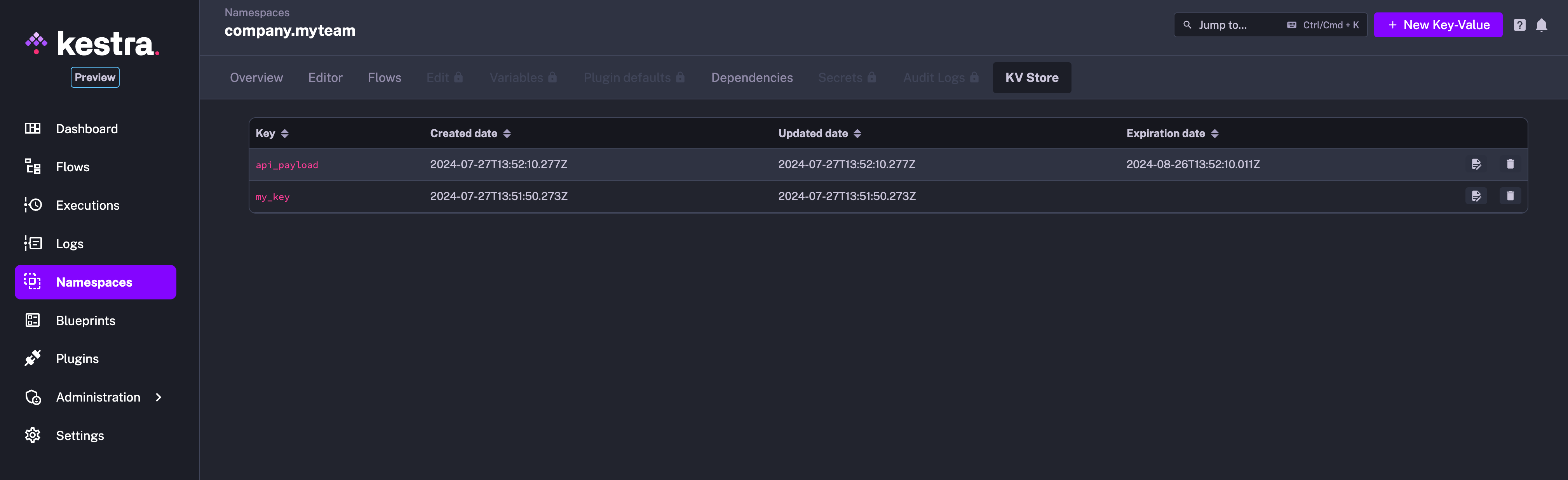
Note that KV Store is a Namespace-level feature — to start adding new KV pairs, navigate to any given Namespace and then click on the KV Store tab.
If you are on Enterprise Edition, make sure to add a KVSTORE permission to any Role that needs access to the KV Store. You need to explicitly add that permission to see the KV Store tab in the UI. You can fully customize which Roles can CREATE, READ, UPDATE or DELETE KV pairs, and you can restrict those permissions to a specific namespace when needed.
Overall, the KV store is a powerful addition to Kestra’s orchestration capabilities, allowing you to persist state and share data across flows and executions.
Read more about the KV Store in our documentation.
Before Kestra 0.18.0, the Namespaces UI page suffered from the following issues:
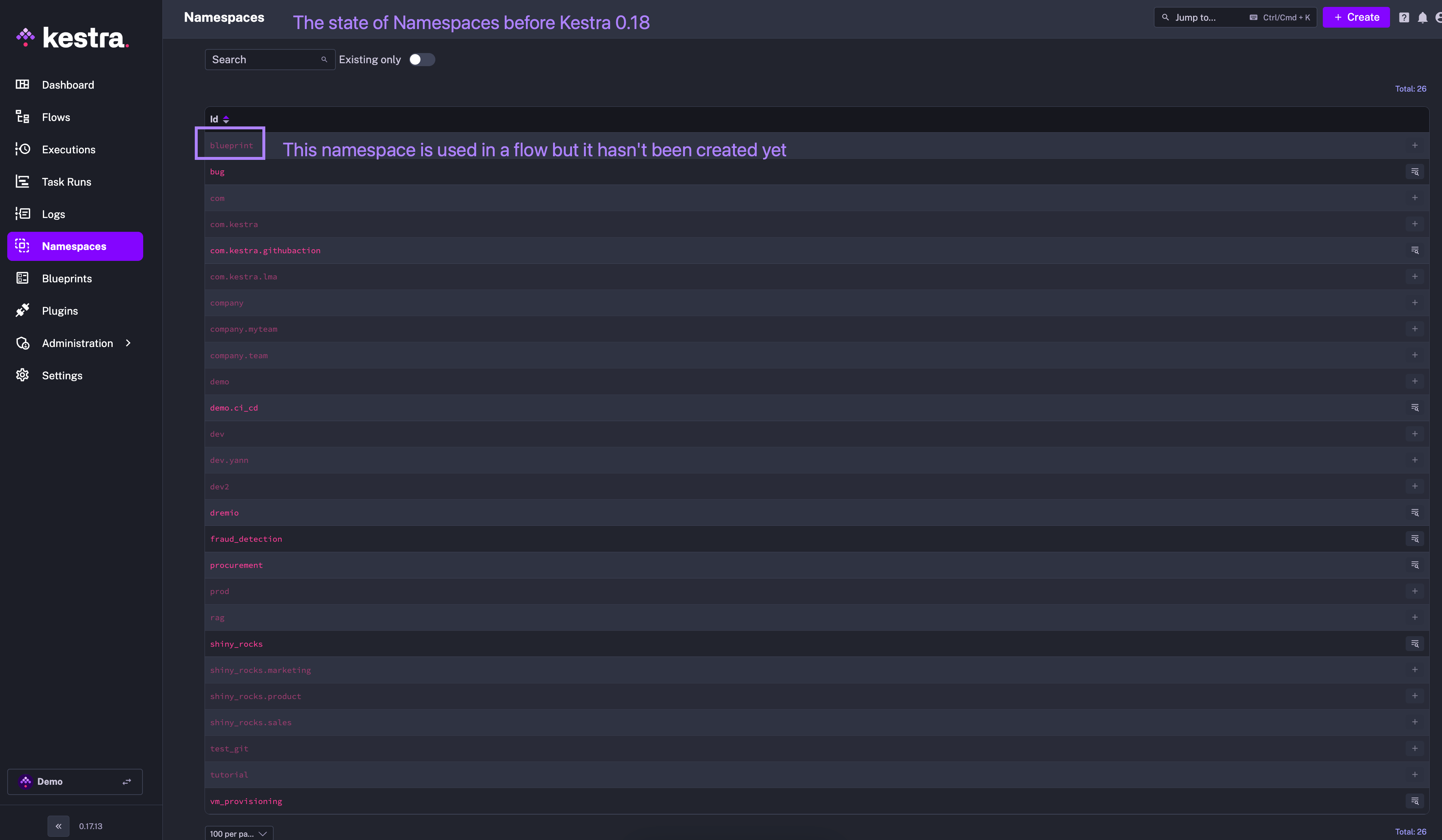
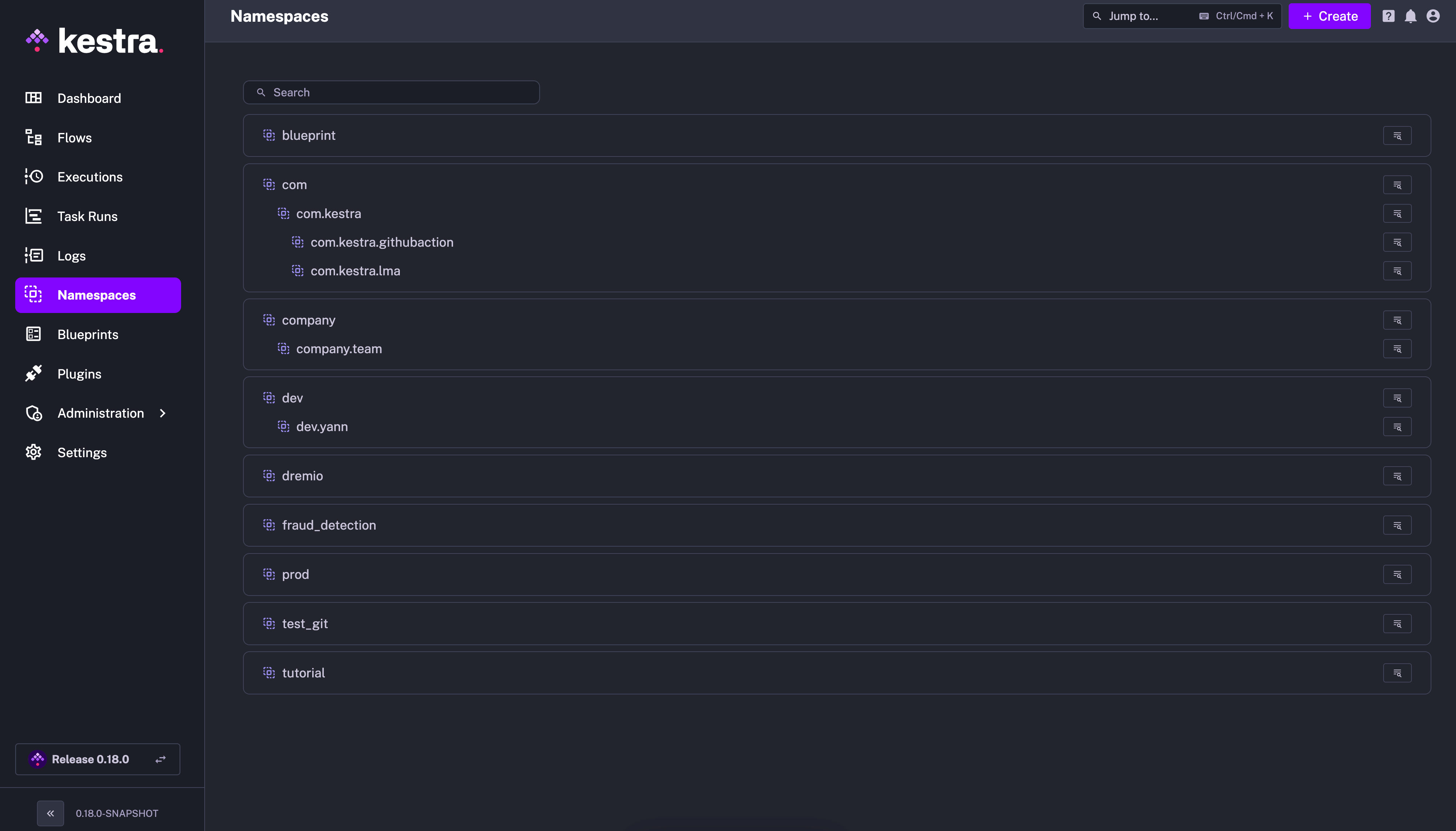
The Namespaces page has been fully redesigned in Kestra 0.18.0 to address these issues. You will now see all namespaces used in any flow in a hierarchical structure, including nested child namespaces that can be expanded and collapsed. And we’re excited to announce that this feature is now available in the open-source version as well.
We have also added the Editor tab to the Namespace page, offering one more place from where you can access and manage Namespace Files.
Here is how the new Namespaces overview page looks like in Kestra 0.18.0 (in both Open Source and Enterprise Edition):
Here is a detailed page for a Namespace in the Open-Source version — note how the KV Store is displayed as one of the Namespace-level tabs:
And here is how the same Namespace page looks like in the Enterprise Edition:
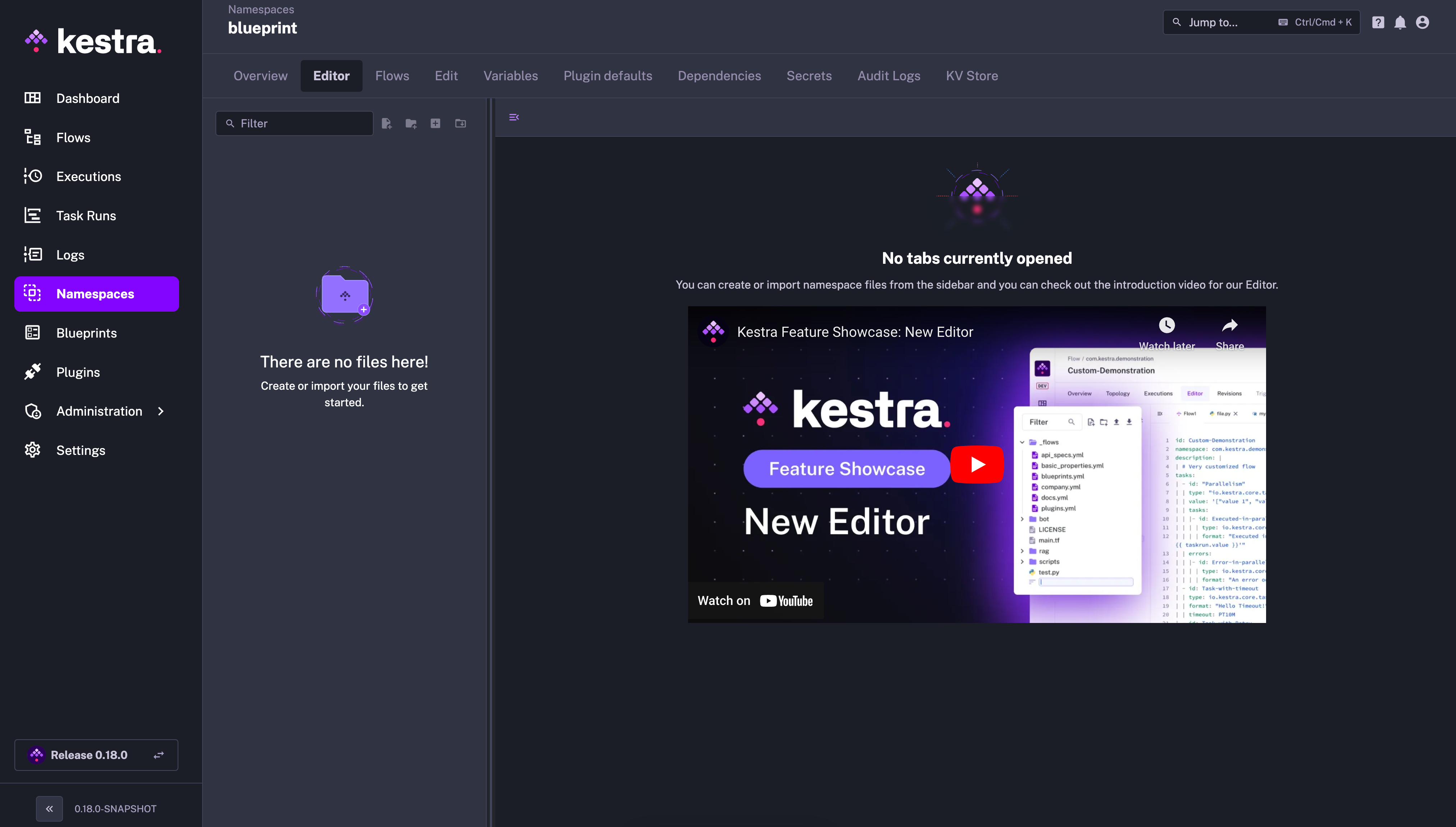
Check the following video demo for a deep dive into the new Namespaces UI:
The Enterprise Edition of Kestra now supports Directory Sync Integration via SCIM 2.0 protocol, allowing you to keep your users and groups in sync between your Identity Provider (IdP) and Kestra.
Our SCIM integration allows you to automate the provisioning and de-provisioning of users and groups via our SCIM API endpoint. Instead of manually creating and updating users in Kestra, you can configure a SCIM Provisioning integration from the IAM section in the Kestra UI, and that integration will keep your Kestra instance in sync with the latest user and group information in your IdP.
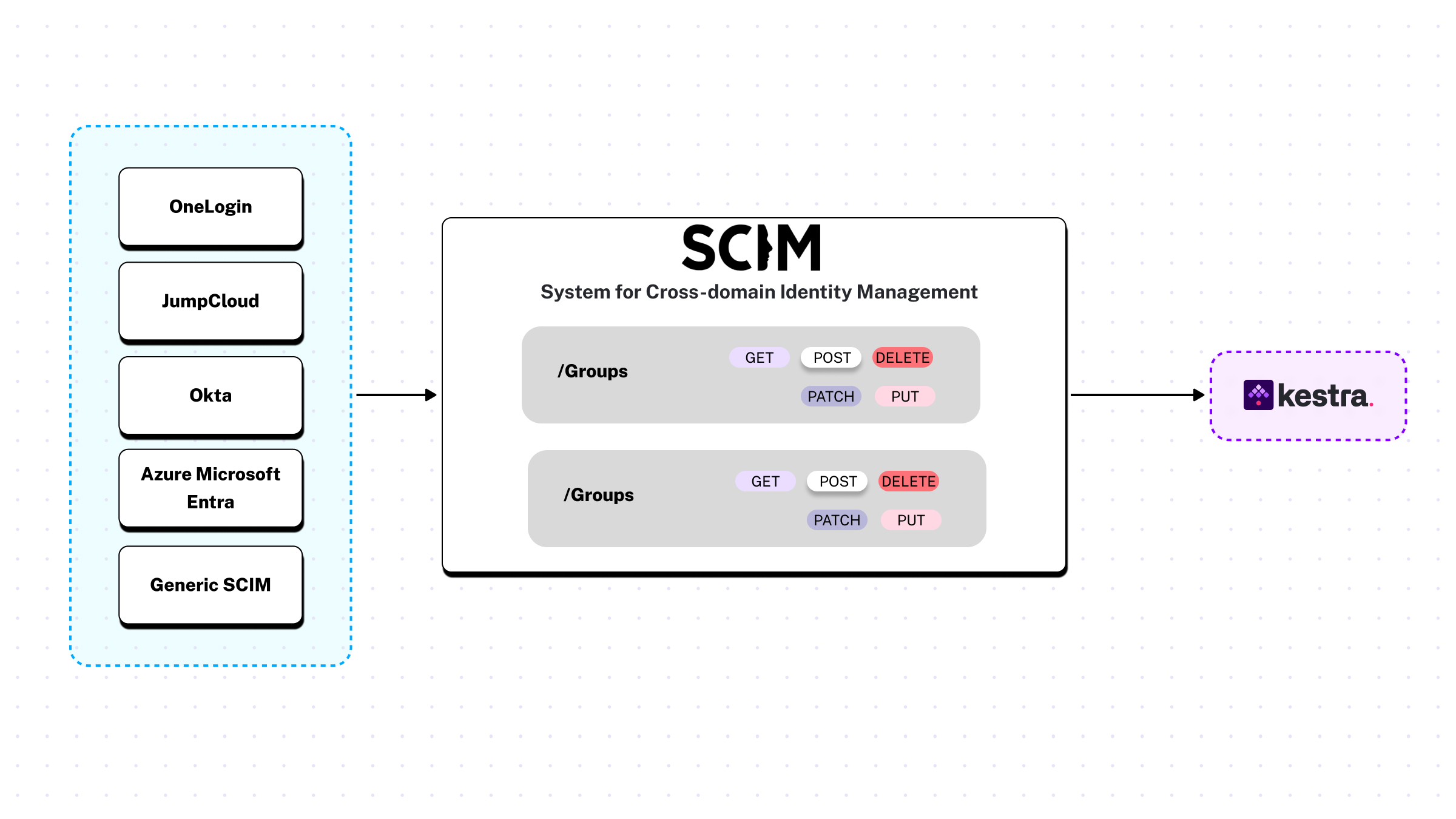
At the time of this release, we have tested and documented our SCIM integration with Microsoft Entra ID, Okta, Keycloak, and authentik. If you are using a different IdP or struggle to set up SCIM with Kestra, please reach out.
Based on requests from several Enterprise customers, we’ve added SQL Server as a backend database option for Kestra EE. This feature is currently in preview, and we are looking for feedback from early adopters of this backend.
Until we remove the preview label, we recommend using SQL Server in development/staging environments only and PostgreSQL for production JDBC-based deployments.
To help you set up a SQL Server backend, check our Database Configuration Guide.
Our audit logs have undergone a comprehensive refactor in this release, making it easier to track changes.
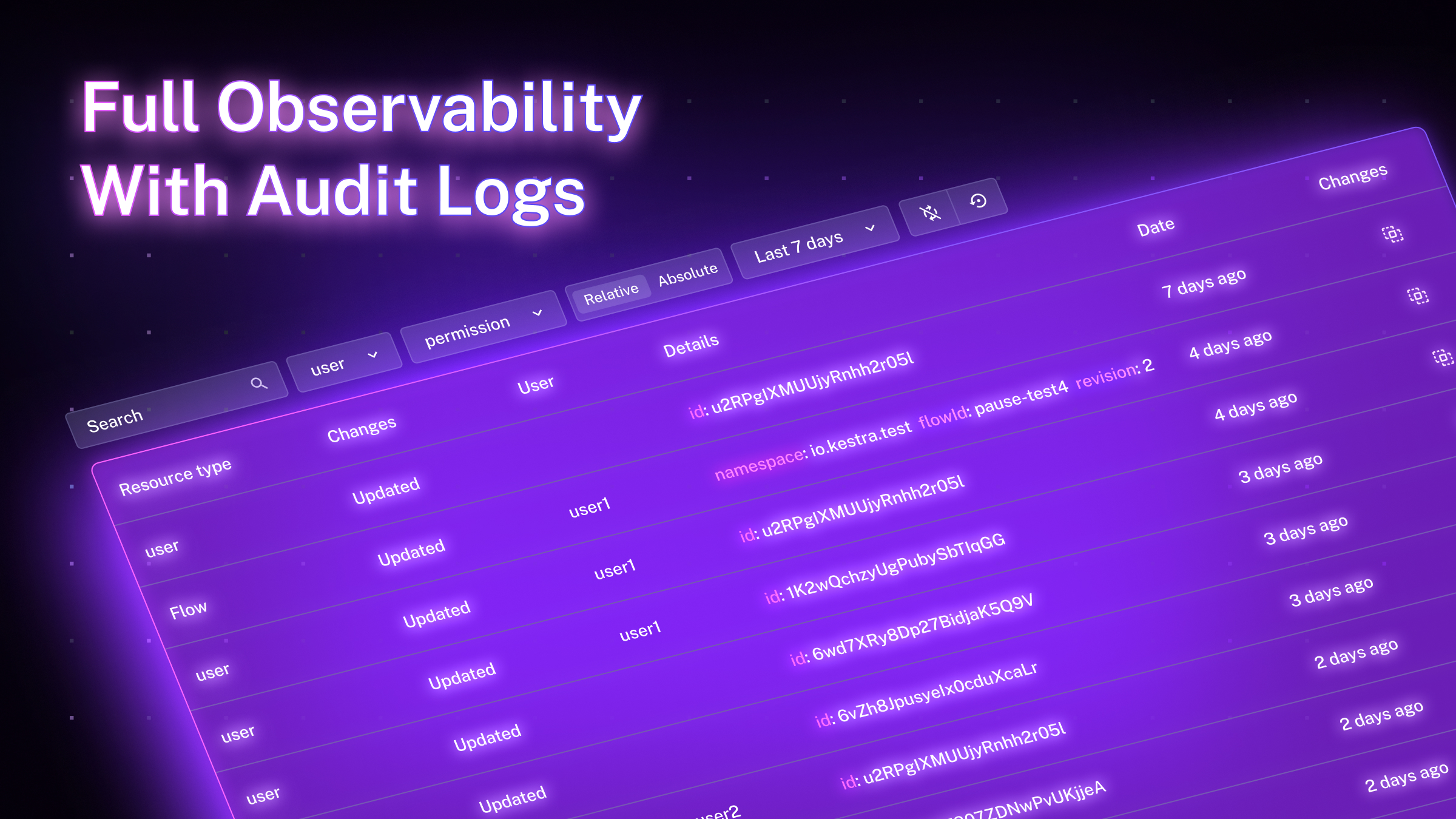
You can now filter Audit Log events created by a specific User. Each audit log now additionally includes information on whether a given resource has been Created, Updated or Deleted. When you need to dive even deeper, click on the Changes icon to see a JSON diff of the changes displayed in a Git-like diff format, similar to the one you can see in the flow revision history.
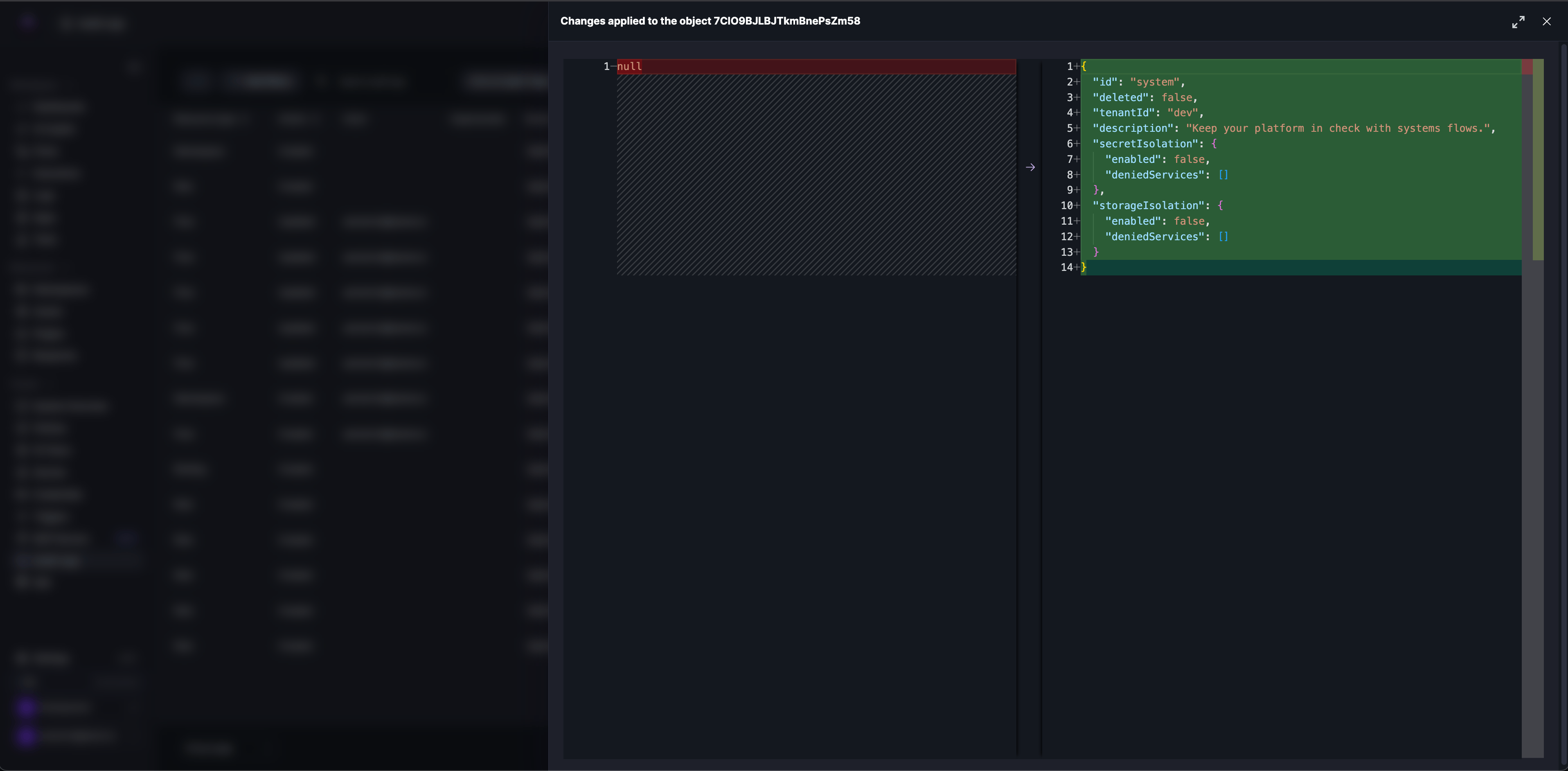
We’ve also introduced a couple of new log events, e.g. for Tenant-level changes (when a tenant is created, renamed, or deleted).
This release has brought additional improvements to our Secrets handling, allowing for description and tagging of secrets, and more cost-effective API calls to external secrets managers.
Instead of querying all available secrets in a fast (but potentially costly) manner, Kestra now lists secrets more gradually, starting by querying the flow’s namespace (without including parent namespaces). If the requested secret was not found, we search for it one level higher in the namespace hierarchy, and then another level higher, and so on.
To further limit the number of required API calls to the Secrets Manager, we’ve introduced a new cache property under the kestra.secret configuration section. When enabled, Kestra will cache the secrets, reducing the number of API calls to the secrets manager.
kestra: secret: type: aws-secret-manager cache: enabled: true # false by default maximumSize: 1000 expireAfterWrite: 60s aws-secret-manager: accessKeyId: mysuperaccesskey secretKeyId: mysupersecretkey region: us-east-1The cache section includes the following properties:
kestra.secret.cache.enabled: whether to enable caching for secretskestra.secret.cache.maximumSize: the maximum number of cached entrieskestra.secret.cache.expireAfterWrite: a duration after which the cache will be invalidated.Apart from the more cost-effective handling of API calls to secrets managers, you can now forward kestra-specific tags and a description of the secret to the external secrets manager.
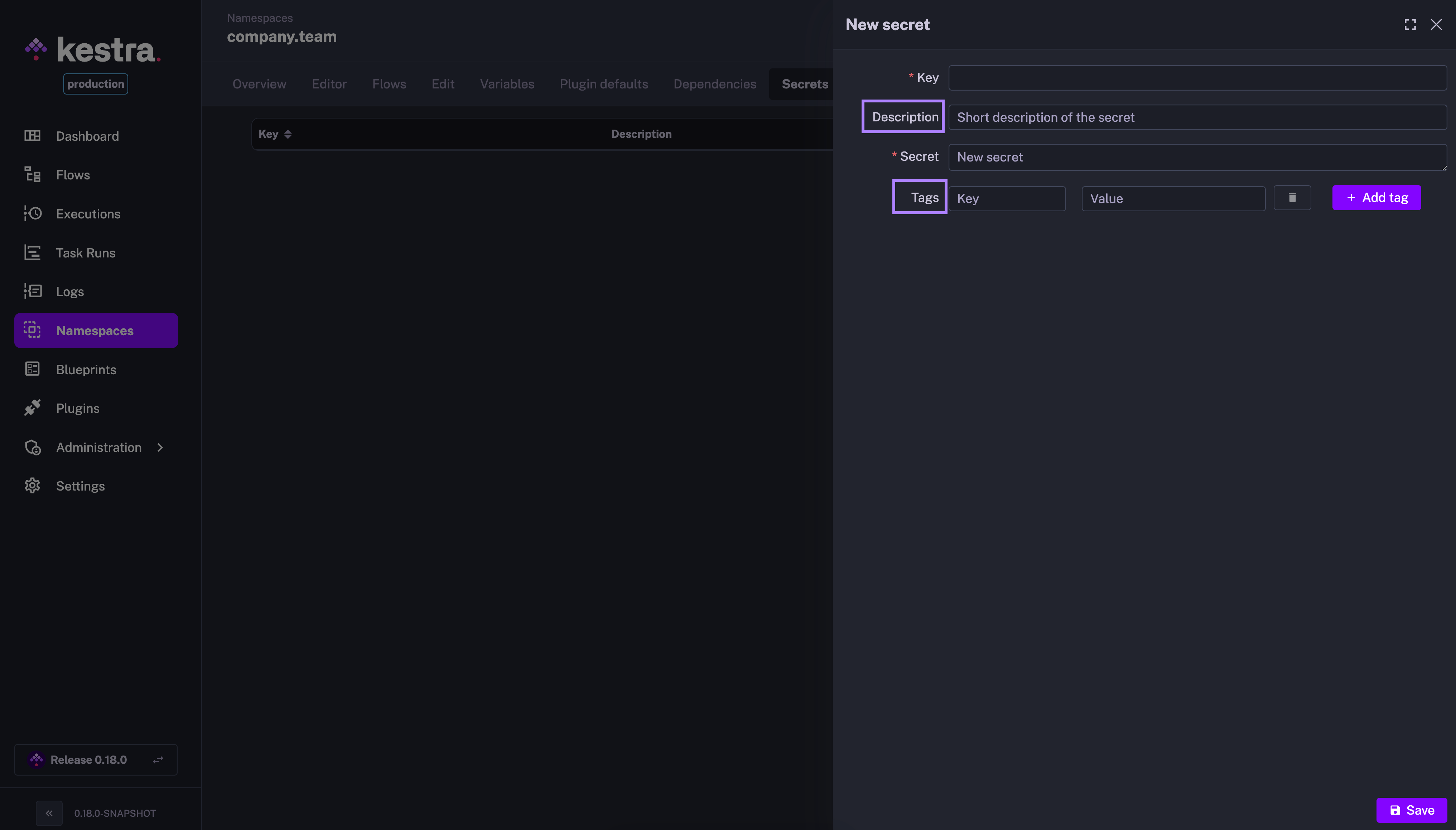
Finally, you can add a global configuration to automatically forward some tags to all newly created or updated secrets managed by Kestra:
kestra: secret: type: aws-secret-manager tags: application: kestra environment: productionBased on your feedback, we’re excited to introduce the new Outputs UI!
The Outputs tab now displays Execution outputs in a multi-column format with a hierarchical structure, allowing you to gradually expand nested outputs.
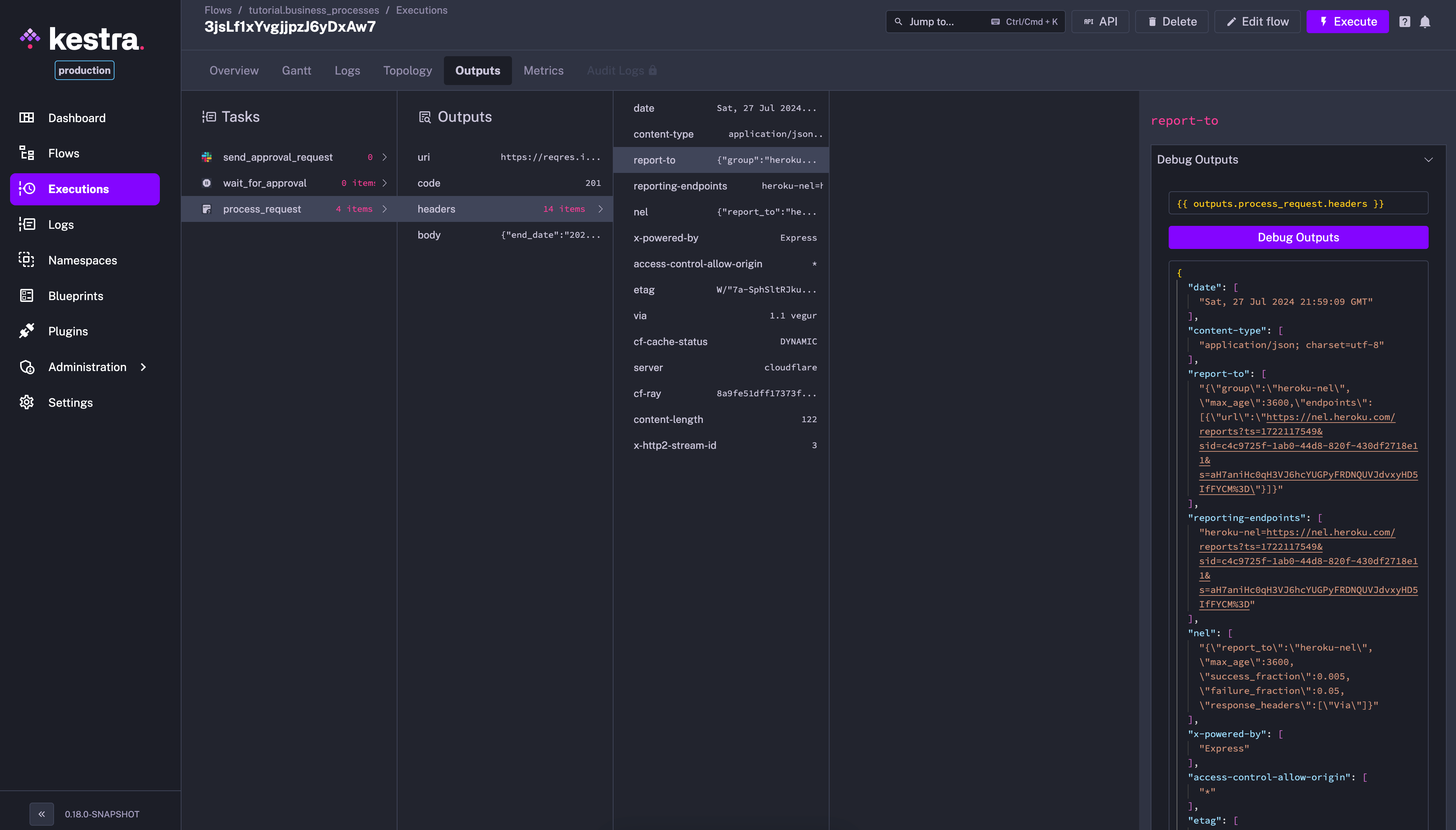
All existing features such as the Outputs preview and the ability to render custom expressions are still available — the only change here is that the Render Expressions field has been renamed to Debug Outputs.
To make Realtime Triggers more observable and easier to troubleshoot, we’ve extended the trigger view with logs and a restart functionality. For each Realtime Trigger, you can now dive into its logs and restart it directly from the UI when needed.
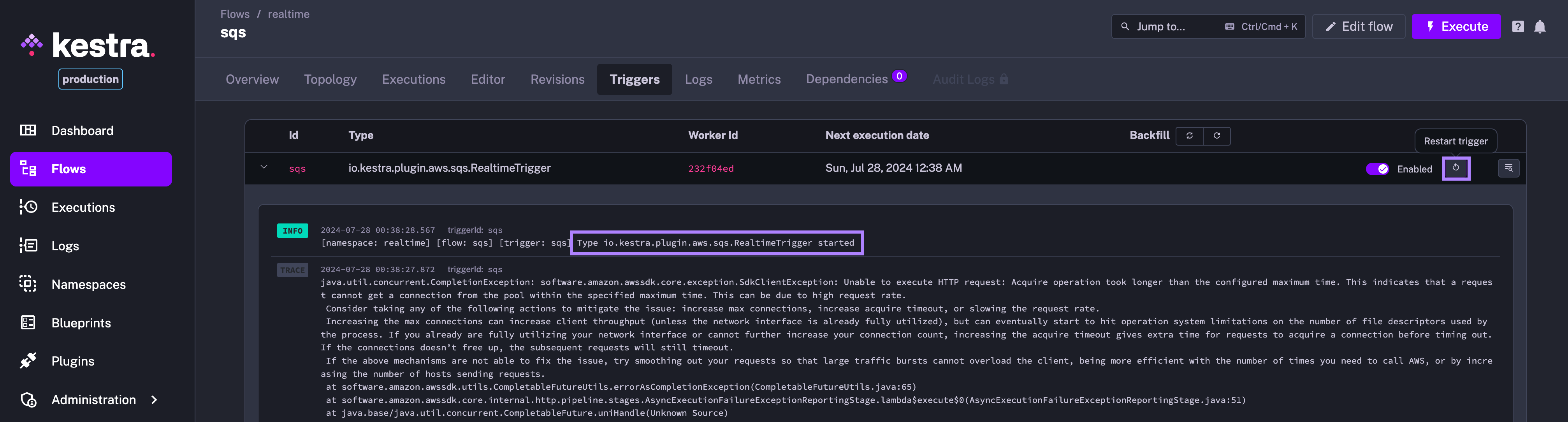
If a RealtimeTrigger is misconfigured (e.g. invalid SQS or Kafka credentials), Kestra will now immediately generate a failed Execution with a friendly error message asking you to verify the trigger configuration. You can then correct the misconfigured properties and restart the trigger from the UI.
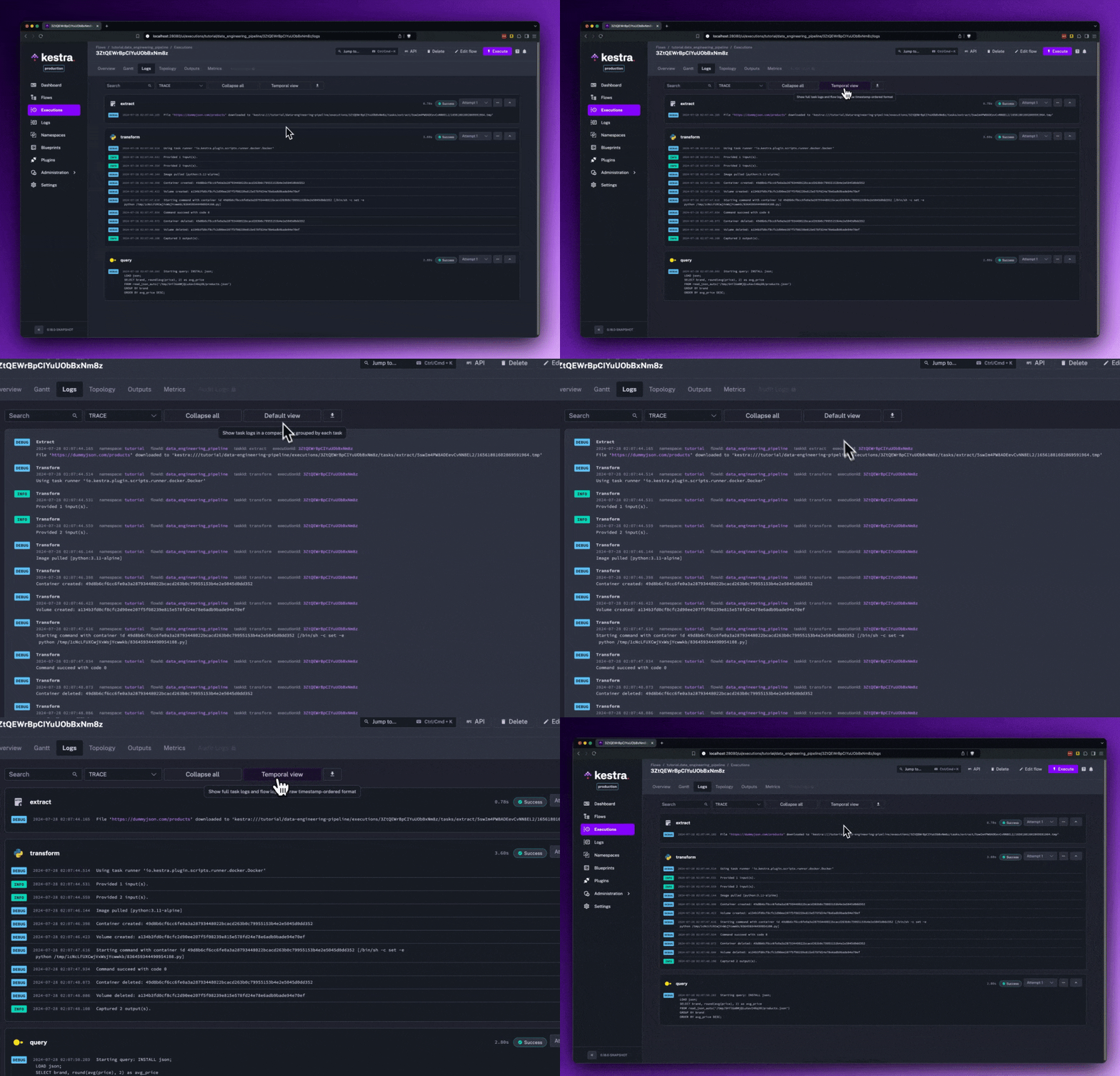
The UI now provides a new view to display workflow execution logs. In addition to the Default view showing logs grouped by a task, you can now switch to a Temporal view showing both task logs and flow logs in a raw timestamp-ordered format. This allows you to see:
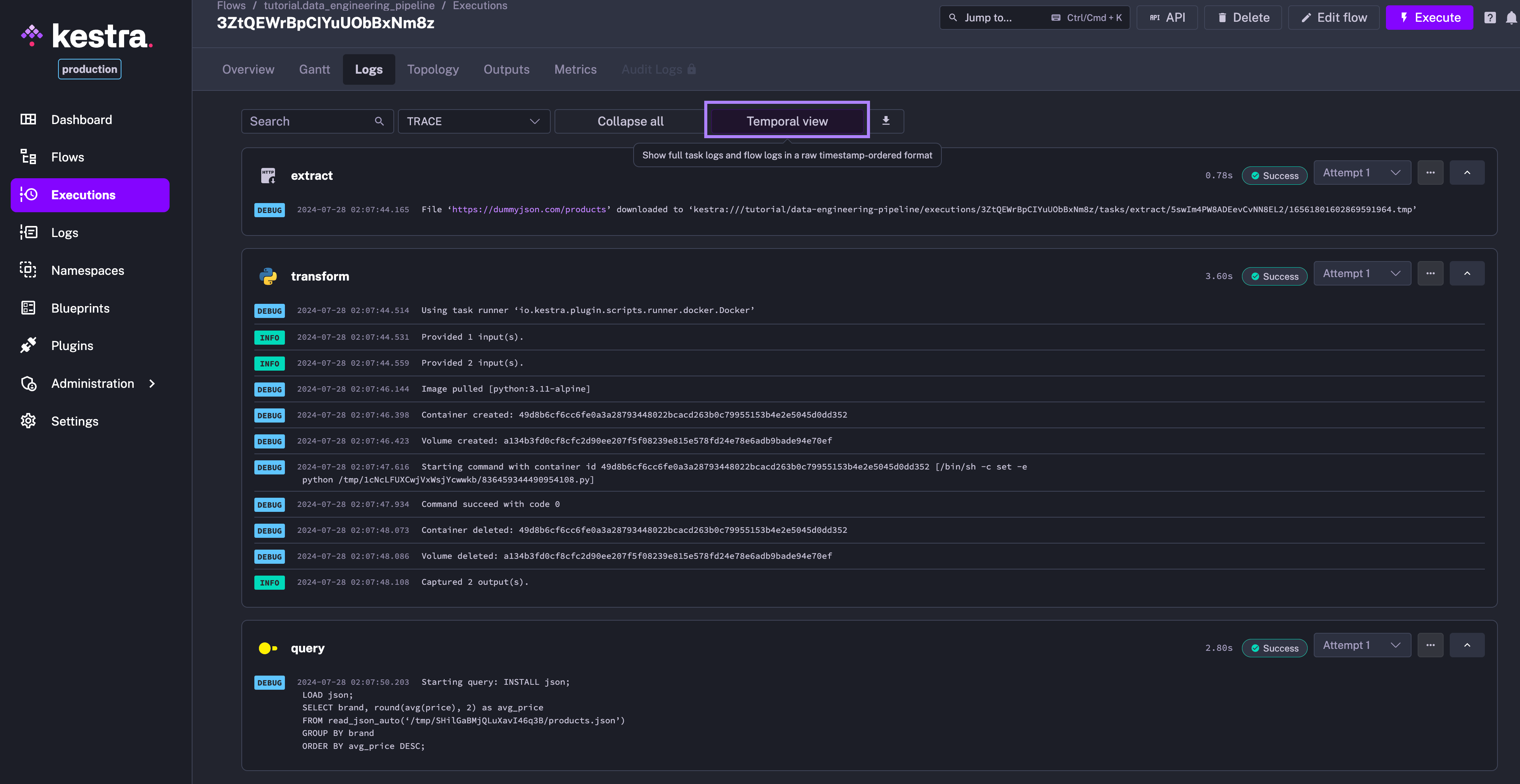
The GIF below shows how you can switch between both views:
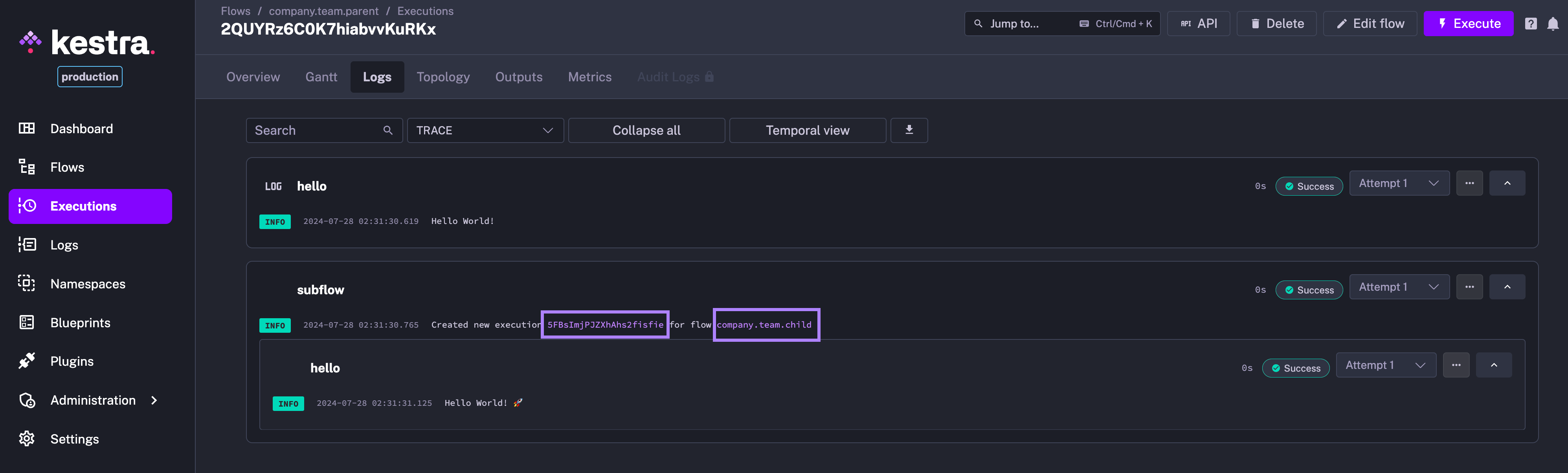
All subflow executions (those created via a Subflow task and those created via ForEachItem) now generate clickable links to the corresponding subflow and its execution, simplifying the navigation in parent-child workflows:
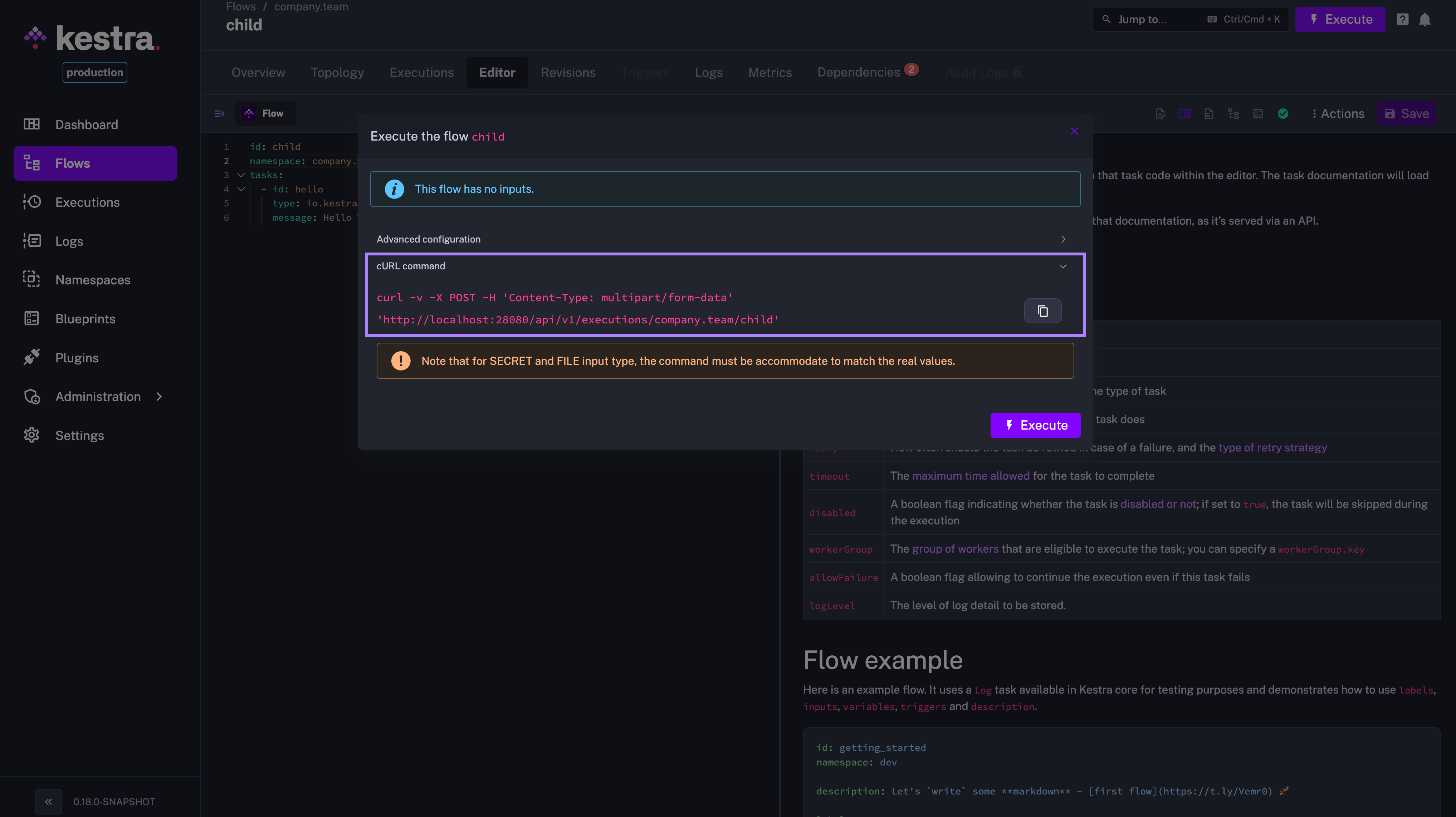
The Execute modal now additionally displays a Copy as cURL button making it easier to trigger your execution from anywhere:
One of the major highlights of Kestra 0.18.0 is that Task Runners are now out of Beta.
Task Runners is a pluggable system capable of executing your tasks in remote environments. We introduced task runners in Beta in Kestra 0.16.0, and since then, we’ve been improving their performance, stability, and usability. Thanks to feedback from over 80 users and many enhancements and bug fixes, Task Runners are now generally available and ready for production use at scale.
Check the video below for a Task Runners feature showcase:
Here are the main enhancements to Task Runners added in this release:
taskRunner property has been added to all CLI tasks including DbtCLI, TerraformCLI, and all other script tasks.runner property has been deprecated in favor of the now generally available taskRunner property, which provides more flexibility and allows you to run your code in different remote environments, including Kubernetes, AWS Batch, Azure Batch, Google Batch, and more.WorkingDirectory task are now correctly injected into the taskRunner container’s working directory.projectDir and add the --project-dir dbt/ to your dbt command).AWS/Azure/Google Batch task runners. Instead, we now reuse the existing job.outputFiles so that you can now declare which files should be captured as outputs using a simple RegEx expression e.g. "*.json".serviceAccountName field.Task Runners in Kestra 0.18.0 offer more resilient file handling and more stability when recovering from failure in remote compute environments.
Note that starting from Kestra 0.18.0, the Docker and Process task runners are included in the Open Source edition. The Kubernetes, AWS Batch, Azure Batch, Google Batch, and Google Cloud Run task runners require an Enterprise Edition license or a Kestra Cloud account. If you are interested in trying them out, please reach out.
Read more about Task Runners in our Documentation.
ForEach taskA new ForEach core task has been introduced to unify and simplify parallel and sequential task executions, replacing (in a non-breaking way) the EachParallel and EachSequential tasks. Those old tasks are deprecated but you can still use them — take as much time as you need to migrate.
Check the core plugin documentation to learn more.
SELECT and MULTISELECT input typesThe new SELECT and MULTISELECT input types provide a more intuitive and improved functionality over the (now deprecated) ENUM-type input. They both allow you to provide a list of values to choose from, with SELECT allowing only one value and MULTISELECT allowing multiple values to be selected.
We’ve made several improvements to JSON and ION handling. To avoid confusion between the json filter and json() function, we’ve renamed them as follows:
json filter is now called toJson — it converts an object into a JSON string e.g. {{ [1, 2, 3] | toJson }}json() function is now called fromJson — it converts a JSON string into an object, allowing you to access JSON properties using the dot notation e.g. {{ fromJson(kv('JSON_KEY')).property }}.We’ve also implemented equivalent functionality for ION — the new fromIon() function converts an ION string into an object. This function will raise an error if you try to parse a multi-line string (i.e. an ION file with multiple rows) — it’s intended to be used in combination with the ForEachItem or Split tasks.
The renaming has been implemented in a non-breaking way — using json() will raise a warning in the UI but it will still work.
We have extended the cron property to allow scheduling with a precision down to the second level.
Note that this is a non-breaking change. You need to explicitly add the withSeconds: true property to your Schedule trigger to enable the sixth field in your cron expressions. If you don’t add this property, the schedule definition will be parsed using the regular 5 fields (at a minute level) as before:
┌──────── minute (0 - 59)│ ┌────── hour (0 - 23)│ │ ┌──── day of month (1 - 31)│ │ │ ┌── month (1 - 12 or Jan - Dec)│ │ │ │ ┌ day of week (0 - 7 or Sun - Sat, 0 and 7 are Sunday)│ │ │ │ │* * * * *The example below shows how to schedule a flow to run every 5 seconds:
id: every_5_secondsnamespace: company.team
tasks:  - id: log    type: io.kestra.plugin.core.log.Log    message: This workflow runs every 5 seconds
triggers: - id: every_5_seconds type: io.kestra.plugin.core.trigger.Schedule withSeconds: true cron: "*/5 * * * * *"Speaking of scheduling, the UI now displays CRON schedules in a human-readable format, making it easier to understand when your executions are scheduled to run.
For example, instead of 0 9 * * *, the Flows page will now display the trigger as At 09:00 AM.
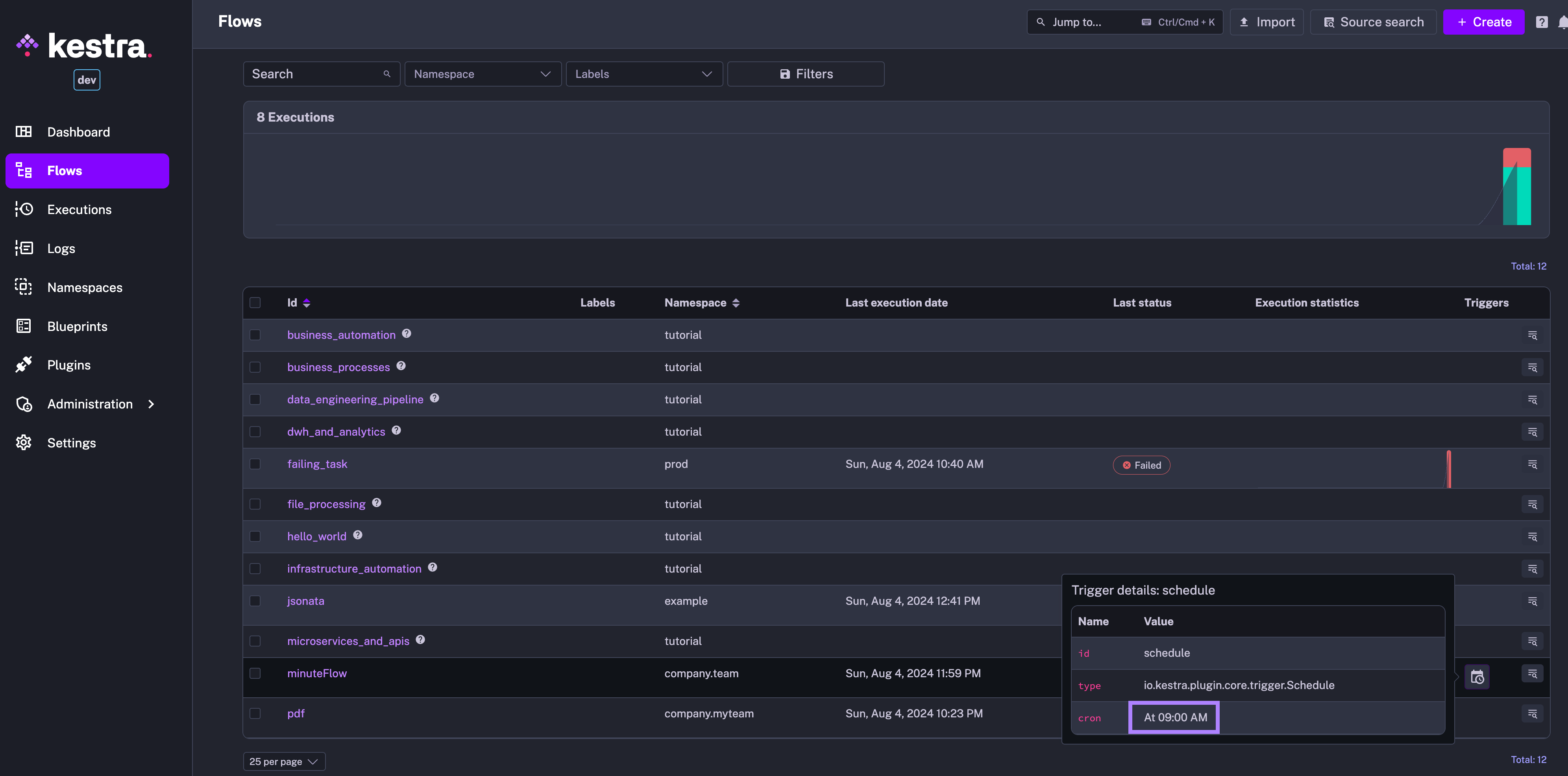
Big thanks to Yuri for contributing this powerful enhancement!
null HandlingWe’ve resolved an issue with the null coalescing operator to ensure it functions correctly when processing both empty (null) and undefined inputs.
Learn more in a dedicated How-to Guide.
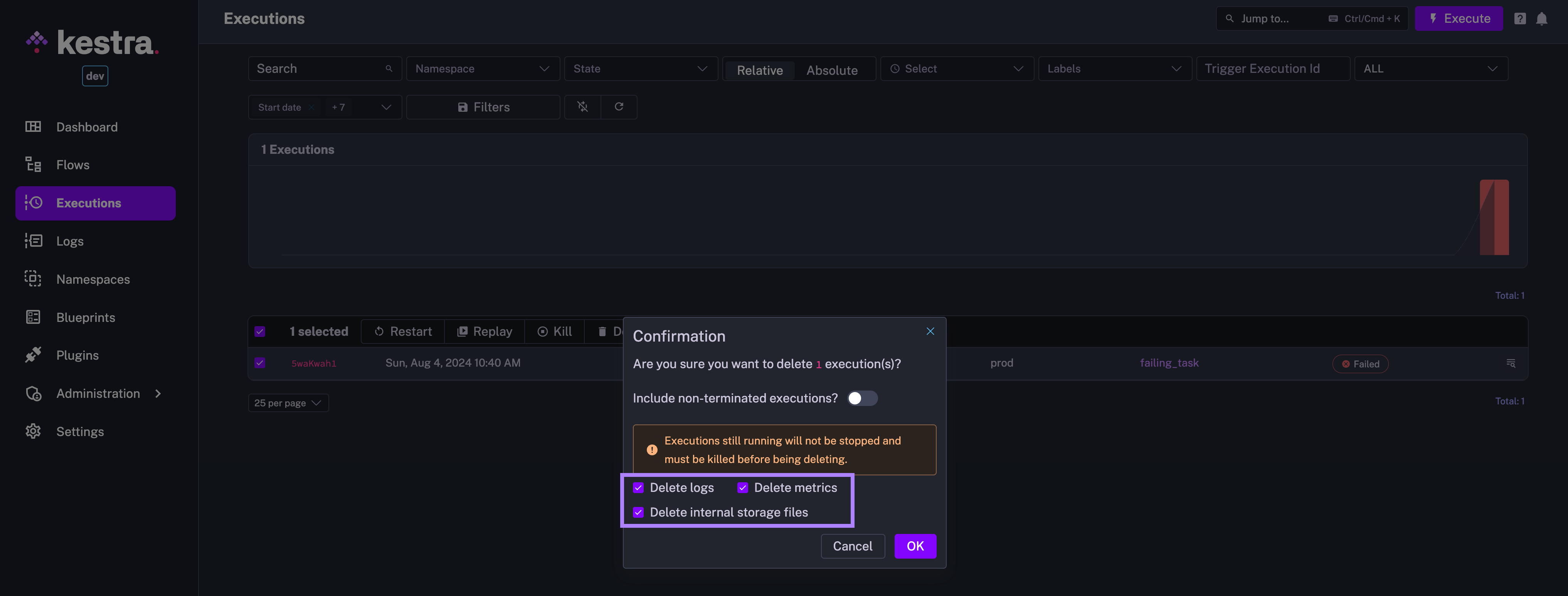
When you delete an execution from the UI, you now have the option to choose whether you also want to delete the logs, metrics and internal storage files related to that execution. Starting from Kestra 0.18.0, we now purge all execution-related data by default. This ensures that your storage space is not cluttered with logs, metrics or files for executions that no longer exist. However, you have full flexibility to choose whether you want to keep that data for specific executions.
We’ve added new tasks UploadFiles, DownloadFiles, and DeleteFiles allowing you to automatically manage your namespace files from a flow.
The DownloadFiles task allows you to download Namespace Files stored in another namespace to facilitate sharing code across projects and teams.
The UploadFiles and DeleteFiles are useful to help you manage code changes, e.g. when you want to upload the latest changes of your production code to your Kestra instance and develop it further from the Kestra UI. The example below shows how to do that for a dbt project:
id: upload_dbt_projectnamespace: company.datateam.dbtdescription: |  This flow will download the latest dbt project from a Git repository  and upload it to the Kestra instance.  It's useful when developing your dbt code directly from the Kestra Editor.  Later, you can use the PushNamespaceFiles task to push the changes back to Git.tasks:  - id: wdir    type: io.kestra.plugin.core.flow.WorkingDirectory    tasks:      - id: git_clone        type: io.kestra.plugin.git.Clone        url: https://github.com/kestra-io/dbt-example        branch: master
- id: upload type: io.kestra.plugin.core.namespace.UploadFiles files: - "glob:**/dbt/**"As your workflows grow, you may need to clean up old executions and logs to save disk space.
We’ve improved the mechanism of the Purge tasks to make them more performant and reliable — some tasks have been renamed to reflect their enhanced functionality.
Here are the main Purge plugin changes in Kestra 0.18.0:
io.kestra.plugin.core.storage.Purge has been renamed to io.kestra.plugin.core.execution.PurgeExecutions to reflect that it only purges data related to executions (e.g. not including trigger logs — to purge those you should use the PurgeLogs task) — we’ve added an alias so that using the old task type will still work but it will emit a warning. We recommend using the new task type.io.kestra.plugin.core.storage.PurgeExecution has been renamed to io.kestra.plugin.core.storage.PurgeCurrentExecutionFiles to reflect that it can purge all execution-related data incl. inputs to an Execution and Execution outputs — also here, we’ve added an alias so that using the old task type will still work but it will emit a warning. Again, we recommend adjusting your flow code to match the new task type.From Kestra 0.18.0 on, the recommended way to clean execution and logs is using a combination of io.kestra.plugin.core.execution.PurgeExecutions and the newly added io.kestra.plugin.core.log.PurgeLogs task as shown below. The PurgeLogs task removes all logs (both Execution logs and Trigger logs) in a performant batch operation. Combining those two together will give you the same functionality as the previous io.kestra.plugin.core.storage.Purge task but in a more performant and reliable way (roughly 10x faster).
id: purgenamespace: company.myteamdescription: |  This flow will remove all executions and logs older than 1 month.  We recommend running this flow daily to avoid running out of disk space.
tasks:  - id: purge_executions    type: io.kestra.plugin.core.execution.PurgeExecutions    endDate: "{{ now() | dateAdd(-1, 'MONTHS') }}"    purgeLog: false
  - id: purge_logs    type: io.kestra.plugin.core.log.PurgeLogs    endDate: "{{ now() | dateAdd(-1, 'MONTHS') }}"
triggers: - id: daily type: io.kestra.plugin.core.trigger.Schedule cron: "@daily"We’ve renamed the Docker image tags to ensure that the default Kestra image kestra/kestra
includes all plugins.Here is what you need to adjust in your Docker image tags:
develop-full or latest-full image with all plugins, cut the -full suffix from your Docker image tag.develop or latest image without plugins, add -no-plugins suffix to the image tag.For more details on that change, check the Docker Image Tags documentation and the Breaking Changes section of the GitHub Release Notes.
kestra-ee binary has been renamed to kestraIf you use the kestra-ee CLI, note that it has been renamed to kestra. This change is intended to avoid confusion between the open-source and Enterprise Edition binaries.
Kestra’s integration ecosystem keeps growing with every new release. The plugins added in v0.18.0 include:
This post covered new features and enhancements added in Kestra 0.18.0. Which of them are your favorites? What should we add next? Your feedback is always appreciated.
If you have any questions, reach out via Slack or open a GitHub issue.
If you like the project, give us a GitHub star and join the community.

Stay up to date with the latest features and changes to Kestra