Authors

François Delbrayelle
Lead Software Engineer
François Delbrayelle
Lead Software Engineer
Writing a Kestra flow from scratch means knowing what plugins exist, which tasks they expose, and what properties each task accepts. For simple, familiar workflows this is fine. For anything more complex — choosing the right S3 trigger variant, checking what secret managers are supported, or confirming whether a Blueprint already covers your use case — you end up context-switching to the docs browser mid-task.
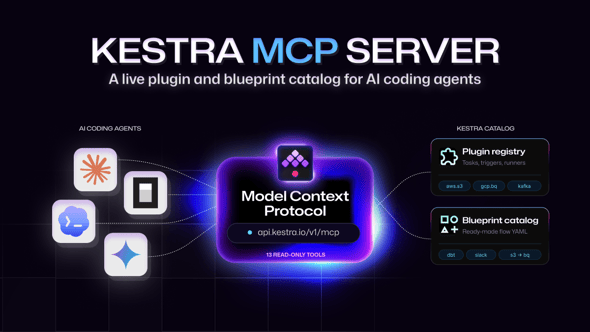
The Kestra MCP server eliminates that friction. It is a remote HTTP server at https://api.kestra.io/v1/mcp that speaks the Model Context Protocol, exposing the full Kestra plugin registry and Blueprint catalog as callable tools. Connect it to your AI coding agent once; from that point, the agent can discover plugins, inspect task schemas, and fetch Blueprint YAML without ever leaving the conversation.
The Model Context Protocol is an open standard for connecting AI agents to external tools over a well-defined interface. An MCP server declares a set of tools; a compatible client (your AI agent) invokes them by name and receives structured results. Because MCP is transport-agnostic, the Kestra server uses HTTP with Server-Sent Events — no local process to install or manage, just a URL.
Add the Kestra MCP server to Claude Code with a single command:
# Project-scoped (stores in .claude/settings.json in current repo)claude mcp add --transport http kestra https://api.kestra.io/v1/mcp
# User-scoped (global, available in every project)claude mcp add --transport http --scope user kestra https://api.kestra.io/v1/mcp
Or add it manually to .claude/settings.json:
{ "mcpServers": { "kestra": { "type": "http", "url": "https://api.kestra.io/v1/mcp" } }}Once connected, the 9 tools are immediately available in every Claude Code session. You can verify with /mcp, or simply start a flow-writing task — Claude will invoke the relevant tools automatically.
All 9 tools carry readOnlyHint: true. The server is a pure catalog; it never modifies state.
| Tool | What it returns |
|---|---|
list_plugins | All loaded plugins with name, categories, and counts per element type (tasks, triggers, task runners, storages, secret managers, log exporters). Optional category filter: AI, BUSINESS, CLOUD, CORE, DATA, INFRASTRUCTURE. Optional detail filter: full (default) or concise to omit descriptions. |
plugin_tasks | All tasks, triggers, conditions, and task runners for one plugin, grouped by subpackage. Accepts a plugin name (plugin-aws) or group (io.kestra.plugin.aws). |
list_installed_versions | Installed version of every plugin. Optional name filter. |
list_plugin_elements | All elements of one type across all plugins (FQCN + owning plugin), via an elementType parameter: TASK_RUNNER (task runner backends — Docker, Kubernetes, GCP Batch, AWS Batch, …), TRIGGER (trigger types — Schedule, Webhook, Kafka, JDBC, …), STORAGE (internal storage backends — GCS, S3, Azure Blob Storage, MinIO, …), SECRET_MANAGER (secret manager integrations — HashiCorp Vault, AWS Secrets Manager, GCP Secret Manager, Azure Key Vault, 1Password, CyberArk, Doppler, …), LOG_EXPORTER (log shipper backends), plus APP, APP_BLOCK, CHART, DATA_FILTER, DATA_FILTER_KPI, and ADDITIONAL_PLUGIN. Optional detail filter: full (default) or concise. |
| Tool | What it returns |
|---|---|
task_schema | Full JSON schema and documentation for a task class, including all properties and outputs. Accepts the fully-qualified class name (e.g. io.kestra.plugin.aws.s3.Upload) and an optional properties parameter: declared (default) or all to include inherited properties. |
| Tool | What it returns |
|---|---|
search_blueprints | Search flow templates by text query and/or tags. Optional types parameter filters by included task FQCN (combine with list_plugin_elements to get valid values). Returns id, title, description, tags, included task list, and ee flag (Enterprise Edition only). |
get_blueprint_flow | Full YAML source for a Blueprint by id. Ready to paste into a flow. |
| Tool | What it returns |
|---|---|
plugin_release_history | Full GitHub release history for a plugin, including the Kestra version each release targets. |
| Tool | What it returns |
|---|---|
search | Full-text search across plugins, docs, blueprints, or blogs. Optional type filter: PLUGINS (default), DOCS, BLUEPRINTS, BLOGS. |
Ask Claude Code to write a flow that reads from S3 and loads into BigQuery. Instead of guessing task names or hallucinating property shapes, the agent calls list_plugins to discover plugin-aws and plugin-gcp, then plugin_tasks for each to enumerate available tasks, then task_schema on io.kestra.plugin.aws.s3.Downloads and io.kestra.plugin.gcp.bigquery.Load to get exact property names, types, and defaults. The resulting YAML is valid on the first attempt.
“Does Kestra support Vault for secrets?” — the agent calls list_plugin_elements(elementType: "SECRET_MANAGER") and returns the full list including the FQCN and description for the HashiCorp Vault implementation. The same pattern works for TASK_RUNNER (“can I run tasks on GCP Batch?”), STORAGE (“does Kestra support MinIO?”), and TRIGGER (“is there a Kafka realtime trigger?”). No guessing, no docs tab, no stale answers.
Before writing a flow from scratch, the agent calls search_blueprints with a query like "dbt" or "slack notification", scans the matches, and calls get_blueprint_flow on the best result to retrieve the full YAML. This is faster than authoring from scratch and guarantees the output follows Kestra’s own patterns and best practices.
When a flow breaks after a plugin upgrade, the agent calls plugin_release_history to retrieve the full release history with the target Kestra version for each tag. This surfaces the exact release where a change was introduced without leaving the conversation or opening GitHub.
The same endpoint works with any MCP-compatible tool:
Codex CLI — ~/.codex/config.toml:
[[mcp_servers]]name = "kestra"url = "https://api.kestra.io/v1/mcp"Gemini CLI — ~/.gemini/settings.json:
{ "mcpServers": { "kestra": { "httpUrl": "https://api.kestra.io/v1/mcp" } }}OpenCode — ~/.config/opencode/config.json:
{ "mcp": { "kestra": { "type": "remote", "url": "https://api.kestra.io/v1/mcp" } }}Most MCP servers are local processes: install them, keep them updated, configure them per machine. A remote HTTP MCP server requires none of that. There is nothing to install, nothing to update locally, and no background process consuming memory. The catalog stays current because it mirrors the live plugin registry and Blueprint index that powers kestra.io/plugins — updated on every Kestra release.
A remote HTTP endpoint at https://api.kestra.io/v1/mcp that implements the Model Context Protocol. It gives AI coding agents live access to Kestra’s plugin registry and Blueprint catalog through 9 read-only tools — with no installation required.
Run claude mcp add --transport http kestra https://api.kestra.io/v1/mcp for project scope, or add --scope user for global availability. You can also add the mcpServers entry directly to .claude/settings.json.
9 tools covering plugin discovery (list_plugins, plugin_tasks, list_installed_versions), element-type listing (list_plugin_elements, parameterized by elementType), task documentation (task_schema), Blueprint search and retrieval (search_blueprints, get_blueprint_flow), release history (plugin_release_history), and full-text search (search). The search_blueprints tool accepts a types parameter (comma-separated FQCNs) to filter templates by included task type — combine it with list_plugin_elements to get valid values.
No. The endpoint is public and requires no API key or login. All tools are read-only.
Yes. Codex CLI, Gemini CLI, OpenCode, or any framework that supports MCP over HTTP. Configuration snippets for each are in the post above.

Stay up to date with the latest features and changes to Kestra