Authors

Benoit Pimpaud

Benoit Pimpaud
Airflow 2 recently reached end of life. For most teams, the easiest path is to upgrade to Airflow 3 and move on. I think that’s a mistake worth pausing on. The Airflow 3 open issue tracker hints at a non-trivial migration even within the ecosystem, and the end of a major version is one of the few moments where the switching cost is low enough to seriously evaluate alternatives. If you’re still weighing that decision, the Airflow 2 end-of-life guide covers the upgrade-or-rethink question in depth.
The reason most teams won’t evaluate is the same reason I failed to migrate a data team to dbt a few years ago. I had a working prototype, benchmarks, and a migration plan. What I didn’t have was a working example in front of the people who needed to say yes, before they’d already mentally committed to the status quo. Airflow migrations replay this pattern: the translation work kills most evaluations before they start. Most teams look at years of accumulated DAGs and decide the upgrade is easier. They never get to the working demo stage.
LLMs have started to change that calculus. I built migration-skills so the conversion part takes minutes instead of weeks. Convert a DAG, run it in Kestra, and you have something to show the right people the same day you decide to look.
Kestra takes a different approach: declarative YAML flows, file-based data passing with no size limits, and a 1200+ plugin ecosystem that covers most integrations out of the box. The IDE-like UI, with a live topology view and built-in code editor, makes the day-to-day workflow significantly smoother.
I’ll walk through a real migration (a DummyJSON products analytics pipeline) using AI coding agents and Kestra’s dedicated agent skills to show exactly what the process looks like.
Before touching any code, it helps to internalize the key conceptual shifts:
| Aspect | Airflow | Kestra |
|---|---|---|
| Definition format | Python code (DAG files) | Declarative YAML |
| State passing | XCom (serialized to metadata DB, size-limited) | Files via internal storage, no size limits |
| Parallelism | Implicit; independent tasks run in parallel | Explicit; wrap concurrent tasks in io.kestra.plugin.core.flow.Parallel |
| Scheduling | schedule parameter on the DAG object | Separate Schedule trigger with a cron expression |
| Dependencies | pip packages installed on workers | Java plugins loaded at startup, or per-task dependencies |
| Namespace files | No equivalent | First-class script/config storage, scoped per namespace |
The biggest shift is data passing. In Airflow, tasks return Python objects via XCom, which get serialized to the metadata database. In Kestra, tasks write files to disk, declare them in outputFiles, and Kestra uploads them to internal storage. Downstream tasks reference them via inputFiles using Pebble expressions like {{ outputs.my_task.outputFiles['data.json'] }}. No size limits, no serialization overhead.
The migration uses three tools working together:
kestra-flow agent skill, which gives Claude Code live knowledge of Kestra’s flow schema so it never generates invalid YAMLkestra-ops agent skill, which gives Claude Code the ability to operate kestractl for deployment, validation, and namespace file managementInstall both skills by following the instructions at kestra.io/docs/ai-tools/agent-skills. Once installed, Claude Code automatically invokes the right skill based on what you ask.
You also need kestractl installed and pointed at a running Kestra instance:
kestractl config add local http://localhost:8080 ""kestractl config use local
# Verify connectivitykestractl flows list --namespace company.analytics
The source DAG, dummyjson_products_pipeline.py, fetches product data from dummyjson.com, runs pandas analytics, and produces JSON output artifacts. It has two stages of parallelism:
fetch_all_products ──┬──> compute_category_stats ──────┐ ├──> compute_brand_stats ──────────┤ ├──> compute_price_tiers ──────────┼──> build_executive_summary └──> compute_category_review_sentiment ──┘fetch_categories ────┘ (also feeds review_sentiment)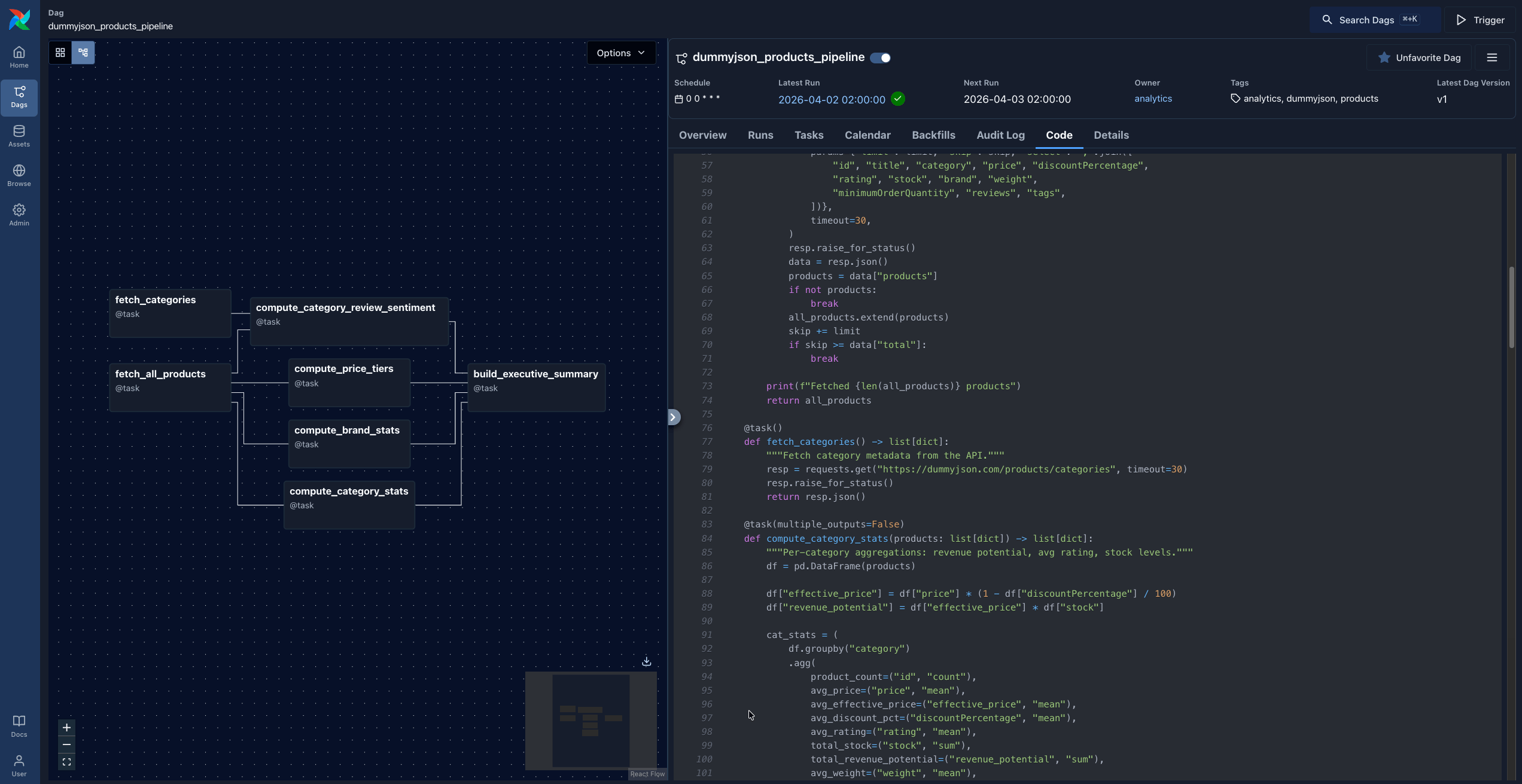
The DAG uses the @task decorator pattern, with all business logic embedded directly in the DAG file:
default_args = {    "owner": "analytics",    "retries": 2,}
with DAG(    dag_id="dummyjson_products_pipeline",    schedule="@daily",    catchup=False,    default_args=default_args,):    @task()    def fetch_all_products() -> list[dict]:        """Paginate through all products from the API."""        all_products = []        limit, skip = 30, 0        while True:            resp = requests.get(                "https://dummyjson.com/products",                params={"limit": limit, "skip": skip, "select": "id,title,category,price,..."},                timeout=30,            )            resp.raise_for_status()            data = resp.json()            products = data["products"]            if not products:                break            all_products.extend(products)            skip += limit            if skip >= data["total"]:                break        return all_products
    @task(multiple_outputs=False)    def compute_category_stats(products: list[dict]) -> list[dict]:        df = pd.DataFrame(products)        df["effective_price"] = df["price"] * (1 - df["discountPercentage"] / 100)        df["revenue_potential"] = df["effective_price"] * df["stock"]        cat_stats = df.groupby("category").agg(...).round(2)        return cat_stats.reset_index().to_dict(orient="records")
    # ... more tasks
products = fetch_all_products() categories = fetch_categories() cat_stats = compute_category_stats(products) brand_stats = compute_brand_stats(products) price_tiers = compute_price_tiers(products) review_sentiment = compute_category_review_sentiment(products, categories) build_executive_summary(cat_stats, brand_stats, price_tiers, review_sentiment)Everything lives in one Python file. The task functions return Python objects that Airflow serializes via XCom.
If you don’t have a local Airflow instance already running, just ask Claude Code:
Install Airflow and run it on port 28080Claude will create a virtual environment, install Airflow, initialize the database, and run airflow standalone. You’ll have a working Airflow UI at http://localhost:28080 in a few minutes.
Open Claude Code in your project directory and give it a specific migration prompt:
Using the kestra-flow skill, migrate my Airflow DAG atdags/dummyjson_products_pipeline.py to Kestra.
Requirements:- Namespace: company.analytics- Use Python Commands tasks with python:3.11 container image- Extract each @task function into a standalone namespace file under scripts/- Preserve both stages of parallelism: fetch stage and analytics stage- Use retries: 2 from the DAG's default_args- Output results to the kestra-migrate/ directory
What happens under the hood:
kestra-flow skill, which fetches the live Kestra plugin schema from https://api.kestra.io/v1/plugins/schemas/flow@task function is extracted into its own Python script. XCom returns become file writes, XCom inputs become file reads.The output:
kestra-migrate/├── flow.yaml└── scripts/ ├── fetch_all_products.py ├── fetch_categories.py ├── compute_category_stats.py ├── compute_brand_stats.py ├── compute_price_tiers.py ├── compute_category_review_sentiment.py └── build_executive_summary.pyThe key transformation is how XCom data passing becomes file I/O. In Airflow, fetch_all_products returns a Python list that Airflow serializes to the metadata database. In the extracted namespace file, it writes a JSON file to disk instead:
@task()def fetch_all_products() -> list[dict]: all_products = [] # ... pagination logic ... return all_products # serialized via XComimport json, requests
all_products = []limit, skip = 30, 0while True: resp = requests.get("https://dummyjson.com/products", params={...}, timeout=30) resp.raise_for_status() data = resp.json() products = data["products"] if not products: break all_products.extend(products) skip += limit if skip >= data["total"]: break
print(f"Fetched {len(all_products)} products")json.dump(all_products, open("products.json", "w"), indent=2) # written to diskSimilarly, compute_category_stats, which in Airflow received products via XCom, now reads products.json from disk:
import json, pandas as pd
products = json.load(open("products.json"))  # reads from inputFilesdf = pd.DataFrame(products)df["effective_price"] = df["price"] * (1 - df["discountPercentage"] / 100)df["revenue_potential"] = df["effective_price"] * df["stock"]cat_stats = df.groupby("category").agg(...).round(2)json.dump(result, open("category_stats.json", "w"), indent=2, default=str)  # written to disk
The Kestra flow connects these files explicitly through outputFiles and inputFiles:
id: dummyjson_products_pipelinenamespace: company.analyticsdescription: "Fetch products from DummyJSON, transform with pandas, produce analytics"
labels:  analytics: "true"  products: "true"  dummyjson: "true"
tasks:  # Stage 1 — parallel fetch  - id: fetch_data    type: io.kestra.plugin.core.flow.Parallel    tasks:      - id: fetch_all_products        type: io.kestra.plugin.scripts.python.Commands        containerImage: python:3.11        namespaceFiles:          enabled: true          include:            - scripts/fetch_all_products.py        dependencies:          - requests        commands:          - python scripts/fetch_all_products.py        outputFiles:          - products.json
      - id: fetch_categories        type: io.kestra.plugin.scripts.python.Commands        containerImage: python:3.11        namespaceFiles:          enabled: true          include:            - scripts/fetch_categories.py        dependencies:          - requests        commands:          - python scripts/fetch_categories.py        outputFiles:          - categories.json
  # Stage 2 — parallel analytics (fan out from Stage 1 outputs)  - id: compute_analytics    type: io.kestra.plugin.core.flow.Parallel    tasks:      - id: compute_category_stats        type: io.kestra.plugin.scripts.python.Commands        containerImage: python:3.11        namespaceFiles:          enabled: true          include:            - scripts/compute_category_stats.py        inputFiles:          products.json: "{{ outputs.fetch_all_products.outputFiles['products.json'] }}"        dependencies:          - pandas        commands:          - python scripts/compute_category_stats.py        outputFiles:          - category_stats.json
      - id: compute_brand_stats        type: io.kestra.plugin.scripts.python.Commands        containerImage: python:3.11        namespaceFiles:          enabled: true          include:            - scripts/compute_brand_stats.py        inputFiles:          products.json: "{{ outputs.fetch_all_products.outputFiles['products.json'] }}"        dependencies:          - pandas        commands:          - python scripts/compute_brand_stats.py        outputFiles:          - brand_stats.json
      - id: compute_price_tiers        type: io.kestra.plugin.scripts.python.Commands        containerImage: python:3.11        namespaceFiles:          enabled: true          include:            - scripts/compute_price_tiers.py        inputFiles:          products.json: "{{ outputs.fetch_all_products.outputFiles['products.json'] }}"        dependencies:          - pandas        commands:          - python scripts/compute_price_tiers.py        outputFiles:          - price_tiers.json
      - id: compute_category_review_sentiment        type: io.kestra.plugin.scripts.python.Commands        containerImage: python:3.11        namespaceFiles:          enabled: true          include:            - scripts/compute_category_review_sentiment.py        inputFiles:          products.json: "{{ outputs.fetch_all_products.outputFiles['products.json'] }}"          categories.json: "{{ outputs.fetch_categories.outputFiles['categories.json'] }}"        dependencies:          - pandas        commands:          - python scripts/compute_category_review_sentiment.py        outputFiles:          - category_review_sentiment.json
  # Stage 3 — fan-in: combine all analytics into executive summary  - id: build_executive_summary    type: io.kestra.plugin.scripts.python.Commands    containerImage: python:3.11    namespaceFiles:      enabled: true      include:        - scripts/build_executive_summary.py    inputFiles:      category_stats.json: "{{ outputs.compute_category_stats.outputFiles['category_stats.json'] }}"      brand_stats.json: "{{ outputs.compute_brand_stats.outputFiles['brand_stats.json'] }}"      price_tiers.json: "{{ outputs.compute_price_tiers.outputFiles['price_tiers.json'] }}"      category_review_sentiment.json: "{{ outputs.compute_category_review_sentiment.outputFiles['category_review_sentiment.json'] }}"    dependencies:      - pandas    commands:      - python scripts/build_executive_summary.py    outputFiles:      - executive_summary.json
triggers:  - id: daily    type: io.kestra.plugin.core.trigger.Schedule    cron: "@daily"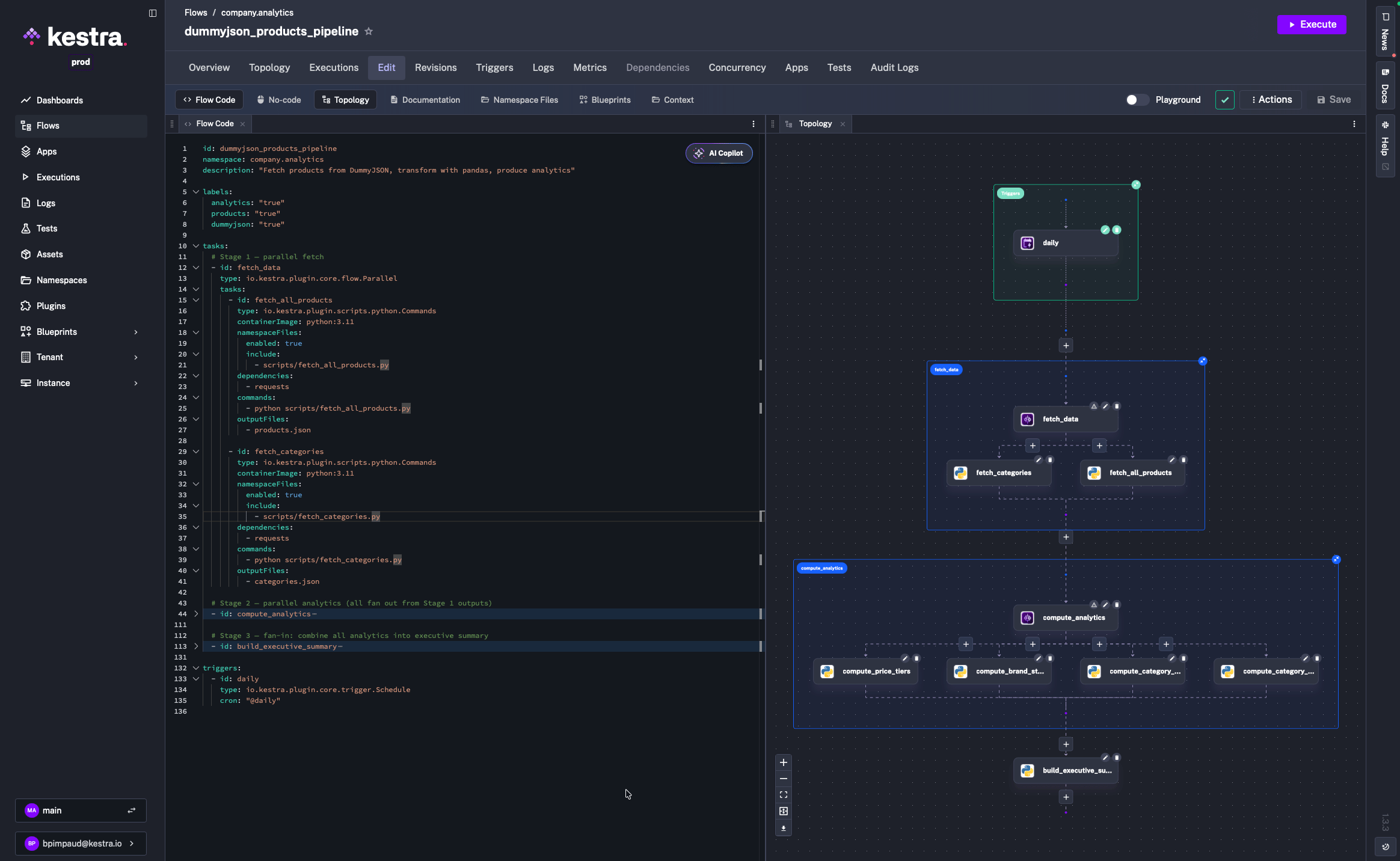
Notice how compute_category_review_sentiment receives both products.json from fetch_all_products and categories.json from fetch_categories. The same multi-input dependency that the Airflow DAG expressed via function parameters is now explicit in inputFiles.
Namespace files let your flows reference scripts stored in Kestra’s file storage, separate from the flow YAML itself. Upload the extracted scripts:
for f in kestra-migrate/scripts/*.py; do  name=$(basename "$f")  kestractl nsfiles upload company.analytics "$f" "scripts/$name" \    --allow-missing-namespace --overridedone
# Verifykestractl nsfiles list company.analytics --path scripts/ --recursive
Or ask Claude to handle this for you. It will use the kestra-ops skill and run the right kestractl commands.
Always validate before deploying:
kestractl flows validate kestra-migrate/flow.yamlExpected output:
FILE STATUS CONSTRAINTS WARNINGSkestra-migrate/flow.yaml OK - -If validation fails, paste the error back to Claude:
The flow validation failed with this error: <paste error>. Fix the flow YAML.The kestra-flow skill will re-fetch the schema and correct the YAML. Then deploy:
# First timekestractl flows create kestra-migrate/flow.yaml
# Update existing flowkestractl flows create kestra-migrate/flow.yaml --override
Open the Kestra UI to confirm the topology view shows three stages (fetch, analytics fan-out, and executive summary), then trigger a test execution.
Converting Python DAGs to YAML flows is exactly the kind of task LLMs handle well: the source is structured code with predictable patterns, the target format is well-documented, and the mapping rules are consistent. What breaks that is schema drift. An AI agent guessing task type names and property names produces YAML that fails validation.
The kestra-flow skill solves this by grounding Claude Code in the actual, live Kestra schema. Every generated property is validated against the plugin registry before it’s written.
The kestra-ops skill handles the operational side. Claude doesn’t need to memorize kestractl flags. It fetches the right commands, runs them, and reports back.
For teams with large DAG catalogs, this approach scales. You can migrate DAGs one at a time, running both Airflow and Kestra in parallel until you’re confident in the new flows.
dag = DAG("my_dag", schedule="@daily", ...)triggers: - id: daily type: io.kestra.plugin.core.trigger.Schedule cron: "@daily"Kestra supports multiple triggers per flow. Combine a schedule with a webhook to make the same flow runnable both on a schedule and via API call.
default_args = {"retries": 2, "retry_delay": timedelta(seconds=30)}- id: my_task type: io.kestra.plugin.scripts.python.Commands retry: type: constant maxAttempts: 2 interval: PT30S@task.branchdef choose_branch(**kwargs): return "task_a" if condition else "task_b"- id: choose_branch type: io.kestra.plugin.core.flow.If condition: "{{ outputs.previous_task.vars.condition == 'true' }}" then: - id: task_a type: ... else: - id: task_b type: ...These are the patterns that come up most when working through a larger DAG catalog.
| Airflow Concept | Kestra Equivalent |
|---|---|
| DAG | Flow |
| Task | Task (YAML object in tasks list) |
| Operator | Plugin task type |
| XCom | outputFiles / inputFiles with internal storage |
| Connections | {{ secret('KEY') }} or task-level credential properties |
| Variables | Flow inputs or KV store |
| Sensors | Schedule, Webhook, Flow triggers or polling tasks |
| TaskGroups | io.kestra.plugin.core.flow.Parallel or Sequential grouping |
| SubDAGs | io.kestra.plugin.core.flow.Subflow |
default_args | Per-task retry, timeout |
| Tags | Labels (labels: { env: "prod" }) |
trigger_rule | allowFailure: true on tasks |
Spin up a local Kestra instance with Docker:
docker run --pull=always --rm -it -p 8080:8080 --user=root \ -v /var/run/docker.sock:/var/run/docker.sock \ -v /tmp:/tmp kestra/kestra:latest server localThen:
kestractl: kestra.io/docs/kestra-cli/kestractlIf you prefer a standalone migration tool, the kestra-io/agent-skills repository on GitHub provides a dedicated /migrate-airflow-kestra skill you can install directly into Claude Code. It handles the full migration workflow (DAG parsing, namespace file extraction, flow validation, and deployment) as a single command.
A working example moves things faster than any migration plan. One DAG, converted, running in Kestra, in front of the people who need to say yes. That’s how evaluations actually start.

Stay up to date with the latest features and changes to Kestra