Authors

Anna Geller
Product Lead
Anna Geller
Product Lead
Building data pipelines often comes down to getting the right compute power when you need it. With serverless options like Modal and BigQuery, you can focus on your workflows without having to think about infrastructure. In this post, we’ll walk through a real-world example of a serverless data pipeline where we use Kestra for orchestration, Modal for on-demand compute, dbt for data transformations, and BigQuery for data storage and querying. Based on this example, we’ll explore why Kestra is a great choice for orchestrating serverless data pipelines and how it can help you build interactive workflows that dynamically adapt compute to your needs.
You can find the entire code for this project in the kestra-io/serverless repository.
Here is a conceptual overview of the project:
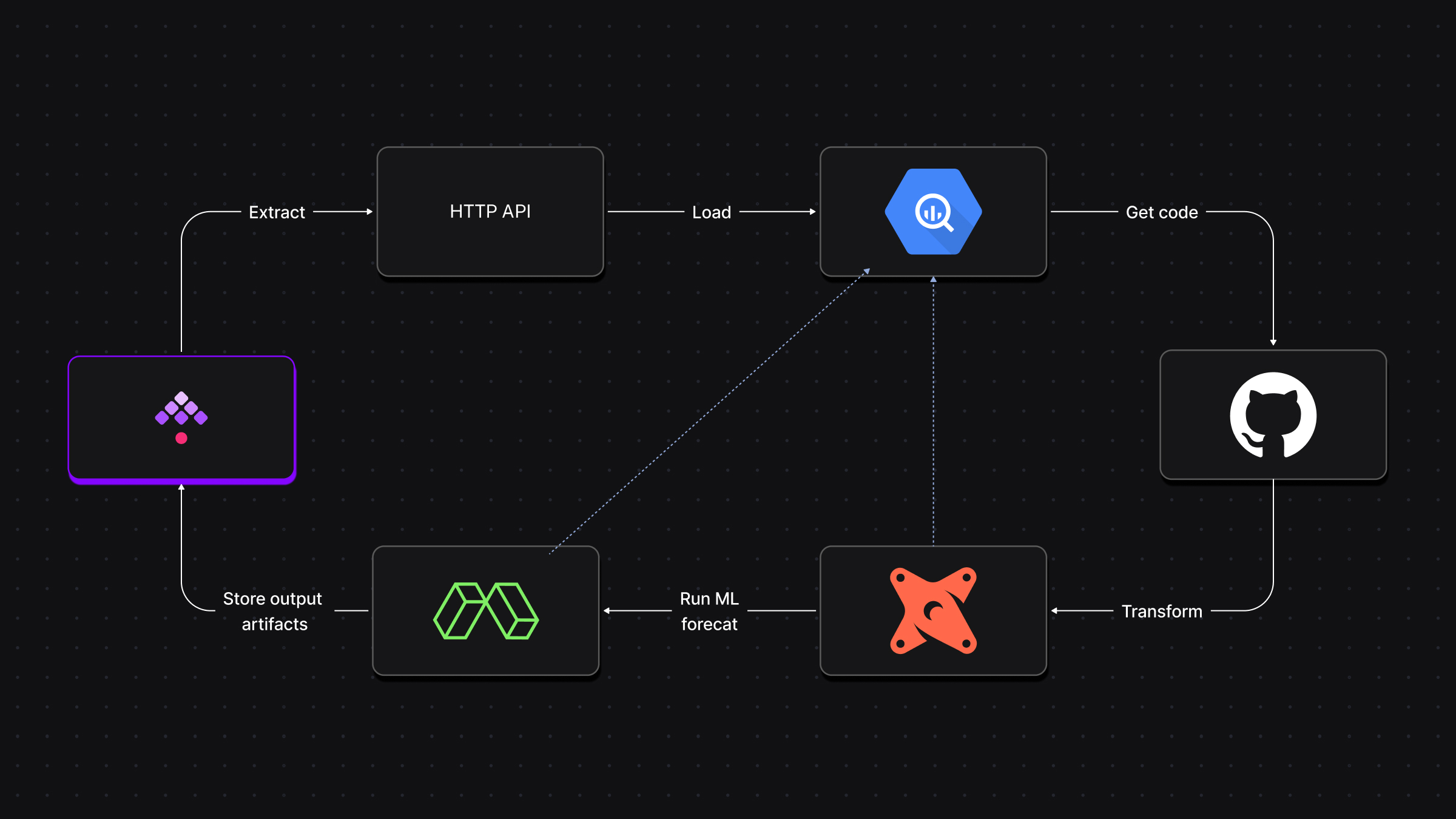
In this project, we’ll simulate an e-commerce company that wants to forecast sales for the upcoming holiday season. The company has historical data about customers, orders, products, and supplies stored in their internal database. We’ll extract that data, load it to BigQuery, and transform it using dbt. Then, we’ll run a time-series forecasting model on Modal to predict the order volume for the next 180 days.
Here’s a more detailed breakdown of the workflow:
Data ingestion with Kestra: the workflow starts by ingesting raw data from an HTTP REST API into BigQuery. The dataset includes customers, orders, order items, product details, stores, and supplies. Each dataset is fetched and stored as a .parquet file and loaded into its own BigQuery table.
Transformation with dbt: once the data is loaded into BigQuery, we use dbt to transform it. For example, we use dbt to join datasets, create aggregate tables, and apply business logic to make the data ready for analysis. A critical part of this process is generating a manifest.json file, which dbt uses to track the state of the models. Kestra stores this manifest in a KV Store, so the next time the workflow runs, we don’t need to re-run unchanged models.
Forecasting on Modal: after the transformation, we trigger a forecasting model using Modal. This is where serverless compute comes into play — Modal dynamically provisions the necessary resources (with requested CPU, memory, etc.) based on user inputs. If you need more CPU for a large dataset, you simply select it in the dropdown menu in the UI when running the workflow, and Kestra will pass that information to Modal. The forecasted data is stored in BigQuery, and the final interactive HTML report is stored in a Google Cloud Storage (GCS) bucket.
Logs and artifacts: throughout, Kestra manages all code dependencies, state, and outputs. It captures logs, metrics, and artifacts like the dbt manifest and the HTML report from Modal. This way, you can monitor progress, troubleshoot issues, and even reuse artifacts in future runs.
You can see the entire workflow in action in the video below:
The dbt models used in this project are structured into three main layers: staging, marts, and aggregations:
Each layer handles a different stage of data transformation.
This modular structure helps ensure that the data transformations are well-organized, maintainable and scalable.
Now that we covered what the project does and how it’s structured, let’s highlight the benefits of using Kestra for orchestrating serverless data pipelines such as this one.
Serverless is often associated with a tangled mess of functions and services that are hard to manage and debug. But it doesn’t have to be that way. With Kestra, you can create structured, modular workflows that are easy to understand, maintain, and scale.
Using labels, subflows, flow triggers, tenants and namespaces you can bring order, structure and governance to serverless workflows.
One of the standout features of Kestra is the ability to create interactive workflows with conditional inputs that depend on each other. In our example, the workflow dynamically adapts to user inputs to determine whether to run a task, adjust compute resource requests, or customize the forecast output. Here’s why this flexibility is valuable:
Schedule trigger definition as shown below. Conditional inputs, like the cpu and memory options shown only when you choose to run the Modal task, make the workflow less error-prone as users can’t accidentally enter the wrong values or run the flow with invalid parameters. The strongly typed inputs introduce governance and guardrails to ensure that only valid inputs are accepted.triggers: - id: daily type: io.kestra.plugin.core.trigger.Schedule cron: "0 9 * * *" inputs: run_ingestion: false run_modal: true cpu: 0.25 memory: 256 customize_forecast: true nr_days_fcst: 90 color_history: blue color_prediction: orangeSkip Unnecessary Tasks: some tasks don’t always need to run. For example, if the ingestion process hasn’t changed, you can skip it by setting the run_ingestion input to false. Kestra’s conditional logic ensures tasks are executed only when necessary, saving time and compute resources.
Dynamic Resource Allocation: Kestra’s interactive workflows make it easy to fine-tune input parameters on the fly, depending on the size of your dataset or the complexity of your model. The dbt project already runs on serverless compute with BigQuery, but you can additionally scale the dbt model parsing process to run on serverless compute such as AWS ECS Fargate, Google Cloud Run, or Azure Batch using Kestra’s Task Runners.
Another benefit of using Kestra in this architecture is its ability to store and manage state, which is especially needed for serverless data pipelines that are typically stateless by design. Kestra keeps track of the workflow state, so you can easily rerun any part of the pipeline if any task fails, e.g. using one of our most popular 🔥 Replay feature allowing you to rerun a flow from any chosen task.
For example, Kestra can store artifacts such as dbt’s manifest.json in the KV store. This file contains information about materialized tables, so we can avoid rerunning dbt models that haven’t changed since the last run. This is a notable time-saver, especially when working with large datasets or complex transformations.
Additionally, Kestra captures logs, metrics and outputs at each stage of the workflow. This provides visibility into what happened during serverless workflow execution. If something goes wrong, Kestra can automatically retry transient failures, and if retries don’t help, you can quickly track down the issue by reviewing the logs or inspecting the output artifacts and replaying the flow from a specific point. And when everything works as expected, these logs serve as a detailed record of what was processed, when, how long each step took, and what were the final outputs.
The power of this architecture lies in combining serverless infrastructure with a reliable, flexible orchestration platform. Each component brings specific strengths:
The best part about Kestra is that everything works out of the box. Thanks to the built-in plugins, you don’t have to fight with Python dependencies to install dbt or Modal — plugins are pre-installed and ready to use. The powerful UI lets you interactively adjust workflow inputs, skip steps if needed, and easily track all output artifacts without jumping through hoops. Adding Modal and BigQuery to the mix provides serverless compute on-demand and a scalable data warehouse to future-proof your data platform.
If you want to give this setup a try, you can find the entire code for this project in the kestra-io/serverless repository. Launch Kestra in Docker, add the flow from that GitHub repository, and run it. That’s all you need to get started with serverless, interactive workflows.
If you like the project, give us a GitHub star ⭐️ and join the community.
If you have any questions, reach out via Slack or open a GitHub issue.

Stay up to date with the latest features and changes to Kestra