Kestra 2.0 - Now Available

Orchestration Rebuilt
for the AI Era

Any workload. Any network. Zero boundary compromises.

Govern AI agents and deterministic workflows at scale with a rewritten engine that enforces a strict separation between your control plane and your data plane.

Introducing Kestra 2.0, the open-source declarative orchestration platform
2,000+
Plugins, installed at runtime
LTS
One year of fixes, no forced upgrade
Apache 2.0
Engine, UI, editor and plugins
Read the full release notes

Kestra Orchestrates Your AI Stack.
Not the Other Way Around.

Agents call flows. Flows govern agents. You keep control.

Any Flow Is Now a Tool

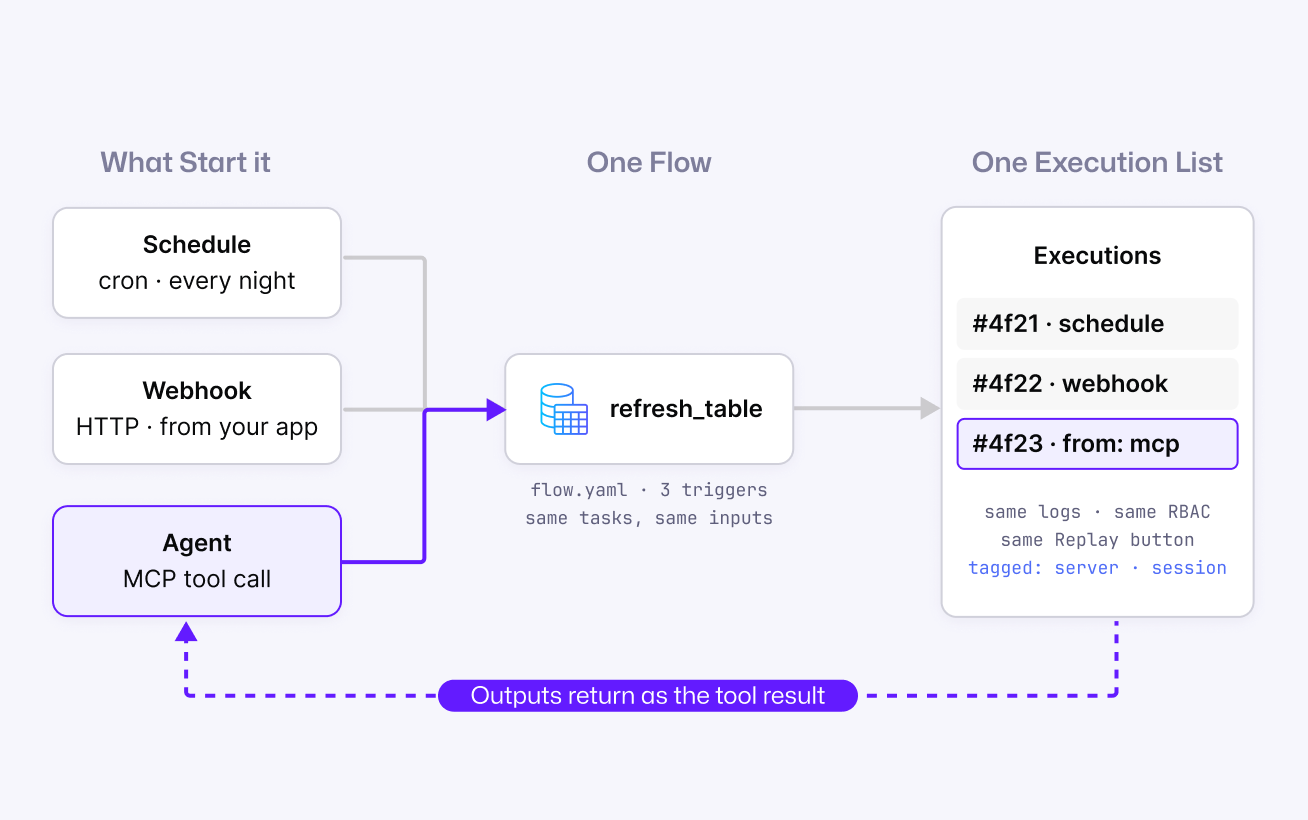
Add one trigger and any Kestra flow registers as a named tool on an MCP server. An agent sends a tool call, Kestra runs the flow with the matched inputs and returns the outputs. No custom API wrapper, no polling loop. Inputs map to the tool's JSON schema automatically, and every agent-initiated execution is tagged by origin and session, so you can audit exactly what your AI touched.

triggers:
  - id: mcp
    type: io.kestra.plugin.core.trigger.McpToolTrigger
    toolName: run-dbt-model
    toolDescription: Runs a dbt model in production. Use when a user
      asks to refresh a table.
See how any flow becomes an agent tool
A schedule, a webhook and an agent tool call all start the same flow and land in one execution list
T-Systems used to integrate its systems with custom code and no role-based governance. Those integrations now run as Kestra flows exposed over MCP: an agent can only call what its role allows, and every call is an execution the team can filter, monitor and audit.
T-Systems - Deutsche Telekom

Your Editor Is Now a Kestra Client

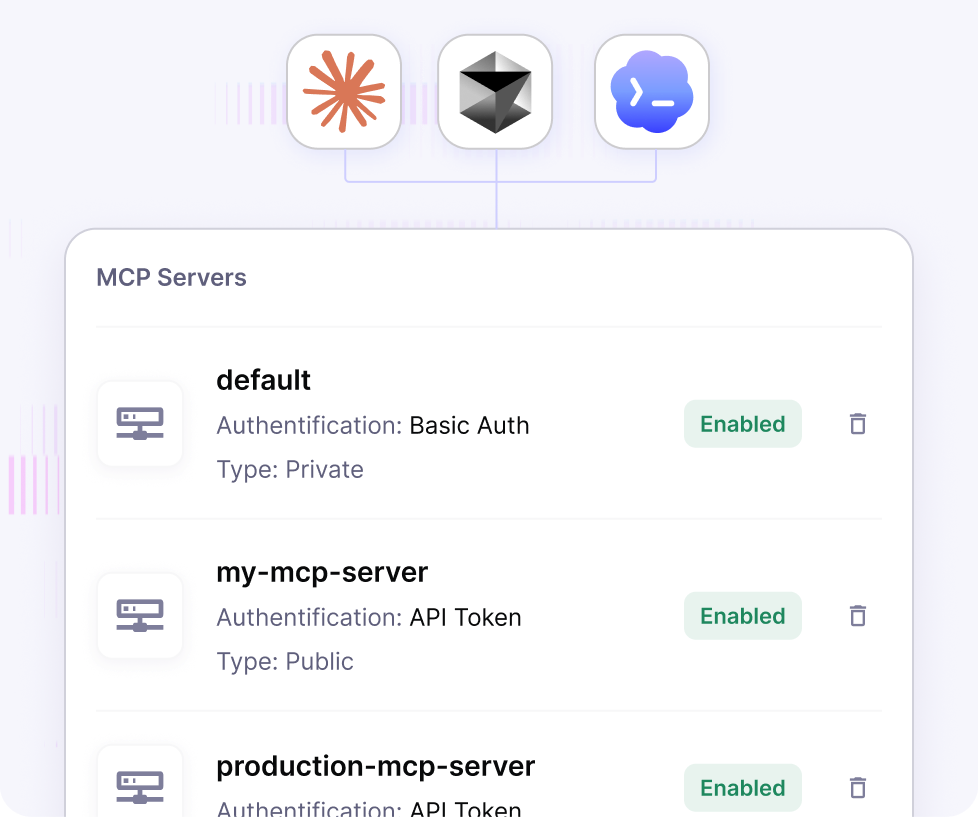
Connect Claude, Cursor, Codex or any MCP-compatible client to the Kestra MCP server without opening the UI. Each server ships ready-to-paste connection config, and a default server is provisioned per tenant on startup.

Claude, Cursor and Codex connected to a list of Kestra MCP servers

A Copilot That Remembers, Plans, and Asks Before Acting

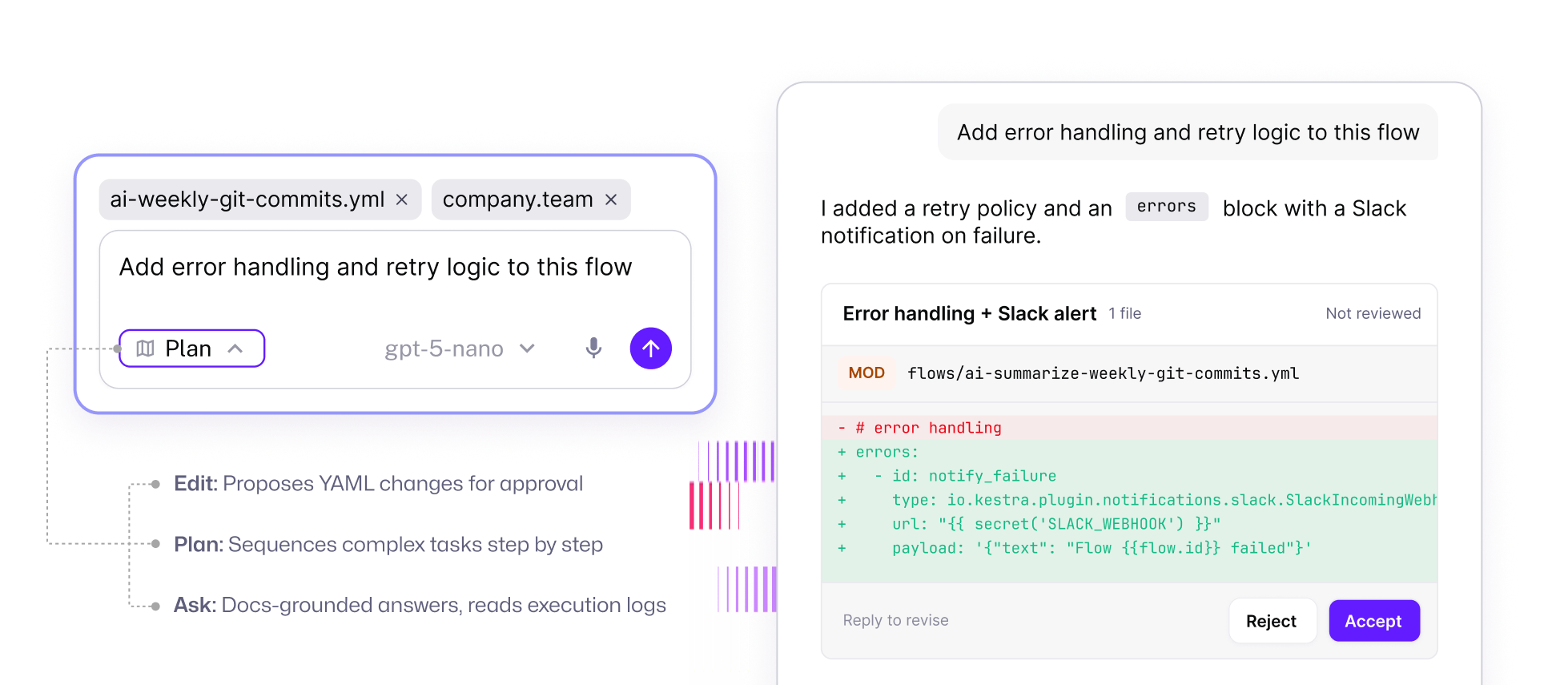
The new Copilot is a persistent sidebar with multi-turn memory and three modes: Edit proposes YAML changes for approval, Plan sequences complex tasks step by step, Ask answers grounded in official docs and can read execution logs to diagnose a failed run. It reads your Policies, Variables, Secrets, and KV store to ground suggestions in your real configuration. Nothing changes without an explicit confirmation gate.

The Copilot sidebar proposing an error-handling change to a flow, with Accept and Reject buttons

Put Agent Work Under Operational Control

AI Agent tasks can enforce input and output guardrails, stopping work that falls outside your rules. Prometheus metrics expose every tool, model provider, and embedding-store call, so teams can monitor how agents behave and what they cost. New MCP client tasks also let agents use approved external MCP servers as tools, extending their reach without giving up orchestration.

Run AI Agents under guardrails

Build Flows the Way You Think

No code, YAML, or natural language. Always in sync.

No Code Editor,
With Zero Compromise

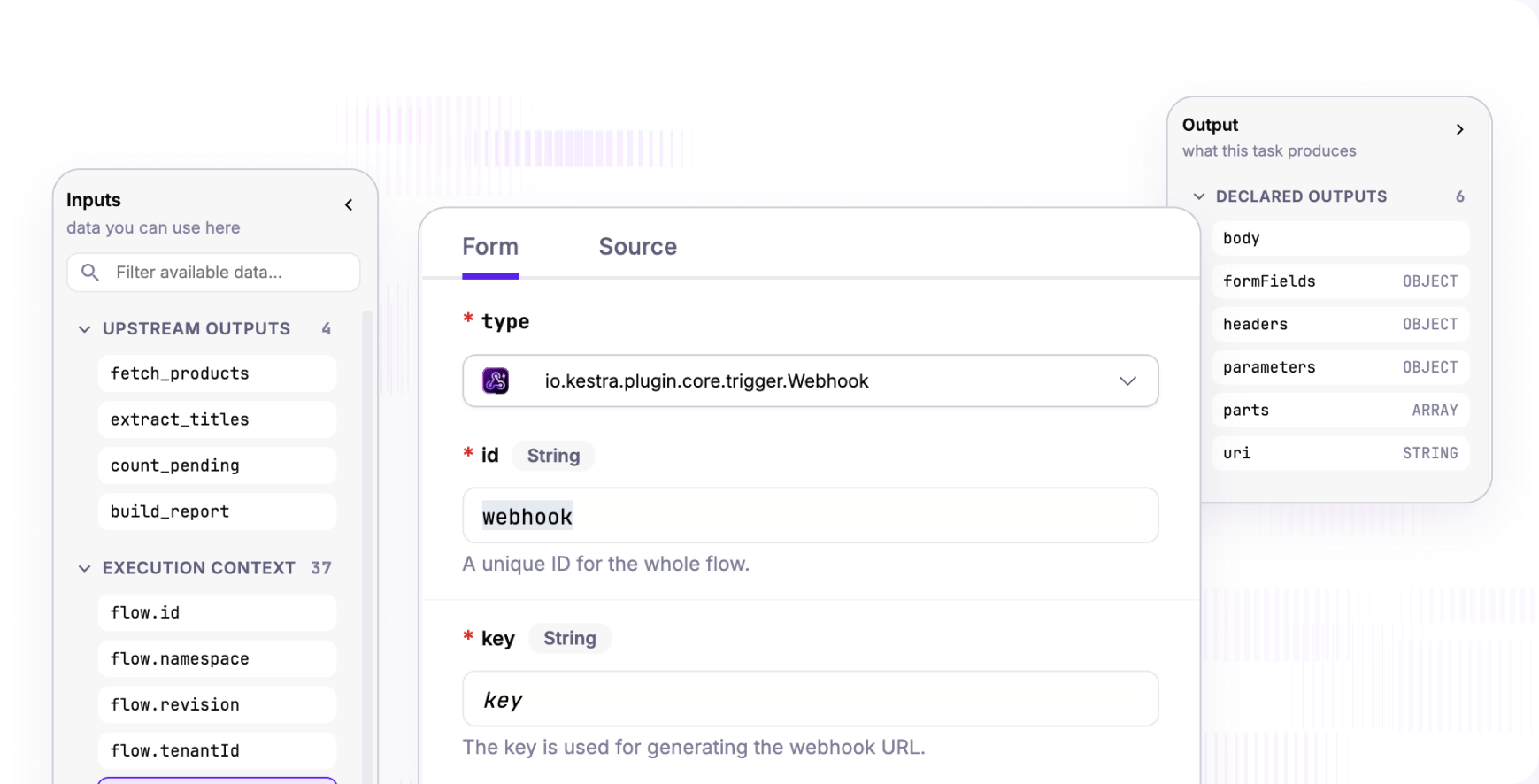
A visual editor sits alongside the YAML editor. Each flow section (Triggers, Tasks, Errors, Finally, After Execution) renders as blocks; click one to configure it through a guided form with inline docs, or drop into raw YAML for that block. Every upstream output and context variable is listed right there for Pebble references. No code, YAML, and Copilot stay in sync: start anywhere, switch freely.

Explore the No Code editor
The no-code editor: an inputs panel, a guided form for a webhook trigger and the declared outputs

Draft Without Fear

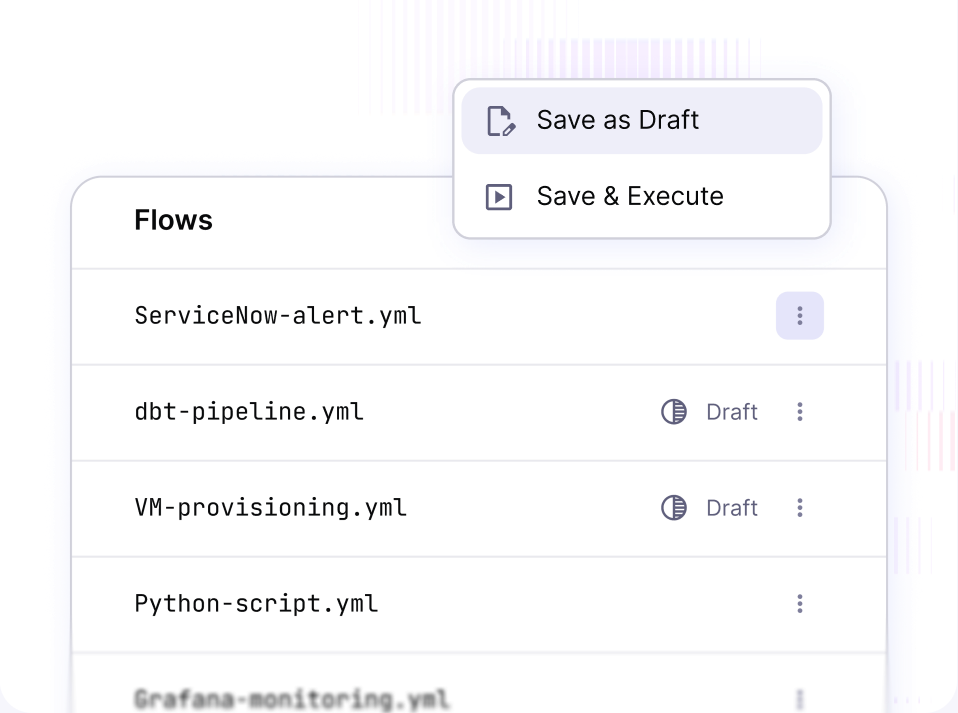
Prepare, review, and refine flow changes as drafts without touching production. A draft is never executed: both scheduled triggers and manual runs continue using the last published revision, so live operations stay protected while work is in progress. When the change is ready, the editor makes the next step clear: review it, then publish with confidence.

A flow list with draft revisions and a Save as Draft menu

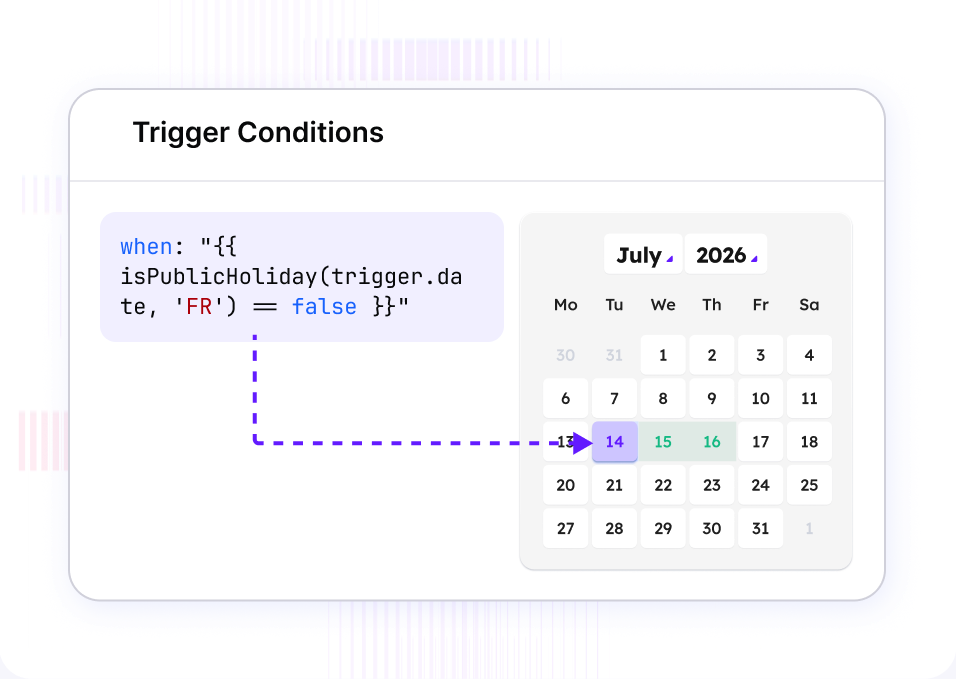
Trigger Conditions in One Line

Define trigger rules with a single when expression, using the familiar conditional syntax of modern CI/CD pipelines. Every trigger type supports it, turning multi-step configuration into one readable rule. Schedule around business calendars, public holidays, and working days, then coordinate dependent flows within a defined time window.

A trigger condition skipping public holidays next to a calendar

Loop: Iteration That Can't Take Down Your Instance

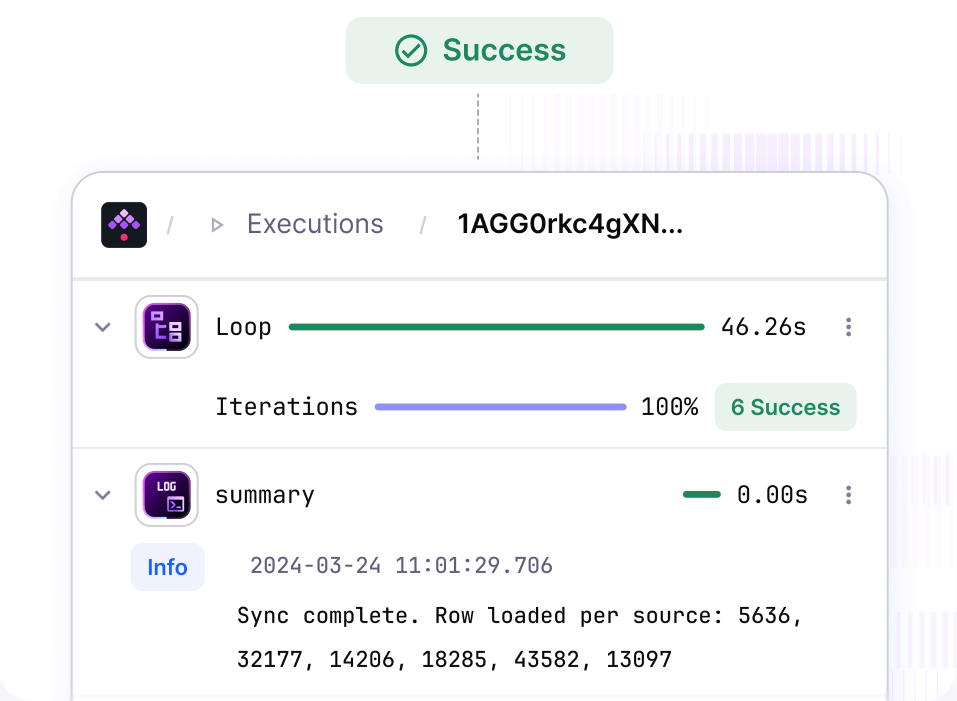
Loop replaces ForEach and ForEachItem. Each iteration runs as an isolated sub-execution, so a runaway loop over a huge list can no longer exhaust executor memory and impact every other flow on the instance. Define the output you need once, then gather that result across every iteration in a single step.

An execution with a Loop task showing six successful iterations
JPMorgan Chase's cybersecurity department brought the workflows of its security teams, from telemetry ingestion to control assessments, onto one Kestra platform instead of one orchestrator per team. Billions of rows and thousands of API pulls a week, and the analysts who need a workflow write it themselves. One place to ask what ran, and whether it finished.
JPMorgan Chase - Cybersecurity department

A Cleaner Interface, Built for Work

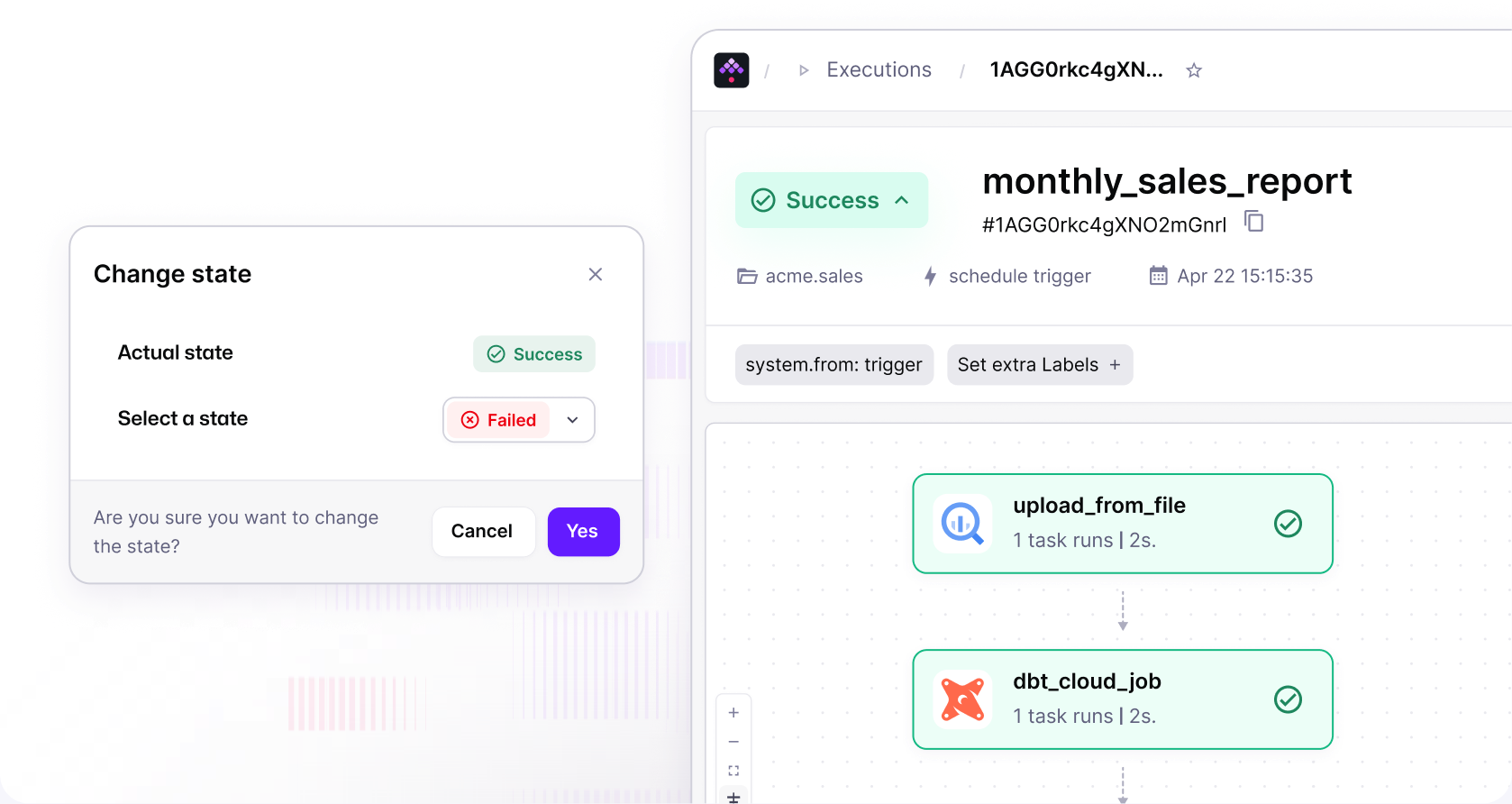
The new Kestra interface gives developers and platform teams a polished experience building workflows. Essential context stays within reach, with less visual noise between authoring, monitoring, and troubleshooting. Move from a flow change to a live execution with confidence, while keeping the information needed to make the next decision in view.

The execution view with a change-state dialog and the task list

Plugin Artifacts: See What Happens Inside

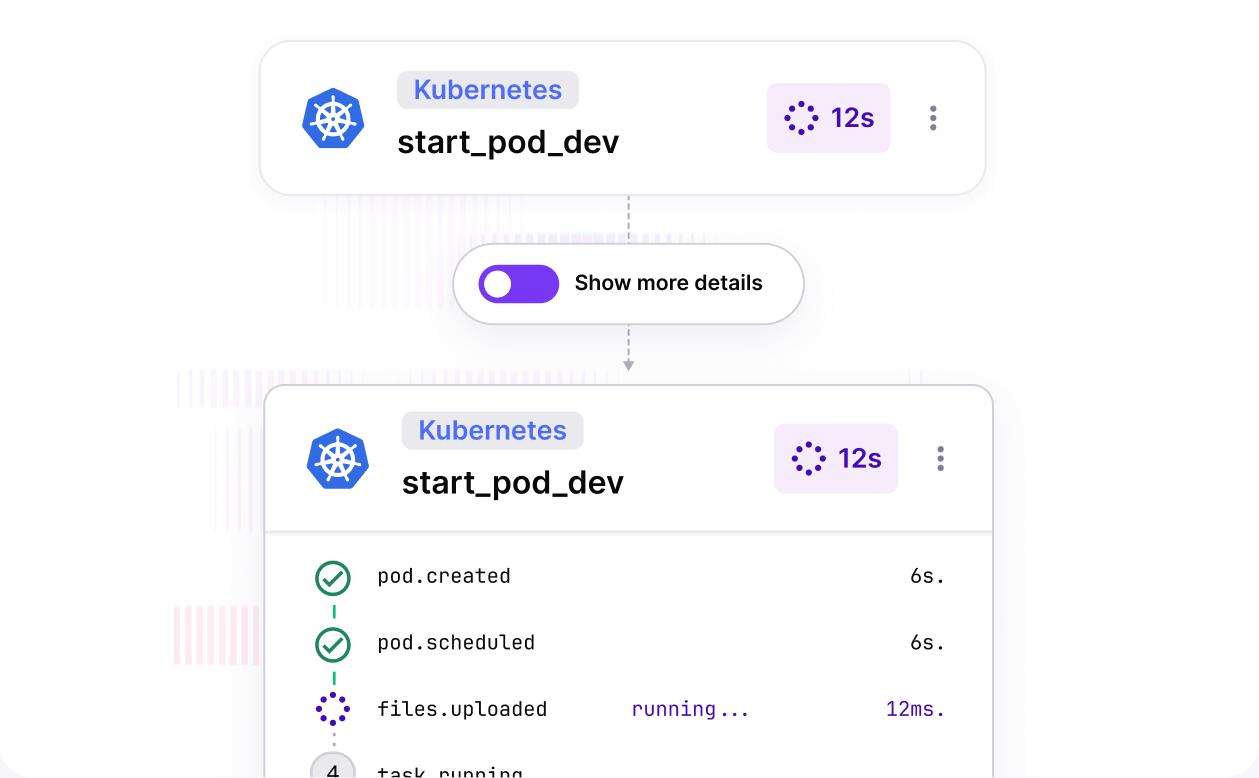
Plugin Artifacts bring the details behind an execution into the Kestra experience. Plugins can surface their own progress, metrics, and technology-specific stages directly in the execution view, task drawer, or detail panel. See where time is spent, identify the source of a slowdown, and understand the work happening beyond the orchestration layer, without digging through raw logs.

A Kubernetes task run showing its own stages and timings

Inputs That Scale With Your Teams

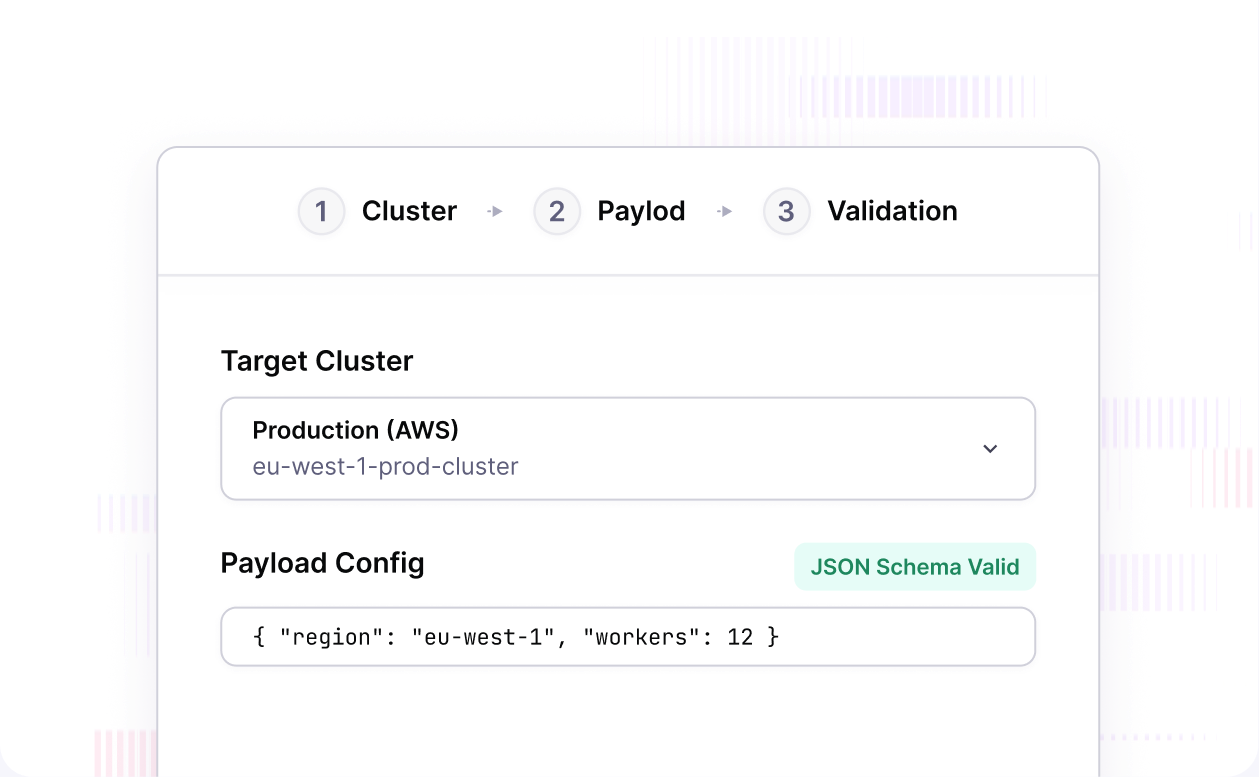
Define an input group once at namespace level and reference it across flows with a single line. SELECT inputs now carry human-readable labels with technical values underneath, JSON inputs validate against a JSON Schema before any task runs, and a new FORM type turns complex trigger forms into a multi-step wizard.

A three-step input wizard with a cluster select and a validated JSON payload

VS Code, Connected to Your Instance

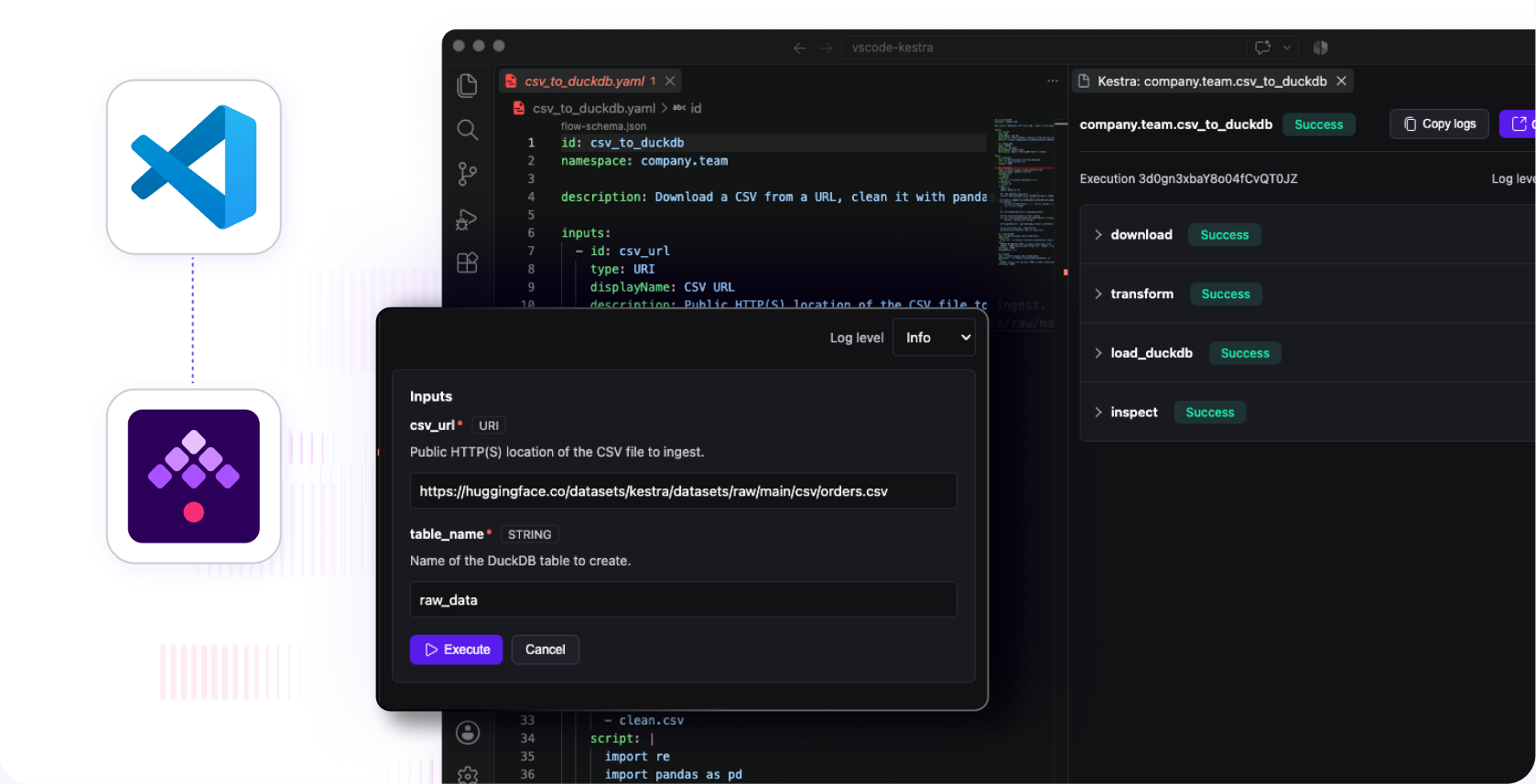
The extension now pulls the flow schema from your connected instance, so completion reflects the plugins you actually have. Live validation, Pebble autocompletion, topology preview with live task states, and run-from-editor are all included.

The Kestra VS Code extension editing a flow with live validation

Enterprise Governance,
Finally in the Platform

Enforce standards, manage incidents, promote to production. Without leaving Kestra.

Policies: Standards That Enforce Themselves

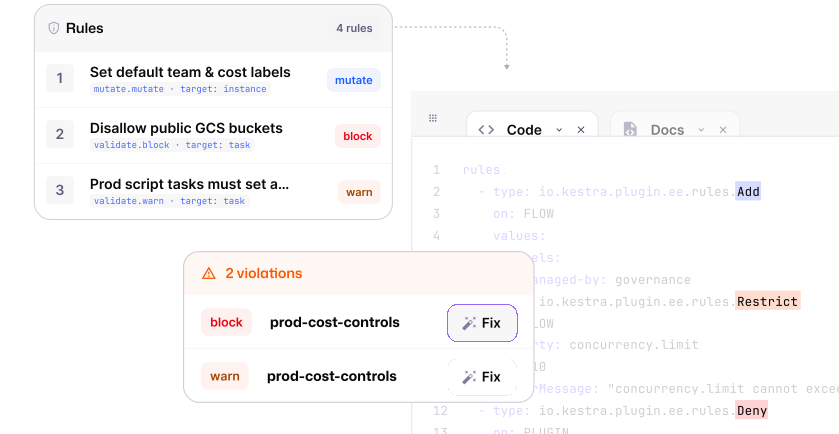
Set your operating standards once and apply them across every team, environment, and workflow. Policies can fill in required settings, flag exceptions, or stop work that does not meet your rules, from workflow-wide safeguards to approved infrastructure choices. Start by seeing where standards are missed, then enforce when ready. Authors always see the standards applied to their work.

A policy with mutate, block and warn rules and the violations it flags in the editor

Promote: Dev to Prod Is a Button, With a Diff

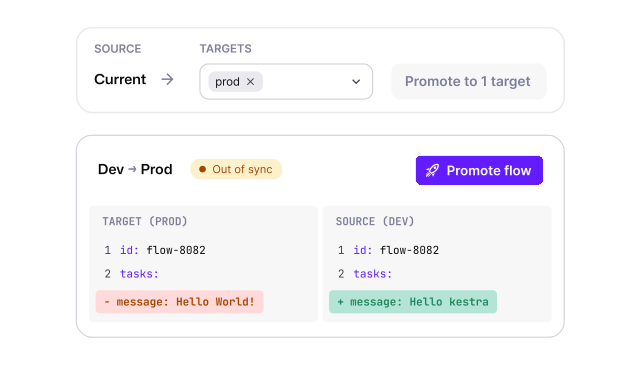
Moving a flow across environments is now a first-class action. A Promote tab on every flow lets you pick a target, review exactly what changes, and confirm. Gated targets require explicit sign-off. The flows list shows drift at a glance: in sync, out of sync, or not promoted. Every promotion is recorded: what, which revision, where, who, when.

The Promote tab comparing a dev flow with its prod target
Policies assign the worker queue and the task runner by namespace, so their developers never configure compute. Quotas mean one team's spike cannot degrade everyone else's instance. Airflow, Sidekiq and years of scripts, consolidated under one set of rules.
Alternative-investments fintech - 1,500+ employees · New York, NY, USA

Quotas: Keep Execution Volume in Check

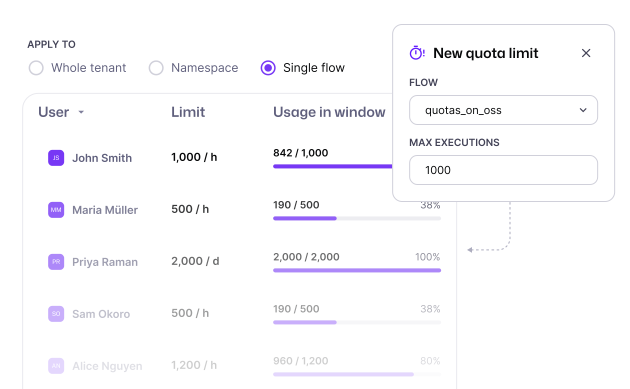
Set clear limits on how many executions a workflow can create over time, protecting shared infrastructure from runaway schedules and unexpected demand. Apply quotas to a single workflow, an entire team namespace, or the whole tenant, and choose whether excess work should fail or be cancelled. Control volume where it matters, before it becomes an operational problem.

A quota usage table per user and a new quota limit form

Cases: Incidents Live Next to the Executions That Caused Them

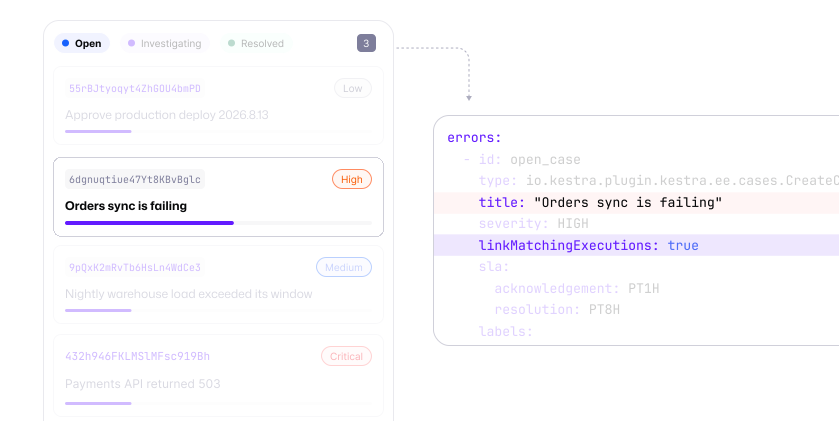
Turn workflow failures into managed incidents without leaving Kestra. Group repeated failures from the same issue into one case instead of an endless stream of alerts, then give it an owner, priority, response target, and shared activity history. Teams can track work on live boards and launch approved remediation flows directly from the incident, bringing recovery and accountability together.

A case board next to the CreateCase task that opens an incident

Run Anywhere.
Scale Without Compromise.

Workers go where the work is. The platform stays in control.

Your Orchestrator Shouldn't Dictate Your Network Topology

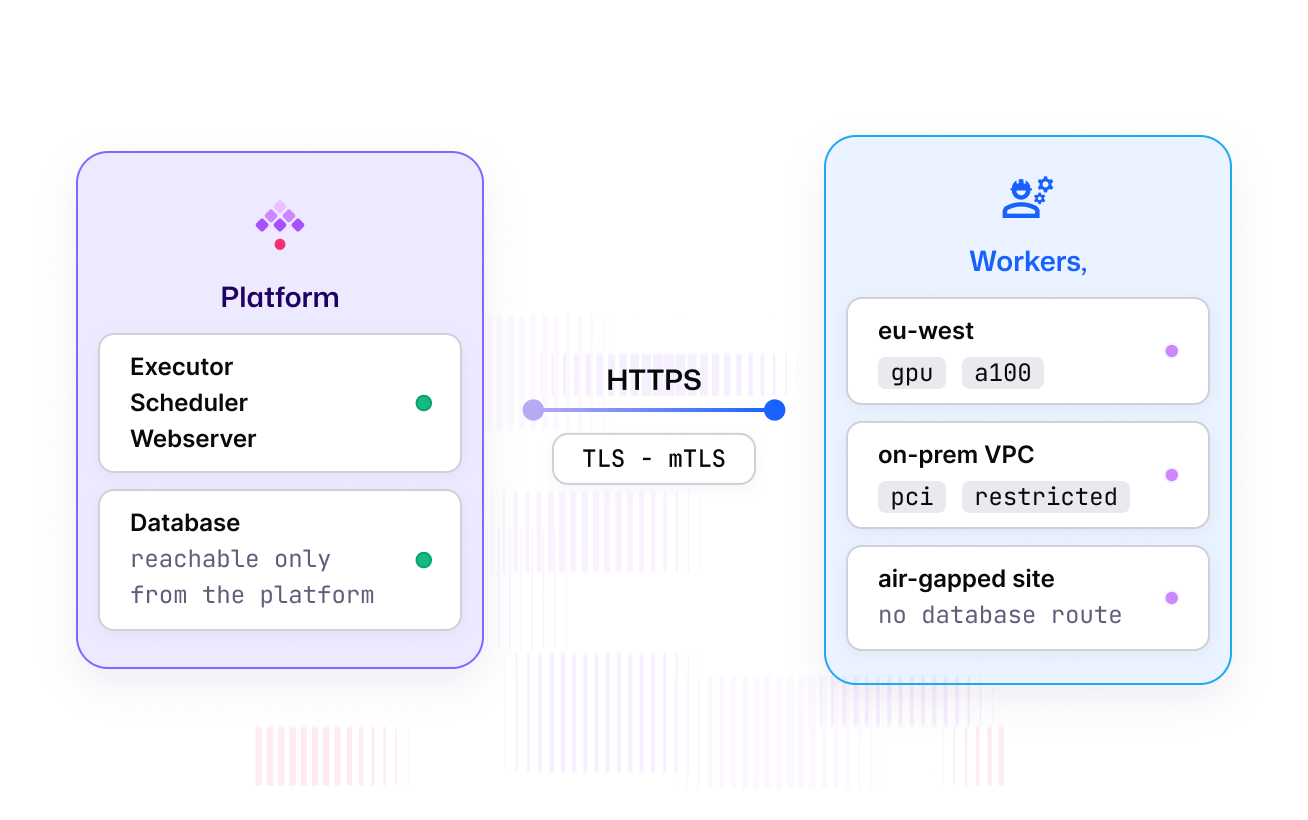
In 1.x, every worker needed a direct route to the database, limiting where work could run and complicating security reviews. Kestra 2.0 removes that dependency. Workers connect to the platform instead, so you can place them inside private networks, isolated environments, and regions where the data and infrastructure already live.

See how we reworked the architecture
Workers in eu-west, an on-prem VPC and an air-gapped site connecting to the platform over HTTPS with mTLS
Running GPU workloads on Kubernetes was the hardest part of the pipeline, and the orchestrator the team had built in-house was getting heavier to maintain. With Kestra, GPU tasks run as Kubernetes pods, routed through worker groups with per-region isolation. The team cut orchestration overhead by close to 90 percent.
AI-powered medical diagnostics - 1000+ employees · CA, USA

Worker Groups 2.0:
Routing by Intent

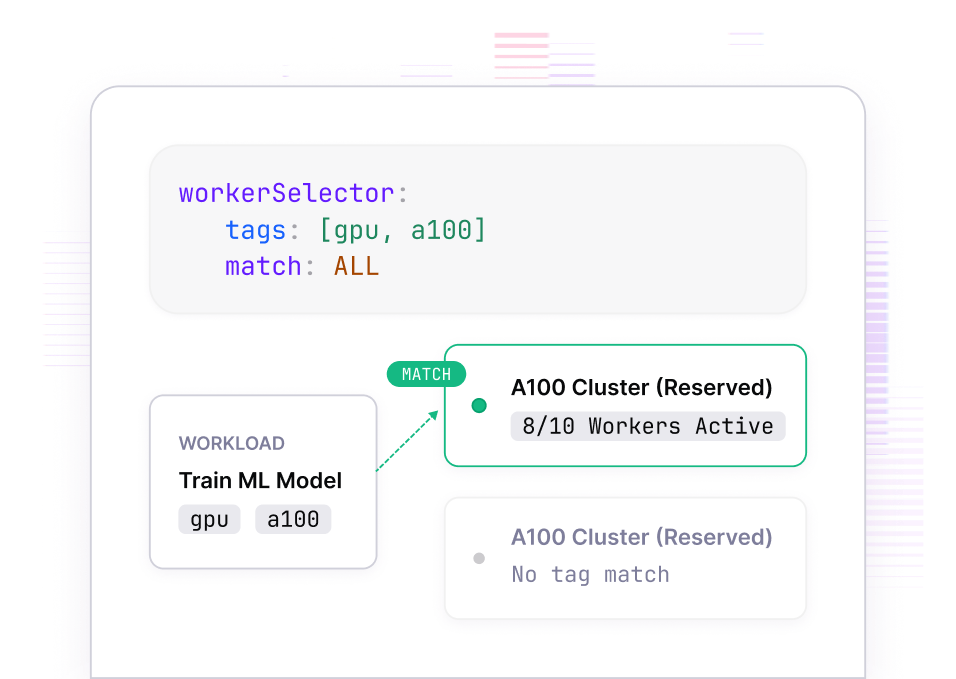
Use tag-based routing to send every workload to the compute it needs, whether that is GPU capacity, a secure network, or a regional team. Reserve capacity for critical work so competing demand cannot crowd it out, while allowing unused resources to serve other teams when appropriate. Adjust allocations live as priorities shift and define your worker topology once for consistent deployment.

A workerSelector with gpu and a100 tags matching a reserved A100 cluster

Run on Bare VMs, Not Just Containers

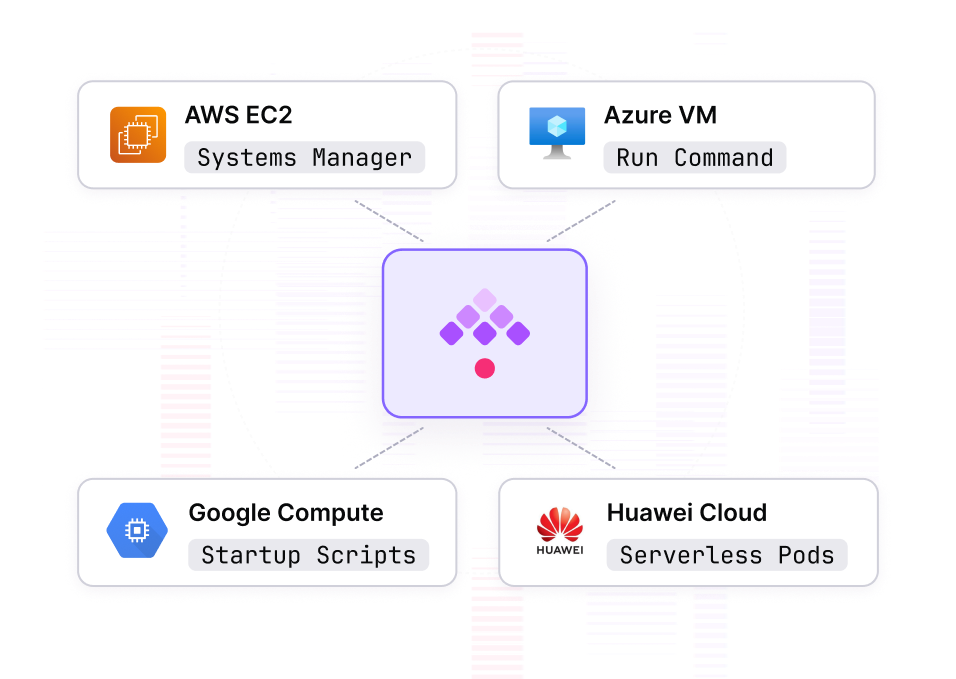
Four new task runners target workloads that shouldn't be containerized: GPU training on a custom AMI, licensed software bound to a machine image, anything needing direct VM control. AWS EC2 via Systems Manager, Azure VM via Run Command, Google Compute Engine as startup scripts, Huawei Cloud CCI as serverless pods. No SSH, no public IPs.

Kestra dispatching to AWS EC2, Azure VM, Google Compute and Huawei Cloud task runners

Choose the Queue That Fits Your Platform

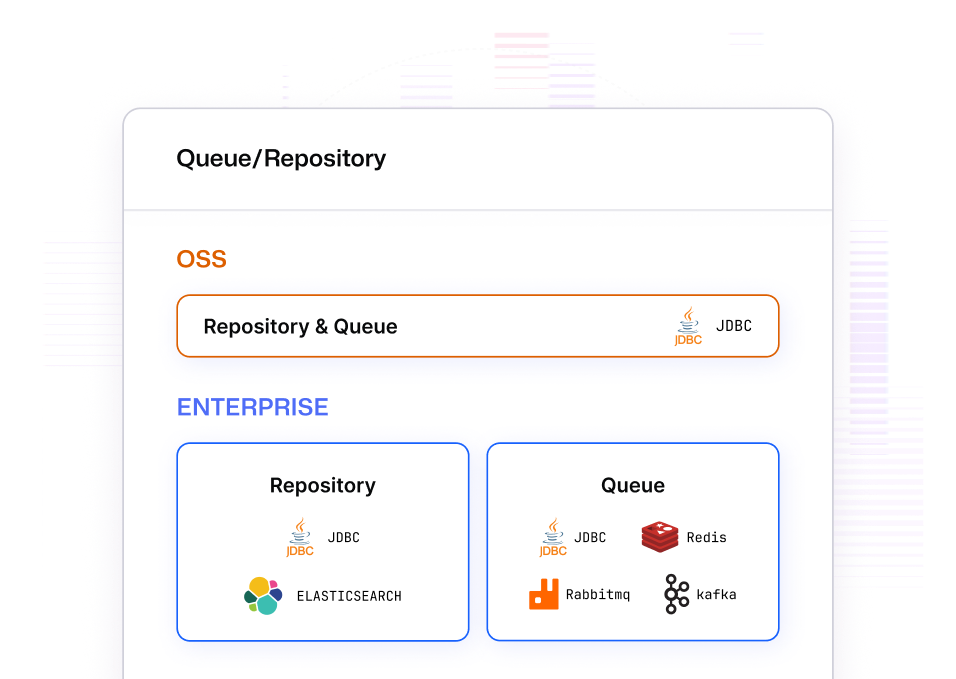
Kestra 2.0 breaks the old rule that queue and database must be one. One execution model, pluggable queue backends, and a thin adapter layer for each system. Choose JDBC, Kafka, Redis, or AMQP to match your infrastructure and scale needs without rewriting the platform. We also send only the minimal message state over the queue and keep the database as the source of truth, reducing load and simplifying operations. More flexibility. Better scale.

Queue and repository options: JDBC for both in open source, and in Enterprise a JDBC or Elasticsearch repository with a JDBC, Redis, Kafka or Google Pub/Sub queue

Performance That Holds
as You Grow

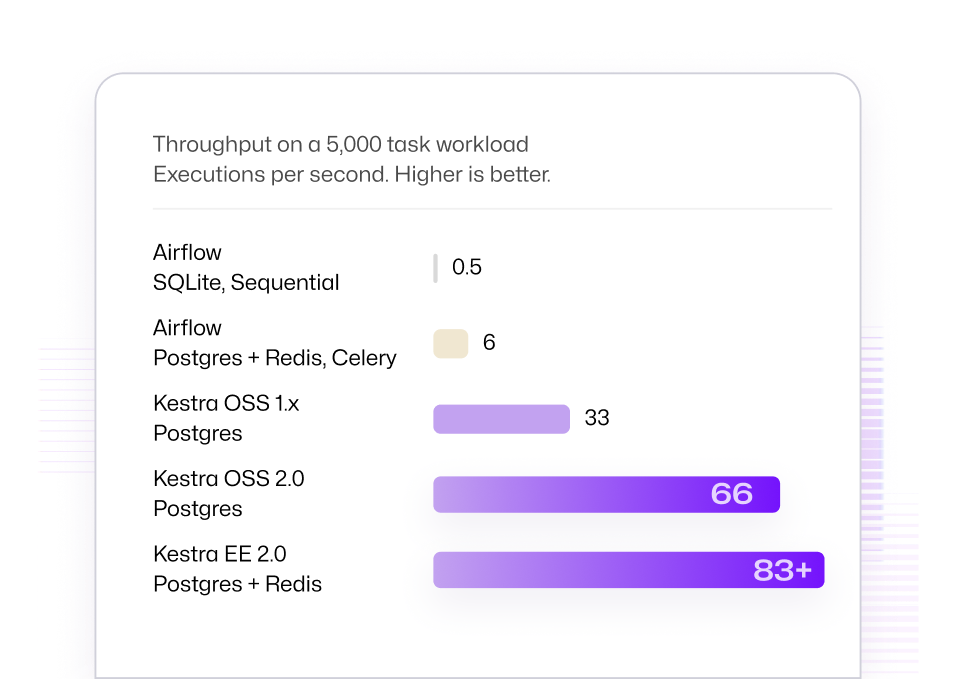
Task run outputs move to dedicated storage instead of living inside execution records, keeping bulky data out of your core database. Outputs also switch to a binary format, cutting storage consumption up to 40%.
That means lower database load, less storage overhead, and orchestration that stays responsive as execution volume grows to millions of runs.

Throughput on a 5,000 task workload in executions per second: Airflow at 0.5 and 6, Kestra OSS 1.x at 33, Kestra OSS 2.0 at 66 and Kestra EE 2.0 at 83+

Day-Two Operations for Your Infrastructure

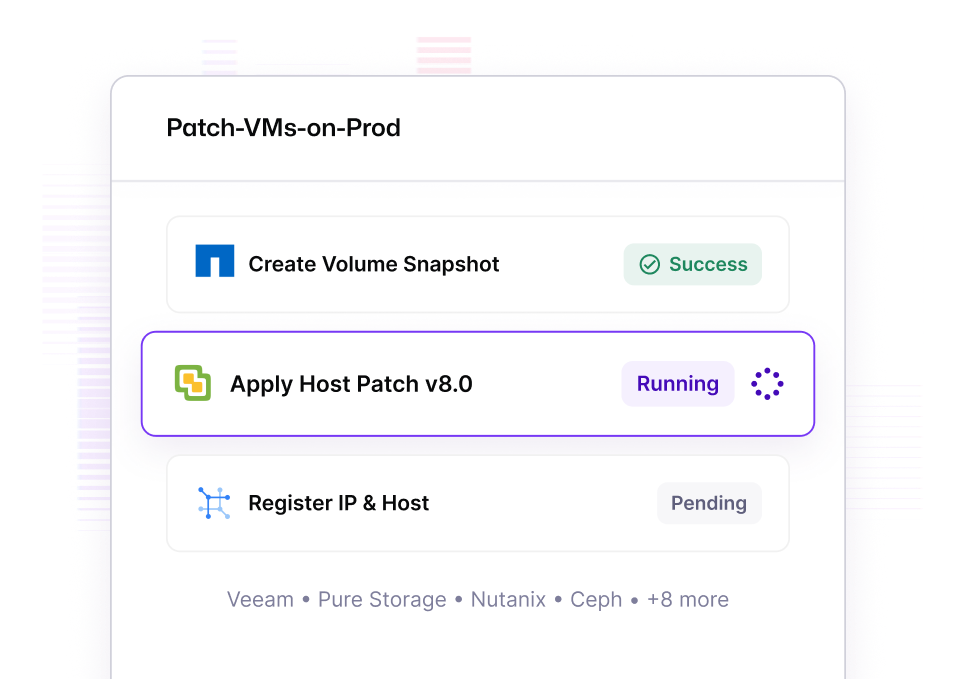
NetApp ONTAP, Veeam, Pure Storage, Dell PowerStore, Ceph, Huawei Cloud, F5, and SolarWinds IPAM join VMware, Nutanix, Proxmox, Infoblox, and Netbox. Snapshot before patching, clone volumes for dev/test, provision and register infrastructure in a single flow.

A Patch-VMs-on-Prod flow snapshotting a volume, patching a host and registering the IP

Start Slim, Grow on Demand

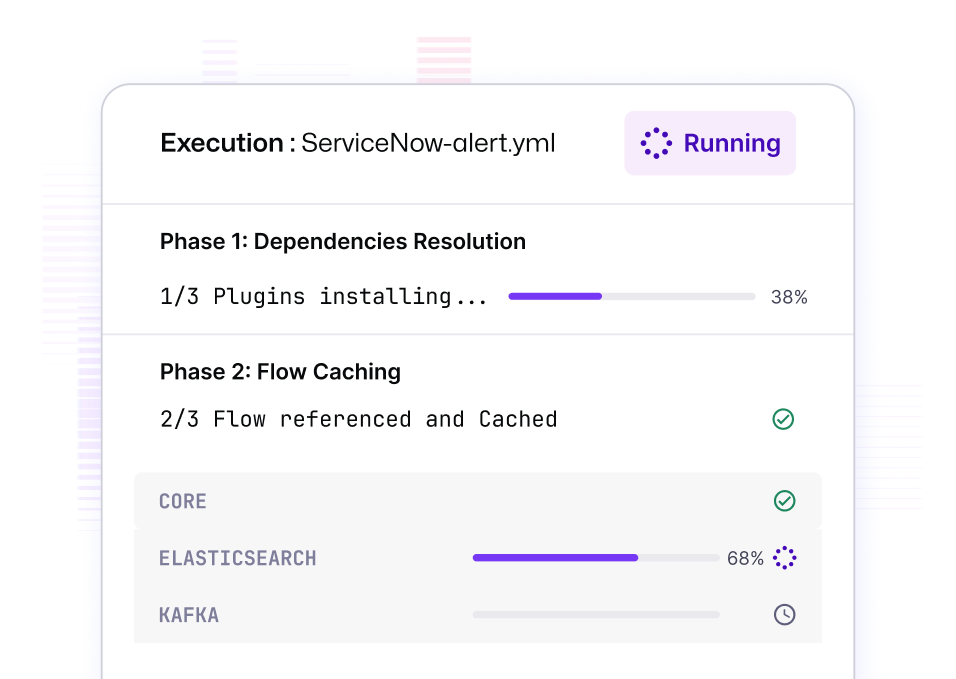
kestra/kestra:*-slim ships with no bundled plugins. Enable auto-install and Kestra fetches what your flows reference on first use, caches it, and keeps editor autocomplete current. Fast first pull, nothing you don't need.

An execution installing the plugins its flow references on first use

Enforced Security by Default

Every worker authenticated. Every log where your SIEM expects it.

Workers That Prove Who They Are

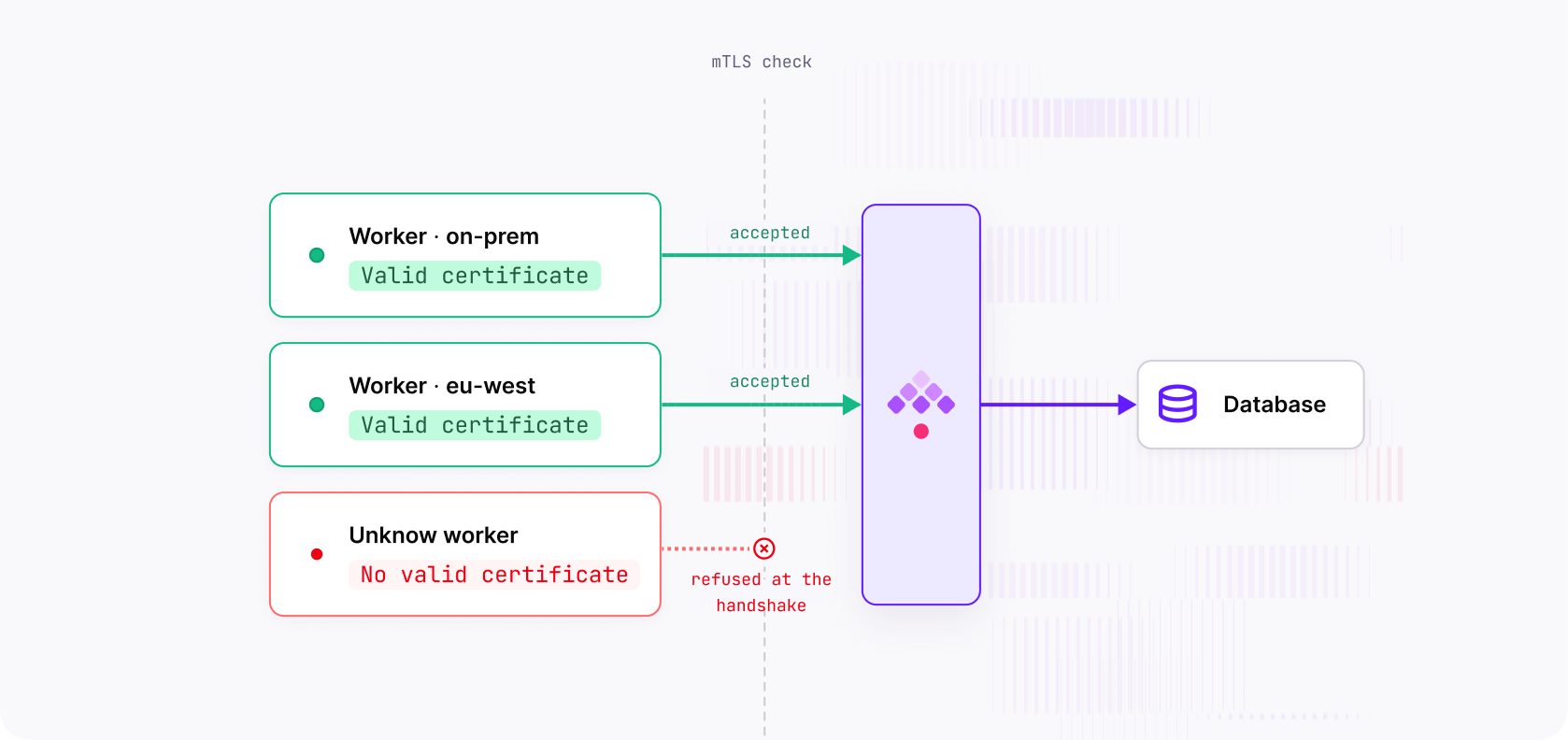
Workers no longer connect directly to your database. They connect to the platform over a secure, TLS-encrypted channel, allowing you to place compute across regions, private networks, and restricted environments without exposing database access. Every worker authenticates with short-lived credentials that can be revoked, and mutual TLS can reject unknown workers before they reach the platform.

Two workers with valid certificates accepted by the mTLS check and an unknown worker refused at the handshake

Straight Into Your SIEM

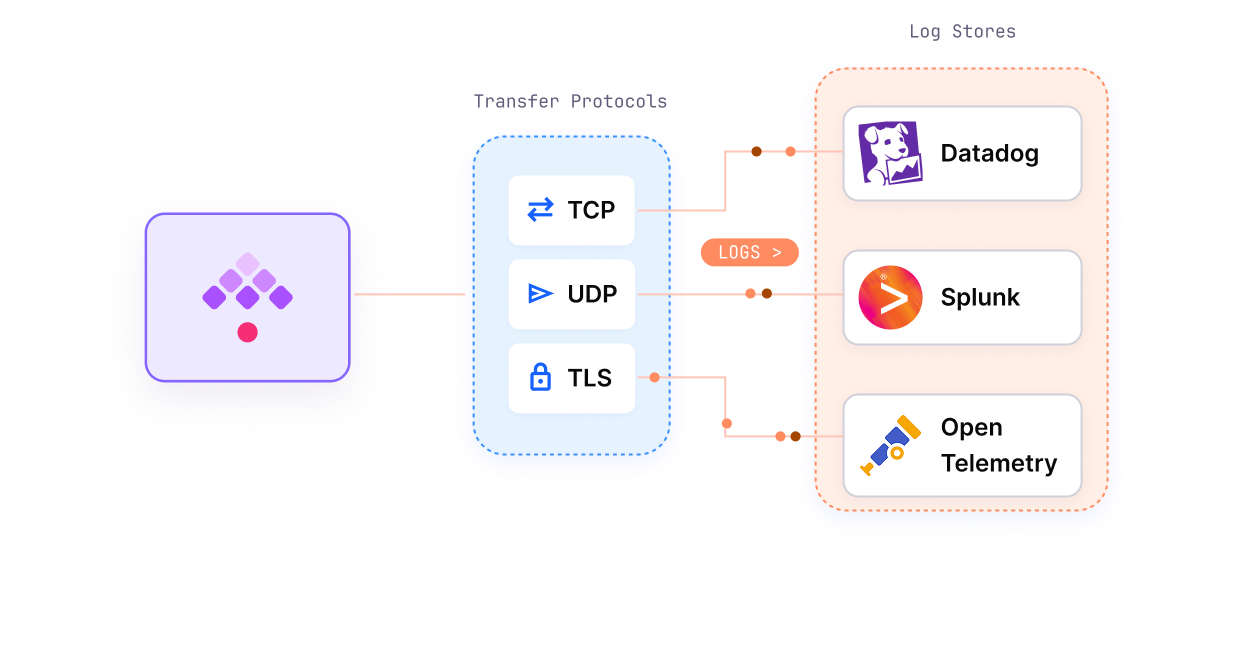
Log Shipper and Audit Log Shipper gain a Syslog CEF destination over TCP, UDP, or TLS. Kestra events route directly into Graylog, Splunk, or QRadar without a custom adapter.

Kestra shipping logs over TCP, UDP or TLS into Datadog, Splunk and OpenTelemetry

Logs Out of the Critical Path

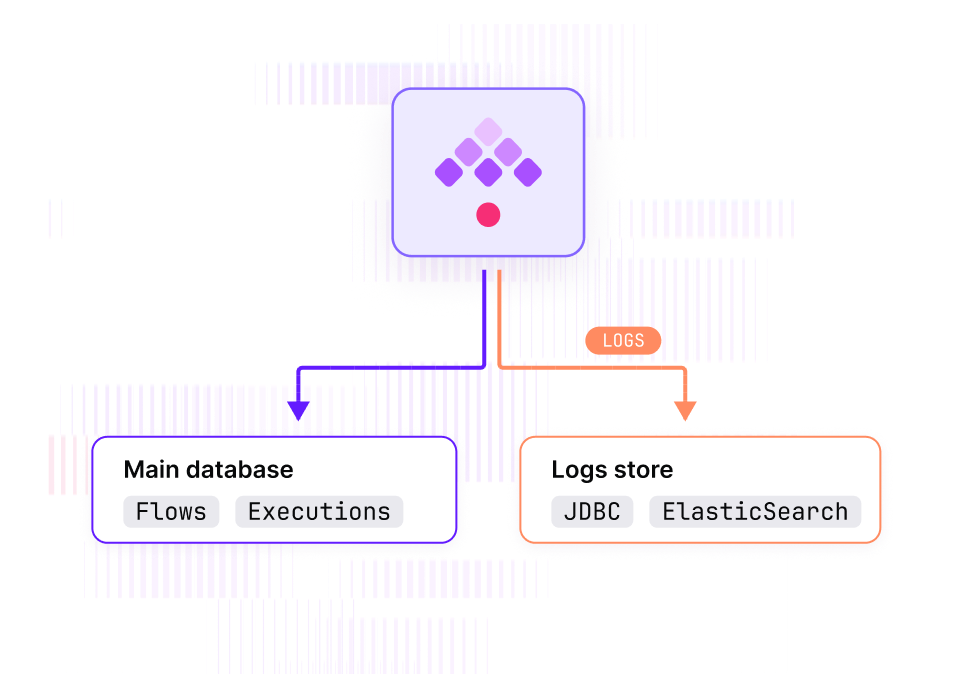
Execution logs are your highest-volume data, and they no longer have to share a database with flows and state. Route them to a separate JDBC store or Elasticsearch. Lighter migrations, independent retention, faster operational queries.

Flows and executions in the main database, logs routed to a separate JDBC or Elasticsearch store

Upgrade With Confidence

One year of LTS support. A migration tool that does the heavy lifting.

1.xto 2.0

2.0 requires Kestra 1.3.x. kestra-migrate rewrites most flows automatically; ForEach and pluginDefaults are flagged for review because they need a judgment call. Every breaking change has a dedicated before/after guide in the v2.0.0 migration hub, and the LTS policy spells out what one year of support covers.

LTS
First long-term support release
1 year
Bug and security fixes backported
0
Major upgrades in that window
$ kestra-migrate --check ./flows/
# scope the work, nothing written
 214 flows scanned · 187 auto-rewritable
! 27 flagged for review (ForEach, pluginDefaults)
$ kestra-migrate -o v2-flows/ ./flows/
 written to v2-flows/
For Amdocs, the upgrade to 2.0 was the project. Their provisioning workers now run inside the network segments they build environments in, with no database route required. That deployment did not exist before.
Amdocs - Software and services for communications providers

The Foundation for
What Comes Next

Kestra 2.0 is where the platform stops carrying 1.x constraints and starts building on a clean architecture. First LTS release. Bug and security fixes backported for a year. Upgrade once, then build.