Authors

AJ Emerich
Technical Writer
AJ Emerich
Technical Writer
Kestra 2.0 is available today. Until now, network access to the Kestra database was required for every worker, so workers could only be deployed on the same network as the control plane. The queue was coupled to the database as well, so every feature had to be built twice, once for JDBC and once for Kafka.
In 2.0, each worker is connected to the control plane over a single outbound gRPC stream, so it can be deployed in another region, in a different cloud, or in a network that only allows outbound connections. The queue is independent of the database now, so there is a single implementation for both backends.
Everything else in 2.0 is built on those two changes. In this post, we cover what’s new and what has to be changed when upgrading. The table below lists features we introduced in each edition.
| Feature | What | Edition |
|---|---|---|
| MCP Tool Trigger + MCP Server | Flows exposed as tools callable by AI agents | OSS, EE, Cloud |
| AI Copilot agentic loop | Three-mode chat sidebar (Edit, Plan, Ask) with multi-turn memory and a confirmation step | EE, Cloud |
| No-code editor | Guided form editor with a contextual data panel showing available inputs and outputs at each step; in sync with YAML and AI Copilot | OSS, EE, Cloud |
| RBAC action-based permissions | Resource plus action model in place of CRUD | EE, Cloud |
| Policies | Namespace-scoped governance rules in place of pluginDefaults | EE, Cloud |
| Cases | Incident management for executions: create, deduplicate, and track to resolution without leaving Kestra | EE, Cloud |
| Promote | Move flows across environments from the UI, with drift detection and a review step | EE, Cloud |
| Blueprint version control | PushBlueprints and SyncBlueprints tasks for Git-based governance | EE, Cloud |
| kestractl IAM commands | Full IAM management (users, groups, roles, service accounts) from CLI | EE, Cloud |
| Worker Groups 2.0 | Tag-based routing, capacity reservation, JWT auth | EE, Cloud |
| New task runners | AWS EC2, Azure VM, Google Compute Engine, Huawei CCI | EE, Cloud |
| Loop task | In place of ForEach and ForEachItem, with isolated sub-executions | OSS, EE, Cloud |
Trigger when expression | Pebble expression in place of chained condition syntax on all trigger types | OSS, EE, Cloud |
| PurgeStorage | Storage-driven cleanup for orphaned execution files | OSS, EE, Cloud |
| External Log Data Store | Route execution logs to a separate JDBC database or Elasticsearch | EE |
| Reusable Inputs | Shared input groups defined once at namespace level | EE, Cloud |
| Slim image + plugin auto-install | kestra/kestra:*-slim has no bundled plugins; with KESTRA_PLUGINS_AUTO_INSTALL_ENABLED=true, whatever a flow references is installed on first use | OSS |
| Plugin artifacts | Vue.js UI components bundled in a plugin and loaded into the execution topology at runtime | OSS, EE, Cloud |
Upgrading from 1.x? You must be on Kestra 1.3.x before upgrading. Several constructs are removed in 2.0 (ForEach, trigger conditions, workerGroup.key, pluginDefaults), but most flow rewrites are handled automatically by kestra-migrate. The full checklist is in Upgrade and Migration, and every breaking change has a dedicated guide in the v2.0.0 migration hub.
In 2.0, Kestra is split into a control plane and a data plane. The Executor, Worker Controller, Scheduler, Webserver and Indexer are part of the control plane, where work is coordinated and no user code is run. Runnable tasks and polling triggers are executed in the data plane by the Workers, which are the only ones with access to your infrastructure. Each plane can be scaled independently, so a control plane can be run with no workers at all, and worker capacity can be added later to match the workload.
Workers no longer need a database connection. Instead, a single persistent gRPC stream is opened to the Worker Controller, always by the worker and never in the other direction. Since it is outbound only, no inbound port has to be opened where a worker is deployed. Jobs are sent to the worker over that stream, and results, logs and metrics are returned the same way. A worker can therefore be run on premises, next to data that is not allowed to leave your network. The channel can be encrypted with TLS, and each worker can be required to present a certificate (mTLS) or a JWT before any job is dispatched to it. Any proxy or load balancer between a worker and the control plane has to allow gRPC, which needs HTTP/2 and a connection that stays open for the life of the worker.
Until 2.0, the queue and the repository had to be chosen together, either Postgres or MySQL for both or Kafka with Elasticsearch, and each option had its own engine implementation. In 2.0 they are configured separately, with one implementation of the Executor, Scheduler and Indexer underneath whichever combination is chosen. The Kafka Streams engine was removed, and only minimal information is sent over the queue now, with the repository as the source of truth. We benchmark against a single Postgres used as both queue and repository, and that is where most deployments should start. If you need lower latency or higher throughput, the queue can be moved to Kafka, Redis or AMQP.
Every component, and each step of an execution across them, is described in the architecture docs. Which combination of queue and repository to pick, and what each one is good for, is covered in In Kestra 2.0 your backend is a choice, and the engineering decisions behind the rewrite in Ludo’s post on the 2.0 architecture.
Connecting an AI agent to real infrastructure usually means writing a custom integration layer. The MCP Tool Trigger skips it: any flow you’ve already built (a data pipeline, a provisioning sequence, an incident response) is callable by an AI agent as a named tool.
A default MCP server is provisioned for every tenant on startup, and the McpToolTrigger handles registration. Additional servers (separate servers per team, or one per environment) can be created from the UI with the Enterprise Edition. Each server generates ready-to-paste connection configuration for Claude Desktop, Claude Code, Cursor, and Codex. An AI agent sends a tool call; Kestra creates an execution with the matched inputs, runs the flow, and returns the outputs.
This example flow returns a pipeline health summary for any namespace, the kind of question an AI agent can answer on demand and then chain into a remediation tool if failures are found:
id: get_pipeline_statusnamespace: company.ai
inputs:  - id: namespace    type: STRING    defaults: company.analytics    description: "The namespace to report on. Defaults to company.analytics."  - id: hours    type: INT    defaults: 24    description: "How many hours back to look. Defaults to 24."
tasks:  - id: fetch_executions    type: io.kestra.plugin.core.http.Request    uri: "{{ secret('KESTRA_URL') | trim }}/api/v1/dev/executions/search?namespace={{ inputs.namespace }}&size=100&sort=state.startDate:desc"    method: GET    headers:      Authorization: "Bearer {{ secret('KESTRA_API_TOKEN') | trim }}"
  - id: summarize    type: io.kestra.plugin.scripts.python.Script    dependencies:      - kestra    inputFiles:      executions.json: "{{ outputs.fetch_executions.body }}"    env:      NAMESPACE: "{{ inputs.namespace }}"      HOURS: "{{ inputs.hours }}"    script: |      import json, os      from collections import Counter      from datetime import datetime, timezone, timedelta
      with open("executions.json") as f:          data = json.load(f)
      executions = data.get("results", [])      namespace = os.environ["NAMESPACE"]      hours = int(os.environ["HOURS"])      cutoff = datetime.now(timezone.utc) - timedelta(hours=hours)
      recent = [e for e in executions if datetime.fromisoformat(e["state"]["startDate"]) >= cutoff]      states = Counter(e["state"]["current"] for e in recent)      failed = [e for e in recent if e["state"]["current"] == "FAILED"]
      lines = [f"Namespace: {namespace}  |  Last {hours}h  |  {len(recent)} executions"]      lines.append("  " + "   ".join(f"{s}: {c}" for s, c in sorted(states.items())))
      if failed:          lines.append("\nFailed:")          for e in failed[:5]:              ts = e["state"]["startDate"][:16].replace("T", " ")              lines.append(f"  - {e['flowId']} at {ts}")      else:          lines.append("\nNo failures.")
      from kestra import Kestra      Kestra.outputs({"summary": "\n".join(lines)})
outputs:  - id: summary    type: STRING    value: "{{ outputs.summarize.vars.summary }}"
triggers: - id: mcp type: io.kestra.plugin.core.trigger.McpToolTrigger toolName: get_pipeline_status title: Get Pipeline Status toolDescription: > Returns a summary of recent pipeline executions in a Kestra namespace, including counts by state (SUCCESS, FAILED, RUNNING), names of any failed flows with timestamps. Call this when the user asks about pipeline health, recent runs, or failures. mcpServer: defaultThe toolDescription field is the most important property to get right. Agents use it to decide when and how to invoke the tool, so a vague description produces poor routing. Write it from the agent’s perspective: what situation should trigger this call, and what does the input represent.
Flow inputs map automatically to the tool’s JSON schema parameter spec. Outputs become the tool’s response payload. If a flow has a JSON input with a jsonSchema property, the schema propagates to the tool spec.
All executions created via MCP are tagged with system.from: mcp, system.mcpServerId, and system.mcpSessionId, so you can filter by agent origin in the execution list.
Full setup in the MCP server docs and McpToolTrigger reference.
The AI Copilot is now a persistent right-sidebar chat panel that stays open while you work. Conversations are multi-turn: say “add retry logic” and it refines what’s already in the flow rather than generating from scratch. Open it with the AI button in the top toolbar. Click New chat + to start fresh; use Recents to return to a prior conversation.
A new mode selector at the bottom of the panel switches between three behaviors:
| Mode | What it does |
|---|---|
| Edit | Generates and iteratively refines declarative flow YAML. The Copilot proposes the change for approval before applying it; rejecting keeps the conversation going so you can redirect rather than start over. |
| Plan | Proposes a numbered sequence of steps for a complex task and executes each one after you confirm. Rejecting any step cancels the rest. |
| Ask | Answers questions about Kestra grounded in the official documentation via an internal Kestra MCP client. Can also read execution logs directly to help diagnose a failed run. |
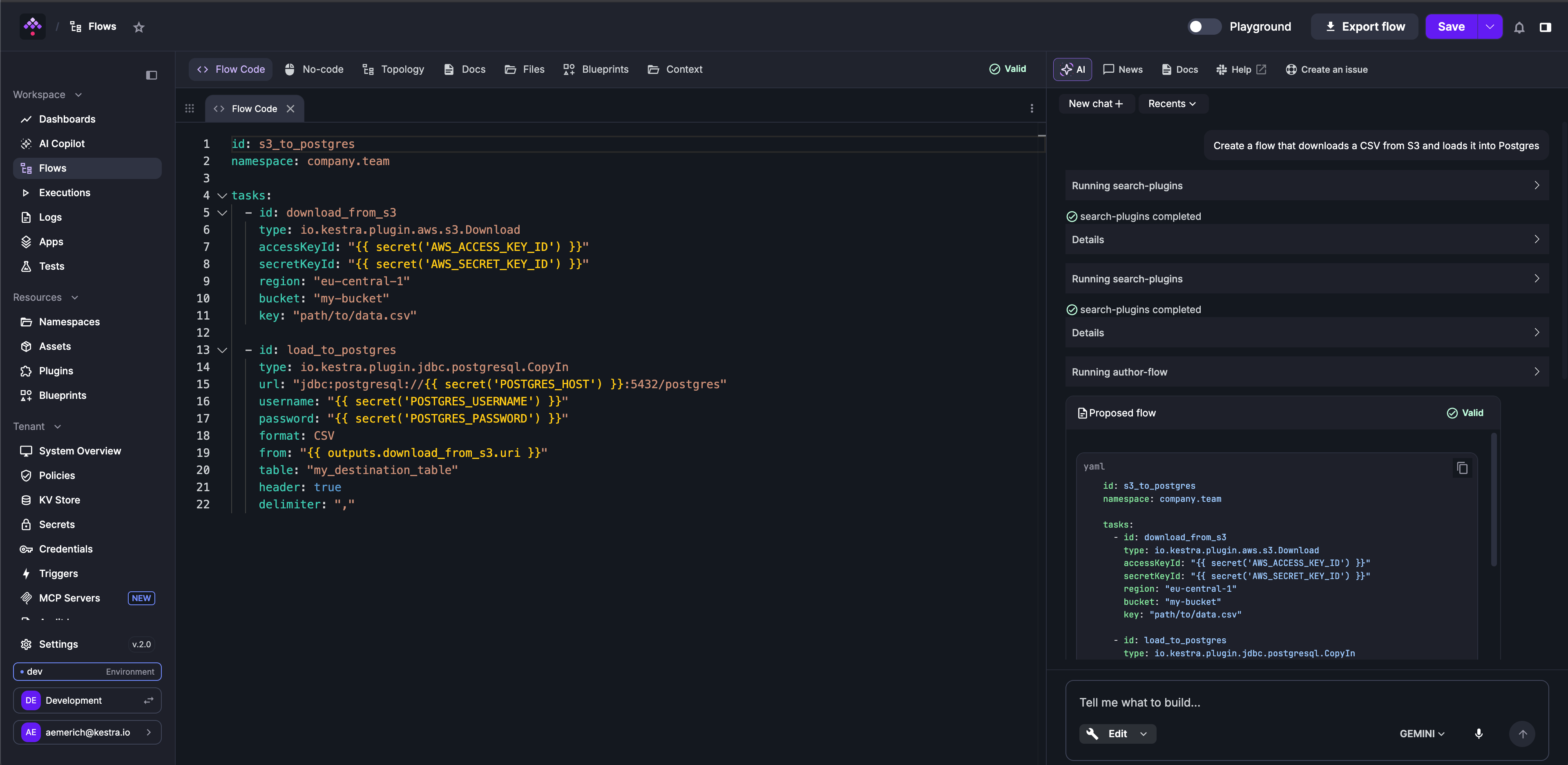
When you open the sidebar while viewing a resource, that resource attaches automatically as a context tag above the input. Context tags are independently dismissible. Every addition and removal is recorded in the transcript so you can always see what the agent is looking at. Attachable resources include flows, namespaces, executions, dashboards, apps, test suites, blueprints, and plugins. The AI Copilot also reads namespace metadata (Policies, Variables, Secrets, Key-Value pairs) to ground authoring suggestions against your actual configuration, so prompts like “create a task that reads from our MongoDB” can reuse configured credentials without extra hints.
Actions that modify resources require explicit confirmation before the AI Copilot executes them. A prompt appears in the chat with an optional field to steer the next attempt. Approving applies the change; rejecting resumes the conversation in Edit mode, or cancels the current plan in Plan mode, keeping you in full control while you iterate.
The AI Copilot docs cover mode details, context tags, and RBAC config.
For teams who prefer building flows through forms rather than YAML, the No-code editor has been polished significantly in 2.0. A contextual data panel now sits alongside every configuration form, listing every input, upstream task output, and execution context variable available at that point in the flow, organized by category and filterable. A demo below says more than a thousand words, and all three views (YAML editor, No-code editor, and AI Copilot) stay in sync throughout the editing process.
The flow editor docs cover both No-code and YAML editing in full.
Navigation between authoring, execution history, and execution detail has been simplified across the board. The paths between the editor and a failed run have fewer steps, with less visual noise at each stop.
The topology view is redesigned. Task states animate as executions progress, so you can watch a run advance in real time. Each node also surfaces inline plugin details (documentation and configured properties) alongside the graph, so debugging an unfamiliar task no longer requires a separate docs tab. Plugins can extend this view further with custom UI components; check out the Plugin Artifacts section which covers that in more detail.
The execution view adds per-phase timing, so a slow run has an identifiable culprit rather than an opaque total duration. The outputs panel now handles purged files correctly: files cleaned up by PurgeExecutions or PurgeStorage display as purged rather than appearing to error.
In 2.0, RBAC permissions have been redesigned to give fine-grained control over what each user is allowed to do. Every resource used to have the same four permissions (CREATE, READ, UPDATE, DELETE) regardless of what could actually be done with them. There are now 159 permissions across the product, one per action.
Executions are the clearest example. Under CRUD, restarting an execution, killing a running one, replaying it and deleting it all had to be expressed as CREATE, UPDATE or DELETE, and it wasn’t obvious which permission allowed which action. Killing an execution changes its state, so UPDATE seems right, but it also terminates the run, so DELETE seems just as plausible. Each of those actions is a separate permission now: RESTART, REPLAY, KILL, PAUSE, RESUME, UNQUEUE, FORCE_RUN, CHANGE_LABELS, UPDATE, DELETE and EXPORT, alongside read-only ones like VIEW, LIST, FOLLOW, ACCESS_LOGS, ACCESS_OUTPUTS and ACCESS_FILES. Whoever is on call can be allowed to kill a runaway execution without being able to delete it, while a data engineer can restart or replay a failed run without being able to stop a running one.
Every other resource works the same way, with its own action list. Starting a flow, for instance, is FLOW: EXECUTE, kept separate from anything that happens to the execution afterwards.
New resources in 2.0 include TRIGGER (previously part of FLOW), SYSTEM_SETTINGS, TENANT_SETTINGS, COPILOT, and MCP_SERVER.
Setting every permission by hand isn’t the expected path. Five managed roles come with 2.0, available as presets when a role is created: Viewer, Launcher, Editor, Developer, and Admin. Existing custom roles and bindings are migrated automatically on upgrade.
The RBAC reference has the full action list per resource, and the action model migration guide covers what changes on upgrade.
Without enforcement tooling, keeping flows compliant across many namespaces is a manual coordination problem: authors must set values correctly on every task, and administrators have no way to verify or block non-compliant flows. Policies address this at the platform layer, replacing pluginDefaults in EE with governance rules that inject configuration, validate compliance, and block non-conforming flows, including flow-level properties that pluginDefaults could never reach, like retry, concurrency, and labels.
A Policy is a named set of rules scoped to a namespace or a tenant. Rules from a parent namespace cascade to all child namespaces automatically, so a company-wide constraint placed at the root namespace reaches every team without per-namespace configuration.
Five rule types are available in 2.0: Add and Delete mutate configuration before execution without altering stored flow YAML; Deny, Restrict, and Require validate it and can block or warn when a flow violates a constraint. Rules target either the flow (on: FLOW) or any plugin instance in it (tasks, triggers, task runners) (on: PLUGIN), narrowed by a where clause that matches on the plugin type.
A practical example: require that every flow declares a team label, and restrict all script tasks to an approved container registry.
id: prod-standardsdescription: "Label requirements and registry policy for production flows."enforcement: ACTIVE
rules:  - type: io.kestra.plugin.ee.rules.Require    on: FLOW    properties:      - labels.team    errorMessage: "Every flow must declare labels.team."
  - type: io.kestra.plugin.ee.rules.Restrict    on: PLUGIN    where:      - field: type        operator: STARTS_WITH        value: io.kestra.plugin.scripts    property: containerImage    regex: "^registry.internal/.*"    action: block    errorMessage: "Container images must be pulled from registry.internal."
Add rules inject values at resolution time. With override: false (the default), the author’s explicit value wins and the policy fills in only what’s absent. With override: true, the policy value always wins. Either way, every injection is annotated in the flow editor’s merged preview, so forced values are never invisible to authors.
Before enabling enforcement, set enforcement: EVALUATE. The policy checks every flow in scope and surfaces violations in the Governance UI, but violations are only reported: nothing is blocked, and Add/Delete mutate rules are skipped. When the violation report looks right, flip to ACTIVE.
pluginDefaults is removed in 2.0 for both OSS and EE. The migration guide covers all three scopes (flow-level, namespace-level, and global server config) with before-and-after examples. The Policies docs have the full rule details, including where clause syntax and the EVALUATE vs ACTIVE enforcement modes.
Failed executions are incidents, and they usually get tracked outside Kestra. Cases bring incident management into Kestra itself so you can create, assign, and resolve incidents next to the executions that caused them; no need to switch between tools.
The CreateCase task opens a case from any block in a flow: errors, finally, afterExecution, or a regular task combined with runIf. It calls the Kestra API, so it needs an endpoint and credentials: kestraUrl defaults to the current instance, and auth accepts an API token or username/password. Namespace or tenant-level default credentials work as a fallback so you don’t have to repeat auth config on every task.
errors: - id: open_case type: io.kestra.plugin.kestra.ee.cases.CreateCase title: "Orders sync failed: {{ flow.id }}" severity: HIGH linkMatchingExecutions: true sla: acknowledgement: PT1H resolution: PT8HThe linkMatchingExecutions property is the most useful option for high-frequency flows. A single external API going down can generate dozens of failed executions per hour. With linkMatchingExecutions: true, each subsequent failure attaches to the already-open case rather than creating a new one. The same behavior is available from the UI on any existing case via auto-attach, which generates a Flow trigger behind the scenes and removes it when the case resolves.
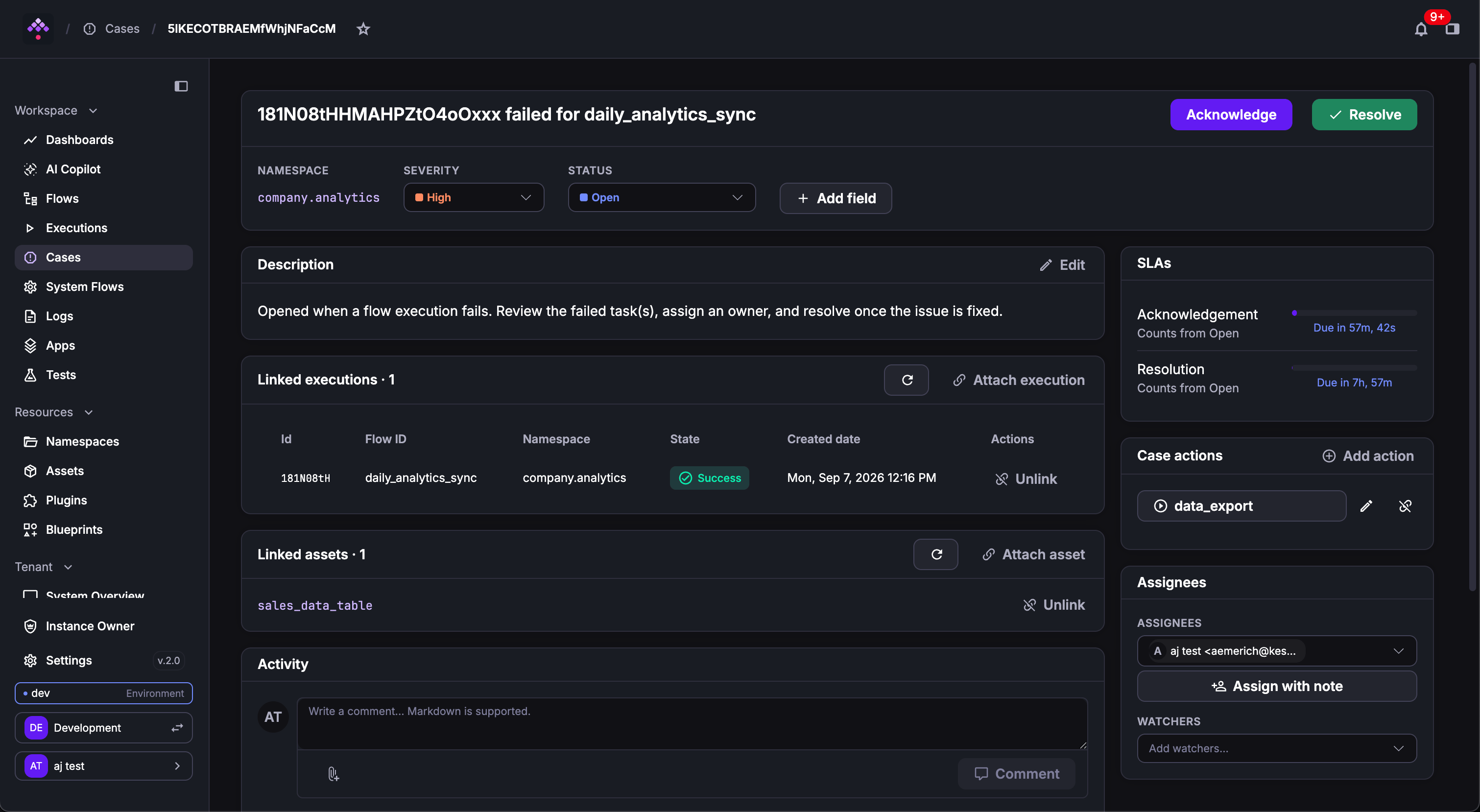
Each case tracks status, severity, assignees, SLA timers, affected assets, and linked executions, with a full activity timeline. Cases can also have case actions: flows attached as one-click remediation buttons on the case detail page.
The Cases board view and list view sit in the left menu. The board groups cards by status, severity, or assignee with a live SLA countdown per card similar to a kanban view in GitHub or JIRA. Dragging a card to Resolved opens the resolve modal, where a resolution reason is required and a case can be closed.
The Cases docs cover SLA configuration, case actions, and the auto-attach trigger setup.
Before Promote, moving a flow between environments meant a CI/CD pipeline outside Kestra, a manual copy-paste of YAML, or both, with no drift visibility and no audit trail inside the platform. The goal, same as Cases, is to keep you in Kestra rather than context-switching to a separate CI/CD tool.
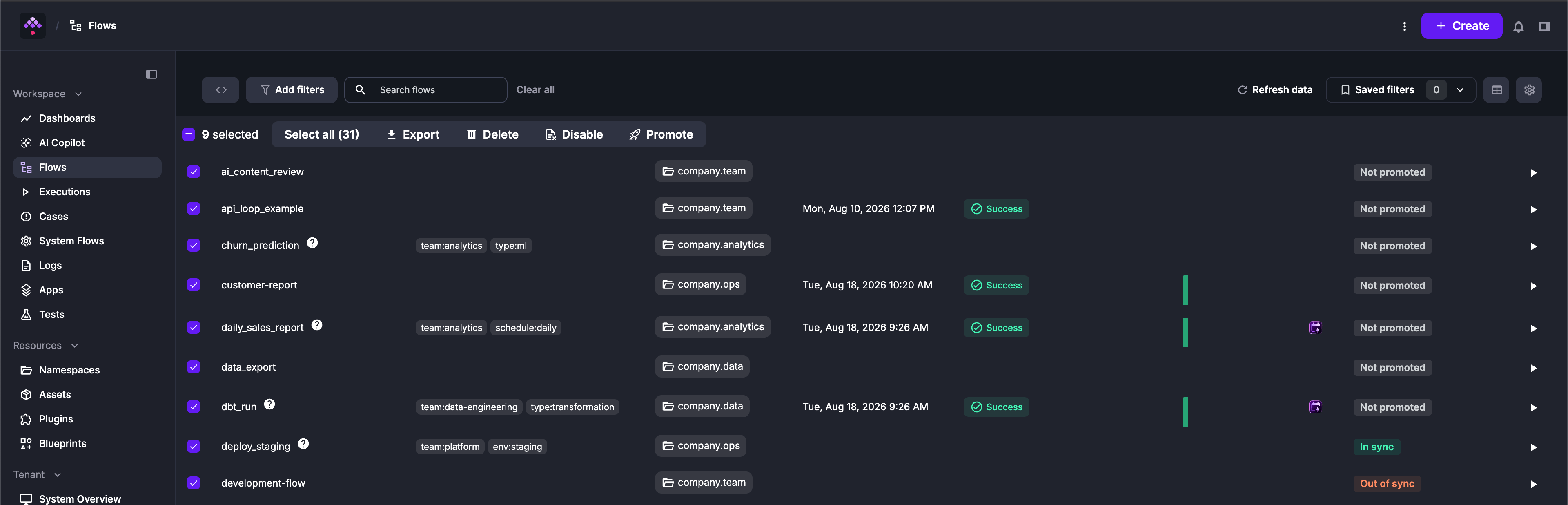
Promote gives you a built-in path for moving flows between environments. Each flow gains a Promote tab alongside the editor: select a target, review a diff of exactly what changes in that revision, and confirm. Protected targets require explicit confirmation before anything lands in production. Every promotion is recorded in full: what moved, which revision, where it went, who confirmed it, and when. No Git pipeline required.
The flows table includes a column showing drift at a glance. If production is running an older revision, the column shows out of sync. If a flow has never been promoted to that environment, it shows not promoted, so you never need to open each instance separately to check.
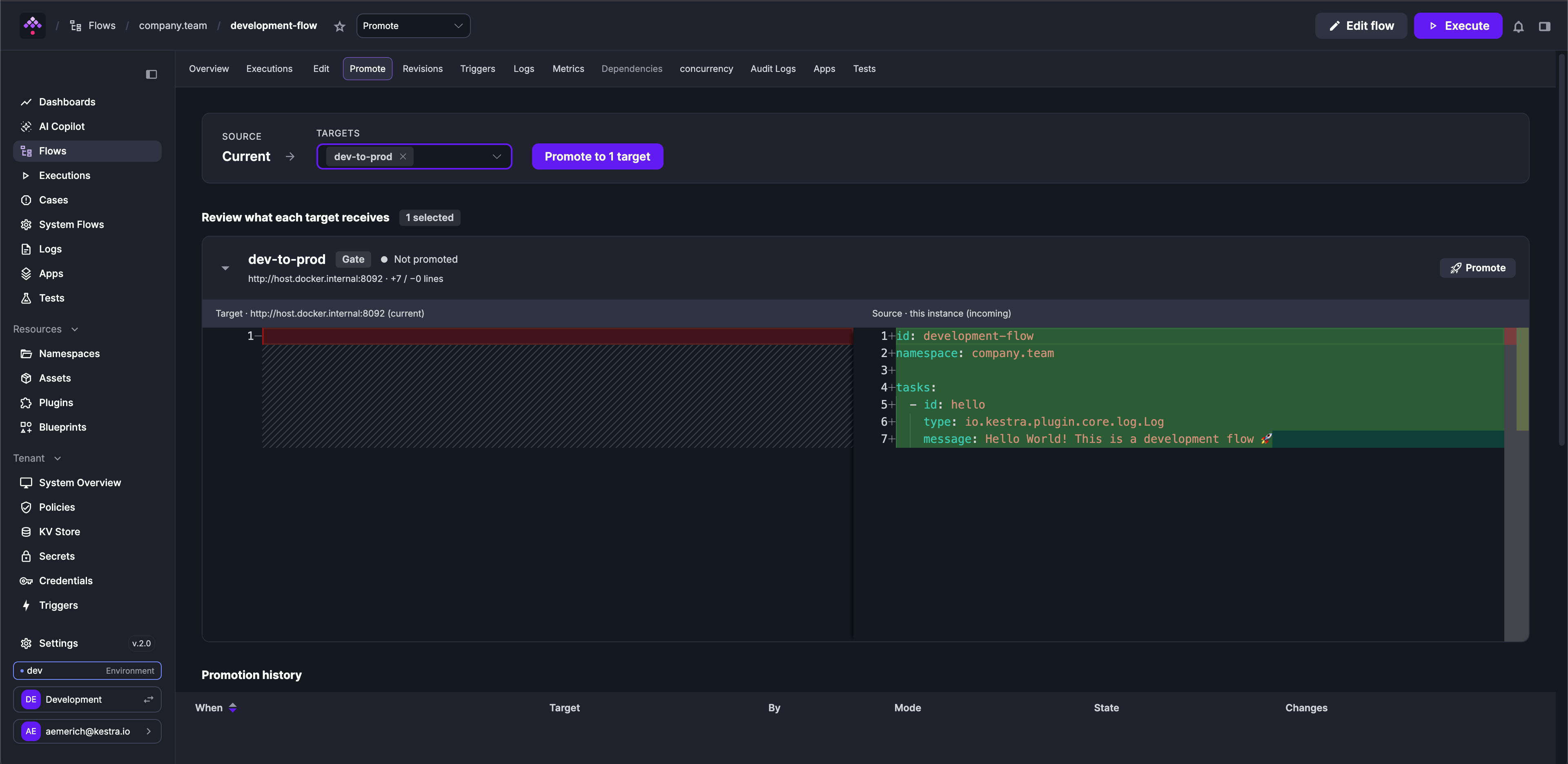
The Promote docs cover the confirmation process, drift detection, and promotion history.
Custom Blueprints can now be version-controlled with Git using two new EE tasks:
PushBlueprints commits and pushes blueprints from Kestra to a Git repository,SyncBlueprints pulls blueprints from Git into Kestra, treating Git as the single source of truth.The pattern mirrors the PushFlows/SyncFlows GitOps model. Platform teams can manage the approved blueprint library centrally, review changes via pull requests, and deploy consistently across multiple Kestra instances or environments.
This complements Templated Blueprints, which let platform teams author blueprints with Pebble-based form templates. Users fill a form; Kestra generates the flow YAML. Combined with version control, the governance loop closes: templates are authored in code, reviewed in Git, and distributed as a self-service library.
The Custom Blueprints docs have the Pebble template syntax and supported form field types.
kestractl, introduced in Kestra 1.3, gains full EE IAM management in 2.0. If you’re provisioning Kestra programmatically (onboarding teams, managing service accounts in CI/CD, or scripting role assignments) you no longer need the UI. Every IAM entity is now reachable from the CLI:
kestractl users: create, list, get, update, delete users; set passwordskestractl groups: manage groups and memberships (tenant-scoped)kestractl roles: create and bind roles; assign permissions via --permission TYPE:ACTION[,ACTION] or --permissions-filekestractl service-accounts: create and manage service accounts (instance-level)The --output json flag applies across all commands, so kestractl output can pipe directly into jq or other tooling in CI scripts.
kestractl contains more commands in the 2.0 cycle than fit in a release post; the kestractl reference has every command with flags and authentication configuration.
With workers now deployable across regions and clouds, you need a routing and access model to match. Worker Groups and Queues in 2.0 add tag-based task routing, per-group capacity allocation, and JWT authentication for worker connections.
Worker Groups now route tasks by tags instead of a single group name. Replace workerGroup.key with workerSelector.tags:
tasks: - id: gpu_inference type: io.kestra.plugin.scripts.python.Commands workerSelector: tags: - gpu - a100 match: ALL fallback: FAILA task is routed to the first available Worker Group that covers all required tags. match: ANY requires at least one match instead.
One important default changed: fallback now defaults to FAIL instead of WAIT. Tasks that previously waited silently for a matching worker will fail immediately after upgrading. Set fallback: WAIT explicitly on any task where the old behavior was intentional.
Beyond routing, each group subscription supports capacity reservation, which sets a thread pool floor dedicated to that queue, keeping reserved capacity from sitting idle and preventing high-volume flows from exhausting worker threads. For platform admins, a kestra.ee.setup block in application.yml lets you declare the full topology at startup without a manual provisioning step.
The Worker Groups docs have migration steps, the full workerGroup.key to workerSelector.tags mapping, and the kestra.ee.setup topology config reference.
Four new EE task runners arrived in this release cycle, each targeting workloads that cannot or should not run in a container: GPU training tied to a custom AMI, licensed software bound to a specific machine image, or workloads where direct VM control matters. Full docs are linked below and in the plugin catalog.
ForEach and ForEachItem are removed in 2.0. The Loop task replaces both.
The removal was driven by a stability problem. A ForEach task with a large input list could generate thousands of child task runs within a single flow execution, exhausting executor memory and affecting every other flow running on the instance at the same time. Loop runs each iteration as an isolated sub-execution. A runaway loop cannot destabilize the instance.
The expression syntax is also cleaner. Where ForEach and ForEachItem both used {{ taskrun.value }} (with {{ parent.taskrun.value }} for nested access), Loop uses:
| Old expression | New expression |
|---|---|
{{ taskrun.value }} | {{ item.value }} |
{{ taskrun.iteration }} | {{ item.index }} |
{{ parent.taskrun.value }} | {{ item.value }} (no prefix needed — item is accessible at any depth inside a loop) |
{{ parents[0].taskrun.value }} | {{ item.parent.value }} (inner loop of two nested loops) |
Outputs work differently too. ForEach had implicit output collection; Loop requires an explicit outputs: block on the Loop task itself, and the loopOutputs() function extracts a flat list of one field across all iterations:
id: process_filesnamespace: company.data
tasks:  - id: loop    type: io.kestra.plugin.core.flow.Loop    values: "{{ inputs.file_list }}"    fetchType: FETCH    outputs:      - id: result_path        type: STRING        value: "{{ outputs.transform.vars.result_path }}"    tasks:      - id: transform        type: io.kestra.plugin.scripts.python.Script        dependencies:          - kestra        script: |          from kestra import Kestra          input_path = "{{ item.value }}"          # process the file and return the output path          Kestra.outputs({"result_path": f"output/{input_path.split('/')[-1]}"})
- id: collect_results type: io.kestra.plugin.core.log.Log message: "{{ loopOutputs(outputs.loop.outputs, 'result_path') | join(', ') }}"The ForEach to Loop migration guide maps every ForEach and ForEachItem pattern to its Loop equivalent, including nested loops, subflow iteration, and output collection.
when ExpressionThe old conditions list required chaining specific condition types, each with its own syntax, nested inside each other for anything beyond a single check. The firing logic was spread across multiple blocks and hard to read at a glance. A when Pebble expression puts it all in one place, uses the same syntax authors already know from tasks, and keeps the trigger self-contained.
All triggers now accept a top-level when Pebble expression in place of the conditions list. Here’s the same schedule trigger written both ways:
The old model:
triggers: - id: weekly type: io.kestra.plugin.core.trigger.Schedule cron: "0 9 * * 1" conditions: - type: io.kestra.plugin.core.condition.DayWeek dayOfWeek: MONDAY - type: io.kestra.plugin.core.condition.NotCondition conditions: - type: io.kestra.plugin.core.condition.PublicHolidayCondition country: FRThe same logic in 2.0:
triggers: - id: weekly type: io.kestra.plugin.core.trigger.Schedule cron: "0 9 * * 1" when: "{{ isWeekend(trigger.date, 'Europe/Paris') == false and isPublicHoliday(trigger.date, 'FR') == false }}"New date and calendar helper functions ship alongside the redesign: isWeekend(), isPublicHoliday() (with country and subdivision), isDayWeekInMonth(), isLastWorkingDay(), dayOfWeek(), dayOfMonth(), monthOfYear(), and hourOfDay().
Flow triggers also change: preconditions is replaced by a dependsOn list with a window property for accumulation. The trigger conditions migration guide maps every condition class to its when equivalent.
The existing PurgeExecutions task deletes execution records and their associated files, but it is database-driven: it cannot clean files whose execution records are already gone. This becomes a problem in deployments where worker groups use isolated internal storage and files accumulate without any corresponding execution record to trigger a cleanup.
PurgeStorage takes the storage-driven approach instead. It walks the storage tree directly and deletes files based on last-modified date, regardless of whether a matching execution record exists. The task defaults to dryRun: true, so the first run only reports what would be deleted.
Running PurgeStorage on a specific worker group via workerSelector.tags targets that worker’s isolated storage directly.
The purge guide covers setup and the two-step orphan-file remediation pattern.
Execution logs are the highest-volume data Kestra writes. In most production installations they dwarf flows and executions combined, yet they share the same database. Schema migrations pay a per-row cost across every table including logs. Backup and retention schedules apply uniformly when the operational reality is that logs and executions have different lifecycles.
In 2.0 (EE), logs can be routed to a separate store using kestra.logs.type. Both JDBC (H2, PostgreSQL, MySQL) and Elasticsearch backends are supported. When configured, the main database handles only flows, executions, and state. Existing installations see no change on upgrade; historical logs written before the switch remain in the main database.
The External Log Data Store docs cover Elasticsearch config, aggregation and pagination behavior, and the plugin developer guide for custom backends.
Getting started with Kestra OSS used to mean pulling a large image that bundled every plugin, most of which you’d never use. The kestra/kestra:*-slim image flips that: pull a minimal image and let Kestra figure out what to install as you build.
Set KESTRA_PLUGINS_AUTO_INSTALL_ENABLED=true. When a flow references a plugin that isn’t installed, Kestra fetches it from Maven Central before the execution starts and caches it for subsequent runs. Plugin autocomplete in the editor stays current as plugins are added, so you don’t lose discoverability while keeping the initial pull fast. The quickstart uses this configuration by default.
Auto-install requires outbound access to Maven Central and pulls the current version of each plugin at install time. If your environment restricts outbound access or needs a fixed plugin set, install plugins explicitly with kestra plugins install.
The suffix was renamed from -no-plugins to -slim in 2.0. Update any Dockerfiles or compose files that reference the old tag.
Tag conventions are in the Docker installation guide; build patterns for pinned plugin sets are in the selected plugin installation guide.
Plugins can now ship Vue.js frontend components that load into the Kestra UI at runtime, without any changes to the core application. Three named slots let components render in the execution topology view, the task side drawer, or the task detail modal; when a plugin’s task types appear in an execution, the matching component renders in place.
Each component is compiled as a Module Federation micro-frontend using @kestra-io/artifact-sdk and bundled into the plugin JAR. At startup, Kestra discovers these bundles and makes them available to the host UI without static linking.
A concrete example: a task runner that breaks execution into distinct infrastructure phases (scheduling, image pull, file transfer, task code) can render a topology-details component showing per-phase timing directly in the execution view, so slow executions have an identifiable owner. Without a plugin artifact, that timing data lives in raw log output.
Plugin artifacts are available to all plugin authors in 2.0. The plugin artifact developer guide covers the SDK, slot registration, and bundling setup.
CANCEL or FAIL behavior, a limit, and an ISO-8601 duration. Quotas stack at flow, namespace, and tenant scope, evaluated most-specific-first. Where concurrency limits simultaneous runs, quotas limit creation rate.io.kestra.plugin.kestra.ee.locks.Acquire and release it with Release. While a lock is held, concurrent writes from other flows are rejected with a 423; reads stay open. User-initiated locks (via the asset detail page) block all flow writes and can be released from the UI by anyone with the UNLOCK permission.type: REUSABLE_INPUTS) and reference it across flows with a single line. Child inputs are accessible as {{ inputs.<refId>.<childId> }}. Namespace hierarchy inheritance and revision pinning are supported.read() on ION outputs and then do string operations need fromIon() wrapping. The migration guide covers affected tasks and patterns.{label, value} objects, so the UI can show a human-readable label while flows receive the underlying technical value. A subflow() Pebble function in expression: populates dropdown values from a subflow execution at form render time, for cases where kv() or http() aren’t enough. JSON inputs gain a jsonSchema property (JSON Schema Draft 2020-12) that validates at execution creation time, rejecting invalid payloads before any task runs.expectedState: flow unit tests can now assert that a test case ends in FAILED, WARNING, or KILLED. Testing intentional failure paths (validation guards using io.kestra.plugin.core.execution.Fail, SLA breaches, and so on) is now first-class.{{ trace.parent }} as the TRACEPARENT environment variable in script tasks to parent their OpenTelemetry spans under the Kestra task span. This closes a distributed tracing gap for teams running scripts inside Docker containers.mode: GROUP_SYNC_ONLY lets teams keep their existing SSO provider for login while using LDAP exclusively to resolve group memberships.guardrails attach input/output expressions that fail the task when violated, giving you deterministic filtering around a non-deterministic component. Prometheus metrics now cover tool calls, provider calls, and embedding store calls. New MCP client tasks let Agent tasks call external MCP servers as tools.GET /executions/search responses are significantly lighter, which directly improves execution list load time on large instances. Integrations that read taskRunList[*].outputs from the execution endpoint should switch to GET /outputs/{executionId}/{taskRunId}. See the execution API response migration guide.A systematic audit in the 2.0 cycle closed a range of issues covering secret encryption, password hashing, management endpoint exposure, and injection vectors. Several defaults moved from open to closed; review the migration guide before upgrading.
2.0 requires being on Kestra 1.3.x before upgrading. If you are on an earlier version, follow the 1.1 and 1.2 migration guides first.
For most flows, kestra-migrate handles the mechanical rewrites automatically:
kestra-migrate --check ./flows/ # scope the work, no changes writtenkestra-migrate -o v2-flows/ ./flows/ # rewrite into a new directoryForEach and pluginDefaults are flagged for manual review rather than automatically rewritten, as both require judgment about intended behavior. Everything else in the table has a dedicated migration guide in the v2.0.0 migration hub.
The breaking changes that require action:
| Change | What to update |
|---|---|
ForEach and ForEachItem removed | Migrate to Loop. Use item.value / item.index / loopOutputs(). |
Trigger conditions removed | Replace with when Pebble expression. Flow trigger uses dependsOn + window. |
workerGroup.key removed | Migrate to workerSelector.tags. Check the fallback default change (WAIT to FAIL). |
| RBAC CRUD model replaced | Existing roles migrate automatically. Review custom roles against the new action model. |
json() Pebble function removed | Replace with fromJson() (same signature). |
Namespace and global pluginDefaults removed | Replace with Policies (EE) or remove them (OSS). |
kestra.ee.execution-data.internal-storage removed (EE) | Remove these keys from your configuration. Task run outputs are now stored separately from the execution record in 2.0. |
| ION binary format | read() on ION outputs followed by string ops needs fromIon() wrapping. |
| Four core tasks removed | io.kestra.plugin.core.execution.Count, Resume, trigger.Toggle, and log.Fetch are removed. Replace with their equivalents in the plugin-kestra SDK. |
CANCELED enum alias removed | Replace the single-L spelling with CANCELLED in flow expressions, API consumers, and any tooling that checks execution state. |
| SDK auth required for internal tasks | Tasks that call the Kestra API internally (git sync tasks and others) now require explicit credentials. See the migration guide. |
| Super Admin renamed to Instance Owner | The Super Admin role is renamed to Instance Owner across the UI, CLI, config, and API. HTTP API responses emit instanceOwner instead of superAdmin; update any consumers that read this field. See the migration guide. |
| Dashboards moved to the Enterprise Edition | The SyncDashboards and PushDashboards tasks are removed from the Git plugin and will be available in the Git EE plugin. |
Terraform provider ~> 2.0 | permissions → resources/actions on kestra_role; plugin_defaults and worker_group removed from kestra_namespace; kestra_template removed. New resources: kestra_policy, kestra_worker_queue, kestra_worker_group. See the Terraform migration guide. |
2.0 is the foundation the next phase of Kestra is built on. It’s an LTS release, with bug and security fixes backported for one year. Anyone upgrading now won’t face another major migration in that window.
The Kestra 2.0 migration guide covers every breaking change with before/after examples. The quickstart and Docker Compose setup are updated for 2.0.
There’s more to come, so stay tuned for more 2.0 release content on the feed, and as always, find us on GitHub or Slack for questions, migration issues, feature requests, and sharing with the community what you’re orchestrating.

Stay up to date with the latest features and changes to Kestra