Write Flow Unit Tests with Mocks and Assertions
For the complete documentation index, see llms.txt. For a full content snapshot, see llms-full.txt. Append.mdto anykestra.io/docs/*URL for plain Markdown.
Available on:Enterprise EditionCloud
Unit tests verify that flows behave as expected without running every task or producing real side effects — for example, mocking a notification task to confirm the configuration is correct without sending dummy alerts, or isolating a single changed task without re-executing the whole flow.
Flow unit tests
Each test runs a single flow and checks its outcomes against your assertions, helping you avoid regressions when you change the flow later. Each test case creates a new transient execution, making it easy to run multiple tests in parallel, and each test case will not affect the others. Fixtures mock specific tasks or inputs by returning predefined outputs and states without executing the tasks.
Unit tests are configured for and connected to their respective flows. They are accessible through the Tests tab on the left-hand side panel of the Kestra UI or via the Tests tab of a flow. When creating tests, the YAML for both the test and its flow can be viewed side by side.
Once tests are created, they can all be viewed from the Tests tab with their respective Id, Namespace, Tested Flow, and current State listed. Additionally, tests can be run from this view with expandable results.
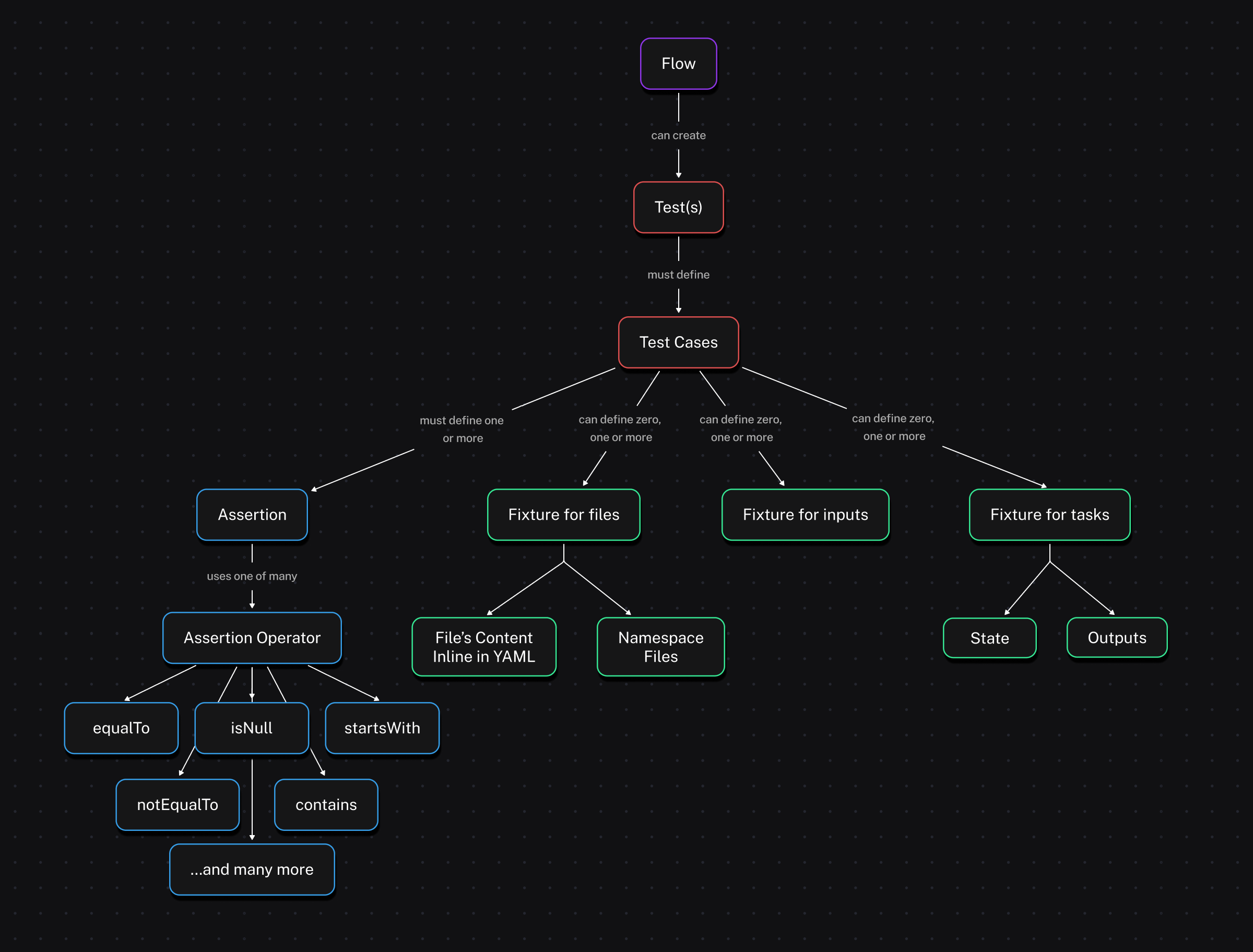
The following diagram illustrates the structure of flows and unit tests together in Kestra:
Configuration
Unit tests are written in YAML like flows. A test is made up of testCases, and each test case is made up of fixtures, assertions, and an optional expectedState. Fixtures can target files, inputs, tasks, or triggers depending on what you need to mock or override. Like flows, you can write unit tests as code, in No Code, or with the AI Copilot.
- A fixture refers to the setup required before a test runs, such as initializing objects or configuring environments, to ensure the test has a consistent starting state.
- An assertion is a statement that checks if a specific condition is true during the test. If the condition is false, the test fails, indicating an issue with the code being tested, while true indicates the expectation is met.
- expectedState sets the terminal state the flow must reach for the test to pass. It defaults to
SUCCESS; set it toFAILED,WARNING,KILLED, or any other valid state to test intentional failure paths. Note thatassertionsis required on every test case — a case with onlyexpectedStateand noassertionsis rejected.
Common fixture types:
- files: provide inline files or namespace file URIs the flow can read.
- inputs: set flow input values without changing the flow definition.
- tasks: skip or mock task execution, override outputs, or force a state.
- triggers: simulate an incoming event (e.g., webhook payload) that starts the flow.
Keep the following in mind when you write fixtures:
- A
FILEinput takes a namespace file URI, for examplemyfile: "nsfile:///data/in.txt", or an inline file fixture, for examplemyfile: "{{ files['in.txt'] }}". - Kestra renders expressions in
fixtures.inputsbefore it validates the inputs. If an expression fails to render, the test case reportsERRORwithInvalid fixture inputs: <reason>. - Nested inputs, such as
FORMinputs and reusable inputs, take a nested map infixtures.inputs, for examplead: {username: bob}. Dotted keys such asad.username: bobdon’t set the nested input. - A task fixture on a task inside a
Loopapplies to every iteration. Leavevalueunset: tasks inside aLoopiteration have no value, so a fixture withvaluenever matches them. - A trigger fixture acts as if the trigger fired, so Kestra doesn’t evaluate the trigger’s
whencondition. - Tasks inside a
WorkingDirectorytask can’t be mocked individually. Mock theWorkingDirectorytask as a whole.
Test suites, test cases, task fixtures, and assertions also accept these optional fields:
| Field | Set on | Description |
|---|---|---|
disabled | Test suite | Skips every test case in the suite. |
disabled | Test case | Skips the test case, which reports SKIPPED. |
assets | Task fixture | Output assets the mocked task reports on its task run. Test executions don’t add them to the asset inventory. |
description | Assertion | Text shown next to the assertion in the test results. |
errorMessage | Assertion | Replaces the default message when the assertion fails. |
taskId | Assertion | Labels the assertion with a task in the test results. It doesn’t change what the assertion checks. |
If you don’t specify any fixtures, the test runs the entire flow as in production. Every task you don’t mock runs for real, including the flow’s errors, finally, and afterExecution tasks, so a flow that sends an alert or opens a Case from them does so on every test run. Mock those tasks with a task fixture, as the following example does for the Slack message.
Test executions don’t start flows that use a Flow trigger on the tested flow. SLAs, concurrency limits, and flow, namespace, and tenant quotas apply as in a normal execution. A suite that runs often, for example in CI, can use up a quota and cause production executions to fail or be cancelled.
Test executions also follow the flow rules that apply to every execution:
- A test runs the latest published revision of the flow, never a draft revision. If the flow only has draft revisions, the test run fails with
Flow execution blocked: flow <flow> only has draft revisions. - If the flow is disabled, no task runs and every test case reports
SKIPPED. - The flow’s checks evaluate against the fixture inputs. A
BLOCK_EXECUTIONcheck that fails stops the test case before any task runs, and the test case reportsERRORwith the check message. A failedFAIL_EXECUTIONcheck creates the test execution in theFAILEDstate, which you can assert withexpectedState.
The following flow:
- sends a Slack message when it starts
- extracts data from an API
- transforms the returned data
- loads the transformed data into BigQuery
id: etl_daily_products_bigquerynamespace: company.team
tasks:  - id: send_slack_message_started    type: io.kestra.plugin.slack.notifications.SlackIncomingWebhook    url: "https://kestra.io/api/mock" # To use this example, replace the url with your own Slack webhook    payload: |      {        "text": "{{ flow.namespace }}.{{ flow.id }}: Daily products flow has started"      }
  - id: extract    type: io.kestra.plugin.core.http.Download    uri: https://huggingface.co/datasets/kestra/datasets/raw/main/json/orders.json
  - id: transform_to_products_name    type: io.kestra.plugin.core.output.OutputValues    values:      result: "{{ fromJson(read(outputs.extract.uri)) | jq('.Account.Order[].Product[].\"Product Name\"') }}"
  - id: transform_to_uppercase    type: io.kestra.plugin.core.output.OutputValues    values:      result: "{{ fromJson(outputs.transform_to_products_name.values.result) | upper }}"
- id: load type: io.kestra.plugin.gcp.bigquery.Load from: "{{ outputs.transform_to_uppercase.values.result }}" destinationTable: "my_project.my_dataset.my_table" format: JSONThis example test suite shows two common patterns: letting one transformation run normally while mocking side effects, and fully mocking an upstream task to isolate a downstream transformation.
id: etl_daily_products_bigquery_testsuitenamespace: company.teamflowId: etl_daily_products_bigquerytestCases: - id: extract_should_return_data type: io.kestra.core.tests.flow.UnitTest fixtures: tasks: - id: send_slack_message_started description: "don't send Slack message" - id: load description: "don't load data into BigQuery" assertions: - value: "{{ outputs.transform_to_uppercase.values.result }}" contains: "BOWLER HAT" - id: extract_should_transform_product_names_to_uppercase_mocked type: io.kestra.core.tests.flow.UnitTest fixtures: tasks: - id: send_slack_message_started description: "don't send Slack message" - id: load description: "don't load data into BigQuery" - id: extract description: "don't fetch data from API" - id: transform_to_products_name outputs: values: result: | [ "my-product-1" ] assertions: - value: "{{outputs.transform_to_uppercase.values.result}}" contains: "MY-PRODUCT-1"The id is unique to the test suite, and the namespace and flowId must match the intended flow. When you create a test from a flow, those values are filled in automatically. The testCases property contains the fixtures and assertions for each test case.
In the first test case, extract_should_return_data, the fixtures include tasks to replace the Slack alert and BigQuery data load so as to not clutter a Slack channel with test alert messages or a BigQuery table with test data but still test the overall design of the flow.
The assertions property defines the conditions for success or failure. In the example, the test checks that the output of the transform_to_uppercase task contains BOWLER HAT, an uppercased product name from the API response.
Because we wrote the test suite with two test cases, both execute during the run. For more isolation, you could separate test cases into multiple tests of the flow as needed. While we know from the first test that the uppercase transformation was successful, you may not want to extract actual data during testing, as it could add load to an external service or send unnecessary alerts. To mitigate this, the second test case extract_should_transform_product_names_to_uppercase_mocked mocks extract to prevent the API call and mocks transform_to_products_name to return my-product-1 in lowercase — then asserts that transform_to_uppercase produced MY-PRODUCT-1.
After running, both assertions pass with their actual and expected values visible in the expanded results:
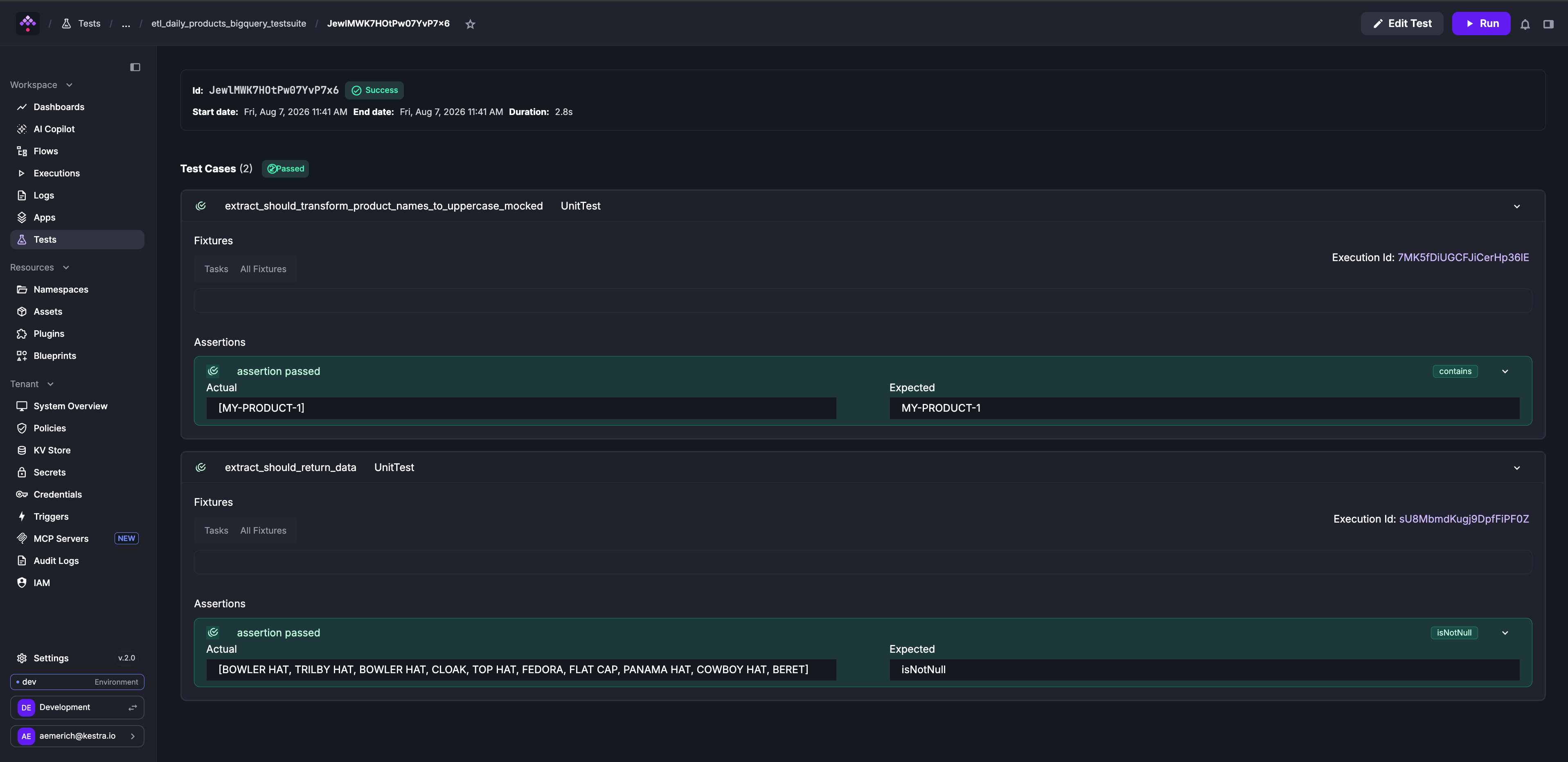
Execution details are not stored in the Executions page like normally run flows to avoid cluttering that space with unnecessary execution details. To view an execution made from a test, open the test case and click the ExecutionId link.
Unit test with a namespace file
You can also simulate flows with namespace files that contain scripts, test data, or any other file content. In the previous example, you can add a namespace file that contains sample data from the production API endpoint so you do not need to make any API calls during testing. This avoids extra cost and unnecessary calls to external services.
The following flow:
id: etl_download_filenamespace: company.team
tasks:  - id: extract    type: io.kestra.plugin.core.http.Download    uri: https://huggingface.co/datasets/kestra/datasets/raw/main/json/orders.json    method: GET
  - id: transform_to_products_name    type: io.kestra.plugin.core.output.OutputValues    values:      result: "{{ fromJson(read(outputs.extract.uri)) | jq('.Account.Order[].Product[].\"Product Name\"') }}"
  - id: transform_to_uppercase    type: io.kestra.plugin.core.output.OutputValues    values:      result: "{{ fromJson(outputs.transform_to_products_name.values.result) | upper }}"
  - id: load_result_to_outgoing_api    type: io.kestra.plugin.core.log.Log    message: "{{ outputs.transform_to_uppercase.this_task_should_not_be_run }}"
Then add a namespace file in the company.team namespace that mimics the API response format.
For example, add my-namespace-file-with-products.json to the company.team namespace:
{ "Account": { "Account Name": "Firefly", "Order": [ { "OrderID": "order103", "Product": [ { "Product Name": "Bowler Hat", "ProductID": 858383, "SKU": "0406654608", "Description": { "Colour": "Purple", "Width": 300, "Height": 200, "Depth": 210, "Weight": 0.75 }, "Price": 34.45, "Quantity": 2 }, { "Product Name": "Trilby hat", "ProductID": 858236, "SKU": "0406634348", "Description": { "Colour": "Orange", "Width": 300, "Height": 200, "Depth": 210, "Weight": 0.6 }, "Price": 21.67, "Quantity": 1 } ] } ] }}This test uses the namespace file as mocked task output so the transformation runs against sample data instead of making the API request:
id: etl_mockfile_from_nsnamespace: company.teamflowId: etl_download_filetestCases: - id: extract_should_transform_productNames_to_uppercase_with_mocked_file type: io.kestra.core.tests.flow.UnitTest fixtures: tasks: - id: extract description: "mock extract data file" outputs: uri: "{{ fileURI('my-namespace-file-with-products.json') }}" # this file is a namespace file in the same namespace - id: load_result_to_outgoing_api description: "don't send end output" assertions: - value: "{{outputs.transform_to_uppercase.values.result}}" equalTo: "[BOWLER HAT, TRILBY HAT]"With a combination of namespace files and tests, you can target specific components of your flow for correct functionality without using up any external resources or unnecessarily communicating with external hosts for scripts or files.
Inline file fixture
If you prefer not to use a namespace file for the file fixture in the test, write the file contents inline with the files property and reference the file with {{ files['<file_name>'] }}:
id: etl_mockfile_inlinenamespace: company.teamflowId: etl_download_filetestCases: - id: extract_should_transform_product_names_to_uppercase_with_inline_file type: io.kestra.core.tests.flow.UnitTest fixtures: files: products.json: | {"Account": {"Order": [{"Product": [{"Product Name": "Bowler Hat"}, {"Product Name": "Trilby hat"}]}]}} tasks: - id: extract description: "mock extract data file" outputs: # the inline file declared under fixtures.files uri: "{{ files['products.json'] }}" - id: load_result_to_outgoing_api description: "don't send end output" assertions: - value: "{{ outputs.transform_to_uppercase.values.result }}" equalTo: "[BOWLER HAT, TRILBY HAT]"An inline file can also feed a FILE input. The following flow logs the content of an uploaded file:
id: log_uploaded_filenamespace: company.team
inputs:  - id: orders    type: FILE
tasks:  - id: log_orders    type: io.kestra.plugin.core.log.Log    message: "{{ read(inputs.orders) }}"
The test passes the inline file to the orders input, so you don’t need a namespace file for each test case:
id: log_uploaded_file_testsnamespace: company.teamflowId: log_uploaded_filetestCases: - id: orders_input_should_come_from_inline_file type: io.kestra.core.tests.flow.UnitTest fixtures: files: orders.csv: | order_id,quantity 103,2 inputs: orders: "{{ files['orders.csv'] }}" assertions: - value: "{{ read(inputs.orders) }}" contains: "103,2"Trigger fixture example
When your flow is kicked off by a trigger, you can mock the trigger payload directly in the test so you don’t have to hit the real endpoint. The example below stubs a webhook trigger carrying an order event and asserts the flow formats the message correctly.
Example flow:
id: return-flow-webhooknamespace: io.kestra.tests
triggers:  - id: webhook    type: io.kestra.plugin.core.trigger.Webhook    key: webhook
tasks:  - id: return_summary    type: io.kestra.plugin.core.output.OutputValues    values:      body: "{{ trigger.body }}"
Example unit test:
id: simple-webhook-test-suite-1-idnamespace: io.kestra.testsdescription: assert flow is returning the input value as outputflowId: return-flow-webhooktestCases: - id: test_case_1 type: io.kestra.core.tests.flow.UnitTest fixtures: trigger: id: webhook type: io.kestra.plugin.core.trigger.Webhook variables: body: webhook assertions: - value: "{{ trigger.body }}" equalTo: "webhook"What this test does: it mocks the webhook trigger payload (body: webhook), skips any real HTTP call, runs the flow once, and asserts that the flow receives the mocked payload via trigger.body. Because fixtures create a transient execution, the test is fast, isolated, and leaves no execution history clutter.
Mock task output files
When testing flows that include script tasks (such as Shell, Python, or other scripts) that generate output files, you can mock these output files in your test fixtures. This is particularly useful when:
- You want to test downstream tasks that parse or process output files without running the actual script
- The script is expensive or time-consuming to execute
- You want to test specific edge cases by providing controlled output file content
For example, consider a flow where a shell script generates an output file that is later processed by another task:
id: shell_outputnamespace: company.team
tasks:  - id: generate_output_file    type: io.kestra.plugin.scripts.shell.Script    taskRunner:      type: io.kestra.plugin.core.runner.Process    outputFiles:      - out.txt    script: |      echo "Processing data..." > out.txt      echo "Result: SUCCESS" >> out.txt
  - id: parse_output    type: io.kestra.plugin.core.log.Log    message: "Output file content: {{ read(outputs.generate_output_file.outputFiles['out.txt']) }}"
You can create a unit test that mocks the output file content without executing the shell script:
id: test_shell_outputflowId: shell_outputnamespace: company.teamtestCases: - id: mock_shell_output type: io.kestra.core.tests.flow.UnitTest description: Mock shell script output file to test downstream processing fixtures: files: mocked_output.txt: | Processing data... Result: SUCCESS tasks: - id: generate_output_file state: SUCCESS description: "don't run the shell script, mock its output" outputs: outputFiles: out.txt: "{{files['mocked_output.txt']}}" assertions: - value: "{{ read(outputs.generate_output_file.outputFiles['out.txt']) }}" contains: "Result: SUCCESS"In this example:
- The
filesproperty defines inline file content (mocked_output.txt) that will be used as the mocked output - The task fixture for
generate_output_filespecifiesstate: SUCCESSto mark the task as successful without execution - The
outputs.outputFilesproperty maps the expected output file name (out.txt) to the mocked file content using thefilesreference - Downstream tasks can read the mocked output file as if the script had actually run
- The assertion reads the mocked file and checks that it contains
Result: SUCCESS
This approach allows you to test the complete flow logic while avoiding the overhead and complexity of executing actual scripts during testing.
Assert expected failure state
Some flows are designed to fail when conditions are not met — for example, a validation guard that uses io.kestra.plugin.core.execution.Fail to reject invalid inputs. The expectedState property on a test case lets you assert that a flow ends in a specific terminal state. It defaults to SUCCESS; set it to FAILED, WARNING, KILLED, or any other valid state.
The following flow fails when the supplied quantity is not positive:
id: order_validationnamespace: company.team
inputs:  - id: quantity    type: INT
tasks:  - id: validate_quantity    type: io.kestra.plugin.core.execution.Fail    condition: "{{ inputs.quantity <= 0 }}"    errorMessage: "Order quantity must be greater than zero"
The test asserts that passing a negative value causes the expected failure:
id: order_validation_testsnamespace: company.teamflowId: order_validationtestCases: - id: invalid_quantity_should_fail type: io.kestra.core.tests.flow.UnitTest expectedState: FAILED fixtures: inputs: quantity: -1 assertions: - value: "{{ inputs.quantity }}" lessThan: 1When expectedState is set, the test passes only if the execution ends in exactly that state. If it ends in a different state, the test case reports ERROR with both the expected and actual states.
The same assertion works for a flow check with behavior: FAIL_EXECUTION: when the fixture inputs fail the check, Kestra creates the test execution in the FAILED state. A failed BLOCK_EXECUTION check creates no execution, so the test case reports ERROR whatever expectedState you set.
Assert that a task ran
To check whether a task ran, use the tasksWithState() function. It lists the tasks that ended in a given state, including tasks without outputs such as a Log task. A task that never ran doesn’t appear in any list.
The following flow logs a message in after and has an errors handler, on_error:
id: task_ran_demonamespace: company.team
tasks:  - id: before    type: io.kestra.plugin.core.log.Log    message: Starting
  - id: after    type: io.kestra.plugin.core.log.Log    message: Done
errors:  - id: on_error    type: io.kestra.plugin.core.log.Log    message: Something failed
The test asserts that after ran, that on_error didn’t, and that the execution succeeded:
id: task_ran_demo_testsnamespace: company.teamflowId: task_ran_demotestCases: - id: after_runs_and_errors_handler_does_not type: io.kestra.core.tests.flow.UnitTest assertions: # the task after ended in SUCCESS - value: "{{ tasksWithState('SUCCESS') | jq('[.[] | select(.taskId == \"after\")] | length') | first }}" equalTo: 1 # the errors handler did not run - value: "{{ tasksWithState('SUCCESS') | jq('[.[] | select(.taskId == \"on_error\")] | length') | first }}" equalTo: 0 # the state of the whole execution - value: "{{ execution.state }}" equalTo: SUCCESSUse the jq filter to match the task ID exactly. A contains: after assertion on the list of task IDs also matches a task called after_load.
Available assertion operators
While the above examples use contains and equalTo as assertion operators, there are many more that can be used when designing unit tests for your flows. The complete list is as follows:
| Operator | Description of the assertion operator |
|---|---|
| isNotNull | Asserts the value is not null, e.g. isNotNull: true |
| isNull | Asserts the value is null, e.g. isNull: true |
| equalTo | Asserts the value is equal to the expected value, e.g. equalTo: 200 |
| notEqualTo | Asserts the value is not equal to the specified value, e.g. notEqualTo: 200 |
| endsWith | Asserts the value ends with the specified suffix, e.g. endsWith: .json |
| startsWith | Asserts the value starts with the specified prefix, e.g. startsWith: prod- |
| contains | Asserts the value contains the specified substring, e.g. contains: success |
| greaterThan | Asserts the value is greater than the specified value, e.g. greaterThan: 10 |
| greaterThanOrEqualTo | Asserts the value is greater than or equal to the specified value, e.g. greaterThanOrEqualTo: 5 |
| lessThan | Asserts the value is less than the specified value, e.g. lessThan: 100 |
| lessThanOrEqualTo | Asserts the value is less than or equal to the specified value, e.g. lessThanOrEqualTo: 20 |
| in | Asserts the value is in the specified list of values, e.g. in: ["200", "201", "202"] |
| notIn | Asserts the value is not in the specified list of values, e.g. notIn: ["404", "500"] |
The value expression always renders as a string, so keep these behaviors in mind:
- The rendered value is never null, so
isNull: truenever passes on an expression. A null value renders as an empty string, and a value that doesn’t exist fails the assertion with an evaluation error. To check that a value is missing, use Pebble’sis definedtest withequalTo:
assertions: - value: "{{ outputs.my_task.values.optional is defined }}" equalTo: falseAssert on execution outputs
Rather than assert with an operator and a fixed value, you can use execution outputs in your tests. To assert on execution outputs, use the {{ execution.outputs.your_output_id }} syntax in your test assertions. This allows you to verify that task outputs match the expected values.
The following example assumes there is a flow that outputs a value:
id: flow_outputs_demonamespace: demotasks: - id: mytask type: io.kestra.plugin.core.output.OutputValues values: myvalue: kestraoutputs: - id: myvalue type: STRING value: "{{ outputs.mytask.values.myvalue }}"Then, create a unit test for this flow that asserts the output value as follows:
id: test_flow_outputs_demoflowId: flow_outputs_demonamespace: demotestCases: - id: flow_output type: io.kestra.core.tests.flow.UnitTest assertions: - value: "{{ execution.outputs.myvalue }}" equalTo: kestraWhen you run this test, Kestra will execute the flow and verify that the output value matches the expected value. If the assertion fails, the test will be marked as failed, and you can inspect the execution logs to see what went wrong.
Was this page helpful?