Add Markdown Descriptions to Flows, Tasks, and Triggers
For the complete documentation index, see llms.txt. For a full content snapshot, see llms-full.txt. Append.mdto anykestra.io/docs/*URL for plain Markdown.
The description property accepts Markdown and is available on flows, inputs, outputs, tasks, and triggers. Descriptions are rendered in the UI wherever the component appears.
Flow descriptions support full Markdown: headings, lists, bold, code spans, and more:
id: data-engineering-pipeline-demonamespace: tutorialdescription: |  # Data Engineering Pipelines for Product Inventory
  This flow demonstrates a complete data engineering pipeline, from data extraction to transformation and analysis, using Kestra.
  ## Flow Overview:  1.  **Extract**: Downloads product data from a public API.  2.  **Transform**: Processes the raw data using a Python script, filtering for specified columns and creating a clean JSON output.  3.  **Query**: Loads the transformed data into a DuckDB instance and performs an aggregation to calculate the average price per brand.
  ## Inputs:  -   `columns_to_keep`: An array of strings specifying which columns from the raw data should be retained during the transformation step. Defaults to `["brand", "price"]`.
  ## Tasks Breakdown:
  ### 1. `extract` (HTTP Download)  -   **Type**: `io.kestra.plugin.core.http.Download`  -   **Purpose**: Fetches product data from `https://dummyjson.com/products`.  -   **Output**: The raw JSON data is stored in Kestra's internal storage, and its URI is made available for subsequent tasks.
  ### 2. `transform` (Python Script)  -   **Type**: `io.kestra.plugin.scripts.python.Script`  -   **Purpose**: Transforms the extracted product data.  -   **Container Image**: `python:3.11-alpine` is used for a lightweight execution environment.  -   **Input**: Takes the URI of the downloaded `data.json` from the `extract` task.  -   **Logic**:      -   Reads the `data.json` file.      -   Filters the product list to keep only the columns specified in the `columns_to_keep` input.      -   Generates a new JSON file named `products.json` with the filtered data.  -   **Output**: The `products.json` file is uploaded to Kestra's internal storage.
  ### 3. `query` (DuckDB Queries)  -   **Type**: `io.kestra.plugin.jdbc.duckdb.Queries`  -   **Purpose**: Analyzes the transformed product data using DuckDB.  -   **Input**: Uses the `products.json` file generated by the `transform` task.  -   **SQL Queries**:      -   `INSTALL json; LOAD json;`: Installs and loads the JSON extension for DuckDB to handle JSON files.      -   `SELECT brand, round(avg(price), 2) as avg_price FROM read_json_auto('{{ workingDir }}/products.json') GROUP BY brand ORDER BY avg_price DESC;`: Reads the `products.json` file, calculates the average price for each brand, and orders the results by average price in descending order.  -   **Fetch Type**: `STORE` ensures that the results of the SQL query are stored as an output file in Kestra's internal storage, making them accessible for further use or inspection.
inputs:  - id: columns_to_keep    type: ARRAY    itemType: STRING    defaults:      - brand      - price
tasks:  - id: extract    type: io.kestra.plugin.core.http.Download    uri: https://dummyjson.com/products
  - id: transform    type: io.kestra.plugin.scripts.python.Script    taskRunner:      type: io.kestra.plugin.scripts.runner.docker.Docker    containerImage: python:3.11-alpine    inputFiles:      data.json: "{{ outputs.extract.uri }}"    script: |      import json
      columns_to_keep = {{ inputs.columns_to_keep | toJson }}
      with open("data.json") as f:          data = json.load(f)
      products = [          {col: p[col] for col in columns_to_keep if col in p}          for p in data["products"]      ]
      with open("products.json", "w") as f:          json.dump(products, f)    outputFiles:      - products.json
  - id: query    type: io.kestra.plugin.jdbc.duckdb.Query    inputFiles:      products.json: "{{ outputs.transform.outputFiles['products.json'] }}"    sql: |      INSTALL json;      LOAD json;      SELECT brand, round(avg(price), 2) AS avg_price      FROM read_json_auto('products.json')      GROUP BY brand      ORDER BY avg_price DESC;    store: true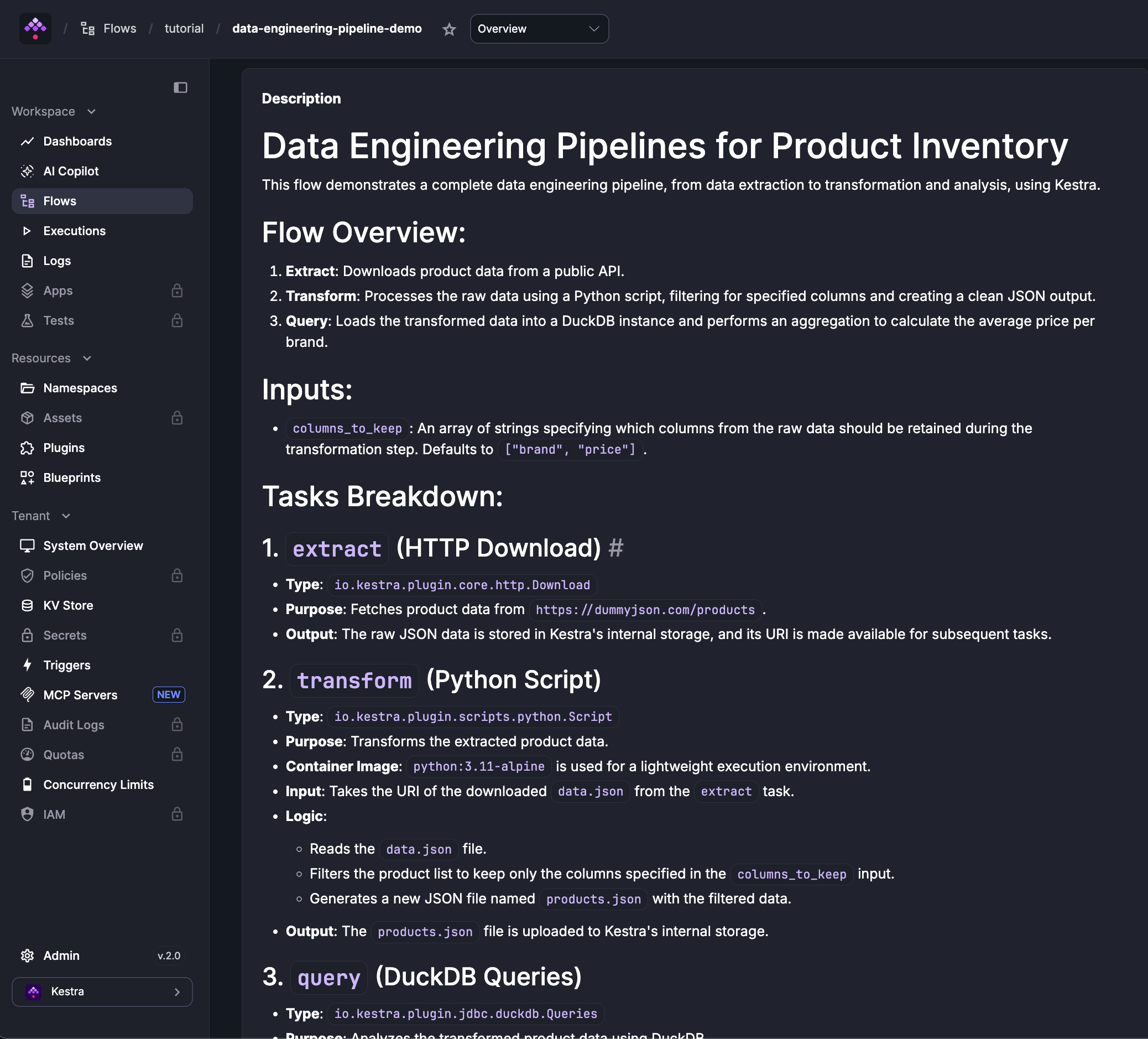
The description property works on all supported components in the same flow:
id: myflownamespace: company.teamdescription: |  This is the **Flow Description**.  You can look at `input description`, `task description`, `output description` and `trigger description` as well in this example.
labels:  env: dev  project: myproject
inputs:  - id: payload    type: JSON    description: JSON request payload to the API # Input description example    defaults: |      [{"name": "kestra", "rating": "best in class"}]
tasks:  - id: send_data    type: io.kestra.plugin.core.http.Request    description: Sends a POST API request to https://kestra.io/api/mock # Task description example    uri: https://kestra.io/api/mock    method: POST    contentType: application/json    body: "{{ inputs.payload }}"
  - id: print_status    type: io.kestra.plugin.core.debug.Return    description: Prints the API request date # Task description example    format: hello on {{ outputs.send_data.headers.date | first }}
outputs:  - id: final    type: STRING    description: Final flow output derived from the task result    value: "{{ outputs.print_status.value }}"
triggers: - id: daily type: io.kestra.plugin.core.trigger.Schedule description: Triggers the flow every day at 09:00 AM # Trigger description example cron: "0 9 * * *"Was this page helpful?