Run Actions After Flow Completion with afterExecution
For the complete documentation index, see llms.txt. For a full content snapshot, see llms-full.txt. Append.mdto anykestra.io/docs/*URL for plain Markdown.
afterExecution tasks run once a flow reaches a terminal state, giving you access to the final execution status for notifications, reporting, or conditional follow-up actions.
Use afterExecution with runIf to branch on the final execution state:
id: alerts_demonamespace: company.team
tasks:  - id: fail    type: io.kestra.plugin.core.execution.Fail
afterExecution:  - id: onSuccess    runIf: "{{ execution.state == 'SUCCESS' }}"    type: io.kestra.plugin.slack.notifications.SlackIncomingWebhook    url: https://hooks.slack.com/services/xxxxx    messageText: "{{ flow.namespace }}.{{ flow.id }} finished successfully!"
  - id: onFailure    runIf: "{{ execution.state == 'FAILED' }}"    type: io.kestra.plugin.slack.notifications.SlackIncomingWebhook    url: https://hooks.slack.com/services/xxxxx    messageText: "Oh no, {{ flow.namespace }}.{{ flow.id }} failed!!!"
afterExecution vs errors
Both run near the end of a flow, but at different moments and for different purposes:
afterExecution | errors | |
|---|---|---|
| When it runs | After the execution reaches a terminal state | When a task or flow errors |
| State visibility | Sees the final execution state (SUCCESS, FAILED, etc.) | Sees RUNNING — the execution hasn’t settled yet |
| Scope | Flow level only | Flow level or local to a flowable task |
Use afterExecution when you need to branch on the final status — one message for SUCCESS, another for FAILED, a third for WARNING. Use errors when you only need failure handling or local error handling inside a specific flowable task. See the errors documentation for details.
Errors inside an afterExecution block do not change the final execution state. A failing afterExecution task will not flip the execution from SUCCESS to FAILED, and will not trigger flows that listen for FAILED executions. To force a state change, use a Sequential task with its own errors block:
afterExecution: - id: t2 type: io.kestra.plugin.core.flow.Sequential tasks: - id: t2-t1 type: io.kestra.plugin.core.flow.Sleep duration: "PT5S" - id: t2-t2 type: io.kestra.plugin.core.execution.Fail errors: - id: sendAlert type: io.kestra.plugin.slack.notifications.SlackIncomingWebhook url: https://hooks.slack.com/services/xxxxx messageText: "Flow {{ flow.namespace }}.{{ flow.id }} with execution ID {{ execution.id }} failed."afterExecution vs finally
finally runs while the execution is still RUNNING — it cannot see the terminal state. afterExecution runs after the execution settles, so it sees SUCCESS, FAILED, or WARNING. Use finally for cleanup that must always happen; use afterExecution when follow-up logic depends on the outcome.
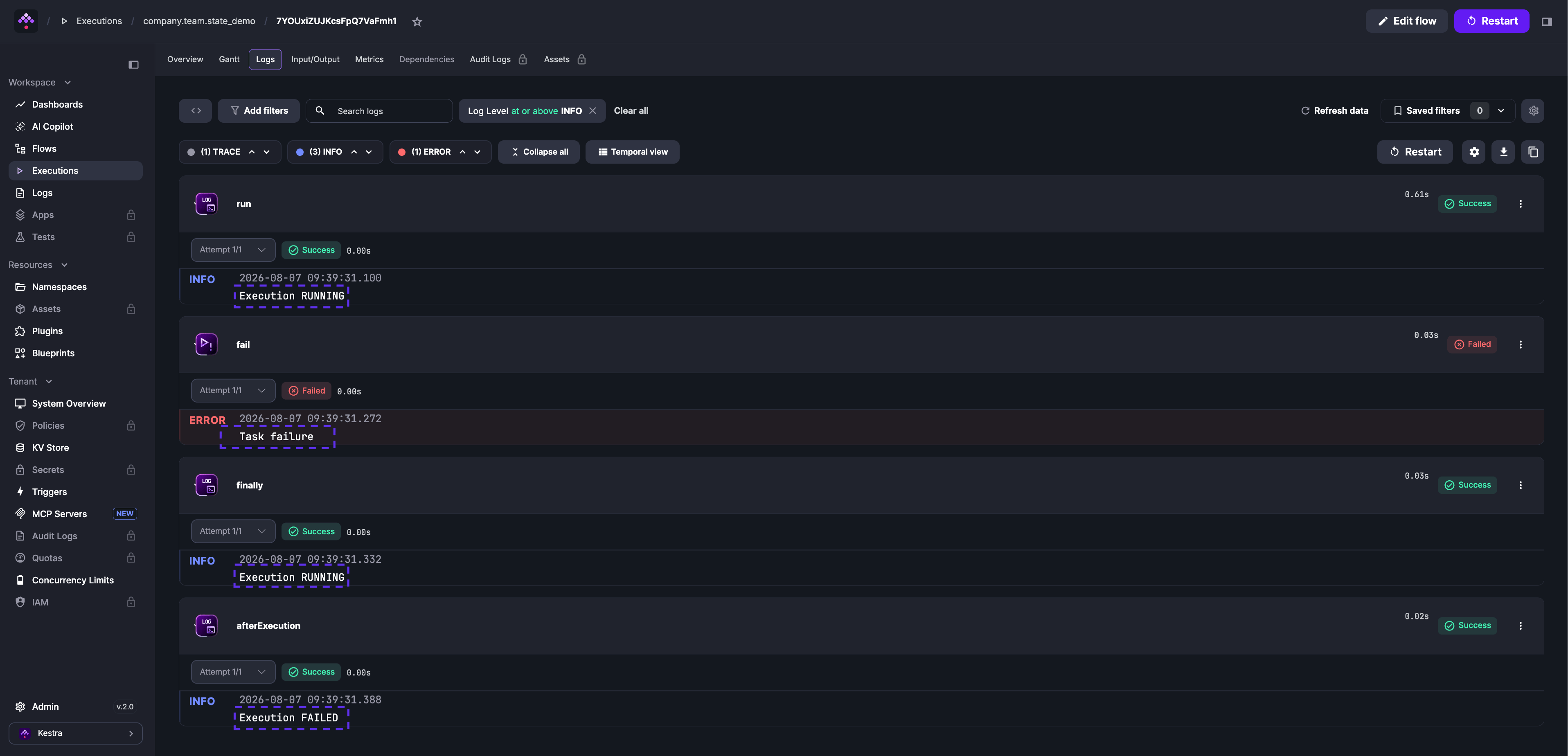
The following flow demonstrates the difference:
id: state_demonamespace: company.team
tasks:  - id: run    type: io.kestra.plugin.core.log.Log    message: Execution {{ execution.state }} # Will show RUNNING
  - id: fail    type: io.kestra.plugin.core.execution.Fail
finally:  - id: finally    type: io.kestra.plugin.core.log.Log    message: Execution {{ execution.state }} # Will show RUNNING
afterExecution:  - id: afterExecution    type: io.kestra.plugin.core.log.Log    message: Execution {{ execution.state }} # Will show FAILED
The finally task logs Execution RUNNING because it runs before the execution reaches its terminal state. The afterExecution task logs Execution FAILED because it runs after. See the finally documentation for more on cleanup patterns.
Was this page helpful?