Pipedream Alternatives After the Workflows Shutdown: What Moves, What to Save, and How to Migrate
Pipedream Workflows shuts down on March 31, 2027 and its data is deleted on April 30. What the export contains, what you must save first, how the alternatives compare, and a four-stage plan to move your workflows to Kestra in time.
Pipedream Workflows, the serverless product for connecting APIs with triggers, code steps and pre-built actions, is being retired. Pipedream was acquired by Workday, and Workflows is now in maintenance mode: no new signups, no new features, and a hard stop on March 31, 2027. A month later, on April 30, 2027, all Workflows data is permanently deleted, including the credentials and OAuth tokens of every connected account.
That changes the usual “Pipedream alternatives” question. It is no longer whether to move, but where to, and how to get every workflow, secret and webhook across before the data is gone. This page covers what the shutdown removes, what the export does and does not give you, how the alternatives compare for the workflows teams actually built on Pipedream, and a four-stage plan that finishes before the deadline.
TL;DR: Pipedream Workflows stops on March 31, 2027 and deletes all data, credentials included, on April 30. The export gives you workflow structure as JSON, not secrets, env vars, data stores or OAuth connections, so save those first. Kestra runs the same triggers and code steps as declarative YAML and adds native loops, retries, Git and observability. Kestra Cloud keeps the hosted model you had on Pipedream; if you prefer to self-host, Kestra Open Source (Apache 2.0) and Enterprise run the same flows on your own infrastructure. If you have already decided to move, go straight to the Pipedream migration guide: export, concept mapping, a worked conversion and the cutover plan.
The shutdown timeline
| Date | What happens | What to have done by then |
|---|---|---|
| Now | Workflows is in maintenance mode: no new signups or subscriptions, no new features. Existing workflows keep running. | Export every project and save what the export leaves out. |
| March 31, 2027 | Pipedream Workflows and String shut down. Subscriptions are cancelled with a prorated refund. Every *.m.pipedream.net endpoint stops working. | Every workflow you still need runs on the new platform, and every webhook sender points at it. |
| April 30, 2027 | All Workflows data is permanently deleted, including credentials and OAuth tokens. | Nothing left that only exists in Pipedream: no data store contents, no files, no logs you need for audits. |
| After | Pipedream Connect, its API, MCP servers and API proxy, continues. | If you use Connect for AI agents, that part can stay. |
The dates come from Pipedream’s own shutdown notice. Monthly subscribers can cancel early in account settings; annual subscribers contact Pipedream support for an early, prorated cancellation.
Moving off Pipedream Workflows before March 31?
What the export gives you, and what it leaves behind
Pipedream ships an export tool for the migration. In each project, open Settings and click Export Workflows. Pipedream writes project_export-<project_id>.zip to the project’s File Store, which means you need a plan that includes File Stores. The archive holds a manifest.json with a status and warnings for every workflow, plus one JSON file per workflow with its latest deployed version. One export covers up to 500 workflows or 256 MB; larger projects have to be split first. The export documentation has the details.
The export is structure, not state. Plan for everything in the second half of this table before you need it.
| Item | In the export? | What to do before April 30, 2027 |
|---|---|---|
| Workflow name, description, active flag, settings | Yes | Nothing; map settings to task timeouts, retries and concurrency. |
| Triggers (HTTP, schedule, form) | Yes, configuration in full | List every external sender of each HTTP trigger; you will repoint them. |
| Code steps | Yes, the code | Keep it; it moves into a script task in the same language. |
| Pre-built actions | Component key, version and configured props | Note which app and operation each one calls; it becomes a plugin task or an HTTP request. |
| Branches (if/else, switch) | Yes, steps inside each path | Nothing; they become If and Switch tasks. |
| Secret props, HTTP auth, system props | No, replaced with <redacted> | Collect the real values from their owners and store them as secrets. |
| Connected accounts, OAuth tokens | No, only an authProvisionId | List each app and account; reconnect them on the new platform. |
| Environment variables | No | Copy names and values out of Pipedream now. |
| Data store contents | No | Dump each data store you still need to a file. |
| File Store files, event history | No | Download what you need for operations or audits. |
| Private multi-file components | Key only, not the source | Keep your own copy of the source code. |
The manifest’s warnings name every step and prop you will have to re-enter or reconnect, so it doubles as the checklist for the “save it first” pass. The export checklist in the migration guide lists where to get each missing piece and where it goes in Kestra.
What moves, and what stays put
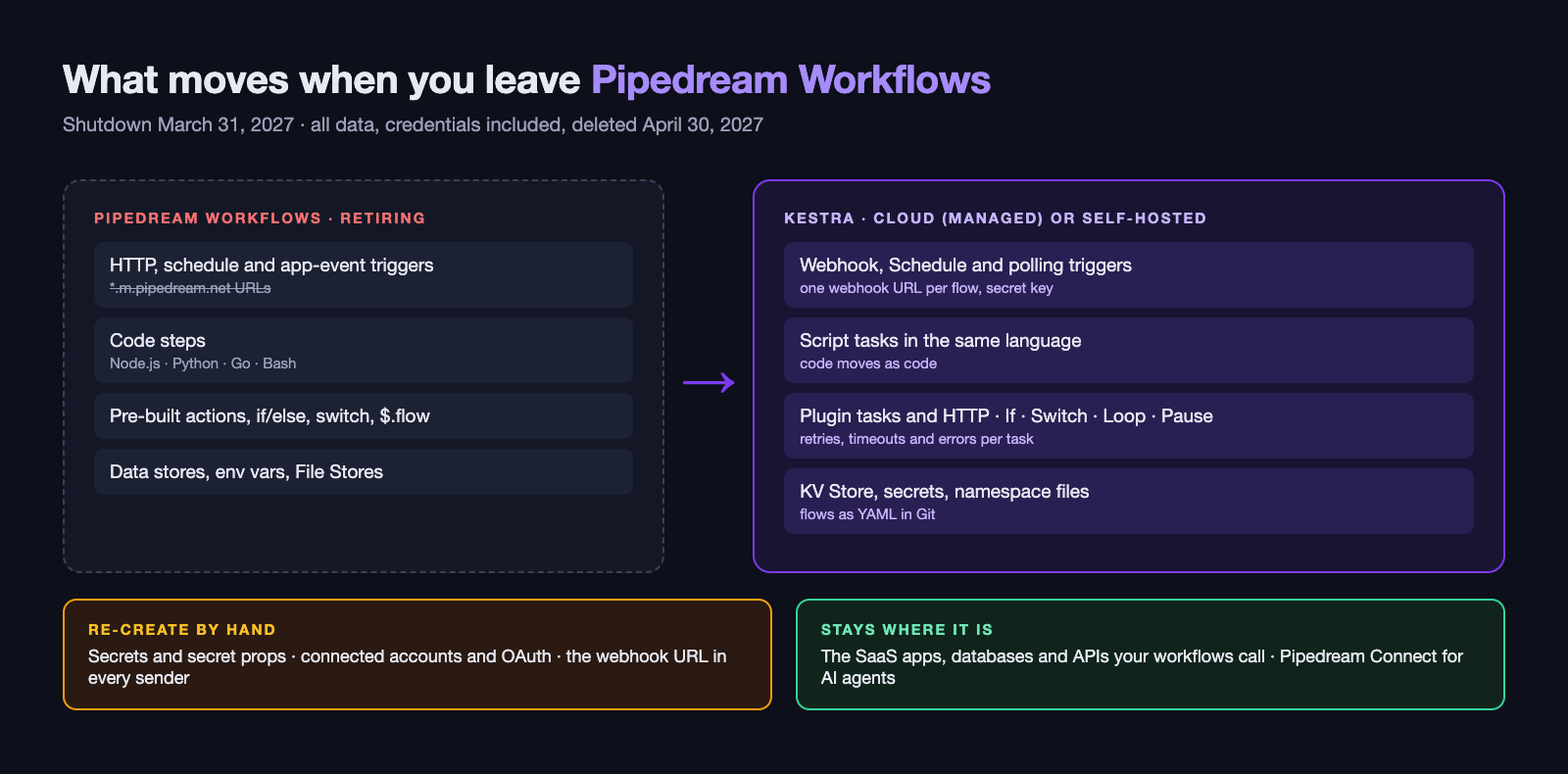
Leaving Pipedream Workflows replaces the engine, not the systems around it. Slack, Google Sheets, your ERP, your database and every API your workflows called keep running; the new orchestrator calls them. A practical way to scope the move is to give each part of the estate a verdict: replace (the new orchestrator takes it over), re-create (it has to be entered again by hand), keep (it stays and gets called) or retire (nothing replaces it).
| Part of the estate | In Pipedream | Verdict | Where it ends up in Kestra |
|---|---|---|---|
| Triggers | HTTP, schedule, email and app-event sources | Replace | Webhook, Schedule, polling and event triggers |
| Logic | Code steps, actions, if/else, switch, $.flow calls | Replace | Script tasks, plugin tasks, If, Switch, Loop, Pause |
| State | Data stores, environment variables, File Stores | Replace | KV Store, secrets, namespace files and internal storage |
| Access | Connected accounts, secret props, HTTP auth | Re-create | Secrets, plugin connections, your secrets manager |
| Endpoints | *.m.pipedream.net URLs registered in other systems | Re-create | One webhook URL per flow; every sender repointed |
| Targets | The SaaS apps, databases and APIs you call | Keep | Called from flows, unchanged |
| AI agent tools | Pipedream Connect, MCP servers | Keep, or move | Connect continues; Kestra’s MCP server exposes flows as tools |
| Dead weight | Workflows nobody runs, copies per team | Retire | Not migrated |
Pipedream concepts in Kestra
Every Pipedream construct has a Kestra equivalent, most of them in the open-source edition. The complete Pipedream-to-Kestra mapping in the migration guide covers every construct, from $.flow.exit() to per-workflow memory settings.
| Pipedream | Kestra equivalent | Edition |
|---|---|---|
| Workflow | Flow (YAML) | Open source |
| Project | Namespace | Open source |
HTTP trigger, $.respond() | Webhook trigger, with wait and returnOutputs for a synchronous reply | Open source |
| Schedule trigger | Schedule trigger, with backfills | Open source |
| App event source | Polling or event trigger from the matching plugin, or a webhook | Open source |
| Code step (Node.js, Python, Go, Bash) | Script task in the same language, such as Go | Open source |
| Pre-built action | Plugin task, or an HTTP request for APIs without a plugin | Open source |
steps.<name>.$return_value | {{ outputs.<task>... }}, with large data stored once and passed by reference | Open source |
| If/else, switch | If, Switch | Open source |
| Loops written inside a code step | Loop, LoopUntil, Parallel, subflows | Open source |
$.flow.delay, $.flow.rerun | Sleep, WaitFor, Pause with a form for approvals | Open source |
$.flow.exit | Exit task or runIf on a task | Open source |
| Data store | KV Store | Open source |
| Environment variable, secret prop | Secret; external secrets managers in Enterprise | Open source / Enterprise |
File Store, /tmp | Namespace files and internal storage | Open source |
| Memory and timeout settings | Task timeout, task runner sizing | Open source |
| Concurrency and throttling | Flow concurrency with queue, cancel or fail | Open source |
| Error notifications | errors block, failure triggers, log exporters | Open source |
| Workflow versions, GitHub sync | Git sync and CI/CD | Open source |
| Testing a step in the builder | Test runs with inputs, replay from a failed task, unit tests | Open source / Enterprise |
| Shared workspace | Tenants, RBAC, SSO, audit logs | Enterprise |
What gets better on the way over
A forced migration is also the moment to stop living with the workarounds. Six come up in nearly every Pipedream estate.
Loops. Pipedream has no loop step, so iterating over records means a loop inside one code step, where one bad record fails the whole run, or a workflow that calls itself. In Kestra a Loop is a task: each item runs the same tasks with its own logs, retries and status, and a failed item can be replayed alone.
Memory and credits. In Pipedream, each step’s return value is kept and exposed to the steps after it, and a credit covers up to 30 seconds of compute, with more credits used when you raise a workflow’s memory. Long workflows that pass a large payload from step to step end up with memory set far above what the data needs. In Kestra, large outputs are written once to internal storage and later tasks receive a reference, so a 40-step flow does not carry 40 copies of the same file.
Slow APIs and long jobs. ERP and finance APIs can take minutes to answer. Kestra sets a timeout and a retry policy per task, and heavy or long-running steps can run on a task runner in your own AWS, GCP or Azure account, where they use your compute rather than a shared time limit.
Errors and environments. Pipedream teams often build their own error router to send failures to the right people. In Kestra the errors block, a flow trigger on failed executions, and log exporters to tools such as Datadog do that as configuration. Flows live in Git, promote from dev to prod, and can be tested before they run for real.
Access and audit. Finance, HR and payroll workflows are often the ones Pipedream ran, and they need tighter control than a shared workspace gives. In Kestra each team’s flows live in a namespace, and Kestra Cloud and Enterprise add SSO, role-based access per namespace, and audit logs of who changed or ran what.
People who are not developers. Pipedream let analysts make small changes and watch runs. In Kestra, business users can work in the no-code editor, follow executions and usage on dashboards, or launch a process from a form built with Apps without touching the flow itself.
Four tests for any Pipedream alternative
Most tools that come up in a Pipedream replacement search are strong in one slice of what Pipedream did. Ask four questions of each.
- Does it run your code as code? Pipedream steps are Node.js, Python, Go and Bash. An alternative that only offers a visual builder means rewriting that logic.
- Can the control flow grow? Loops, branches, waits, approvals and calls to other workflows should be native, not workarounds.
- How hard is it to leave? Where do definitions live, can you read them without the product, and could you run it yourself if the vendor changed course? Could you rebuild your business logic from a backup if you had to? This is the test Pipedream just failed.
- Can more than one team use it? Integrations rarely stay integrations; the same platform ends up running data loads, finance processes and infrastructure tasks.
| Dimension | Zapier / Make | n8n | Temporal | Windmill | Kestra |
|---|---|---|---|---|---|
| Primary job | No-code SaaS automation | Visual workflow automation | Durable execution in application code | Scripts and internal tools | Workflow orchestration across systems |
| Definition format | Visual builder | Visual builder, JSON export | Code (Go, Java, Python, TypeScript and others) | Scripts plus flow definitions | Declarative YAML, plus a no-code editor |
| Runs Pipedream code steps as code | Limited code steps | JavaScript and Python nodes | Only inside your application | Yes, several languages | Yes: Node.js, Python, Go, Bash and more |
| Native loops and approvals | Iterators; limited approvals | Loop node; wait nodes | In code | Yes | Loop, Switch, Parallel, Pause |
| Git and environments | No | Source control on paid plans | Your application’s repository | Git sync | Git sync, CI/CD, Terraform provider |
| Managed cloud | Yes, only option | n8n Cloud | Temporal Cloud | Windmill Cloud | Kestra Cloud |
| Self-hosted | No | Yes, fair-code license | Yes, MIT | Yes, AGPLv3 core | Yes, Open Source (Apache 2.0) or Enterprise |
| Data, infrastructure and AI workflows | No | Partly | Through code you write | Partly | Yes, 2,300+ plugins |
Choose Zapier or Make when business users own simple automations and no code needs to move. Choose n8n for a self-hosted visual builder, and Temporal when the workflow belongs inside an application your developers ship. Choose Kestra when you need the layer Pipedream was for engineering teams, triggers plus code plus API calls, with the control flow, Git, observability and portability it never had, hosted for you on Kestra Cloud or run on your own infrastructure. The Kestra vs. Pipedream comparison goes feature by feature.
A Pipedream workflow rebuilt as a Kestra flow
A common Pipedream pattern: a file lands in shared storage, a code step parses it, a loop inside the next step posts each record to an ERP API, and a final step notifies the team. In Kestra it is one flow, and it runs the same on Kestra Cloud, Open Source and Enterprise. For a webhook-driven example with a code step, an ERP call over HTTP and a Slack alert on failure, see the worked conversion in the migration guide.
id: post_journal_entriesnamespace: finance.integrationsdescription: Replaces a Pipedream workflow triggered by new files in a shared folder.
triggers:  - id: new_file    type: io.kestra.plugin.aws.s3.Trigger    bucket: finance-drop    prefix: journal/    interval: PT1M    action: MOVE    moveTo:      key: journal/processed/
concurrency:  limit: 2  behavior: QUEUE
tasks:  - id: parse    type: io.kestra.plugin.scripts.python.Script    containerImage: python:3.12-slim    outputFiles:      - entries.json    script: |      import csv, json      rows = list(csv.DictReader(open("{{ trigger.objects[0].uri }}")))      json.dump(rows, open("entries.json", "w"))
  - id: each_entry    type: io.kestra.plugin.core.flow.Loop    values: "{{ fromJson(read(outputs.parse.outputFiles['entries.json'])) }}"    tasks:      - id: post_entry        type: io.kestra.plugin.core.http.Request        uri: "{{ secret('ERP_URL') }}/journal-entries"        method: POST        contentType: application/json        body: "{{ item.value | toJson }}"        headers:          Authorization: "Bearer {{ secret('ERP_TOKEN') }}"        timeout: PT10M        retry:          type: exponential          interval: PT30S          maxInterval: PT5M          maxAttempts: 5
  - id: notify    type: io.kestra.plugin.slack.notifications.SlackIncomingWebhook    url: "{{ secret('SLACK_WEBHOOK') }}"    messageText: "Posted {{ outputs.each_entry.iterationCount ?? 'all' }} journal entries"
errors: - id: route_failure type: io.kestra.plugin.slack.notifications.SlackIncomingWebhook url: "{{ secret('FINANCE_ONCALL_WEBHOOK') }}" messageText: "Journal posting failed, execution {{ execution.id }}"The parsing code is the code from the Pipedream step, reading its input from the trigger instead of the steps object. The loop is a task, so one rejected entry retries on its own instead of failing the batch, and the ten-minute timeout covers an ERP that is slow to answer. Concurrency is capped in the definition, failures go to the team that owns them, and the whole thing is a file you review in a pull request. The Blueprints library has ready-made flows for many of the same integrations.
Kestra Cloud, Open Source or Enterprise
Pipedream teams are used to a platform someone else runs, and a deadline is a bad time to start operating new infrastructure. That is why we recommend Kestra Cloud for most Pipedream migrations; the self-hosted editions are there for teams that want them.
| Option | Who runs it | Best for |
|---|---|---|
| Kestra Cloud (recommended) | Kestra: provisioning, scaling, upgrades and security | Teams coming from Pipedream’s hosted model who want to spend the migration on workflows, not servers |
| Kestra Open Source | You, on Docker, Kubernetes or a VM, under Apache 2.0 | Teams that want full control and already run their own infrastructure |
| Kestra Enterprise | You, on your infrastructure, with Kestra support | Organizations that need SSO, RBAC, tenants, audit logs, unit tests or air-gapped deployment |
The flows are the same YAML in all three, so starting on Kestra Cloud does not lock you in: the same Git repository can move to a self-hosted edition later.
A four-stage plan that finishes before March 31
The plan below is the short version. The Pipedream migration guide runs the same work as four stages, Assess, Trial, Migrate and Exit, with the export checklist, the Pipedream-to-Kestra mapping table, a full worked conversion and what to test before you repoint a webhook.
1. Save and inventory (now). Export every project and keep the ZIPs outside Pipedream. In the same pass, copy environment variable names and values, list every connected account and the app it belongs to, dump the data stores you still need, download File Store files and event history you need for audits, and write down every external system that sends to a *.m.pipedream.net URL. The manifest’s warnings tell you which steps and props will need attention.
2. Triage. Many teams came to Pipedream through a migration of their own, often from Workato, and remember it taking months. This one has to take weeks, and triage is what makes that possible. The first workflow count is always larger than the real work. Three passes shrink it. The figures are illustrative, not a benchmark; plug in your own export.
| Pass | Rule | Illustrative estate |
|---|---|---|
| Raw export | Every workflow in every project | 80 workflows |
| Retire what nobody runs | Inactive, never deployed, or no events in months | 62 still in scope |
| Merge near-duplicates | Copies per team or environment become one flow with inputs | 48 distinct flows |
| Separate thin wrappers | One trigger and one API call map straight to a plugin task | 30 flows with real logic |
Give the rest a verdict: convert as-is, rebuild because the Pipedream version was full of workarounds, or move somewhere else entirely, such as a function inside an application that already exists. Put the workflows with the highest business risk in the first wave, not the last.
3. Convert in waves. Start on Kestra Cloud, or self-host Kestra Open Source or Enterprise, and convert one wave at a time. Hand an exported workflow JSON to the AI Copilot, or connect your own assistant through the Kestra MCP server, and ask for the equivalent flow. Review each draft: replace pre-built actions with plugins or HTTP calls, re-create secrets, reconnect accounts. Run the new flow next to the Pipedream one on the same inputs until the outputs match.
4. Cut over and close down. Repoint each webhook sender, one at a time, and watch executions arrive in Kestra before you disable the Pipedream workflow. Revoke the OAuth grants Pipedream held in each connected app. Finish before March 31, 2027, and keep April as the buffer, because after April 30 there is nothing left to go back to.
How teams have run the switch
Víssimo Group, the company behind Brazil’s Evino and Grand Cru wine brands, ran its commerce integrations on an iPaaS and its BI pipelines on AWS Lambdas, with retries, timeouts and reprocessing hand-coded into each integration. It evaluated n8n, Temporal, Prefect, Airflow and Kestra, and consolidated both layers onto Kestra Open Source. Integration costs dropped by 90% and BI costs by 40%, it runs around 600 workflows in production, and Black Friday 2025 was its first without a major incident. Retries, timeouts and concurrency limits now live in the flow definitions instead of in each engineer’s code.
Where to start
- Export every Pipedream project this week, and save the secrets, env vars, data stores and webhook senders the export leaves out.
- Request Kestra Cloud access for a managed setup like the one you had on Pipedream, or start Kestra Open Source with Docker Compose if you prefer to self-host, and have the people doing the migration take the free courses on Kestra Academy.
- Convert two or three real workflows first: one webhook-triggered, one scheduled, and the most complex one you have. Measure the hours each took; that rate, across your triage count, is the estimate.
- Plan the waves backwards from March 31, 2027 with the migration guide, and talk to us if you want help with the conversion or a review of the plan.
Pipedream Workflows keeps running until the shutdown, so every wave stays reversible until you disable its Pipedream side. The goal is to make that the last migration your automation ever has to make.
Export, map, convert, cut over: the full Pipedream migration guide.
Related resources
Frequently asked questions
Find answers to your questions right here, and don't hesitate to Contact Us if you couldn't find what you're looking for.