Run Kestra Tasks as Serverless Containers on Google Cloud Run
For the complete documentation index, see llms.txt. For a full content snapshot, see llms-full.txt. Append.mdto anykestra.io/docs/*URL for plain Markdown.
Run tasks as containers on Google Cloud Run.
If you already manage Cloud Run Jobs outside Kestra (via Terraform, gcloud, or the console) and want Kestra to trigger executions of those existing jobs, use io.kestra.plugin.ee.gcp.cloudrun.Run instead. That task submits an execution against an existing job without creating or modifying the job definition.
Overview
The Google Cloud Run task runner deploys the container for each task as a Cloud Run Job. When no file operations are configured, the container starts in the root directory — use the {{ workingDir }} Pebble expression or the WORKING_DIR environment variable to reference input files and outputs rather than relying on the current directory.
File handling
To use the inputFiles, outputFiles, or namespaceFiles properties, set the bucket property. The bucket acts as an intermediary storage layer:
- Input and namespace files are uploaded to the bucket before the task runs.
- Output files are stored in the bucket during execution and made available for download and preview in the Kestra UI afterward.
The task runner creates a unique folder for each run. You can access this folder using the {{ bucketPath }} Pebble expression or the BUCKET_PATH environment variable.
Syncing the full working directory
Set syncWorkingDirectory: true to download the entire working directory after task completion, which is useful when tasks produce files dynamically without knowing their names in advance:
yamltaskRunner:
  type: io.kestra.plugin.ee.gcp.runner.CloudRun
  projectId: "{{ secret('GCP_PROJECT_ID') }}"
  region: europe-west2
  bucket: "{{ secret('GCP_BUCKET') }}"
  serviceAccount: "{{ secret('GOOGLE_SA') }}"
  syncWorkingDirectory: true
IAM permissions
The service account used by Kestra must be able to create Cloud Run jobs, view logs, and access the Cloud Storage bucket used for staging files.
Grant the following IAM roles to the Kestra service account:
- Cloud Run Developer
- Logs Viewer
- Storage Admin if you use
inputFiles,outputFiles, ornamespaceFileswith abucket
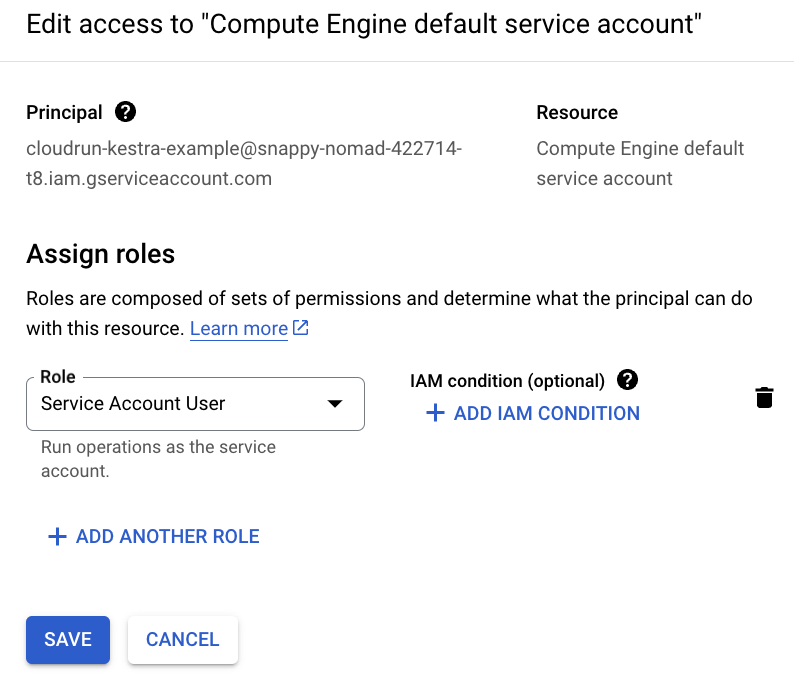
If Cloud Run jobs execute as the Compute Engine default service account, also grant the Kestra service account the Service Account User role on that service account.
Termination behavior
If the Kestra Worker running this task is terminated, the Cloud Run job continues to run until completion. This prevents interruptions due to Worker crashes.
If you manually stop the execution from the Kestra UI, the Cloud Run job is terminated to avoid unnecessary costs. (This behavior is under development; track progress on GitHub).
By default, jobs are deleted after the task completes. When a Kestra Worker restarts mid-execution, resume: true (the default) reattaches to the already-running execution of a matching job so the task continues instead of re-running from scratch. When no running execution is found, a new job definition is created with a unique ID, unless useBucketForLog is enabled and the previous run had already completed, in which case its logs and outputs are recovered from the bucket instead of the work being re-run. resume does not reuse job definitions across independent task runs. Note that resume: true issues a listJobs call on every task start to look for a match — its cost grows with the project's job inventory. Use delete: false to keep the job for inspection after completion, or resume: false to force a new execution on every attempt:
yamltaskRunner:
  type: io.kestra.plugin.ee.gcp.runner.CloudRun
  projectId: "{{ secret('GCP_PROJECT_ID') }}"
  region: europe-west2
  serviceAccount: "{{ secret('GOOGLE_SA') }}"
  delete: false
  resume: false
Container resources
Use the resources property to set CPU and memory limits on the Cloud Run container. Both cpu and memory accept static values or Pebble expressions:
yamltaskRunner:
  type: io.kestra.plugin.ee.gcp.runner.CloudRun
  projectId: "{{ secret('GCP_PROJECT_ID') }}"
  region: europe-west2
  serviceAccount: "{{ secret('GOOGLE_SA') }}"
  resources:
    cpu: "2"
    memory: "4Gi"
CPU accepts whole vCPUs (1, 2, 4, 8) or millicores (1000m). Memory accepts standard SI suffixes (512Mi, 1Gi, 2Gi).
Both fields support Pebble expressions, so you can size containers dynamically from flow inputs:
yamlinputs:
  - id: cpu_count
    type: INT
    defaults: 2
  - id: memory_gb
    type: INT
    defaults: 4

tasks:
  - id: run
    type: io.kestra.plugin.scripts.shell.Commands
    containerImage: ubuntu
    taskRunner:
      type: io.kestra.plugin.ee.gcp.runner.CloudRun
      projectId: "{{ secret('GCP_PROJECT_ID') }}"
      region: europe-west2
      serviceAccount: "{{ secret('GOOGLE_SA') }}"
      resources:
        cpu: "{{ inputs.cpu_count }}"
        memory: "{{ inputs.memory_gb }}Gi"
    commands:
      - echo "Running with {{ inputs.cpu_count }} vCPUs and {{ inputs.memory_gb }}Gi memory"
Timeout and polling
Three properties control how long the runner waits and how often it checks job status:
| Property | Default | Description |
|---|---|---|
waitUntilCompletion | PT1H | Maximum wall-clock time before the job is timed out. The task's own timeout takes precedence when set. |
completionCheckInterval | PT5S | How often to poll the Cloud Run API for job status. Lower values reduce latency for short jobs; higher values reduce API calls for long ones. |
waitForLogInterval | PT5S | Extra time to stream late log entries after job completion. |
The task-level logToFile property controls where Kestra stores log lines it has already retrieved. It does not affect polling frequency or quota consumption. On the default log transport, retrieval goes through entries.list at the logPollInterval rate, which defaults to completionCheckInterval. To reduce Cloud Logging read-quota pressure, raise logPollInterval, which does not slow status detection, or set useBucketForLog: true to have the container write its logs to the staging bucket instead, which removes the 60 requests per minute per project cap entirely.
yamltaskRunner:
  type: io.kestra.plugin.ee.gcp.runner.CloudRun
  projectId: "{{ secret('GCP_PROJECT_ID') }}"
  region: europe-west2
  serviceAccount: "{{ secret('GOOGLE_SA') }}"
  waitUntilCompletion: PT4H
  completionCheckInterval: PT30S
  waitForLogInterval: PT10S
Job retries
maxRetries controls the number of Cloud Run task-level retries (default 3). These are retries within the Cloud Run execution itself, not Kestra-level task retries. Set to 0 to disable:
yamltaskRunner:
  type: io.kestra.plugin.ee.gcp.runner.CloudRun
  projectId: "{{ secret('GCP_PROJECT_ID') }}"
  region: europe-west2
  serviceAccount: "{{ secret('GOOGLE_SA') }}"
  maxRetries: 0
VPC networking
VPC Access Connector
Route job traffic through a Serverless VPC Access Connector to reach private resources such as Cloud SQL or internal services. Both vpcAccessConnector and vpcEgress must be set together:
yamltaskRunner:
  type: io.kestra.plugin.ee.gcp.runner.CloudRun
  projectId: "{{ secret('GCP_PROJECT_ID') }}"
  region: europe-west1
  serviceAccount: "{{ secret('GOOGLE_SA') }}"
  vpcAccessConnector: projects/my-project/locations/europe-west1/connectors/my-connector
  vpcEgress: PRIVATE_RANGES_ONLY
vpcEgress accepts PRIVATE_RANGES_ONLY (only private RFC 1918 ranges use the connector) or ALL_TRAFFIC (all outbound traffic uses the connector).
Direct VPC Egress
Direct VPC Egress connects the job to a VPC network without a connector. Set network and/or subnetwork using full resource paths. vpcAccessConnector and Direct VPC Egress are mutually exclusive:
yamltaskRunner:
  type: io.kestra.plugin.ee.gcp.runner.CloudRun
  projectId: "{{ secret('GCP_PROJECT_ID') }}"
  region: europe-west1
  serviceAccount: "{{ secret('GOOGLE_SA') }}"
  network: projects/my-project/global/networks/my-vpc
  subnetwork: projects/my-project/regions/europe-west1/subnetworks/my-subnet
  vpcEgress: ALL_TRAFFIC
Mounting GCS buckets as volumes
Use volumes to mount one or more GCS buckets directly into the container at specified paths. This is independent of the bucket property used for file transfer, and is useful for mounting reference datasets or shared outputs:
yamltaskRunner:
  type: io.kestra.plugin.ee.gcp.runner.CloudRun
  projectId: "{{ secret('GCP_PROJECT_ID') }}"
  region: europe-west1
  serviceAccount: "{{ secret('GOOGLE_SA') }}"
  volumes:
    - bucket: my-reference-data-bucket
      mountPath: /data
      readOnly: true
    - bucket: my-output-bucket
      mountPath: /output
Each entry requires bucket (the GCS bucket name) and mountPath (the absolute path inside the container). Set readOnly: true for read-only access; the default is read-write.
Service account configuration
The Cloud Run task runner uses three service account properties with distinct roles:
| Property | Purpose |
|---|---|
serviceAccount | JSON key used for Kestra API calls to create and manage Cloud Run jobs. Also used as the job execution identity when runtimeServiceAccount is not set. |
runtimeServiceAccount | Email of the service account that the Cloud Run container runs as (--service-account equivalent). Controls what GCP resources the container can access at runtime. When set, takes precedence over serviceAccount for job execution identity. |
impersonatedServiceAccount | Email of a service account to impersonate for API calls (--impersonate-service-account equivalent). Applies to job creation and management, not the container runtime. |
Use runtimeServiceAccount when the container needs a different identity from the service account Kestra uses to manage jobs:
yamltaskRunner:
  type: io.kestra.plugin.ee.gcp.runner.CloudRun
  projectId: "{{ secret('GCP_PROJECT_ID') }}"
  region: europe-west2
  serviceAccount: "{{ secret('GOOGLE_SA') }}"
  runtimeServiceAccount: container-runner@my-project.iam.gserviceaccount.com
Example flows
Basic example
The following example runs a shell command inside a Cloud Run container:
yamlid: new-shell
namespace: company.team

variables:
  projectId: myProjectId
  region: europe-west2

tasks:
  - id: shell
    type: io.kestra.plugin.scripts.shell.Commands
    taskRunner:
      type: io.kestra.plugin.ee.gcp.runner.CloudRun
      projectId: "{{ vars.projectId }}"
      region: "{{ vars.region }}"
      serviceAccount: "{{ secret('GOOGLE_SA') }}"
    commands:
      - echo "Hello World"
Example with file inputs and outputs
The following flow uploads an input file to GCS, runs a shell command, and retrieves the output:
yamlid: new-shell-with-file
namespace: company.team

variables:
  projectId: myProjectId
  region: europe-west2

inputs:
  - id: file
    type: FILE

tasks:
  - id: shell
    type: io.kestra.plugin.scripts.shell.Commands
    inputFiles:
      data.txt: "{{ inputs.file }}"
    outputFiles:
      - out.txt
    containerImage: ubuntu
    taskRunner:
      type: io.kestra.plugin.ee.gcp.runner.CloudRun
      projectId: "{{ vars.projectId }}"
      region: "{{ vars.region }}"
      bucket: "{{ vars.bucket }}"
      serviceAccount: "{{ secret('GOOGLE_SA') }}"
    commands:
      - cp {{ workingDir }}/data.txt {{ workingDir }}/out.txt
For a complete list of properties available in the Cloud Run task runner, see the GCP plugin documentation or explore the configuration in the built-in Code Editor in the Kestra UI.
How to run tasks on Google Cloud Run
Before you begin
Ensure you have the following:
- A Google Cloud account.
- A Kestra instance with Google credentials stored as secrets or as environment variables.
Google Cloud Console setup
Create a project
If you don't already have one, create a new project in the Google Cloud Console.
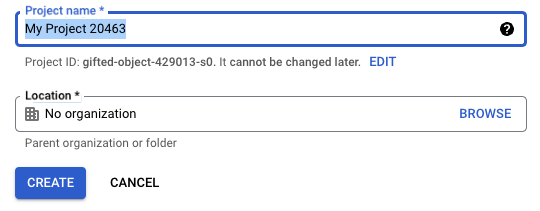
Ensure the new project is selected in the top navigation bar.

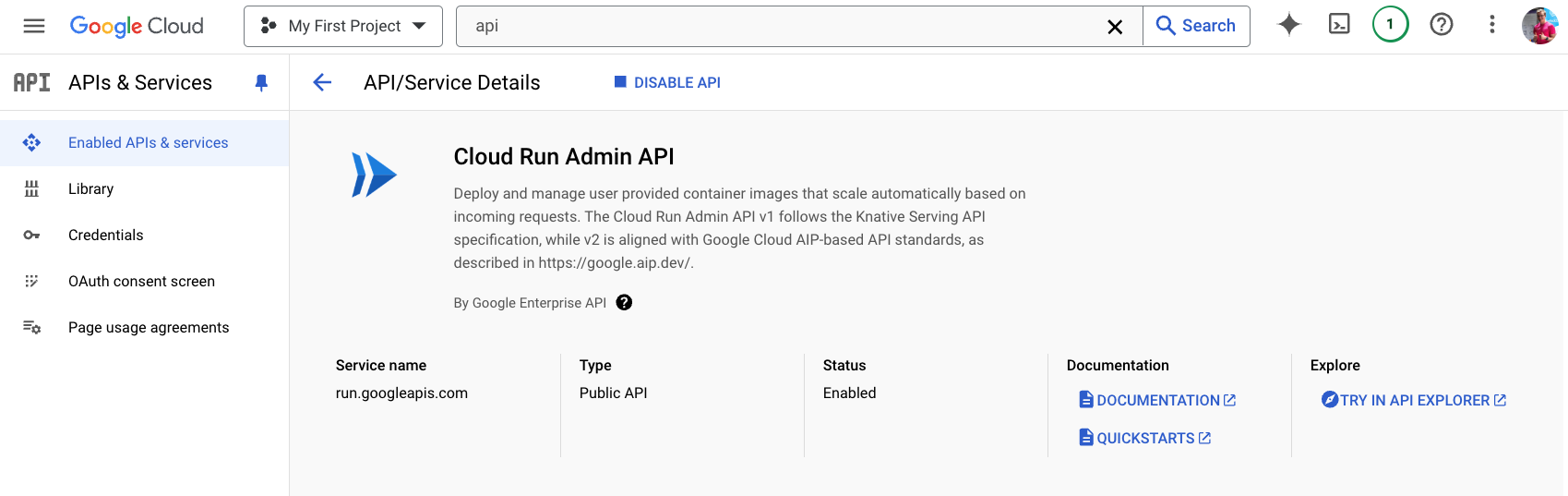
Enable the Cloud Run Admin API
Open APIs & Services → Enable APIs and Services, then search for and enable Cloud Run Admin API.
Create a service account
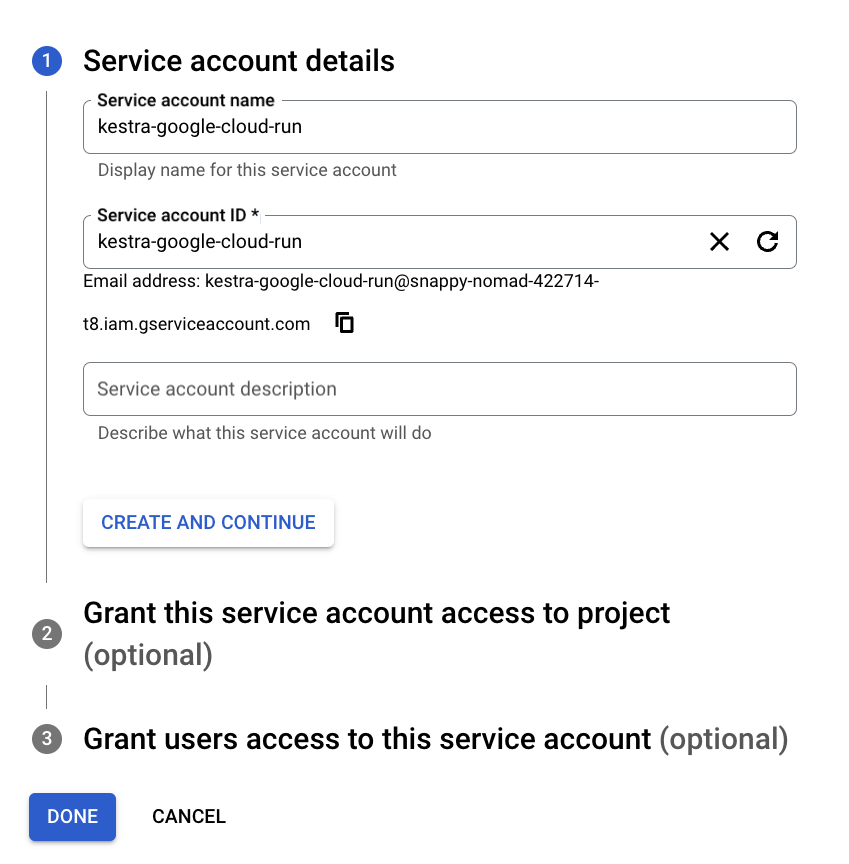
After enabling the API, create a service account to allow Kestra to access Cloud Run resources.
In the search bar, find Service Accounts and select Create Service Account.
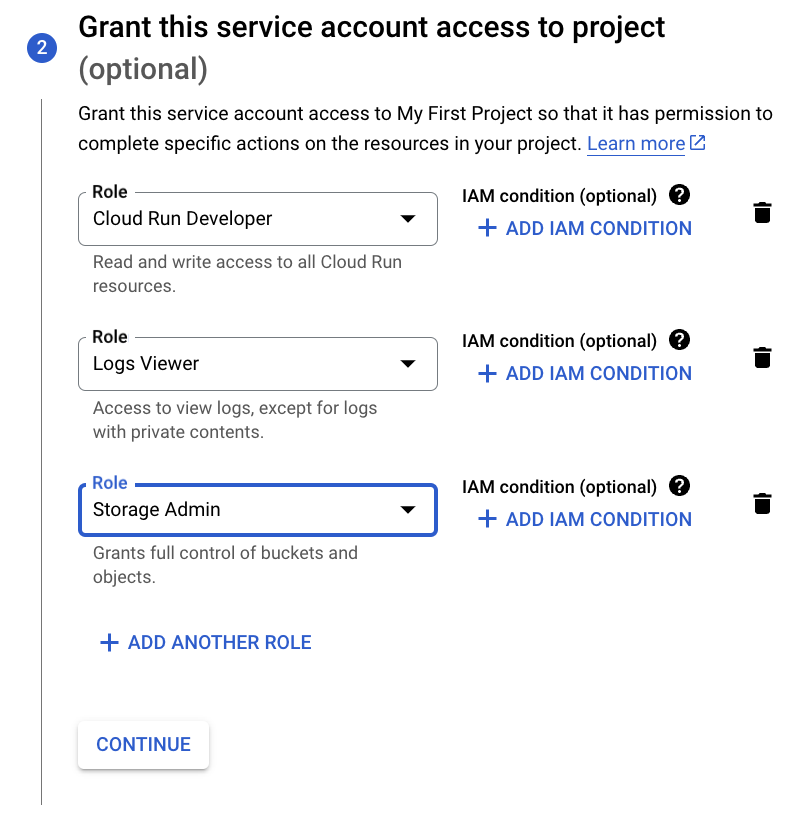
Assign the following roles to the service account:
- Cloud Run Developer
- Logs Viewer
- Storage Admin (required for file upload and download)
Refer to the Google credentials guide for details on adding the service account to Kestra as a secret.
To grant access to the Compute Engine default service account, go to IAM & Admin → Service Accounts → Permissions → Grant Access, and assign the Service Account User role to your new service account.
Create a storage bucket
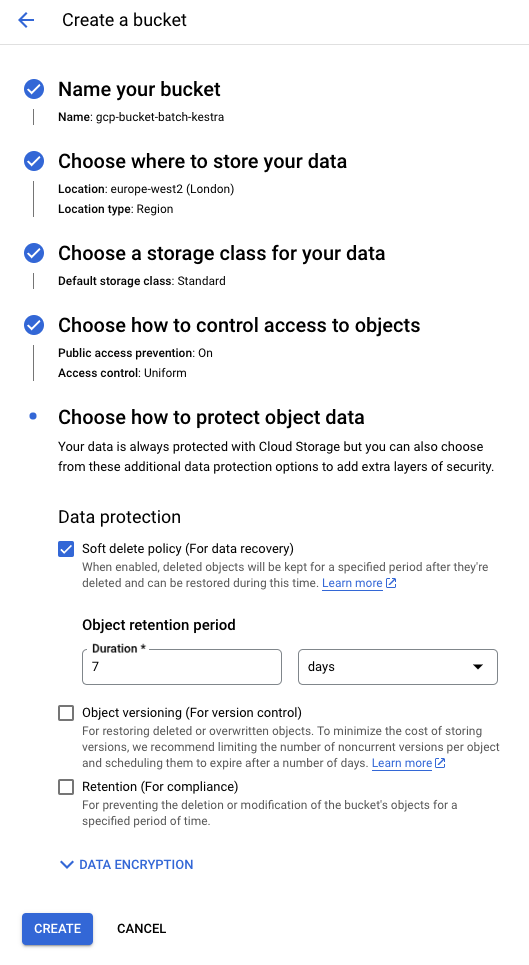
Search for "Bucket" in the Cloud Console and create a new GCS bucket. Use default settings unless otherwise required.
Create a flow
The following flow runs a shell script using the Google Cloud Run task runner and copies a file under a new name:
yamlid: new-shell-with-file
namespace: company.team

variables:
  projectId: myProjectId
  region: europe-west2

inputs:
  - id: file
    type: FILE

tasks:
  - id: shell
    type: io.kestra.plugin.scripts.shell.Commands
    inputFiles:
      data.txt: "{{ inputs.file }}"
    outputFiles:
      - out.txt
    containerImage: ubuntu
    taskRunner:
      type: io.kestra.plugin.ee.gcp.runner.CloudRun
      projectId: "{{ secret('GCP_PROJECT_ID') }}"
      region: "{{ vars.region }}"
      bucket: "{{ secret('GCP_BUCKET') }}"
      serviceAccount: "{{ secret('GOOGLE_SA') }}"
    commands:
      - cp {{ workingDir }}/data.txt {{ workingDir }}/out.txt
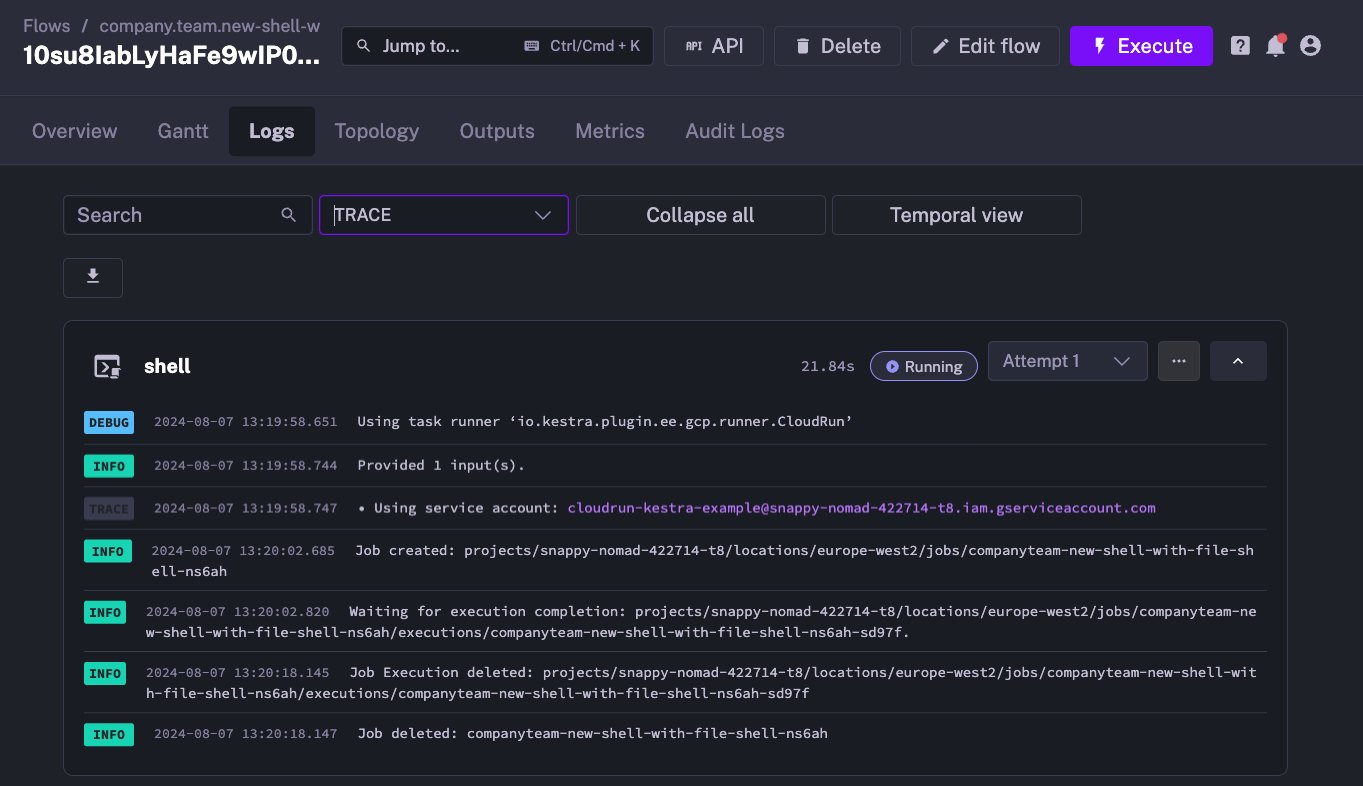
When you execute the flow, the Kestra logs confirm that the Cloud Run job was created and started:
You can also verify job creation in the Google Cloud Console:
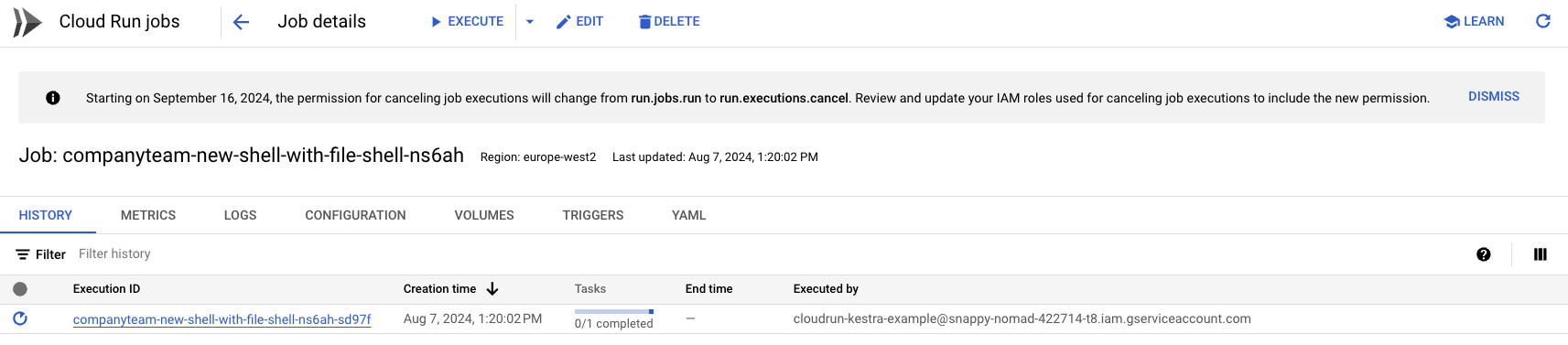
After the task completes, the Cloud Run job is automatically deleted to free up resources.