Create Private Workflow Templates with Custom Blueprints
For the complete documentation index, see llms.txt. For a full content snapshot, see llms-full.txt. Append.mdto anykestra.io/docs/*URL for plain Markdown.
How to create and manage Custom Blueprints.
Custom Blueprints in Kestra Enterprise – Private Templates
In addition to the publicly available Community Blueprints, Kestra allows you to create Custom Blueprints—private, reusable workflow templates tailored to your team. These blueprints help centralize orchestration patterns, document best practices, and streamline collaboration across your organization.
You can think of Custom Blueprints as your team's internal App Store, offering a wide range of integrations and validated workflow patterns tailored to your needs.
How to create a new custom blueprint
From the left navigation menu, go to Blueprints. Then, select the Custom Blueprints tab. Click on Create.
Add a title, description, and the contents of the flow. You can add as many tags as you want. Then click on the Create button.
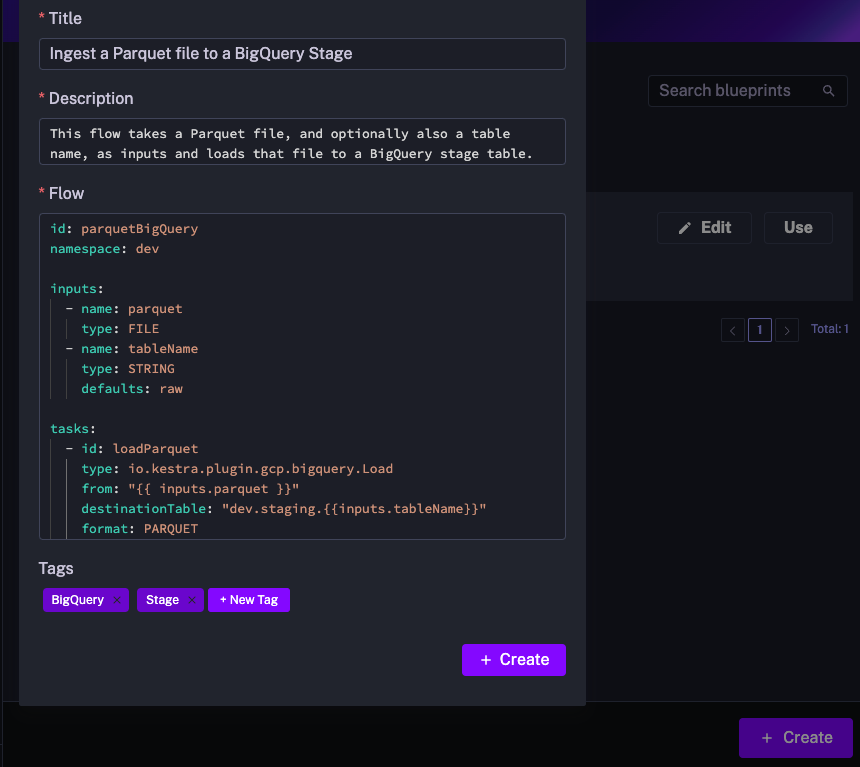
You can edit Blueprints at any time, for example, to add new tasks or expand the documentation.
Templated Blueprints
Templated Blueprints allow you to create reusable, configurable workflows that users can instantiate without editing YAML. Instead of copying and modifying Blueprints, users fill in guided inputs and Kestra generates the complete flow automatically.
Platform teams build templates once; business users instantiate them by filling in a form rather than editing YAML.
How It Works: Templated Blueprints use Pebble templating, with custom delimiters to avoid conflicts with Kestra expressions.
Define Template Arguments
Template arguments define the inputs users must provide. To add them to your Blueprint, use the extend key with a templateArguments section:
yamlextend:
  templateArguments:
    - id: values
      displayName: An array of values
      type: MULTISELECT
      values:
        - value1
        - value2
        - value3
All Kestra input types and their validation rules are supported. These arguments automatically generate a UI form when the blueprint is instantiated.
Use Template Arguments
Templated blueprints use the Pebble templating engine. To avoid conflicts with Kestra expressions ({{ }}), template arguments use custom delimiters: << and >>.
Template arguments are accessed using the arg prefix. For example, if you have a template argument with id: my_custom_field, you can use it in your flow as follows:
yamltasks:
  - id: log
    type: io.kestra.plugin.core.log.Log
    message: Hello << arg.my_custom_field >>
Loops and Conditions
You can dynamically generate multiple tasks, inputs, variables, or triggers through for-loops and if/else conditions using the <% %> syntax.
For example, the following loop creates one log task for each value in an array input.
yamlextend:
  templateArguments:
    - id: values
      displayName: An array of values
      type: MULTISELECT
      values:
        - value1
        - value2
        - value3
id: myflow
namespace: company.team
tasks:
  <% for value in arg.values %>
  - id: log_<< value >>
    type: io.kestra.plugin.core.log.Log
    message: Hello << value >>
  <% endfor %>
This allows you to dynamically generate tasks or include them conditionally.
Solutions such as templatized Terraform configurations or using the Python SDK to make DAG factories are still valid ways to address similar templating needs. Templated Custom Blueprints offer a more direct, simpler and integrated approach within the Kestra platform.
Example: Data Ingestion Template
Here's an example showing a Templated Blueprint that generates data ingestion workflows based on user selections:
Template Definition
yamlid: data-ingest
namespace: kestra.data

extend:
  templateArguments:
    - id: domains
      displayName: Domains
      type: MULTISELECT
      values:
        - Online Shop
        - Manufacture
        - HR
        - Finance

    - id: target
      type: SELECT
      values:
        - Postgres
        - Oracle

    - id: env
      type: SELECT
      values:
        - dev
        - staging
        - prod

tasks:
  - id: parallel_<< arg.env >>
    type: io.kestra.plugin.core.flow.Parallel
    tasks:
<% for domain in arg.domains %>
      - id: sequential_<< domain | slugify >>
        type: io.kestra.plugin.core.flow.Sequential
        tasks:
        - id: << domain | slugify >>-download
          type: io.kestra.plugin.jdbc.postgresql.CopyOut
          sql: SELECT * FROM public.<< domain | slugify >>
        - id: << domain | slugify >>-ingest
          <% if arg.target == 'Oracle' %>
          type: io.kestra.plugin.jdbc.oracle.Batch
          from: "{{ << domain | slugify >>-download.uri }}"
          table: public.< domain | slugify >>
          <% elseif arg.target == 'Postgres' %>
          type: io.kestra.plugin.jdbc.postgresql.CopyIn
          from: "{{ outputs.<< domain | slugify >>-download.uri }}"
          url: jdbc:postgres://sample_<< arg.target | lower>>:5432/<<arg.env>>
          table: public.< domain | slugify >>
          <% endif %>
<% endfor %>

pluginDefaults:
  - type: io.kestra.plugin.jdbc.postgresql
    values:
      url: jdbc:postgresql://sample_postgres:5432/<<arg.env>>
      username: '{{ secret("POSTGRES_USERNAME") }}'
      password: '{{ secret("POSTGRES_PASSWORD") }}'
      format: CSV

  - type: io.kestra.plugin.jdbc.oracle.Batch
    values:
      url: jdbc:oracle:thin:@<< arg.env >>:49161:XE
      username: '{{ secret("ORACLE_USERNAME") }}'
      password: '{{ secret("ORACLE_USERNAME") }}'
Generated Flow (after template rendering)
After selecting env: dev, domains: [HR, Manufacture], and target: Oracle, the template generates this complete workflow:
yamlid: data-ingest
namespace: kestra.data

tasks:
  - id: parallel_dev
    type: io.kestra.plugin.core.flow.Parallel
    tasks:

      - id: sequential_hr
        type: io.kestra.plugin.core.flow.Sequential
        tasks:
        - id: hr-download
          type: io.kestra.plugin.jdbc.postgresql.CopyOut
          sql: SELECT * FROM public.hr
        - id: hr-ingest
          type: io.kestra.plugin.jdbc.oracle.Batch
          from: "{{ hr-download.uri }}"
          table: public.< domain | slugify >>

      - id: sequential_manufacture
        type: io.kestra.plugin.core.flow.Sequential
        tasks:
        - id: manufacture-download
          type: io.kestra.plugin.jdbc.postgresql.CopyOut
          sql: SELECT * FROM public.manufacture
        - id: manufacture-ingest
          type: io.kestra.plugin.jdbc.oracle.Batch
          from: "{{ manufacture-download.uri }}"
          table: public.< domain | slugify >>

pluginDefaults:
  - type: io.kestra.plugin.jdbc.postgresql
    values:
      url: jdbc:postgresql://sample_postgres:5432/dev
      username: '{{ secret("POSTGRES_USERNAME") }}'
      password: '{{ secret("POSTGRES_PASSWORD") }}'
      format: CSV

  - type: io.kestra.plugin.jdbc.oracle.Batch
    values:
      url: jdbc:oracle:thin:@dev:49161:XE
      username: '{{ secret("ORACLE_USERNAME") }}'
      password: '{{ secret("ORACLE_USERNAME") }}'