Version Kestra Flows and Namespace Files with Git
For the complete documentation index, see llms.txt. For a full content snapshot, see llms-full.txt. Append.mdto anykestra.io/docs/*URL for plain Markdown.
Learn how to pair Kestra with Git so you can version flows, namespace files, and related artifacts alongside your application code.
Version flows and namespace files with Git
Kestra supports version control with Git. You can use one or more repositories to store your flows, namespace files, apps, tests, and dashboards, tracking changes through Git history.
There are multiple ways to combine Kestra with Git:
- SyncFlows implements GitOps with Git as the single source of truth for flows.
- SyncNamespaceFiles syncs namespace files the same way.
- PushFlows commits and pushes flow edits from the UI to Git, useful when you rely on the built-in editor but still want version history.
- PushNamespaceFiles does the same for namespace files.
- Clone clones a repository directly into a flow so scripts are available at runtime.
- TenantSync synchronizes all namespaces in a tenant, including flows, files, apps, tests, and dashboards.
- NamespaceSync keeps a single namespace in sync with a Git repo.
- PushBlueprints (Enterprise Edition) commits and pushes custom blueprints from Kestra to Git.
- SyncBlueprints (Enterprise Edition) syncs custom blueprints from Git into Kestra.
- A custom CI/CD pipeline lets you manage deployments yourself (GitHub Actions, Terraform, etc.) while keeping Git authoritative.
The image below shows how to choose the right pattern based on your needs:
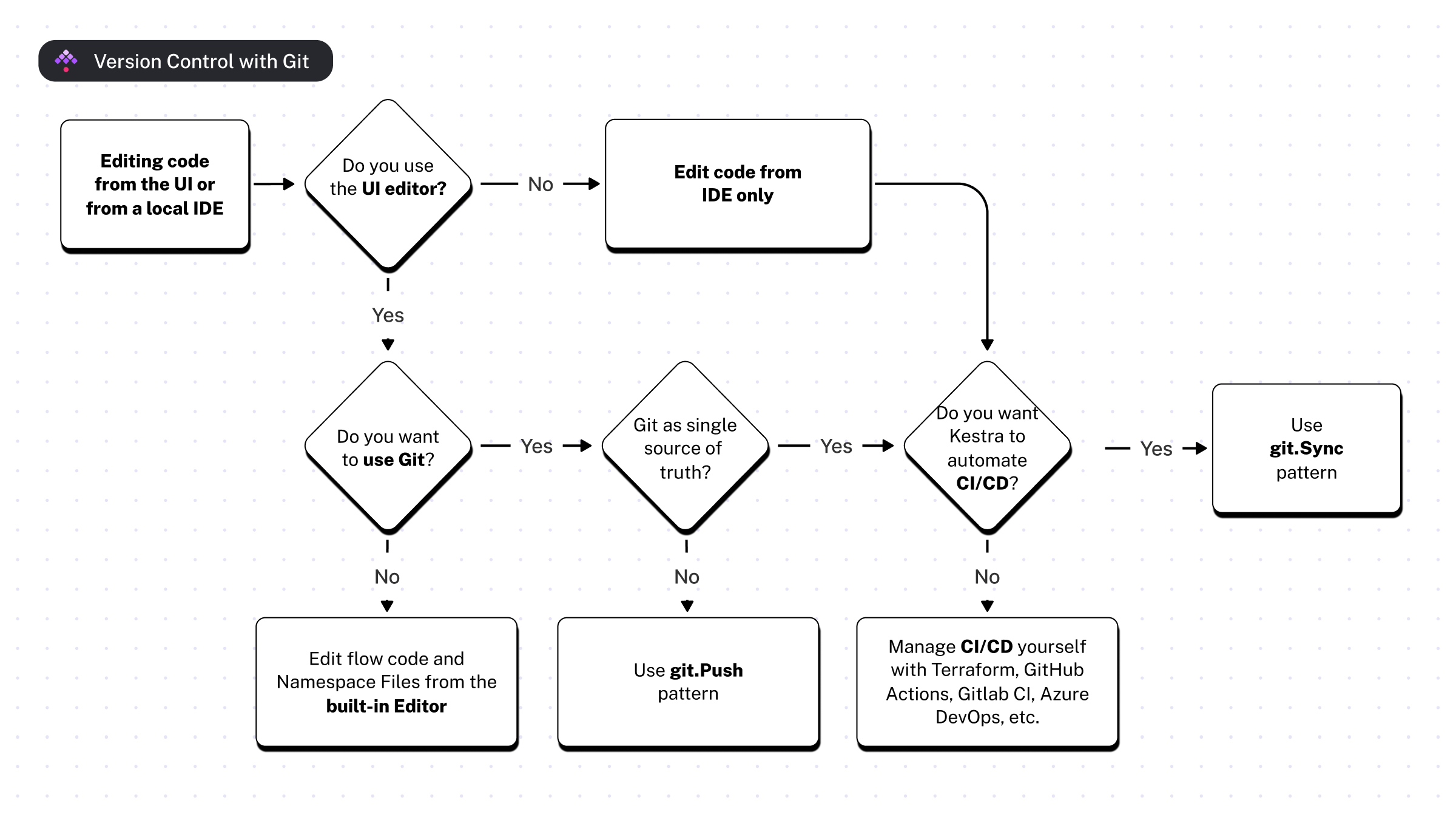
The following sections cover each pattern and when to use it.
Git SyncFlows and SyncNamespaceFiles
The Git SyncFlows pattern implements GitOps with Git as the single source of truth. Store flows in Git, and run a sync flow that automatically applies changes into Kestra. The Git SyncNamespaceFiles pattern mirrors this for namespace files.
Here's how it works:
- Store flows and namespace files in Git.
- Schedule a sync flow that automatically applies changes from Git to Kestra.
- Modify files in Git whenever you need to change a flow or namespace file.
- The sync flow applies those changes, overwriting any conflicting UI edits with the Git version.
This pattern suits teams that treat Git as the single source of truth and prefer not to edit flows or namespace files in the UI. No CI/CD pipeline is required, so it's ideal if you already follow GitOps practices or come from a Kubernetes background.
Here is an example sync flow to declaratively apply changes from Git to Kestra:
yamlid: sync_from_git
namespace: company.ops

tasks:
  - id: git
    type: io.kestra.plugin.git.SyncFlows
    url: https://github.com/kestra/scripts
    branch: main
    username: git_username
    password: "{{ secret('GITHUB_ACCESS_TOKEN') }}"
    targetNamespace: git
    includeChildNamespaces: true # optional; by default, it's set to false to allow explicit definition
    gitDirectory: your_git_dir

triggers:
  - id: schedule
    type: io.kestra.plugin.core.trigger.Schedule
    cron: "*/1 * * * *" # every minute
Commit this flow to Git or add it via the built-in editor; it won't be overwritten by reconciliation.
You can also sync namespace files with the example below:
yamlid: sync_from_git
namespace: company.ops


tasks:
  - id: git
    type: io.kestra.plugin.git.SyncNamespaceFiles
    namespace: prod
    gitDirectory: _files # optional; set to _files by default
    url: https://github.com/kestra-io/flows
    branch: main
    username: git_username
    password: "{{ secret('GITHUB_ACCESS_TOKEN') }}"
You can also trigger this flow with a GitHub webhook whenever changes land in Git:
yamlid: sync_from_git
namespace: company.ops

tasks:
  - id: git
    type: io.kestra.plugin.git.SyncFlows
    url: https://github.com/kestra/scripts
    branch: main
    targetNamespace: git
    username: git_username
    password: "{{ secret('GITHUB_ACCESS_TOKEN') }}"

triggers:
  - id: github_webhook
    type: io.kestra.plugin.core.trigger.Webhook
    key: "{{ secret('WEBHOOK_KEY') }}"
The webhook key authenticates requests and prevents unauthorized access. For the flow above, paste the following URL into your repository’s Webhooks settings:
bashhttp://your_kestra_host:8080/api/v1/<your_tenant>/executions/webhook/prod/sync_from_git/your_secret_key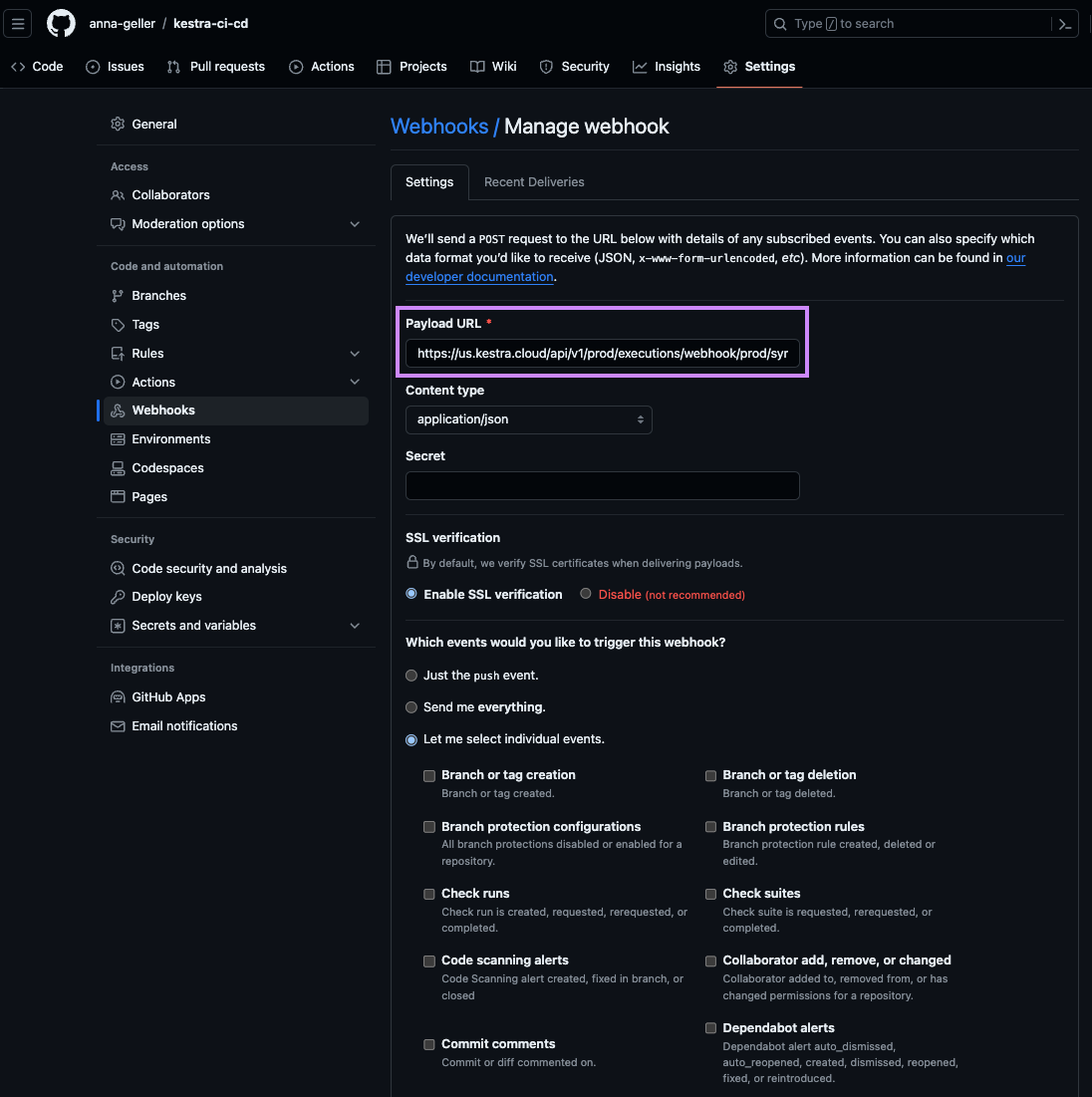
Following the pattern:
bashhttp://<host>/api/v1/<tenant>/executions/webhook/<namespace>/<flow>/<webhook_key>CI/CD
The CI/CD pattern still treats Git as the single source of truth but pushes code changes to Kestra whenever a pull request merges. Unlike the Sync pattern, you manage the automation (GitHub Actions, Terraform, etc.). See the CI/CD docs for setup details.
Git PushFlows and PushNamespaceFiles
The Git PushFlows pattern lets you edit flows in the UI while pushing versions to Git. The Git PushNamespaceFiles pattern offers the same workflow for namespace files.
Example flow for pushing from Kestra to Git:
yamlid: push_to_git
namespace: company.ops

tasks:
  - id: commit_and_push
    type: io.kestra.plugin.git.PushFlows
    url: https://github.com/kestra-io/scripts
    sourceNamespace: dev
    targetNamespace: pod
    flows: "*"
    branch: kestra
    username: github_username
    password: "{{ secret('GITHUB_ACCESS_TOKEN') }}"
    commitMessage: add namespace files changes

triggers:
  - id: schedule
    type: io.kestra.plugin.core.trigger.Schedule
    cron: "* */1 * * *" # every hour
Example flow for pushing namespace files:
yamlid: push_to_git
namespace: company.ops

tasks:
  - id: commit_and_push
    type: io.kestra.plugin.git.PushNamespaceFiles
    namespace: dev
    files: "*"
    gitDirectory: _files
    url: https://github.com/kestra-io/scripts # required string
    username: git_username
    password: "{{ secret('GITHUB_ACCESS_TOKEN') }}"
    branch: dev
    commitMessage: "add namespace files"


triggers:
  - id: schedule_push_to_git
    type: io.kestra.plugin.core.trigger.Schedule
    cron: "*/15 * * * *"
Use this pattern to push to a feature branch and open a pull request for review.
Git Clone
The Git Clone pattern clones a repository at runtime so you can orchestrate code managed elsewhere, for example:
- dbt projects via the dbt CLI task
- Infrastructure deployments via Terraform CLI, OpenTofu CLI, Terragrunt CLI, or Ansible CLI
- Docker builds via the Docker Build task
Git TenantSync and NamespaceSync
Both Git TenantSync and Git NamespaceSync give you full control over synchronizing Kestra objects with your Git repository.
TenantSync– synchronizes all namespaces in a tenant, including flows, files, apps, tests, dashboards, and custom blueprints.- Requires
kestraUrlandauthso the task can call Kestra's API with tenant-wide RBAC. - Useful when you need to back up the entire tenant to Git and promote environments through pull requests.
- When
sourceOfTruth: GIT, namespaces discovered in Git that have content are created automatically.
- Requires
NamespaceSync– synchronizes flows and namespace files within a single namespace with your Git repository. In Enterprise Edition, also syncs apps and unit tests.- Requires the
namespaceproperty but notkestraUrlorauth; it relies on namespace-level RBAC and can be run by any user with sufficient permissions. - Ideal for teams that sync one namespace per repository, allowing owners to manage their own syncs.
- The flow running this task does not need to live in the namespace being synced — a flow in
company.opscan synccompany.team. - Namespace creation: When
sourceOfTruth: GIT, the target namespace is created automatically if it does not exist — in both OSS and Enterprise Edition. WhensourceOfTruth: KESTRA, the namespace must already exist.
- Requires the
Both plugins support:
sourceOfTruth(GITorKESTRA) to define the update strategy.whenMissingInSourcewith optionsDELETE,KEEP, orFAILto control how missing objects should be handled.- An opinionated folder structure for flows, apps, dashboards, tests, and files with one folder per namespace (see Git directory structure below).
protectedNamespacesto ensure your Kestra objects from critical namespaces (such assystem) are not accidentally deleted whensourceOfTruthisGIT.- Validation rules requiring explicit Git
branchand optionalgitDirectory. - Options like
dryRunandonInvalidSyntaxfor safe rollouts and error handling.
Example usage of the TenantSync task:
yamlid: tenant_git_sync
namespace: company.ops

tasks:
  - id: tenant
    type: io.kestra.plugin.git.TenantSync
    sourceOfTruth: KESTRA
    whenMissingInSource: DELETE
    url: https://github.com/org/repo
    branch: main
    protectedNamespaces:
      - system
    kestraUrl: http://localhost:8080
    auth:
      username: admin@kestra.io
      password: "{{ secret('KESTRA_PASSWORD') }}"
Example usage of the NamespaceSync task:
yamlid: namespace_git_sync
namespace: company.ops

tasks:
  - id: namespace
    type: io.kestra.plugin.git.NamespaceSync
    namespace: company.team
    sourceOfTruth: GIT
    whenMissingInSource: KEEP
    url: https://github.com/org/repo
    branch: main
    protectedNamespaces:
      - system
Git directory structure
Both TenantSync and NamespaceSync expect a specific folder structure inside your Git repository. The optional gitDirectory property sets a base folder within the repo; if omitted the repo root is used. Under that base, Kestra uses a fixed layout organized by namespace and resource type:
| Resource type | Path in Git |
|---|---|
| Flows | <namespace>/flows/<flowId>.yaml |
| Namespace files | <namespace>/files/<path> |
| Apps | <namespace>/apps/<appId>.yaml |
| Unit tests | <namespace>/tests/<testId>.yaml |
| Dashboards | _global/dashboards/<dashboardId>.yaml |
| Custom blueprints | _global/blueprints/<blueprintId>.yaml |
gitDirectory | Namespace | Expected Git path |
|---|---|---|
| (not set) | company | company/flows/my-flow.yaml |
monorepo | company.ops | monorepo/company.ops/flows/flow.yaml |
projectA | company.team | projectA/company.team/flows/flow.yaml |
A dotted namespace such as company.team maps to a folder literally named company.team in Git — not to a nested company/team path.
How resource identity works
The filename stem is the resource ID. For flows, apps, unit tests, and dashboards the part of the filename before .yaml is used as the object's ID during sync — not the id field written inside the YAML. Custom blueprints are an exception: the sync reads the id field from the YAML content and falls back to the filename stem only when the field is absent. Namespace files use their full relative path under <namespace>/files/ as the file path identity.
This has an important consequence: the filename must match the id inside the YAML. When Kestra pushes objects from the UI to Git (for example with sourceOfTruth: KESTRA), it generates filenames from the object's ID automatically. If you later rename a file in Git, the sync treats the old filename as a deleted object and the new filename as a new object. When it tries to create the new object, Kestra rejects it because a resource with that ID already exists in the instance — resulting in an error like:
textInvalid entity: App already exists for id 'solutions_ai_search_annual_report'To avoid this error, keep filenames in sync with the id field inside each YAML. If you need to rename a file, also update the id inside the YAML at the same time.
Handling mismatched filenames with onInvalidSyntax
If you encounter files whose names do not match the expected ID (for example after a manual rename), you can control how the sync reacts using the onInvalidSyntax property:
| Value | Behavior |
|---|---|
FAIL (default) | Throws an exception and stops the sync |
WARN | Logs a warning and continues |
SKIP | Logs an info message and continues |
Use WARN or SKIP as a short-term workaround while you correct the naming in Git:
yamltasks:
  - id: sync
    type: io.kestra.plugin.git.TenantSync
    sourceOfTruth: GIT
    onInvalidSyntax: WARN
    # ... other properties
Git PushBlueprints and SyncBlueprints
These tasks are available in the Enterprise Edition only.
PushBlueprints and SyncBlueprints bring Git version control to custom blueprints, following the same push/sync pattern as flows and namespace files. Because blueprints are tenant-scoped rather than namespace-scoped, both tasks operate across all blueprints in the tenant regardless of the flow's own namespace.
PushBlueprints commits all custom blueprints from Kestra to a Git repository. Blueprints are stored under _blueprints/ by default, with one YAML file per blueprint:
yamlid: push_blueprints
namespace: company.ops
tasks:
  - id: commit_and_push
    type: io.kestra.plugin.ee.git.PushBlueprints
    url: https://github.com/kestra-io/scripts
    username: git_username
    password: "{{ secret('GITHUB_ACCESS_TOKEN') }}"
    branch: main
    commitMessage: "push blueprints from {{ flow.namespace ~ '.' ~ flow.id }}"
SyncBlueprints treats Git as the source of truth and applies blueprint changes from Git into Kestra. Set delete: true to remove blueprints present in Kestra but absent in Git — this is destructive, so use dryRun: true first to preview changes:
yamlid: sync_blueprints_from_git
namespace: company.ops
tasks:
  - id: git
    type: io.kestra.plugin.ee.git.SyncBlueprints
    delete: true
    url: https://github.com/kestra-io/blueprints
    branch: main
    username: git_username
    password: "{{ secret('GITHUB_ACCESS_TOKEN') }}"
    dryRun: true
triggers:
  - id: every_full_hour
    type: io.kestra.plugin.core.trigger.Schedule
    cron: "0 * * * *"
Git SyncApps and SyncUnitTests
These tasks are available in the Enterprise Edition only.
SyncApps and SyncUnitTests treat Git as the source of truth for apps and unit tests, following the same sync pattern as flows and namespace files.
Both tasks accept an optional namespace property. When set, only apps or unit tests in that namespace and its child namespaces are synced, and with delete: true only those resources are eligible for deletion. When left empty, the task operates across all apps or unit tests in the tenant, which is the default. Set namespace to keep one-repo-per-namespace setups safe to run with delete: true without touching resources owned by other namespaces.
yamlid: sync_apps_from_git
namespace: company.ops
tasks:
  - id: git
    type: io.kestra.plugin.ee.git.SyncApps
    namespace: company.team
    delete: true
    url: https://github.com/my-org/company-team
    branch: main
    username: git_username
    password: "{{ secret('GITHUB_ACCESS_TOKEN') }}"
    dryRun: true
triggers:
  - id: every_full_hour
    type: io.kestra.plugin.core.trigger.Schedule
    cron: "0 * * * *"
Dashboards are not attached to a namespace, so SyncDashboards has no namespace scoping and operates across all dashboards in the tenant.