Build Resilient Workflows with Retries, Alerts & Failure Handling
For the complete documentation index, see llms.txt. For a full content snapshot, see llms-full.txt. Append.mdto anykestra.io/docs/*URL for plain Markdown.
Handle errors with automatic retries and notifications.
Failure is inevitable. Kestra offers automatic retries and error handling to help you build resilient workflows.
Handle errors with retries and alerts
By default, if any task fails, the execution stops and is marked as failed. For more control over error handling, you can add the errors property, AllowFailure tasks, or automatic retries.
The errors property allows you to execute one or more actions before terminating the flow (e.g., sending an email or a Slack message to your team). The property is named errors because it is triggered when errors occur within a flow.
You can implement error handling at the flow level or namespace level:
- Flow-level: Useful to implement custom alerting for a specific flow or task. This can be accomplished by adding the
errorsproperty. - Namespace-level: Useful to send a notification for any failed Execution within a given namespace. This approach allows you to implement centralized error handling for all flows within a given namespace.
Flow-level error handling using errors
The errors property of a flow accepts a list of tasks to execute when an error occurs. You can add as many tasks as you want, and they will be executed sequentially similar to the tasks block.
The following example workflow automatically sends a Slack alert via the SlackIncomingWebhook whenever any flow in the company.team namespace fails or finishes with warnings.
yamlid: unreliable_flow
namespace: company.team

tasks:
  - id: fail
    type: io.kestra.plugin.core.execution.Fail

errors:
  - id: alert_on_failure
    type: io.kestra.plugin.slack.notifications.SlackIncomingWebhook
    url: "{{ secret('SLACK_WEBHOOK') }}" # https://hooks.slack.com/services/xyz/xyz/xyz
    messageText: "Failure alert for flow {{ flow.namespace }}.{{ flow.id }} with ID {{ execution.id }}"
Note that we hide the Slack Webhook URL with a secret expression to not expose private endpoints or credentials. Follow our Open-source Secrets guide or check out the Enterprise Edition to incorporate your own external Secrets Manager.
Taking our flow from earlier stages, we can add a Slack alert on an execution error like the following:
yamlid: getting_started_category_check
namespace: company.team

triggers:
  - id: every_monday_at_10_am
    type: io.kestra.plugin.core.trigger.Schedule
    cron: 0 10 * * 1

inputs:
  - id: category
    type: SELECT
    displayName: Select a category
    values: ['beauty', 'notebooks']
    defaults: 'beauty'

tasks:
  - id: api
    type: io.kestra.plugin.core.http.Request
    uri: "https://dummyjson.com/products/category/{{ inputs.category }}"
    method: GET

  - id: check_products
    type: io.kestra.plugin.core.flow.If
    condition: "{{ json(outputs.api.body).products | length > 0 }}"
    then:
      - id: log_status
        type: io.kestra.plugin.core.log.Log
        message: "Found {{ json(outputs.api.body).products | length }} products for category {{ inputs.category }}"
      - id: transform
        type: io.kestra.plugin.scripts.python.Script
        containerImage: python:slim
        dependencies:
          - polars
        outputFiles:
          - "products.csv"
        script: |
          import polars as pl
          data = {{ outputs.api.body | jq('.products') | first }}
          df = pl.from_dicts(data)
          df.glimpse()
          df.select(["title", "brand", "price", "rating"]).write_csv("products.csv")
      - id: sql_query
        type: io.kestra.plugin.jdbc.duckdb.Queries
        inputFiles:
          in.csv: "{{ outputs.transform.outputFiles['products.csv'] }}"
        sql: |
          SELECT brand, round(avg(price), 2) AS avg_price, count(*) AS cnt
          FROM read_csv_auto('{{ workingDir }}/in.csv', header=True)
          GROUP BY brand
          ORDER BY avg_price DESC;
        store: true
    else:
      - id: when_false
        type: io.kestra.plugin.core.log.Log
        message: "No products found for category {{ inputs.category }}."

errors:
  - id: alert_on_failure
    type: io.kestra.plugin.slack.notifications.SlackIncomingWebhook
    url: "{{ secret('SLACK_WEBHOOK') }}"
    messageText: "Failure alert for flow {{ flow.namespace }}.{{ flow.id }} with ID {{ execution.id }}"
Now if there is an error, say our API endpoint is unreachable, we'll get a Slack alert notifying a team to investigate. For more, check the error handling page.
Namespace-level error handling using a flow trigger
To get notified on a workflow failure, you can leverage Kestra's built-in notification tasks, including:
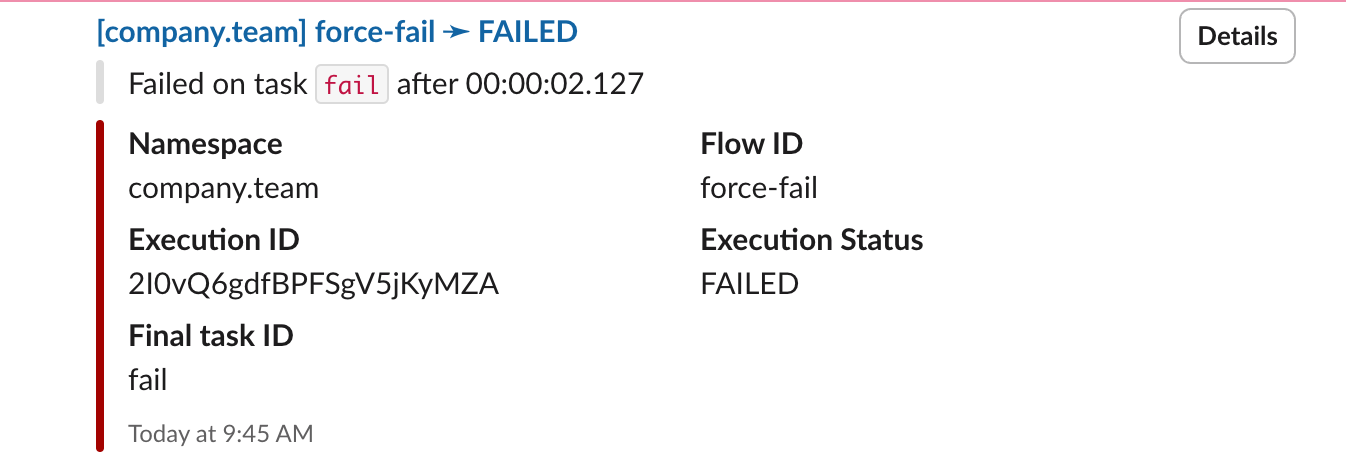
For centralized namespace-level alerting, add a dedicated monitoring workflow with one of the notification tasks above and a Flow trigger. Below is an example workflow that automatically sends a Slack alert as soon as any flow in the namespace company.team fails or finishes with warnings.
yamlid: failure_alert
namespace: system

tasks:
  - id: send
    type: io.kestra.plugin.slack.notifications.SlackExecution
    url: "{{ secret('SLACK_WEBHOOK') }}"
    executionId: "{{ trigger.executionId }}"

triggers:
  - id: listen
    type: io.kestra.plugin.core.trigger.Flow
    conditions:
      - type: io.kestra.plugin.core.condition.ExecutionStatus
        in:
          - FAILED
          - WARNING
      - type: io.kestra.plugin.core.condition.ExecutionNamespace
        namespace: company.team
        prefix: true
Adding this flow ensures you receive a Slack alert for any flow failure in the company.team namespace.
Retries
When working with external systems, transient errors are common. For example, a file may not be available yet, an API might be temporarily unreachable, or a database can be under maintenance. In such cases, retries can often resolve the issue without human intervention.
Configuring retries
Each task can be retried a certain number of times and in a specific way. Use the retry property with the desired type of retry.
The following types of retries are currently supported:
- Constant: The task will be retried every X seconds/minutes/hours/days.
- Exponential: The task will also be retried every X seconds/minutes/hours/days but with an exponential backoff (i.e., an exponential time interval in between each retry attempt.)
- Random: The task will be retried every X seconds/minutes/hours/days with a random delay (i.e., a random time interval in between each retry attempt.)
In this example, the task is retried up to 5 times within a total duration of 1 minute, with a constant 2-second interval between attempts.
yamlid: retries
namespace: company.team

tasks:
  - id: fail_four_times
    type: io.kestra.plugin.scripts.shell.Commands
    taskRunner:
      type: io.kestra.plugin.core.runner.Process
    commands:
      - 'if [ "{{ taskrun.attemptsCount }}" -eq 4 ]; then exit 0; else exit 1; fi'
    retry:
      type: constant
      interval: PT2S
      maxAttempts: 5
      maxDuration: PT1M
      warningOnRetry: false

errors:
  - id: will_never_run
    type: io.kestra.plugin.core.debug.Return
    format: This will never be executed as retries will fix the issue
Adding a retry configuration to our tutorial workflow
Returning to the first iteration of our flow from the Fundamentals section. We can add a retry configuration to the api task. API calls are prone to transient errors, so we will retry that task up to 10 times, for at most 1 hour of total duration, every 10 seconds (i.e., with a constant interval of 10 seconds in between retry attempts).
yamlid: retry_request
namespace: company.team

tasks:
  - id: api
    type: io.kestra.plugin.core.http.Request
    uri: https://dummyjson.com/products
    retry:
      type: constant
      interval: PT20S
      maxDuration: PT1H
      maxAttempts: 10
      warningOnRetry: true
With the complete example looking something like the following:
yamlid: getting_started_category_check
namespace: company.team

inputs:
  - id: category
    type: SELECT
    displayName: Select a category
    values: ['beauty', 'notebooks']
    defaults: 'beauty'

tasks:
  - id: api
    type: io.kestra.plugin.core.http.Request
    uri: "https://dummyjson.com/products/category/{{ inputs.category }}"
    method: GET
    retry:
      type: constant
      interval: PT20S
      maxDuration: PT1H
      maxAttempts: 10
      warningOnRetry: true

  - id: check_products
    type: io.kestra.plugin.core.flow.If
    condition: "{{ json(outputs.api.body).products | length > 0 }}"
    then:
      - id: log_status
        type: io.kestra.plugin.core.log.Log
        message: "Found {{ json(outputs.api.body).products | length }} products for category {{ inputs.category }}"
      - id: python
        type: io.kestra.plugin.scripts.python.Script
        containerImage: python:slim
        dependencies:
          - polars
        outputFiles:
          - "products.csv"
        script: |
          import polars as pl
          data = {{ outputs.api.body | jq('.products') | first }}
          df = pl.from_dicts(data)
          df.glimpse()
          df.select(["title", "brand", "price", "rating"]).write_csv("products.csv")
      - id: sqlQuery
        type: io.kestra.plugin.jdbc.duckdb.Queries
        inputFiles:
          in.csv: "{{ outputs.python.outputFiles['products.csv'] }}"
        sql: |
          SELECT brand, round(avg(price), 2) AS avg_price, count(*) AS cnt
          FROM read_csv_auto('{{ workingDir }}/in.csv', header=True)
          GROUP BY brand
          ORDER BY avg_price DESC;
        store: true
    else:
      - id: when_false
        type: io.kestra.plugin.core.log.Log
        message: "No products found for category {{ inputs.category }}."

errors:
  - id: alert_on_failure
    type: io.kestra.plugin.slack.notifications.SlackIncomingWebhook
    url: "{{ secret('SLACK_WEBHOOK') }}"
    messageText: "Failure alert for flow {{ flow.namespace }}.{{ flow.id }} with ID {{ execution.id }}"

triggers:
  - id: every_monday_at_10_am
    type: io.kestra.plugin.core.trigger.Schedule
    cron: 0 10 * * 1
Next steps
Congrats! 🎉 You've completed the tutorial.
Next, you can dive into:
- Architecture
- Workflow Components
- Key concepts
- Plugins to integrate with external systems
- Deployments to deploy Kestra to production.
- Scripts