
Getting Started with Modern Infrastructure Orchestration
See how Kestra replaces VMware Aria Automation with declarative YAML workflows across any cloud.
VMware Aria Automation (formerly vRA/vRO) is the go-to portal for catalog-driven VM provisioning in vSphere environments. But as infrastructure expands to AWS, Azure, GCP, and Kubernetes—and as teams demand Git-native workflows, clear error messages, and modern developer experience—the proprietary JavaScript vRO model breaks down. Kestra replaces vRA/vRO with declarative YAML workflows that work across every cloud, on-prem, and air-gapped environments.
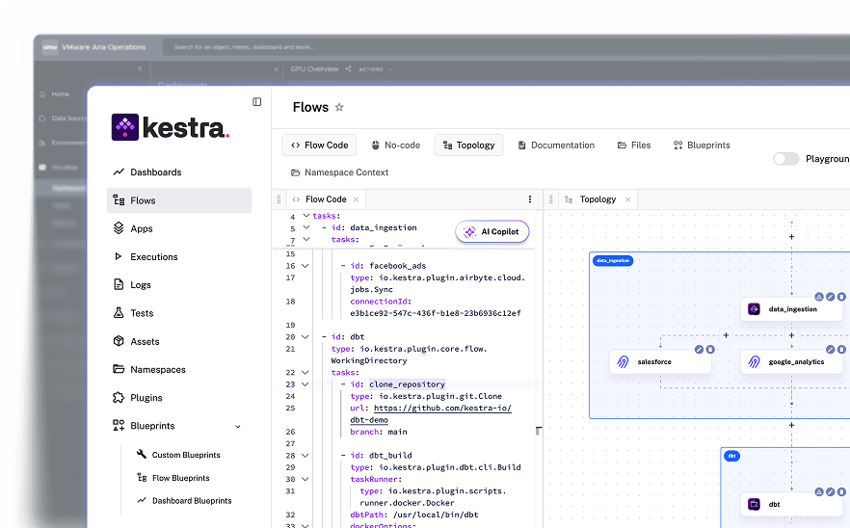
Define every provisioning workflow in YAML. Orchestrate Terraform, Ansible, vSphere, AWS, Azure, and GCP in one flow. Self-service Apps with dynamic forms and approval gates replace the vRA catalog. Every workflow is Git-native, reviewable, and deployable through CI/CD—no JavaScript, no proprietary APIs, no hidden state.
VMware Aria Automation provides a polished portal for catalog-driven VM provisioning tightly integrated with vSphere. But orchestration logic lives in vRO—JavaScript with proprietary APIs, ambiguous error messages, and no native Git integration. Expanding beyond VMware infrastructure adds friction.
Kestra starts in minutes with Docker Compose. VMware Aria Automation requires an existing vSphere environment, enterprise licensing, and a multi-step installation wizard that typically takes days and professional services.
curl -o docker-compose.yml \https://raw.githubusercontent.com/kestra-io/kestra/develop/docker-compose.ymldocker compose up
# Open localhost:8080# Pick an Infrastructure Automation Blueprint, run it. Done.
Download the Docker Compose file, run it, open the UI, and pick an infrastructure automation Blueprint. Your first provisioning workflow includes a dynamic approval form, Terraform apply, and Ansible configuration—all in readable YAML ready for Git.
# VMware Aria Automation# Prerequisites:# - Existing vSphere/vCenter infrastructure# - Broadcom enterprise license# - Aria Automation appliance deployment# - vRO configuration and endpoint registration# - Service catalog setup# Typical time: 2-5 days + professional servicesVMware Aria Automation requires an existing vSphere environment, enterprise licensing, and a multi-step installation wizard. A typical deployment takes days of infrastructure preparation and often requires Broadcom professional services before the first workflow runs.
YAML workflows read like documentation. The AI Copilot writes them for you. Every workflow goes through Git and CI/CD—no hidden state in a UI. Approvals, secrets, retries, and ITSM integration are first-class YAML constructs.
VMware vRO workflows are written in JavaScript with proprietary vRO APIs that wrap vSphere objects. They're difficult to version, test, or debug. Error messages are often ambiguous and require vCenter-level access to diagnose. There is no native Git integration—workflows live in the vRO server.
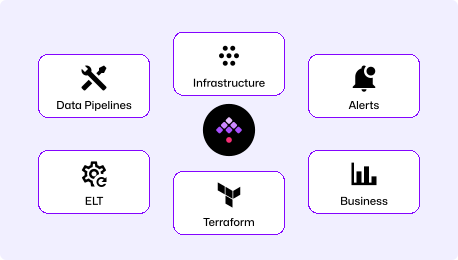
One platform for VM provisioning, Terraform IaC, Ansible configuration, incident response, and ITSM integration. Self-service Apps with dynamic forms, approvals, and full audit trails. Works on-prem, in Kubernetes, and in air-gapped environments.
VMware Aria Automation provides a polished portal for catalog-driven VM and service provisioning with deep vSphere integration. Orchestration logic lives in vRO—JavaScript with proprietary APIs, difficult debugging, and no native Git integration. Expanding beyond VMware infrastructure adds significant friction.
| | | |
|---|---|---|
| Primary use case | Full infrastructure lifecycle (provision, configure, remediate, decommission) | Catalog-driven VM provisioning tightly coupled to vSphere |
| Workflow definition | Declarative YAML (code-first, Git-native) | JavaScript + proprietary vRO APIs (GUI-first, no native Git) |
| Multi-cloud support | Cloud-agnostic: AWS, Azure, GCP, vSphere, Kubernetes | vSphere-first; multi-cloud requires Aria Multi-Cloud add-ons |
| Developer experience | YAML workflows, clear error messages, full execution logs | Ambiguous error messages, proprietary APIs, difficult debugging |
| IaC integration | Native Terraform, Ansible, PowerShell, Python, Pulumi support | vRO plugins (limited); Terraform requires extra configuration |
| Self-service Apps | Built-in dynamic forms, approvals, and RBAC per namespace | vRA service catalog (VMware-centric, limited extensibility) |
| Air-gapped deployment | Fully supported (on-prem, Kubernetes) | Requires vSphere infrastructure; limited true air-gap support |
| Version control | Native (Git, CI/CD, Terraform provider) | No native Git—workflows live in vRO server |
| Observability | Full execution logs, artifact storage, clear error messages | Ambiguous vRO logs; requires vCenter access to diagnose failures |
| Event-driven triggers | Webhooks, schedules, file detection, message queues, flow triggers | Catalog requests and basic event subscriptions |
| Licensing model | Flat instance + worker-based pricing | Per-user + per-VM (Broadcom); costs increasing post-acquisition |

Kestra handles catalog-driven VM provisioning with dynamic Apps, approval gates, and vSphere integration—everything vRA does, plus Terraform, Ansible, and multi-cloud support. One tool, one contract, one set of logs. No JavaScript, no proprietary APIs.
Every workflow is YAML you can commit, review in a pull request, and deploy through CI/CD. BHP's team manages all their infrastructure provisioning logic as code—versioned, testable, and auditable. No hidden state in a portal, no manual change tracking.
Deploy Kestra on Kubernetes, Docker, or bare metal. Run remote workers close to vSphere targets for hybrid environments. Air-gap deployments supported for regulated industries—no external connectivity required. ITZBund and the Austrian Ministry of Defense run Kestra fully disconnected.
Find answers to your questions right here, and don't hesitate to Contact us if you couldn't find what you're looking for.

See how Kestra replaces VMware Aria Automation with declarative YAML workflows across any cloud.